依赖版本
由于使用expo创建的RN项目,因此使用的依赖库是expo-sqlite,因为react native中如果依赖版本对应关系至关重要,不匹配将会导致很多莫名其妙的问题
json
    "react": "19.1.0",
    "react-dom": "19.1.0",
    "react-native": "0.81.5",
    "expo-sqlite": "~16.0.10",
对于前端er来说数据库可能接触的不是很多,但是基本都有了解过mySql数据库,核心概念无非是表,表结构,列,字段,值的类型,以及类型在数据库中表示的方式,然后是增删改查,在expo-sqlite的文档中没有这些简介,它默认你了解数据库以及移动端的sqlite数据库,如果你的应用非常依赖sqlite数据库,它提供了useSQLiteContext hooks 进行上下文通信,通过SQLiteProvider组件包裹,子组件均能非常简单的访问到数据库,但是对于大多数前端er通常更习惯像调用后端接口的方式专门封装api,便于后续的调用,无论哪种方式都可以,也没有什么优劣之分,不过在react框架下,一个项目可能会有多个provider,在根组件外围包裹,我个人觉得有些杂乱,因此倾向于封装api式编写。
数据库的用途
如果单说数据库过于漫无目的,大家可以直接去看各种网络教程,而这篇文章也不是为了从零到一教大家使用sqlite数据库,而是以一个音乐项目的本地数据存储方案为模板顺带说一下sqlite的使用方法。 一个音乐播放器应用,在不考虑后端获取歌曲数据而以管理记录本地音乐文件时,势必有数据增删改查,管理应用的问题,而且音乐应用有一个特点:就是各种列表,歌单列表,歌手列表,专辑列表,文件列表,说到这一下子是不是觉得回到了后台管理类项目中的场景?而结合市面上的音乐播放器应用,我们需要在可用的资源中实现我们的需求。
需求分析
我以自用手机上系统自带音乐播放器为蓝本,进行了简单的需求分析:
- 本地歌曲有一个专门的本地列表,列表可以增删改查,它可以是一个独立的歌单,有稳定的顺序
- 收藏列表,可以专门查看自己收藏的歌曲,在其中陈列着我们收藏的歌曲
- 歌手的所有歌曲列表,不同歌曲可能是同一个歌手演唱,比如周杰伦的七里香,搁浅,等歌曲因此一个歌手应该对应多个歌曲
- 专辑歌曲,一个专辑下可以有多个歌曲,比如七里香专辑可以有七里香,搁浅等歌曲
- 自定义歌单:用户可以创建自定义歌单并向其中添加歌曲
- 转换歌曲,这是我个人项目中特有的,是视频转歌后记录产物信息的表,它会被添加到本地歌曲列表中,同时也是独立队列:
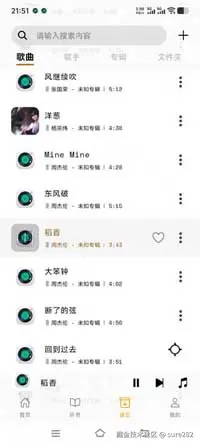
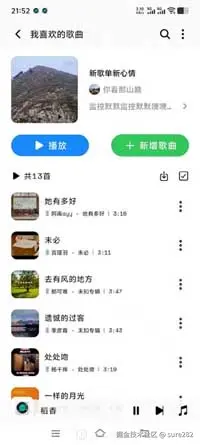
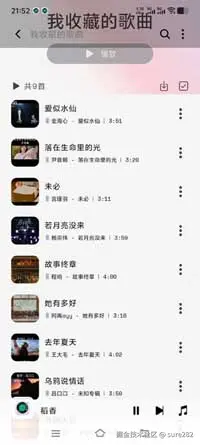 以上罗列的需求核心都是不同特点的数据,直观来看的话我们就应该有如上这么多张表,相互独立,进行增删改查。其实在早期我使用了前端的json表存储数据,但是json每次增删改查都有重写整个文件,这对于大量数据肯定不行的。但是数据其实都来自本地歌曲列表,本地列表中的数据在不同场景,不同歌单中下有了额外的身份,说到这后端常识丰富一点的朋友肯定立马想到关联表:既然同一条数据在不同场景下有不同身份,那意味着他们有特殊的关联,如果完全是独立的表很明显会在不同表中产生大量相同数据,而关联表在此刻很重要:它记录数据和不同表之间的特殊关系而不是单独一套完整记录数据的表。(假设本地歌曲数据共100条,收藏歌单中将其全部收藏产生100条数据,歌单中添加100条...大量的重复数据而且增删改查数据之间的同步非常不友好)
数据库建立开启
一个应用可以创建多个数据库,其实绝大多数情况一个就够了,每个数据库应该有独一无二的名称便于区分:
ts
//数据库名称
const DB_NAME = 'music.db';
// 使用单例模式管理数据库连接
let dbInstance: SQLiteDatabase | null = null;
// 数据库连接状态管理
interface DBState {
    instance: SQLiteDatabase | null;
    initializing: boolean;
    initPromise: Promise<void> | null;
};
const dbState: DBState = {
    instance: null,
    initializing: false,
    initPromise: null
};

// 独立的数据库初始化函数
async function initializeDatabase(): Promise<SQLiteDatabase> {
    if (dbState.instance) {
        return dbState.instance;
    };

    if (dbState.initializing) {
        // 如果正在初始化,等待初始化完成
        if (dbState.initPromise) {
            await dbState.initPromise;
        }
        return dbState.instance!;
    };

    dbState.initializing = true;

    try {
        dbState.initPromise = (async () => {
            const db = await openDatabaseAsync(DB_NAME);

            // 创建表结构 本地歌曲表
            await db.execAsync(`CREATE TABLE IF NOT EXISTS ${SQLITE_SONG_TABLE_NAME} (
                id TEXT PRIMARY KEY,
                uri TEXT,
                coverUrl TEXT DEFAULT '${DEFAULT_COVER}',
                duration REAL DEFAULT 0,
                artist TEXT DEFAULT '未知艺术家',
                isPrivate INTEGER DEFAULT 0,
                title TEXT DEFAULT '未知标题',
                durationString TEXT,
                modificationTime REAL DEFAULT 0,
                creationTime REAL DEFAULT 0,
                album TEXT DEFAULT '未知专辑',
                lyrics TEXT DEFAULT '',
                quality TEXT DEFAULT 'PQ'
            );`);
            /**
             * 转换后的歌曲表
             */
            await db.execAsync(`CREATE TABLE IF NOT EXISTS ${SQLITE_CONVERTED_TABLE_NAME} (
                id TEXT PRIMARY KEY,
                uri TEXT,
                coverUrl TEXT DEFAULT '${DEFAULT_COVER}',
                duration REAL DEFAULT 0,
                artist TEXT DEFAULT '未知艺术家',
                isCollection INTEGER DEFAULT 0,
                isPrivate INTEGER DEFAULT 0,
                title TEXT DEFAULT '未知标题',
                durationString TEXT,
                modificationTime REAL DEFAULT 0,
                creationTime REAL DEFAULT 0,
                album TEXT DEFAULT '未知专辑',
                created_at INTEGER DEFAULT 0,
                lyrics TEXT DEFAULT '',
                quality TEXT DEFAULT 'PQ'
            );`);
            /**
             * 视频背景表
             */
            await db.execAsync(`CREATE TABLE IF NOT EXISTS ${SQLITE_VIDEO_BG_TABLE_NAME} (
                id TEXT PRIMARY KEY,
                uri TEXT,
                title TEXT DEFAULT '未知标题',
                modificationTime REAL DEFAULT 0,
                creationTime REAL DEFAULT 0,
                size INTEGER DEFAULT 0
            );`);
            /**
             * 歌手表
             */
            await db.execAsync(`CREATE TABLE IF NOT EXISTS ${SQLITE_SINGER_TABLE_NAME} (
                id TEXT PRIMARY KEY,
                name TEXT DEFAULT '未知歌手',
                coverUrl TEXT DEFAULT '${DEFAULT_COVER}',
                count INTEGER DEFAULT 0
            );`);
            // 创建歌单表
            await db.execAsync(`
                CREATE TABLE IF NOT EXISTS ${SQLITE_PLAYLIST_TABLE_NAME} (
                    id TEXT PRIMARY KEY,
                    name TEXT NOT NULL,
                    coverUrl TEXT,
                    description TEXT,
                    creationTime INTEGER NOT NULL,
                    count INTEGER DEFAULT 0
                );
                -- 创建索引加速查询,按创建时间排序
                CREATE INDEX IF NOT EXISTS idx_playlist_created ON ${SQLITE_PLAYLIST_TABLE_NAME}(creationTime);
            `);
            // 创建歌单歌曲关联表
            await db.execAsync(`
                CREATE TABLE IF NOT EXISTS ${SQLITE_PLAYLIST_SONG_RELATION_TABLE_NAME} (
                    id TEXT PRIMARY KEY,
                    playlistId TEXT NOT NULL,    -- 外键,关联到 ${SQLITE_PLAYLIST_TABLE_NAME}.id
                    songId TEXT NOT NULL,        -- 外键,关联到 ${SQLITE_SONG_TABLE_NAME}.id
                    position INTEGER NOT NULL,    -- 歌曲在歌单中的顺序
                    creationTime INTEGER NOT NULL,    -- 添加时间

                    -- 外键约束:删除歌单时,自动删除关联的歌曲记录
                    FOREIGN KEY (playlistId) REFERENCES ${SQLITE_PLAYLIST_TABLE_NAME}(id) ON DELETE CASCADE,
                    -- 外键约束:删除歌曲时,自动删除关联的歌单记录
                    FOREIGN KEY (songId) REFERENCES ${SQLITE_SONG_TABLE_NAME}(id) ON DELETE CASCADE
                );

                -- 创建索引加速查询
                CREATE INDEX IF NOT EXISTS idx_playlist_songs_playlist ON ${SQLITE_PLAYLIST_SONG_RELATION_TABLE_NAME}(playlistId);
                CREATE INDEX IF NOT EXISTS idx_playlist_songs_song ON ${SQLITE_PLAYLIST_SONG_RELATION_TABLE_NAME}(songId);
            `);
            // 创建收藏关联表
            await db.execAsync(`
                CREATE TABLE IF NOT EXISTS ${SQLITE_COLLECTION_SONGS_RELATION_TABLE_NAME} (
                    id TEXT PRIMARY KEY,
                    songId TEXT NOT NULL UNIQUE,    -- 外键,关联到 ${SQLITE_SONG_TABLE_NAME}.id,UNIQUE 保证不重复
                    addedAt INTEGER NOT NULL,        -- 添加时间

                    FOREIGN KEY (songId) REFERENCES ${SQLITE_SONG_TABLE_NAME}(id) ON DELETE CASCADE
                );

                -- 创建索引加速查询
                CREATE INDEX IF NOT EXISTS idx_collection_song ON ${SQLITE_COLLECTION_SONGS_RELATION_TABLE_NAME}(songId);
            `);
            // 创建歌手-歌曲关联表
            await db.execAsync(`
                CREATE TABLE IF NOT EXISTS ${SQLITE_SINGER_SONG_RELATION_TABLE_NAME} (
                    id TEXT PRIMARY KEY,
                    singerId TEXT NOT NULL,    -- 外键,关联到 ${SQLITE_SINGER_TABLE_NAME}.id
                    songId TEXT NOT NULL,        -- 外键,关联到 ${SQLITE_SONG_TABLE_NAME}.id
                    addedAt INTEGER NOT NULL,        -- 添加时间

                    FOREIGN KEY (singerId) REFERENCES ${SQLITE_SINGER_TABLE_NAME}(id) ON DELETE CASCADE,
                    FOREIGN KEY (songId) REFERENCES ${SQLITE_SONG_TABLE_NAME}(id) ON DELETE CASCADE
                );

                -- 创建索引加速查询
                CREATE INDEX IF NOT EXISTS idx_singer_song_singer ON ${SQLITE_SINGER_SONG_RELATION_TABLE_NAME}(singerId);
                CREATE INDEX IF NOT EXISTS idx_singer_song_song ON ${SQLITE_SINGER_SONG_RELATION_TABLE_NAME}(songId);
            `);
            // 创建专辑表
            await db.execAsync(`
                CREATE TABLE IF NOT EXISTS ${SQLITE_ALBUM_TABLE_NAME} (
                    id TEXT PRIMARY KEY,
                    name TEXT NOT NULL DEFAULT '未知专辑',
                    artist TEXT DEFAULT '未知艺术家',
                    coverUrl TEXT DEFAULT '${DEFAULT_COVER}',
                    count INTEGER DEFAULT 0,
                    description TEXT,
                    creationTime INTEGER NOT NULL
                );
                -- 创建索引加速查询
                CREATE INDEX IF NOT EXISTS idx_album_artist ON ${SQLITE_ALBUM_TABLE_NAME}(artist);
                CREATE INDEX IF NOT EXISTS idx_album_created ON ${SQLITE_ALBUM_TABLE_NAME}(creationTime);
            `);
            // 创建专辑-歌曲关联表
            await db.execAsync(`
                CREATE TABLE IF NOT EXISTS ${SQLITE_ALBUM_SONG_RELATION_TABLE_NAME} (
                    id TEXT PRIMARY KEY,
                    albumId TEXT NOT NULL,    -- 外键,关联到 ${SQLITE_ALBUM_TABLE_NAME}.id
                    songId TEXT NOT NULL,        -- 外键,关联到 ${SQLITE_SONG_TABLE_NAME}.id
                    trackNumber INTEGER DEFAULT 0,    -- 歌曲在专辑中的曲号
                    addedAt INTEGER NOT NULL,        -- 添加时间

                    FOREIGN KEY (albumId) REFERENCES ${SQLITE_ALBUM_TABLE_NAME}(id) ON DELETE CASCADE,
                    FOREIGN KEY (songId) REFERENCES ${SQLITE_SONG_TABLE_NAME}(id) ON DELETE CASCADE
                );

                -- 创建索引加速查询
                CREATE INDEX IF NOT EXISTS idx_album_song_album ON ${SQLITE_ALBUM_SONG_RELATION_TABLE_NAME}(albumId);
                CREATE INDEX IF NOT EXISTS idx_album_song_song ON ${SQLITE_ALBUM_SONG_RELATION_TABLE_NAME}(songId);
            `);

            dbState.instance = db;
        })();

        await dbState.initPromise;
        return dbState.instance!;
    } catch (error) {
        dbState.initializing = false;
        dbState.initPromise = null;
        throw error;
    }
};
以上代码是初始化数据库以及创建表,IF NOT EXIST就是字面意思如果表不存在就创建,否则不创建,在应用初始化或者调用数据库时执行如上函数保证要访问的表存在。以上创建的独立表有本地音乐列表SQLITE_SONG_TABLE_NAME, 转换歌曲列表SQLITE_CONVERTED_TABLE_NAME,SQLITE_VIDEO_BG_TABLE_NAME横屏播放时的视频背景和SQLITE_PLAYLIST_TABLE_NAME存储用户自建的歌单表,这些表的column较多且完备,其余的收藏,歌手,专辑表列数则少很多并且添加索引,有利于提高查询效率,创建它们与本地列表的关联表,而关联表则有外键和其他表进行关联,这使得在一些增删改查时只需要修改一个表中的数据,由于关联外键也能使得关联表中的数据同步更新。此外表内的一些字段值表示方式和MySQL不同,比如字符串sql中时varchart,这里是TEXT,不能存储布尔值,这里使用0,1表示等,当前同样有主键primary key,其实这里需要特别注意,如果不添加额外列表示数据信息并依据该字段查询,对于同一张表的不同查询返回的数据顺序并不是添加时的顺序:比如依次添加了id为1,2,3的数据,如果直接查询这三条数据,返回的顺序并不一定是1,2,3!
以上函数是每次调用数据库时都应先调用表示开启数据库,然后才能查询数据
删库跑路
坊间可能流传过各种传说,但是程序猿比较感兴趣的一定是删库跑路,这个不用多说,在sqlite中非常简单:
删库跑路第一弹:删除表
一步一步来,别直接删库,open方法就是上面的initializeDatabase,不要迷惑,肯定要先开启数据库
ts
// 简化的 open 函数 - 不再调用 initDB
export async function open() {
    return await initializeDatabase();
}
/**
 * 删除某个表
 * @param table 表名
 * @returns Promise<boolean> true 表示成功
 */
export const removeTable = async (table: string): Promise<boolean> => {
    const db = await open();
    try {
        await db.execAsync(`DROP TABLE IF EXISTS ${table};`);
        return true;
    } catch (error) {
        return false;
    }
}
删库跑路第二弹:删除整个数据库
其实非常简单,deleteDatabaseAsync是expo-sqlite提供的api,引入即可
ts
/**
 * 删除数据库删库跑路及其所有表
 * @returns 删除成功返回true,否则返回false
 */
export const deleteDatabase = async (): Promise<boolean> => {
    try {
        await deleteDatabaseAsync(DB_NAME);
        return true;
    } catch (error) {
        return false;
    }
};
删库跑路第三弹:删除指定表名内数据
玩归玩闹归闹,这个很实用的
ts
/**
 * 删除表内所有数据
 * @param table 表名
 * @returns Promise<boolean> true 表示成功
 */
export const removeAllDataFromTable = async (table: string): Promise<boolean> => {
    try {
        const db = await open();
        await db.execAsync(`DELETE FROM ${table};`);
        return true;
    } catch (error) {
        return false;
    }
};
删库跑路第四弹:批量删除主数据并清理关联数据
ts
/**
 * 批量删除歌曲并清理所有关联数据
 * @param songIds 要删除的歌曲ID数组
 * @returns 是否删除成功
 */
export async function batchDeleteSongsWithRelations(songIds: string[]): Promise<boolean> {
    const db = await open();
    try {
        await db.execAsync('BEGIN TRANSACTION');

        // 1. 获取受影响的歌手、专辑、歌单
        const singerResults = await db.getAllAsync<{ singerId: string }>(
            `SELECT DISTINCT singerId FROM ${SQLITE_SINGER_SONG_RELATION_TABLE_NAME} WHERE songId IN (${songIds.map(() => '?').join(',')})`,
            songIds
        );
        const singerIds = singerResults.map(r => r.singerId);

        const albumResults = await db.getAllAsync<{ albumId: string }>(
            `SELECT DISTINCT albumId FROM ${SQLITE_ALBUM_SONG_RELATION_TABLE_NAME} WHERE songId IN (${songIds.map(() => '?').join(',')})`,
            songIds
        );
        const albumIds = albumResults.map(r => r.albumId);

        const playlistResults = await db.getAllAsync<{ playlistId: string }>(
            `SELECT DISTINCT playlistId FROM ${SQLITE_PLAYLIST_SONG_RELATION_TABLE_NAME} WHERE songId IN (${songIds.map(() => '?').join(',')})`,
            songIds
        );
        const playlistIds = playlistResults.map(r => r.playlistId);

        // 2. 删除所有关联记录
        await db.runAsync(
            `DELETE FROM ${SQLITE_SINGER_SONG_RELATION_TABLE_NAME} WHERE songId IN (${songIds.map(() => '?').join(',')})`,
            songIds
        );
        await db.runAsync(
            `DELETE FROM ${SQLITE_ALBUM_SONG_RELATION_TABLE_NAME} WHERE songId IN (${songIds.map(() => '?').join(',')})`,
            songIds
        );
        await db.runAsync(
            `DELETE FROM ${SQLITE_PLAYLIST_SONG_RELATION_TABLE_NAME} WHERE songId IN (${songIds.map(() => '?').join(',')})`,
            songIds
        );
        await db.runAsync(
            `DELETE FROM ${SQLITE_COLLECTION_SONGS_RELATION_TABLE_NAME} WHERE songId IN (${songIds.map(() => '?').join(',')})`,
            songIds
        );

        // 3. 更新受影响的歌手 count
        for (const singerId of singerIds) {
            const countResult = await db.getFirstAsync<{ count: number }>(
                `SELECT COUNT(*) as count FROM ${SQLITE_SINGER_SONG_RELATION_TABLE_NAME} WHERE singerId = ?`,
                [singerId]
            );
            await db.runAsync(
                `UPDATE ${SQLITE_SINGER_TABLE_NAME} SET count = ? WHERE id = ?`,
                [countResult?.count ?? 0, singerId]
            );
        }

        // 4. 更新受影响的专辑 count
        for (const albumId of albumIds) {
            const countResult = await db.getFirstAsync<{ count: number }>(
                `SELECT COUNT(*) as count FROM ${SQLITE_ALBUM_SONG_RELATION_TABLE_NAME} WHERE albumId = ?`,
                [albumId]
            );
            await db.runAsync(
                `UPDATE ${SQLITE_ALBUM_TABLE_NAME} SET count = ? WHERE id = ?`,
                [countResult?.count ?? 0, albumId]
            );
        }

        // 5. 更新受影响的歌单 count
        for (const playlistId of playlistIds) {
            const countResult = await db.getFirstAsync<{ count: number }>(
                `SELECT COUNT(*) as count FROM ${SQLITE_PLAYLIST_SONG_RELATION_TABLE_NAME} WHERE playlistId = ?`,
                [playlistId]
            );
            await db.runAsync(
                `UPDATE ${SQLITE_PLAYLIST_TABLE_NAME} SET count = ? WHERE id = ?`,
                [countResult?.count ?? 0, playlistId]
            );
        }

        // 6. 删除歌曲
        const result = await db.runAsync(
            `DELETE FROM ${SQLITE_SONG_TABLE_NAME} WHERE id IN (${songIds.map(() => '?').join(',')})`,
            songIds
        );

        await db.execAsync('COMMIT');
        return (result.changes ?? 0) > 0;
    } catch (error) {
        await db.execAsync('ROLLBACK');
        return false;
    }
}
玩归玩闹归闹,创建表时可能有遗漏,要加字段
给指定表添加column,就是添加字段:
ts
/**
 * 给指定表添加指定名称的列
 * @param tableName 表名
 * @param columnName 列名
 * @param columnDefinition 列定义(如 "TEXT DEFAULT '默认值'"、"INTEGER DEFAULT 0" 等)
 * @param ifNotExists 如果列已存在是否跳过(默认 true)
 * @returns 是否添加成功
 */
export async function addColumnToTable(
    tableName: string,
    columnName: string,
    columnDefinition: string,
    ifNotExists: boolean = true
): Promise<boolean> {
    const db = await open();
    try {
        // 验证表名是否合法
        if (!SQLITE_TABLE_NAMES_SET_DATA.has(tableName)) {
            throw new Error(`Invalid table name: ${tableName}`);
        }
        // 如果检查列是否已存在
        if (ifNotExists) {
            const tableInfo = await db.getAllAsync<{ name: string }>(`PRAGMA table_info(${tableName})`);
            const columnExists = tableInfo.some(column => column.name === columnName);
            if (columnExists) {
                return true;
            }
        }
        // 添加列
        await db.execAsync(`ALTER TABLE ${tableName} ADD COLUMN ${columnName} ${columnDefinition}`);
        return true;
    } catch (error) {
        return false;
    }
};
言归正传,如果删除本地列表(所有歌单歌曲数据的真正来源)的数据时:
因为会涉及到大量关联表的数据处理,直接执行效率可能比较低,数据库提供了开启事务方式即await db.execAsync('BEGIN TRANSACTION')提高处理速度:
ts
/**
 * 删除歌曲并清理所有关联数据
 * 包括:
 * 1. 从 songList 表删除歌曲
 * 2. 从收藏关联表删除记录
 * 3. 从歌手-歌曲关联表删除记录并更新歌手 count
 * 4. 从专辑-歌曲关联表删除记录并更新专辑 count
 * 5. 从歌单-歌曲关联表删除记录并更新歌单 count
 * 6. 从收藏-歌曲关联表删除记录并更新收藏 count
 * @param songId 要删除的歌曲ID
 * @returns 是否删除成功
 */
export async function deleteSongWithRelations(songId: string): Promise<boolean> {
    const db = await open();
    try {
        await db.execAsync('BEGIN TRANSACTION');

        // 1. 获取包含该歌曲的歌手列表(用于更新 count)
        const singerResults = await db.getAllAsync<{ singerId: string }>(
            `SELECT singerId FROM ${SQLITE_SINGER_SONG_RELATION_TABLE_NAME} WHERE songId = ?`,
            [songId]
        );
        const singerIds = singerResults.map(({ singerId }) => singerId);

        // 2. 获取包含该歌曲的专辑列表(用于更新 count)
        const albumResults = await db.getAllAsync<{ albumId: string }>(
            `SELECT albumId FROM ${SQLITE_ALBUM_SONG_RELATION_TABLE_NAME} WHERE songId = ?`,
            [songId]
        );
        const albumIds = albumResults.map(({ albumId }) => albumId);

        // 3. 获取包含该歌曲的歌单列表(用于更新 count)
        const playlistResults = await db.getAllAsync<{ playlistId: string }>(
            `SELECT playlistId FROM ${SQLITE_PLAYLIST_SONG_RELATION_TABLE_NAME} WHERE songId = ?`,
            [songId]
        );
        const playlistIds = playlistResults.map(({ playlistId }) => playlistId);

        // 4. 从歌手-歌曲关联表删除记录
        await db.runAsync(
            `DELETE FROM ${SQLITE_SINGER_SONG_RELATION_TABLE_NAME} WHERE songId = ?`,
            [songId]
        );

        // 5. 从专辑-歌曲关联表删除记录
        await db.runAsync(
            `DELETE FROM ${SQLITE_ALBUM_SONG_RELATION_TABLE_NAME} WHERE songId = ?`,
            [songId]
        );

        // 6. 从歌单-歌曲关联表删除记录
        await db.runAsync(
            `DELETE FROM ${SQLITE_PLAYLIST_SONG_RELATION_TABLE_NAME} WHERE songId = ?`,
            [songId]
        );

        // 7. 从收藏关联表删除记录
        await db.runAsync(
            `DELETE FROM ${SQLITE_COLLECTION_SONGS_RELATION_TABLE_NAME} WHERE songId = ?`,
            [songId]
        );

        // 8. 更新受影响歌手的 count(通过重新计算关联表中的歌曲数)
        for (const singerId of singerIds) {
            const countResult = await db.getFirstAsync<{ count: number }>(
                `SELECT COUNT(*) as count FROM ${SQLITE_SINGER_SONG_RELATION_TABLE_NAME} WHERE singerId = ?`,
                [singerId]
            );
            await db.runAsync(
                `UPDATE ${SQLITE_SINGER_TABLE_NAME} SET count = ? WHERE id = ?`,
                [countResult?.count ?? 0, singerId]
            );
        }

        // 9. 更新受影响专辑的 count(通过重新计算关联表中的歌曲数)
        for (const albumId of albumIds) {
            const countResult = await db.getFirstAsync<{ count: number }>(
                `SELECT COUNT(*) as count FROM ${SQLITE_ALBUM_SONG_RELATION_TABLE_NAME} WHERE albumId = ?`,
                [albumId]
            );
            await db.runAsync(
                `UPDATE ${SQLITE_ALBUM_TABLE_NAME} SET count = ? WHERE id = ?`,
                [countResult?.count ?? 0, albumId]
            );
        }

        // 10. 更新受影响歌单的 count(通过重新计算关联表中的歌曲数)
        for (const playlistId of playlistIds) {
            const countResult = await db.getFirstAsync<{ count: number }>(
                `SELECT COUNT(*) as count FROM ${SQLITE_PLAYLIST_SONG_RELATION_TABLE_NAME} WHERE playlistId = ?`,
                [playlistId]
            );
            await db.runAsync(
                `UPDATE ${SQLITE_PLAYLIST_TABLE_NAME} SET count = ? WHERE id = ?`,
                [countResult?.count ?? 0, playlistId]
            );
        }

        // 11. 从 songList 表删除歌曲
        const result = await db.runAsync(
            `DELETE FROM ${SQLITE_SONG_TABLE_NAME} WHERE id = ?`,
            [songId]
        );

        await db.execAsync('COMMIT');
        return (result.changes ?? 0) > 0;
    } catch (error) {
        await db.execAsync('ROLLBACK');
        return false;
    }
}如上方式开启事务集中处理,处理程序结束后应该提交事务db.execAsync('COMMIT'); 如果操作中途出现意外情况,有些数据可能已经处理,有些没有处理,那将变得非常麻烦,不过sqlite提供了回滚api: await db.execAsync('ROLLBACK');
以上介绍了sqlite数据库的创建 添加列,删除表创建表,,删除表内数据,主数据删除同时更新关联表,删除整个数据库,开启事务提速。至于单个表的增删改查,语句和sql非常类似,不做讲解。接下来重点分析应用运行时歌曲队列的处理
音乐播放器应用运行时的歌曲队列管理
上面说了很多但是本质是数据的存取问题,对于前端er来说就不是自己的活儿,但是接下来可真就是前端er的活儿了啊!
- 用户界面可以有多个歌单,例如本地歌曲列表,歌手的歌曲列表,专辑的歌曲列表,用户收藏的列表,用户自建的歌单列表,数据的请求和展示不用多说,大列表,分页
- 用户在使用应用时在不同歌单切换播放歌曲时阁下如何应对?上一曲下一曲时的歌曲是哪一首?
- 用户切换到别的歌单歌曲,那上一个歌单的当前歌曲和索引怎么处理?因为用户不同歌单可能在不同页面,由A歌单播放歌曲时转而进入B歌单播放歌曲,又返回看A歌单页面,是不是也应该有上次播放的高亮痕迹?
- 用户退出应用后再次打开应用怎么读取上次播放歌曲进度列表等信息?本地列表,收藏列表你可以创建固定字段记录,但是自建歌单可以有无数个,你无法预先创建出这么多字段记录它们
很显然这些问题是运行时的数据,不适合存储在数据库中,大家肯定能够想到,如果将以上都记录下来,切换歌单读取歌单时去取即可,而前端中心化数据存储方案中,我使用了zustand,没有使用redux react-redux或者context等方案,因为它比较简单,而且便于持久化
应对方案 管理用户队列
为本地歌曲列表创建字段,值为数组,创建currentSong,currentIndex表示当前播放的歌曲以及在歌曲数组中的下表,通过下标我们可以处理上一曲下一曲(尤其是顺序播放时)的顺序问题,记录当前歌曲便于页面中的信息展示
创建独立的和本地歌曲同级别收藏列表信息,字段和如上一致。在我的应用中它们两个是主要的歌曲列表,因此它们拥有专属字段
自定义队列,比如歌手的歌曲表专辑表,自建歌单,用户进入后播放任意一首应该都在当前队列中播放,它们分别有有 currentSong currentIndex又有一个当用户播放任意一个自定义队列时公用的currentSong currentIndex,和队列数组存储方式,如果切换自定义队列先去查找有没有播放存储过这个队列,有的话取出替换公用的cusntomCurrentSong
ts
    currentMusicType: MusicType;
    localCurrent: number;
    collectionCurrent: number;
    /** 无论是本地还是收藏还是自定义歌单时的当前歌曲和index*/
    currentSong: SqliteSongInfo | null;
    localCurrentSong: SqliteSongInfo | null;
    collectionCurrentSong: SqliteSongInfo | null;
    localList: SqliteSongInfo[];
    collectionList: SqliteSongInfo[];
   /**
     * 当前播放的歌单(歌手歌单,专辑歌单,用户自建歌单)
     * 的当前播放索引,当前歌曲,歌单id(歌手,专辑,用户自建歌单的id)
     * 歌单数组,当切换歌单时,修改如下数据
     */
    customCurrent: number;
    customCurrentSong: SqliteSongInfo | null;
    customList: SqliteSongInfo[];
    customListId: string;
    customType: CustomPlayType;
无论播放哪个队列的歌曲,currentSong一定是当前播放歌曲,currentMusicType记录是哪个队列:本地歌曲,收藏歌曲还是自建歌单歌曲,专辑,歌手歌曲列表。customType则是细分自定义列表中播放的到底是专辑列表歌曲还是歌手,自建歌单,转换歌曲列表,自建歌单有自己一套管理体系,当播放自建歌单时要再去修改currentMusicType为custom 并替换currentSong,自建歌单的某一个歌单的歌曲列表数组,当前歌曲和索引index都被存储在Map数据中,最多存储5个队列,按栈的模式进出:
ts
    /**
     * 用户歌单映射数据包含歌手的歌曲,专辑的歌曲,用户自建歌单
     * 转换后的歌曲
     * 键为用户歌单id,值为该歌单的歌曲列表
     */
    customMapData: Map<string, MapDataType>;
整个store的类型定义如下
js
/**
* proMusicStore中的数据类型
*/
export interface MusicStoreType {
player: AudioPlayer | null;
setPlayer: (player: AudioPlayer) => void;
currentMusicType: MusicType;
localCurrent: number;
remoteCurrent: number;
collectionCurrent: number;
playModel: RepeatType
currentSong: SqliteSongInfo | null;
remoteCurrentSong: Record<string, any> | null;
localCurrentSong: SqliteSongInfo | null;
collectionCurrentSong: SqliteSongInfo | null;
localList: SqliteSongInfo[];
collectionList: SqliteSongInfo[];
remoteSongList: Array<Record<string, any>>;
collectionCover: string;
selectedScene: SqliteVideoBgInfo | null;
/**
* 添加下一首歌曲信息,用户点击了下一首播放按钮,则将该数据替换为
* 下一首歌曲信息,当执行到下一首时,将该数据替换为null,在该项已有歌曲信息时
* 再次点击下一首播放按钮,替换该项目
*
* 下一首播放操作时,应该先检查该项是否为空,如果有歌曲则播放该歌曲,并更新currentSong
*/
nextSong: SqliteSongInfo | null;
setCollectionCover: (uri: string) => void;
setNextSong: (song: SqliteSongInfo | null) => void;
updateLocalFile: (song: SqliteSongInfo) => void;
/**
* 跨页面通信,主要用于AudioOperation页面
* 删除更新数据后设置通知,指定页面监听signal值为指定值时,刷新数据
* 值由跳转到AudioOperation页面时传递,跳转页面监听signal值为指定值时,刷新数据
* 然后修改signal值为空字符串,即可刷新数据
*/
signal: Set<string>,
/**
* 当前播放的歌单(歌手歌单,专辑歌单,用户自建歌单)
* 的当前播放索引,当前歌曲,歌单id(歌手,专辑,用户自建歌单的id)
* 歌单数组,当切换歌单时,修改如下数据
*/
customCurrent: number;
customCurrentSong: SqliteSongInfo | null;
customList: SqliteSongInfo[];
customListId: string;
customType: CustomPlayType;
/**
* 用户歌单映射数据包含歌手的歌曲,专辑的歌曲,用户自建歌单
* 转换后的歌曲
* 键为用户歌单id,值为该歌单的歌曲列表
*/
customMapData: Map<string, MapDataType>;
/**
*
* @param data 歌曲列表数据
* @param id 歌单id, 对应的歌单数据,对应歌曲列表
* @returns
*/
setCustomMapData: (data: SqliteSongInfo[], id: string) => void;
/**
* 设置当前播放歌曲
* @param currentSong 当前播放的歌曲信息
* @param id 歌单id
* @returns
*/
setCustomMapCurrentSong: (currentSong: SqliteSongInfo, id: string) => void;
/**
* 切换自定义系列歌单的类型,同时,如果CurrentMusicType不为custom,
* 则将CurrentMusicType设置为custom,这个方法是在自定义歌单页面点击歌曲或者点击播放全部时执行
* 当currentMusicType为custom时,AudioOperation页面需要特殊处理
* @param {CustomPlayType} type 自定义播放类型
* @returns
*/
setCustomType: (type: CustomPlayType) => void;
setSelectedScene: (scene: SqliteVideoBgInfo | null) => void;
updateCurrentSong: (song: SqliteSongInfo) => void;
/**
* 设置/清空信号,当接收信号组件监听signal为当前组件名称时,刷新数据
* @param signal 信号,通常为接收信号的组件名称
*/
setSignal(signal: string): void;
deleteSignal(signal: string): void;
/**
* 更新store中的歌曲列表数据,不包含歌单类数据
* @param {SqliteSongInfo[]} songList 具体的歌单数据
* @param {StoreListType} name 列表名称
* @param {(success?: boolean) => void} [callback] - 操作完成后的回调函数
* @returns void
*/
setSongList: (songList: SqliteSongInfo[], name: StoreListType) => void;
/**
* 更新或删除播放列表中的歌曲映射数据,更新私有歌单的歌曲列表
* @param {string} playListId - 播放列表ID
* @param {SqliteSongInfo} songInfo - 歌曲信息对象
* @param {boolean} isDelete - 是否执行删除操作
* @param {(success?: boolean) => void} [callback] - 操作完成后的回调函数
*/
updateOrDeleteMapData(playListId: string, songInfo: SqliteSongInfo, isDelete: boolean): void;
/**
* 设置当前播放歌曲,直接点击了一个歌曲播放,更新当前播放索引,限于本地,远程,收藏歌单
* @param {SqliteSongInfo} source 歌曲信息
* @param {BasicMusicType} type 音乐类型
* @returns void
*/
setCurrentSong: (source: SqliteSongInfo, type: BasicMusicType) => void;
/**
* 切换播放模式
* @param {RepeatType} model 播放模式
* @returns void
*/
setPlayModel: (model: RepeatType) => void;
prevOrNextSong: (isNext: boolean) => void;
};
store文件内容如下:
```ts
const useProMusicStore = create(
persist<MusicStoreType>(set => ({
player: null,
currentMusicType: 'local' as MusicType,
localCurrent: 0,
remoteCurrent: 0,
collectionCurrent: 0,
currentSong: null,
remoteCurrentSong: null,
localCurrentSong: null,
collectionCurrentSong: null,
remoteSongList: [],
localList: [],
collectionList: [],
collectionCover: DEFAULT_COVER,
setCollectionCover(cover) {
set(({ collectionCover, collectionList }) => {
if (cover) {
if (collectionCover !== cover) {
return { collectionCover: cover };
} else {
return {};
};
} else {
if (collectionList.length > 0) {
return { collectionCover: collectionList[0].coverUrl };
} else {
return { collectionCover: DEFAULT_COVER };
};
};
});
},
playModel: 'repeat' as RepeatType,
signal: new Set<string>(),
selectedScene: null,
nextSong: null,
setPlayer(newPlayer) {
set(({ player }) => {
if (player) {
return {};
};
// 始终更新 player,允许组件重新挂载时重新设置
return { player: newPlayer };
});
},
setNextSong(song) {
set({ nextSong: song });
},
updateLocalFile(song) {
set(({ localList, collectionList }) => {
const obj: Partial<MusicStoreType> = {};
const index = localList.findIndex(item => item.id === song.id);
if (index !== -1) {
localList[index] = song;
obj.localList = localList;
};
const i = collectionList.findIndex(item => item.id === song.id);
if (i !== -1) {
collectionList[i] = song;
obj.collectionList = collectionList;
};
return obj;
});
},
/**
* 当前播放的歌单(歌手歌单,专辑歌单,用户自建歌单)
* 的当前播放索引,当前歌曲,歌单id(歌手,专辑,用户自建歌单的id)
* 歌单数组,当切换歌单时,修改如下数据
*/
customCurrent: 0,
customCurrentSong: null,
customList: [],
customListId: '',
customType: 'userPlay' as CustomPlayType,
customMapData: new Map<string, MapDataType>(),
setSelectedScene(selectedScene) {
set({ selectedScene });
},
updateCurrentSong(song) {
set(({ customCurrentSong, collectionCurrentSong, localCurrentSong, currentSong }) => {
const obj: Partial<MusicStoreType> = {};
const { id } = song;
if (customCurrentSong?.id === id) {
obj.customCurrentSong = song;
};
if (collectionCurrentSong?.id === id) {
obj.collectionCurrentSong = song;
};
if (localCurrentSong?.id === id) {
obj.localCurrentSong = song;
};
if (currentSong?.id === id) {
obj.currentSong = song;
};
// 如果没有实际变化,返回空对象避免触发订阅
return obj;
});
},
/**
* 用户在进入歌单歌手专辑歌曲列表页面请求到列表数据会调用该方法
* 如果map中没有则添加,有则不做处理,且只有用户在歌单页面确切执行了点播某一个歌曲
* 或者播放全部时才调用该方法,因此如果队列中没有该播放列表id则添加,并更新current系列
* @param list 播放列表
* @param id 播放列表id
*/
setCustomMapData(list, id) {
set(({ customMapData }) => {
/**
* 检查是否已经存在,存在
*/
if (customMapData.has(id)) {
return {};
};
/**
* 限制MapData最多存储5个播放列表
* 超过则删除最早添加的那个,Map数据没有下标但是有添加顺序
*/
if (customMapData.size === 5) {
const lastKey = [...customMapData.keys()].at(-1);
if (lastKey) {
customMapData.delete(lastKey);
};
};
customMapData.set(id, {
currentSong: null,
currentIndex: 0,
id,
list
});
return { customMapData };
})
},
/**
* 设置当前播放歌曲
* @param song 当前播放歌曲
* @param id 要设置当前播放歌曲的播放列表id
*/
setCustomType(newCustomType) {
set(({ currentMusicType, customType }) => {
const obj: Partial<MusicStoreType> = {};
if (currentMusicType !== 'custom') {
obj.currentMusicType = 'custom';
};
if (customType !== newCustomType) {
obj.customType = newCustomType;
}
return obj;
});
},
setSignal(newSignal) {
set(({ signal }) => {
if (newSignal.includes(',')) {
const signals = newSignal.split(',');
signals.forEach(item => {
if (!signal.has(item)) {
signal.add(item);
}
});
return { signal };
} else {
if (signal.has(newSignal)) {
return {};
} else {
signal.add(newSignal);
return { signal };
}
}
});
},
deleteSignal(newSignal) {
set(({ signal }) => {
if (signal.has(newSignal)) {
signal.delete(newSignal);
return { signal };
} else {
return {};
}
});
},
setCustomMapCurrentSong(song, id) {
set(({
customMapData, customListId, customList, currentSong, customCurrent, customCurrentSong, player
}) => {
let newCustomMapData = customMapData,
newCurrentSong = currentSong,
newCustomCurrent = customCurrent,
newCustomCurrentSong = customCurrentSong,
newCustomList = customList,
newCustomListId = customListId;
/**
* 如果当前传入的歌单id和现在的播放列表id相同
* 直接替换当前歌曲以及index,currentSong等并更新map中对应的currentIndex以及currentSong
* 转换歌曲歌单特殊,会随着转换而改变,即便当前播放 的是转换歌单但是,可能有新转换的歌曲
* 会在播放时加入Map数据中和更新队列所以特殊处理
*/
if (id === customListId) {
const index = customList.findIndex(item => item.id === song.id);
if (index !== -1) {
newCustomCurrent = index;
newCustomCurrentSong = song;
newCurrentSong = song;
const originMapData = customMapData.get(id);
if (originMapData) {
customMapData.set(id, { ...originMapData, currentIndex: index, currentSong: song });
newCustomMapData = customMapData;
};
player?.replace(song.uri);
player?.play();
MediaControl.updatePlaybackState(PlaybackState.PLAYING);
} else {
/**
* 队列是正在播放的队列但是找不到该歌曲
* 可能是刚转换完的新歌曲,当页面执行播放时
* 对比数据长度更新map中的数据
* 没有找到尝试从Map中查找
*/
const originMapData = customMapData.get(id);
const data = originMapData?.list ?? [];
const index = data.findIndex(el => el.id === song.id)
if (index !== -1) {
newCustomCurrent = index;
newCustomCurrentSong = song;
newCurrentSong = song;
newCustomList = data;
newCustomListId = id;
if (originMapData) {
customMapData.set(id, { ...originMapData, currentIndex: index, currentSong: song });
newCustomMapData = customMapData;
};
player?.replace(song.uri);
player?.play();
MediaControl.updatePlaybackState(PlaybackState.PLAYING);
} else {
/**
* 不太可能还没有加入map中
*/
}
}
} else {
/**
* 否则去歌单map中找到它更新map对应数据中的currentIndex以及currentSong
* 并更新当前的userPlayCurrentSong以及userPlayCurrent等数据
*/
if (customMapData.has(id)) {
const { list } = customMapData.get(id) as MapDataType;
const index = list.findIndex(item => item.id === song.id);
if (index !== -1) {
// 更新map
customMapData.set(id, { currentIndex: index, currentSong: song, list, id });
newCustomCurrent = index;
newCustomCurrentSong = song;
newCurrentSong = song;
newCustomMapData = customMapData;
newCustomList = list;
newCustomListId = id;
player?.replace(song.uri);
player?.play();
MediaControl.updatePlaybackState(PlaybackState.PLAYING);
}
}
};
return {
currentMusicType: 'custom',
customCurrent: newCustomCurrent,
customCurrentSong: newCustomCurrentSong,
currentSong: newCurrentSong,
customMapData: newCustomMapData,
customList: newCustomList,
customListId: newCustomListId
}
})
},
updateOrDeleteMapData(playListId, songInfo, isDelete) {
set(({ customListId, customMapData, customList, customCurrent, customCurrentSong, }) => {
let newCustomMapData = customMapData,
newCustomList = customList,
newCustomCurrent = customCurrent,
newCustomCurrentSong = customCurrentSong;
if (isDelete) {
/**
* 当前播放队列更新时,需要更新currentIndex以及currentSong
* 无论是否是当前正在播放队列都应该更新mapData
*/
if (playListId === customListId) {
newCustomList = customList.filter(item => item.id !== songInfo.id);
if (customCurrentSong?.id === songInfo.id) {
newCustomCurrentSong = null;
newCustomCurrent = 0;
};
}
const originMapData = customMapData.get(playListId);
if (originMapData) {
const { list } = originMapData;
const newList = list.filter(item => item.id !== songInfo.id);
newCustomMapData.set(customListId, { ...originMapData, list: newList, currentIndex: newCustomCurrent, currentSong: newCustomCurrentSong });
}
} else {
/**
* 更新一个歌曲的收藏以及信息,某一个歌曲可能在当前的所有歌单中存在
* 如果只更新当前传入列表id可能会导致用户看其他列表时显示状态不一致
* 比如歌手列表中执行收藏,数据库表已更新,当用户访问到比如专辑列表同一个歌曲
* 该专辑列表来自store中缓存的数据,状态就会不一致,所有都应检查一遍,收藏列表和本地列表
*/
newCustomMapData.forEach(({ list, currentSong }) => {
if (currentSong?.id === songInfo.id) {
currentSong = songInfo;
};
for (const el of list) {
if (el.id === songInfo.id) {
Object.assign(el, songInfo);
break;
};
};
});
// 更新当前播放队列中的歌曲信息
if (songInfo.id === customCurrentSong?.id) {
newCustomCurrentSong = songInfo;
}
const index = customList.findIndex(item => item.id === songInfo.id);
if (index !== -1) {
customList[index] = songInfo;
newCustomList = customList;
}
}
return {
customMapData: newCustomMapData,
customList: newCustomList,
customCurrent: newCustomCurrent,
customCurrentSong: newCustomCurrentSong,
}
})
},
prevOrNextSong(isNext) {
set(({
currentMusicType, remoteCurrent, remoteSongList, localList, localCurrent, collectionCurrent, collectionList,
playModel, customCurrent, customList, customMapData, customListId, nextSong, player
}) => {
/**
* 执行下一首时检查是否设置了下一首播放的歌曲(插播歌曲)
* 插播歌曲播放完成后,继续按原队列播放下一首,不改变当前播放索引
*/
if (isNext && nextSong) {
player?.replace(nextSong.uri);
player?.play();
MediaControl.updatePlaybackState(PlaybackState.PLAYING);
// 插播歌曲:只更新 currentSong 和清空 nextSong
// 不改变当前播放索引,因为插播是临时播放
const result: Partial<MusicStoreType> = {
currentSong: nextSong,
nextSong: null
};
// 注意:插播歌曲不需要更新 currentIndex,因为它是临时播放的
// 插播完成后,用户点击下一首时会继续从原来的索引位置播放
return result;
};
/**
* 得到当前播放列表
* 以及对应的当前播放index下标,从0开始
*/
const { list, current } = {
local: { list: localList, current: localCurrent },
collection: { list: collectionList, current: collectionCurrent },
remote: { list: remoteSongList, current: remoteCurrent },
custom: { list: customList, current: customCurrent }
}[currentMusicType];
let newSong = list[current] as any, newIndex = current, newCustomMapData = customMapData;
// length -1便于比对index
const newLength = list.length - 1;
/**
* 列表为空没有歌曲
* 通常不可能,因为应用启动时会根据当前的musicType
* 从数据库读取歌曲表,读取后就会有,暂定不执行播放
*/
if (newLength === -1) {
return {}
};
/**
* 上一曲和下一曲在歌曲列表只有一首歌曲时的逻辑都一样,
* 都是播放当前歌曲,相当于单曲循环
*/
if (newLength === 0) {
if (newIndex !== 0) {
newIndex = 0;
}
newSong = list[0];
player?.replace(newSong.uri);
player?.play();
MediaControl.updatePlaybackState(PlaybackState.PLAYING);
return {
[`${currentMusicType}Current`]: newIndex,
[`${currentMusicType}CurrentSong`]: newSong,
currentSong: newSong
};
};
/**
* 播放模式包含顺序播放,随机播放和单曲循环
* 如果单曲循环,currentIndex不变,currentSong不变,播放当前歌曲
*/
if (playModel === 'repeat-one') {
// 单曲循环也需要更新通知栏元数据
player?.replace(newSong.uri);
player?.play();
MediaControl.updatePlaybackState(PlaybackState.PLAYING);
return {};
};
/**
* 如果是随机播放,上一曲下一曲逻辑都一样,都是随机播放一首歌曲
*/
if (playModel === 'shuffle') {
const newIndex = Math.floor(Math.random() * list.length);
const newSong = list[newIndex];
player?.replace(newSong.uri);
player?.play();
MediaControl.updatePlaybackState(PlaybackState.PLAYING);
const result: Partial<MusicStoreType> = {
[`${currentMusicType}Current`]: newIndex,
[`${currentMusicType}CurrentSong`]: newSong,
currentSong: newSong as any
};
if (currentMusicType === 'custom') {
const data = newCustomMapData.get(customListId);
if (data) {
newCustomMapData.set(customListId, {
...data,
currentIndex: newIndex,
currentSong: newSong as any
});
result.customMapData = newCustomMapData;
};
};
return result;
};
/**
* 顺序播放下一曲逻辑
*/
if (isNext) {
if (current === newLength) {
/**
* 上面已经考虑了length为0的情况
* 这里直接考虑列表长度大于1的情况
* 如果当前播放歌曲是最后一首,则下一首是第一首
* 执行播放
*/
newIndex = 0;
newSong = list[newIndex];
} else {
/**
* 如果当前播放歌曲不是最后一首,则下一首是当前播放歌曲的下一首
*/
newIndex = current + 1;
newSong = list[newIndex];
}
} else {
/**
* 顺序播放上一曲逻辑
*/
if (newIndex === 0) {
// 第一首歌上一首是最后一首
newIndex = newLength;
newSong = list[newIndex];
} else {
// 中间歌曲上一首
newIndex = newIndex - 1;
newSong = list[newIndex];
}
};
player?.replace(newSong.uri);
player?.play();
MediaControl.updatePlaybackState(PlaybackState.PLAYING);
const result: Partial<MusicStoreType> = {
[`${currentMusicType}Current`]: newIndex,
[`${currentMusicType}CurrentSong`]: newSong,
currentSong: newSong
};
if (currentMusicType === 'custom') {
const data = newCustomMapData.get(customListId);
if (data) {
newCustomMapData.set(customListId, {
...data,
currentIndex: newIndex,
currentSong: newSong
});
result.customMapData = newCustomMapData;
};
};
return result;
})
},
setPlayModel(playModel) {
set(() => ({ playModel }))
},
setSongList(songList, name) {
set(() => {
return { [name]: songList }
})
},
setCurrentSong(currentSong, type = 'local') {
set(({ localList, collectionList, customList, remoteSongList, player }) => {
const config: Record<MusicType, Array<any>> = {
local: localList,
remote: remoteSongList,
collection: collectionList,
custom: customList
};
/**
* 点击播放某个歌曲时找到它的下标
*/
if (type !== 'remote') {
let currentIndex = -1;
const list = config[type];
currentIndex = list.findIndex(item => item.id === currentSong?.id);
player?.replace(currentSong.uri);
player?.play();
MediaControl.updatePlaybackState(PlaybackState.PLAYING);
return {
[`${type}CurrentSong`]: currentSong,
[`${type}Current`]: currentIndex > -1 ? currentIndex : 0,
currentMusicType: type,
currentSong
}
} else {
// 远程歌曲暂不处
return {}
}
})
},
}),
{
name: 'promusicstore',
storage: createJSONStorage(() => AsyncStorage),
/**
* 部分化函数,用于指定哪些状态需要被持久化存储
* @param param0
* @returns 部分化后的状态对象
*/
partialize: ({
currentMusicType, localCurrent, collectionCurrent, currentSong, localCurrentSong, customCurrent, playModel,
collectionCurrentSong, collectionCover, customCurrentSong, customListId, customType, selectedScene
}) => ({
currentMusicType, localCurrent, collectionCurrent, currentSong, localCurrentSong, customCurrent, playModel,
collectionCurrentSong, collectionCover, customCurrentSong, customListId, customType, selectedScene
}) as MusicStoreType,
}
)
);因为自建歌单可以有无数个,除了固定的本地歌曲,收藏歌曲列表我们可以确定字段写在store中,其余的则需要一个大对象或者Map数据结构集中记录它们的歌曲队列数组,当前播放歌曲,当前歌曲下标数据,通过记录自建歌单数据,当用户切换显示自建歌单时从Map中将数据取回,进行回显匹,当播放,上一曲下一曲时分别更新currentSong和customCurrentSong和Map数据中的对应数据。其实核心仍然是增删改查,代码逻辑很简单,只不过是对于无法固定的字段数据的存取问题。
以上说的比较多而且繁琐,具体可以查看项目代码,目前项目中没有对iOS端做专门适配,当前已经可以打包成apk使用了,当然bug是肯定有的,欢迎斧正,交流,建议,参考,star