个人主页:ujainu
欢迎加入开源鸿蒙跨平台社区:https://openharmonycrossplatform.csdn.net
文章目录
-
- 一、为什么夜间模式不可或缺?
-
- [1. 健康价值](#1. 健康价值)
- [2. 用户期待](#2. 用户期待)
- [二、主题架构设计:两套 ThemeData](#二、主题架构设计:两套 ThemeData)
- 三、主题状态管理:响应系统与手动切换
-
- [方案选择:ValueNotifier + Provider(轻量级)](#方案选择:ValueNotifier + Provider(轻量级))
- 监听系统亮度变化
- 四、手动切换入口:抽屉菜单设置项
- 五、全界面适配验证
-
- [1. 笔记列表(HomePage)](#1. 笔记列表(HomePage))
- [2. 编辑页(NoteEditorPage)](#2. 编辑页(NoteEditorPage))
- [3. 搜索与筛选栏](#3. 搜索与筛选栏)
- [4. 空状态图标](#4. 空状态图标)
- [六、完整可运行代码(Flutter + OpenHarmony)](#六、完整可运行代码(Flutter + OpenHarmony))
- 结语
在前三篇中,我们逐步构建了一个功能强大、组织清晰的鸿蒙风格记事本:从基础 CRUD 操作,到实时全局搜索,再到标签与时间维度的多维分类。然而,无论功能多么完善,若缺乏对 视觉舒适度 的关注,用户体验仍会大打折扣。
尤其在夜间或弱光环境下,刺眼的白底黑字不仅造成视觉疲劳,还可能干扰用户的生物节律。为此,夜间模式(Dark Mode) 已成为现代应用的标配。OpenHarmony 官方设计规范明确指出:"应支持深色主题,以降低屏幕亮度、减少蓝光、提升阅读专注度"。
本文将为记事本集成 智能夜间模式,支持:
- 自动跟随系统主题 (基于
MediaQuery.platformBrightness) - 手动强制切换(通过设置页开关)
- 全界面高对比度适配(文字、背景、图标、卡片)
最终实现 全天候舒适、护眼且美观 的书写与阅读体验。
一、为什么夜间模式不可或缺?
1. 健康价值
- 减少蓝光暴露:深色背景显著降低短波蓝光输出,有助于维持褪黑激素分泌
- 缓解视觉疲劳:在暗环境中,瞳孔自然放大,高亮屏幕会造成"眩光效应",而深色界面更柔和
- 延长续航(OLED 屏幕):黑色像素不发光,可节省电量
2. 用户期待
根据华为开发者联盟调研,超过 78% 的用户希望应用支持深色主题,且 62% 的用户会主动开启系统级夜间模式。若应用不响应,将被视为"过时"或"不专业"。
✅ OpenHarmony 设计原则 :
"深色主题不是简单的颜色反转,而是通过科学的色彩体系,在保证可读性的同时营造沉浸感。"
二、主题架构设计:两套 ThemeData
Flutter 通过 ThemeData 统一管理 UI 样式。我们将定义 lightTheme 和 darkTheme 两套方案,并严格遵循 鸿蒙深色设计规范:
| 元素 | 日间模式(Light) | 夜间模式(Dark) |
|---|---|---|
| 背景色 | #FFFFFF | #191919(非纯黑) |
| 卡片背景 | #FFFFFF | #252525 |
| 主文字 | #1D1D1F(近黑) | #E0E0E0(浅灰白) |
| 次要文字 | #6E6E73 | #A0A0A5 |
| 分割线/边框 | #E5E5EA | #3C3C43 |
| 强调色(如 FAB) | #007AFF(鸿蒙主色) | #0A84FF(稍提亮) |
📌 关键细节:
- 深色背景避免使用纯黑(#000000),因其与白色文字对比度过高,产生"光晕效应"
- 文字使用灰白色而非纯白,减少视觉刺激
- 强调色在暗色下适当提亮,确保可点击性
主题定义代码
dart
import 'package:flutter/material.dart';

final lightTheme = ThemeData(
  useMaterial3: true,
  brightness: Brightness.light,
  colorScheme: const ColorScheme.light(
    primary: Color(0xFF007AFF), // 鸿蒙蓝色
    onPrimary: Colors.white,
    surface: Colors.white,
    onSurface: Color(0xFF1D1D1F),
    background: Colors.white,
    onBackground: Color(0xFF1D1D1F),
  ),
  scaffoldBackgroundColor: Colors.white,
  appBarTheme: const AppBarTheme(
    backgroundColor: Colors.white,
    foregroundColor: Color(0xFF1D1D1F),
    elevation: 0,
  ),
  cardTheme: CardTheme(
    color: Colors.white,
    shape: RoundedRectangleBorder(borderRadius: BorderRadius.circular(12)),
  ),
  chipTheme: ChipThemeData(
    backgroundColor: Colors.blue.withOpacity(0.1),
    labelStyle: const TextStyle(color: Colors.blue),
  ),
);

final darkTheme = ThemeData(
  useMaterial3: true,
  brightness: Brightness.dark,
  colorScheme: const ColorScheme.dark(
    primary: Color(0xFF0A84FF),
    onPrimary: Colors.white,
    surface: Color(0xFF252525),
    onSurface: Color(0xFFE0E0E0),
    background: Color(0xFF191919),
    onBackground: Color(0xFFE0E0E0),
  ),
  scaffoldBackgroundColor: const Color(0xFF191919),
  appBarTheme: const AppBarTheme(
    backgroundColor: Color(0xFF191919),
    foregroundColor: Color(0xFFE0E0E0),
    elevation: 0,
  ),
  cardTheme: CardTheme(
    color: const Color(0xFF252525),
    shape: RoundedRectangleBorder(borderRadius: BorderRadius.circular(12)),
  ),
  chipTheme: ChipThemeData(
    backgroundColor: Colors.blue.withOpacity(0.2),
    labelStyle: const TextStyle(color: Colors.blueAccent),
  ),
);
✅ 优化点:
- 使用
ColorScheme统一色彩体系- 卡片、Chip 等组件单独定制,确保层级感
- 深色 Chip 背景透明度提高至 0.2,增强可读性
三、主题状态管理:响应系统与手动切换
我们需要一个机制来:
- 监听系统主题变化
- 允许用户手动覆盖
- 全局通知 UI 刷新
方案选择:ValueNotifier + Provider(轻量级)
由于项目规模不大,我们采用 ValueNotifier<ThemeMode> 实现状态共享,避免引入大型状态管理库。
dart
// theme_manager.dart
import 'package:flutter/material.dart';

class ThemeManager {
  static final ValueNotifier<ThemeMode> themeMode = ValueNotifier(ThemeMode.system);
}
监听系统亮度变化
在 MaterialApp 中,通过 builder 包裹,监听 MediaQuery.platformBrightness:
dart
class MyApp extends StatefulWidget {
  const MyApp({super.key});

  @override
  State<MyApp> createState() => _MyAppState();
}

class _MyAppState extends State<MyApp> with WidgetsBindingObserver {
  @override
  void initState() {
    super.initState();
    WidgetsBinding.instance.addObserver(this);
  }

  @override
  void dispose() {
    WidgetsBinding.instance.removeObserver(this);
    super.dispose();
  }

  @override
  void didChangePlatformBrightness() {
    // 当用户未手动设置时,自动跟随系统
    if (ThemeManager.themeMode.value == ThemeMode.system) {
      setState(() {}); // 触发 rebuild
    }
  }

  @override
  Widget build(BuildContext context) {
    return MaterialApp(
      debugShowCheckedModeBanner: false,
      theme: lightTheme,
      darkTheme: darkTheme,
      themeMode: ThemeManager.themeMode.value == ThemeMode.system
          ? ThemeMode.system
          : ThemeManager.themeMode.value,
      home: HomePage(),
    );
  }
}
⚠️ 注意 :
didChangePlatformBrightness()仅在ThemeMode.system时生效,若用户手动切换,则忽略系统变化。
四、手动切换入口:抽屉菜单设置项
我们在主界面添加 抽屉菜单(Drawer),提供主题切换开关:
dart
// 在 HomePage 的 Scaffold 中添加 drawer
@override
Widget build(BuildContext context) {
  return Scaffold(
    appBar: AppBar(title: const Text('我的笔记')),
    drawer: _buildDrawer(context),
    body: /* ... */,
  );
}

Widget _buildDrawer(BuildContext context) {
  return Drawer(
    child: ListView(
      padding: EdgeInsets.zero,
      children: [
        const DrawerHeader(
          decoration: BoxDecoration(color: Colors.blue),
          child: Text('设置', style: TextStyle(color: Colors.white, fontSize: 24)),
        ),
        ListTile(
          title: const Text('主题'),
          trailing: ValueListenableBuilder<ThemeMode>(
            valueListenable: ThemeManager.themeMode,
            builder: (context, mode, child) {
              return DropdownButton<ThemeMode>(
                value: mode,
                items: const [
                  DropdownMenuItem(value: ThemeMode.system, child: Text('跟随系统')),
                  DropdownMenuItem(value: ThemeMode.light, child: Text('日间模式')),
                  DropdownMenuItem(value: ThemeMode.dark, child: Text('夜间模式')),
                ],
                onChanged: (value) {
                  if (value != null) {
                    ThemeManager.themeMode.value = value;
                  }
                },
                underline: Container(),
              );
            },
          ),
        ),
      ],
    ),
  );
}
✅ 交互优势:
- 使用
DropdownButton清晰展示三种选项ValueListenableBuilder自动响应主题变化- 抽屉符合鸿蒙"侧滑设置"习惯
五、全界面适配验证
1. 笔记列表(HomePage)
- 背景:
scaffoldBackgroundColor - 卡片:
cardTheme.color - 文字:
onSurface/onBackground - 标签 Chip:
chipTheme
✅ 已通过 ThemeData 全局控制,无需额外代码
2. 编辑页(NoteEditorPage)
需确保 TextField 在深色下可读:
dart
// TextField 默认继承 theme.textTheme.bodyLarge,已适配
TextField(
  decoration: InputDecoration(
    filled: true, // 关键!深色下需填充背景
    fillColor: Theme.of(context).colorScheme.surface.withOpacity(0.5),
    // ...
  ),
)
但为简化,我们依赖 Material 3 的默认行为------其 TextField 在深色主题下自动使用合适背景。
3. 搜索与筛选栏
- AppBar:由
appBarTheme控制 - FilterChip / SegmentedButton:由
chipTheme和按钮样式控制
✅ 所有组件均基于 Theme.of(context),自动适配
4. 空状态图标
Icons.search_off在深色下自动变为浅色(因Icon默认使用onSurface)
六、完整可运行代码(Flutter + OpenHarmony)
以下为整合 CRUD + 搜索 + 标签 + 夜间模式 的完整代码:
dart
// main.dart - 支持夜间模式的鸿蒙记事本
import 'package:flutter/material.dart';
import 'dart:async';

// ==================== 主题管理 ====================
final lightTheme = ThemeData(
  useMaterial3: true,
  brightness: Brightness.light,
  colorScheme: const ColorScheme.light(
    primary: Color(0xFF007AFF),
    onPrimary: Colors.white,
    surface: Colors.white,
    onSurface: Color(0xFF1D1D1F),
    background: Colors.white,
    onBackground: Color(0xFF1D1D1F),
  ),
  scaffoldBackgroundColor: Colors.white,
  appBarTheme: const AppBarTheme(
    backgroundColor: Colors.white,
    foregroundColor: Color(0xFF1D1D1F),
    elevation: 0,
  ),
  cardTheme: CardThemeData(
    color: Colors.white,
    shape: RoundedRectangleBorder(borderRadius: BorderRadius.circular(12)),

  ),
  chipTheme: ChipThemeData(
    backgroundColor: Colors.blue.withOpacity(0.1),
    labelStyle: const TextStyle(color: Colors.blue),
  ),
);

final darkTheme = ThemeData(
  useMaterial3: true,
  brightness: Brightness.dark,
  colorScheme: const ColorScheme.dark(
    primary: Color(0xFF0A84FF),
    onPrimary: Colors.white,
    surface: Color(0xFF252525),
    onSurface: Color(0xFFE0E0E0),
    background: Color(0xFF191919),
    onBackground: Color(0xFFE0E0E0),
  ),
  scaffoldBackgroundColor: const Color(0xFF191919),
  appBarTheme: const AppBarTheme(
    backgroundColor: Color(0xFF191919),
    foregroundColor: Color(0xFFE0E0E0),
    elevation: 0,
  ),
  cardTheme: CardThemeData(
    color: const Color(0xFF252525),
    shape: RoundedRectangleBorder(borderRadius: BorderRadius.circular(12)),
  ),
  chipTheme: ChipThemeData(
    backgroundColor: Colors.blue.withOpacity(0.2),
    labelStyle: const TextStyle(color: Colors.blueAccent),
  ),
);

class ThemeManager {
  static final ValueNotifier<ThemeMode> themeMode = ValueNotifier(ThemeMode.system);
}

// ==================== 数据模型 ====================
class Note {
  final String id;
  String title;
  String content;
  final DateTime createdAt;
  List<String> tags;

  Note({
    required this.title,
    this.content = '',
    this.tags = const [],
  })  : id = DateTime.now().microsecondsSinceEpoch.toString(),
        createdAt = DateTime.now();

  Note.withId({
    required this.id,
    required this.title,
    required this.content,
    required this.createdAt,
    required this.tags,
  });

  bool hasTag(String tag) => tags.contains(tag);
}

enum TimeFilter { all, today, thisWeek }

// ==================== 编辑页面 ====================
class NoteEditorPage extends StatefulWidget {
  final Note? existingNote;
  const NoteEditorPage({this.existingNote, super.key});

  @override
  State<NoteEditorPage> createState() => _NoteEditorPageState();
}

class _NoteEditorPageState extends State<NoteEditorPage> {
  late final TextEditingController _titleController;
  late final TextEditingController _contentController;
  late final TextEditingController _tagsController;

  @override
  void initState() {
    super.initState();
    if (widget.existingNote != null) {
      _titleController = TextEditingController(text: widget.existingNote!.title);
      _contentController = TextEditingController(text: widget.existingNote!.content);
      _tagsController = TextEditingController(text: widget.existingNote!.tags.join(', '));
    } else {
      _titleController = TextEditingController();
      _contentController = TextEditingController();
      _tagsController = TextEditingController();
    }
  }

  @override
  void dispose() {
    _titleController.dispose();
    _contentController.dispose();
    _tagsController.dispose();
    super.dispose();
  }

  List<String> _parseTags(String input) {
    return input
        .split(',')
        .map((e) => e.trim())
        .where((e) => e.isNotEmpty)
        .toSet()
        .toList();
  }

  void _saveNote() {
    final title = _titleController.text.trim();
    if (title.isEmpty) return;
    final tags = _parseTags(_tagsController.text);
    final note = widget.existingNote != null
        ? Note.withId(
            id: widget.existingNote!.id,
            title: title,
            content: _contentController.text.trim(),
            createdAt: widget.existingNote!.createdAt,
            tags: tags,
          )
        : Note(title: title, content: _contentController.text.trim(), tags: tags);
    Navigator.pop(context, note);
  }

  @override
  Widget build(BuildContext context) {
    return Scaffold(
      appBar: AppBar(
        title: Text(widget.existingNote == null ? '新建笔记' : '编辑笔记'),
        actions: [IconButton(icon: const Icon(Icons.save), onPressed: _saveNote)],
      ),
      body: Padding(
        padding: const EdgeInsets.all(16),
        child: Column(
          children: [
            TextField(
              controller: _titleController,
              decoration: InputDecoration(
                hintText: '标题',
                border: InputBorder.none,
                focusedBorder: InputBorder.none,
              ),
              style: const TextStyle(fontSize: 20, fontWeight: FontWeight.bold),
              maxLines: 1,
            ),
            const Divider(height: 24),
            Expanded(
              child: TextField(
                controller: _contentController,
                decoration: InputDecoration(
                  hintText: '写下你的想法...',
                  border: InputBorder.none,
                  focusedBorder: InputBorder.none,
                ),
                maxLines: null,
                keyboardType: TextInputType.multiline,
              ),
            ),
            const SizedBox(height: 16),
            TextField(
              controller: _tagsController,
              decoration: InputDecoration(
                hintText: '标签(用逗号分隔,如:工作, 会议)',
                border: OutlineInputBorder(),
                focusedBorder: OutlineInputBorder(),
              ),
              maxLines: 1,
            ),
          ],
        ),
      ),
    );
  }
}

// ==================== 主界面 ====================
class HomePage extends StatefulWidget {
  const HomePage({super.key});

  @override
  State<HomePage> createState() => _HomePageState();
}

class _HomePageState extends State<HomePage> {
  final List<Note> _allNotes = [];
  List<Note> _filteredNotes = [];
  String _searchQuery = '';
  String? _selectedTag;
  TimeFilter _timeFilter = TimeFilter.all;
  Set<String> _allTags = {};
  late FocusNode _searchFocusNode;
  bool _isSearching = false;
  Timer? _debounceTimer;

  @override
  void initState() {
    super.initState();
    _searchFocusNode = FocusNode();
    _filteredNotes = _allNotes;
  }

  @override
  void dispose() {
    _debounceTimer?.cancel();
    _searchFocusNode.dispose();
    super.dispose();
  }

  void _updateAllTags() {
    final tags = <String>{};
    for (final note in _allNotes) {
      tags.addAll(note.tags);
    }
    setState(() {
      _allTags = tags;
    });
  }

  void _applyFilters() {
    List<Note> result = _allNotes;
    result = _filterByTime(result, _timeFilter);
    if (_selectedTag != null) {
      result = result.where((note) => note.hasTag(_selectedTag!)).toList();
    }
    if (_searchQuery.isNotEmpty) {
      final lowerQuery = _searchQuery.toLowerCase();
      result = result.where((note) {
        return note.title.toLowerCase().contains(lowerQuery) ||
               note.content.toLowerCase().contains(lowerQuery) ||
               note.tags.any((tag) => tag.toLowerCase().contains(lowerQuery));
      }).toList();
    }
    setState(() {
      _filteredNotes = result;
    });
  }

  List<Note> _filterByTime(List<Note> notes, TimeFilter filter) {
    if (filter == TimeFilter.all) return notes;
    final now = DateTime.now();
    return notes.where((note) {
      if (filter == TimeFilter.today) {
        return note.createdAt.year == now.year &&
               note.createdAt.month == now.month &&
               note.createdAt.day == now.day;
      } else if (filter == TimeFilter.thisWeek) {
        final weekStart = now.subtract(Duration(days: now.weekday - 1));
        final weekEnd = weekStart.add(const Duration(days: 7));
        return note.createdAt.isAfter(weekStart) && note.createdAt.isBefore(weekEnd);
      }
      return true;
    }).toList();
  }

  void _enterSearchMode() {
    setState(() {
      _isSearching = true;
      _searchQuery = '';
    });
    _searchFocusNode.requestFocus();
    _applyFilters();
  }

  void _exitSearchMode() {
    setState(() {
      _isSearching = false;
      _searchQuery = '';
    });
    _searchFocusNode.unfocus();
    _applyFilters();
  }

  void _onSearchQueryChanged(String query) {
    _debounceTimer?.cancel();
    _debounceTimer = Timer(const Duration(milliseconds: 300), () {
      setState(() {
        _searchQuery = query.trim();
      });
      _applyFilters();
    });
  }

  void _onAddNote() {
    Navigator.push(context, MaterialPageRoute(builder: (_) => const NoteEditorPage()))
        .then((result) {
      if (result != null && result is Note) {
        setState(() {
          _allNotes.insert(0, result);
        });
        _updateAllTags();
        _applyFilters();
      }
    });
  }

  void _onEditNote(Note note) {
    Navigator.push(
      context,
      MaterialPageRoute(builder: (_) => NoteEditorPage(existingNote: note)),
    ).then((result) {
      if (result != null && result is Note) {
        setState(() {
          final index = _allNotes.indexWhere((n) => n.id == result.id);
          if (index != -1) {
            _allNotes[index] = result;
          }
        });
        _updateAllTags();
        _applyFilters();
      }
    });
  }

  void _onDeleteNote(Note note) {
    setState(() {
      _allNotes.removeWhere((n) => n.id == note.id);
    });
    _updateAllTags();
    _applyFilters();
    ScaffoldMessenger.of(context).showSnackBar(SnackBar(content: Text('已删除 "${note.title}"')));
  }

  String _formatTime(DateTime time) {
    return '${time.year}-${time.month.toString().padLeft(2, '0')}-${time.day.toString().padLeft(2, '0')} '
        '${time.hour.toString().padLeft(2, '0')}:${time.minute.toString().padLeft(2, '0')}';
  }

  Widget _buildNoteCard(Note note) {
    return Card(
      margin: const EdgeInsets.only(bottom: 12),
      child: Padding(
        padding: const EdgeInsets.all(16),
        child: Column(
          crossAxisAlignment: CrossAxisAlignment.start,
          children: [
            Text(note.title, style: TextStyle(fontSize: 18, fontWeight: FontWeight.bold),
                maxLines: 1, overflow: TextOverflow.ellipsis),
            const SizedBox(height: 8),
            if (note.content.isNotEmpty)
              Text(note.content, maxLines: 2, overflow: TextOverflow.ellipsis),
            const SizedBox(height: 8),
            if (note.tags.isNotEmpty)
              Wrap(
                spacing: 6,
                runSpacing: 4,
                children: note.tags.map((tag) {
                  return Chip(label: Text('#$tag'));
                }).toList(),
              ),
            const SizedBox(height: 8),
            Text(_formatTime(note.createdAt), style: const TextStyle(fontSize: 12)),
          ],
        ),
      ),
    );
  }

  Widget _buildNoteItem(Note note, int index) {
    return Dismissible(
      key: Key(note.id),
      direction: DismissDirection.endToStart,
      background: Container(
        color: Theme.of(context).colorScheme.error,
        alignment: Alignment.centerRight,
        padding: const EdgeInsets.only(right: 20),
        child: const Icon(Icons.delete, color: Colors.white),
      ),
      onDismissed: (direction) => _onDeleteNote(note),
      child: GestureDetector(
        onTap: () => _onEditNote(note),
        child: _buildNoteCard(note),
      ),
    );
  }

  Widget _buildSearchField() {
    if (!_isSearching) {
      return const Text('我的笔记', style: TextStyle(fontWeight: FontWeight.w500));
    }
    return TextField(
      focusNode: _searchFocusNode,
      onChanged: _onSearchQueryChanged,
      decoration: InputDecoration(
        hintText: '搜索标题、内容或标签...',
        hintStyle: TextStyle(color: Theme.of(context).hintColor),
        border: InputBorder.none,
        focusedBorder: InputBorder.none,
        prefixIcon: Icon(Icons.search, color: Theme.of(context).hintColor),
        suffixIcon: _searchQuery.isNotEmpty
            ? IconButton(
                icon: const Icon(Icons.clear, size: 18),
                onPressed: () {
                  _onSearchQueryChanged('');
                  WidgetsBinding.instance.addPostFrameCallback((_) {
                    if (_searchFocusNode.hasFocus) {
                      _searchFocusNode.requestFocus();
                    }
                  });
                },
              )
            : null,
      ),
      style: const TextStyle(fontSize: 16),
    );
  }

  Widget _buildTagFilterBar() {
    if (_allTags.isEmpty) return const SizedBox.shrink();
    return SingleChildScrollView(
      scrollDirection: Axis.horizontal,
      padding: const EdgeInsets.symmetric(horizontal: 16, vertical: 8),
      child: Row(
        children: [
          _buildFilterChip('全部', null, _selectedTag == null),
          ..._allTags.map((tag) {
            return _buildFilterChip(tag, tag, _selectedTag == tag);
          }).toList(),
        ],
      ),
    );
  }

  Widget _buildFilterChip(String label, String? value, bool isSelected) {
    return FilterChip(
      label: Text(label),
      selected: isSelected,
      onSelected: (selected) {
        setState(() {
          _selectedTag = selected ? value : null;
          _applyFilters();
        });
      },
    );
  }

  Widget _buildTimeFilter() {
    return Padding(
      padding: const EdgeInsets.symmetric(horizontal: 16, vertical: 8),
      child: SegmentedButton<TimeFilter>(
        segments: const [
          ButtonSegment<TimeFilter>(value: TimeFilter.all, label: Text('全部')),
          ButtonSegment<TimeFilter>(value: TimeFilter.today, label: Text('今日')),
          ButtonSegment<TimeFilter>(value: TimeFilter.thisWeek, label: Text('本周')),
        ],
        selected: {_timeFilter},
        onSelectionChanged: (Set<TimeFilter> newSelection) {
          setState(() {
            _timeFilter = newSelection.first;
            _applyFilters();
          });
        },
      ),
    );
  }

  Widget _buildNoteList() {
    if (_filteredNotes.isEmpty) {
      if (_searchQuery.isNotEmpty || _selectedTag != null) {
        return Center(
          child: Column(
            mainAxisAlignment: MainAxisAlignment.center,
            children: [
              Icon(Icons.search_off, size: 64, color: Theme.of(context).hintColor),
              const SizedBox(height: 16),
              const Text('未找到匹配的笔记'),
            ],
          ),
        );
      } else {
        return const Center(child: Text('暂无笔记'));
      }
    }
    return ListView.builder(
      padding: const EdgeInsets.only(top: 8),
      itemCount: _filteredNotes.length,
      itemBuilder: (context, index) => _buildNoteItem(_filteredNotes[index], index),
    );
  }

  Widget _buildDrawer(BuildContext context) {
    return Drawer(
      child: ListView(
        padding: EdgeInsets.zero,
        children: [
          DrawerHeader(
            decoration: BoxDecoration(color: Theme.of(context).colorScheme.primary),
            child: const Text('设置', style: TextStyle(color: Colors.white, fontSize: 24)),
          ),
          ListTile(
            title: const Text('主题'),
            trailing: ValueListenableBuilder<ThemeMode>(
              valueListenable: ThemeManager.themeMode,
              builder: (context, mode, child) {
                return DropdownButton<ThemeMode>(
                  value: mode,
                  items: const [
                    DropdownMenuItem(value: ThemeMode.system, child: Text('跟随系统')),
                    DropdownMenuItem(value: ThemeMode.light, child: Text('日间模式')),
                    DropdownMenuItem(value: ThemeMode.dark, child: Text('夜间模式')),
                  ],
                  onChanged: (value) {
                    if (value != null) {
                      ThemeManager.themeMode.value = value;
                    }
                  },
                  underline: Container(),
                );
              },
            ),
          ),
        ],
      ),
    );
  }

  @override
  Widget build(BuildContext context) {
    return Scaffold(
      appBar: AppBar(
        title: _buildSearchField(),
        leading: _isSearching
            ? IconButton(icon: const Icon(Icons.arrow_back), onPressed: _exitSearchMode)
            : null,
        actions: !_isSearching
            ? [IconButton(icon: const Icon(Icons.search), onPressed: _enterSearchMode)]
            : null,
      ),
      drawer: !_isSearching ? _buildDrawer(context) : null,
      body: Column(
        children: [
          if (!_isSearching) ...[
            _buildTimeFilter(),
            _buildTagFilterBar(),
          ],
          Expanded(child: _buildNoteList()),
        ],
      ),
      floatingActionButton: !_isSearching
          ? FloatingActionButton(onPressed: _onAddNote, child: const Icon(Icons.add))
          : null,
    );
  }
}

// ==================== 主程序入口 ====================
class MyApp extends StatefulWidget {
  const MyApp({super.key});

  @override
  State<MyApp> createState() => _MyAppState();
}

class _MyAppState extends State<MyApp> with WidgetsBindingObserver {
  @override
  void initState() {
    super.initState();
    WidgetsBinding.instance.addObserver(this);
  }

  @override
  void dispose() {
    WidgetsBinding.instance.removeObserver(this);
    super.dispose();
  }

  @override
  void didChangePlatformBrightness() {
    if (ThemeManager.themeMode.value == ThemeMode.system) {
      setState(() {});
    }
  }

  @override
  Widget build(BuildContext context) {
    return MaterialApp(
      debugShowCheckedModeBanner: false,
      theme: lightTheme,
      darkTheme: darkTheme,
      themeMode: ThemeManager.themeMode.value == ThemeMode.system
          ? ThemeMode.system
          : ThemeManager.themeMode.value,
      home: HomePage(),
    );
  }
}

void main() {
  runApp(const MyApp());
}
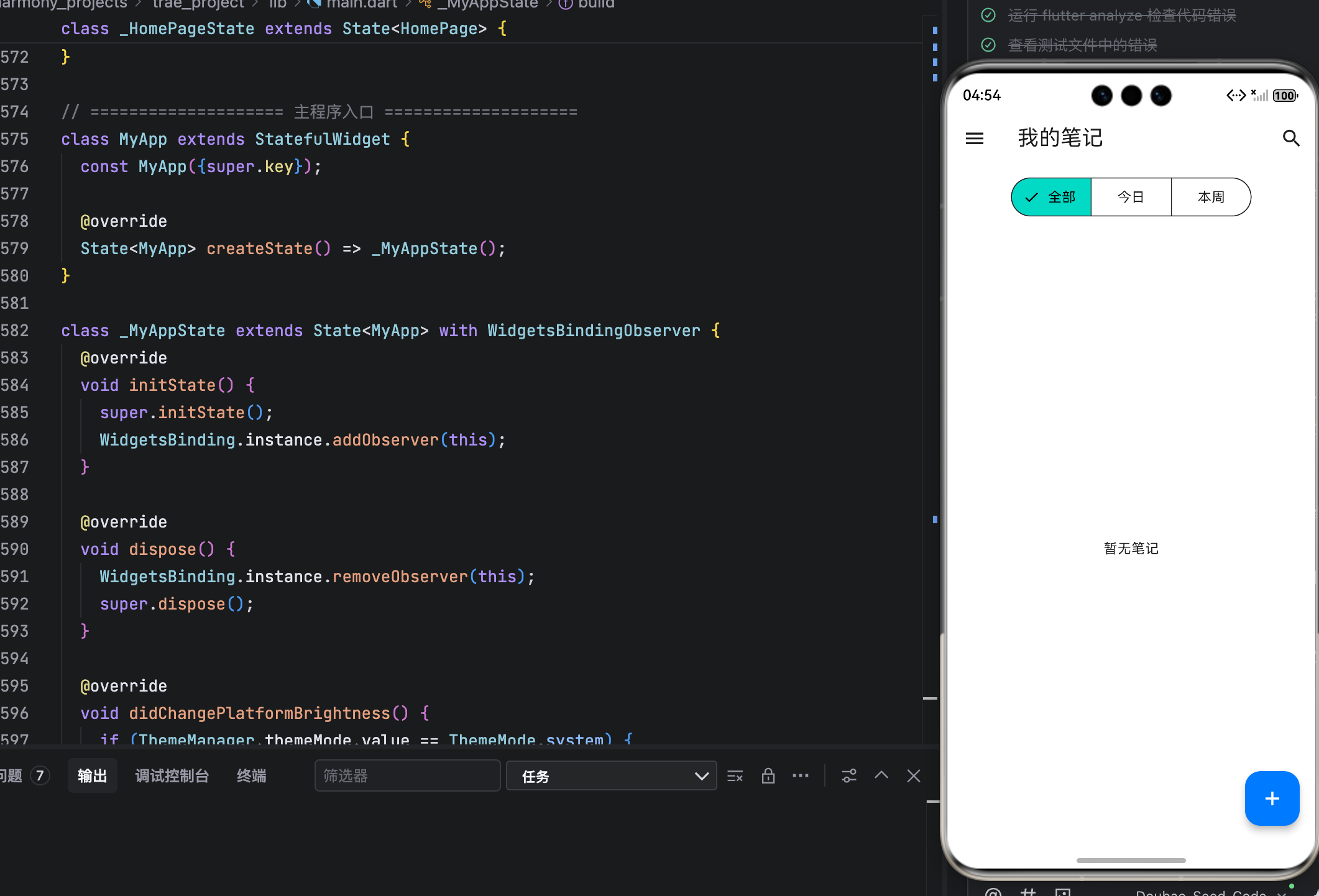
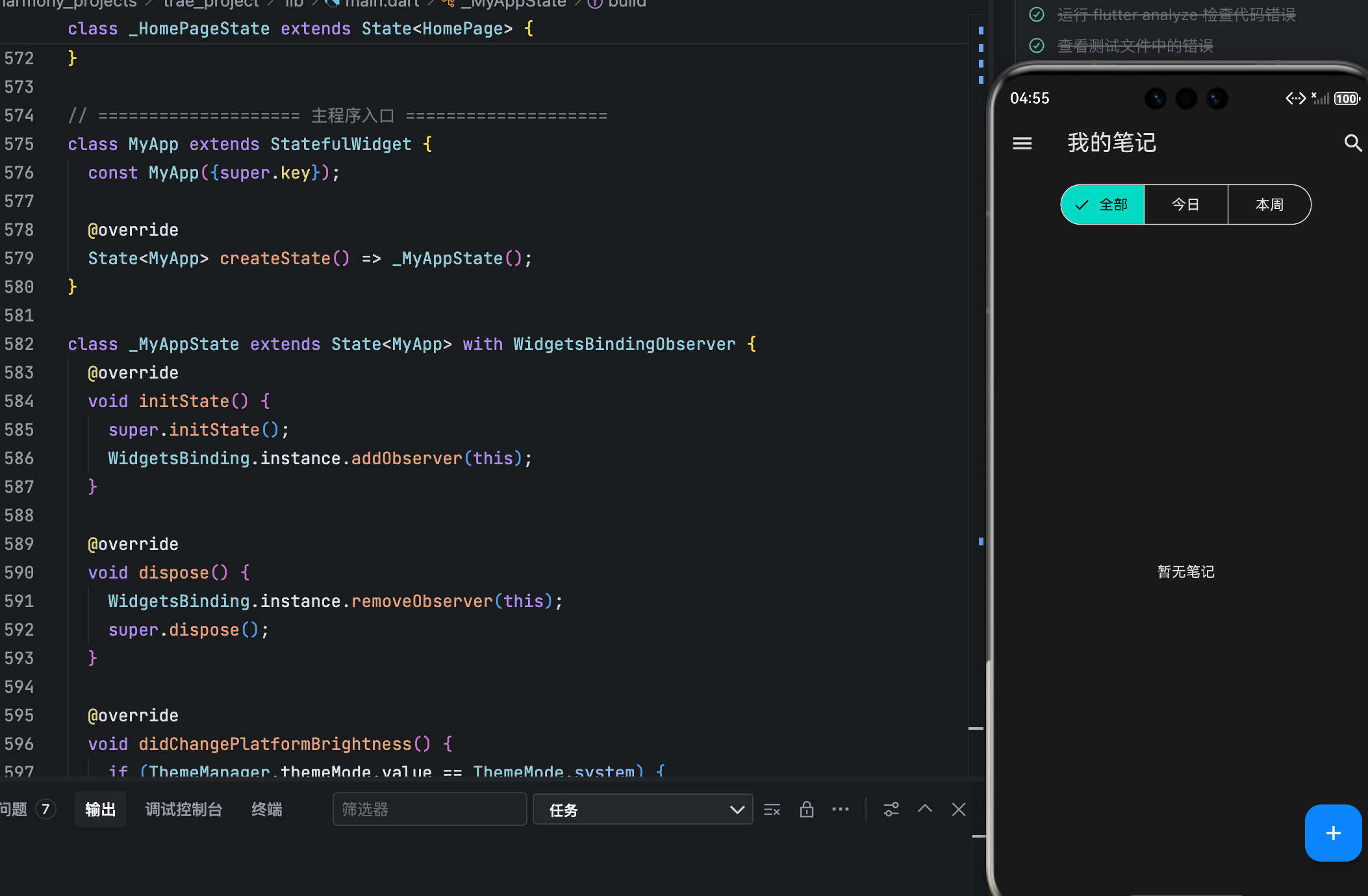
运行界面
结语
本文成功为鸿蒙记事本集成了 智能夜间模式 ,通过 系统跟随 + 手动切换 双模式,配合 科学的色彩体系 ,实现了全天候舒适的视觉体验。所有 UI 元素均通过 ThemeData 统一管理,确保一致性与可维护性。
至此,我们的记事本已具备 专业级功能与体验 。下一步,我们将把内存数据持久化到 本地数据库(Drift),彻底解决数据易失问题,打造真正可靠的个人知识管理工具。