由于西门子ug图形软件的 open api接口基本无详细有用的指南可参考,二次开发如果使用纯粹的外部模式会变得极度困难,尽管连ug官方使用的也都是内部模式,在内部模式下许多工作可以利用ug的自动编程功能生成,但毕竟内部模式是在线程同步机制下运行,功能受限,无法套入view2,第三方ui控件等新的技术组件,无法实现复杂功能和美观界面,同时,同步机制下,插件在同步机制下工作,影响ug性能,这里,我将使用ug内部模式下的dll函数入口,用异步启动外部插件软件,利用外部和内部混合的模式进行开发插件,这样,外部软件就在线程外单独运行,不会影响到ug性能,代价是,外部模式需要增加一道通讯机制进行数据交互
一.UG动态链接库dll作为桥梁,连接ug内部+启动外部模式的插件
cs
using NXOpen;
using NXOpen.UF;
using System;
using System.Collections.Generic;
using System.Diagnostics;
using System.IO;
using System.Linq;
using System.Runtime.Remoting.Messaging;
using System.Text;
using System.Threading.Tasks;//线程必要引入
namespace ug_api
{
    public class Program
    {


        private static Session theSession;
        private static UFSession theUFSession = null;
        private static UI theUI;
        private static Program theProgram;
        private static bool isDisposeCalled;


        /// <summary>
        /// 构造NX关键字
        /// </summary>
        public Program()
        {

            try
            {
                theSession = Session.GetSession();
                theUI = UI.GetUI();
                theUFSession = UFSession.GetUFSession();
                isDisposeCalled = false;
            }
            catch (NXOpen.NXException ex)
            {


            }
        }


        /// <summary>
        /// 常规入口函数
        /// </summary>
        /// <param name="args"></param>
        public static int Main(string[] args)
        {

            int retValue = 0;
            try
            {

                theProgram = new Program();
                //这里写你的代码

                StartApplicationAsync().Wait(); // 等待异步启动外部软件


                theProgram.Dispose();//关闭插件后台

            }
            catch (NXOpen.NXException ex)
            {

            }
            return retValue;
        }


        /// <summary>
        /// NX启动时调用的入口
        /// </summary>
        /// <returns></returns>
        public static int Startup()
        {
            try
            {
            }
            catch (Exception ex)
            {
            }
            return 0;
        }

        /// <summary>
        /// 获取程序的卸载方式
        /// </summary>
        /// <param name="arg"></param>
        /// <returns></returns>
        public static int GetUnloadOption(string arg)
        {
            //return System.Convert.ToInt32(Session.LibraryUnloadOption.AtTermination);//NX退出时卸载
            //return System.Convert.ToInt32(Session.LibraryUnloadOption.Explicitly);//通过【卸载共享镜像】功能卸载
            return System.Convert.ToInt32(Session.LibraryUnloadOption.Immediately);//立即卸载dll
        }

        /// <summary>
        /// 卸载时被调用
        /// </summary>
        /// <param name="arg"></param>
        public void Dispose()
        {
            try
            {
                if (isDisposeCalled == false)
                {
                    //todo :add your application code here
                }
                isDisposeCalled = true;
            }
            catch (NXOpen.NXException ex)
            {


            }


        }

        /// <summary>
        /// 异步启动自定义的ug设计软件
        /// </summary>
        /// <returns></returns>
        static async Task StartApplicationAsync()
        {
            await Task.Run(() =>
            {
                try
                {
                    // 启动指定路径下的可执行文件
                    string exePath = @"D:\UG_TOOL\bin\Debug\net10.0-windows\UG_TOOL.exe"; // 修改为你的程序路径
                    Process.Start(exePath);
                }
                catch (Exception ex)
                {
                    // 处理异常
                }
            });
        }


    }


}
二.为dll和外部软件增加管道通讯,数据格式处理以json
1.建数据模型类
cs
 public class Person
 {
     public string Name { get; set; }
     public int Age { get; set; }
 }
2.为dll增加管道通讯
dll做为管道通讯服务器,等待客户端连接,客户端连接上后,监听信息,接收到信息后将信息解析到Person类,并显示接收到的数据
cs
  //管道通讯服务器对象
   using (NamedPipeServerStream pipeServer = new NamedPipeServerStream("testpipe", PipeDirection.InOut))
   {
       pipeServer.WaitForConnection();//启动服务器

       using (StreamReader reader = new StreamReader(pipeServer))
       {
           string message;
           while (true)
           {
               message = reader.ReadLine(); // 读取新消息
               if (message == null) break; // 如果没有消息则退出循环
               var jsonMessage = JsonConvert.DeserializeObject<Person>(message); // 解析 JSON 消息到数据类Person
               theUFSession.Ui.DisplayMessage("Name: " + jsonMessage.Name + "Age:"+jsonMessage.Age, 1);//界面显示测试
           }
       }
   }
3.需要安装Newtonsoft.Json包(旧框架,不可用其他高级包)

完整的dll代码如下
cs
using NXOpen;
using NXOpen.UF;
using System;
using System.Collections.Generic;
using System.Diagnostics;
using System.IO;
using System.IO.Pipes;
using System.Linq;
using System.Runtime.Remoting.Messaging;
using System.Text;
using System.Threading.Tasks;
using Newtonsoft.Json;
using ug_api.Models;
namespace ug_api
{
    public class Program
    {


        private static Session theSession;
        private static UFSession theUFSession = null;
        private static UI theUI;
        private static Program theProgram;
        private static bool isDisposeCalled;


        /// <summary>
        /// 构造NX关键字
        /// </summary>
        public Program()
        {

            try
            {
                theSession = Session.GetSession();
                theUI = UI.GetUI();
                theUFSession = UFSession.GetUFSession();
                isDisposeCalled = false;
            }
            catch (NXOpen.NXException ex)
            {


            }
        }


        /// <summary>
        /// 常规入口函数
        /// </summary>
        /// <param name="args"></param>
        public static int Main(string[] args)
        {

            int retValue = 0;
            try
            {

                theProgram = new Program();


                //这里写你的代码
                StartApplicationAsync().Wait(); // 等待异步启动设计软件方法完成

               //管道通讯服务器对象
                using (NamedPipeServerStream pipeServer = new NamedPipeServerStream("testpipe", PipeDirection.InOut))
                {
                    pipeServer.WaitForConnection();//启动服务器

                    using (StreamReader reader = new StreamReader(pipeServer))
                    {
                        string message;
                        while (true)
                        {
                            message = reader.ReadLine(); // 读取新消息
                            if (message == null) break; // 如果没有消息则退出循环
                            var jsonMessage = JsonConvert.DeserializeObject<Person>(message); // 解析 JSON 消息到数据类Person
                            theUFSession.Ui.DisplayMessage("Name: " + jsonMessage.Name + "Age:"+jsonMessage.Age, 1);//界面显示测试
                        }
                    }
                }

                theProgram.Dispose();//关闭插件后台

            }
            catch (NXOpen.NXException ex)
            {

            }
            return retValue;
        }


        /// <summary>
        /// NX启动时调用的入口
        /// </summary>
        /// <returns></returns>
        public static int Startup()
        {
            try
            {
            }
            catch (Exception ex)
            {
            }
            return 0;
        }

        /// <summary>
        /// 获取程序的卸载方式
        /// </summary>
        /// <param name="arg"></param>
        /// <returns></returns>
        public static int GetUnloadOption(string arg)
        {
            //return System.Convert.ToInt32(Session.LibraryUnloadOption.AtTermination);//NX退出时卸载
            //return System.Convert.ToInt32(Session.LibraryUnloadOption.Explicitly);//通过【卸载共享镜像】功能卸载
            return System.Convert.ToInt32(Session.LibraryUnloadOption.Immediately);//立即卸载dll
        }

        /// <summary>
        /// 卸载时被调用
        /// </summary>
        /// <param name="arg"></param>
        public void Dispose()
        {
            try
            {
                if (isDisposeCalled == false)
                {
                    //todo :add your application code here
                }
                isDisposeCalled = true;
            }
            catch (NXOpen.NXException ex)
            {


            }


        }

        /// <summary>
        /// 异步启动自定义的ug设计软件
        /// </summary>
        /// <returns></returns>
        static async Task StartApplicationAsync()
        {
            await Task.Run(() =>
            {
                try
                {
                    // 启动指定路径下的可执行文件
                    string exePath = @"D:\UG_TOOL\bin\Debug\net10.0-windows\UG_TOOL.exe"; // 修改为你的程序路径
                    Process.Start(exePath);
                }
                catch (Exception ex)
                {
                    // 处理异常
                }
            });
        }


    }


}
三.另建一个WPF程序项目来作为ug二次开发的外部插件,为ug插件提供ui
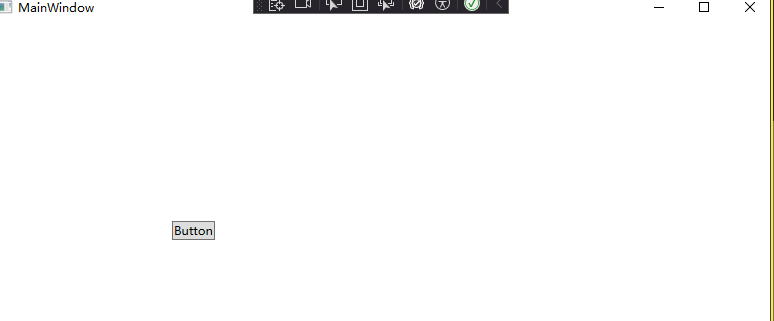
界面放 一个按键,来处理所需命令
1.wpf项目同样安装json包和新建一样的模型类
2.客户端代码
cs
private void btu_Click(object sender, RoutedEventArgs e)
{
    var person = new Person { Name = "陈佳鹏", Age = 30 };//构建数据类
    string jsonString = JsonConvert.SerializeObject(person);//数据类对象序列化为json数据

    //连接到名为testpipe管道通讯服务器上
    using (NamedPipeClientStream pipeClient = new NamedPipeClientStream(".", "testpipe", PipeDirection.InOut))
    {
        pipeClient.Connect();//管道客户端启动
        MessageBox.Show("已连接到服务器.");

        using (StreamWriter writer = new StreamWriter(pipeClient) { AutoFlush = true })
        {

            writer.WriteLine(jsonString); // 发送消息
        }
        pipeClient.Close();//关闭客户端
    }
}
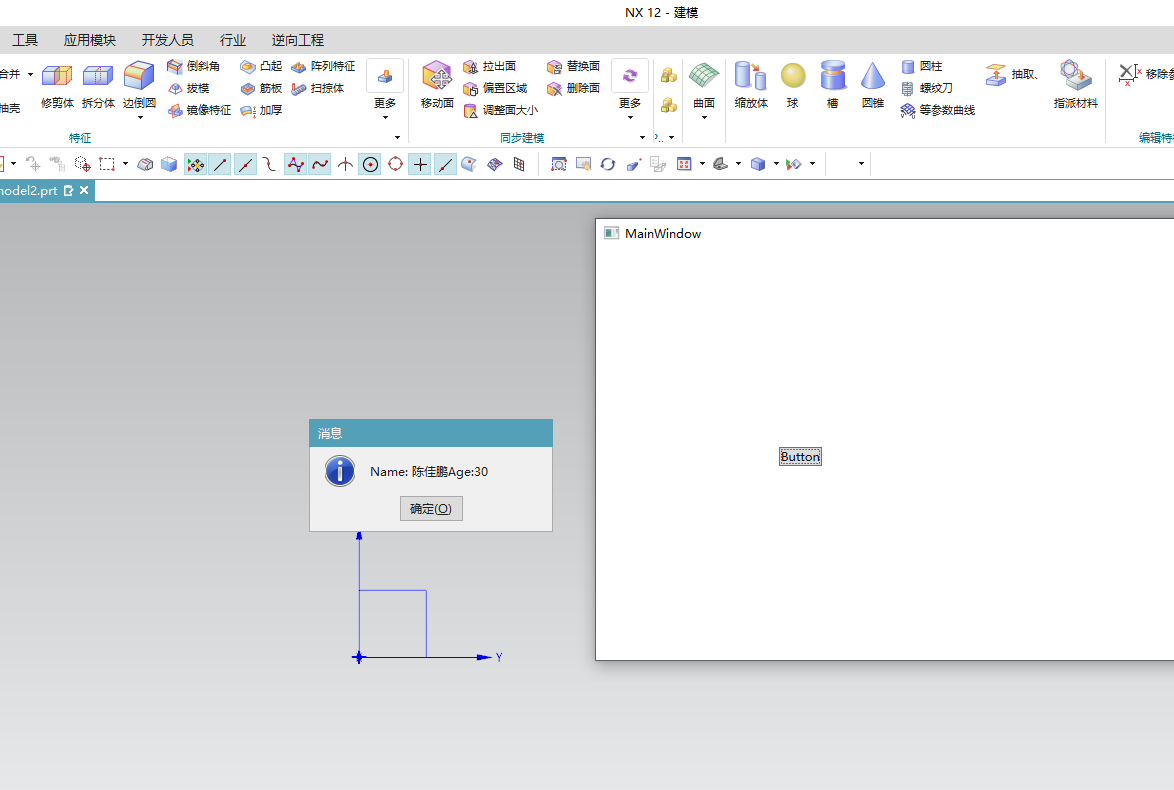
运行结果:
dll成功拿到了外部软件的json数据,由于dll在西门子ug软件内部,后续的自动生成3维模型,自动设计工作实现起就很简单了