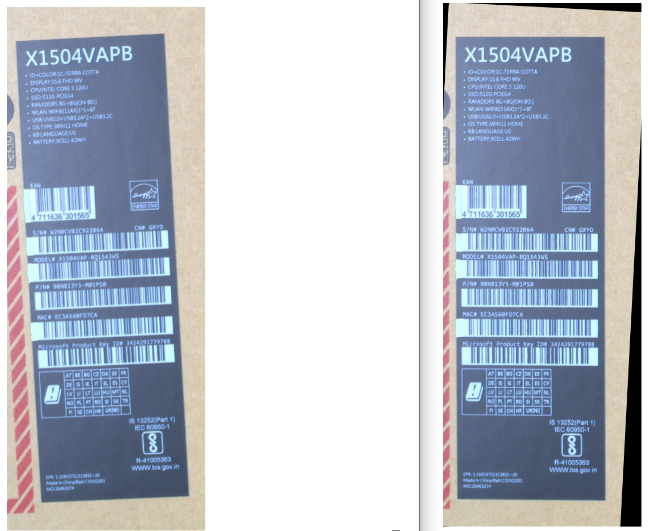
使用python+OCR实现图片矫正
python
import cv2
import numpy as np
from paddleocr import PaddleOCR


# 设定模型路径
paddleocr = PaddleOCR(
		      cls_model_dir='D:/paddle OCR/ch_ppocr_mobile_v2.0_cls_slim_infer',
                      det_model_dir='D:/paddle OCR/ch_PP-OCRv4_det_infer',
                      rec_model_dir='D:/paddle OCR/ch_PP-OCRv4_rec_infer') # 推理模型路径
# img = cv2.imread(r'D:\LabelAOI\source\Test\CM\6.jpg')  # 打开需要识别的图片
img = cv2.imread(r'D:\LabelAOI\source\Test\crops\26463274Q0041-W2N0CV02C922064_20260207003954_L_main_CAM_basler_UPC_CAM114.jpg')  # 打开需要识别的图片
# img = cv2.resize(image, (300,500))
#img = cv2.imread(r'.\UPC_CAM94.jpg')  # 打开需要识别的图片
result = paddleocr.ocr(img)

# 获取文字内容最长的框
max_text_length = 0
max_text_index = 0

for i, (points, (text, confidence)) in enumerate(result[0]):
    current_length = len(text.strip())
    if current_length > max_text_length and current_length > 0:
        max_text_length = current_length
        max_text_index = i
# 获取最长文本的框坐标(转换为Python原生整数)
points, (text, confidence) = result[0][max_text_index]
points = np.array(points, dtype=np.int32)  # 先转numpy整数
# 从numpy数组中提取元素,并转换为Python原生int类型
rot_center_x = int(points[0][0].item())  # .item()将numpy类型转为Python类型
rot_center_y = int(points[0][1].item())
rot_center = (rot_center_x, rot_center_y)  # 确保是纯Python整数元组
# 计算旋转角度
dx = points[1][0] - points[0][0]
dy = points[1][1] - points[0][1]
angle = np.arctan2(dy, dx) * 180 / np.pi  # 弧度转角度
# 生成旋转矩阵(此时rot_center为Python int元组,符合OpenCV要求)
M = cv2.getRotationMatrix2D(rot_center, angle, 1.0)
rotated_img = cv2.warpAffine(img, M, (img.shape[1], img.shape[0]))
# # 绘制结
# cv2.polylines(rotated_img, [points], True, (0, 255, 0), 2)
# confidence_percentage = int(confidence * 100)
# cv2.putText(
#     rotated_img, f"{text} ({confidence_percentage}%)",
#     (points[0][0], points[0][1] - 10),
#     cv2.FONT_HERSHEY_SIMPLEX, 0.5, (0, 0, 255), 2
# )
# cv2.putText(
#     rotated_img, f"Angle: {angle:.2f}°",
#     (points[0][0], points[0][1] - 30),
#     cv2.FONT_HERSHEY_SIMPLEX, 0.5, (0, 0, 255), 2
# )

cv2.imwrite("D:\paddle OCR\mm.png", rotated_img)
cv2.imshow('Longest Text Region', rotated_img)
cv2.waitKey(0)
cv2.destroyAllWindows()
效果如下: