javascript
/**
 * 通用动画函数
 * @param {Object} options 配置对象
 * @param {number} [options.duration] 动画持续时间 (毫秒),如果提供则优先使用
 * @param {number} [options.speed] 动画速度 (单位/毫秒),当未提供 duration 时生效
 * @param {number} options.from 起始值,默认为 0
 * @param {number} options.to 结束值
 * @param {Function} [options.callback] 每一帧的回调函数,接收 (currentValue, progress) 作为参数
 * @param {Function} [options.onComplete] 动画结束时的回调函数
 * @param {Function} [legacyCallback] 兼容旧调用的第二个参数作为回调
 * @returns {Function} 取消动画的函数
 */
let animateMoveFn = ({ duration, speed, from, to, callback, onComplete }) => {

    // --- 参数类型校验开始 ---

    // 校验 from
    if (from === undefined || from === null) {
        console.error(`animateMoveFn: "from" 必须是数字且必填。当前值: ${from}。动画将不执行。`);
        return () => { }; // 返回空的取消函数
    }
    if (typeof from !== 'number' || isNaN(from)) {
        console.warn(`animateMoveFn: "from" 必须是数字。当前值: ${from}。已重置为 0。`);
        return () => { }; // 返回空的取消函数
    }

    // 校验 to
    if (to === undefined || to === null) {
        console.error(`animateMoveFn: "to" 必须是数字且必填。当前值: ${to}。动画将不执行。`);
        return () => { }; // 返回空的取消函数
    }
    if (typeof to !== 'number' || isNaN(to)) {
        console.warn(`animateMoveFn: "to" 必须是数字。当前值: ${to}。已重置为 0。`);
        return () => { }; // 返回空的取消函数
    }

    // 校验 duration
    if (duration !== undefined && duration !== null) {
        if (typeof duration !== 'number' || isNaN(duration) || duration < 0) {
            console.warn(`animateMoveFn: "duration" 必须是非负数字。当前值: ${duration}。将忽略此参数。`);
            duration = undefined;
        }
    }

    // 校验 speed
    if (speed !== undefined && speed !== null) {
        if (typeof speed !== 'number' || isNaN(speed) || speed <= 0) {
            console.warn(`animateMoveFn: "speed" 必须是正数字。当前值: ${speed}。将忽略此参数。`);
            speed = undefined;
        }
    }

    // 校验 callback
    if (callback !== undefined && typeof callback !== 'function') {
        console.warn(`animateMoveFn: "callback" 必须是函数。当前类型: ${typeof callback}。`);
        callback = null;
    }

    // 校验 onComplete
    if (onComplete !== undefined && typeof onComplete !== 'function') {
        console.warn(`animateMoveFn: "onComplete" 必须是函数。当前类型: ${typeof onComplete}。`);
        onComplete = null;
    }

    // --- 参数类型校验结束 ---

    // 记录动画开始的时间戳
    let startTime = Date.now();

    // 存储当前的 requestAnimationFrame ID,用于取消动画
    let reqId = null;

    // 动画是否已取消的标志
    let isCancelled = false;

    // 核心动画循环函数
    let moveFn = () => {

        // 如果动画已取消,直接退出
        if (isCancelled) return;

        // 计算从开始到现在经过的时间
        let elapsed = Date.now() - startTime;

        // 当前动画进度 (0 到 1 之间)
        let progress = 0;

        if (duration && duration > 0) {
            // 模式 1: 基于持续时间 (Duration-based)
            progress = elapsed / duration;
        } else if (speed && speed > 0) {
            // 模式 2: 基于速度 (Speed-based)
            // 计算总距离
            let totalDistance = Math.abs(to - from);
            if (totalDistance === 0) {
                progress = 1;
            } else {
                // 已移动距离 = 速度 * 时间
                let coveredDistance = speed * elapsed;
                progress = coveredDistance / totalDistance;
            }
        } else {
            // 既无 duration 也无 speed,或者值无效,默认直接完成
            progress = 1;
        }

        // 确保进度不超过 1
        if (progress > 1) progress = 1;

        // 计算当前值:起始值 + (总变化量 * 进度)
        // 使用线性插值 (Linear Interpolation)
        let currentValue = from + (to - from) * progress;

        // 执行回调,将当前值和进度传递出去
        if (callback) {
            callback(currentValue, progress);
        }

        // 检查动画是否结束
        if (progress < 1) {
            // 动画未结束,请求下一帧
            reqId = requestAnimationFrame(moveFn);
        } else {
            // 动画结束
            onComplete(currentValue, progress);
        }
    };

    // 启动动画
    reqId = requestAnimationFrame(moveFn);

    // 返回一个取消函数,外部调用它可以立即停止动画
    return () => {
        isCancelled = true;
        if (reqId) {
            cancelAnimationFrame(reqId);
        }
    };
};

// 兼容旧的命名(如果项目中有其他地方用到)
window.animateMoeveFn = animateMoveFn;
window.animateMoveFn = animateMoveFn;
javascript
<!DOCTYPE html>
<html lang="en">
<head>
    <meta charset="UTF-8">
    <meta name="viewport" content="width=device-width, initial-scale=1.0">
    <title>Animation Test</title>
    <style>
        body {
            font-family: 'Segoe UI', Tahoma, Geneva, Verdana, sans-serif;
            padding: 20px;
            max-width: 800px;
            margin: 0 auto;
        }
        .box {
            width: 50px;
            height: 50px;
            background-color: #e74c3c;
            position: relative;
            margin-bottom: 30px;
            border-radius: 4px;
            box-shadow: 0 2px 5px rgba(0,0,0,0.2);
            display: flex;
            align-items: center;
            justify-content: center;
            color: white;
            font-weight: bold;
            font-size: 12px;
        }
        .controls {
            display: grid;
            grid-template-columns: repeat(auto-fill, minmax(180px, 1fr));
            gap: 10px;
            margin-bottom: 20px;
        }
        button {
            padding: 10px 15px;
            cursor: pointer;
            background-color: #3498db;
            color: white;
            border: none;
            border-radius: 4px;
            font-size: 14px;
            transition: background 0.2s;
        }
        button:hover {
            background-color: #2980b9;
        }
        button.cancel {
            background-color: #e67e22;
        }
        button.cancel:hover {
            background-color: #d35400;
        }
        #output {
            padding: 15px;
            border: 1px solid #ddd;
            background: #f8f9fa;
            max-height: 300px;
            overflow-y: auto;
            font-family: 'Consolas', monospace;
            font-size: 13px;
            border-radius: 4px;
        }
        .log-entry {
            margin-bottom: 4px;
            border-bottom: 1px solid #eee;
            padding-bottom: 2px;
        }
        .log-time {
            color: #888;
            margin-right: 8px;
        }
        .log-success { color: #27ae60; font-weight: bold; }
        .log-warn { color: #e67e22; }
        .log-error { color: #c0392b; }
    </style>
</head>
<body>

    <h1>Animation Test for ani.js</h1>

    <div class="box" id="testBox">0</div>

    <div class="controls">
        <button id="btnDuration">1. 时长模式 (Duration)</button>
        <button id="btnSpeed">2. 速度模式 (Speed)</button>
        <button id="btnReverse">3. 反向动画 (Reverse)</button>
        <button id="btnOnComplete">4. 完整回调 (onComplete)</button>
        <button id="btnPriority">5. 优先级 (Duration > Speed)</button>
        <button id="btnError">6. 错误参数测试 (Check Console)</button>
        <button id="btnCancel" class="cancel">7. 中途取消 (Cancel)</button>
        <button id="btnClearLog" style="background:#95a5a6">清除日志</button>
    </div>

    <div id="output">日志准备就绪...</div>

    <script src="./js/ani.js"></script>
    <script>
        const box = document.getElementById('testBox');
        const output = document.getElementById('output');
        let currentCancelFn = null;

        function log(msg, type = 'normal') {
            const div = document.createElement('div');
            div.className = 'log-entry';

            const timeSpan = document.createElement('span');
            timeSpan.className = 'log-time';
            timeSpan.textContent = `[${new Date().toLocaleTimeString()}]`;

            const msgSpan = document.createElement('span');
            msgSpan.textContent = msg;

            if (type === 'success') msgSpan.className = 'log-success';
            if (type === 'warn') msgSpan.className = 'log-warn';
            if (type === 'error') msgSpan.className = 'log-error';

            div.appendChild(timeSpan);
            div.appendChild(msgSpan);
            output.prepend(div);
        }

        function reset(startVal = 0) {
            if (currentCancelFn) {
                currentCancelFn();
                currentCancelFn = null;
                log('上一个动画已终止', 'warn');
            }
            box.style.left = startVal + 'px';
            box.textContent = Math.round(startVal);
        }

        // 1. 基础时长模式
        document.getElementById('btnDuration').onclick = () => {
            reset(0);
            log('测试1: 基于 Duration (0 -> 500px, 1000ms)');

            currentCancelFn = animateMoveFn({
                duration: 1000,
                from: 0,
                to: 500,
                callback: (val) => {
                    box.style.left = val + 'px';
                    box.textContent = Math.round(val);
                },
                onComplete: (val) => {
                    log(`动画结束: 到达 ${val}px`, 'success');
                }
            });
        };

        // 2. 速度模式
        document.getElementById('btnSpeed').onclick = () => {
            reset(0);
            log('测试2: 基于 Speed (0 -> 500px, speed: 0.5px/ms)');
            log('预期耗时: 500 / 0.5 = 1000ms');

            currentCancelFn = animateMoveFn({
                speed: 0.5, // 0.5px per ms = 500px per second
                from: 0,
                to: 500,
                callback: (val) => {
                    box.style.left = val + 'px';
                    box.textContent = Math.round(val);
                },
                onComplete: (val) => {
                    log(`动画结束: 到达 ${val}px`, 'success');
                }
            });
        };

        // 3. 反向动画
        document.getElementById('btnReverse').onclick = () => {
            reset(500);
            log('测试3: 反向动画 (500 -> 0px, speed: 1px/ms)');

            currentCancelFn = animateMoveFn({
                speed: 1, // 1000px/s, fast!
                from: 500,
                to: 0,
                callback: (val) => {
                    box.style.left = val + 'px';
                    box.textContent = Math.round(val);
                },
                onComplete: () => log('反向动画结束', 'success')
            });
        };

        // 4. onComplete 测试
        document.getElementById('btnOnComplete').onclick = () => {
            reset(0);
            log('测试4: 测试 onComplete 回调');

            currentCancelFn = animateMoveFn({
                duration: 500,
                from: 0,
                to: 200,
                callback: (val) => {
                    box.style.left = val + 'px';
                    box.textContent = Math.round(val);
                },
                onComplete: (val, progress) => {
                    log(`onComplete 触发! Val: ${val}, Progress: ${progress}`, 'success');
                    box.style.backgroundColor = '#2ecc71'; // 变绿
                    setTimeout(() => box.style.backgroundColor = '#e74c3c', 500); // 变回红
                }
            });
        };

        // 5. 优先级测试
        document.getElementById('btnPriority').onclick = () => {
            reset(0);
            log('测试5: 优先级测试 (传入 duration=2000 和 speed=10)');
            log('预期: 应该使用 duration (2秒),忽略极快的 speed');

            currentCancelFn = animateMoveFn({
                duration: 2000,
                speed: 10, // 如果生效只要 50ms,如果不生效要 2000ms
                from: 0,
                to: 500,
                callback: (val) => {
                    box.style.left = val + 'px';
                    box.textContent = Math.round(val);
                },
                onComplete: () => log('动画结束 (检查耗时是否接近 2秒)', 'success')
            });
        };

        // 6. 错误参数测试
        document.getElementById('btnError').onclick = () => {
            reset(0);
            log('测试6: 错误参数 (请查看浏览器控制台 Console)', 'warn');

            // Case A: 缺少 to
            log('Case A: 缺少 "to" 参数 -> 应该报错不执行');
            animateMoveFn({ duration: 1000, from: 0 });

            // Case B: 错误的 duration
            // setTimeout(() => {
            //     log('Case B: duration 为字符串 -> 应该警告并忽略');
            //     animateMoveFn({
            //         duration: "invalid",
            //         speed: 1, // 备用方案
            //         from: 0,
            //         to: 100,
            //         callback: (v) => box.style.left = v + 'px'
            //     });
            // }, 500);
        };

        // 7. 取消测试
        document.getElementById('btnCancel').onclick = () => {
            reset(0);
            log('测试7: 启动并在 500ms 后取消');

            currentCancelFn = animateMoveFn({
                duration: 2000,
                from: 0,
                to: 800,
                callback: (val) => {
                    box.style.left = val + 'px';
                    box.textContent = Math.round(val);
                },
                onComplete: () => log('ERROR: 动画不应该完成!', 'error')
            });

            setTimeout(() => {
                if (currentCancelFn) {
                    currentCancelFn();
                    currentCancelFn = null;
                    log('已调用 cancel()', 'warn');
                }
            }, 500);
        };

        document.getElementById('btnClearLog').onclick = () => {
            output.innerHTML = '';
            log('日志已清空');
        };

    </script>
</body>
</html>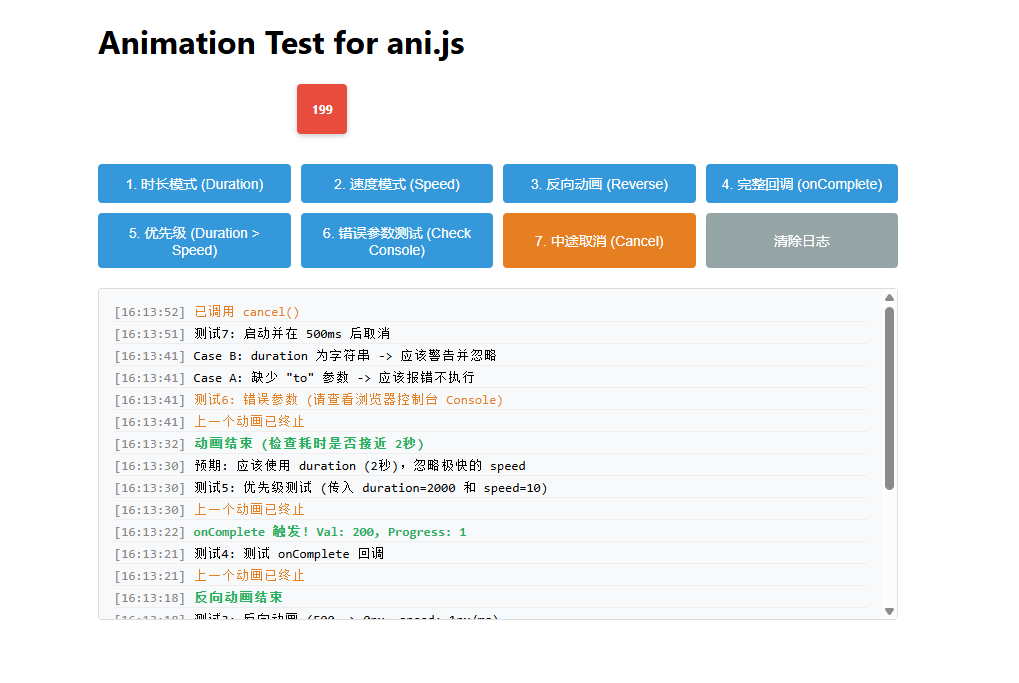
ani.js 动画库实现原理解析教程
本教程将带你深入了解 ani.js 的实现原理。这是一个轻量级的通用动画函数,旨在通过精确的时间控制来实现平滑的数值过渡效果。它不仅支持传统的时长模式 (Duration) ,还创新地引入了速度模式 (Speed),非常适合用于 UI 交互、游戏开发或任何需要动态数值变化的场景。
1. 核心设计理念
ani.js 的核心思想是基于时间 (Time-based) 而非基于帧数 (Frame-based)。
- 基于帧数:每一帧增加固定的数值。如果设备卡顿,掉帧会导致动画变慢,总时长不可控。
- 基于时间 :根据当前时间与开始时间的差值 (
elapsed) 来计算当前应处的位置。无论帧率如何波动,动画总是在预定的时间到达终点,保证了动画的流畅性和同步性。
2. 函数签名与参数设计
函数采用单一对象参数 options 的设计模式,这使得参数扩展变得非常灵活,同时保持了调用的清晰度。
javascript
let animateMoveFn = ({
    duration,   // 动画持续时间 (毫秒)
    speed,      // 动画速度 (单位/毫秒)
    from = 0,   // 起始值 (默认为 0)
    to,         // 结束值 (必填)
    callback,   // 每帧回调:(currentValue, progress) => {}
    onComplete  // 结束回调:(finalValue, progress) => {}
}) => { ... }
亮点分析:
- 双模式驱动 :
- 时长优先 :如果你提供了
duration,动画将严格在指定时间内完成。 - 速度优先 :如果你未提供
duration但提供了speed,函数会自动根据Math.abs(to - from)计算所需时间。
- 时长优先 :如果你提供了
- 健壮性校验 :函数内部对所有参数进行了严格的类型检查(如
typeof,isNaN),确保无效参数不会导致运行时错误,并提供友好的控制台警告。
3. 核心实现深度解析
3.1 动画循环 (The Loop)
动画引擎的心脏是 requestAnimationFrame。它比 setInterval 更高效,因为它会跟随浏览器的刷新率(通常是 60Hz),并在后台标签页暂停执行以节省电量。
javascript
let startTime = Date.now();
let moveFn = () => {
    // 1. 计算流逝的时间
    let elapsed = Date.now() - startTime;

    // 2. 计算进度 (0.0 ~ 1.0)
    // ... (核心算法见下文)

    // 3. 更新数值并绘制
    // ...

    // 4. 决定下一帧
    if (progress < 1) {
        reqId = requestAnimationFrame(moveFn);
    } else {
        // 动画结束
    }
};
3.2 进度计算策略 (The Math)
这是 ani.js 最精彩的部分。它根据输入模式动态决定进度计算方式:
模式 A:时长模式 (Duration Mode)
最常见的模式。进度等于"已过去的时间"除以"总时长"。
javascript
progress = elapsed / duration;模式 B:速度模式 (Speed Mode)
当距离不确定,但希望保持恒定速度时使用(例如:无论滑块拖动多远,回弹速度一致)。
javascript
let totalDistance = Math.abs(to - from);
let coveredDistance = speed * elapsed; // 速度 * 时间 = 路程
progress = coveredDistance / totalDistance;
3.3 线性插值 (Linear Interpolation / Lerp)
一旦算出 progress (0 到 1 之间的浮点数),我们就可以计算当前的数值:
javascript
// 公式:当前值 = 起始值 + (总变化量 * 进度)
let currentValue = from + (to - from) * progress;
这个公式非常强大:
- 当
progress = 0时,结果为from。 - 当
progress = 1时,结果为to。 - 当
progress = 0.5时,结果正好在中间。 - 支持反向 :即使
to < from,公式依然成立(因为to - from会是负数)。
3.4 生命周期管理与取消机制
为了让动画可控,函数返回了一个闭包函数 (Closure),用于取消动画。
javascript
return () => {
    isCancelled = true; // 标志位:阻止后续帧执行
    if (reqId) cancelAnimationFrame(reqId); // 清除浏览器队列中的请求
};
这种设计允许外部代码随时打断动画(例如用户再次触发了新的动画),防止多个动画冲突。
4. 最佳实践与使用示例
场景一:基础位移 (1秒内移动到 500px)
javascript
const cancel = animateMoveFn({
    duration: 1000,
    from: 0,
    to: 500,
    callback: (val) => element.style.left = val + 'px'
});
场景二:恒定速度回弹 (无论多远,速度都是 2px/ms)
javascript
const cancel = animateMoveFn({
    speed: 2, // 2000px/s,非常快
    from: currentPosition, // 动态获取当前位置
    to: 0,
    callback: (val) => element.style.left = val + 'px'
});
场景三:防止动画冲突 (Anti-conflict)
在启动新动画前,务必取消旧动画。
javascript
let currentAnim = null;

function startNewAnim() {
    if (currentAnim) currentAnim(); // 停止旧的

    currentAnim = animateMoveFn({
        to: 100,
        // ...
        onComplete: () => currentAnim = null // 结束后清理引用
    });
}
5. 总结
ani.js 是一个教科书式的现代 JavaScript 动画实现。它展示了如何通过:
- 参数解构与默认值 来提升 API 易用性。
- 防御性编程 来处理无效输入。
- 时间轴插值算法 来保证动画平滑度。
- 闭包与高阶函数 来管理状态和副作用。
掌握了这个函数的实现,你就掌握了前端动画引擎的基石。