1、写一个简单的demo
1、建一个文件夹,在文件夹中创建2个文件
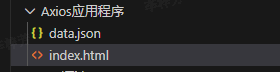
- data.json中,存放json字符串
python
{
	"name": "百度",
	"url": "http://www.baicu.com",
	"page": 66,
	"isNonProfit": true,
	"address": {
		"street": "海定区",
		"city": "北京市",
		"country": "中国"
	},
	"links": [{
		"name": "Google",
		"url": "http://www.google.com"
	},
    {
        "name": "Baidu",
        "url": "http://www.baidu.com"
    },
    {
        "name": "Sougou",
        "url": "http://www.sougou.com"
    }

    ]
}- index.html中存放代码
python
<!DOCTYPE html>
<html>
    <head>
        <meta charset="utf-8">
        <script src="https://cdn.jsdelivr.net/npm/vue/dist/vue.js"></script>
        <script src="https://unpkg.com/axios/dist/axios.min.js"></script>
        <title>Axios应用程序</title>
    </head>

    <body>
        <div id = 'app'>
             <div>
                名称:{{info.name}}
            </div>
            <div>
                 url:<a v-bird:href="info.url" target="_blank">{{info.url}}</a>
            </div>
            <ul>
                <li v-for='link in info.links'>
                    {{link.name}} ---> {{link.url}}
                </li>
            </ul>
        </div>

    </body>

    <script>
        var app = new Vue({
            el: '#app',
            data(){
                return {
                    info:{
                        name:'',
                        url:'',
                        links:[]
                    }
                }
            },
            // 钩子函数
            mounted(){
                // 链式编程
                axios
                    .get("data.json")
                    //用{}括起来才算数,要不不能请求到数据
                    .then(response => {this.info=response.data})

                // alert("Hello Vue!!!")
            }
        })
    </script>

</html>
2、运行
1、安装http-server插件,安装命令
python
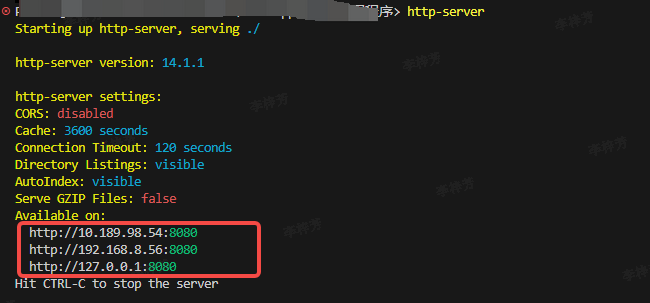
npm install -g http-server2、切换到index.html所在目录下,执行 http-server即可,以下是我执行的结果,任意点击我圈出来的这几个链接,即可请求成功
3、遇到的问题
1、直接执行html文件后,没有出现对应的数据
解决:观察请求的接口出现了CORS的错误,问了下豆包,豆包建议下载http-server插件,下载后就好了