openclaw部署
Openclaw 工作原理
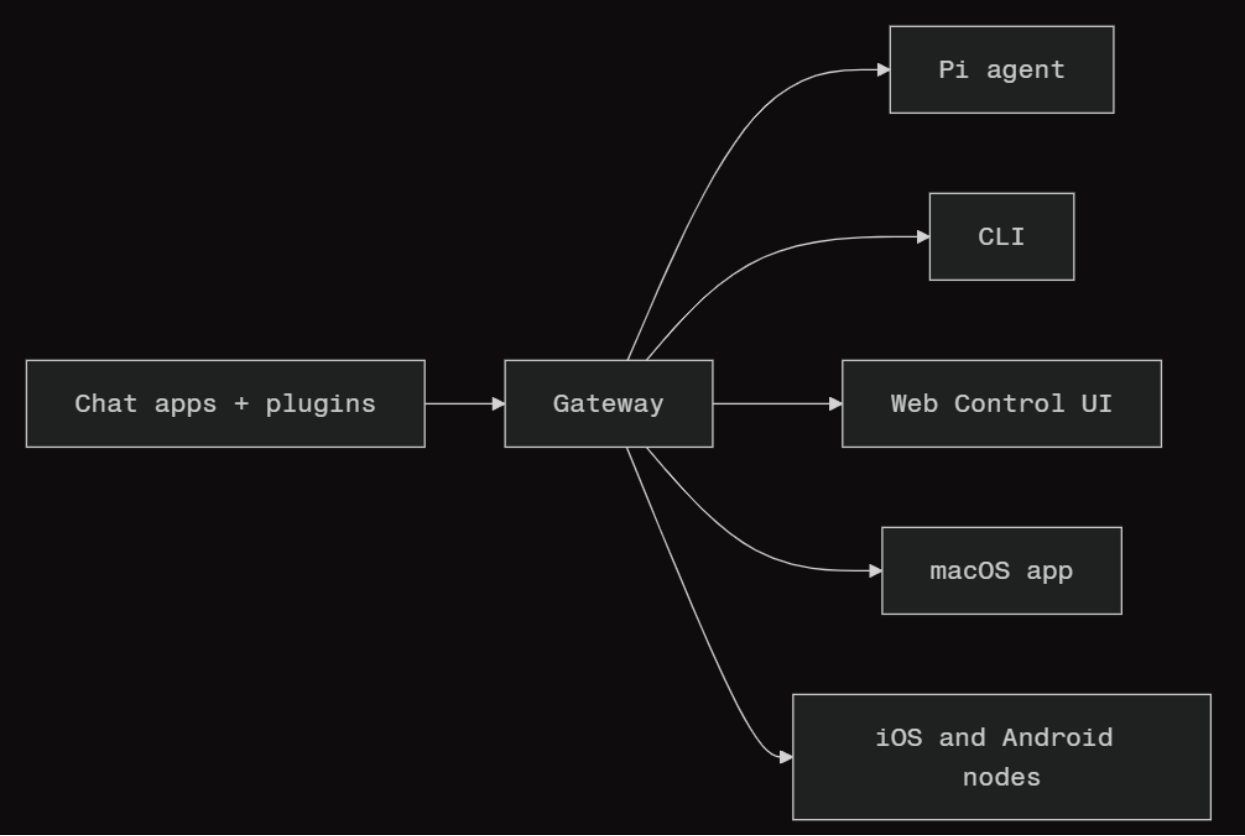
OpenClaw 部署大致分为4部分:
1、OpenClaw 的部署(本文记录)
2、AI工具的接入
3、飞书等消息工具的接入
4、Skills的编写
部署前环境准备:
本地+VMware + Ubuntu 22.04.5 LTS + Node >=22(必须)
shell
安装nodejs,确保 Node.js 22+
curl -fsSL https://deb.nodesource.com/setup_22.x | sudo -E bash -
sudo apt-get install -y nodejs
验证
node -v
npm -v
OpenClaw 官方提供的一键安装脚本(执行后大约需要等几分钟)
注:以下操作● ○(单选框)左右上下选择后按回车,◼ ◻(多选框)按空格多选完成后按回车
shell
root@openclaw-server:~# curl -fsSL https://openclaw.ai/install.sh | bash
╭─────────────────────────────────────────────────────────────╮
│ │
│ 🦞 OpenClaw Installer │
│ I read logs so you can keep pretending you do not have to. │
│ modern installer mode │
│ │
╰─────────────────────────────────────────────────────────────╯
✓ gum bootstrapped (temp, verified, v0.17.0)
✓ Detected: linux
Install plan
OS linux
Install method npm
Requested version latest
[1/3] Preparing environment
✓ Node.js v22.22.0 found
[2/3] Installing OpenClaw
✓ Git already installed
INFO Installing OpenClaw v2026.2.12
✓ OpenClaw npm package installed
✓ OpenClaw installed
[3/3] Finalizing setup
🦞 OpenClaw installed successfully (2026.2.12)!
Ahh nice, I like it here. Got any snacks?
INFO Starting setup
🦞 OpenClaw 2026.2.12 (f9e444d) --- Pairing codes exist because even bots believe in consent---and good security hygiene.
▄▄▄▄▄▄▄▄▄▄▄▄▄▄▄▄▄▄▄▄▄▄▄▄▄▄▄▄▄▄▄▄▄▄▄▄▄▄▄▄▄▄▄▄▄▄▄▄▄▄▄▄
██░▄▄▄░██░▄▄░██░▄▄▄██░▀██░██░▄▄▀██░████░▄▄▀██░███░██
██░███░██░▀▀░██░▄▄▄██░█░█░██░█████░████░▀▀░██░█░█░██
██░▀▀▀░██░█████░▀▀▀██░██▄░██░▀▀▄██░▀▀░█░██░██▄▀▄▀▄██
▀▀▀▀▀▀▀▀▀▀▀▀▀▀▀▀▀▀▀▀▀▀▀▀▀▀▀▀▀▀▀▀▀▀▀▀▀▀▀▀▀▀▀▀▀▀▀▀▀▀▀▀
🦞 OPENCLAW 🦞
┌ OpenClaw onboarding
│
◇ Security ──────────────────────────────────────────────────────────────────────────────╮
│ │
│ Security warning --- please read. │
│ │
│ OpenClaw is a hobby project and still in beta. Expect sharp edges. │
│ This bot can read files and run actions if tools are enabled. │
│ A bad prompt can trick it into doing unsafe things. │
│ │
│ If you're not comfortable with basic security and access control, don't run OpenClaw. │
│ Ask someone experienced to help before enabling tools or exposing it to the internet. │
│ │
│ Recommended baseline: │
│ - Pairing/allowlists + mention gating. │
│ - Sandbox + least-privilege tools. │
│ - Keep secrets out of the agent's reachable filesystem. │
│ - Use the strongest available model for any bot with tools or untrusted inboxes. │
│ │
│ Run regularly: │
│ openclaw security audit --deep │
│ openclaw security audit --fix │
│ │
│ Must read: https://docs.openclaw.ai/gateway/security │
│ │
├─────────────────────────────────────────────────────────────────────────────────────────╯
│
# 选择Yes,
◆ I understand this is powerful and inherently risky. Continue?
│ ● Yes / ○ No
└
# 选择快速开始
◆ Onboarding mode
│ ● QuickStart (Configure details later via openclaw configure.)
│ ○ Manual (Configure port, network, Tailscale, and auth options.)
└
│
◇ QuickStart ─────────────────────────╮
│ │
│ Gateway port: 18789 │
│ Gateway bind: Loopback (127.0.0.1) │
│ Gateway auth: Token (default) │
│ Tailscale exposure: Off │
│ Direct to chat channels. │
│ │
├──────────────────────────────────────╯
│
# 配置你要对接的 AI 模型服务,我选的Qwen
◆ Model/auth provider
│ ○ OpenAI
│ ○ Anthropic
│ ○ MiniMax
│ ○ Moonshot AI (Kimi K2.5)
│ ○ Google
│ ○ xAI (Grok)
│ ○ OpenRouter
│ ● Qwen (OAuth)
│ ○ Z.AI
│ ○ Qianfan
│ ○ Copilot
│ ○ Vercel AI Gateway
│ ○ OpenCode Zen
│ ○ Xiaomi
│ ○ Synthetic
│ ○ Together AI
│ ○ Venice AI
│ ○ LiteLLM
│ ○ Cloudflare AI Gateway
│ ○ Custom Provider
│ ○ Skip for now
└
◐ Starting Qwen OAuth.....│
# 复制下面的链接到浏览器进行确认
◇ Qwen OAuth ─────────────────────────────────────────────────────────────────────────╮
│ │
│ Open https://chat.qwen.ai/authorize?user_code=JLN02DJ6&client=qwen-code to approve │
│ access. │
│ If prompted, enter the code JLN02DJ6. │
│ │
├──────────────────────────────────────────────────────────────────────────────────────╯
◑ Waiting for Qwen OAuth approval.....
◇ Qwen OAuth complete
│
◇ Model configured ─────────────────────────────╮
│ │
│ Default model set to qwen-portal/coder-model │
│ │
├────────────────────────────────────────────────╯
│
◇ Provider notes ──────────────────────────────────────────────────────────────────────╮
│ │
│ Qwen OAuth tokens auto-refresh. Re-run login if refresh fails or access is revoked. │
│ Base URL defaults to https://portal.qwen.ai/v1. Override │
│ models.providers.qwen-portal.baseUrl if needed. │
│ │
├───────────────────────────────────────────────────────────────────────────────────────╯
│
# 指定 OpenClaw 在执行任务时优先使用的 AI 模型,先保持现状
◆ Default model
│ ● Keep current (qwen-portal/coder-model)
│ ○ Enter model manually
│ ○ qwen-portal/coder-model
│ ○ qwen-portal/vision-model
└
◇ Channel status ────────────────────────────╮
│ │
│ Telegram: not configured │
│ WhatsApp: not configured │
│ Discord: not configured │
│ IRC: not configured │
│ Google Chat: not configured │
│ Slack: not configured │
│ Signal: not configured │
│ iMessage: not configured │
│ Feishu: install plugin to enable │
│ Google Chat: install plugin to enable │
│ Nostr: install plugin to enable │
│ Microsoft Teams: install plugin to enable │
│ Mattermost: install plugin to enable │
│ Nextcloud Talk: install plugin to enable │
│ Matrix: install plugin to enable │
│ BlueBubbles: install plugin to enable │
│ LINE: install plugin to enable │
│ Zalo: install plugin to enable │
│ Zalo Personal: install plugin to enable │
│ Tlon: install plugin to enable │
│ │
├─────────────────────────────────────────────╯
│
◇ How channels work ─────────────────────────────────────────────────────────────────────╮
│ │
│ DM security: default is pairing; unknown DMs get a pairing code. │
│ Approve with: openclaw pairing approve <channel> <code> │
│ Public DMs require dmPolicy="open" + allowFrom=["*"]. │
│ Multi-user DMs: set session.dmScope="per-channel-peer" (or "per-account-channel-peer" │
│ for multi-account channels) to isolate sessions. │
│ Docs: start/pairing │
│ │
│ Telegram: simplest way to get started --- register a bot with @BotFather and get going. │
│ WhatsApp: works with your own number; recommend a separate phone + eSIM. │
│ Discord: very well supported right now. │
│ IRC: classic IRC networks with DM/channel routing and pairing controls. │
│ Google Chat: Google Workspace Chat app with HTTP webhook. │
│ Slack: supported (Socket Mode). │
│ Signal: signal-cli linked device; more setup (David Reagans: "Hop on Discord."). │
│ iMessage: this is still a work in progress. │
│ Feishu: 飞书/Lark enterprise messaging with doc/wiki/drive tools. │
│ Nostr: Decentralized protocol; encrypted DMs via NIP-04. │
│ Microsoft Teams: Bot Framework; enterprise support. │
│ Mattermost: self-hosted Slack-style chat; install the plugin to enable. │
│ Nextcloud Talk: Self-hosted chat via Nextcloud Talk webhook bots. │
│ Matrix: open protocol; install the plugin to enable. │
│ BlueBubbles: iMessage via the BlueBubbles mac app + REST API. │
│ LINE: LINE Messaging API bot for Japan/Taiwan/Thailand markets. │
│ Zalo: Vietnam-focused messaging platform with Bot API. │
│ Zalo Personal: Zalo personal account via QR code login. │
│ Tlon: decentralized messaging on Urbit; install the plugin to enable. │
│ │
├─────────────────────────────────────────────────────────────────────────────────────────╯
│
# 选择交互通道,我选的是feishu
◆ Select channel (QuickStart)
│ ○ Telegram (Bot API)
│ ○ WhatsApp (QR link)
│ ○ Discord (Bot API)
│ ○ IRC (Server + Nick)
│ ○ Google Chat (Chat API)
│ ○ Slack (Socket Mode)
│ ○ Signal (signal-cli)
│ ○ iMessage (imsg)
│ ● Feishu/Lark (飞书) (plugin · install)
│ ○ Nostr (NIP-04 DMs)
│ ○ Microsoft Teams (Bot Framework)
│ ○ Mattermost (plugin)
│ ○ Nextcloud Talk (self-hosted)
│ ○ Matrix (plugin)
│ ○ BlueBubbles (macOS app)
│ ○ LINE (Messaging API)
│ ○ Zalo (Bot API)
│ ○ Zalo (Personal Account)
│ ○ Tlon (Urbit)
│ ○ Skip for now
└
◆ Install Feishu plugin?
│ ● Download from npm (@openclaw/feishu)
│ ○ Skip for now
└
◇ Install Feishu plugin?
│ Download from npm (@openclaw/feishu)
Downloading @openclaw/feishu...
Extracting /tmp/openclaw-npm-pack-iFRWLy/openclaw-feishu-2026.2.12.tgz...
WARNING: Plugin "feishu" contains dangerous code patterns: Environment variable access combined with network send --- possible credential harvesting (/tmp/openclaw-plugin-rVJtFq/extract/package/src/media.ts:493)
Installing to /root/.openclaw/extensions/feishu...
Installing plugin dependencies...
│
◇ Feishu credentials ──────────────────────────────────────────────────────────────╮
│ │
│ 1) Go to Feishu Open Platform (open.feishu.cn) │
│ 2) Create a self-built app │
│ 3) Get App ID and App Secret from Credentials page │
│ 4) Enable required permissions: im:message, im:chat, contact:user.base:readonly │
│ 5) Publish the app or add it to a test group │
│ Tip: you can also set FEISHU_APP_ID / FEISHU_APP_SECRET env vars. │
│ Docs: feishu │
│ │
├───────────────────────────────────────────────────────────────────────────────────╯
│
# 上面1-5是操作步骤
# 访问https://open.feishu.cn/app/
# 自建应用后,到凭证与基础信息中有以下的App ID、App Secret
◆ Enter Feishu App ID
│ _
└
│ cli_a9042011acb89cbb
│
◇ Enter Feishu App Secret
│ L5pFGwJUEJrmhDrSISUABePwhuGpaW1C
[info]: [ 'client ready' ]
│
◇ Feishu connection test ────────────────────────────╮
│ │
│ Connection failed: API error: app do not have bot │
│ │
├─────────────────────────────────────────────────────╯
│
◆ Which Feishu domain?
│ ● Feishu (feishu.cn) - China
│ ○ Lark (larksuite.com) - International
└
# Allowlist - only respond in specific groups:白名单模式,仅在你指定的群聊中响应,需要后续配置群聊 ID(chat_ids),安全性更高。
# Open - respond in all groups (requires mention):开放模式,在所有群聊中响应,但必须被 @ 提及才会回复,这是当前选中的选项。
# Disabled - don't respond in groups:禁用群聊响应,OpenClaw 不会在任何群聊中回复,仅支持私聊。
◆ Group chat policy
│ ○ Allowlist - only respond in specific groups
│ ● Open - respond in all groups (requires mention)
│ ○ Disabled - donot respond in groups
└
◇ Selected channels ──────────────────────────────────────────╮
│ │
│ Feishu --- 飞书/Lark enterprise messaging. Docs: │
│ feishu │
│ │
├──────────────────────────────────────────────────────────────╯
Config warnings:
- plugins.entries.feishu: plugin feishu: duplicate plugin id detected; later plugin may be overridden (/usr/lib/node_modules/openclaw/extensions/feishu/index.ts)
Updated ~/.openclaw/openclaw.json
Workspace OK: ~/.openclaw/workspace
Sessions OK: ~/.openclaw/agents/main/sessions
│
◇ Skills status ─────────────╮
│ │
│ Eligible: 8 │
│ Missing requirements: 38 │
│ Unsupported on this OS: 7 │
│ Blocked by allowlist: 0 │
│ │
├─────────────────────────────╯
│
# 现在要不要配置skills,大佬请选No
◆ Configure skills now? (recommended)
│ ● Yes / ○ No
└
# 第一个必选,其他看自己需求,也可以直接跳过
# clawhub:OpenClaw 官方技能仓库,用于安装、更新和管理技能,是扩展功能的核心入口。
# github:与 GitHub 集成,管理代码仓库、Issues、PR,是开发者和自动化场景的必备。
# mcporter:项目构建、部署自动化工具,支持从代码到可执行文件 / 包的全流程,是开发和 DevOps 场景的核心。
# summarize:自动生成长文本、会议纪要、邮件的摘要,大幅节省阅读时间。
# nano-pdf:处理 PDF 文件(提取文本、合并拆分),是办公和文档处理的刚需。
# obsidian:与 Obsidian 笔记应用集成,适合知识管理和个人知识库构建。
# openai-whisper:语音转文字,适合会议记录、语音笔记等场景。
◆ Install missing skill dependencies
│ ◼ Skip for now (Continue without installing dependencies)
│ ◻ 🔐 1password (Set up and use 1Password CLI (op). Use when installing the CLI, enabling desktop app inte...)
│ ◻ 📰 blogwatcher
│ ◻ 🫐 blucli
│ ◻ 📸 camsnap
│ ◻ 🧩 clawhub
│ ◻ 🎛️ eightctl
│ ◻ ♊️ gemini
│ ◻ 🧲 gifgrep
│ ◻ 🐙 github
│ ◻ 🎮 gog
│ ◻ 📍 goplaces
│ ◻ 📧 himalaya
│ ◻ 📦 mcporter
│ ◻ 🍌 nano-banana-pro
│ ◻ 📄 nano-pdf
│ ◻ 💎 obsidian
│ ◻ 🎙️ openai-whisper
│ ◻ 💡 openhue
│ ◻ 🧿 oracle
│ ◻ 🛵 ordercli
│ ◻ 🗣️ sag
│ ◻ 🌊 songsee
│ ◻ 🔊 sonoscli
│ ◻ 🧾 summarize
│ ◻ 🎞️ video-frames
│ ◻ 📱 wacli
└
◇ Homebrew recommended ──────────────────────────────────────────────────────────╮
│ │
│ Many skill dependencies are shipped via Homebrew. │
│ Without brew, you will need to build from source or download releases manually. │
│ │
├─────────────────────────────────────────────────────────────────────────────────╯
│
◆ Show Homebrew install command?
│ ● Yes / ○ No
└
◇ Homebrew install ─────────────────────────────────────────────────────╮
│ │
│ Run: │
│ /bin/bash -c "$(curl -fsSL │
│ https://raw.githubusercontent.com/Homebrew/install/HEAD/install.sh)" │
│ │
├────────────────────────────────────────────────────────────────────────╯
│
# 我已经装node了,就不需要Homebrew了,npm新手和生产环境推荐,pnpm有性能需求可以试试,bun官方不推荐
◆ Preferred node manager for skill installs
│ ● npm
│ ○ pnpm
│ ○ bun
└
◇ Installed clawhub
│
◇ Install failed: github ? brew not installed
Tip: run `openclaw doctor` to review skills + requirements.
Docs: https://docs.openclaw.ai/skills
│
◇ Installed mcporter
│
◇ Install failed: nano-pdf ? uv not installed (install via brew)
Tip: run `openclaw doctor` to review skills + requirements.
Docs: https://docs.openclaw.ai/skills
│
◇ Install failed: obsidian ? brew not installed
Tip: run `openclaw doctor` to review skills + requirements.
Docs: https://docs.openclaw.ai/skills
│
◇ Install failed: openai-whisper ? brew not installed
Tip: run `openclaw doctor` to review skills + requirements.
Docs: https://docs.openclaw.ai/skills
│
◇ Install failed: summarize ? brew not installed
Tip: run `openclaw doctor` to review skills + requirements.
Docs: https://docs.openclaw.ai/skills
│
# 上面失败的就失败吧,后面再补
# 下面先全选No
◆ Set GOOGLE_PLACES_API_KEY for goplaces?
│ ○ Yes / ● No
└
◆ Set GOOGLE_PLACES_API_KEY for local-places?
│ ○ Yes / ● No
└
◆ Set GEMINI_API_KEY for nano-banana-pro?
│ ○ Yes / ● No
└
◆ Set NOTION_API_KEY for notion?
│ ○ Yes / ● No
└
◆ Set OPENAI_API_KEY for openai-image-gen?
│ ○ Yes / ● No
└
◆ Set OPENAI_API_KEY for openai-whisper-api?
│ ○ Yes / ● No
└
◆ Set ELEVENLABS_API_KEY for sag?
│ ○ Yes / ● No
└
◇ Hooks ──────────────────────────────────────────────────────────╮
│ │
│ Hooks let you automate actions when agent commands are issued. │
│ Example: Save session context to memory when you issue /new. │
│ │
│ Learn more: https://docs.openclaw.ai/hooks │
│ │
├──────────────────────────────────────────────────────────────────╯
# Hooks(钩子)功能配置,可以跳过,也可以选择command-logger(日志记录) + session-memory(会话记忆)
◆ Enable hooks?
│ ◻ Skip for now
│ ◻ 🚀 boot-md
│ ◻ 📝 command-logger
│ ◻ 💾 session-memory
└
◇ Hooks Configured ────────────────────────────────╮
│ │
│ Enabled 2 hooks: command-logger, session-memory │
│ │
│ You can manage hooks later with: │
│ openclaw hooks list │
│ openclaw hooks enable <name> │
│ openclaw hooks disable <name> │
│ │
├───────────────────────────────────────────────────╯
Config warnings:
- plugins.entries.feishu: plugin feishu: duplicate plugin id detected; later plugin may be overridden (/usr/lib/node_modules/openclaw/extensions/feishu/index.ts)
│
◇ Systemd ────────────────────────────────────────────────────────────────────────────────╮
│ │
│ Linux installs use a systemd user service by default. Without lingering, systemd stops │
│ the user session on logout/idle and kills the Gateway. │
│ Enabling lingering now (may require sudo; writes /var/lib/systemd/linger). │
│ │
├──────────────────────────────────────────────────────────────────────────────────────────╯
│
◇ Systemd ─────────────────────────────╮
│ │
│ Enabled systemd lingering for root. │
│ │
├───────────────────────────────────────╯
│
◇ Gateway service runtime ────────────────────────────────────────────╮
│ │
│ QuickStart uses Node for the Gateway service (stable + supported). │
│ │
├──────────────────────────────────────────────────────────────────────╯
│
◓ Installing Gateway service...
Installed systemd service: /root/.config/systemd/user/openclaw-gateway.service
◇ Gateway service installed.
Config warnings:\n- plugins.entries.feishu: plugin feishu: duplicate plugin id detected; later plugin may be overridden (/usr/lib/node_modules/openclaw/extensions/feishu/index.ts)
Config warnings:\n- plugins.entries.feishu: plugin feishu: duplicate plugin id detected; later plugin may be overridden (/usr/lib/node_modules/openclaw/extensions/feishu/index.ts)
Config warnings:\n- plugins.entries.feishu: plugin feishu: duplicate plugin id detected; later plugin may be overridden (/usr/lib/node_modules/openclaw/extensions/feishu/index.ts)
Config warnings:\n- plugins.entries.feishu: plugin feishu: duplicate plugin id detected; later plugin may be overridden (/usr/lib/node_modules/openclaw/extensions/feishu/index.ts)
Config warnings:\n- plugins.entries.feishu: plugin feishu: duplicate plugin id detected; later plugin may be overridden (/usr/lib/node_modules/openclaw/extensions/feishu/index.ts)
Config warnings:\n- plugins.entries.feishu: plugin feishu: duplicate plugin id detected; later plugin may be overridden (/usr/lib/node_modules/openclaw/extensions/feishu/index.ts)
Config warnings:\n- plugins.entries.feishu: plugin feishu: duplicate plugin id detected; later plugin may be overridden (/usr/lib/node_modules/openclaw/extensions/feishu/index.ts)
Config warnings:\n- plugins.entries.feishu: plugin feishu: duplicate plugin id detected; later plugin may be overridden (/usr/lib/node_modules/openclaw/extensions/feishu/index.ts)
Config warnings:\n- plugins.entries.feishu: plugin feishu: duplicate plugin id detected; later plugin may be overridden (/usr/lib/node_modules/openclaw/extensions/feishu/index.ts)
Config warnings:\n- plugins.entries.feishu: plugin feishu: duplicate plugin id detected; later plugin may be overridden (/usr/lib/node_modules/openclaw/extensions/feishu/index.ts)
Config warnings:\n- plugins.entries.feishu: plugin feishu: duplicate plugin id detected; later plugin may be overridden (/usr/lib/node_modules/openclaw/extensions/feishu/index.ts)
Config warnings:\n- plugins.entries.feishu: plugin feishu: duplicate plugin id detected; later plugin may be overridden (/usr/lib/node_modules/openclaw/extensions/feishu/index.ts)
│
◇
Feishu: failed (unknown) - API error: app do not have bot
Agents: main (default)
Heartbeat interval: 30m (main)
Session store (main): /root/.openclaw/agents/main/sessions/sessions.json (0 entries)
│
◇ Optional apps ────────────────────────╮
│ │
│ Add nodes for extra features: │
│ - macOS app (system + notifications) │
│ - iOS app (camera/canvas) │
│ - Android app (camera/canvas) │
│ │
├────────────────────────────────────────╯
│
◇ Control UI ─────────────────────────────────────────────────────────────────────╮
│ │
│ Web UI: http://127.0.0.1:18789/ │
│ Web UI (with token): │
│ http://127.0.0.1:18789/#token=47b92a1f1c38ae9dd7a21298c9cbd6a119938e7796f1129f │
│ Gateway WS: ws://127.0.0.1:18789 │
│ Gateway: reachable │
│ Docs: https://docs.openclaw.ai/web/control-ui │
│ │
├──────────────────────────────────────────────────────────────────────────────────╯
│
◇ Start TUI (best option!) ─────────────────────────────────╮
│ │
│ This is the defining action that makes your agent you. │
│ Please take your time. │
│ The more you tell it, the better the experience will be. │
│ We will send: "Wake up, my friend!" │
│ │
├────────────────────────────────────────────────────────────╯
│
◇ Token ─────────────────────────────────────────────────────────────────────────────────╮
│ │
│ Gateway token: shared auth for the Gateway + Control UI. │
│ Stored in: ~/.openclaw/openclaw.json (gateway.auth.token) or OPENCLAW_GATEWAY_TOKEN. │
│ View token: openclaw config get gateway.auth.token │
│ Generate token: openclaw doctor --generate-gateway-token │
│ Web UI stores a copy in this browser's localStorage (openclaw.control.settings.v1). │
│ Open the dashboard anytime: openclaw dashboard --no-open │
│ If prompted: paste the token into Control UI settings (or use the tokenized dashboard │
│ URL). │
│ │
├─────────────────────────────────────────────────────────────────────────────────────────╯
│
◆ How do you want to hatch your bot?
│ ● Hatch in TUI (recommended)
│ ○ Open the Web UI
│ ○ Do this later
└
Config warnings:\n- plugins.entries.feishu: plugin feishu: duplicate plugin id detected; later plugin may be overridden (/usr/lib/node_modules/openclaw/extensions/feishu/index.ts)
openclaw tui - ws://127.0.0.1:18789 - agent main - session main
session agent:main:main
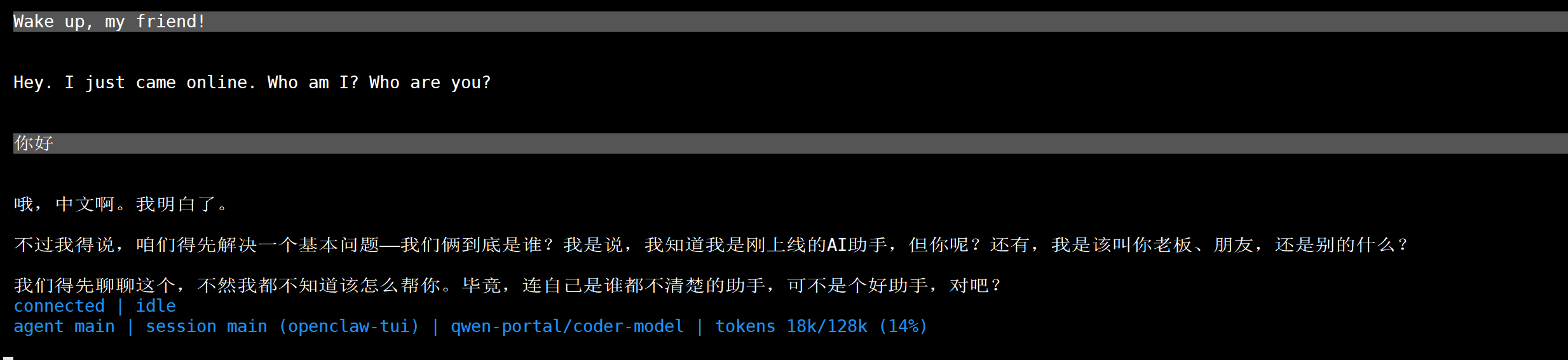
Wake up, my friend!
Hey. I just came online. Who am I? Who are you?
gateway connected | idle
agent main | session main (openclaw-tui) | qwen-portal/coder-model | tokens 0/128k (0%)
────────────────────────────────────────────────────────────────────────────────────────────────────────────────────────────────────────────────────────────────────────────────────────────────到此部署完成了,不要动,输入你好试一下。