欢迎加入开源鸿蒙跨平台社区:https://openharmonycrossplatform.csdn.net
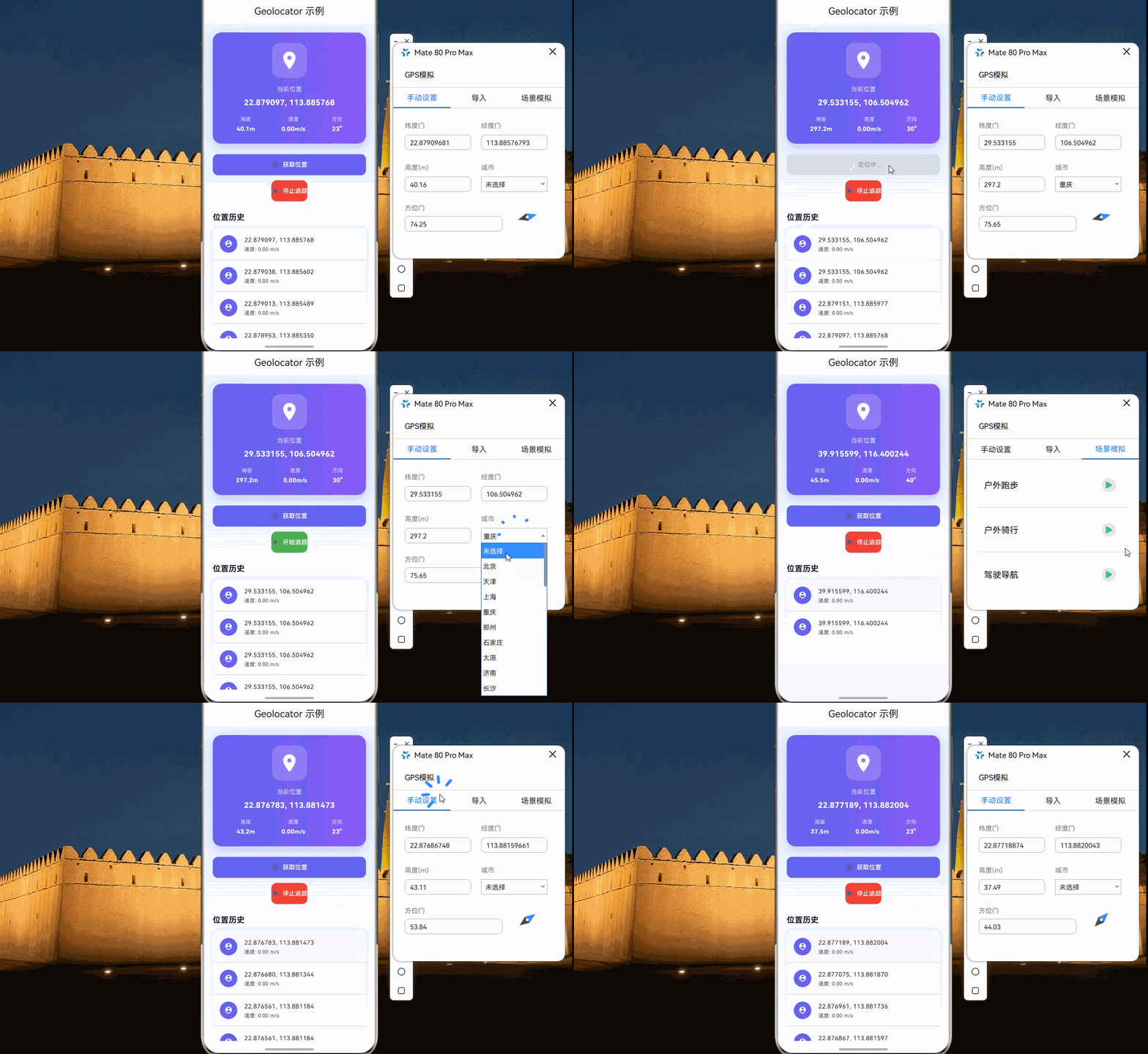
🎯 欢迎来到 Flutter for OpenHarmony 社区!本文将深入讲解 Flutter 中 geolocator GPS定位组件的使用方法,带你全面掌握在应用中获取位置信息、实时追踪、位置变化监听等功能。
一、geolocator 组件概述
在 Flutter for OpenHarmony 应用开发中,geolocator 是一个非常实用的 GPS 定位插件,它允许开发者获取设备的当前位置信息,包括经纬度、海拔、速度、方向等。对于地图导航、位置打卡、附近搜索、运动追踪等场景,定位功能是必不可少的基础能力。
📋 geolocator 组件特点
| 特点 | 说明 |
|---|---|
| 跨平台支持 | 支持 Android、iOS、Web、OpenHarmony |
| 高精度定位 | 支持 GPS、网络、基站等多种定位方式 |
| 实时追踪 | 支持位置变化流式监听 |
| 后台定位 | 支持应用后台时持续定位 |
| 丰富的位置信息 | 提供经纬度、海拔、速度、方向、精度等信息 |
| 权限管理 | 内置权限检查和请求功能 |
💡 使用场景:地图导航、位置打卡、附近搜索、运动追踪、物流配送、社交应用等。
二、OpenHarmony 平台适配说明
2.1 兼容性信息
本项目基于 geolocator@13.0.0 开发,适配 Flutter 3.27.5-ohos-1.0.4。
2.2 支持的功能
在 OpenHarmony 平台上,geolocator 支持以下功能:
| 功能 | 说明 | OpenHarmony 支持 |
|---|---|---|
| 获取当前位置 | 单次定位 | ✅ yes |
| 位置变化监听 | 实时位置流 | ✅ yes |
| 高精度定位 | GPS 定位 | ✅ yes |
| 网络定位 | 基站/WiFi 定位 | ✅ yes |
| 后台定位 | 应用后台时定位 | ✅ yes |
| 权限检查 | 检查定位权限 | ✅ yes |
三、项目配置与安装
3.1 添加依赖配置
首先,需要在你的 Flutter 项目的 pubspec.yaml 文件中添加 geolocator 依赖。
打开项目根目录下的 pubspec.yaml 文件,找到 dependencies 部分,添加以下配置:
yaml
dependencies:
  flutter:
    sdk: flutter

  # 添加 geolocator 依赖(OpenHarmony 适配版本)
  geolocator:
    git:
      url: "https://atomgit.com/openharmony-sig/fluttertpc_geolocator.git"
      path: geolocator
配置说明:
- 使用 git 方式引用开源鸿蒙适配的 fluttertpc_geolocator 仓库
url:指定 AtomGit 托管的仓库地址ref:指定适配 OpenHarmony 的分支版本- 本项目基于
geolocator@13.0.0开发,适配 Flutter 3.27.5-ohos-1.0.4
⚠️ 重要:对于 OpenHarmony 平台,必须使用 git 方式引用适配版本,不能直接使用 pub.dev 的版本号。
3.2 下载依赖
配置完成后,需要在项目根目录执行以下命令下载依赖:
bash
flutter pub get执行成功后,你会看到类似以下的输出:
Running "flutter pub get" in my_cross_platform_app...
Resolving dependencies...
Got dependencies!
3.3 权限配置
定位功能需要配置相应的权限。在 OpenHarmony 平台上,user_grant 类型的权限必须添加 reason 和 usedScene 字段:
ohos/entry/src/main/module.json5:
json
{
  "module": {
    "requestPermissions": [
      {
        "name": "ohos.permission.LOCATION",
        "reason": "$string:location_reason",
        "usedScene": {
          "abilities": ["EntryAbility"],
          "when": "inuse"
        }
      },
      {
        "name": "ohos.permission.APPROXIMATELY_LOCATION",
        "reason": "$string:location_reason",
        "usedScene": {
          "abilities": ["EntryAbility"],
          "when": "inuse"
        }
      },
      {
        "name": "ohos.permission.LOCATION_IN_BACKGROUND",
        "reason": "$string:location_background_reason",
        "usedScene": {
          "abilities": ["EntryAbility"],
          "when": "always"
        }
      }
    ]
  }
}
⚠️ 重要 :
reason字段必须引用字符串资源,不能直接写中文文本。需要在ohos/entry/src/main/resources/base/element/string.json中定义:
ohos/entry/src/main/resources/base/element/string.json:
json
{
  "string": [
    {
      "name": "location_reason",
      "value": "用于获取您的位置信息,提供位置相关服务"
    },
    {
      "name": "location_background_reason",
      "value": "用于在后台持续获取位置信息,提供导航追踪服务"
    }
  ]
}
权限说明:
| 权限 | 说明 | when 值 |
|---|---|---|
| ohos.permission.LOCATION | 精确位置权限 | inuse |
| ohos.permission.APPROXIMATELY_LOCATION | 大致位置权限 | inuse |
| ohos.permission.LOCATION_IN_BACKGROUND | 后台定位权限 | always |
usedScene 字段说明:
| 字段 | 说明 |
|---|---|
| abilities | 使用该权限的 Ability 名称 |
| when | 使用时机:inuse(使用时)或 always(始终) |
四、geolocator 基础用法
4.1 导入库
在使用 geolocator 之前,需要先导入库:
dart
import 'package:geolocator/geolocator.dart';4.2 初始化定位服务
dart
class LocationService {
  Future<bool> initialize() async {
    // 检查服务是否启用
    bool serviceEnabled = await Geolocator.isLocationServiceEnabled();
    if (!serviceEnabled) {
      return false;
    }

    // 检查权限
    LocationPermission permission = await Geolocator.checkPermission();
    if (permission == LocationPermission.denied) {
      permission = await Geolocator.requestPermission();
      if (permission != LocationPermission.whileInUse &&
          permission != LocationPermission.always) {
        return false;
      }
    }

    return true;
  }
}
4.3 获取当前位置
dart
Future<Position?> getCurrentLocation() async {
  try {
    final position = await Geolocator.getCurrentPosition(
      desiredAccuracy: LocationAccuracy.high,
    );
    return position;
  } catch (e) {
    print('获取位置失败: $e');
    return null;
  }
}
4.4 监听位置变化
dart
StreamSubscription<Position>? _positionSubscription;

void startLocationStream() {
  const locationSettings = LocationSettings(
    accuracy: LocationAccuracy.high,
    distanceFilter: 0,
  );

  _positionSubscription = Geolocator.getPositionStream(
    locationSettings: locationSettings,
  ).listen((Position position) {
    print('纬度: ${position.latitude}');
    print('经度: ${position.longitude}');
    print('速度: ${position.speed}');
    print('方向: ${position.heading}');
  });
}

void stopLocationStream() {
  _positionSubscription?.cancel();
  _positionSubscription = null;
}
五、常用 API 详解
5.1 Position - 位置数据
Position 包含以下属性:
| 属性 | 类型 | 说明 |
|---|---|---|
| latitude | double | 纬度 |
| longitude | double | 经度 |
| altitude | double | 海拔高度(米) |
| speed | double | 速度(米/秒) |
| heading | double | 方向(度) |
| accuracy | double | 精度(米) |
| speedAccuracy | double | 速度精度 |
| altitudeAccuracy | double | 海拔精度 |
| timestamp | DateTime? | 时间戳 |
5.2 Geolocator 方法
dart
// 检查定位服务是否启用
Future<bool> isLocationServiceEnabled()

// 检查定位权限
Future<LocationPermission> checkPermission()

// 请求定位权限
Future<LocationPermission> requestPermission()

// 获取当前位置
Future<Position> getCurrentPosition({
  LocationAccuracy desiredAccuracy = LocationAccuracy.best,
  Duration? timeLimit,
})

// 位置变化流
Stream<Position> getPositionStream({
  LocationSettings? locationSettings,
})

// 计算两点间距离
double distanceBetween(
  double startLatitude,
  double startLongitude,
  double endLatitude,
  double endLongitude,
)

// 计算两点间方位角
double bearingBetween(
  double startLatitude,
  double startLongitude,
  double endLatitude,
  double endLongitude,
)
5.3 LocationPermission - 权限状态
| 枚举值 | 说明 |
|---|---|
| LocationPermission.whileInUse | 使用时允许 |
| LocationPermission.always | 始终允许 |
| LocationPermission.denied | 已拒绝 |
| LocationPermission.deniedForever | 永久拒绝 |
5.4 LocationSettings - 定位设置
dart
// 基础定位设置
const locationSettings = LocationSettings(
  accuracy: LocationAccuracy.high,    // 定位精度
  distanceFilter: 0,                   // 最小距离变化(米)
  timeLimit: Duration(seconds: 30),    // 超时时间
);

// Android 专用设置
final androidSettings = AndroidSettings(
  accuracy: LocationAccuracy.high,
  distanceFilter: 0,
  intervalDuration: const Duration(milliseconds: 500),  // 更新间隔
  foregroundNotificationConfig: const ForegroundNotificationConfig(
    notificationText: '正在追踪您的位置',
    notificationTitle: '位置追踪中',
    enableWakeLock: true,
  ),
);
5.5 LocationAccuracy - 定位精度
| 枚举值 | 说明 |
|---|---|
| LocationAccuracy.lowest | 最低精度 |
| LocationAccuracy.low | 低精度 |
| LocationAccuracy.medium | 中等精度 |
| LocationAccuracy.high | 高精度 |
| LocationAccuracy.best | 最高精度 |
| LocationAccuracy.bestForNavigation | 导航最佳精度 |
六、实际应用场景
6.1 单次定位获取
dart
class SingleLocationPage extends StatefulWidget {
  const SingleLocationPage({super.key});

  @override
  State<SingleLocationPage> createState() => _SingleLocationPageState();
}

class _SingleLocationPageState extends State<SingleLocationPage> {
  Position? _currentPosition;
  bool _isLoading = false;

  Future<bool> _checkPermissions() async {
    bool serviceEnabled = await Geolocator.isLocationServiceEnabled();
    if (!serviceEnabled) {
      if (mounted) {
        ScaffoldMessenger.of(context).showSnackBar(
          const SnackBar(
            content: Text('请开启定位服务:设置 > 位置信息 > 开启位置服务'),
            duration: Duration(seconds: 4),
          ),
        );
      }
      return false;
    }

    LocationPermission permission = await Geolocator.checkPermission();
    if (permission == LocationPermission.denied) {
      permission = await Geolocator.requestPermission();
      if (permission == LocationPermission.denied) {
        if (mounted) {
          ScaffoldMessenger.of(context).showSnackBar(
            const SnackBar(
              content: Text('需要定位权限:请在设置中授予应用定位权限'),
              duration: Duration(seconds: 4),
            ),
          );
        }
        return false;
      }
    }

    if (permission == LocationPermission.deniedForever) {
      if (mounted) {
        ScaffoldMessenger.of(context).showSnackBar(
          const SnackBar(
            content: Text('定位权限被永久拒绝,请在设置中手动开启'),
            duration: Duration(seconds: 4),
          ),
        );
      }
      return false;
    }

    return true;
  }

  Future<void> _getLocation() async {
    setState(() => _isLoading = true);

    try {
      final hasPermission = await _checkPermissions();
      if (!hasPermission) {
        setState(() => _isLoading = false);
        return;
      }

      final position = await Geolocator.getCurrentPosition(
        desiredAccuracy: LocationAccuracy.high,
        timeLimit: const Duration(seconds: 30),
      );

      if (mounted) {
        setState(() => _currentPosition = position);
      }
    } on TimeoutException {
      if (mounted) {
        ScaffoldMessenger.of(context).showSnackBar(
          const SnackBar(
            content: Text('定位超时,请确保设备位置信息已开启'),
            duration: Duration(seconds: 4),
          ),
        );
      }
    } catch (e) {
      if (mounted) {
        ScaffoldMessenger.of(context).showSnackBar(
          SnackBar(
            content: Text('获取位置失败: $e'),
            duration: const Duration(seconds: 4),
          ),
        );
      }
    } finally {
      if (mounted) {
        setState(() => _isLoading = false);
      }
    }
  }

  @override
  Widget build(BuildContext context) {
    return Scaffold(
      appBar: AppBar(title: const Text('单次定位')),
      body: Center(
        child: Column(
          mainAxisAlignment: MainAxisAlignment.center,
          children: [
            if (_isLoading)
              const CircularProgressIndicator()
            else if (_currentPosition != null)
              _buildLocationInfo()
            else
              const Text('点击按钮获取位置'),
            const SizedBox(height: 20),
            ElevatedButton.icon(
              onPressed: _isLoading ? null : _getLocation,
              icon: const Icon(Icons.location_on),
              label: const Text('获取当前位置'),
            ),
          ],
        ),
      ),
    );
  }

  Widget _buildLocationInfo() {
    return Card(
      margin: const EdgeInsets.all(16),
      child: Padding(
        padding: const EdgeInsets.all(16),
        child: Column(
          children: [
            _buildInfoRow('纬度', _currentPosition!.latitude.toStringAsFixed(6)),
            _buildInfoRow('经度', _currentPosition!.longitude.toStringAsFixed(6)),
            _buildInfoRow('海拔', '${_currentPosition!.altitude.toStringAsFixed(2)} 米'),
            _buildInfoRow('速度', '${_currentPosition!.speed.toStringAsFixed(2)} m/s'),
            _buildInfoRow('方向', '${_currentPosition!.heading.toStringAsFixed(0)}°'),
            _buildInfoRow('精度', '${_currentPosition!.accuracy.toStringAsFixed(0)} 米'),
          ],
        ),
      ),
    );
  }

  Widget _buildInfoRow(String label, String value) {
    return Padding(
      padding: const EdgeInsets.symmetric(vertical: 8),
      child: Row(
        mainAxisAlignment: MainAxisAlignment.spaceBetween,
        children: [
          Text(label, style: const TextStyle(color: Colors.grey)),
          Text(value, style: const TextStyle(fontWeight: FontWeight.bold)),
        ],
      ),
    );
  }
}
6.2 实时位置追踪
dart
class LocationTrackingPage extends StatefulWidget {
  const LocationTrackingPage({super.key});

  @override
  State<LocationTrackingPage> createState() => _LocationTrackingPageState();
}

class _LocationTrackingPageState extends State<LocationTrackingPage> {
  StreamSubscription<Position>? _positionSubscription;
  final List<Position> _locationHistory = [];
  Position? _currentPosition;
  bool _isTracking = false;

  @override
  void dispose() {
    _stopTracking();
    super.dispose();
  }

  Future<bool> _checkPermissions() async {
    bool serviceEnabled = await Geolocator.isLocationServiceEnabled();
    if (!serviceEnabled) {
      ScaffoldMessenger.of(context).showSnackBar(
        const SnackBar(content: Text('请开启定位服务')),
      );
      return false;
    }

    LocationPermission permission = await Geolocator.checkPermission();
    if (permission == LocationPermission.denied) {
      permission = await Geolocator.requestPermission();
    }

    if (permission == LocationPermission.denied ||
        permission == LocationPermission.deniedForever) {
      ScaffoldMessenger.of(context).showSnackBar(
        const SnackBar(content: Text('需要定位权限')),
      );
      return false;
    }

    return true;
  }

  Future<void> _startTracking() async {
    final hasPermission = await _checkPermissions();
    if (!hasPermission) return;

    final locationSettings = AndroidSettings(
      accuracy: LocationAccuracy.high,
      distanceFilter: 0,
      intervalDuration: const Duration(milliseconds: 500),
      foregroundNotificationConfig: const ForegroundNotificationConfig(
        notificationText: '正在追踪您的位置',
        notificationTitle: '位置追踪中',
        enableWakeLock: true,
      ),
    );

    setState(() {
      _isTracking = true;
      _locationHistory.clear();
    });

    _positionSubscription = Geolocator.getPositionStream(
      locationSettings: locationSettings,
    ).listen((Position position) {
      if (mounted) {
        setState(() {
          _currentPosition = position;
          _locationHistory.add(position);
          if (_locationHistory.length > 100) {
            _locationHistory.removeAt(0);
          }
        });
      }
    }, onError: (error) {
      if (mounted) {
        ScaffoldMessenger.of(context).showSnackBar(
          SnackBar(content: Text('追踪错误: $error')),
        );
      }
    });
  }

  void _stopTracking() {
    _positionSubscription?.cancel();
    _positionSubscription = null;
    setState(() => _isTracking = false);
  }

  @override
  Widget build(BuildContext context) {
    return Scaffold(
      appBar: AppBar(
        title: const Text('位置追踪'),
        actions: [
          IconButton(
            icon: Icon(_isTracking ? Icons.stop : Icons.play_arrow),
            onPressed: _isTracking ? _stopTracking : _startTracking,
          ),
        ],
      ),
      body: _locationHistory.isEmpty
          ? Center(
              child: Column(
                mainAxisAlignment: MainAxisAlignment.center,
                children: [
                  const Icon(Icons.location_on, size: 64, color: Colors.grey),
                  const SizedBox(height: 16),
                  const Text('点击播放按钮开始追踪'),
                  const SizedBox(height: 24),
                  ElevatedButton.icon(
                    onPressed: _startTracking,
                    icon: const Icon(Icons.play_arrow),
                    label: const Text('开始追踪'),
                  ),
                ],
              ),
            )
          : Column(
              children: [
                _buildCurrentLocationCard(),
                const Divider(),
                Expanded(
                  child: ListView.builder(
                    itemCount: _locationHistory.length,
                    reverse: true,
                    itemBuilder: (context, index) {
                      final position = _locationHistory[_locationHistory.length - 1 - index];
                      return ListTile(
                        leading: const CircleAvatar(
                          child: Icon(Icons.location_history),
                        ),
                        title: Text(
                          '${position.latitude.toStringAsFixed(6)}, ${position.longitude.toStringAsFixed(6)}',
                        ),
                        subtitle: Text(
                          '速度: ${position.speed.toStringAsFixed(2)} m/s',
                        ),
                      );
                    },
                  ),
                ),
              ],
            ),
    );
  }

  Widget _buildCurrentLocationCard() {
    final latest = _currentPosition!;
    return Container(
      padding: const EdgeInsets.all(16),
      decoration: const BoxDecoration(
        gradient: LinearGradient(
          colors: [Color(0xFF6366F1), Color(0xFF8B5CF6)],
        ),
      ),
      child: Column(
        children: [
          Row(
            mainAxisAlignment: MainAxisAlignment.spaceAround,
            children: [
              _buildStatItem('纬度', latest.latitude.toStringAsFixed(6)),
              _buildStatItem('经度', latest.longitude.toStringAsFixed(6)),
            ],
          ),
          const SizedBox(height: 12),
          Row(
            mainAxisAlignment: MainAxisAlignment.spaceAround,
            children: [
              _buildStatItem('速度', '${latest.speed.toStringAsFixed(2)} m/s'),
              _buildStatItem('方向', '${latest.heading.toStringAsFixed(0)}°'),
            ],
          ),
        ],
      ),
    );
  }

  Widget _buildStatItem(String label, String value) {
    return Column(
      children: [
        Text(label, style: const TextStyle(color: Colors.white70, fontSize: 12)),
        const SizedBox(height: 4),
        Text(value, style: const TextStyle(color: Colors.white, fontWeight: FontWeight.bold)),
      ],
    );
  }
}
6.3 完整示例:位置打卡应用
dart
import 'dart:async';
import 'package:flutter/material.dart';
import 'package:geolocator/geolocator.dart';

void main() {
  runApp(const MyApp());
}

class MyApp extends StatelessWidget {
  const MyApp({super.key});

  @override
  Widget build(BuildContext context) {
    return MaterialApp(
      title: 'Geolocator 示例',
      debugShowCheckedModeBanner: false,
      theme: ThemeData(
        colorScheme: ColorScheme.fromSeed(seedColor: const Color(0xFF6366F1)),
        useMaterial3: true,
      ),
      home: const LocationDemoPage(),
    );
  }
}

class LocationDemoPage extends StatefulWidget {
  const LocationDemoPage({super.key});

  @override
  State<LocationDemoPage> createState() => _LocationDemoPageState();
}

class _LocationDemoPageState extends State<LocationDemoPage> {
  Position? _currentPosition;
  StreamSubscription<Position>? _positionSubscription;
  bool _isTracking = false;
  bool _isLoading = false;
  final List<Position> _history = [];

  @override
  void dispose() {
    _positionSubscription?.cancel();
    super.dispose();
  }

  Future<bool> _checkPermissions() async {
    bool serviceEnabled = await Geolocator.isLocationServiceEnabled();
    if (!serviceEnabled) {
      if (mounted) {
        ScaffoldMessenger.of(context).showSnackBar(
          const SnackBar(
            content: Text('请开启定位服务:设置 > 位置信息 > 开启位置服务'),
            duration: Duration(seconds: 4),
          ),
        );
      }
      return false;
    }

    LocationPermission permission = await Geolocator.checkPermission();
    if (permission == LocationPermission.denied) {
      permission = await Geolocator.requestPermission();
      if (permission == LocationPermission.denied) {
        if (mounted) {
          ScaffoldMessenger.of(context).showSnackBar(
            const SnackBar(
              content: Text('需要定位权限:请在设置中授予应用定位权限'),
              duration: Duration(seconds: 4),
            ),
          );
        }
        return false;
      }
    }

    if (permission == LocationPermission.deniedForever) {
      if (mounted) {
        ScaffoldMessenger.of(context).showSnackBar(
          const SnackBar(
            content: Text('定位权限被永久拒绝,请在设置中手动开启'),
            duration: Duration(seconds: 4),
          ),
        );
      }
      return false;
    }

    return true;
  }

  Future<void> _getCurrentLocation() async {
    setState(() => _isLoading = true);

    try {
      final hasPermission = await _checkPermissions();
      if (!hasPermission) {
        setState(() => _isLoading = false);
        return;
      }

      final position = await Geolocator.getCurrentPosition(
        desiredAccuracy: LocationAccuracy.high,
        timeLimit: const Duration(seconds: 30),
      );

      if (mounted) {
        setState(() => _currentPosition = position);
      }
    } on TimeoutException {
      if (mounted) {
        ScaffoldMessenger.of(context).showSnackBar(
          const SnackBar(
            content: Text('定位超时,请确保设备位置信息已开启'),
            duration: Duration(seconds: 4),
          ),
        );
      }
    } catch (e) {
      if (mounted) {
        ScaffoldMessenger.of(context).showSnackBar(
          SnackBar(
            content: Text('获取位置失败: $e'),
            duration: const Duration(seconds: 4),
          ),
        );
      }
    } finally {
      if (mounted) {
        setState(() => _isLoading = false);
      }
    }
  }

  void _toggleTracking() {
    if (_isTracking) {
      _stopTracking();
    } else {
      _startTracking();
    }
  }

  Future<void> _startTracking() async {
    final hasPermission = await _checkPermissions();
    if (!hasPermission) return;

    final locationSettings = AndroidSettings(
      accuracy: LocationAccuracy.high,
      distanceFilter: 0,
      intervalDuration: const Duration(milliseconds: 500),
      foregroundNotificationConfig: const ForegroundNotificationConfig(
        notificationText: '正在追踪您的位置',
        notificationTitle: '位置追踪中',
        enableWakeLock: true,
      ),
    );

    setState(() {
      _isTracking = true;
      _history.clear();
    });

    _positionSubscription = Geolocator.getPositionStream(
      locationSettings: locationSettings,
    ).listen((Position position) {
      if (mounted) {
        setState(() {
          _currentPosition = position;
          _history.add(position);
          if (_history.length > 100) {
            _history.removeAt(0);
          }
        });
      }
    }, onError: (error) {
      if (mounted) {
        ScaffoldMessenger.of(context).showSnackBar(
          SnackBar(content: Text('追踪错误: $error')),
        );
      }
    });
  }

  void _stopTracking() {
    _positionSubscription?.cancel();
    _positionSubscription = null;
    setState(() => _isTracking = false);
  }

  String _formatDouble(double value, int fractionDigits) {
    return value.toStringAsFixed(fractionDigits);
  }

  @override
  Widget build(BuildContext context) {
    return Scaffold(
      appBar: AppBar(
        title: const Text('Geolocator 示例'),
        centerTitle: true,
        elevation: 0,
      ),
      body: Container(
        decoration: const BoxDecoration(
          gradient: LinearGradient(
            begin: Alignment.topCenter,
            end: Alignment.bottomCenter,
            colors: [
              Color(0xFFE8F4FF),
              Color(0xFFF8F9FF),
            ],
          ),
        ),
        child: SafeArea(
          child: SingleChildScrollView(
            padding: const EdgeInsets.all(20),
            child: Column(
              crossAxisAlignment: CrossAxisAlignment.stretch,
              children: [
                _buildLocationCard(),
                const SizedBox(height: 24),
                _buildActionButtons(),
                const SizedBox(height: 24),
                if (_history.isNotEmpty) _buildHistoryList(),
              ],
            ),
          ),
        ),
      ),
    );
  }

  Widget _buildLocationCard() {
    return Container(
      padding: const EdgeInsets.all(24),
      decoration: BoxDecoration(
        gradient: const LinearGradient(
          colors: [Color(0xFF6366F1), Color(0xFF8B5CF6)],
        ),
        borderRadius: BorderRadius.circular(20),
        boxShadow: [
          BoxShadow(
            color: const Color(0xFF6366F1).withOpacity(0.3),
            blurRadius: 20,
            offset: const Offset(0, 10),
          ),
        ],
      ),
      child: Column(
        children: [
          Container(
            width: 80,
            height: 80,
            decoration: BoxDecoration(
              color: Colors.white.withOpacity(0.2),
              borderRadius: BorderRadius.circular(20),
            ),
            child: const Icon(Icons.location_on, size: 48, color: Colors.white),
          ),
          const SizedBox(height: 16),
          const Text(
            '当前位置',
            style: TextStyle(color: Colors.white70, fontSize: 14),
          ),
          const SizedBox(height: 8),
          if (_currentPosition != null) ...[
            Text(
              '${_formatDouble(_currentPosition!.latitude, 6)}, ${_formatDouble(_currentPosition!.longitude, 6)}',
              style: const TextStyle(
                color: Colors.white,
                fontSize: 18,
                fontWeight: FontWeight.bold,
              ),
            ),
            const SizedBox(height: 16),
            Row(
              mainAxisAlignment: MainAxisAlignment.spaceAround,
              children: [
                _buildStatItem('海拔', '${_formatDouble(_currentPosition!.altitude, 1)}m'),
                _buildStatItem('速度', '${_formatDouble(_currentPosition!.speed, 2)}m/s'),
                _buildStatItem('方向', '${_formatDouble(_currentPosition!.heading, 0)}°'),
              ],
            ),
          ] else
            const Text(
              '点击按钮获取位置',
              style: TextStyle(color: Colors.white70),
            ),
        ],
      ),
    );
  }

  Widget _buildStatItem(String label, String value) {
    return Column(
      children: [
        Text(label, style: const TextStyle(color: Colors.white70, fontSize: 12)),
        const SizedBox(height: 4),
        Text(value, style: const TextStyle(color: Colors.white, fontWeight: FontWeight.bold)),
      ],
    );
  }

  Widget _buildActionButtons() {
    return Column(
      children: [
        Row(
          children: [
            Expanded(
              child: ElevatedButton.icon(
                onPressed: _isLoading ? null : _getCurrentLocation,
                icon: _isLoading
                    ? const SizedBox(
                        width: 20,
                        height: 20,
                        child: CircularProgressIndicator(strokeWidth: 2, color: Colors.white),
                      )
                    : const Icon(Icons.my_location),
                label: Text(_isLoading ? '定位中...' : '获取位置'),
                style: ElevatedButton.styleFrom(
                  backgroundColor: const Color(0xFF6366F1),
                  foregroundColor: Colors.white,
                  padding: const EdgeInsets.symmetric(vertical: 14),
                  shape: RoundedRectangleBorder(
                    borderRadius: BorderRadius.circular(12),
                  ),
                ),
              ),
            ),
          ],
        ),
        const SizedBox(height: 12),
        ElevatedButton.icon(
          onPressed: _toggleTracking,
          icon: Icon(_isTracking ? Icons.stop : Icons.play_arrow),
          label: Text(_isTracking ? '停止追踪' : '开始追踪'),
          style: ElevatedButton.styleFrom(
            backgroundColor: _isTracking ? Colors.red : Colors.green,
            foregroundColor: Colors.white,
            padding: const EdgeInsets.symmetric(vertical: 14),
            shape: RoundedRectangleBorder(
              borderRadius: BorderRadius.circular(12),
            ),
          ),
        ),
      ],
    );
  }

  Widget _buildHistoryList() {
    return Column(
      crossAxisAlignment: CrossAxisAlignment.start,
      children: [
        const Text(
          '位置历史',
          style: TextStyle(fontSize: 18, fontWeight: FontWeight.bold),
        ),
        const SizedBox(height: 12),
        Container(
          decoration: BoxDecoration(
            color: Colors.white,
            borderRadius: BorderRadius.circular(12),
            boxShadow: [
              BoxShadow(
                color: Colors.black.withOpacity(0.05),
                blurRadius: 10,
              ),
            ],
          ),
          child: ListView.separated(
            shrinkWrap: true,
            physics: const NeverScrollableScrollPhysics(),
            itemCount: _history.length > 10 ? 10 : _history.length,
            separatorBuilder: (_, __) => const Divider(height: 1),
            itemBuilder: (context, index) {
              final position = _history[_history.length - 1 - index];
              return ListTile(
                leading: const CircleAvatar(
                  backgroundColor: Color(0xFF6366F1),
                  child: Icon(Icons.location_history, color: Colors.white, size: 20),
                ),
                title: Text(
                  '${_formatDouble(position.latitude, 6)}, ${_formatDouble(position.longitude, 6)}',
                  style: const TextStyle(fontSize: 14),
                ),
                subtitle: Text(
                  '速度: ${_formatDouble(position.speed, 2)} m/s',
                  style: const TextStyle(fontSize: 12),
                ),
              );
            },
          ),
        ),
      ],
    );
  }
}
七、常见问题与解决方案
7.1 定位服务未开启
问题:获取位置时提示定位服务未开启。
解决方案:
dart
bool serviceEnabled = await Geolocator.isLocationServiceEnabled();
if (!serviceEnabled) {
  serviceEnabled = await Geolocator.openLocationSettings();
}
7.2 权限被拒绝
问题:用户拒绝了定位权限。
解决方案:
dart
LocationPermission permission = await Geolocator.checkPermission();
if (permission == LocationPermission.deniedForever) {
  // 权限被永久拒绝,引导用户去设置页面
  await Geolocator.openAppSettings();
}
7.3 定位超时
问题:定位时间过长或超时。
解决方案:
dart
final position = await Geolocator.getCurrentPosition(
  desiredAccuracy: LocationAccuracy.medium,  // 降低精度
  timeLimit: const Duration(seconds: 10),    // 设置超时
);
7.4 后台定位不工作
问题:应用在后台时无法获取位置。
解决方案:
- 确保已添加
ohos.permission.LOCATION_IN_BACKGROUND权限 - 使用
AndroidSettings配置前台通知:
dart
final locationSettings = AndroidSettings(
  foregroundNotificationConfig: const ForegroundNotificationConfig(
    notificationText: '正在追踪您的位置',
    notificationTitle: '位置追踪中',
    enableWakeLock: true,
  ),
);
八、最佳实践
8.1 权限处理最佳实践
dart
Future<bool> handleLocationPermission() async {
  bool serviceEnabled = await Geolocator.isLocationServiceEnabled();
  if (!serviceEnabled) {
    // 提示用户开启定位服务
    return false;
  }

  LocationPermission permission = await Geolocator.checkPermission();

  if (permission == LocationPermission.denied) {
    permission = await Geolocator.requestPermission();
    if (permission == LocationPermission.denied) {
      // 权限被拒绝
      return false;
    }
  }

  if (permission == LocationPermission.deniedForever) {
    // 权限被永久拒绝,引导用户去设置
    await Geolocator.openAppSettings();
    return false;
  }

  return true;
}
8.2 电量优化
dart
// 根据场景选择合适的精度
LocationAccuracy getAccuracyForScene(SceneType scene) {
  switch (scene) {
    case SceneType.navigation:
      return LocationAccuracy.bestForNavigation;
    case SceneType.tracking:
      return LocationAccuracy.high;
    case SceneType.nearby:
      return LocationAccuracy.medium;
    case SceneType.general:
      return LocationAccuracy.low;
  }
}

// 设置合理的距离过滤
final locationSettings = LocationSettings(
  accuracy: LocationAccuracy.high,
  distanceFilter: 10,  // 移动10米才更新
);
8.3 错误处理
dart
Future<Position?> getLocationSafely() async {
  try {
    return await Geolocator.getCurrentPosition();
  } on TimeoutException {
    print('定位超时');
  } on LocationServiceDisabledException {
    print('定位服务未开启');
  } catch (e) {
    print('定位错误: $e');
  }
  return null;
}
九、总结
本文详细介绍了 Flutter for OpenHarmony 中 geolocator 定位插件的使用方法,包括:
- 基础配置:依赖添加、权限配置
- 核心 API:获取位置、监听位置变化、权限管理
- 实际应用:单次定位、实时追踪、位置打卡
- 最佳实践:权限处理、电量优化、错误处理
通过本文的学习,你应该能够在 Flutter for OpenHarmony 应用中熟练使用定位功能,为用户提供更好的位置相关服务。