概述
因为 WSL2 容器端口可以直接映射到 Windows 本地访问
所以决定用wsl 作为本地的容器开发环境
一 wsl2 安装和镜像导入
	1 Windows 安装wsl2
	2 wsl 导入镜像(方式一:wsl 客户端)
	3 wsl 导入镜像(方式二:wsl 命令)
二、wls2 安装 podman
	1 安装podman
	1.2 配置加速访问(2026-02)
	1.3 podman 启动nginx镜像
	1.4 wls2 镜像端口映射
	1.5 常用pdman 命令
一 wsl2 安装和镜像导入
1 Windows 安装wsl2
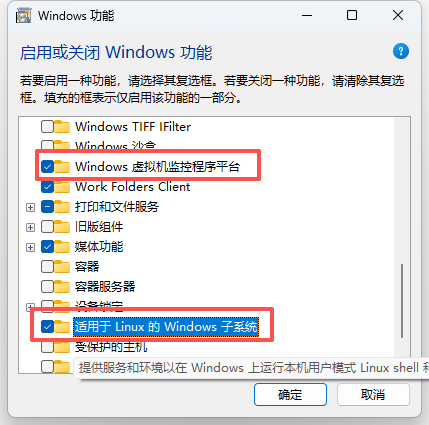
1.1 启用 wsl
Win + R 输入:optionalfeatures
勾选 虚拟机平台、适用于 Linux 的 Windows 子系统 → 重启系统
1.2 更新 wsl 为2
windows+R: cmd 或者powerShell
wsl --update # 确保 WSL 版本 ≥ 2.0.0
wsl --set-default-version 2 # 设置默认使用 WSL 2:重启系统保证配置生效
# 检查 WSL 状态
wsl --status

# 检查已安装的发行版
wsl -l -v
2 wsl 导入镜像(方式一:客户端)
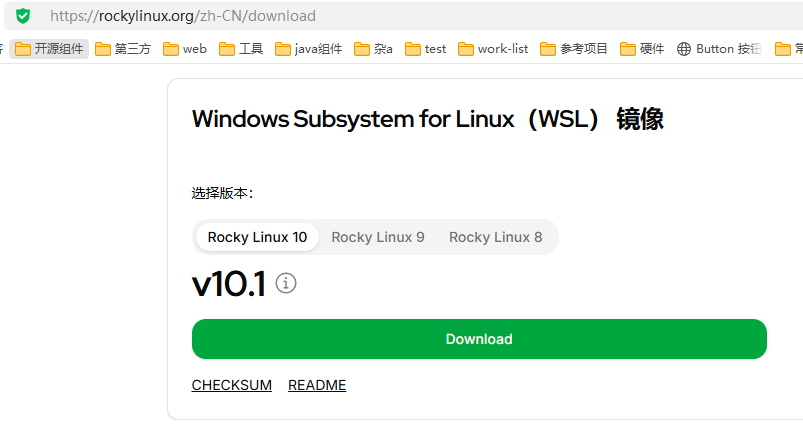
2.1 下载 wsl 镜像
下载 rockylinux WSL镜像
https://rockylinux.org/zh-CN/download
2.2 wsl 客户端安装
下载 wsl wsl-dashboard
仓库地址:https://github.com/owu/wsl-dashboard
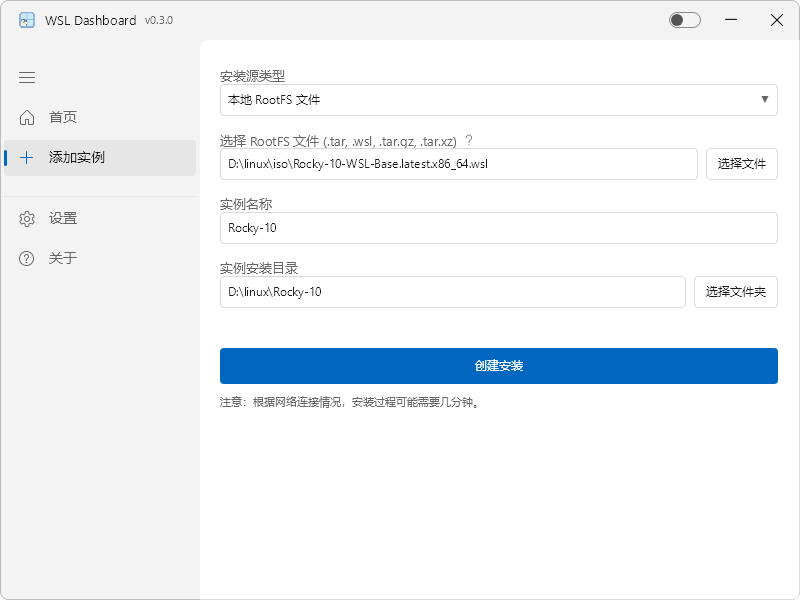
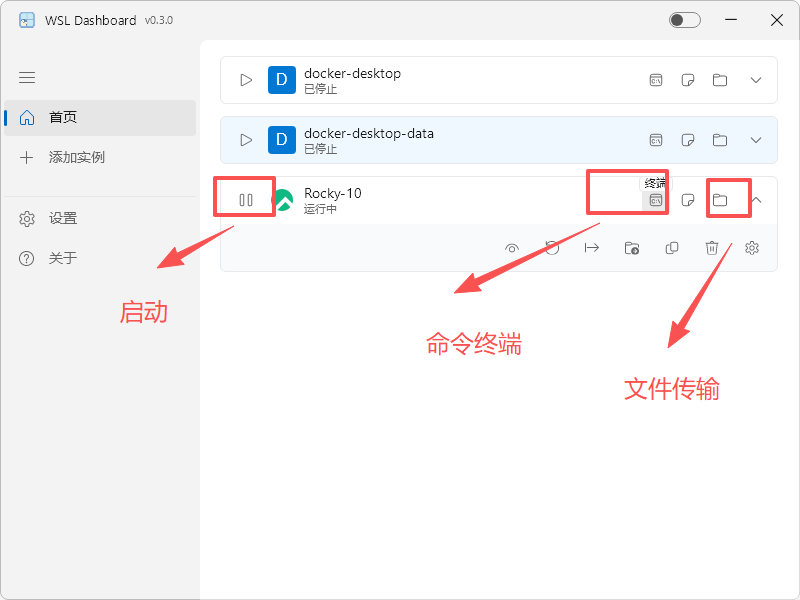
2.3 图下图导入镜像
然后如下图导入镜像,并启动
3 wsl 导入镜像(方式二:命令)
powershell 导入到 WSL()
# 将下载的文件放在方便的位置,如 D:\WSL 并切换至此路径
d:
cd D:\WSL
# 导入此路径的镜像
wsl --import RockyLinux10 D:\WSL\Rocky10 .\Rocky-10-WSL-Base.latest.x86_64.wsl
# 查看安装情况
wsl -l -v
# 以root身份启动指定的发行版Linux
wsl -d RockyLinux10 -u root
# 停止镜像
wsl --terminate RockyLinux10

# 设置 root 密码(这边本地调试:可设置个简单密码)
sudo passwd root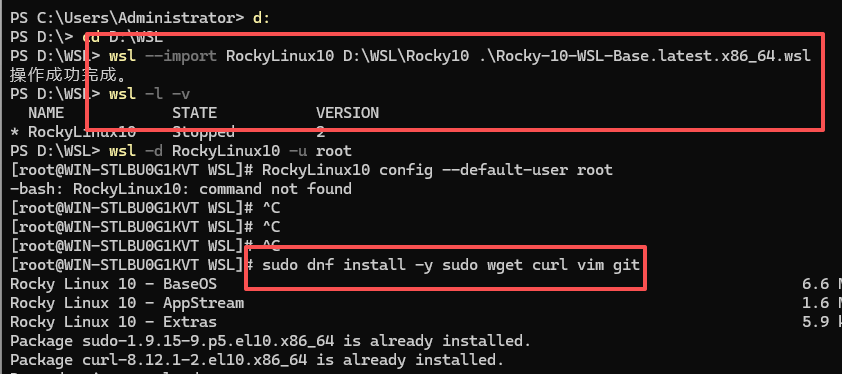
重置和卸载
# 完全重置 WSL(会删除所有发行版,谨慎操作)
wsl --shutdown
wsl --unregister RockyLinux10

# 清理旧数据
rmdir /s D:\WSL\Rocky10

# 重启计算机
二、wls2 安装 podman
1 安装podman
安装虚拟容器podman,我当前版本用的
# 安装常用工具
sudo dnf install -y sudo wget curl vim git net-tools rsync tar nftables
#  安装 podman
sudo dnf install -y podman
# 查看版本
podman --version
# 查看 podman信息
podman info
1.2 配置加速访问(2026-02)
编辑 \etc\containers\registries.conf
注释下列行,并添加一行
# unqualified-search-registries = ["registry.access.redhat.com", "registry.redhat.io", "docker.io"]
unqualified-search-registries = ['docker.mirrors.sjtug.sjtu.edu.cn', 'docker.nju.edu.cn', 'docker.1ms.run', 'docker.io']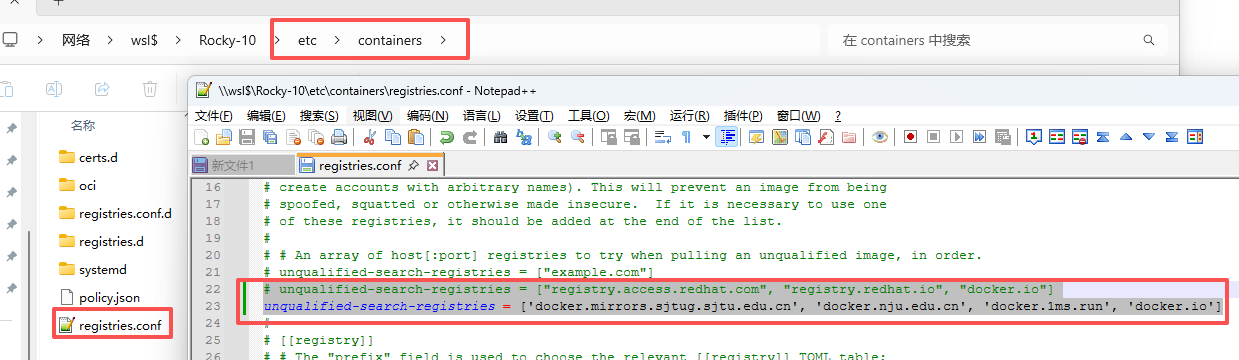
配置:定义短名称和仓库地址的映射
\etc\containers\registries.conf.d\000-shortnames.conf
改之前先复制为 000-shortnames.conf.bak 方便追溯,并把文件内容改为
[aliases]
  # almalinux
  "almalinux" = "docker.1ms.run/library/almalinux"
  "almalinux-minimal" = "docker.1ms.run/library/almalinux-minimal"
  # Amazon Linux
  "amazonlinux" = "public.ecr.aws/amazonlinux/amazonlinux"
  # Arch Linux
  "archlinux" = "docker.1ms.run/library/archlinux"
  # centos
  "centos" = "quay.io/centos/centos"
  # containers
  "skopeo" = "quay.io/skopeo/stable"
  "buildah" = "quay.io/buildah/stable"
  "podman" = "quay.io/podman/stable"
  "hello" = "quay.io/podman/hello"
  "hello-world" = "quay.io/podman/hello"
  # docker
  "alpine" = "docker.1ms.run/library/alpine"
  "docker" = "docker.1ms.run/library/docker"
  "registry" = "docker.1ms.run/library/registry"
  "swarm" = "docker.1ms.run/library/swarm"
  # Fedora
  "fedora-bootc" = "registry.fedoraproject.org/fedora-bootc"
  "fedora-minimal" = "registry.fedoraproject.org/fedora-minimal"
  "fedora" = "registry.fedoraproject.org/fedora"
  # Gentoo
  "gentoo" = "docker.1ms.run/gentoo/stage3"
  # openSUSE
  "opensuse/tumbleweed" = "registry.opensuse.org/opensuse/tumbleweed"
  "opensuse/tumbleweed-dnf" = "registry.opensuse.org/opensuse/tumbleweed-dnf"
  "opensuse/tumbleweed-microdnf" = "registry.opensuse.org/opensuse/tumbleweed-microdnf"
  "opensuse/leap" = "registry.opensuse.org/opensuse/leap"
  "opensuse/busybox" = "registry.opensuse.org/opensuse/busybox"
  "tumbleweed" = "registry.opensuse.org/opensuse/tumbleweed"
  "tumbleweed-dnf" = "registry.opensuse.org/opensuse/tumbleweed-dnf"
  "tumbleweed-microdnf" = "registry.opensuse.org/opensuse/tumbleweed-microdnf"
  "leap" = "registry.opensuse.org/opensuse/leap"
  "leap-dnf" = "registry.opensuse.org/opensuse/leap-dnf"
  "leap-microdnf" = "registry.opensuse.org/opensuse/leap-microdnf"
  "tw-busybox" = "registry.opensuse.org/opensuse/busybox"
  # OTel (Open Telemetry) - opentelemetry.io
  "otel/autoinstrumentation-go" = "docker.1ms.run/otel/autoinstrumentation-go"
  "otel/autoinstrumentation-nodejs" = "docker.1ms.run/otel/autoinstrumentation-nodejs"
  "otel/autoinstrumentation-python" = "docker.1ms.run/otel/autoinstrumentation-python"
  "otel/autoinstrumentation-java" = "docker.1ms.run/otel/autoinstrumentation-java"
  "otel/autoinstrumentation-dotnet" = "docker.1ms.run/otel/autoinstrumentation-dotnet"
  "otel/opentelemetry-collector" = "docker.1ms.run/otel/opentelemetry-collector"
  "otel/opentelemetry-collector-contrib" = "docker.1ms.run/otel/opentelemetry-collector-contrib"
  "otel/opentelemetry-collector-contrib-dev" = "docker.1ms.run/otel/opentelemetry-collector-contrib-dev"
  "otel/opentelemetry-collector-k8s" = "docker.1ms.run/otel/opentelemetry-collector-k8s"
  "otel/opentelemetry-operator" = "docker.1ms.run/otel/opentelemetry-operator"
  "otel/opentelemetry-operator-bundle" = "docker.1ms.run/otel/opentelemetry-operator-bundle"
  "otel/operator-opamp-bridge" = "docker.1ms.run/otel/operator-opamp-bridge"
  "otel/semconvgen" = "docker.1ms.run/otel/semconvgen"
  "otel/weaver" = "docker.1ms.run/otel/weaver"
  # SUSE
  "suse/sle15" = "registry.suse.com/suse/sle15"
  "suse/sles12sp5" = "registry.suse.com/suse/sles12sp5"
  "suse/sles12sp4" = "registry.suse.com/suse/sles12sp4"
  "suse/sles12sp3" = "registry.suse.com/suse/sles12sp3"
  "sle15" = "registry.suse.com/suse/sle15"
  "sles12sp5" = "registry.suse.com/suse/sles12sp5"
  "sles12sp4" = "registry.suse.com/suse/sles12sp4"
  "sles12sp3" = "registry.suse.com/suse/sles12sp3"
  "bci-base" = "registry.suse.com/bci/bci-base"
  "bci/bci-base" = "registry.suse.com/bci/bci-base"
  "bci-micro" = "registry.suse.com/bci/bci-micro"
  "bci/bci-micro" = "registry.suse.com/bci/bci-micro"
  "bci-minimal" = "registry.suse.com/bci/bci-minimal"
  "bci/bci-minimal" = "registry.suse.com/bci/bci-minimal"
  "bci-busybox" = "registry.suse.com/bci/bci-busybox"
  "bci/bci-busybox" = "registry.suse.com/bci/bci-busybox"
  # Red Hat Enterprise Linux
  "rhel" = "registry.access.redhat.com/rhel"
  "rhel6" = "registry.access.redhat.com/rhel6"
  "rhel7" = "registry.access.redhat.com/rhel7"
  "rhel7.9" = "registry.access.redhat.com/rhel7.9"
  "rhel-atomic" = "registry.access.redhat.com/rhel-atomic"
  "rhel9-bootc" = "registry.redhat.io/rhel9/rhel-bootc"
  "rhel-minimal" = "registry.access.redhat.com/rhel-minimal"
  "rhel-init" = "registry.access.redhat.com/rhel-init"
  "rhel7-atomic" = "registry.access.redhat.com/rhel7-atomic"
  "rhel7-minimal" = "registry.access.redhat.com/rhel7-minimal"
  "rhel7-init" = "registry.access.redhat.com/rhel7-init"
  "rhel7/rhel" = "registry.access.redhat.com/rhel7/rhel"
  "rhel7/rhel-atomic" = "registry.access.redhat.com/rhel7/rhel-atomic"
  "ubi7/ubi" = "registry.access.redhat.com/ubi7/ubi"
  "ubi7/ubi-minimal" = "registry.access.redhat.com/ubi7-minimal"
  "ubi7/ubi-init" = "registry.access.redhat.com/ubi7-init"
  "ubi7" = "registry.access.redhat.com/ubi7"
  "ubi7-init" = "registry.access.redhat.com/ubi7-init"
  "ubi7-minimal" = "registry.access.redhat.com/ubi7-minimal"
  "rhel8" = "registry.access.redhat.com/ubi8"
  "rhel8-init" = "registry.access.redhat.com/ubi8-init"
  "rhel8-minimal" = "registry.access.redhat.com/ubi8-minimal"
  "rhel8-micro" = "registry.access.redhat.com/ubi8-micro"
  "ubi8" = "registry.access.redhat.com/ubi8"
  "ubi8-minimal" = "registry.access.redhat.com/ubi8-minimal"
  "ubi8-init" = "registry.access.redhat.com/ubi8-init"
  "ubi8-micro" = "registry.access.redhat.com/ubi8-micro"
  "ubi8/ubi" = "registry.access.redhat.com/ubi8/ubi"
  "ubi8/ubi-minimal" = "registry.access.redhat.com/ubi8-minimal"
  "ubi8/ubi-init" = "registry.access.redhat.com/ubi8-init"
  "ubi8/ubi-micro" = "registry.access.redhat.com/ubi8-micro"
  "ubi8/podman" = "registry.access.redhat.com/ubi8/podman"
  "ubi8/buildah" = "registry.access.redhat.com/ubi8/buildah"
  "ubi8/skopeo" = "registry.access.redhat.com/ubi8/skopeo"
  "rhel9" = "registry.access.redhat.com/ubi9"
  "rhel9-init" = "registry.access.redhat.com/ubi9-init"
  "rhel9-minimal" = "registry.access.redhat.com/ubi9-minimal"
  "rhel9-micro" = "registry.access.redhat.com/ubi9-micro"
  "ubi9" = "registry.access.redhat.com/ubi9"
  "ubi9-minimal" = "registry.access.redhat.com/ubi9-minimal"
  "ubi9-init" = "registry.access.redhat.com/ubi9-init"
  "ubi9-micro" = "registry.access.redhat.com/ubi9-micro"
  "ubi9/ubi" = "registry.access.redhat.com/ubi9/ubi"
  "ubi9/ubi-minimal" = "registry.access.redhat.com/ubi9-minimal"
  "ubi9/ubi-init" = "registry.access.redhat.com/ubi9-init"
  "ubi9/ubi-micro" = "registry.access.redhat.com/ubi9-micro"
  "ubi9/podman" = "registry.access.redhat.com/ubi9/podman"
  "ubi9/buildah" = "registry.access.redhat.com/ubi9/buildah"
  "ubi9/skopeo" = "registry.access.redhat.com/ubi9/skopeo"
  # Rocky Linux
  "rockylinux" = "quay.io/rockylinux/rockylinux"
  # Debian
  "debian" = "docker.1ms.run/library/debian"
  # Kali Linux
  "kali-bleeding-edge" = "docker.1ms.run/kalilinux/kali-bleeding-edge"
  "kali-dev" = "docker.1ms.run/kalilinux/kali-dev"
  "kali-experimental" = "docker.1ms.run/kalilinux/kali-experimental"
  "kali-last-release" = "docker.1ms.run/kalilinux/kali-last-release"
  "kali-rolling" = "docker.1ms.run/kalilinux/kali-rolling"
  # Ubuntu
  "ubuntu" = "docker.1ms.run/library/ubuntu"
  # Oracle Linux
  "oraclelinux" = "container-registry.oracle.com/os/oraclelinux"
  # busybox
  "busybox" = "docker.1ms.run/library/busybox"
  # golang
  "golang" = "docker.1ms.run/library/golang"
  # php
  "php" = "docker.1ms.run/library/php"
  # python
  "python" = "docker.1ms.run/library/python"
  # rust
  "rust" = "docker.1ms.run/library/rust"
  # node
  "node" = "docker.1ms.run/library/node"
  # Grafana Labs
  "grafana/agent" = "docker.1ms.run/grafana/agent"
  "grafana/grafana" = "docker.1ms.run/grafana/grafana"
  "grafana/k6" = "docker.1ms.run/grafana/k6"
  "grafana/loki" = "docker.1ms.run/grafana/loki"
  "grafana/mimir" = "docker.1ms.run/grafana/mimir"
  "grafana/oncall" = "docker.1ms.run/grafana/oncall"
  "grafana/pyroscope" = "docker.1ms.run/grafana/pyroscope"
  "grafana/tempo" = "docker.1ms.run/grafana/tempo"
  # curl
  "curl" = "quay.io/curl/curl"
  # nginx
  "nginx" = "docker.1ms.run/library/nginx"
  # QUBIP
  "qubip/pq-container" = "quay.io/qubip/pq-container"
1.3 podman 启动nginx镜像
不用重启服务
# 拉取 nginx
podman pull nginx

# wsl中一般强制用 host网络启用容器,不做端口转发
podman run --network host -d --name mynginx nginx

# 普通linux 一般用下列命名
# -d 表示在后台运行容器。
# --name mynginx 为容器指定一个名称。
# -p 8080:80 将容器的 80 端口映射到宿主机的 8080 端口
podman run -d --name mynginx -p 8080:80 nginx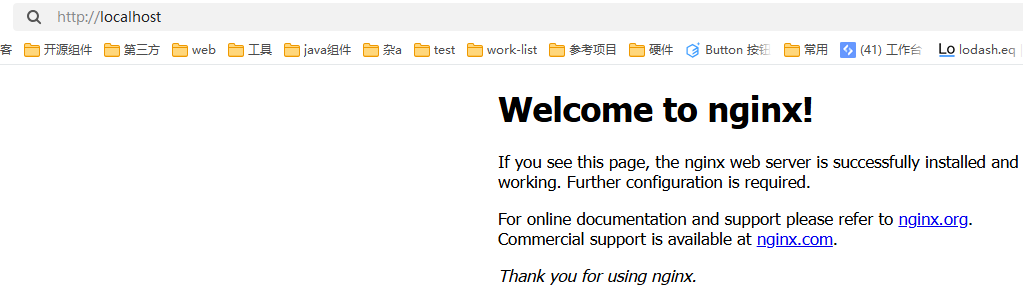
1.4 wls2 镜像端口映射
WSL2 的微软定制内核缺失 nftables 内核模块,netavark无法工作;而slirp4netns因为不依赖内核模块,只需要安装它的用户态程序,Podman 就能通过它完成容器的网络转发
# 安装slirp4netns
sudo dnf install -y slirp4netns

# 使用 --network slirp4netns 显式指定网络模式
podman run -d --name mynginx --network slirp4netns -p 8080:80 nginx
1.5 常用pdman 命令
# 查看当前正在运行的容器
podman ps
# 查看所有容器(包括未运行的容器)
podman ps -a
# 查看容器资源
podman stats
# 清理所有已停止的容器
podman container prune

# 停止容器
podman stop mynginx
# 启动容器
podman start mynginx
# 查看容器日志
podman logs mynginx
# 删除容器
podman rm mynginx
# 查看容器详细信息
podman inspect mynginx

# 查看本地镜像列表
podman images
#  Docker Hub 拉取一个新的ningx镜像
podman pull nginx
# 进入启动的容器 - mynginx
podman run -it mynginx /bin/sh