前言
欢迎加入开源鸿蒙跨平台社区:https://openharmonycrossplatform.csdn.net
分析完了 Dart 层和 Android/iOS 的实现,现在正式进入 OpenHarmony 适配的核心环节。第一步是搭建 ohos 插件工程------创建目录结构、配置文件、入口文件。这些配置看起来琐碎,但任何一个配错都会导致编译失败或运行时找不到插件。
我把每个文件的每一行都讲清楚,确保你照着做不会踩坑。
一、ohos 目录结构
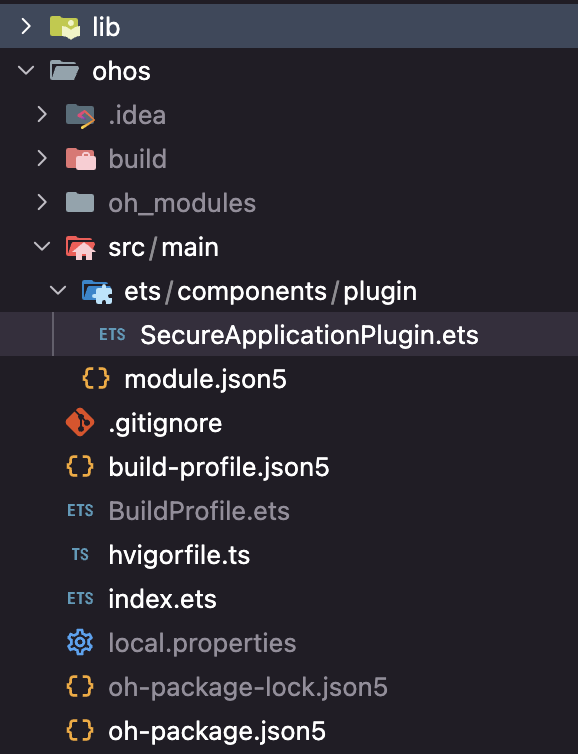
1.1 完整目录树
ohos/
├── .gitignore                         # Git 忽略规则
├── BuildProfile.ets                   # 构建配置 ArkTS 文件
├── build-profile.json5                # 构建配置
├── hvigorfile.ts                      # 构建脚本
├── index.ets                          # 入口文件(插件导出)
├── oh-package.json5                   # 包配置(类似 package.json)
└── src/
    └── main/
        ├── module.json5               # 模块声明
        └── ets/
            └── components/
                └── plugin/
                    └── SecureApplicationPlugin.ets  # 核心实现
1.2 与 Android 目录的对比
| Android | OpenHarmony | 说明 |
|---|---|---|
| android/ | ohos/ | 平台目录 |
| build.gradle | build-profile.json5 | 构建配置 |
| AndroidManifest.xml | module.json5 | 模块声明 |
| src/main/kotlin/...Plugin.kt | src/main/ets/.../Plugin.ets | 插件实现 |
| --- | index.ets | 入口导出(Android 无此概念) |
| --- | oh-package.json5 | 包配置(Android 用 build.gradle) |
二、oh-package.json5 配置
2.1 完整内容
json5
{
  "name": "secure_application",
  "version": "1.0.0",
  "description": "Please describe the basic information.",
  "main": "index.ets",
  "author": "",
  "license": "Apache-2.0",
  "dependencies": {}
}
2.2 字段说明
| 字段 | 值 | 说明 |
|---|---|---|
name |
"secure_application" | 包名,必须与 pubspec.yaml 中 ohos.package 一致 |
version |
"1.0.0" | 包版本号 |
main |
"index.ets" | 入口文件路径 |
license |
"Apache-2.0" | 开源许可证 |
dependencies |
{} | 无额外依赖 |
2.3 name 字段的重要性
yaml
# pubspec.yaml 中的 ohos 配置
ohos:
  pluginClass: SecureApplicationPlugin
  fileName: secure_application_plugin.ets
json5
// oh-package.json5 中的 name
"name": "secure_application"
⚠️ 注意 :这里 secure_application 的 pubspec.yaml 使用了
fileName而不是package。这是因为插件的导出方式不同------通过index.ets默认导出,而不是通过包名定位。
2.4 dependencies 为空的原因
secure_application 的 OpenHarmony 原生端只依赖系统 API(@kit.ArkUI、@kit.AbilityKit、@kit.BasicServicesKit),这些都是 SDK 自带的,不需要在 dependencies 中声明。
@ohos/flutter_ohos 框架依赖在编译时由 Flutter-OHOS 构建系统自动注入,也不需要手动声明。
三、build-profile.json5 构建配置
3.1 完整内容
json5
{
  "apiType": "stageMode",
  "targets": [
    {
      "name": "default",
      "runtimeOS": "OpenHarmony"
    }
  ]
}
3.2 字段说明
| 字段 | 值 | 说明 |
|---|---|---|
apiType |
"stageMode" | 使用 Stage 模型(OpenHarmony 推荐) |
targets[0].name |
"default" | 默认构建目标 |
targets[0].runtimeOS |
"OpenHarmony" | 目标操作系统 |
3.3 Stage 模型 vs FA 模型
| 模型 | 说明 | 状态 |
|---|---|---|
| FA 模型 | 早期的应用模型 | 已废弃 |
| Stage 模型 | 新的应用模型 | 推荐使用 |
Flutter-OHOS 插件必须使用 Stage 模型。如果你看到旧的教程使用 FA 模型,不要照搬。
四、module.json5 模块声明
4.1 完整内容
json5
{
  "module": {
    "name": "secure_application",
    "type": "har",
    "deviceTypes": [
      "default",
      "tablet"
    ]
  }
}
4.2 字段说明
| 字段 | 值 | 说明 |
|---|---|---|
name |
"secure_application" | 模块名称 |
type |
"har" | HAR(HarmonyOS Archive)类型,即库模块 |
deviceTypes |
"default", "tablet" | 支持的设备类型 |
4.3 模块类型
| 类型 | 说明 | 用途 |
|---|---|---|
entry |
应用入口模块 | 主应用 |
feature |
功能模块 | 动态加载的功能 |
har |
库模块 | Flutter 插件使用这个 |
hsp |
共享包模块 | 跨应用共享 |
4.4 设备类型
| 类型 | 说明 |
|---|---|
default |
手机 |
tablet |
平板 |
tv |
智慧屏 |
wearable |
穿戴设备 |
car |
车机 |
secure_application 支持手机和平板,这覆盖了大多数使用场景。
4.5 权限声明
注意 secure_application 的 module.json5 中没有声明权限 。setWindowPrivacyMode 在某些 API 版本中需要 ohos.permission.PRIVACY_WINDOW 权限,但在 API 20 中这个权限是可选的。
如果需要声明权限:
json5
{
  "module": {
    "name": "secure_application",
    "type": "har",
    "deviceTypes": ["default", "tablet"],
    "requestPermissions": [
      {
        "name": "ohos.permission.PRIVACY_WINDOW"
      }
    ]
  }
}
📌 实际测试 :在 API 20 的设备上,不声明 PRIVACY_WINDOW 权限也能正常调用
setWindowPrivacyMode。但为了兼容性,建议在宿主应用的 module.json5 中声明。
五、index.ets 入口文件
5.1 完整内容
typescript
import SecureApplicationPlugin from './src/main/ets/components/plugin/SecureApplicationPlugin';
export default SecureApplicationPlugin;
5.2 默认导出 vs 命名导出
typescript
// 默认导出(secure_application 使用的方式)
export default SecureApplicationPlugin;

// 命名导出(flutter_speech 使用的方式)
export { FlutterSpeechPlugin } from './FlutterSpeechPlugin';| 导出方式 | pubspec.yaml 配置 | 说明 |
|---|---|---|
| 默认导出 | fileName: secure_application_plugin.ets |
通过文件名定位 |
| 命名导出 | pluginClass: FlutterSpeechPlugin |
通过类名定位 |
5.3 pubspec.yaml 中的对应配置
yaml
ohos:
  pluginClass: SecureApplicationPlugin
  fileName: secure_application_plugin.ets
Flutter-OHOS 框架会根据 fileName 找到对应的文件,然后导入默认导出的类。
💡 两种方式都可以,选择哪种取决于个人偏好。secure_application 用了默认导出,flutter_speech 用了命名导出。
六、hvigorfile.ts 构建脚本
6.1 完整内容
typescript
import { harTasks } from '@ohos/hvigor-ohos-plugin';

export default {
    system: harTasks,
    plugins: []
}
6.2 作用
hvigorfile.ts 是 OpenHarmony 的构建脚本,类似 Android 的 build.gradle。对于 Flutter 插件来说,使用默认的 harTasks 就够了,不需要自定义构建逻辑。
七、BuildProfile.ets
7.1 完整内容
typescript
/**
 * Use these shared build profile values in your HAR.
 */
import { BuildProfile as BuildProfileBase } from '@aspect/BuildProfile';

const BuildProfile: BuildProfileBase = {
  BUNDLE_NAME: '',
  BUNDLE_TYPE: '',
  VERSION_CODE: 0,
  VERSION_NAME: '',
  TARGET_NAME: '',
  PRODUCT_NAME: '',
  BUILD_MODE_NAME: '',
  DEBUG: false,
}

export default BuildProfile;
7.2 作用
BuildProfile.ets 提供构建时的配置信息。在 Flutter 插件中通常不需要修改这个文件,使用默认值即可。
八、.gitignore 配置
8.1 内容
gitignore
/node_modules
/oh_modules
/.preview
/build
/.cxx
/.test
8.2 需要忽略的目录
| 目录 | 说明 | 是否提交到 Git |
|---|---|---|
| node_modules | npm 依赖 | ❌ |
| oh_modules | ohpm 依赖 | ❌ |
| .preview | 预览缓存 | ❌ |
| build | 构建产物 | ❌ |
| .cxx | C++ 编译缓存 | ❌ |
| .test | 测试缓存 | ❌ |
九、工程创建检查清单
9.1 文件完整性检查
-
ohos/index.ets--- 入口文件,导出插件类 -
ohos/oh-package.json5--- 包配置,name 与 pubspec.yaml 对应 -
ohos/build-profile.json5--- 构建配置,stageMode -
ohos/hvigorfile.ts--- 构建脚本,harTasks -
ohos/BuildProfile.ets--- 构建配置 ArkTS 文件 -
ohos/src/main/module.json5--- 模块声明,type=har -
ohos/src/main/ets/components/plugin/SecureApplicationPlugin.ets--- 核心实现 -
ohos/.gitignore--- Git 忽略规则
9.2 常见错误
| 错误 | 症状 | 解决 |
|---|---|---|
| index.ets 路径错误 | 编译时找不到插件 | 检查 import 路径 |
| oh-package.json5 name 不匹配 | 运行时 MissingPluginException | 与 pubspec.yaml 对齐 |
| module.json5 type 不是 har | 编译错误 | 改为 "har" |
| 缺少 BuildProfile.ets | 编译错误 | 从模板复制 |
总结
本文完成了 secure_application 的 OpenHarmony 插件工程搭建:
- 目录结构:8个文件,层次清晰
- oh-package.json5:包名、版本、入口文件配置
- build-profile.json5:Stage 模型,OpenHarmony 目标
- module.json5:HAR 类型,支持手机和平板
- index.ets:默认导出插件类
下一篇我们实现 FlutterPlugin 接口------这是原生端代码的骨架。
如果这篇文章对你有帮助,欢迎点赞👍、收藏⭐、关注🔔,你的支持是我持续创作的动力!
相关资源:
- OpenHarmony HAR 开发指南
- oh-package.json5 规范
- module.json5 配置
- Stage 模型概述
- Flutter-OHOS 插件开发
- secure_application ohos 源码
- hvigor 构建工具
- 开源鸿蒙跨平台社区
OpenHarmony 插件工程目录结构