欢迎加入开源鸿蒙跨平台社区:https://openharmonycrossplatform.csdn.net
🔍 一、功能概述与应用场景
📱 1.1 为什么需要屏幕方向控制?
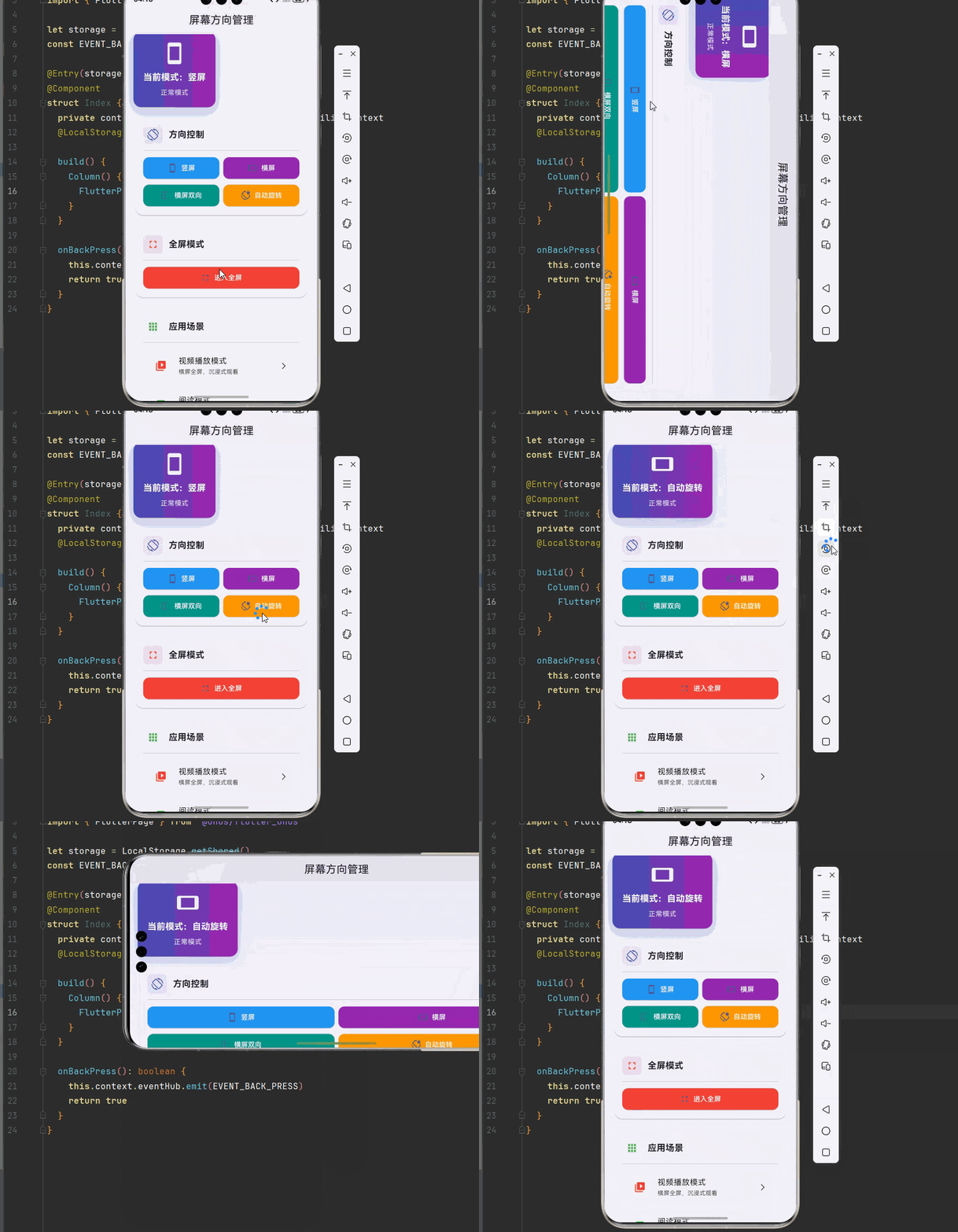
在移动应用开发中,屏幕方向控制是提升用户体验的重要功能。不同的应用场景对屏幕方向有不同的需求:视频播放需要横屏以获得更好的观看体验,阅读应用需要竖屏以方便阅读,游戏可能需要锁定特定方向以避免误操作。
想象一下这样的场景:用户正在观看一部精彩的电影,竖屏模式下视频画面很小,体验很差。如果应用能够自动切换到横屏模式,用户就能获得沉浸式的观看体验。这就是屏幕方向控制要解决的问题。
📋 1.2 SystemChrome 是什么?
SystemChrome 是 Flutter 提供的原生 API,用于控制应用的系统级设置,包括屏幕方向、状态栏、导航栏等。它不需要任何第三方依赖,直接使用 Flutter 内置的服务即可实现屏幕方向控制。
在 OpenHarmony 平台上,SystemChrome 同样提供了完整的支持,让开发者可以无缝地使用这套 API 来实现屏幕方向控制功能。
🎯 1.3 核心功能特性
| 功能特性 | 详细说明 | OpenHarmony 支持 |
|---|---|---|
| 竖屏锁定 | 强制应用以竖屏模式显示 | ✅ 完全支持 |
| 横屏锁定 | 强制应用以横屏模式显示 | ✅ 完全支持 |
| 自动旋转 | 允许应用跟随设备方向旋转 | ✅ 完全支持 |
| 动态切换 | 在运行时动态改变屏幕方向 | ✅ 完全支持 |
| 全屏模式 | 隐藏系统 UI 实现沉浸式体验 | ✅ 完全支持 |
💡 1.4 典型应用场景
在实际的应用开发中,屏幕方向控制有着广泛的应用场景:
视频播放:播放视频时自动切换到横屏模式,提供更好的观看体验。
游戏应用:锁定横屏方向,避免游戏过程中方向变化影响操作。
阅读应用:锁定竖屏方向,提供舒适的阅读体验。
相机应用:根据拍摄需求控制屏幕方向。
🏗️ 二、系统架构设计
📐 2.1 整体架构
为了构建一个可维护、可扩展的屏幕方向管理系统,我们采用分层架构设计:
┌─────────────────────────────────────────────────────────┐
│                    UI 层 (展示层)                        │
│  ┌─────────────┐  ┌─────────────┐  ┌─────────────┐     │
│  │  方向选择   │  │  全屏控制   │  │  状态显示   │     │
│  └─────────────┘  └─────────────┘  └─────────────┘     │
├─────────────────────────────────────────────────────────┤
│                  服务层 (业务逻辑)                       │
│  ┌─────────────────────────────────────────────────┐   │
│  │              OrientationService                  │   │
│  │  • 统一的方向控制接口                            │   │
│  │  • 方向状态管理                                  │   │
│  │  • 全屏模式管理                                  │   │
│  │  • 状态持久化                                    │   │
│  └─────────────────────────────────────────────────┘   │
├─────────────────────────────────────────────────────────┤
│                  基础设施层 (底层实现)                   │
│  ┌─────────────────────────────────────────────────┐   │
│  │              SystemChrome API                    │   │
│  │  • setPreferredOrientations() - 设置方向        │   │
│  │  • setEnabledSystemUIMode() - 设置系统UI模式    │   │
│  │  • DeviceOrientation - 方向枚举                 │   │
│  └─────────────────────────────────────────────────┘   │
└─────────────────────────────────────────────────────────┘
📊 2.2 数据模型设计
为了更好地管理屏幕方向的状态和配置,我们设计了一套数据模型:
dart
/// 屏幕方向类型
enum OrientationType {
  portraitUp,      // 竖屏(正常)
  portraitDown,    // 竖屏(倒置)
  landscapeLeft,   // 横屏(左旋转)
  landscapeRight,  // 横屏(右旋转)
  auto,            // 自动旋转
}

/// 方向配置模型
class OrientationConfig {
  /// 方向类型
  final OrientationType type;

  /// 是否全屏
  final bool fullscreen;

  /// 是否隐藏状态栏
  final bool hideStatusBar;

  const OrientationConfig({
    required this.type,
    this.fullscreen = false,
    this.hideStatusBar = false,
  });
}

/// 方向状态模型
class OrientationState {
  /// 当前方向
  final DeviceOrientation currentOrientation;

  /// 是否全屏
  final bool isFullscreen;

  /// 是否锁定方向
  final bool isLocked;

  const OrientationState({
    required this.currentOrientation,
    this.isFullscreen = false,
    this.isLocked = true,
  });
}
📦 三、项目配置
📥 3.1 导入库
使用 SystemChrome 需要导入 Flutter 的服务库:
dart
import 'package:flutter/services.dart';配置说明:
SystemChrome是 Flutter 内置的 API,不需要添加任何第三方依赖- 本项目基于 Flutter 3.27.5-ohos-1.0.4 开发
- OpenHarmony 平台完全支持 SystemChrome API
🔧 3.2 初始化配置
在应用启动时进行初始化配置:
dart
void main() {
  WidgetsFlutterBinding.ensureInitialized();

  // 设置默认方向(竖屏)
  SystemChrome.setPreferredOrientations([
    DeviceOrientation.portraitUp,
  ]);

  runApp(const MyApp());
}
🛠️ 四、核心服务实现
🔄 4.1 屏幕方向服务
首先,我们实现一个屏幕方向服务,封装 SystemChrome 的底层 API:
dart
import 'package:flutter/material.dart';
import 'package:flutter/services.dart';

/// 屏幕方向类型
enum OrientationType {
  portraitUp,
  portraitDown,
  landscapeLeft,
  landscapeRight,
  auto,
}

/// 屏幕方向服务
///
/// 该服务封装了 SystemChrome 的底层 API,提供统一的屏幕方向控制接口。
/// 所有方法都是静态的,可以在应用的任何地方直接调用。
class OrientationService {
  /// 当前方向
  static DeviceOrientation _currentOrientation = DeviceOrientation.portraitUp;

  /// 是否全屏
  static bool _isFullscreen = false;

  /// 获取当前方向
  static DeviceOrientation get currentOrientation => _currentOrientation;

  /// 获取是否全屏
  static bool get isFullscreen => _isFullscreen;

  /// 设置竖屏
  ///
  /// [up] 是否为正常竖屏,false 为倒置竖屏
  static Future<void> setPortrait({bool up = true}) async {
    final orientation = up
        ? DeviceOrientation.portraitUp
        : DeviceOrientation.portraitDown;
    await SystemChrome.setPreferredOrientations([orientation]);
    _currentOrientation = orientation;
  }

  /// 设置横屏
  ///
  /// [left] 是否为左旋转横屏,false 为右旋转横屏
  static Future<void> setLandscape({bool left = true}) async {
    final orientation = left
        ? DeviceOrientation.landscapeLeft
        : DeviceOrientation.landscapeRight;
    await SystemChrome.setPreferredOrientations([orientation]);
    _currentOrientation = orientation;
  }

  /// 设置横屏(允许左右两个方向)
  static Future<void> setLandscapeBoth() async {
    await SystemChrome.setPreferredOrientations([
      DeviceOrientation.landscapeLeft,
      DeviceOrientation.landscapeRight,
    ]);
  }

  /// 设置自动旋转
  static Future<void> setAutoRotate() async {
    await SystemChrome.setPreferredOrientations([
      DeviceOrientation.portraitUp,
      DeviceOrientation.portraitDown,
      DeviceOrientation.landscapeLeft,
      DeviceOrientation.landscapeRight,
    ]);
  }

  /// 设置方向类型
  ///
  /// [type] 方向类型
  static Future<void> setOrientation(OrientationType type) async {
    switch (type) {
      case OrientationType.portraitUp:
        await setPortrait();
        break;
      case OrientationType.portraitDown:
        await setPortrait(up: false);
        break;
      case OrientationType.landscapeLeft:
        await setLandscape();
        break;
      case OrientationType.landscapeRight:
        await setLandscape(left: false);
        break;
      case OrientationType.auto:
        await setAutoRotate();
        break;
    }
  }

  /// 进入全屏模式
  ///
  /// [orientation] 可选的方向设置
  static Future<void> enterFullscreen({
    DeviceOrientation? orientation,
  }) async {
    await SystemChrome.setEnabledSystemUIMode(
      SystemUiMode.immersive,
    );

    if (orientation != null) {
      await SystemChrome.setPreferredOrientations([orientation]);
      _currentOrientation = orientation;
    }

    _isFullscreen = true;
  }

  /// 退出全屏模式
  static Future<void> exitFullscreen() async {
    await SystemChrome.setEnabledSystemUIMode(
      SystemUiMode.manual,
      overlays: SystemUiOverlay.values,
    );
    _isFullscreen = false;
  }

  /// 切换全屏状态
  ///
  /// [orientation] 全屏时的方向
  static Future<void> toggleFullscreen({
    DeviceOrientation? orientation,
  }) async {
    if (_isFullscreen) {
      await exitFullscreen();
    } else {
      await enterFullscreen(orientation: orientation);
    }
  }

  /// 隐藏状态栏
  static Future<void> hideStatusBar() async {
    await SystemChrome.setEnabledSystemUIMode(
      SystemUiMode.manual,
      overlays: [SystemUiOverlay.bottom],
    );
  }

  /// 显示状态栏
  static Future<void> showStatusBar() async {
    await SystemChrome.setEnabledSystemUIMode(
      SystemUiMode.manual,
      overlays: SystemUiOverlay.values,
    );
  }

  /// 设置状态栏样式
  ///
  /// [color] 状态栏颜色
  /// [iconBrightness] 图标亮度
  static void setStatusBarStyle({
    Color? color,
    Brightness? iconBrightness,
  }) {
    SystemChrome.setSystemUIOverlayStyle(SystemUiOverlayStyle(
      statusBarColor: color,
      statusBarIconBrightness: iconBrightness,
    ));
  }

  /// 重置为默认状态
  static Future<void> reset() async {
    await SystemChrome.setPreferredOrientations([
      DeviceOrientation.portraitUp,
    ]);
    await SystemChrome.setEnabledSystemUIMode(
      SystemUiMode.manual,
      overlays: SystemUiOverlay.values,
    );
    _currentOrientation = DeviceOrientation.portraitUp;
    _isFullscreen = false;
  }
}
📝 五、完整示例代码
下面是一个完整的智能屏幕方向管理系统示例:
dart
import 'package:flutter/material.dart';
import 'package:flutter/services.dart';

// ============ 枚举定义 ============

enum OrientationType {
  portraitUp,
  portraitDown,
  landscapeLeft,
  landscapeRight,
  auto,
}

// ============ 服务类 ============

class OrientationService {
  static DeviceOrientation _currentOrientation = DeviceOrientation.portraitUp;
  static bool _isFullscreen = false;

  static DeviceOrientation get currentOrientation => _currentOrientation;
  static bool get isFullscreen => _isFullscreen;

  static Future<void> setPortrait({bool up = true}) async {
    final orientation = up
        ? DeviceOrientation.portraitUp
        : DeviceOrientation.portraitDown;
    await SystemChrome.setPreferredOrientations([orientation]);
    _currentOrientation = orientation;
  }

  static Future<void> setLandscape({bool left = true}) async {
    final orientation = left
        ? DeviceOrientation.landscapeLeft
        : DeviceOrientation.landscapeRight;
    await SystemChrome.setPreferredOrientations([orientation]);
    _currentOrientation = orientation;
  }

  static Future<void> setLandscapeBoth() async {
    await SystemChrome.setPreferredOrientations([
      DeviceOrientation.landscapeLeft,
      DeviceOrientation.landscapeRight,
    ]);
  }

  static Future<void> setAutoRotate() async {
    await SystemChrome.setPreferredOrientations([
      DeviceOrientation.portraitUp,
      DeviceOrientation.portraitDown,
      DeviceOrientation.landscapeLeft,
      DeviceOrientation.landscapeRight,
    ]);
  }

  static Future<void> setOrientation(OrientationType type) async {
    switch (type) {
      case OrientationType.portraitUp:
        await setPortrait();
        break;
      case OrientationType.portraitDown:
        await setPortrait(up: false);
        break;
      case OrientationType.landscapeLeft:
        await setLandscape();
        break;
      case OrientationType.landscapeRight:
        await setLandscape(left: false);
        break;
      case OrientationType.auto:
        await setAutoRotate();
        break;
    }
  }

  static Future<void> enterFullscreen({DeviceOrientation? orientation}) async {
    await SystemChrome.setEnabledSystemUIMode(SystemUiMode.immersive);
    if (orientation != null) {
      await SystemChrome.setPreferredOrientations([orientation]);
      _currentOrientation = orientation;
    }
    _isFullscreen = true;
  }

  static Future<void> exitFullscreen() async {
    await SystemChrome.setEnabledSystemUIMode(
      SystemUiMode.manual,
      overlays: SystemUiOverlay.values,
    );
    _isFullscreen = false;
  }

  static Future<void> toggleFullscreen({DeviceOrientation? orientation}) async {
    if (_isFullscreen) {
      await exitFullscreen();
    } else {
      await enterFullscreen(orientation: orientation);
    }
  }

  static Future<void> reset() async {
    await SystemChrome.setPreferredOrientations([DeviceOrientation.portraitUp]);
    await SystemChrome.setEnabledSystemUIMode(
      SystemUiMode.manual,
      overlays: SystemUiOverlay.values,
    );
    _currentOrientation = DeviceOrientation.portraitUp;
    _isFullscreen = false;
  }
}

// ============ 应用入口 ============

void main() {
  WidgetsFlutterBinding.ensureInitialized();
  SystemChrome.setPreferredOrientations([DeviceOrientation.portraitUp]);
  runApp(const OrientationDemoApp());
}

class OrientationDemoApp extends StatelessWidget {
  const OrientationDemoApp({super.key});

  @override
  Widget build(BuildContext context) {
    return MaterialApp(
      title: '屏幕方向管理',
      debugShowCheckedModeBanner: false,
      theme: ThemeData(
        colorScheme: ColorScheme.fromSeed(seedColor: Colors.indigo),
        useMaterial3: true,
      ),
      home: const OrientationDemoPage(),
    );
  }
}

class OrientationDemoPage extends StatefulWidget {
  const OrientationDemoPage({super.key});

  @override
  State<OrientationDemoPage> createState() => _OrientationDemoPageState();
}

class _OrientationDemoPageState extends State<OrientationDemoPage> {
  OrientationType _selectedType = OrientationType.portraitUp;

  @override
  void dispose() {
    OrientationService.reset();
    super.dispose();
  }

  Future<void> _setOrientation(OrientationType type) async {
    await OrientationService.setOrientation(type);
    setState(() => _selectedType = type);
  }

  Future<void> _toggleFullscreen() async {
    await OrientationService.toggleFullscreen(
      orientation: DeviceOrientation.landscapeLeft,
    );
    setState(() {});
  }

  @override
  Widget build(BuildContext context) {
    return Scaffold(
      appBar: AppBar(
        title: const Text('屏幕方向管理'),
        centerTitle: true,
        elevation: 0,
      ),
      body: Container(
        decoration: BoxDecoration(
          gradient: LinearGradient(
            begin: Alignment.topCenter,
            end: Alignment.bottomCenter,
            colors: [
              Colors.indigo.shade50,
              Colors.white,
            ],
          ),
        ),
        child: SingleChildScrollView(
          padding: const EdgeInsets.all(16),
          child: Column(
            crossAxisAlignment: CrossAxisAlignment.start,
            children: [
              _buildStatusCard(),
              const SizedBox(height: 16),
              _buildSectionCard(
                title: '方向控制',
                icon: Icons.screen_rotation,
                color: Colors.indigo,
                child: Column(
                  children: [
                    Row(
                      children: [
                        Expanded(
                          child: _buildOrientationButton(
                            '竖屏',
                            Icons.stay_current_portrait,
                            () => _setOrientation(OrientationType.portraitUp),
                            Colors.blue,
                          ),
                        ),
                        const SizedBox(width: 8),
                        Expanded(
                          child: _buildOrientationButton(
                            '横屏',
                            Icons.stay_current_landscape,
                            () => _setOrientation(OrientationType.landscapeLeft),
                            Colors.purple,
                          ),
                        ),
                      ],
                    ),
                    const SizedBox(height: 8),
                    Row(
                      children: [
                        Expanded(
                          child: _buildOrientationButton(
                            '横屏双向',
                            Icons.flip,
                            () => OrientationService.setLandscapeBoth(),
                            Colors.teal,
                          ),
                        ),
                        const SizedBox(width: 8),
                        Expanded(
                          child: _buildOrientationButton(
                            '自动旋转',
                            Icons.screen_lock_rotation,
                            () => _setOrientation(OrientationType.auto),
                            Colors.orange,
                          ),
                        ),
                      ],
                    ),
                  ],
                ),
              ),
              const SizedBox(height: 16),
              _buildSectionCard(
                title: '全屏模式',
                icon: Icons.fullscreen,
                color: Colors.red,
                child: SizedBox(
                  width: double.infinity,
                  child: _buildOrientationButton(
                    OrientationService.isFullscreen ? '退出全屏' : '进入全屏',
                    OrientationService.isFullscreen
                        ? Icons.fullscreen_exit
                        : Icons.fullscreen,
                    _toggleFullscreen,
                    Colors.red,
                  ),
                ),
              ),
              const SizedBox(height: 16),
              _buildSectionCard(
                title: '应用场景',
                icon: Icons.apps,
                color: Colors.green,
                child: Column(
                  children: [
                    _buildScenarioButton(
                      '视频播放模式',
                      '横屏全屏,沉浸式观看',
                      Icons.video_library,
                      () async {
                        await OrientationService.enterFullscreen(
                          orientation: DeviceOrientation.landscapeLeft,
                        );
                        setState(() {});
                      },
                      Colors.red,
                    ),
                    const SizedBox(height: 8),
                    _buildScenarioButton(
                      '阅读模式',
                      '竖屏锁定,专注阅读',
                      Icons.book,
                      () => _setOrientation(OrientationType.portraitUp),
                      Colors.green,
                    ),
                    const SizedBox(height: 8),
                    _buildScenarioButton(
                      '游戏模式',
                      '横屏锁定,流畅游戏',
                      Icons.games,
                      () => _setOrientation(OrientationType.landscapeLeft),
                      Colors.indigo,
                    ),
                    const SizedBox(height: 8),
                    _buildScenarioButton(
                      '重置默认',
                      '恢复竖屏,显示系统UI',
                      Icons.restore,
                      () async {
                        await OrientationService.reset();
                        setState(() => _selectedType = OrientationType.portraitUp);
                      },
                      Colors.grey,
                    ),
                  ],
                ),
              ),
              const SizedBox(height: 32),
            ],
          ),
        ),
      ),
    );
  }

  Widget _buildStatusCard() {
    return Container(
      padding: const EdgeInsets.all(20),
      decoration: BoxDecoration(
        gradient: const LinearGradient(
          colors: [Colors.indigo, Colors.purple],
        ),
        borderRadius: BorderRadius.circular(16),
        boxShadow: [
          BoxShadow(
            color: Colors.indigo.withOpacity(0.3),
            blurRadius: 20,
            offset: const Offset(0, 10),
          ),
        ],
      ),
      child: Column(
        children: [
          Icon(
            _selectedType == OrientationType.portraitUp
                ? Icons.stay_current_portrait
                : Icons.stay_current_landscape,
            size: 48,
            color: Colors.white,
          ),
          const SizedBox(height: 12),
          Text(
            '当前模式:${_getTypeName(_selectedType)}',
            style: const TextStyle(
              color: Colors.white,
              fontSize: 18,
              fontWeight: FontWeight.bold,
            ),
          ),
          const SizedBox(height: 8),
          Text(
            OrientationService.isFullscreen ? '全屏模式' : '正常模式',
            style: TextStyle(
              color: Colors.white.withOpacity(0.8),
              fontSize: 14,
            ),
          ),
        ],
      ),
    );
  }

  Widget _buildSectionCard({
    required String title,
    required IconData icon,
    required Color color,
    required Widget child,
  }) {
    return Card(
      elevation: 2,
      shape: RoundedRectangleBorder(
        borderRadius: BorderRadius.circular(16),
      ),
      child: Padding(
        padding: const EdgeInsets.all(16),
        child: Column(
          crossAxisAlignment: CrossAxisAlignment.start,
          children: [
            Row(
              children: [
                Container(
                  padding: const EdgeInsets.all(8),
                  decoration: BoxDecoration(
                    color: color.withOpacity(0.1),
                    borderRadius: BorderRadius.circular(8),
                  ),
                  child: Icon(icon, color: color, size: 24),
                ),
                const SizedBox(width: 12),
                Text(
                  title,
                  style: const TextStyle(
                    fontSize: 18,
                    fontWeight: FontWeight.bold,
                  ),
                ),
              ],
            ),
            const Divider(height: 24),
            child,
          ],
        ),
      ),
    );
  }

  Widget _buildOrientationButton(
    String label,
    IconData icon,
    VoidCallback onTap,
    Color color,
  ) {
    return ElevatedButton.icon(
      onPressed: onTap,
      icon: Icon(icon, size: 20),
      label: Text(label),
      style: ElevatedButton.styleFrom(
        backgroundColor: color,
        foregroundColor: Colors.white,
        padding: const EdgeInsets.symmetric(vertical: 12),
        shape: RoundedRectangleBorder(
          borderRadius: BorderRadius.circular(12),
        ),
      ),
    );
  }

  Widget _buildScenarioButton(
    String title,
    String subtitle,
    IconData icon,
    VoidCallback onTap,
    Color color,
  ) {
    return ListTile(
      leading: Container(
        padding: const EdgeInsets.all(8),
        decoration: BoxDecoration(
          color: color.withOpacity(0.1),
          borderRadius: BorderRadius.circular(8),
        ),
        child: Icon(icon, color: color),
      ),
      title: Text(title),
      subtitle: Text(subtitle, style: const TextStyle(fontSize: 12)),
      trailing: const Icon(Icons.arrow_forward_ios, size: 16),
      onTap: onTap,
      shape: RoundedRectangleBorder(
        borderRadius: BorderRadius.circular(12),
      ),
      tileColor: Colors.grey.shade50,
    );
  }

  String _getTypeName(OrientationType type) {
    switch (type) {
      case OrientationType.portraitUp:
        return '竖屏';
      case OrientationType.portraitDown:
        return '竖屏(倒置)';
      case OrientationType.landscapeLeft:
        return '横屏';
      case OrientationType.landscapeRight:
        return '横屏(右旋)';
      case OrientationType.auto:
        return '自动旋转';
    }
  }
}
🏆 六、最佳实践与注意事项
⚠️ 6.1 方向切换最佳实践
及时恢复:在页面退出时,务必恢复默认方向设置,避免影响其他页面。
异步操作 :方向设置是异步操作,使用 await 确保操作完成。
状态管理:使用状态管理工具记录当前方向,避免重复设置。
🔐 6.2 全屏模式注意事项
用户退出:提供明显的退出全屏按钮,让用户可以随时退出。
手势操作:考虑添加手势操作(如双击)来切换全屏状态。
系统UI恢复:退出全屏时,确保正确恢复系统 UI。
📱 6.3 OpenHarmony 平台特殊说明
原生支持:OpenHarmony 原生支持 SystemChrome API。
方向枚举 :使用 DeviceOrientation 枚举指定方向。
系统UI控制 :使用 SystemUiMode 控制系统 UI 显示。
📌 七、总结
本文通过一个完整的智能屏幕方向管理系统案例,深入讲解了 SystemChrome 屏幕方向控制的使用方法与最佳实践:
架构设计:采用分层架构(UI层 → 服务层 → 基础设施层),让代码更清晰,便于维护和测试。
服务封装:统一封装方向控制逻辑,提供语义化的方法名,让调用代码更易读。
多模式支持:支持竖屏、横屏、自动旋转等多种模式,满足不同场景需求。
全屏控制:支持全屏模式切换,提供沉浸式体验。
掌握这些技巧,你就能构建出专业级的屏幕方向控制功能,为用户提供更好的使用体验。