欢迎加入开源鸿蒙跨平台社区:https://openharmonycrossplatform.csdn.net
🔍 一、第三方库概述与应用场景
📱 1.1 为什么需要 GPS 定位?
在移动应用开发中,GPS 定位是一项非常基础且重要的功能。无论是地图导航、外卖配送、社交应用还是运动健身,都需要获取用户的位置信息。准确的定位服务可以让应用提供更加个性化和精准的服务。
想象一下这样的场景:用户打开一个外卖应用,应用自动获取用户当前位置,推荐附近的餐厅;用户使用运动应用记录跑步轨迹,应用实时追踪用户位置并计算运动距离;用户在社交应用中分享位置,让朋友知道自己在哪。这些都是 GPS 定位功能的典型应用。
📋 1.2 geolocator 是什么?
geolocator 是 Flutter 生态中最流行的定位插件,提供了跨平台的位置服务能力。它支持获取当前位置、监听位置变化、计算距离和方位角等功能,并且内置了权限管理机制,让开发者可以轻松实现定位功能。
🎯 1.3 核心功能特性
| 功能特性 | 详细说明 | OpenHarmony 支持 |
|---|---|---|
| 单次定位 | 获取设备当前位置 | ✅ 完全支持 |
| 实时追踪 | 持续监听位置变化 | ✅ 完全支持 |
| 高精度定位 | GPS 高精度定位 | ✅ 完全支持 |
| 网络定位 | 基站/WiFi 定位 | ✅ 完全支持 |
| 后台定位 | 应用后台时定位 | ✅ 完全支持 |
| 距离计算 | 计算两点间距离 | ✅ 完全支持 |
💡 1.4 典型应用场景
地图导航:获取用户位置,提供导航服务。
外卖配送:定位用户地址,计算配送距离。
运动健身:记录运动轨迹,计算运动距离。
社交应用:分享位置,查找附近的人。
🏗️ 二、系统架构设计
📐 2.1 整体架构
┌─────────────────────────────────────────────────────────┐
│                    UI 层 (展示层)                        │
│  ┌─────────────┐  ┌─────────────┐  ┌─────────────┐     │
│  │  位置显示   │  │  地图展示   │  │  轨迹绘制   │     │
│  └─────────────┘  └─────────────┘  └─────────────┘     │
├─────────────────────────────────────────────────────────┤
│                  服务层 (业务逻辑)                       │
│  ┌─────────────────────────────────────────────────┐   │
│  │            LocationService                       │   │
│  │  • 权限检查与请求                                │   │
│  │  • 单次定位获取                                  │   │
│  │  • 位置流监听                                    │   │
│  │  • 距离与方位计算                                │   │
│  └─────────────────────────────────────────────────┘   │
├─────────────────────────────────────────────────────────┤
│                  基础设施层 (底层实现)                   │
│  ┌─────────────────────────────────────────────────┐   │
│  │            geolocator 库                         │   │
│  │  • Geolocator - 主控制器                         │   │
│  │  • Position - 位置数据模型                       │   │
│  │  • LocationSettings - 定位设置                   │   │
│  │  • LocationPermission - 权限状态                 │   │
│  └─────────────────────────────────────────────────┘   │
└─────────────────────────────────────────────────────────┘
📊 2.2 数据模型设计
dart
/// 位置数据模型
class LocationData {
  /// 纬度
  final double latitude;

  /// 经度
  final double longitude;

  /// 海拔高度(米)
  final double altitude;

  /// 速度(米/秒)
  final double speed;

  /// 方向(度)
  final double heading;

  /// 精度(米)
  final double accuracy;

  /// 时间戳
  final DateTime timestamp;

  const LocationData({
    required this.latitude,
    required this.longitude,
    required this.altitude,
    required this.speed,
    required this.heading,
    required this.accuracy,
    required this.timestamp,
  });
}

/// 定位配置模型
class LocationConfig {
  /// 定位精度
  final LocationAccuracy accuracy;

  /// 最小距离变化(米)
  final int distanceFilter;

  /// 超时时间
  final Duration timeLimit;

  const LocationConfig({
    this.accuracy = LocationAccuracy.high,
    this.distanceFilter = 0,
    this.timeLimit = const Duration(seconds: 30),
  });
}
📦 三、项目配置与依赖安装
📥 3.1 添加依赖
打开项目根目录下的 pubspec.yaml 文件,添加以下配置:
yaml
dependencies:
  flutter:
    sdk: flutter

  # geolocator - GPS定位插件
  geolocator:
    git:
      url: "https://atomgit.com/openharmony-sig/fluttertpc_geolocator.git"
path: geolocator配置说明:
- 使用 git 方式引用开源鸿蒙适配的 fluttertpc_geolocator 仓库
url:指定 AtomGit 托管的仓库地址ref:指定适配 OpenHarmony 的分支版本- 本项目基于
geolocator@13.0.0开发,适配 Flutter 3.27.5-ohos-1.0.4
⚠️ 重要:对于 OpenHarmony 平台,必须使用 git 方式引用适配版本,不能直接使用 pub.dev 的版本号。
🔧 3.2 下载依赖
配置完成后,需要在项目根目录执行以下命令下载依赖:
bash
flutter pub get🔐 3.3 权限配置
定位功能需要配置相应的权限。在 OpenHarmony 平台上,user_grant 类型的权限必须添加 reason 和 usedScene 字段:
ohos/entry/src/main/module.json5:
json
{
  "module": {
    "requestPermissions": [
      {
        "name": "ohos.permission.LOCATION",
        "reason": "$string:location_reason",
        "usedScene": {
          "abilities": ["EntryAbility"],
          "when": "inuse"
        }
      },
      {
        "name": "ohos.permission.APPROXIMATELY_LOCATION",
        "reason": "$string:location_reason",
        "usedScene": {
          "abilities": ["EntryAbility"],
          "when": "inuse"
        }
      },
      {
        "name": "ohos.permission.LOCATION_IN_BACKGROUND",
        "reason": "$string:location_background_reason",
        "usedScene": {
          "abilities": ["EntryAbility"],
          "when": "always"
        }
      }
    ]
  }
}
ohos/entry/src/main/resources/base/element/string.json:
json
{
  "string": [
    {
      "name": "location_reason",
      "value": "用于获取您的位置信息,提供位置相关服务"
    },
    {
      "name": "location_background_reason",
      "value": "用于在后台持续获取位置信息,提供导航追踪服务"
    }
  ]
}
权限说明:
| 权限 | 说明 | when 值 |
|---|---|---|
| ohos.permission.LOCATION | 精确位置权限 | inuse |
| ohos.permission.APPROXIMATELY_LOCATION | 大致位置权限 | inuse |
| ohos.permission.LOCATION_IN_BACKGROUND | 后台定位权限 | always |
🛠️ 四、核心 API 详解
🎬 4.1 权限检查与请求
dart
// 检查定位服务是否启用
bool serviceEnabled = await Geolocator.isLocationServiceEnabled();

// 检查定位权限
LocationPermission permission = await Geolocator.checkPermission();

// 请求定位权限
LocationPermission permission = await Geolocator.requestPermission();
LocationPermission 枚举值:
| 枚举值 | 说明 |
|---|---|
| LocationPermission.whileInUse | 使用时允许 |
| LocationPermission.always | 始终允许 |
| LocationPermission.denied | 已拒绝 |
| LocationPermission.deniedForever | 永久拒绝 |
📍 4.2 获取当前位置
dart
// 获取当前位置
Position position = await Geolocator.getCurrentPosition(
  desiredAccuracy: LocationAccuracy.high,
  timeLimit: Duration(seconds: 30),
);

// 位置数据属性
print('纬度: ${position.latitude}');
print('经度: ${position.longitude}');
print('海拔: ${position.altitude}');
print('速度: ${position.speed}');
print('方向: ${position.heading}');
print('精度: ${position.accuracy}');
📡 4.3 监听位置变化
dart
// 位置变化流
StreamSubscription<Position>? subscription;

void startTracking() {
  const locationSettings = LocationSettings(
    accuracy: LocationAccuracy.high,
    distanceFilter: 0,
  );

  subscription = Geolocator.getPositionStream(
    locationSettings: locationSettings,
  ).listen((Position position) {
    print('位置更新: ${position.latitude}, ${position.longitude}');
  });
}

void stopTracking() {
  subscription?.cancel();
  subscription = null;
}
📏 4.4 距离与方位计算
dart
// 计算两点间距离(米)
double distance = Geolocator.distanceBetween(
  startLatitude, startLongitude,
  endLatitude, endLongitude,
);

// 计算两点间方位角(度)
double bearing = Geolocator.bearingBetween(
  startLatitude, startLongitude,
  endLatitude, endLongitude,
);
⚙️ 4.5 LocationSettings - 定位设置
dart
// 基础定位设置
const locationSettings = LocationSettings(
  accuracy: LocationAccuracy.high,    // 定位精度
  distanceFilter: 0,                   // 最小距离变化(米)
  timeLimit: Duration(seconds: 30),    // 超时时间
);

// Android 专用设置
final androidSettings = AndroidSettings(
  accuracy: LocationAccuracy.high,
  distanceFilter: 0,
  intervalDuration: const Duration(milliseconds: 500),
  foregroundNotificationConfig: const ForegroundNotificationConfig(
    notificationText: '正在追踪您的位置',
    notificationTitle: '位置追踪中',
    enableWakeLock: true,
  ),
);
LocationAccuracy 精度级别:
| 枚举值 | 说明 |
|---|---|
| LocationAccuracy.lowest | 最低精度 |
| LocationAccuracy.low | 低精度 |
| LocationAccuracy.medium | 中等精度 |
| LocationAccuracy.high | 高精度 |
| LocationAccuracy.best | 最高精度 |
📝 五、完整示例代码
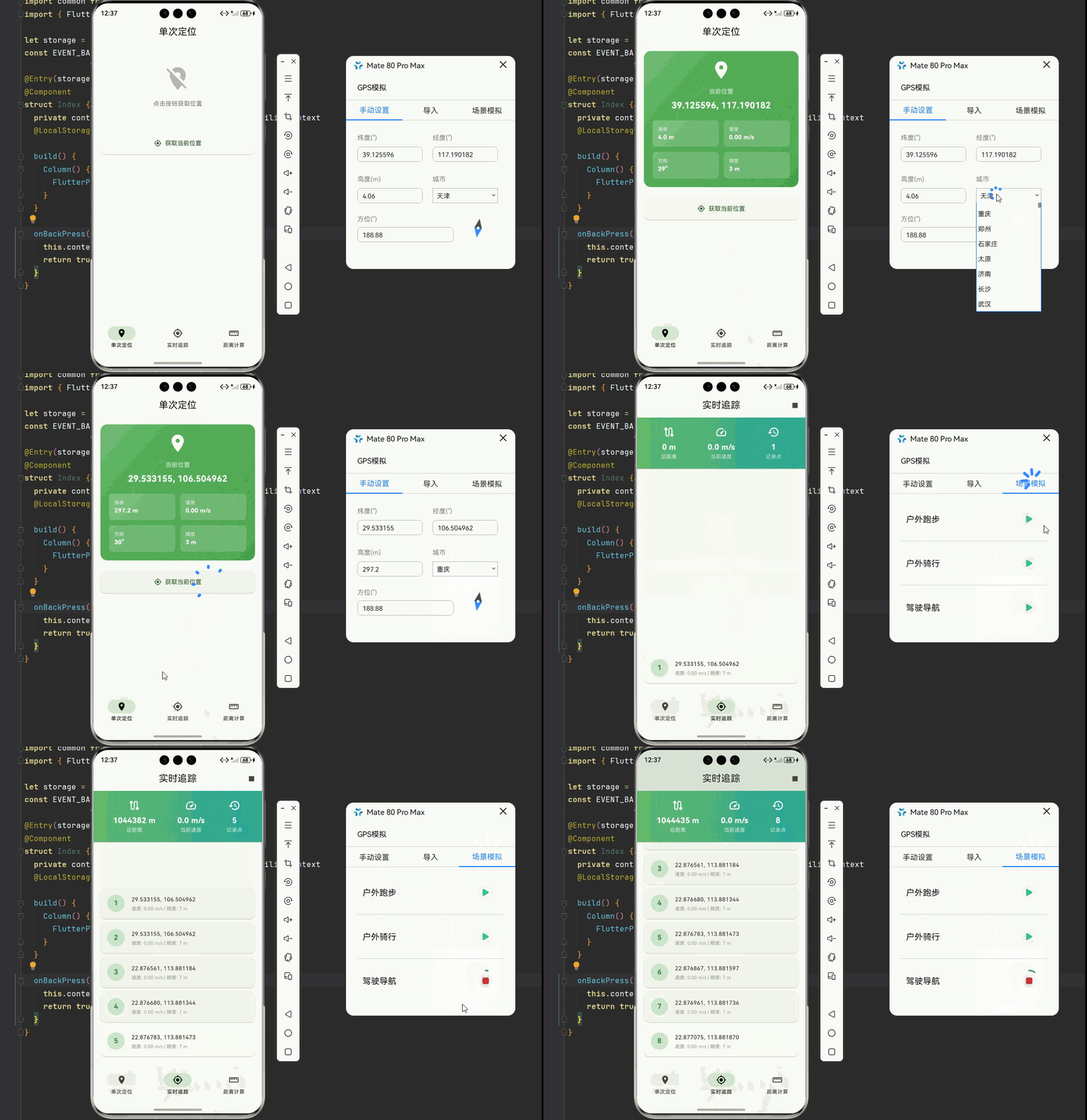
下面是一个完整的 GPS定位与位置服务系统示例:
dart
import 'dart:async';
import 'dart:io';
import 'package:flutter/material.dart';
import 'package:geolocator/geolocator.dart';
void main() {
runApp(const LocationApp());
}
class LocationApp extends StatelessWidget {
const LocationApp({super.key});
@override
Widget build(BuildContext context) {
return MaterialApp(
title: 'GPS定位系统',
debugShowCheckedModeBanner: false,
theme: ThemeData(
colorScheme: ColorScheme.fromSeed(seedColor: Colors.green),
useMaterial3: true,
),
home: const MainPage(),
);
}
}
class MainPage extends StatefulWidget {
const MainPage({super.key});
@override
State<MainPage> createState() => _MainPageState();
}
class _MainPageState extends State<MainPage> {
int _currentIndex = 0;
final List<Widget> _pages = [
const SingleLocationPage(),
const LocationTrackingPage(),
const DistanceCalculatorPage(),
];
@override
Widget build(BuildContext context) {
return Scaffold(
body: _pages[_currentIndex],
bottomNavigationBar: NavigationBar(
selectedIndex: _currentIndex,
onDestinationSelected: (index) {
setState(() => _currentIndex = index);
},
destinations: const [
NavigationDestination(icon: Icon(Icons.location_on), label: '单次定位'),
NavigationDestination(icon: Icon(Icons.my_location), label: '实时追踪'),
NavigationDestination(icon: Icon(Icons.straighten), label: '距离计算'),
],
),
);
}
}
// ============ 单次定位页面 ============
class SingleLocationPage extends StatefulWidget {
const SingleLocationPage({super.key});
@override
State<SingleLocationPage> createState() => _SingleLocationPageState();
}
class _SingleLocationPageState extends State<SingleLocationPage> {
Position? _currentPosition;
bool _isLoading = false;
String? _errorMessage;
Future<bool> _checkPermissions() async {
bool serviceEnabled = await Geolocator.isLocationServiceEnabled();
if (!serviceEnabled) {
setState(() {
_errorMessage = '请开启定位服务:设置 > 位置信息 > 开启位置服务';
});
return false;
}
LocationPermission permission = await Geolocator.checkPermission();
if (permission == LocationPermission.denied) {
permission = await Geolocator.requestPermission();
if (permission == LocationPermission.denied) {
setState(() {
_errorMessage = '需要定位权限:请在设置中授予应用定位权限';
});
return false;
}
}
if (permission == LocationPermission.deniedForever) {
setState(() {
_errorMessage = '定位权限被永久拒绝,请在设置中手动开启';
});
return false;
}
return true;
}
Future<void> _getLocation() async {
setState(() {
_isLoading = true;
_errorMessage = null;
});
try {
final hasPermission = await _checkPermissions();
if (!hasPermission) {
setState(() => _isLoading = false);
return;
}
final position = await Geolocator.getCurrentPosition(
desiredAccuracy: LocationAccuracy.high,
timeLimit: const Duration(seconds: 30),
);
setState(() {
_currentPosition = position;
_isLoading = false;
});
} catch (e) {
setState(() {
_errorMessage = '获取位置失败: $e';
_isLoading = false;
});
}
}
@override
Widget build(BuildContext context) {
return Scaffold(
appBar: AppBar(
title: const Text('单次定位'),
centerTitle: true,
),
body: SingleChildScrollView(
padding: const EdgeInsets.all(16),
child: Column(
children: [
_buildLocationCard(),
const SizedBox(height: 24),
SizedBox(
width: double.infinity,
child: ElevatedButton.icon(
onPressed: _isLoading ? null : _getLocation,
icon: _isLoading
? const SizedBox(
width: 20,
height: 20,
child: CircularProgressIndicator(strokeWidth: 2),
)
: const Icon(Icons.my_location),
label: Text(_isLoading ? '定位中...' : '获取当前位置'),
style: ElevatedButton.styleFrom(
padding: const EdgeInsets.symmetric(vertical: 16),
shape: RoundedRectangleBorder(
borderRadius: BorderRadius.circular(12),
),
),
),
),
if (_errorMessage != null) ...[
const SizedBox(height: 16),
Container(
padding: const EdgeInsets.all(16),
decoration: BoxDecoration(
color: Colors.red.shade50,
borderRadius: BorderRadius.circular(12),
),
child: Row(
children: [
Icon(Icons.error_outline, color: Colors.red.shade400),
const SizedBox(width: 12),
Expanded(
child: Text(
_errorMessage!,
style: TextStyle(color: Colors.red.shade700),
),
),
],
),
),
],
],
),
),
);
}
Widget _buildLocationCard() {
if (_currentPosition == null) {
return Container(
padding: const EdgeInsets.all(32),
decoration: BoxDecoration(
color: Colors.grey.shade100,
borderRadius: BorderRadius.circular(16),
),
child: Column(
children: [
Icon(Icons.location_off, size: 64, color: Colors.grey.shade400),
const SizedBox(height: 16),
Text(
'点击按钮获取位置',
style: TextStyle(color: Colors.grey.shade600),
),
],
),
);
}
final pos = _currentPosition!;
return Container(
padding: const EdgeInsets.all(20),
decoration: BoxDecoration(
gradient: LinearGradient(
colors: [Colors.green.shade400, Colors.green.shade600],
begin: Alignment.topLeft,
end: Alignment.bottomRight,
),
borderRadius: BorderRadius.circular(16),
),
child: Column(
children: [
const Icon(Icons.location_on, color: Colors.white, size: 48),
const SizedBox(height: 16),
const Text(
'当前位置',
style: TextStyle(color: Colors.white70, fontSize: 14),
),
const SizedBox(height: 8),
Text(
'${pos.latitude.toStringAsFixed(6)}, ${pos.longitude.toStringAsFixed(6)}',
style: const TextStyle(
color: Colors.white,
fontSize: 20,
fontWeight: FontWeight.bold,
),
),
const SizedBox(height: 20),
_buildInfoGrid(pos),
],
),
);
}
Widget _buildInfoGrid(Position pos) {
return GridView.count(
shrinkWrap: true,
physics: const NeverScrollableScrollPhysics(),
crossAxisCount: 2,
mainAxisSpacing: 12,
crossAxisSpacing: 12,
childAspectRatio: 2.5,
children: [
_buildInfoItem('海拔', '${pos.altitude.toStringAsFixed(1)} m'),
_buildInfoItem('速度', '${pos.speed.toStringAsFixed(2)} m/s'),
_buildInfoItem('方向', '${pos.heading.toStringAsFixed(0)}°'),
_buildInfoItem('精度', '${pos.accuracy.toStringAsFixed(0)} m'),
],
);
}
Widget _buildInfoItem(String label, String value) {
return Container(
padding: const EdgeInsets.symmetric(horizontal: 12, vertical: 8),
decoration: BoxDecoration(
color: Colors.white.withOpacity(0.2),
borderRadius: BorderRadius.circular(8),
),
child: Column(
crossAxisAlignment: CrossAxisAlignment.start,
mainAxisAlignment: MainAxisAlignment.center,
children: [
Text(label, style: const TextStyle(color: Colors.white70, fontSize: 11)),
Text(value, style: const TextStyle(color: Colors.white, fontWeight: FontWeight.bold)),
],
),
);
}
}
// ============ 实时追踪页面 ============
class LocationTrackingPage extends StatefulWidget {
const LocationTrackingPage({super.key});
@override
State<LocationTrackingPage> createState() => _LocationTrackingPageState();
}
class _LocationTrackingPageState extends State<LocationTrackingPage> {
StreamSubscription<Position>? _positionSubscription;
final List<Position> _locationHistory = [];
Position? _currentPosition;
bool _isTracking = false;
double _totalDistance = 0;
@override
void dispose() {
_stopTracking();
super.dispose();
}
Future<bool> _checkPermissions() async {
bool serviceEnabled = await Geolocator.isLocationServiceEnabled();
if (!serviceEnabled) {
ScaffoldMessenger.of(context).showSnackBar(
const SnackBar(content: Text('请开启定位服务')),
);
return false;
}
LocationPermission permission = await Geolocator.checkPermission();
if (permission == LocationPermission.denied) {
permission = await Geolocator.requestPermission();
}
if (permission == LocationPermission.denied ||
permission == LocationPermission.deniedForever) {
ScaffoldMessenger.of(context).showSnackBar(
const SnackBar(content: Text('需要定位权限')),
);
return false;
}
return true;
}
Future<void> _startTracking() async {
final hasPermission = await _checkPermissions();
if (!hasPermission) return;
final locationSettings = AndroidSettings(
accuracy: LocationAccuracy.high,
distanceFilter: 0,
intervalDuration: const Duration(milliseconds: 500),
foregroundNotificationConfig: const ForegroundNotificationConfig(
notificationText: '正在追踪您的位置',
notificationTitle: '位置追踪中',
enableWakeLock: true,
),
);
setState(() {
_isTracking = true;
_locationHistory.clear();
_totalDistance = 0;
});
_positionSubscription = Geolocator.getPositionStream(
locationSettings: locationSettings,
).listen((Position position) {
if (mounted) {
setState(() {
if (_currentPosition != null) {
_totalDistance += Geolocator.distanceBetween(
_currentPosition!.latitude,
_currentPosition!.longitude,
position.latitude,
position.longitude,
);
}
_currentPosition = position;
_locationHistory.add(position);
if (_locationHistory.length > 100) {
_locationHistory.removeAt(0);
}
});
}
});
}
void _stopTracking() {
_positionSubscription?.cancel();
_positionSubscription = null;
setState(() => _isTracking = false);
}
@override
Widget build(BuildContext context) {
return Scaffold(
appBar: AppBar(
title: const Text('实时追踪'),
centerTitle: true,
actions: [
IconButton(
icon: Icon(_isTracking ? Icons.stop : Icons.play_arrow),
onPressed: _isTracking ? _stopTracking : _startTracking,
),
],
),
body: _locationHistory.isEmpty
? _buildEmptyState()
: _buildTrackingContent(),
);
}
Widget _buildEmptyState() {
return Center(
child: Column(
mainAxisAlignment: MainAxisAlignment.center,
children: [
Icon(Icons.route, size: 80, color: Colors.grey.shade300),
const SizedBox(height: 16),
Text(
'点击播放按钮开始追踪',
style: TextStyle(color: Colors.grey.shade500, fontSize: 16),
),
const SizedBox(height: 24),
ElevatedButton.icon(
onPressed: _startTracking,
icon: const Icon(Icons.play_arrow),
label: const Text('开始追踪'),
),
],
),
);
}
Widget _buildTrackingContent() {
return Column(
children: [
_buildStatsCard(),
const Divider(height: 1),
Expanded(
child: ListView.builder(
padding: const EdgeInsets.all(16),
itemCount: _locationHistory.length,
reverse: true,
itemBuilder: (context, index) {
final position = _locationHistory[_locationHistory.length - 1 - index];
return _buildLocationItem(position, index);
},
),
),
],
);
}
Widget _buildStatsCard() {
return Container(
padding: const EdgeInsets.all(20),
decoration: BoxDecoration(
gradient: LinearGradient(
colors: [Colors.green.shade400, Colors.teal.shade400],
),
),
child: Row(
mainAxisAlignment: MainAxisAlignment.spaceAround,
children: [
_buildStatItem(
icon: Icons.route,
label: '总距离',
value: '${_totalDistance.toStringAsFixed(0)} m',
),
_buildStatItem(
icon: Icons.speed,
label: '当前速度',
value: '${_currentPosition?.speed.toStringAsFixed(1) ?? 0} m/s',
),
_buildStatItem(
icon: Icons.history,
label: '记录点',
value: '${_locationHistory.length}',
),
],
),
);
}
Widget _buildStatItem({
required IconData icon,
required String label,
required String value,
}) {
return Column(
children: [
Icon(icon, color: Colors.white, size: 28),
const SizedBox(height: 8),
Text(
value,
style: const TextStyle(
color: Colors.white,
fontSize: 18,
fontWeight: FontWeight.bold,
),
),
Text(
label,
style: const TextStyle(color: Colors.white70, fontSize: 12),
),
],
);
}
Widget _buildLocationItem(Position position, int index) {
return Card(
margin: const EdgeInsets.only(bottom: 8),
child: ListTile(
leading: CircleAvatar(
backgroundColor: Colors.green.shade100,
child: Text(
'${_locationHistory.length - index}',
style: TextStyle(color: Colors.green.shade700, fontWeight: FontWeight.bold),
),
),
title: Text(
'${position.latitude.toStringAsFixed(6)}, ${position.longitude.toStringAsFixed(6)}',
style: const TextStyle(fontSize: 13),
),
subtitle: Text(
'速度: ${position.speed.toStringAsFixed(2)} m/s | 精度: ${position.accuracy.toStringAsFixed(0)} m',
style: TextStyle(color: Colors.grey.shade500, fontSize: 11),
),
),
);
}
}
// ============ 距离计算页面 ============
class DistanceCalculatorPage extends StatefulWidget {
const DistanceCalculatorPage({super.key});
@override
State<DistanceCalculatorPage> createState() => _DistanceCalculatorPageState();
}
class _DistanceCalculatorPageState extends State<DistanceCalculatorPage> {
final TextEditingController _lat1Controller = TextEditingController();
final TextEditingController _lon1Controller = TextEditingController();
final TextEditingController _lat2Controller = TextEditingController();
final TextEditingController _lon2Controller = TextEditingController();
double? _distance;
double? _bearing;
void _calculate() {
final lat1 = double.tryParse(_lat1Controller.text);
final lon1 = double.tryParse(_lon1Controller.text);
final lat2 = double.tryParse(_lat2Controller.text);
final lon2 = double.tryParse(_lon2Controller.text);
if (lat1 == null || lon1 == null || lat2 == null || lon2 == null) {
ScaffoldMessenger.of(context).showSnackBar(
const SnackBar(content: Text('请输入有效的坐标')),
);
return;
}
final distance = Geolocator.distanceBetween(lat1, lon1, lat2, lon2);
final bearing = Geolocator.bearingBetween(lat1, lon1, lat2, lon2);
setState(() {
_distance = distance;
_bearing = bearing;
});
}
void _fillExample() {
_lat1Controller.text = '39.9042';
_lon1Controller.text = '116.4074';
_lat2Controller.text = '31.2304';
_lon2Controller.text = '121.4737';
_calculate();
}
@override
void dispose() {
_lat1Controller.dispose();
_lon1Controller.dispose();
_lat2Controller.dispose();
_lon2Controller.dispose();
super.dispose();
}
@override
Widget build(BuildContext context) {
return Scaffold(
appBar: AppBar(
title: const Text('距离计算'),
centerTitle: true,
actions: [
TextButton(
onPressed: _fillExample,
child: const Text('示例'),
),
],
),
body: SingleChildScrollView(
padding: const EdgeInsets.all(16),
child: Column(
crossAxisAlignment: CrossAxisAlignment.start,
children: [
_buildCoordinateInput('起点', _lat1Controller, _lon1Controller),
const SizedBox(height: 16),
_buildCoordinateInput('终点', _lat2Controller, _lon2Controller),
const SizedBox(height: 24),
SizedBox(
width: double.infinity,
child: ElevatedButton.icon(
onPressed: _calculate,
icon: const Icon(Icons.calculate),
label: const Text('计算距离'),
style: ElevatedButton.styleFrom(
padding: const EdgeInsets.symmetric(vertical: 16),
shape: RoundedRectangleBorder(
borderRadius: BorderRadius.circular(12),
),
),
),
),
if (_distance != null) ...[
const SizedBox(height: 24),
_buildResultCard(),
],
],
),
),
);
}
Widget _buildCoordinateInput(String label, TextEditingController latController, TextEditingController lonController) {
return Card(
child: Padding(
padding: const EdgeInsets.all(16),
child: Column(
crossAxisAlignment: CrossAxisAlignment.start,
children: [
Text(
label,
style: const TextStyle(fontSize: 16, fontWeight: FontWeight.bold),
),
const SizedBox(height: 12),
Row(
children: [
Expanded(
child: TextField(
controller: latController,
decoration: const InputDecoration(
labelText: '纬度',
border: OutlineInputBorder(),
contentPadding: EdgeInsets.symmetric(horizontal: 12, vertical: 12),
),
keyboardType: const TextInputType.numberWithOptions(decimal: true),
),
),
const SizedBox(width: 12),
Expanded(
child: TextField(
controller: lonController,
decoration: const InputDecoration(
labelText: '经度',
border: OutlineInputBorder(),
contentPadding: EdgeInsets.symmetric(horizontal: 12, vertical: 12),
),
keyboardType: const TextInputType.numberWithOptions(decimal: true),
),
),
],
),
],
),
),
);
}
Widget _buildResultCard() {
return Container(
padding: const EdgeInsets.all(20),
decoration: BoxDecoration(
gradient: LinearGradient(
colors: [Colors.green.shade400, Colors.teal.shade400],
),
borderRadius: BorderRadius.circular(16),
),
child: Column(
children: [
const Text(
'计算结果',
style: TextStyle(color: Colors.white70, fontSize: 14),
),
const SizedBox(height: 16),
Row(
mainAxisAlignment: MainAxisAlignment.spaceAround,
children: [
_buildResultItem(
icon: Icons.straighten,
label: '距离',
value: _formatDistance(_distance!),
),
_buildResultItem(
icon: Icons.explore,
label: '方位角',
value: '${_bearing!.toStringAsFixed(1)}°',
),
],
),
],
),
);
}
Widget _buildResultItem({
required IconData icon,
required String label,
required String value,
}) {
return Column(
children: [
Icon(icon, color: Colors.white, size: 32),
const SizedBox(height: 8),
Text(
value,
style: const TextStyle(
color: Colors.white,
fontSize: 24,
fontWeight: FontWeight.bold,
),
),
Text(
label,
style: const TextStyle(color: Colors.white70, fontSize: 12),
),
],
);
}
String _formatDistance(double meters) {
if (meters < 1000) {
return '${meters.toStringAsFixed(0)} m';
} else {
return '${(meters / 1000).toStringAsFixed(2)} km';
}
}
}🏆 六、最佳实践与注意事项
⚠️ 6.1 权限处理最佳实践
检查服务状态:先检查定位服务是否启用,再请求权限。
分步请求:先请求使用时权限,后台权限按需请求。
友好提示:权限被拒绝时,引导用户到设置页面开启。
🔐 6.2 定位精度选择
高精度场景 :导航、运动追踪使用 LocationAccuracy.high 或 best。
省电场景 :位置打卡、附近搜索使用 LocationAccuracy.medium 或 low。
距离过滤 :设置合理的 distanceFilter 减少不必要的更新。
📱 6.3 OpenHarmony 平台特殊说明
权限配置 :必须配置 LOCATION 和 APPROXIMATELY_LOCATION 权限。
后台定位 :需要额外配置 LOCATION_IN_BACKGROUND 权限。
字符串资源 :reason 字段必须引用字符串资源,不能直接写中文。
📌 七、总结
本文通过一个完整的 GPS定位与位置服务系统案例,深入讲解了 geolocator 第三方库的使用方法与最佳实践:
权限管理:检查定位服务状态,请求定位权限。
单次定位 :使用 getCurrentPosition 获取当前位置。
实时追踪 :使用 getPositionStream 监听位置变化。
距离计算 :使用 distanceBetween 和 bearingBetween 计算距离和方位。
掌握这些技巧,你就能构建出专业级的定位服务功能,满足各种位置相关需求。