欢迎加入开源鸿蒙跨平台社区:https://openharmonycrossplatform.csdn.net
🔍 一、第三方库概述与应用场景
📱 1.1 为什么需要过渡动画?
在移动应用开发中,流畅的过渡动画是提升用户体验的关键因素之一。当用户从一个页面跳转到另一个页面,或者从一个状态切换到另一个状态时,良好的过渡动画能够让用户清晰地感知变化,同时带来愉悦的视觉体验。
想象一下这样的场景:用户在应用中浏览一个商品列表,点击某个商品后,商品卡片平滑地展开成详情页面,图片、标题、价格等元素自然地过渡到新的位置。这种流畅的过渡让用户能够清楚地知道新页面与之前内容的关系,大大提升了应用的品质感。
这就是 animations 库要解决的问题。它提供了一套 Material Design 风格的过渡动画组件,让开发者可以轻松实现专业级的过渡效果。
📋 1.2 animations 是什么?
animations 是 Flutter 官方维护的动画库,提供了一系列 Material Motion 组件,包括容器转换(Container Transform)、共享轴过渡(Shared Axis)、淡入淡出(Fade Through)、淡出(Fade)等过渡动画。这些动画遵循 Material Design 的动效规范,能够帮助开发者快速实现高质量的过渡效果。
🎯 1.3 核心功能特性
| 功能特性 | 详细说明 | OpenHarmony 支持 |
|---|---|---|
| 容器转换 | 元素从一个容器变换到另一个容器 | ✅ 完全支持 |
| 共享轴过渡 | 沿共享轴的过渡动画 | ✅ 完全支持 |
| 淡入淡出 | 元素淡出同时新元素淡入 | ✅ 完全支持 |
| 淡出 | 简单的淡入淡出效果 | ✅ 完全支持 |
| 滑动切换 | 页面间的滑动切换效果 | ✅ 完全支持 |
💡 1.4 典型应用场景
列表到详情:点击列表项后,卡片平滑展开为详情页面。
标签页切换:不同标签页之间的流畅过渡。
表单步骤:多步骤表单之间的过渡动画。
卡片展开:点击卡片后展开显示更多内容。
🏗️ 二、系统架构设计
📐 2.1 整体架构
┌─────────────────────────────────────────────────────────┐
│                    UI 层 (展示层)                        │
│  ┌─────────────┐  ┌─────────────┐  ┌─────────────┐     │
│  │  列表页面   │  │  详情页面   │  │  过渡效果   │     │
│  └─────────────┘  └─────────────┘  └─────────────┘     │
├─────────────────────────────────────────────────────────┤
│                  服务层 (业务逻辑)                       │
│  ┌─────────────────────────────────────────────────┐   │
│  │              AnimationService                    │   │
│  │  • 动画配置管理                                  │   │
│  │  • 过渡状态管理                                  │   │
│  │  • 动画时长控制                                  │   │
│  └─────────────────────────────────────────────────┘   │
├─────────────────────────────────────────────────────────┤
│                  基础设施层 (底层实现)                   │
│  ┌─────────────────────────────────────────────────┐   │
│  │              animations 库                       │   │
│  │  • OpenContainer - 容器转换                      │   │
│  │  • SharedAxisTransition - 共享轴过渡             │   │
│  │  • FadeThroughTransition - 淡入淡出              │   │
│  │  • FadeScaleTransition - 淡出缩放                │   │
│  └─────────────────────────────────────────────────┘   │
└─────────────────────────────────────────────────────────┘
📊 2.2 动画类型说明
dart
/// 过渡动画类型
enum TransitionType {
  container,    // 容器转换
  sharedAxisX,  // X轴共享过渡
  sharedAxisY,  // Y轴共享过渡
  sharedAxisZ,  // Z轴共享过渡
  fadeThrough,  // 淡入淡出
  fade,         // 简单淡出
}

/// 动画配置模型
class AnimationConfig {
  /// 动画时长
  final Duration duration;

  /// 反向动画时长
  final Duration reverseDuration;

  /// 是否可关闭
  final bool dismissible;

  /// 关闭时是否使用根导航器
  final bool useRootNavigator;

  const AnimationConfig({
    this.duration = const Duration(milliseconds: 300),
    this.reverseDuration = const Duration(milliseconds: 300),
    this.dismissible = true,
    this.useRootNavigator = false,
  });
}
📦 三、项目配置与依赖安装
📥 3.1 添加依赖
打开项目根目录下的 pubspec.yaml 文件,添加以下配置:
yaml
dependencies:
  flutter:
    sdk: flutter

  # animations - Material Design 动画库
  animations:
    git:
      url: "https://atomgit.com/openharmony-tpc/flutter_packages.git"
path: "packages/animations"配置说明:
- 使用 git 方式引用开源鸿蒙适配的 flutter_packages 仓库
url:指定 AtomGit 托管的仓库地址path:指定 animations 包的具体路径- 本项目基于
animations@2.0.7开发,适配 Flutter 3.27.5-ohos-1.0.4
⚠️ 重要:对于 OpenHarmony 平台,必须使用 git 方式引用适配版本,不能直接使用 pub.dev 的版本号。
🔧 3.2 下载依赖
配置完成后,需要在项目根目录执行以下命令下载依赖:
bash
flutter pub get执行成功后,你会看到类似以下的输出:
Running "flutter pub get" in my_cross_platform_app...
Resolving dependencies...
Got dependencies!
🛠️ 四、核心动画组件详解
🎬 4.1 OpenContainer - 容器转换
容器转换是最常用的过渡动画,它让一个元素平滑地变换到另一个容器中。
dart
OpenContainer(
  // 关闭状态下的构建
  closedBuilder: (BuildContext context, VoidCallback openContainer) {
    return GestureDetector(
      onTap: openContainer,
      child: Card(
        child: ListTile(
          leading: CircleAvatar(child: Icon(Icons.image)),
          title: Text('点击查看详情'),
          subtitle: Text('容器转换动画演示'),
        ),
      ),
    );
  },
  // 打开状态下的构建
  openBuilder: (BuildContext context, VoidCallback closeContainer) {
    return Scaffold(
      appBar: AppBar(title: Text('详情页面')),
      body: Center(
        child: Column(
          mainAxisAlignment: MainAxisAlignment.center,
          children: [
            CircleAvatar(
              radius: 50,
              child: Icon(Icons.image, size: 48),
            ),
            SizedBox(height: 16),
            Text('详情内容', style: TextStyle(fontSize: 24)),
            SizedBox(height: 24),
            ElevatedButton(
              onPressed: closeContainer,
              child: Text('返回'),
            ),
          ],
        ),
      ),
    );
  },
  // 过渡时长
  transitionDuration: Duration(milliseconds: 500),
  // 关闭时的形状
  closedShape: RoundedRectangleBorder(
    borderRadius: BorderRadius.circular(12),
  ),
  // 关闭时的颜色
  closedColor: Colors.white,
  // 打开时的颜色
  openColor: Colors.white,
);
🔄 4.2 SharedAxisTransition - 共享轴过渡
共享轴过渡适用于有空间关系的页面切换,如列表到详情、步骤向导等。
dart
class SharedAxisExample extends StatefulWidget {
  @override
  _SharedAxisExampleState createState() => _SharedAxisExampleState();
}

class _SharedAxisExampleState extends State<SharedAxisExample> {
  int _currentIndex = 0;

  @override
  Widget build(BuildContext context) {
    return Scaffold(
      appBar: AppBar(title: Text('共享轴过渡')),
      body: Column(
        children: [
          Expanded(
            child: PageTransitionSwitcher(
              duration: Duration(milliseconds: 300),
              transitionBuilder: (child, animation, secondaryAnimation) {
                return SharedAxisTransition(
                  animation: animation,
                  secondaryAnimation: secondaryAnimation,
                  transitionType: SharedAxisTransitionType.horizontal,
                  child: child,
                );
              },
              child: _buildPage(_currentIndex),
            ),
          ),
          BottomNavigationBar(
            currentIndex: _currentIndex,
            onTap: (index) => setState(() => _currentIndex = index),
            items: [
              BottomNavigationBarItem(icon: Icon(Icons.home), label: '首页'),
              BottomNavigationBarItem(icon: Icon(Icons.search), label: '搜索'),
              BottomNavigationBarItem(icon: Icon(Icons.person), label: '我的'),
            ],
          ),
        ],
      ),
    );
  }

  Widget _buildPage(int index) {
    switch (index) {
      case 0:
        return Center(child: Text('首页内容', style: TextStyle(fontSize: 24)));
      case 1:
        return Center(child: Text('搜索内容', style: TextStyle(fontSize: 24)));
      case 2:
        return Center(child: Text('我的内容', style: TextStyle(fontSize: 24)));
      default:
        return Container();
    }
  }
}
✨ 4.3 FadeThroughTransition - 淡入淡出
淡入淡出适用于没有强关联的页面切换,如标签页切换。
dart
PageTransitionSwitcher(
  duration: Duration(milliseconds: 300),
  transitionBuilder: (child, animation, secondaryAnimation) {
    return FadeThroughTransition(
      animation: animation,
      secondaryAnimation: secondaryAnimation,
      child: child,
    );
  },
  child: _buildCurrentPage(),
);
🌟 4.4 FadeScaleTransition - 淡出缩放
淡出缩放适用于弹出框、对话框等场景。
dart
showDialog(
  context: context,
  builder: (context) {
    return FadeScaleTransition(
      animation: AnimationController(
        vsync: this,
        duration: Duration(milliseconds: 300),
      )..forward(),
      child: AlertDialog(
        title: Text('提示'),
        content: Text('这是一个带动画的对话框'),
        actions: [
          TextButton(
            onPressed: () => Navigator.pop(context),
            child: Text('确定'),
          ),
        ],
      ),
    );
  },
);
📝 五、完整示例代码
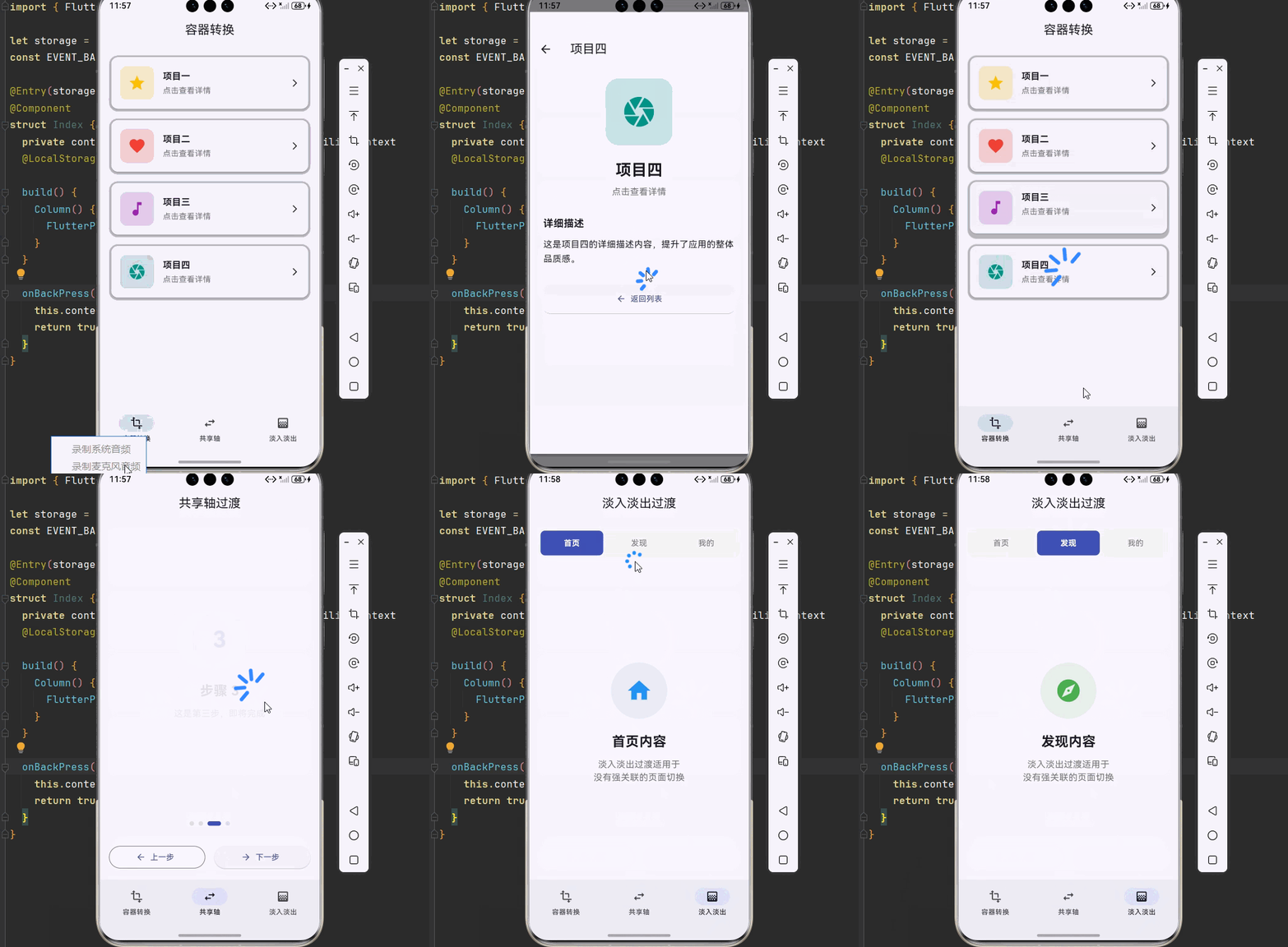
下面是一个完整的流畅过渡动画系统示例:
dart
import 'package:flutter/material.dart';
import 'package:animations/animations.dart';
void main() {
runApp(const AnimationDemoApp());
}
class AnimationDemoApp extends StatelessWidget {
const AnimationDemoApp({super.key});
@override
Widget build(BuildContext context) {
return MaterialApp(
title: '过渡动画系统',
debugShowCheckedModeBanner: false,
theme: ThemeData(
colorScheme: ColorScheme.fromSeed(seedColor: Colors.indigo),
useMaterial3: true,
),
home: const MainPage(),
);
}
}
class MainPage extends StatefulWidget {
const MainPage({super.key});
@override
State<MainPage> createState() => _MainPageState();
}
class _MainPageState extends State<MainPage> {
int _currentIndex = 0;
final List<Widget> _pages = [
const ContainerTransformPage(),
const SharedAxisPage(),
const FadeThroughPage(),
];
@override
Widget build(BuildContext context) {
return Scaffold(
body: PageTransitionSwitcher(
duration: const Duration(milliseconds: 300),
transitionBuilder: (child, animation, secondaryAnimation) {
return FadeThroughTransition(
animation: animation,
secondaryAnimation: secondaryAnimation,
child: child,
);
},
child: _pages[_currentIndex],
),
bottomNavigationBar: NavigationBar(
selectedIndex: _currentIndex,
onDestinationSelected: (index) {
setState(() => _currentIndex = index);
},
destinations: const [
NavigationDestination(
icon: Icon(Icons.transform),
label: '容器转换',
),
NavigationDestination(
icon: Icon(Icons.swap_horiz),
label: '共享轴',
),
NavigationDestination(
icon: Icon(Icons.gradient),
label: '淡入淡出',
),
],
),
);
}
}
// ============ 容器转换页面 ============
class ContainerTransformPage extends StatelessWidget {
const ContainerTransformPage({super.key});
@override
Widget build(BuildContext context) {
return Scaffold(
appBar: AppBar(
title: const Text('容器转换'),
centerTitle: true,
),
body: ListView.builder(
padding: const EdgeInsets.all(16),
itemCount: _items.length,
itemBuilder: (context, index) {
final item = _items[index];
return Padding(
padding: const EdgeInsets.only(bottom: 12),
child: OpenContainer(
transitionDuration: const Duration(milliseconds: 500),
closedBuilder: (context, openContainer) {
return GestureDetector(
onTap: openContainer,
child: Card(
child: Padding(
padding: const EdgeInsets.all(16),
child: Row(
children: [
Container(
width: 60,
height: 60,
decoration: BoxDecoration(
color: item.color.withOpacity(0.2),
borderRadius: BorderRadius.circular(12),
),
child: Icon(item.icon, color: item.color, size: 32),
),
const SizedBox(width: 16),
Expanded(
child: Column(
crossAxisAlignment: CrossAxisAlignment.start,
children: [
Text(
item.title,
style: const TextStyle(
fontSize: 16,
fontWeight: FontWeight.bold,
),
),
const SizedBox(height: 4),
Text(
item.subtitle,
style: TextStyle(
color: Colors.grey.shade600,
fontSize: 14,
),
),
],
),
),
const Icon(Icons.arrow_forward_ios, size: 16),
],
),
),
),
);
},
openBuilder: (context, closeContainer) {
return DetailPage(item: item, onClose: closeContainer);
},
closedShape: RoundedRectangleBorder(
borderRadius: BorderRadius.circular(16),
),
closedColor: Colors.transparent,
openColor: Colors.white,
),
);
},
),
);
}
static final List<DemoItem> _items = [
DemoItem(
title: '项目一',
subtitle: '点击查看详情',
icon: Icons.star,
color: Colors.amber,
description: '这是项目一的详细描述内容,展示了容器转换动画的效果。',
),
DemoItem(
title: '项目二',
subtitle: '点击查看详情',
icon: Icons.favorite,
color: Colors.red,
description: '这是项目二的详细描述内容,卡片平滑展开为详情页面。',
),
DemoItem(
title: '项目三',
subtitle: '点击查看详情',
icon: Icons.music_note,
color: Colors.purple,
description: '这是项目三的详细描述内容,过渡动画流畅自然。',
),
DemoItem(
title: '项目四',
subtitle: '点击查看详情',
icon: Icons.camera,
color: Colors.teal,
description: '这是项目四的详细描述内容,提升了应用的整体品质感。',
),
];
}
// ============ 详情页面 ============
class DetailPage extends StatelessWidget {
final DemoItem item;
final VoidCallback onClose;
const DetailPage({
super.key,
required this.item,
required this.onClose,
});
@override
Widget build(BuildContext context) {
return Scaffold(
appBar: AppBar(
title: Text(item.title),
leading: IconButton(
icon: const Icon(Icons.arrow_back),
onPressed: onClose,
),
),
body: SingleChildScrollView(
padding: const EdgeInsets.all(24),
child: Column(
crossAxisAlignment: CrossAxisAlignment.start,
children: [
Center(
child: Container(
width: 120,
height: 120,
decoration: BoxDecoration(
color: item.color.withOpacity(0.2),
borderRadius: BorderRadius.circular(24),
),
child: Icon(item.icon, color: item.color, size: 64),
),
),
const SizedBox(height: 24),
Center(
child: Text(
item.title,
style: const TextStyle(
fontSize: 28,
fontWeight: FontWeight.bold,
),
),
),
const SizedBox(height: 8),
Center(
child: Text(
item.subtitle,
style: TextStyle(
color: Colors.grey.shade600,
fontSize: 16,
),
),
),
const SizedBox(height: 32),
const Text(
'详细描述',
style: TextStyle(
fontSize: 18,
fontWeight: FontWeight.bold,
),
),
const SizedBox(height: 12),
Text(
item.description,
style: const TextStyle(fontSize: 16, height: 1.6),
),
const SizedBox(height: 32),
SizedBox(
width: double.infinity,
child: ElevatedButton.icon(
onPressed: onClose,
icon: const Icon(Icons.arrow_back),
label: const Text('返回列表'),
style: ElevatedButton.styleFrom(
padding: const EdgeInsets.symmetric(vertical: 16),
shape: RoundedRectangleBorder(
borderRadius: BorderRadius.circular(12),
),
),
),
),
],
),
),
);
}
}
// ============ 共享轴页面 ============
class SharedAxisPage extends StatefulWidget {
const SharedAxisPage({super.key});
@override
State<SharedAxisPage> createState() => _SharedAxisPageState();
}
class _SharedAxisPageState extends State<SharedAxisPage> {
int _step = 0;
double _dragStartX = 0;
@override
Widget build(BuildContext context) {
return Scaffold(
appBar: AppBar(
title: const Text('共享轴过渡'),
centerTitle: true,
),
body: Column(
children: [
Expanded(
child: GestureDetector(
onHorizontalDragStart: (details) {
_dragStartX = details.globalPosition.dx;
},
onHorizontalDragEnd: (details) {
final dragEndX = details.primaryVelocity ?? 0;
if (dragEndX < -500 && _step < 3) {
setState(() => _step++);
} else if (dragEndX > 500 && _step > 0) {
setState(() => _step--);
}
},
child: PageTransitionSwitcher(
duration: const Duration(milliseconds: 400),
transitionBuilder: (child, animation, secondaryAnimation) {
return SharedAxisTransition(
animation: animation,
secondaryAnimation: secondaryAnimation,
transitionType: SharedAxisTransitionType.horizontal,
child: child,
);
},
child: _buildStepPage(_step),
),
),
),
_buildStepIndicator(),
_buildNavigationButtons(),
],
),
);
}
Widget _buildStepPage(int step) {
return Container(
key: ValueKey(step),
padding: const EdgeInsets.all(24),
child: Column(
mainAxisAlignment: MainAxisAlignment.center,
children: [
Container(
width: 100,
height: 100,
decoration: BoxDecoration(
color: Colors.indigo.withOpacity(0.1),
shape: BoxShape.circle,
),
child: Center(
child: Text(
'${step + 1}',
style: const TextStyle(
fontSize: 40,
fontWeight: FontWeight.bold,
color: Colors.indigo,
),
),
),
),
const SizedBox(height: 24),
Text(
'步骤 ${step + 1}',
style: const TextStyle(
fontSize: 24,
fontWeight: FontWeight.bold,
),
),
const SizedBox(height: 12),
Text(
_getStepDescription(step),
textAlign: TextAlign.center,
style: TextStyle(
color: Colors.grey.shade600,
fontSize: 16,
),
),
],
),
);
}
String _getStepDescription(int step) {
switch (step) {
case 0:
return '这是第一步,向右滑动进入下一步';
case 1:
return '这是第二步,继续探索更多功能';
case 2:
return '这是第三步,即将完成';
case 3:
return '恭喜!您已完成所有步骤';
default:
return '';
}
}
Widget _buildStepIndicator() {
return Padding(
padding: const EdgeInsets.symmetric(vertical: 16),
child: Row(
mainAxisAlignment: MainAxisAlignment.center,
children: List.generate(4, (index) {
return Container(
margin: const EdgeInsets.symmetric(horizontal: 4),
width: _step == index ? 24 : 8,
height: 8,
decoration: BoxDecoration(
color: _step == index ? Colors.indigo : Colors.grey.shade300,
borderRadius: BorderRadius.circular(4),
),
);
}),
),
);
}
Widget _buildNavigationButtons() {
return Padding(
padding: const EdgeInsets.all(16),
child: Row(
children: [
if (_step > 0)
Expanded(
child: OutlinedButton.icon(
onPressed: () => setState(() => _step--),
icon: const Icon(Icons.arrow_back),
label: const Text('上一步'),
),
),
if (_step > 0) const SizedBox(width: 16),
Expanded(
child: ElevatedButton.icon(
onPressed: _step < 3
? () => setState(() => _step++)
: () => setState(() => _step = 0),
icon: Icon(_step < 3 ? Icons.arrow_forward : Icons.refresh),
label: Text(_step < 3 ? '下一步' : '重新开始'),
),
),
],
),
);
}
}
// ============ 淡入淡出页面 ============
class FadeThroughPage extends StatefulWidget {
const FadeThroughPage({super.key});
@override
State<FadeThroughPage> createState() => _FadeThroughPageState();
}
class _FadeThroughPageState extends State<FadeThroughPage> {
int _selectedTab = 0;
@override
Widget build(BuildContext context) {
return Scaffold(
appBar: AppBar(
title: const Text('淡入淡出过渡'),
centerTitle: true,
),
body: Column(
children: [
_buildTabBar(),
Expanded(
child: PageTransitionSwitcher(
duration: const Duration(milliseconds: 300),
transitionBuilder: (child, animation, secondaryAnimation) {
return FadeThroughTransition(
animation: animation,
secondaryAnimation: secondaryAnimation,
child: child,
);
},
child: _buildTabContent(_selectedTab),
),
),
],
),
);
}
Widget _buildTabBar() {
return Container(
margin: const EdgeInsets.all(16),
decoration: BoxDecoration(
color: Colors.grey.shade100,
borderRadius: BorderRadius.circular(12),
),
child: Row(
children: List.generate(3, (index) {
return Expanded(
child: GestureDetector(
onTap: () => setState(() => _selectedTab = index),
child: AnimatedContainer(
duration: const Duration(milliseconds: 200),
margin: const EdgeInsets.all(4),
padding: const EdgeInsets.symmetric(vertical: 12),
decoration: BoxDecoration(
color: _selectedTab == index ? Colors.indigo : Colors.transparent,
borderRadius: BorderRadius.circular(8),
),
child: Text(
['首页', '发现', '我的'][index],
textAlign: TextAlign.center,
style: TextStyle(
color: _selectedTab == index ? Colors.white : Colors.grey.shade600,
fontWeight: _selectedTab == index ? FontWeight.bold : FontWeight.normal,
),
),
),
),
);
}),
),
);
}
Widget _buildTabContent(int index) {
final icons = [Icons.home, Icons.explore, Icons.person];
final titles = ['首页内容', '发现内容', '我的内容'];
final colors = [Colors.blue, Colors.green, Colors.orange];
return Container(
key: ValueKey(index),
padding: const EdgeInsets.all(24),
child: Column(
mainAxisAlignment: MainAxisAlignment.center,
children: [
Container(
width: 100,
height: 100,
decoration: BoxDecoration(
color: colors[index].withOpacity(0.1),
shape: BoxShape.circle,
),
child: Icon(icons[index], size: 48, color: colors[index]),
),
const SizedBox(height: 24),
Text(
titles[index],
style: const TextStyle(
fontSize: 24,
fontWeight: FontWeight.bold,
),
),
const SizedBox(height: 12),
Text(
'淡入淡出过渡适用于\n没有强关联的页面切换',
textAlign: TextAlign.center,
style: TextStyle(
color: Colors.grey.shade600,
fontSize: 16,
),
),
],
),
);
}
}
// ============ 数据模型 ============
class DemoItem {
final String title;
final String subtitle;
final IconData icon;
final Color color;
final String description;
const DemoItem({
required this.title,
required this.subtitle,
required this.icon,
required this.color,
required this.description,
});
}🏆 六、最佳实践与注意事项
⚠️ 6.1 性能优化
避免过度使用:过渡动画应该适度使用,不要每个交互都添加动画。
控制时长:动画时长建议在 200-500ms 之间,过长会影响用户体验。
使用 ValueKey:在 PageTransitionSwitcher 中使用 ValueKey 确保正确的页面切换。
🔐 6.2 用户体验注意事项
一致性:整个应用使用统一的过渡动画风格。
可预测性:过渡动画应该让用户能够预测结果。
可中断性:允许用户中断动画,直接跳转到目标状态。
📱 6.3 OpenHarmony 平台特殊说明
原生支持:animations 库在 OpenHarmony 上完全支持。
性能表现:过渡动画在 OpenHarmony 上运行流畅。
无额外配置:不需要任何平台特定的配置。
📌 七、总结
本文通过一个完整的流畅过渡动画系统案例,深入讲解了 animations 第三方库的使用方法与最佳实践:
容器转换:使用 OpenContainer 实现列表到详情的平滑过渡。
共享轴过渡:使用 SharedAxisTransition 实现步骤向导等场景。
淡入淡出:使用 FadeThroughTransition 实现标签页切换。
组合使用:在底部导航中使用 PageTransitionSwitcher 统一管理过渡。
掌握这些技巧,你就能构建出专业级的过渡动画效果,大大提升应用的品质感。