改写gtk4-demo的例子程序sliding_puzzle拼图游戏
在openSUSE-Leap-15.6-DVD-x86_64中改写gtk4-demo的例子程序sliding_puzzle拼图游戏
一、安装gtk4-demo
应用程序------工具------终端
ruhong@localhost:~> su -
密码:
localhost:~ # zypper install gtk4-devel-4.12.4-150600.1.5.x86_64 gtk4-devel-tools-4.12.4-150600.1.5.x86_64
从普通用户ruhong切换到root用户安装gtk4图形工具包
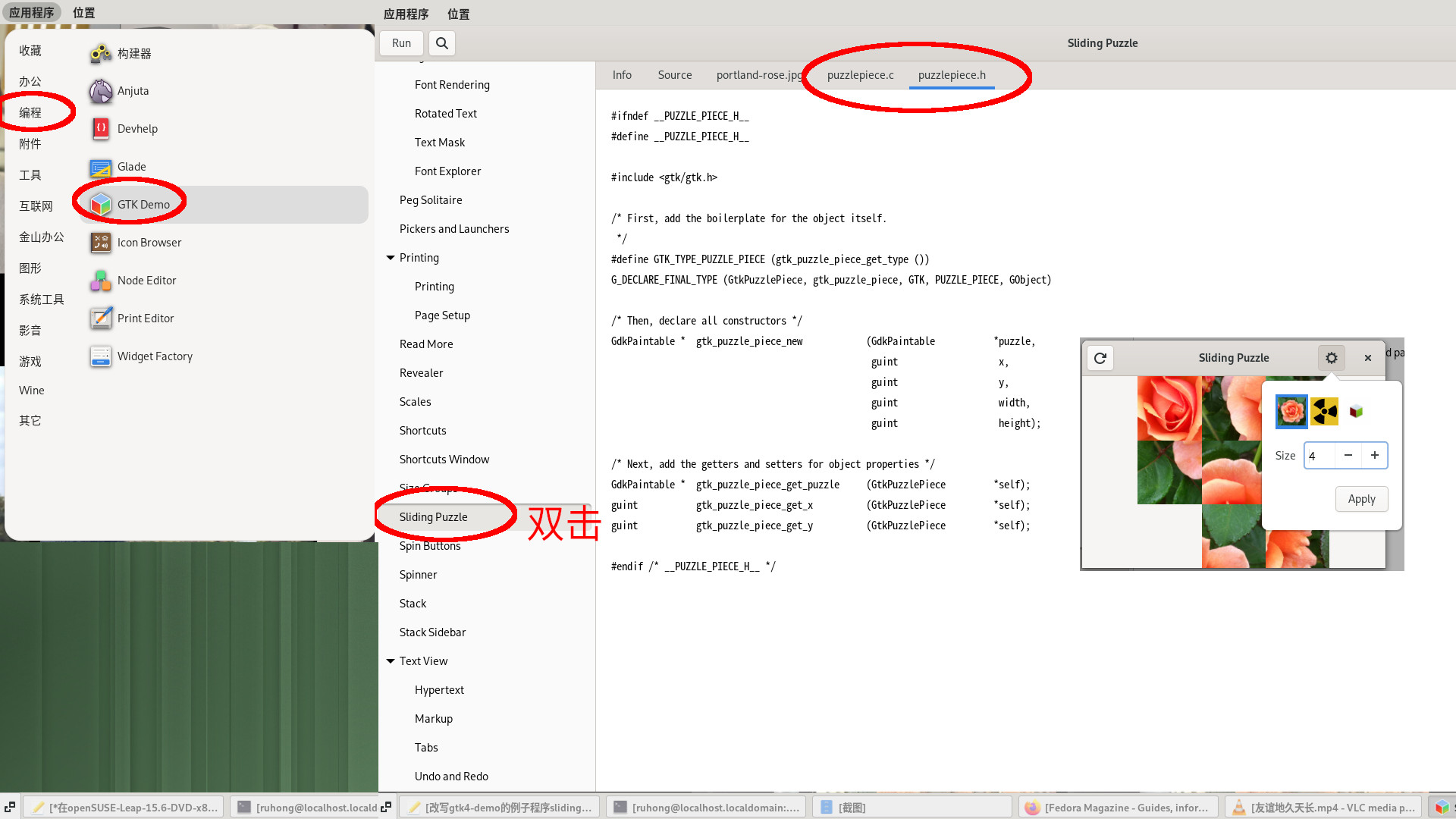
应用程序------编程------GTK Demo
双击sliding puzzle运行程序使用鼠标点击就可以开始游戏了,单击右上角的齿轮图标------选择图片------单击加号图标,将图片切割成3X3、4X4或者5X5------apply开始游戏,单击左上角是重新开始游戏,当你完成拼图后会自动补上最后缺失的小图片并响一声。
二、改写source.c
应用程序------工具------终端,不用切换到root,保持普通用户即可
ruhong@localhost:~> mkdir sliding_puzzle
ruhong@localhost:~> cd sliding_puzzle
ruhong@localhost:~/sliding_puzzle> touch source.c puzzlepiece.c puzzlepiece.h
ruhong@localhost:~/sliding_puzzle> gedit puzzlepiece.h
ruhong@localhost:~/sliding_puzzle> gedit puzzlepiece.c
使用文本编辑器gedit打开puzzlepiece.h,单击puzzlepiece.h标签卡,复制GTK Demo中puzzlepiece.h的代码内容,保持原样保存,不用修改,对于puzzlepiece.c也是同样操作
ruhong@localhost:~/sliding_puzzle> gedit source.c
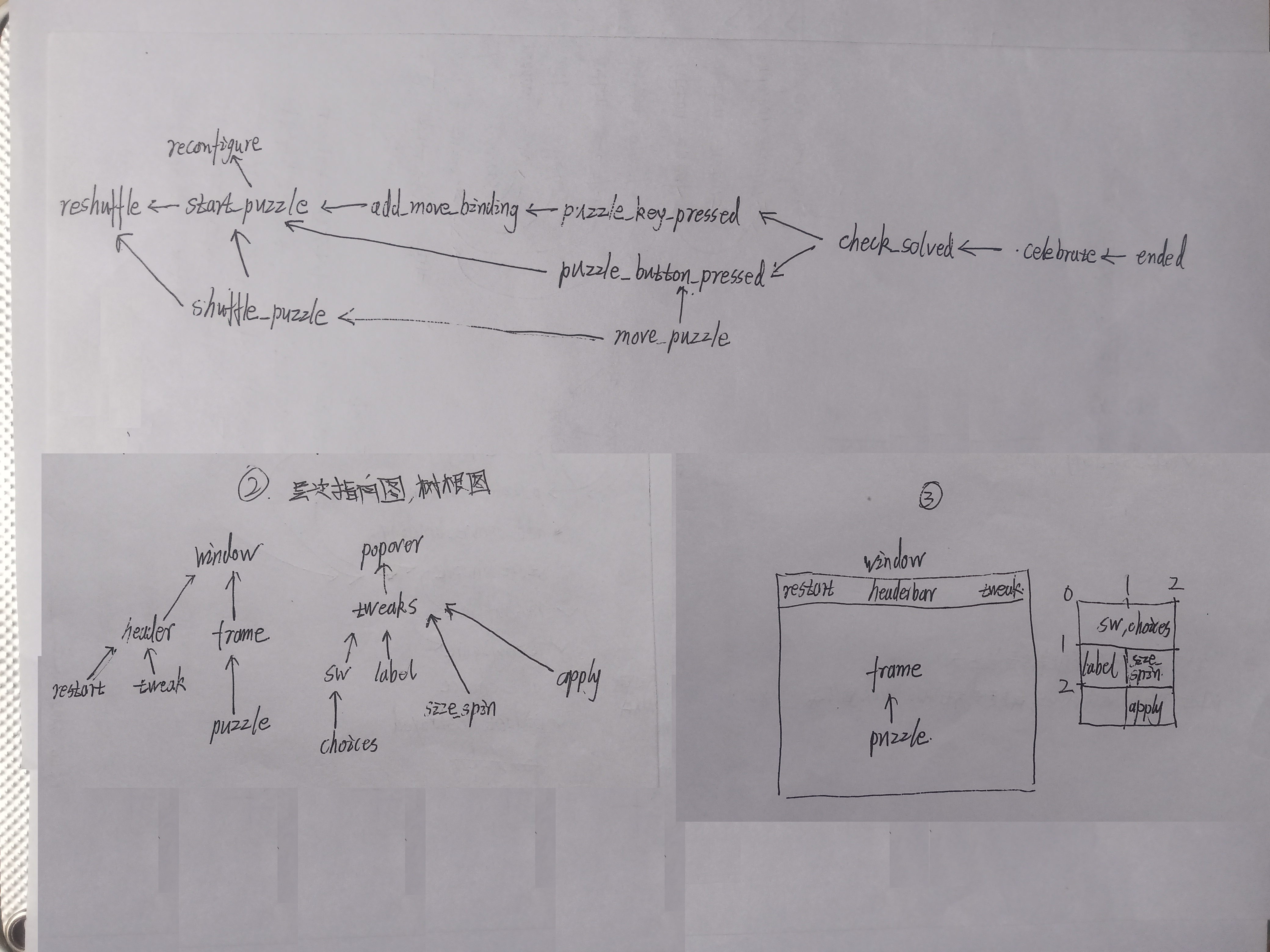
使用文本编辑器gedit打开source.c,复制以下提供修改过的内容
c
/*
Sliding Puzzle
This demo demonstrates how to use gestures and paintables to create a small sliding puzzle game.
*/

#include <gtk/gtk.h>
#include <vlc/vlc.h>

/* Include the header for the puzzle piece */
#include "puzzlepiece.h"
/* #include "paintable.h" */


static GtkWidget *window = NULL;
static GtkWidget *frame = NULL;
static GtkWidget *choices = NULL;
static GtkWidget *size_spin = NULL;
static GdkPaintable *puzzle = NULL;
static GdkPaintable *puzzle02 = NULL;
static GdkPaintable *puzzle03 = NULL;

static gboolean solved = TRUE;
static guint width = 3;
static guint height = 3;
static guint pos_x;
static guint pos_y;

static void
ended (GObject *object)
{
	g_object_unref (object);
}

static void
celebrate (gboolean win)
{
	GtkMediaStream *stream;

	if (win)
	stream = gtk_media_file_new_for_filename ("/home/ruhong/sliding_puzzle/complete.oga");
	gtk_media_stream_set_volume (stream, 1.0);
	gtk_media_stream_play (stream);

	g_signal_connect( stream, "notify::ended", G_CALLBACK( ended ), NULL );
}

static gboolean
move_puzzle (GtkWidget *grid,
             int        dx,
             int        dy)
{
  GtkWidget *pos, *next;
  GdkPaintable *piece;
  guint next_x, next_y;

  /* We don't move anything if the puzzle is solved */
  if (solved)
    return FALSE;

  /* Return FALSE if we can't move to where the call
   * wants us to move.
   */
  if ((dx < 0 && pos_x < -dx) ||
      dx + pos_x >= width ||
      (dy < 0 && pos_y < -dy) ||
      dy + pos_y >= height)
    return FALSE;

  /* Compute the new position */
  next_x = pos_x + dx;
  next_y = pos_y + dy;

  /* Get the current and next image */
  pos = gtk_grid_get_child_at (GTK_GRID (grid), pos_x, pos_y);
  next = gtk_grid_get_child_at (GTK_GRID (grid), next_x, next_y);

  /* Move the displayed piece. */
  piece = gtk_picture_get_paintable (GTK_PICTURE (next));
  gtk_picture_set_paintable (GTK_PICTURE (pos), piece);
  gtk_picture_set_paintable (GTK_PICTURE (next), NULL);

  /* Update the current position */
  pos_x = next_x;
  pos_y = next_y;

  /* Return TRUE because we successfully moved the piece */
  return TRUE;
}

static void
shuffle_puzzle (GtkWidget *grid)
{
  guint i, n_steps;

  /* Do this many random moves */
  n_steps = width * height * 50;

  for (i = 0; i < n_steps; i++)
    {
      /* Get a random number for the direction to move in */
      switch (g_random_int_range (0, 4))
        {
        case 0:
          /* left */
          move_puzzle (grid, -1, 0);
          break;

        case 1:
          /* up */
          move_puzzle (grid, 0, -1);
          break;

        case 2:
          /* right */
          move_puzzle (grid, 1, 0);
          break;

        case 3:
          /* down */
          move_puzzle (grid, 0, 1);
          break;

        default:
          g_assert_not_reached ();
          continue;
        }
    }
}

static gboolean
check_solved (GtkWidget *grid)
{
  GtkWidget *picture;
  GdkPaintable *piece;
  guint x, y;

  /* Nothing to check if the puzzle is already solved */
  if (solved)
    return TRUE;

  /* If the empty cell isn't in the bottom right,
   * the puzzle is obviously not solved */
  if (pos_x != width - 1 ||
      pos_y != height - 1)
    return FALSE;

  /* Check that all pieces are in the right position */
  for (y = 0; y < height; y++)
    {
      for (x = 0; x < width; x++)
        {
          picture = gtk_grid_get_child_at (GTK_GRID (grid), x, y);
          piece = gtk_picture_get_paintable (GTK_PICTURE (picture));

          /* empty cell */
          if (piece == NULL)
            continue;

          if (gtk_puzzle_piece_get_x (GTK_PUZZLE_PIECE (piece)) != x ||
              gtk_puzzle_piece_get_y (GTK_PUZZLE_PIECE (piece)) != y)
            return FALSE;
        }
    }

  /* We solved the puzzle!
   */
  solved = TRUE;

  /* Fill the empty cell to show that we're done.
   */
  picture = gtk_grid_get_child_at (GTK_GRID (grid), 0, 0);
  piece = gtk_picture_get_paintable (GTK_PICTURE (picture));

  piece = gtk_puzzle_piece_new (gtk_puzzle_piece_get_puzzle (GTK_PUZZLE_PIECE (piece)),
                                pos_x, pos_y,
                                width, height);
  picture = gtk_grid_get_child_at (GTK_GRID (grid), pos_x, pos_y);
  gtk_picture_set_paintable (GTK_PICTURE (picture), piece);

  celebrate (TRUE);

  return TRUE;
}

static gboolean
puzzle_key_pressed (GtkWidget *grid,
                    GVariant  *args,
                    gpointer   unused)
{
  int dx, dy;

  g_variant_get (args, "(ii)", &dx, &dy);

  if (!move_puzzle (grid, dx, dy))
    {
      /* Make the error sound and then return TRUE.
       * We handled this key, even though we didn't
       * do anything to the puzzle.
       */
      gtk_widget_error_bell (grid);
      return TRUE;
    }

  check_solved (grid);

  return TRUE;
}

static void
puzzle_button_pressed (GtkGestureClick *gesture,
                       int              n_press,
                       double           x,
                       double           y,
                       GtkWidget       *grid)
{
  GtkWidget *child;
  int l, t, i;
  int pos;

  child = gtk_widget_pick (grid, x, y, GTK_PICK_DEFAULT);

  if (!child)
    {
      gtk_widget_error_bell (grid);
      return;
    }

  gtk_grid_query_child (GTK_GRID (grid), child, &l, &t, NULL, NULL);

  if (l == pos_x && t == pos_y)
    {
      gtk_widget_error_bell (grid);
    }
  else if (l == pos_x)
    {
      pos = pos_y;
      for (i = t; i < pos; i++)
        {
          if (!move_puzzle (grid, 0, -1))
            gtk_widget_error_bell (grid);
        }
      for (i = pos; i < t; i++)
        {
          if (!move_puzzle (grid, 0, 1))
            gtk_widget_error_bell (grid);
        }
    }
  else if (t == pos_y)
    {
      pos = pos_x;
      for (i = l; i < pos; i++)
        {
          if (!move_puzzle (grid, -1, 0))
            gtk_widget_error_bell (grid);
        }
      for (i = pos; i < l; i++)
        {
          if (!move_puzzle (grid, 1, 0))
            gtk_widget_error_bell (grid);
        }
    }
  else
    {
      gtk_widget_error_bell (grid);
    }

  check_solved (grid);
}

static void
add_move_binding (GtkShortcutController *controller,
                  guint                  keyval,
                  guint                  kp_keyval,
                  int                    dx,
                  int                    dy)
{
  GtkShortcut *shortcut;

  shortcut = gtk_shortcut_new_with_arguments (
                 gtk_alternative_trigger_new (gtk_keyval_trigger_new (keyval, 0),
                                              gtk_keyval_trigger_new (kp_keyval, 0)),
                 gtk_callback_action_new (puzzle_key_pressed, NULL, NULL),
                 "(ii)", dx, dy);
  gtk_shortcut_controller_add_shortcut (controller, shortcut);
}

static void
start_puzzle (GdkPaintable *paintable)
{
  GtkWidget *picture, *grid;
  GtkEventController *controller;
  guint x, y;
  float aspect_ratio;

  /* Create a new grid */
  grid = gtk_grid_new ();
  gtk_widget_set_focusable (grid, TRUE);
  gtk_aspect_frame_set_child (GTK_ASPECT_FRAME (frame), grid);
  aspect_ratio = gdk_paintable_get_intrinsic_aspect_ratio (paintable);
  if (aspect_ratio == 0.0)
    aspect_ratio = 1.0;
  gtk_aspect_frame_set_ratio (GTK_ASPECT_FRAME (frame), aspect_ratio);
  gtk_aspect_frame_set_obey_child (GTK_ASPECT_FRAME (frame), FALSE);

  /* Add shortcuts so people can use the arrow
   * keys to move the puzzle
   */
  controller = gtk_shortcut_controller_new ();
  gtk_shortcut_controller_set_scope (GTK_SHORTCUT_CONTROLLER (controller),
                                     GTK_SHORTCUT_SCOPE_LOCAL);
  add_move_binding (GTK_SHORTCUT_CONTROLLER (controller),
                    GDK_KEY_Left, GDK_KEY_KP_Left,
                    -1, 0);
  add_move_binding (GTK_SHORTCUT_CONTROLLER (controller),
                    GDK_KEY_Right, GDK_KEY_KP_Right,
                    1, 0);
  add_move_binding (GTK_SHORTCUT_CONTROLLER (controller),
                    GDK_KEY_Up, GDK_KEY_KP_Up,
                    0, -1);
  add_move_binding (GTK_SHORTCUT_CONTROLLER (controller),
                    GDK_KEY_Down, GDK_KEY_KP_Down,
                    0, 1);
  gtk_widget_add_controller (GTK_WIDGET (grid), controller);

  controller = GTK_EVENT_CONTROLLER (gtk_gesture_click_new ());
  g_signal_connect (controller, "pressed",
                    G_CALLBACK (puzzle_button_pressed),
                    grid);
  gtk_widget_add_controller (GTK_WIDGET (grid), controller);

  /* Make sure the cells have equal size */
  gtk_grid_set_row_homogeneous (GTK_GRID (grid), TRUE);
  gtk_grid_set_column_homogeneous (GTK_GRID (grid), TRUE);

  /* Reset the variables */
  solved = FALSE;
  pos_x = width - 1;
  pos_y = height - 1;

  /* add a picture for every cell */
  for (y = 0; y < height; y++)
    {
      for (x = 0; x < width; x++)
        {
          GdkPaintable *piece;

          /* Don't paint anything for the lsiding part of the video */
          if (x == pos_x && y == pos_y)
            piece = NULL;
          else
            piece = gtk_puzzle_piece_new (paintable,
                                          x, y,
                                          width, height);
          picture = gtk_picture_new_for_paintable (piece);
          gtk_picture_set_content_fit (GTK_PICTURE (picture), GTK_CONTENT_FIT_FILL);
          gtk_grid_attach (GTK_GRID (grid),
                           picture,
                           x, y,
                           1, 1);
        }
    }

  shuffle_puzzle (grid);
}

static void
reshuffle (void)
{
  GtkWidget *grid;

  if (solved)
    {
      start_puzzle (puzzle);
      grid = gtk_aspect_frame_get_child (GTK_ASPECT_FRAME (frame));
    }
  else
    {
      grid = gtk_aspect_frame_get_child (GTK_ASPECT_FRAME (frame));
      shuffle_puzzle (grid);
    }
  gtk_widget_grab_focus (grid);
}

static void
reconfigure (void)
{
  GtkWidget *popover;
  GtkWidget *grid;
  GtkWidget *child;
  GtkWidget *image;
  GList *selected;

  width = height = gtk_spin_button_get_value_as_int (GTK_SPIN_BUTTON (size_spin));

  selected = gtk_flow_box_get_selected_children (GTK_FLOW_BOX (choices));
  if (selected == NULL)
    child = gtk_widget_get_first_child (choices);
  else
    {
      child = selected->data;
      g_list_free (selected);
    }

  image = gtk_flow_box_child_get_child (GTK_FLOW_BOX_CHILD (child));
  puzzle = gtk_image_get_paintable (GTK_IMAGE (image));

  start_puzzle (puzzle);
  popover = gtk_widget_get_ancestor (size_spin, GTK_TYPE_POPOVER);
  gtk_popover_popdown (GTK_POPOVER (popover));
  grid = gtk_aspect_frame_get_child (GTK_ASPECT_FRAME (frame));
  gtk_widget_grab_focus (grid);
}

static void
add_choice (GtkWidget    *container,
            GdkPaintable *paintable)
{
  GtkWidget *icon;

  icon = gtk_image_new_from_paintable (paintable);
  gtk_image_set_icon_size (GTK_IMAGE (icon), GTK_ICON_SIZE_LARGE);

  gtk_flow_box_insert (GTK_FLOW_BOX (container), icon, -1);
}

static void
widget_destroyed (gpointer data,
                  GObject *widget)
{
  if (data)
    *(gpointer *) data = NULL;
}

static void
activate (GtkApplication *app,
          gpointer        user_data)
{
      GtkWidget *header;
      GtkWidget *restart;
      GtkWidget *tweak;
      GtkWidget *popover;
      GtkWidget *tweaks;
      GtkWidget *apply;
      GtkWidget *label;
      GtkWidget *sw;
/*       GtkMediaStream *media;		*/

      window = gtk_application_window_new (app);
      gtk_window_set_title (GTK_WINDOW (window), "Sliding Puzzle");
      gtk_window_set_default_size (GTK_WINDOW (window), 800, 600);
      g_object_weak_ref (G_OBJECT (window), widget_destroyed, &window);

      header = gtk_header_bar_new ();
      gtk_window_set_titlebar (GTK_WINDOW (window), header);

      restart = gtk_button_new_from_icon_name ("view-refresh-symbolic");
      g_signal_connect (restart, "clicked", G_CALLBACK (reshuffle), NULL);
      gtk_header_bar_pack_start (GTK_HEADER_BAR (header), restart);

      popover = gtk_popover_new ();
      tweak = gtk_menu_button_new ();
      gtk_menu_button_set_popover (GTK_MENU_BUTTON (tweak), popover);
      gtk_menu_button_set_icon_name (GTK_MENU_BUTTON (tweak), "emblem-system-symbolic");
      gtk_header_bar_pack_end (GTK_HEADER_BAR (header), tweak);

      tweaks = gtk_grid_new ();
      gtk_popover_set_child (GTK_POPOVER (popover), tweaks);
      gtk_grid_set_row_spacing (GTK_GRID (tweaks), 10);
      gtk_grid_set_column_spacing (GTK_GRID (tweaks), 10);
      gtk_widget_set_margin_start (tweaks, 10);
      gtk_widget_set_margin_end (tweaks, 10);
      gtk_widget_set_margin_top (tweaks, 10);
      gtk_widget_set_margin_bottom (tweaks, 10);

      choices = gtk_flow_box_new ();
      gtk_widget_add_css_class (choices, "view");
      puzzle = GDK_PAINTABLE (gdk_texture_new_from_filename ("/home/ruhong/sliding_puzzle/picture01.jpg", NULL));
      add_choice (choices, puzzle);
      puzzle02 = GDK_PAINTABLE (gdk_texture_new_from_filename ("/home/ruhong/sliding_puzzle/picture02.jpg", NULL));
      add_choice (choices, puzzle02);
      puzzle03 = GDK_PAINTABLE (gdk_texture_new_from_filename ("/home/ruhong/sliding_puzzle/picture03.jpg", NULL));
      add_choice (choices, puzzle03);
/*
      add_choice (choices, nuclear_animation_new (TRUE));
      media = gtk_media_file_new_for_resource ("/images/gtk-logo.webm");
      gtk_media_stream_set_loop (media, TRUE);
      gtk_media_stream_set_muted (media, TRUE);
      gtk_media_stream_play (media);
      add_choice (choices, GDK_PAINTABLE (media));
*/

      sw = gtk_scrolled_window_new ();
      gtk_scrolled_window_set_child (GTK_SCROLLED_WINDOW (sw), choices);
      gtk_grid_attach (GTK_GRID (tweaks), sw, 0, 0, 2, 1);

      label = gtk_label_new ("Size");
      gtk_label_set_xalign (GTK_LABEL (label), 0.0);
      gtk_grid_attach (GTK_GRID (tweaks), label, 0, 1, 1, 1);

      size_spin = gtk_spin_button_new_with_range (2, 10, 1);
      gtk_spin_button_set_value (GTK_SPIN_BUTTON (size_spin), width);
      gtk_grid_attach (GTK_GRID (tweaks), size_spin, 1, 1, 1, 1);

      apply = gtk_button_new_with_label ("Apply");
      gtk_widget_set_halign (apply, GTK_ALIGN_END);
      gtk_grid_attach (GTK_GRID (tweaks), apply, 1, 2, 1, 1);
      g_signal_connect (apply, "clicked", G_CALLBACK (reconfigure), NULL);

      frame = gtk_aspect_frame_new (0.5, 0.5, (float) gdk_paintable_get_intrinsic_aspect_ratio (puzzle), FALSE);
      gtk_window_set_child (GTK_WINDOW (window), frame);

      gtk_widget_set_visible (window, TRUE);

      start_puzzle (puzzle);
}

int
main (int    argc,
      char **argv)
{
  GtkApplication *app;
  int status;

  app = gtk_application_new ("org.gtk.example", G_APPLICATION_DEFAULT_FLAGS);
  g_signal_connect (app, "activate", G_CALLBACK (activate), NULL);
  status = g_application_run (G_APPLICATION (app), argc, argv);
  g_object_unref (app);

  return status;
}
将声音文件complete.oga和三张图片picture01.jpg改为为绝对路径
stream = gtk_media_file_new_for_filename ("/home/ruhong/sliding_puzzle/complete.oga");
puzzle = GDK_PAINTABLE (gdk_texture_new_from_filename ("/home/ruhong/sliding_puzzle/picture01.jpg", NULL));
puzzle02 = GDK_PAINTABLE (gdk_texture_new_from_filename ("/home/ruhong/sliding_puzzle/picture02.jpg", NULL));
puzzle03 = GDK_PAINTABLE (gdk_texture_new_from_filename ("/home/ruhong/sliding_puzzle/picture03.jpg", NULL));
三、使用原作者的素材图片和声音文件
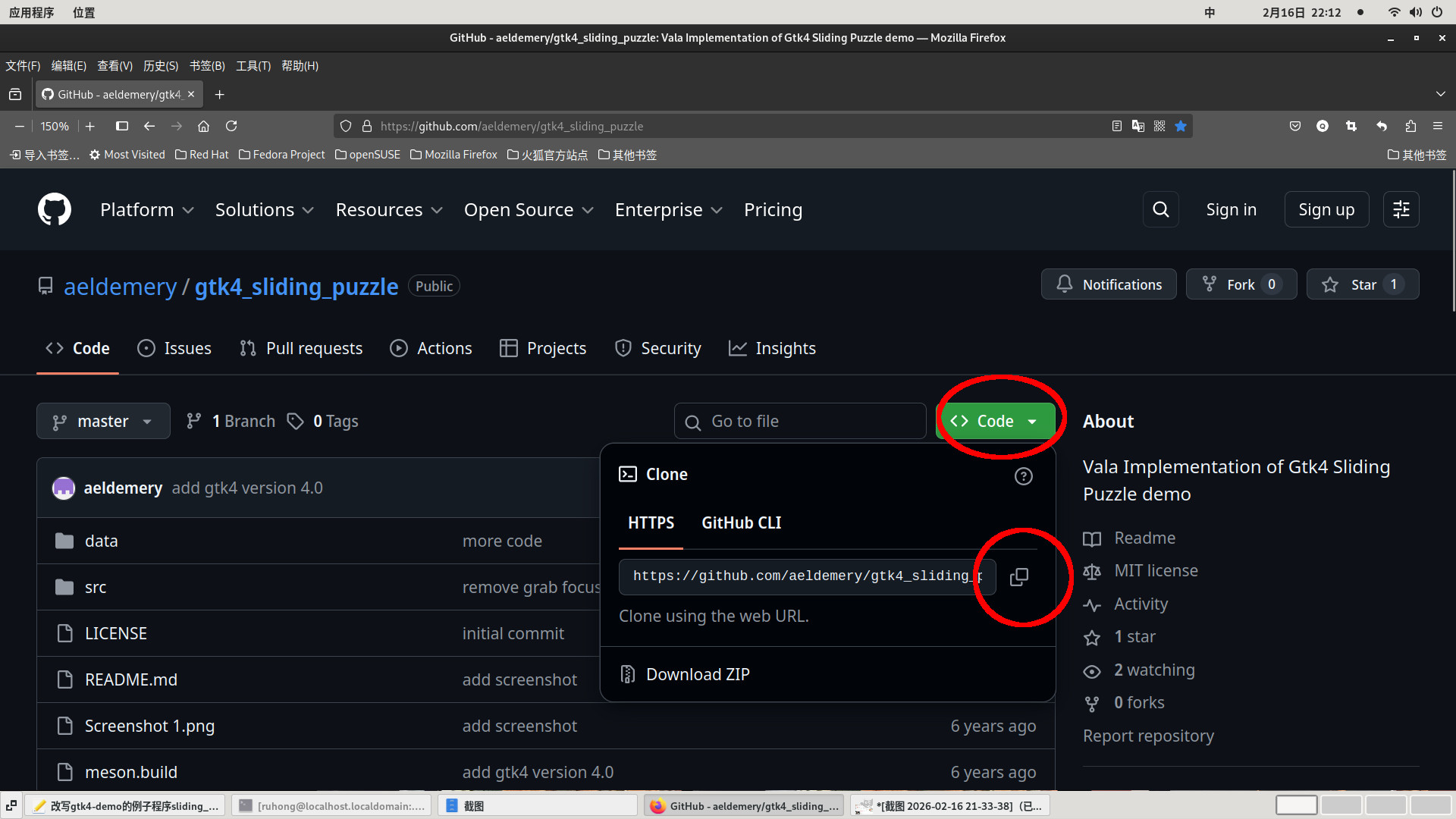
这个拼图游戏是来自于
https://github.com/aeldemery/gtk4_sliding_puzzle
单击code------复制git地址------回到自己的家目录------git克隆整个项目文件
ruhong@localhost:~/sliding_puzzle> cd /home/ruhong
ruhong@localhost:/home/ruhong> git clone https://github.com/aeldemery/gtk4_sliding_puzzle.git
正克隆到 'gtk4_sliding_puzzle'...
remote: Enumerating objects: 50, done.
remote: Counting objects: 100% (50/50), done.
remote: Compressing objects: 100% (34/34), done.
remote: Total 50 (delta 20), reused 46 (delta 16), pack-reused 0 (from 0)
接收对象中: 100% (50/50), 992.13 KiB | 737.00 KiB/s, 完成.
处理 delta 中: 100% (20/20), 完成.
ruhong@localhost:~> cd gtk4_sliding_puzzle/
ruhong@localhost:~/gtk4_sliding_puzzle> ls
data LICENSE meson.build README.md Screenshot 1.png src
ruhong@localhost:~/gtk4_sliding_puzzle> cd data/
ruhong@localhost:~/gtk4_sliding_puzzle/data> ls
distribution-linux.jpg linuxadminhero.jpg penguine.jpg
github.aeldemery.gtk4_sliding_puzzle.gresource.xml linux-penguin-3d-model.jpg portland-rose.jpg
进入文件夹gtk4_sliding_puzzle/data复制三张图片到/home/ruhong/sliding_puzzle/,并依次改名为picture01.jpg,这个过程可以使用鼠标操作,不用全靠命令行操作
ruhong@localhost:~/gtk4_sliding_puzzle/data> cp portland-rose.jpg distribution-linux.jpg penguine.jpg /home/ruhong/sliding_puzzle/
ruhong@localhost:~/gtk4_sliding_puzzle/data> cd /home/ruhong/sliding_puzzle/
ruhong@localhost:~/sliding_puzzle> ls
distribution-linux.jpg penguine.jpg portland-rose.jpg puzzlepiece.c puzzlepiece.h source.c
ruhong@localhost:~/sliding_puzzle> mv portland-rose.jpg picture01.jpg
ruhong@localhost:~/sliding_puzzle> mv distribution-linux.jpg picture02.jpg
ruhong@localhost:~/sliding_puzzle> mv penguine.jpg picture03.jpg
ruhong@localhost:~/sliding_puzzle> ls
picture01.jpg picture02.jpg picture03.jpg puzzlepiece.c puzzlepiece.h source.c
搜索本机系统中所有oga格式的声音文件,找到complete.oga和复制到/home/ruhong/sliding_puzzle中
ruhong@localhost:~/sliding_puzzle> locate .oga
/home/ruhong/sliding_puzzle/complete.oga
/usr/share/novnc/app/sounds/bell.oga
/usr/share/sounds/freedesktop/stereo/alarm-clock-elapsed.oga
...
/usr/share/sounds/freedesktop/stereo/complete.oga
...
ruhong@localhost:~/sliding_puzzle> cp /usr/share/sounds/freedesktop/stereo/complete.oga /home/ruhong/sliding_puzzle/
四、编译与测试
要用到编译C语言的gcc,先查看系统上是否已经安装,没有就要切换root安装
ruhong@localhost:~/sliding_puzzle> su -
密码:
localhost:~ # zypper install gcc
Loading repository data...
Reading installed packages...
'gcc' is already installed.
No update candidate for 'gcc-7-3.9.1.x86_64'. The highest available version is already installed.
Nothing to do.
ruhong@localhost:~/sliding_puzzle> gcc --version
gcc (SUSE Linux) 7.5.0
Copyright © 2017 Free Software Foundation, Inc.
This is free software; see the source for copying conditions. There is NO
warranty; not even for MERCHANTABILITY or FITNESS FOR A PARTICULAR PURPOSE.
ruhong@localhost:~/sliding_puzzle> pkg-config --list-all |grep gtk4
vte-2.91-gtk4 vte - VTE widget for GTK+ 4.0
gtk4-wayland GTK - GTK Graphical UI Library
gtk4-broadway GTK - GTK Graphical UI Library
gtk4-unix-print GTK - GTK Unix print support
gtk4-x11 GTK - GTK Graphical UI Library
gtk4 GTK - GTK Graphical UI Library
bash
ruhong@localhost:~/sliding_puzzle> gcc -g -Wall `pkg-config --cflags gtk4` puzzlepiece.c source.c `pkg-config --libs gtk4` -o source没有报错就会在当前目录产生source,输入./source运行一下,英文句号右斜杠
ruhong@localhost:~/sliding_puzzle> ./source
单击右上角的齿轮图标------单击减号图标,将图片切割成2X2,完成拼图后是否有响一声
五、使用数字图片
使用手机打开淘宝网,输入关键字"数字华容道",下载3X3、4X4、5X5的图片,用数据线将手机与电脑连接,将三个图片复制到电脑中,使用图片编辑软件gimp截取数字部分内容,例如截取好4X4的图片改名为picture02.jpg替换原来的picture02.jpg,看一下实际效果,因为淘宝的图片像素很少,在电脑中会显示空白的
右击4X4的原图片------打开方式------单击gimp------打开
工具------选择工具------矩形选择------选择数字部分
编辑------复制
文件------第二个新建------从剪贴板
文件------保存------名称输入picture02.jpg------保存------带我到导出对话框------选择目录为/home/ruhong/sliding_puzzle/------替换------导出
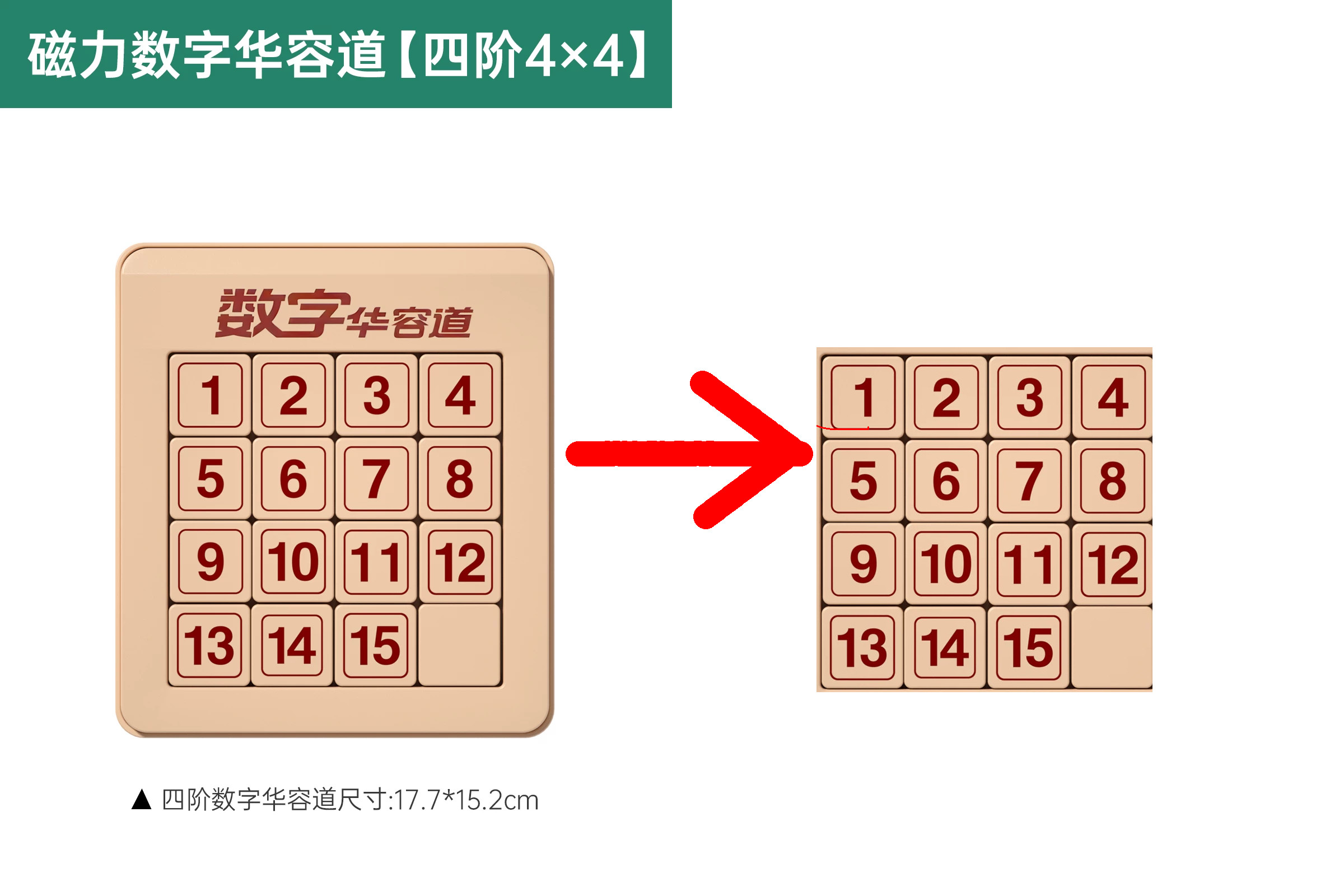
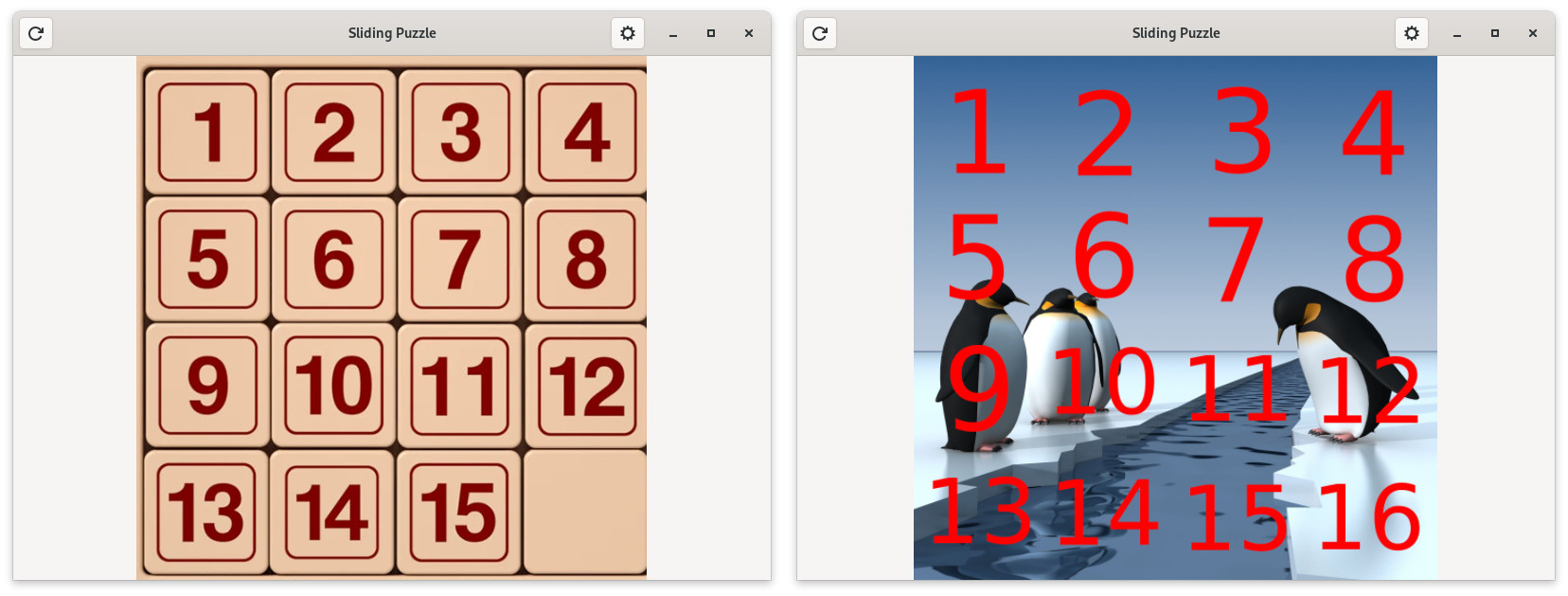
ruhong@localhost:~/sliding_puzzle> ./source
运行一下,看一下实际效果
也可以直接在图片上画上数字,例如在picture03.jpg画上16个数字,右击picture03.jpg------------打开方式------单击gimp------打开------图像带有嵌入的色彩配置文件------保持
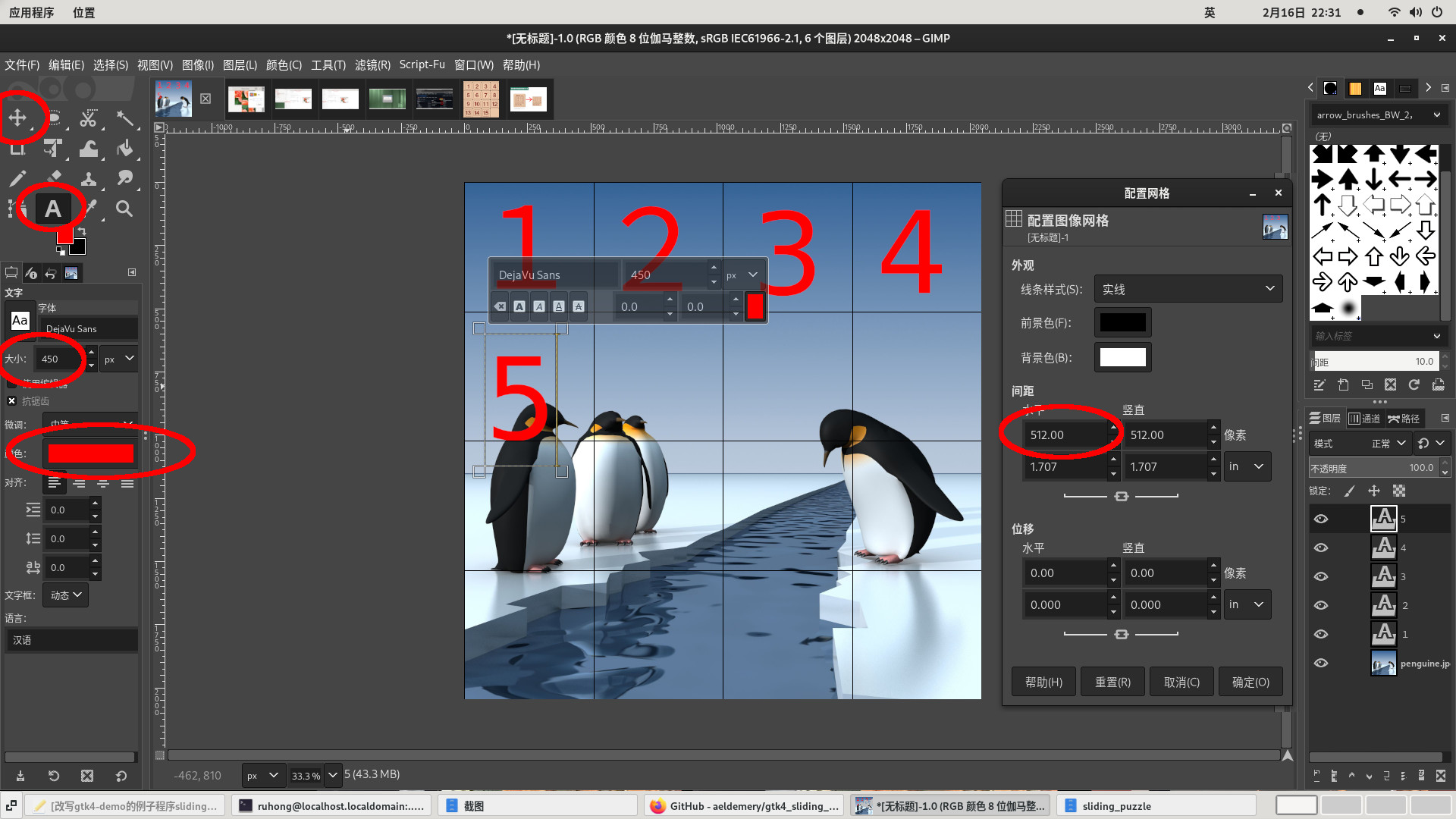
图像------图像属性------大小(像素)是2048X2048------用手机计算2048/4=512
图像------配置网格------间距水平,单击向上三角图标,将数值增加为512------确定
视图------显示网格
工具------文字------双击前景色选择红色------大小改为450------单击第一个小格------输入数字1------单击移动工具十字架图标------将数字移到小格的中间
单击文字工具A字母图标------单击第二个小格------输入数字2------单击移动工具十字架图标------将数字移到小格的中间
如此类推完成9个数字,将大小改为350,完成10到16的数字
文件------保存------名称输入picture03.jpg------保存------带我到导出对话框------选择目录为/home/ruhong/sliding_puzzle/------替换------导出
ruhong@localhost:~/sliding_puzzle> ./source
运行一下,看一下实际效果
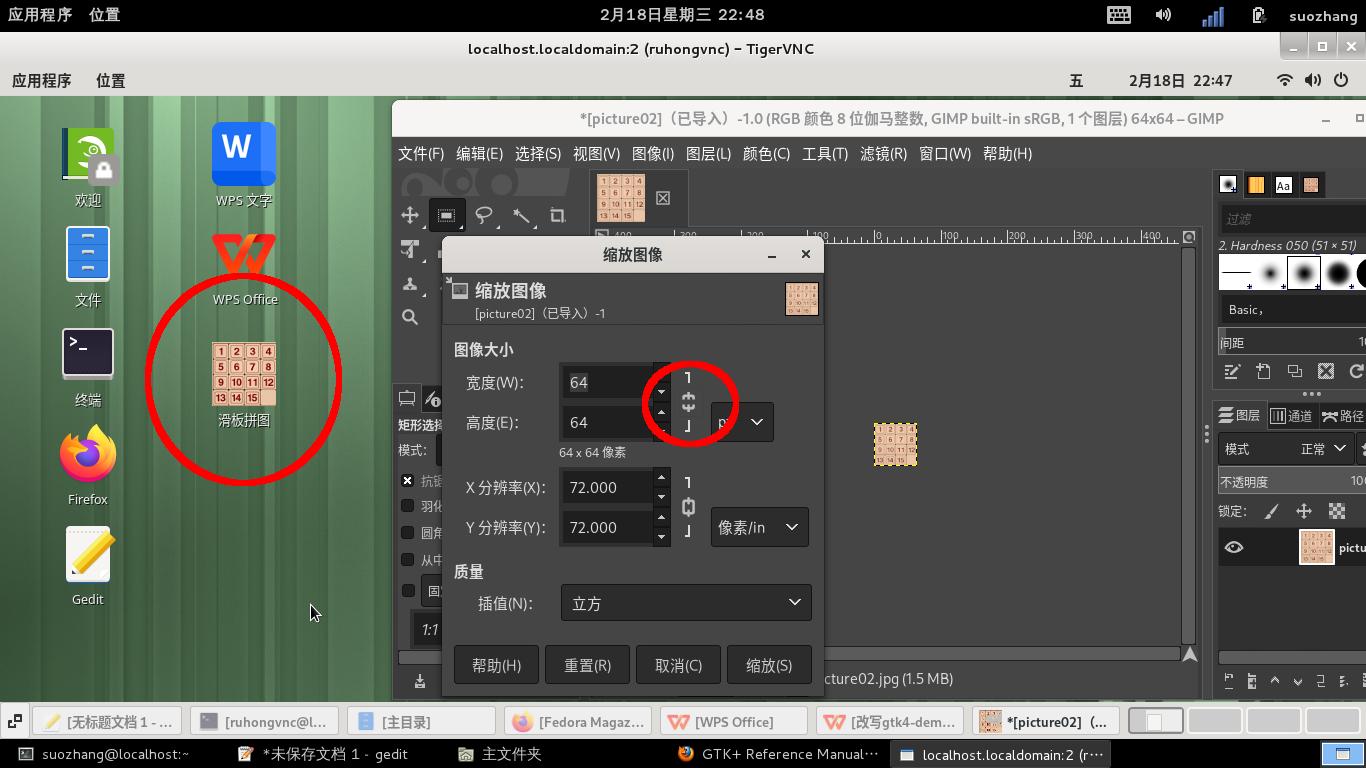
六、制作桌面文件sliding_puzzle.desktop和桌面图标sliding64x64.png
右击picture02.jpg------打开方式------gimp------打开
图像------缩放图像------单击解锁固定比例------宽度和高度都输入64------缩放
文件------另存为------保存文件夹为/home/ruhong/sliding_puzzle/------名称为sliding64x64.png------保存------带我到导出对话框------导出
ruhong@localhost:~/sliding_puzzle> cp /usr/share/applications/org.gnome.Chess.desktop sliding_puzzle.desktop
复制国际象棋游戏的桌面文件org.gnome.Chess.desktop并改名为sliding_puzzle.desktop
ruhong@localhost:~/sliding_puzzle> gedit sliding_puzzle.desktop
使用文本编辑器gedit打开修改成以下内容
Desktop Entry
Namezh_CN=滑板拼图
Name=Sliding
GenericNamezh_CN=滑板拼图游戏
GenericName=Sliding Game
Commentzh_CN=经典的单人滑板拼图益智游戏
Comment=The classic single-player skateboard puzzle game
Keywordszh_CN=game;strategy;游戏;策略;棋;
Keywords=game;strategy;
Version=1.0
Exec=/home/ruhong/sliding_puzzle/source %U
Terminal=false
Type=Application
Categories=GNOME;GTK;Game;BoardGame;
StartupNotify=true
Icon=/home/ruhong/sliding_puzzle/sliding64x64.png
MimeType=application/x-chess-pgn;
DBusActivatable=true
X-Purism-FormFactor=Workstation;Mobile;
ruhong@localhost:~/sliding_puzzle> cp sliding_puzzle.desktop ~/桌面/
ruhong@localhost:~/sliding_puzzle> ll ~/桌面/
总用量 76
-rwxr-xr-x 1 ruhong users 9777 2月 17 21:06 firefox.desktop
-rwxr-xr-x 1 ruhong users 13826 2月 17 21:06 org.gnome.gedit.desktop
-rwxr-xr-x 1 ruhong users 14991 2月 17 21:06 org.gnome.Nautilus.desktop
-rwxr-xr-x 1 ruhong users 15693 2月 17 21:06 org.gnome.Terminal.desktop
-r-xr-xr-x 1 ruhong users 850 2月 17 21:06 org.opensuse.opensuse_welcome.desktop
-rw-r--r-- 1 ruhong users 917 2月 17 22:48 sliding_puzzle.desktop
-rwxr-xr-x 1 ruhong root 446 1月 15 21:10 wps-office-prometheus.desktop
-rwxr-xr-x 1 ruhong users 1247 2月 17 21:06 wps-office-wps.desktop
ruhong@localhost:~/sliding_puzzle> chmod a+x ~/桌面/sliding_puzzle.desktop
将sliding_puzzle.desktop复制到/home/ruhong/桌面和添加执行权限
设置opensuse15.6显示桌面图标
应用程序------工具------终端
ruhong@localhost:~> su -
密码:
localhost:~ # zypper install nemo
...
The following 20 NEW packages are going to be installed:
libnemo-extension1 libxapp1 libxklavier16 nemo nemo-extension-fileroller nemo-extension-seahorse
...
(19/20) Installing: nemo-extension-share-6.0.0-bp156.1.2.x86_64 ...done
(20/20) Installing: nemo-extension-fileroller-6.0.0-bp156.1.2.x86_64 ...done
localhost:~ # exit
logout
ruhong@localhost:~>
ruhong@localhost:~> vim ~/.config/autostart/nemo-autostart-with-gnome.desktop
新建文本文件/home/ruhong/.config/autostart/nemo-autostart-with-gnome.desktop并加入以下内容
Desktop Entry
Type=Application
Name=Nemo
Comment=Start Nemo desktop at log in
Exec=nemo-desktop
OnlyShowIn=GNOME;
AutostartCondition=GSettings org.nemo.desktop show-desktop-icons
X-GNOME-AutoRestart=true
NoDisplay=true
ruhong@localhost:~> gsettings set org.nemo.desktop use-desktop-grid false
ruhong@localhost:~> nemo.desktop &
到此桌面已经显示sliding_puzzle游戏程序图标,双击就可以开始游戏了,也可以复制其它常用程序desktop文件的到桌面也会显示出来的,双击就可以使用了
ruhong@localhost:~> cd /usr/share/applications/
ruhong@localhost:/usr/share/applications> ls ~/.config/autostart/
firefox.desktop org.gnome.Nautilus.desktop wps-office-wps.desktop
nemo-autostart-with-gnome.desktop org.gnome.Terminal.desktop
org.gnome.gedit.desktop org.opensuse.opensuse_welcome.desktop
ruhong@localhost:/usr/share/applications> cp firefox.desktop org.gnome.Nautilus.desktop org.gnome.Terminal.desktop org.gnome.gedit.desktop wps-office-wps.desktop /home/ruhong/桌面/
ruhong@localhost:/usr/share/applications> chmod a+x /home/ruhong/桌面/*
ruhong@localhost:/usr/share/applications> cd
七、结语
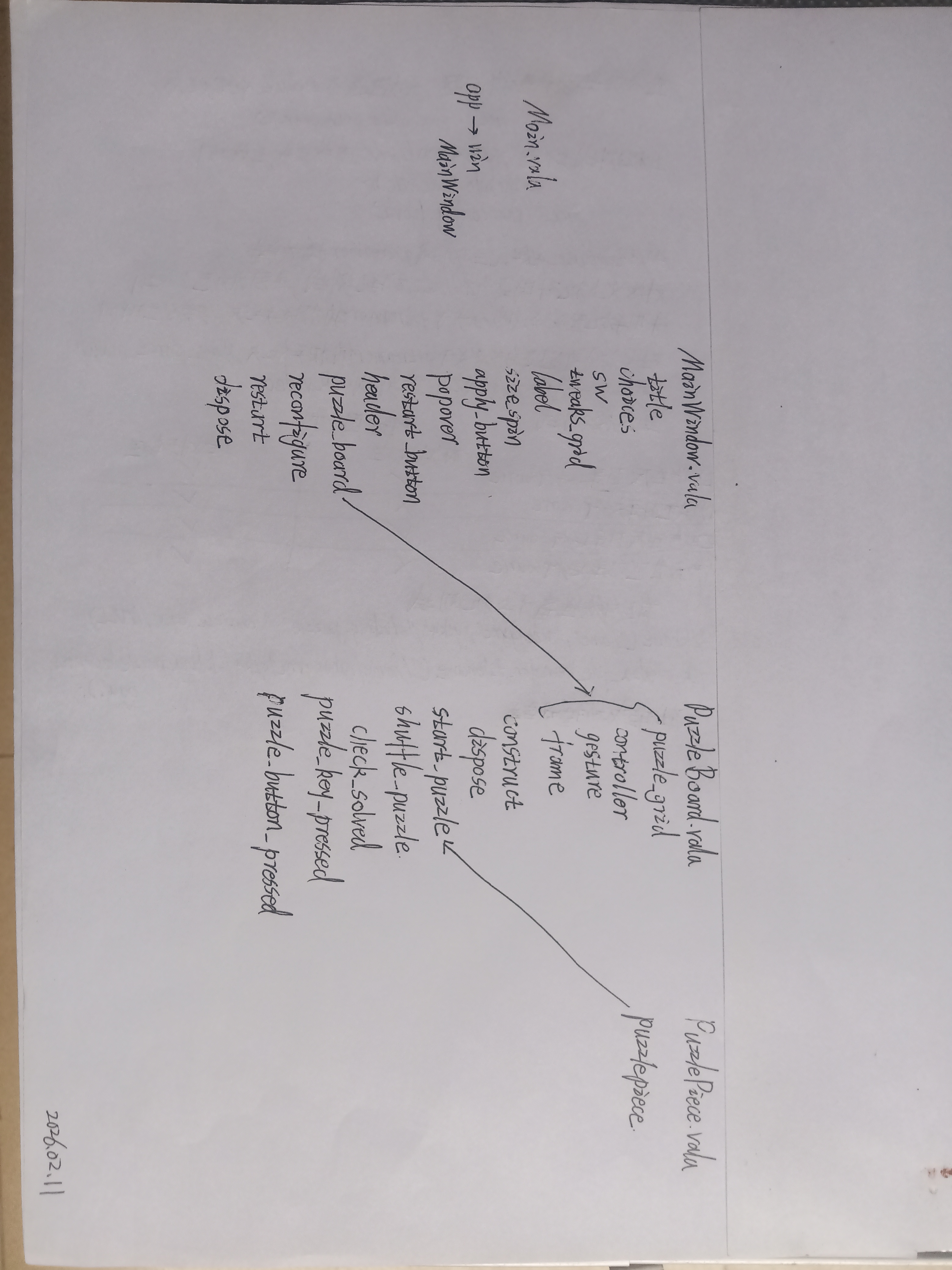
最后上网搜索数字华容道,就有许多视频讲解如何还原的方法和技巧了。阅读作者aeldemery的gtk4_sliding_puzzle原代码就好像阅读报纸上的文章很容易明白的,它是使用vala语言写的,gtk4-demo提供的原代码是C语言写的,而改写source.c的过程很主要还得要参考vala所写原代码的分析过程,尝试修改PuzzleBoard.vala,但是编译不成功,我也没有学过vala语言,只能修改source.c能编译通过,希望有人看过我这篇文章后能够修改PuzzleBoard.vala并编译成功。