1) 安装与基础配置
sudo apt update
sudo apt install -y git openssh-client
git config --global user.name "随便填名字"
git config --global user.email "最好填GitHub的邮箱"
git config --global init.defaultBranch main
2) 生成并配置 SSH Key
生成 key:
ssh-keygen -t ed25519 -C "你的邮箱"
eval "$(ssh-agent -s)"
ssh-add ~/.ssh/id_ed25519
把公钥复制出来:
cat ~/.ssh/id_ed25519.pub在 GitHub 网页添加:
Settings → SSH and GPG keys → New SSH key(粘贴公钥)
验证:
ssh -T git@github.com3) 若 22 端口超时:让 SSH 走 443(无 VPN 常用解法)
创建或者编辑 ~/.ssh/config:
mkdir -p ~/.ssh
nano ~/.ssh/config
写入:
Host github.com
  HostName ssh.github.com
  User git
  Port 443
  IdentityFile ~/.ssh/id_ed25519
  IdentitiesOnly yes
设置权限并测试:
chmod 600 ~/.ssh/config
ssh -T git@github.com
4) GitHub 上创建仓库(repo)
GitHub 页面:New repository
拿到仓库 SSH 地址(创建后提示页面会给),例如:
git@github.com:用户名/仓库名.git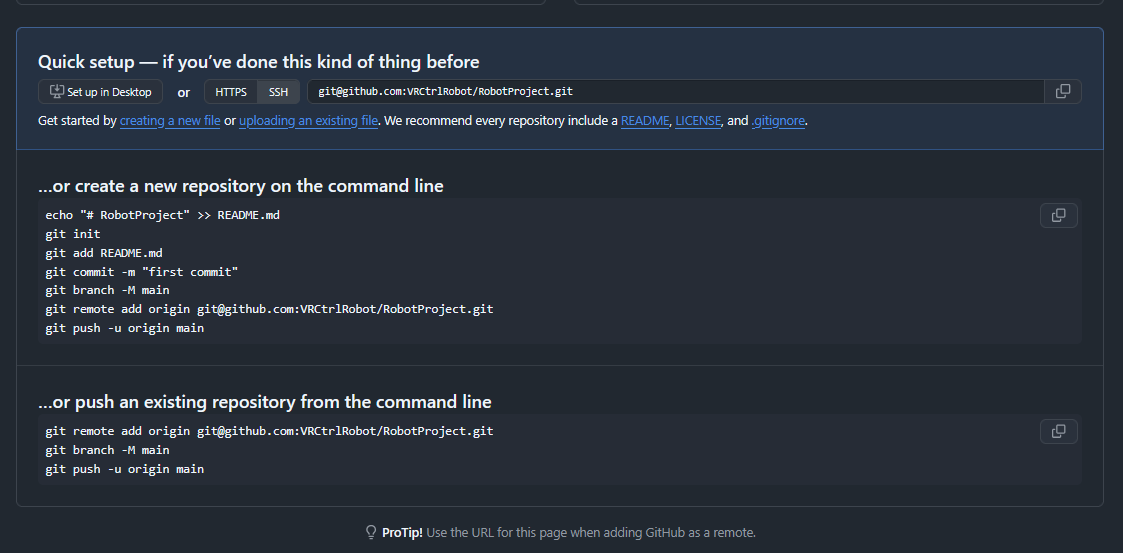
5) 本地工程初始化并首次推送
进入工程目录:
cd /path/to/your/project
git init
git add .
git commit -m "Initial commit"
git branch -M main
git remote add origin git@github.com:用户名/仓库名.git
git push -u origin main
6) ROS2(colcon 工作空间)必须做的忽略项
通常只提交源码(src/)和必要配置,不提交构建/日志产物。
在 workspace 根目录添加 .gitignore(核心三行):
build/
install/
log/
如果这些目录之前已经被提交过,需要取消跟踪(不删本地文件):
git rm -r --cached build install log
git commit -m "Ignore colcon artifacts (build/install/log)"
git push
7) 备选:用 HTTPS 推送(如果 SSH 443 也不通)
把远程改成 HTTPS:
git remote set-url origin https://github.com/用户名/仓库名.git
git push -u origin main
GitHub 会要求你用 Personal Access Token (PAT) 作为密码(不能用账号密码)。