Windows - VsCode导致Windows凭据过多之一键删除
起因
都2026年了,电脑上Github CLI gh版本还是2023年的gh version 2.32.1 (2023-07-24),不支持多账号登录等一些特性,更换新版本gh version 2.87.0 (2026-02-18)后运行报错:
bash
failed to migrate config: cowardly refusing to continue with multi account migration: couldn't migrate oauth token for "github.com": Not enough memory resources are available to process this command.
# 或者报错:
failed to move active token in keyring: Not enough memory resources are available to process this command.
我64G的内存跑不了一个gh身份token的迁移?(bushi),一搜发现Github Desktop(#15217)有类似的问题,评论说删个旧凭据可能有效。
一看凭据,发现有大量的2022-2023年间VsCode存储的微软账号登录凭据,指定是当时设计的有点问题。
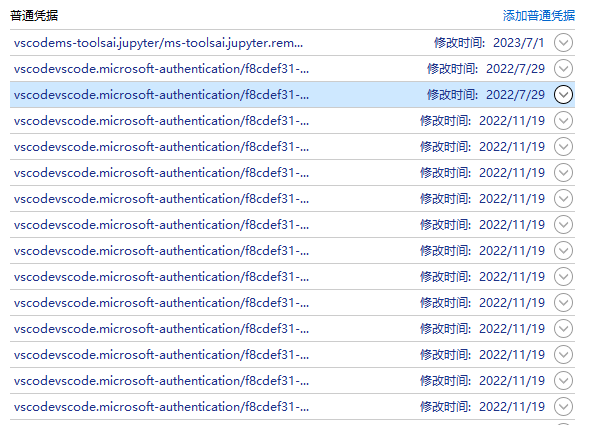
是时候删除多余凭据了。
脚本批量删除
粗略估计这样的凭据至少有100个,手动删除肯定不是程序员的作风,于是(几轮对话)让豆包写了个脚本:
script
powershell
# 强制要求管理员权限
if (-not ([Security.Principal.WindowsPrincipal][Security.Principal.WindowsIdentity]::GetCurrent()).IsInRole([Security.Principal.WindowsBuiltInRole]::Administrator)) {
    Start-Process powershell.exe "-NoProfile -ExecutionPolicy Bypass -File `"$PSCommandPath`"" -Verb RunAs
    exit
}

# 匹配包含 vscodevscode 的 LegacyGeneric 类型凭据
$matchKeyword = "vscodevscode"

try {
    Write-Host "=== 正在读取所有Windows凭据 ===" -ForegroundColor Cyan
    $allCreds = cmdkey /list
    $targetCreds = @()

    # 精准解析格式:目标: LegacyGeneric:target=xxx
    foreach ($line in $allCreds) {
        # 匹配包含 LegacyGeneric:target= 且有 vscodevscode 的行
        if ($line -match "目标:\s*LegacyGeneric:target=(.*$matchKeyword.*)") {
            $credFullName = $matches[1].Trim()
            # 拼接完整的删除参数(必须带 LegacyGeneric:target= 前缀)
            $fullTarget = "LegacyGeneric:target=$credFullName"
            $targetCreds += $fullTarget
        }
    }

    # 处理匹配结果
    if ($targetCreds.Count -eq 0) {
        Write-Host "`n❌ 未找到包含 '$matchKeyword' 的凭据" -ForegroundColor Red
        Read-Host "按回车退出"
        exit
    }

    Write-Host "`n✅ 找到 $($targetCreds.Count) 个VSCode相关凭据:" -ForegroundColor Green
    $targetCreds | ForEach-Object { Write-Host "  - $_" }

    # 确认删除
    $confirm = Read-Host "`n是否确认删除这些凭据?(Y/N)"
    if ($confirm -notmatch "^[Yy]$") {
        Write-Host "`n🚫 用户取消删除" -ForegroundColor Yellow
        Read-Host "按回车退出"
        exit
    }

    # 执行删除(关键:必须用完整的 LegacyGeneric:target=xxx 作为删除参数)
    $deleted = 0
    foreach ($cred in $targetCreds) {
        try {
            # 用cmd调用避免PowerShell转义问题
            $output = cmd /c "cmdkey /delete:`"$cred`"" 2>&1
            if ($LASTEXITCODE -eq 0) {
                Write-Host "✅ 已删除:$cred" -ForegroundColor Green
                $deleted++
            } else {
                Write-Host "❌ 删除失败:$cred (错误:$output)" -ForegroundColor Red
            }
        }
        catch {
            Write-Host "❌ 删除异常:$cred (错误:$($_.Exception.Message))" -ForegroundColor Red
        }
    }

    Write-Host "`n📊 删除完成!成功删除 $deleted / $($targetCreds.Count) 个凭据" -ForegroundColor Green
}
catch {
    Write-Host "`n❌ 脚本执行出错:$($_.Exception.Message)" -ForegroundColor Red
}

Read-Host "按回车退出"使用记事本 另存为xx.ps1,编码为ANSI,管理员身份启动powershell,输入这个脚本的路径并回车,脚本会先列举出以vscodevscode.开头的凭据,按Y回车可以批量删除,世界开始变得清净了。
End
删了当年留下的182个凭据后,gh表现正常了。
The Real End, Thanks! 同步发文于CSDN和我的个人博客,原创不易,转载经作者同意后请附上原文链接哦~
千篇源码题解已开源