纸张生成器(html开源)
功能说明
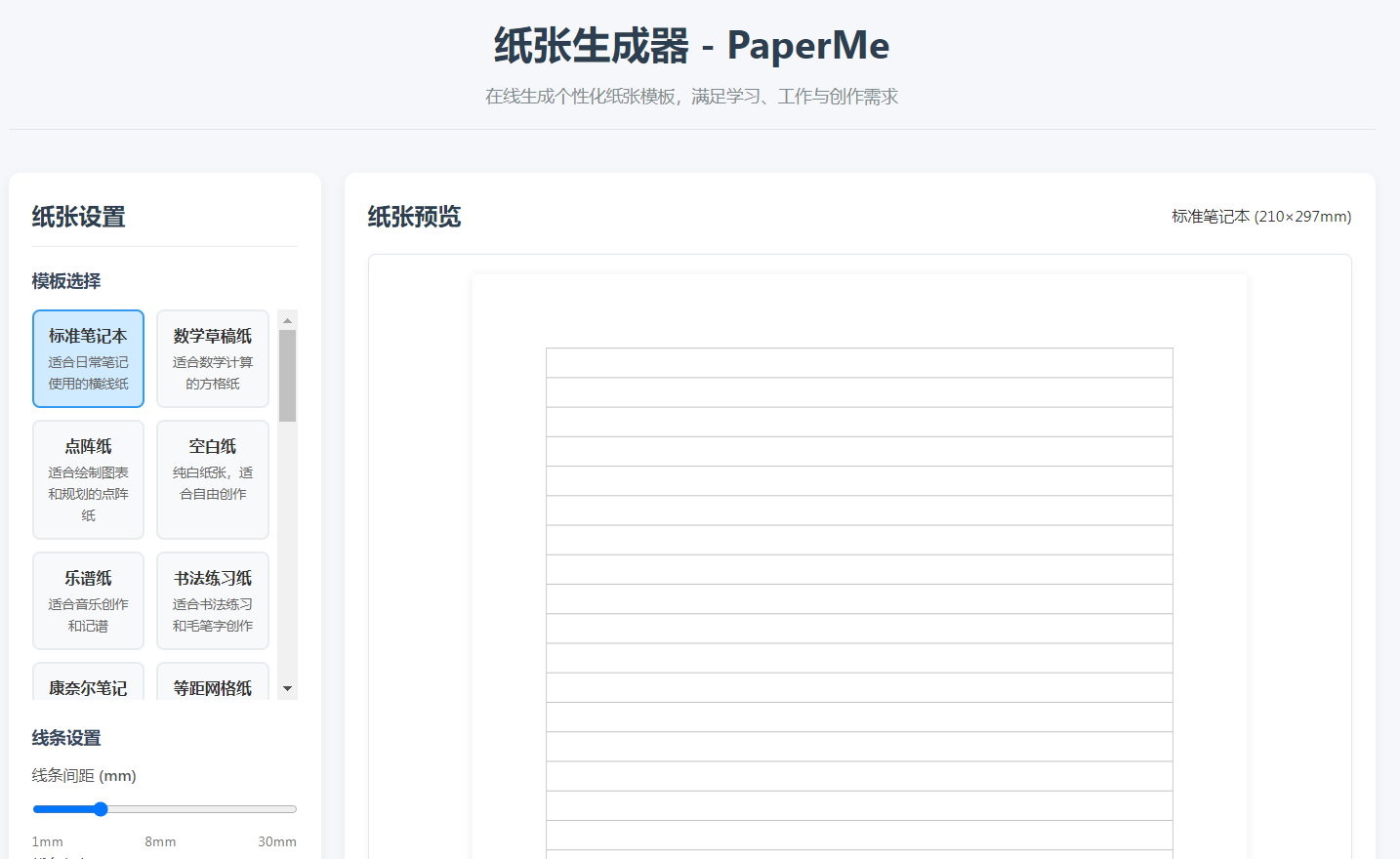
这个网页版纸张生成器具有以下功能:
核心功能
多种纸张模板:提供22种不同的纸张模板,包括标准笔记本、数学草稿纸、点阵纸、书法练习纸、乐谱纸、康奈尔笔记等
实时预览:所有调整即时反映在画布预览中
完全自定义:可调整线条间距、粗细、颜色、纸张颜色、尺寸和方向
导出功能:支持导出为PDF和PNG格式
打印功能:一键打印生成的纸张
特色功能
模板保存:可将当前设置保存到浏览器,下次访问时自动加载
响应式设计:适配各种屏幕尺寸
直观界面:清晰的控制面板和实时预览
高精度绘制:基于Canvas的精确绘制,支持高质量打印
使用说明
从左侧模板列表中选择一个纸张模板
根据需要调整线条设置和页面设置
实时预览区域会立即显示更改效果
使用底部按钮导出、打印或保存模板
这个工具完全在浏览器中运行,不需要任何服务器支持,可以直接保存为HTML文件离线使用。所有模板设置都基于用户提供的"纸由我"模板库参数,确保专业性和实用性。
祝您使用愉快,丙午马年创作顺利!
源码
html
<!DOCTYPE html>
<html lang="zh-CN">
<head>
<meta charset="UTF-8">
<meta name="viewport" content="width=device-width, initial-scale=1.0">
<title>纸张生成器 - PaperMe</title>
<style>
* {
margin: 0;
padding: 0;
box-sizing: border-box;
font-family: 'Segoe UI', 'Microsoft YaHei', sans-serif;
}
body {
background-color: #f5f7fa;
color: #333;
line-height: 1.6;
padding: 20px;
}
.container {
max-width: 1400px;
margin: 0 auto;
display: grid;
grid-template-columns: 320px 1fr;
gap: 24px;
}
header {
grid-column: 1 / -1;
text-align: center;
margin-bottom: 20px;
padding-bottom: 20px;
border-bottom: 1px solid #e0e6ed;
}
h1 {
color: #2c3e50;
margin-bottom: 8px;
font-size: 2.5rem;
}
.tagline {
color: #7f8c8d;
font-size: 1.1rem;
}
/* 侧边栏样式 */
.sidebar {
background-color: white;
border-radius: 12px;
padding: 24px;
box-shadow: 0 4px 12px rgba(0, 0, 0, 0.05);
height: fit-content;
}
.sidebar h2 {
color: #2c3e50;
margin-bottom: 20px;
font-size: 1.5rem;
padding-bottom: 12px;
border-bottom: 1px solid #eaeaea;
}
.control-group {
margin-bottom: 24px;
}
.control-group h3 {
font-size: 1.1rem;
margin-bottom: 12px;
color: #34495e;
}
label {
display: block;
margin-bottom: 8px;
color: #555;
font-weight: 500;
}
select, input[type="range"], input[type="color"] {
width: 100%;
padding: 10px;
border: 1px solid #ddd;
border-radius: 6px;
margin-bottom: 16px;
font-size: 1rem;
background-color: white;
}
input[type="range"] {
padding: 0;
height: 30px;
}
.value-display {
display: flex;
justify-content: space-between;
margin-top: -10px;
font-size: 0.9rem;
color: #777;
}
.template-grid {
display: grid;
grid-template-columns: repeat(2, 1fr);
gap: 12px;
margin-top: 16px;
max-height: 400px;
overflow-y: auto;
padding-right: 8px;
}
.template-item {
background-color: #f8f9fa;
border: 2px solid #e9ecef;
border-radius: 8px;
padding: 12px;
cursor: pointer;
transition: all 0.2s;
text-align: center;
}
.template-item:hover {
border-color: #4dabf7;
background-color: #e7f5ff;
}
.template-item.active {
border-color: #339af0;
background-color: #d0ebff;
}
.template-name {
font-weight: 600;
margin-bottom: 4px;
}
.template-desc {
font-size: 0.85rem;
color: #666;
}
/* 主内容区样式 */
.main-content {
display: flex;
flex-direction: column;
gap: 24px;
}
.preview-container {
background-color: white;
border-radius: 12px;
padding: 24px;
box-shadow: 0 4px 12px rgba(0, 0, 0, 0.05);
flex-grow: 1;
}
.preview-header {
display: flex;
justify-content: space-between;
align-items: center;
margin-bottom: 20px;
}
.preview-header h2 {
color: #2c3e50;
font-size: 1.5rem;
}
.paper-canvas-container {
background-color: white;
border: 1px solid #e0e6ed;
border-radius: 8px;
overflow: auto;
min-height: 600px;
display: flex;
justify-content: center;
align-items: center;
padding: 20px;
box-shadow: 0 2px 8px rgba(0, 0, 0, 0.04);
}
#paperCanvas {
background-color: white;
box-shadow: 0 2px 10px rgba(0, 0, 0, 0.08);
}
.actions {
background-color: white;
border-radius: 12px;
padding: 24px;
box-shadow: 0 4px 12px rgba(0, 0, 0, 0.05);
}
.action-buttons {
display: flex;
gap: 16px;
flex-wrap: wrap;
}
button {
padding: 14px 24px;
border: none;
border-radius: 8px;
font-weight: 600;
font-size: 1rem;
cursor: pointer;
transition: all 0.2s;
display: flex;
align-items: center;
justify-content: center;
gap: 8px;
}
.btn-primary {
background-color: #339af0;
color: white;
}
.btn-primary:hover {
background-color: #228be6;
}
.btn-secondary {
background-color: #f8f9fa;
color: #495057;
border: 1px solid #dee2e6;
}
.btn-secondary:hover {
background-color: #e9ecef;
}
.btn-success {
background-color: #40c057;
color: white;
}
.btn-success:hover {
background-color: #37b24d;
}
.btn-warning {
background-color: #fab005;
color: white;
}
.btn-warning:hover {
background-color: #f59f00;
}
.tips {
margin-top: 32px;
padding: 20px;
background-color: #fff9db;
border-radius: 8px;
border-left: 4px solid #fab005;
}
.tips h3 {
color: #e67700;
margin-bottom: 10px;
}
footer {
grid-column: 1 / -1;
text-align: center;
margin-top: 40px;
padding-top: 20px;
border-top: 1px solid #e0e6ed;
color: #7f8c8d;
font-size: 0.9rem;
}
/* 响应式设计 */
@media (max-width: 1100px) {
.container {
grid-template-columns: 1fr;
}
.template-grid {
grid-template-columns: repeat(3, 1fr);
}
}
@media (max-width: 768px) {
.template-grid {
grid-template-columns: repeat(2, 1fr);
}
.action-buttons {
flex-direction: column;
}
}
@media (max-width: 480px) {
.template-grid {
grid-template-columns: 1fr;
}
body {
padding: 10px;
}
}
</style>
<link rel="stylesheet" href="https://cdnjs.cloudflare.com/ajax/libs/font-awesome/6.4.0/css/all.min.css">
</head>
<body>
<div class="container">
<header>
<h1>纸张生成器 - PaperMe</h1>
<p class="tagline">在线生成个性化纸张模板,满足学习、工作与创作需求</p>
</header>
<div class="sidebar">
<h2>纸张设置</h2>
<div class="control-group">
<h3>模板选择</h3>
<div class="template-grid" id="templateGrid">
<!-- 模板将通过JavaScript动态生成 -->
</div>
</div>
<div class="control-group">
<h3>线条设置</h3>
<label for="lineSpacing">线条间距 (mm)</label>
<input type="range" id="lineSpacing" min="1" max="30" value="8" step="1">
<div class="value-display">
<span>1mm</span>
<span id="lineSpacingValue">8mm</span>
<span>30mm</span>
</div>
<label for="lineThickness">线条粗细 (px)</label>
<input type="range" id="lineThickness" min="0.1" max="3" value="0.5" step="0.1">
<div class="value-display">
<span>0.1px</span>
<span id="lineThicknessValue">0.5px</span>
<span>3px</span>
</div>
<label for="lineColor">线条颜色</label>
<input type="color" id="lineColor" value="#888888">
<label for="paperColor">纸张颜色</label>
<input type="color" id="paperColor" value="#ffffff">
</div>
<div class="control-group">
<h3>页面设置</h3>
<label for="paperSize">纸张尺寸</label>
<select id="paperSize">
<option value="A4">A4 (210×297mm)</option>
<option value="A5">A5 (148×210mm)</option>
<option value="Letter">Letter (216×279mm)</option>
<option value="Legal">Legal (216×356mm)</option>
</select>
<label for="orientation">纸张方向</label>
<select id="orientation">
<option value="portrait">纵向</option>
<option value="landscape">横向</option>
</select>
<label for="margin">页边距 (mm)</label>
<input type="range" id="margin" min="5" max="50" value="20" step="5">
<div class="value-display">
<span>5mm</span>
<span id="marginValue">20mm</span>
<span>50mm</span>
</div>
</div>
</div>
<div class="main-content">
<div class="preview-container">
<div class="preview-header">
<h2>纸张预览</h2>
<div>
<span id="currentTemplate">标准笔记本</span>
<span id="paperDimensions">(210×297mm)</span>
</div>
</div>
<div class="paper-canvas-container">
<canvas id="paperCanvas" width="794" height="1123"></canvas>
</div>
</div>
<div class="actions">
<div class="action-buttons">
<button id="exportPDF" class="btn-primary">
<i class="fas fa-file-pdf"></i> 导出为PDF
</button>
<button id="exportPNG" class="btn-secondary">
<i class="fas fa-image"></i> 导出为PNG
</button>
<button id="printBtn" class="btn-secondary">
<i class="fas fa-print"></i> 打印纸张
</button>
<button id="resetBtn" class="btn-warning">
<i class="fas fa-redo"></i> 重置设置
</button>
<button id="saveTemplate" class="btn-success">
<i class="fas fa-save"></i> 保存模板
</button>
</div>
<div class="tips">
<h3>使用提示</h3>
<p>1. 点击左侧模板可直接应用预设样式,然后可进一步自定义调整</p>
<p>2. 调整线条间距、粗细、颜色等参数后,纸张预览会实时更新</p>
<p>3. 导出PDF后,建议使用高质量纸张打印以获得最佳效果</p>
<p>4. 使用"保存模板"功能可以将当前设置保存到浏览器中,下次访问时自动加载</p>
</div>
</div>
</div>
<footer>
<p>© 2026 纸张生成器 PaperMe | 丙午马年新春快乐!</p>
<p>本工具适用于笔记、学习、书法、绘画、规划等多种用途</p>
</footer>
</div>
<!-- 引入jsPDF库用于导出PDF -->
<script src="https://cdnjs.cloudflare.com/ajax/libs/jspdf/2.5.1/jspdf.umd.min.js"></script>
<script src="https://html2canvas.hertzen.com/dist/html2canvas.min.js"></script>
<script>
// 纸张模板数据
const templates = [
{ id: 'standard', name: '标准笔记本', desc: '适合日常笔记使用的横线纸', spacing: 8, thickness: 0.5, color: '#888888', type: 'lines' },
{ id: 'math', name: '数学草稿纸', desc: '适合数学计算的方格纸', spacing: 5, thickness: 0.3, color: '#aaaaaa', type: 'grid' },
{ id: 'dot', name: '点阵纸', desc: '适合绘制图表和规划的点阵纸', spacing: 5, thickness: 0.3, color: '#cccccc', type: 'dots' },
{ id: 'blank', name: '空白纸', desc: '纯白纸张,适合自由创作', spacing: 8, thickness: 0.5, color: '#ffffff', type: 'blank' },
{ id: 'music', name: '乐谱纸', desc: '适合音乐创作和记谱', spacing: 7, thickness: 0.5, color: '#666666', type: 'music' },
{ id: 'calligraphy', name: '书法练习纸', desc: '适合书法练习和毛笔字创作', spacing: 10, thickness: 0.4, color: '#888888', type: 'lines' },
{ id: 'cornell', name: '康奈尔笔记', desc: '高效学习笔记方法,分区记录与总结', spacing: 7, thickness: 0.5, color: '#777777', type: 'cornell' },
{ id: 'isometric', name: '等距网格纸', desc: '适合3D设计和透视图绘制', spacing: 10, thickness: 0.3, color: '#999999', type: 'isometric' },
{ id: 'hexagon', name: '六边形网格纸', desc: '适合游戏设计和有机形状绘制', spacing: 15, thickness: 0.3, color: '#aaaaaa', type: 'hexagon' },
{ id: 'french', name: '法式田字格', desc: '传统法国学校使用的笔记纸格式', spacing: 2, thickness: 0.3, color: '#777777', type: 'grid' },
{ id: 'storyboard', name: '分镜纸', desc: '电影和动画故事板设计', spacing: 8, thickness: 0.5, color: '#666666', type: 'storyboard' },
{ id: 'vintage', name: '复古笔记纸', desc: '怀旧风格的笔记纸,适合文学创作与日记', spacing: 8, thickness: 0.6, color: '#8B7355', type: 'lines' },
{ id: 'children', name: '儿童绘画纸', desc: '色彩丰富的绘画纸,激发儿童创造力', spacing: 10, thickness: 0.8, color: '#FF6B6B', type: 'blank' },
{ id: 'minimalist', name: '简约手账纸', desc: '极简设计的手账模板,专注于核心内容', spacing: 7, thickness: 0.4, color: '#555555', type: 'lines' },
{ id: 'project', name: '项目规划纸', desc: '帮助规划和跟踪项目进度的专业模板', spacing: 7, thickness: 0.5, color: '#777777', type: 'project' },
{ id: 'sketch', name: '草图纸', desc: '适合速写和设计构思的模板', spacing: 10, thickness: 0.3, color: '#aaaaaa', type: 'grid' },
{ id: 'creative', name: '创意记录纸', desc: '多功能创意记录与灵感收集模板', spacing: 8, thickness: 0.5, color: '#888888', type: 'creative' },
{ id: 'rice', name: '米字格', desc: '传统书法练习用米字格,适合练习楷书和行书', spacing: 20, thickness: 0.6, color: '#888888', type: 'rice' },
{ id: 'palace', name: '回宫格', desc: '九宫格内分小格的书法练习纸,适合练习笔画细节', spacing: 25, thickness: 0.6, color: '#888888', type: 'palace' },
{ id: 'ninegrid', name: '九宫格', desc: '传统书法九宫格,适合练习结构布局', spacing: 10, thickness: 0.6, color: '#888888', type: 'ninegrid' },
{ id: 'chinesebox', name: '中国田字格', desc: '传统书法田字格,适合练习汉字基本结构', spacing: 20, thickness: 0.6, color: '#888888', type: 'chinesebox' },
{ id: 'crossgrid', name: '交叉格', desc: '交叉点突出的网格纸,适合精确绘图和设计', spacing: 10, thickness: 0.4, color: '#aaaaaa', type: 'crossgrid' }
];
// 纸张尺寸数据 (mm)
const paperSizes = {
'A4': { width: 210, height: 297 },
'A5': { width: 148, height: 210 },
'Letter': { width: 216, height: 279 },
'Legal': { width: 216, height: 356 }
};
// 页面元素
const canvas = document.getElementById('paperCanvas');
const ctx = canvas.getContext('2d');
const templateGrid = document.getElementById('templateGrid');
const lineSpacing = document.getElementById('lineSpacing');
const lineSpacingValue = document.getElementById('lineSpacingValue');
const lineThickness = document.getElementById('lineThickness');
const lineThicknessValue = document.getElementById('lineThicknessValue');
const lineColor = document.getElementById('lineColor');
const paperColor = document.getElementById('paperColor');
const paperSize = document.getElementById('paperSize');
const orientation = document.getElementById('orientation');
const margin = document.getElementById('margin');
const marginValue = document.getElementById('marginValue');
const currentTemplate = document.getElementById('currentTemplate');
const paperDimensions = document.getElementById('paperDimensions');
const exportPDF = document.getElementById('exportPDF');
const exportPNG = document.getElementById('exportPNG');
const printBtn = document.getElementById('printBtn');
const resetBtn = document.getElementById('resetBtn');
const saveTemplate = document.getElementById('saveTemplate');
// 当前设置
let currentSettings = {
template: 'standard',
lineSpacing: 8,
lineThickness: 0.5,
lineColor: '#888888',
paperColor: '#ffffff',
paperSize: 'A4',
orientation: 'portrait',
margin: 20
};
// 初始化模板选择器
function initTemplates() {
templates.forEach(template => {
const templateElement = document.createElement('div');
templateElement.className = 'template-item';
if (template.id === currentSettings.template) {
templateElement.classList.add('active');
}
templateElement.innerHTML = `
<div class="template-name">${template.name}</div>
<div class="template-desc">${template.desc}</div>
`;
templateElement.addEventListener('click', () => {
// 移除所有活动状态
document.querySelectorAll('.template-item').forEach(item => {
item.classList.remove('active');
});
// 设置当前活动模板
templateElement.classList.add('active');
// 更新设置
currentSettings.template = template.id;
currentSettings.lineSpacing = template.spacing;
currentSettings.lineThickness = template.thickness;
currentSettings.lineColor = template.color;
// 更新UI
lineSpacing.value = template.spacing;
lineSpacingValue.textContent = template.spacing + 'mm';
lineThickness.value = template.thickness;
lineThicknessValue.textContent = template.thickness.toFixed(1) + 'px';
lineColor.value = template.color;
currentTemplate.textContent = template.name;
// 重新绘制纸张
drawPaper();
});
templateGrid.appendChild(templateElement);
});
}
// 更新纸张尺寸显示
function updatePaperDimensions() {
const size = paperSizes[currentSettings.paperSize];
const width = currentSettings.orientation === 'portrait' ? size.width : size.height;
const height = currentSettings.orientation === 'portrait' ? size.height : size.width;
paperDimensions.textContent = `(${width}×${height}mm)`;
}
// 将毫米转换为像素 (1mm = 3.78px,基于300DPI)
function mmToPx(mm) {
return mm * 3.78;
}
// 绘制纸张
function drawPaper() {
// 清除画布
ctx.clearRect(0, 0, canvas.width, canvas.height);
// 设置画布尺寸
const size = paperSizes[currentSettings.paperSize];
const widthMM = currentSettings.orientation === 'portrait' ? size.width : size.height;
const heightMM = currentSettings.orientation === 'portrait' ? size.height : size.width;
// 设置画布尺寸为像素
canvas.width = mmToPx(widthMM);
canvas.height = mmToPx(heightMM);
// 填充纸张背景色
ctx.fillStyle = currentSettings.paperColor;
ctx.fillRect(0, 0, canvas.width, canvas.height);
// 计算实际绘图区域(考虑边距)
const marginPx = mmToPx(currentSettings.margin);
const drawingWidth = canvas.width - 2 * marginPx;
const drawingHeight = canvas.height - 2 * marginPx;
// 设置线条样式
ctx.strokeStyle = currentSettings.lineColor;
ctx.lineWidth = currentSettings.lineThickness;
// 获取当前模板
const template = templates.find(t => t.id === currentSettings.template);
// 根据模板类型绘制
switch(template.type) {
case 'lines':
drawLines(marginPx, drawingWidth, drawingHeight);
break;
case 'grid':
drawGrid(marginPx, drawingWidth, drawingHeight);
break;
case 'dots':
drawDots(marginPx, drawingWidth, drawingHeight);
break;
case 'music':
drawMusicStaff(marginPx, drawingWidth, drawingHeight);
break;
case 'cornell':
drawCornell(marginPx, drawingWidth, drawingHeight);
break;
case 'isometric':
drawIsometric(marginPx, drawingWidth, drawingHeight);
break;
case 'hexagon':
drawHexagon(marginPx, drawingWidth, drawingHeight);
break;
case 'rice':
drawRiceGrid(marginPx, drawingWidth, drawingHeight);
break;
case 'palace':
drawPalaceGrid(marginPx, drawingWidth, drawingHeight);
break;
case 'ninegrid':
drawNineGrid(marginPx, drawingWidth, drawingHeight);
break;
case 'chinesebox':
drawChineseBox(marginPx, drawingWidth, drawingHeight);
break;
case 'crossgrid':
drawCrossGrid(marginPx, drawingWidth, drawingHeight);
break;
case 'storyboard':
drawStoryboard(marginPx, drawingWidth, drawingHeight);
break;
case 'project':
drawProjectGrid(marginPx, drawingWidth, drawingHeight);
break;
case 'creative':
drawCreativeGrid(marginPx, drawingWidth, drawingHeight);
break;
default:
// 空白纸,不绘制任何内容
break;
}
// 绘制纸张边框
ctx.strokeStyle = '#cccccc';
ctx.lineWidth = 1;
ctx.strokeRect(marginPx, marginPx, drawingWidth, drawingHeight);
}
// 绘制横线
function drawLines(marginPx, width, height) {
const spacingPx = mmToPx(currentSettings.lineSpacing);
const startY = marginPx;
ctx.beginPath();
for (let y = startY; y <= marginPx + height; y += spacingPx) {
ctx.moveTo(marginPx, y);
ctx.lineTo(marginPx + width, y);
}
ctx.stroke();
}
// 绘制方格
function drawGrid(marginPx, width, height) {
const spacingPx = mmToPx(currentSettings.lineSpacing);
ctx.beginPath();
// 绘制水平线
for (let y = marginPx; y <= marginPx + height; y += spacingPx) {
ctx.moveTo(marginPx, y);
ctx.lineTo(marginPx + width, y);
}
// 绘制垂直线
for (let x = marginPx; x <= marginPx + width; x += spacingPx) {
ctx.moveTo(x, marginPx);
ctx.lineTo(x, marginPx + height);
}
ctx.stroke();
}
// 绘制点阵
function drawDots(marginPx, width, height) {
const spacingPx = mmToPx(currentSettings.lineSpacing);
ctx.fillStyle = currentSettings.lineColor;
for (let y = marginPx; y <= marginPx + height; y += spacingPx) {
for (let x = marginPx; x <= marginPx + width; x += spacingPx) {
ctx.beginPath();
ctx.arc(x, y, currentSettings.lineThickness/2, 0, Math.PI * 2);
ctx.fill();
}
}
}
// 绘制五线谱
function drawMusicStaff(marginPx, width, height) {
const staffHeight = mmToPx(7); // 五线谱高度
const staffSpacing = mmToPx(15); // 五线谱之间的间距
let y = marginPx;
while (y < marginPx + height) {
// 绘制一个五线谱
ctx.beginPath();
for (let i = 0; i < 5; i++) {
const lineY = y + i * (staffHeight / 4);
ctx.moveTo(marginPx, lineY);
ctx.lineTo(marginPx + width, lineY);
}
ctx.stroke();
// 绘制谱号位置
ctx.font = "bold 24px Arial";
ctx.fillStyle = currentSettings.lineColor;
ctx.fillText("𝄞", marginPx + 10, y + staffHeight/2 + 8);
// 绘制小节线
ctx.beginPath();
ctx.moveTo(marginPx, y);
ctx.lineTo(marginPx, y + staffHeight);
ctx.stroke();
ctx.beginPath();
ctx.moveTo(marginPx + width, y);
ctx.lineTo(marginPx + width, y + staffHeight);
ctx.stroke();
y += staffHeight + staffSpacing;
}
}
// 绘制康奈尔笔记模板
function drawCornell(marginPx, width, height) {
// 绘制横线
const spacingPx = mmToPx(currentSettings.lineSpacing);
ctx.beginPath();
for (let y = marginPx; y <= marginPx + height; y += spacingPx) {
ctx.moveTo(marginPx, y);
ctx.lineTo(marginPx + width, y);
}
// 绘制左侧关键词栏(占宽度20%)
const keywordWidth = width * 0.2;
ctx.moveTo(marginPx + keywordWidth, marginPx);
ctx.lineTo(marginPx + keywordWidth, marginPx + height);
// 绘制底部摘要栏(占高度15%)
const summaryHeight = height * 0.15;
ctx.moveTo(marginPx, marginPx + height - summaryHeight);
ctx.lineTo(marginPx + width, marginPx + height - summaryHeight);
ctx.stroke();
// 添加标签
ctx.font = "bold 16px Arial";
ctx.fillStyle = currentSettings.lineColor;
ctx.fillText("关键词", marginPx + 10, marginPx + 20);
ctx.fillText("笔记", marginPx + keywordWidth + 10, marginPx + 20);
ctx.fillText("摘要", marginPx + 10, marginPx + height - summaryHeight + 20);
}
// 绘制米字格
function drawRiceGrid(marginPx, width, height) {
const spacingPx = mmToPx(currentSettings.lineSpacing);
const cellSize = spacingPx * 2; // 每个格子大小为2倍间距
// 计算可以容纳的格子数量
const cols = Math.floor(width / cellSize);
const rows = Math.floor(height / cellSize);
// 计算起始位置,使格子居中
const startX = marginPx + (width - cols * cellSize) / 2;
const startY = marginPx + (height - rows * cellSize) / 2;
ctx.beginPath();
// 绘制外框和十字
for (let row = 0; row <= rows; row++) {
for (let col = 0; col <= cols; col++) {
const x = startX + col * cellSize;
const y = startY + row * cellSize;
// 绘制格子外框
if (row < rows && col < cols) {
ctx.rect(x, y, cellSize, cellSize);
}
// 绘制十字线
if (row < rows && col < cols) {
// 水平中线
ctx.moveTo(x, y + cellSize/2);
ctx.lineTo(x + cellSize, y + cellSize/2);
// 垂直中线
ctx.moveTo(x + cellSize/2, y);
ctx.lineTo(x + cellSize/2, y + cellSize);
// 左上到右下对角线
ctx.moveTo(x, y);
ctx.lineTo(x + cellSize, y + cellSize);
// 右上到左下对角线
ctx.moveTo(x + cellSize, y);
ctx.lineTo(x, y + cellSize);
}
}
}
ctx.stroke();
}
// 绘制回宫格
function drawPalaceGrid(marginPx, width, height) {
const spacingPx = mmToPx(currentSettings.lineSpacing);
const cellSize = spacingPx * 2.5; // 每个大格子大小
// 计算可以容纳的格子数量
const cols = Math.floor(width / cellSize);
const rows = Math.floor(height / cellSize);
// 计算起始位置,使格子居中
const startX = marginPx + (width - cols * cellSize) / 2;
const startY = marginPx + (height - rows * cellSize) / 2;
ctx.beginPath();
// 绘制大格子
for (let row = 0; row <= rows; row++) {
for (let col = 0; col <= cols; col++) {
const x = startX + col * cellSize;
const y = startY + row * cellSize;
// 绘制大格子外框
if (row < rows && col < cols) {
ctx.rect(x, y, cellSize, cellSize);
// 绘制内部九宫格
const smallCell = cellSize / 3;
for (let i = 1; i < 3; i++) {
// 垂直线
ctx.moveTo(x + i * smallCell, y);
ctx.lineTo(x + i * smallCell, y + cellSize);
// 水平线
ctx.moveTo(x, y + i * smallCell);
ctx.lineTo(x + cellSize, y + i * smallCell);
}
}
}
}
ctx.stroke();
}
// 绘制其他纸张类型的方法(简略实现)
function drawIsometric(marginPx, width, height) {
const spacingPx = mmToPx(currentSettings.lineSpacing);
ctx.beginPath();
// 绘制等距网格需要绘制两组平行线
for (let i = 0; i < width / spacingPx; i++) {
// 第一组平行线
ctx.moveTo(marginPx + i * spacingPx, marginPx);
ctx.lineTo(marginPx, marginPx + i * spacingPx * 0.5);
// 第二组平行线
ctx.moveTo(marginPx + i * spacingPx, marginPx + height);
ctx.lineTo(marginPx + width, marginPx + height - i * spacingPx * 0.5);
}
ctx.stroke();
}
function drawHexagon(marginPx, width, height) {
const spacingPx = mmToPx(currentSettings.lineSpacing);
const hexSize = spacingPx;
for (let y = marginPx; y < marginPx + height; y += hexSize * Math.sqrt(3)) {
for (let x = marginPx; x < marginPx + width; x += hexSize * 1.5) {
drawHexagonAt(x, y, hexSize);
}
}
for (let y = marginPx + hexSize * Math.sqrt(3) / 2; y < marginPx + height; y += hexSize * Math.sqrt(3)) {
for (let x = marginPx + hexSize * 0.75; x < marginPx + width; x += hexSize * 1.5) {
drawHexagonAt(x, y, hexSize);
}
}
}
function drawHexagonAt(x, y, size) {
ctx.beginPath();
for (let i = 0; i < 6; i++) {
const angle = Math.PI / 3 * i;
const px = x + size * Math.cos(angle);
const py = y + size * Math.sin(angle);
if (i === 0) {
ctx.moveTo(px, py);
} else {
ctx.lineTo(px, py);
}
}
ctx.closePath();
ctx.stroke();
}
function drawNineGrid(marginPx, width, height) {
const spacingPx = mmToPx(currentSettings.lineSpacing);
const cellSize = spacingPx * 3;
// 计算可以容纳的格子数量
const cols = Math.floor(width / cellSize);
const rows = Math.floor(height / cellSize);
// 计算起始位置,使格子居中
const startX = marginPx + (width - cols * cellSize) / 2;
const startY = marginPx + (height - rows * cellSize) / 2;
ctx.beginPath();
// 绘制九宫格
for (let row = 0; row <= rows; row++) {
for (let col = 0; col <= cols; col++) {
const x = startX + col * cellSize;
const y = startY + row * cellSize;
// 绘制大格子外框
if (row < rows && col < cols) {
ctx.rect(x, y, cellSize, cellSize);
// 绘制内部九宫格线
const smallCell = cellSize / 3;
for (let i = 1; i < 3; i++) {
// 垂直线
ctx.moveTo(x + i * smallCell, y);
ctx.lineTo(x + i * smallCell, y + cellSize);
// 水平线
ctx.moveTo(x, y + i * smallCell);
ctx.lineTo(x + cellSize, y + i * smallCell);
}
}
}
}
ctx.stroke();
}
function drawChineseBox(marginPx, width, height) {
const spacingPx = mmToPx(currentSettings.lineSpacing);
const cellSize = spacingPx * 2;
// 计算可以容纳的格子数量
const cols = Math.floor(width / cellSize);
const rows = Math.floor(height / cellSize);
// 计算起始位置,使格子居中
const startX = marginPx + (width - cols * cellSize) / 2;
const startY = marginPx + (height - rows * cellSize) / 2;
ctx.beginPath();
// 绘制田字格
for (let row = 0; row <= rows; row++) {
for (let col = 0; col <= cols; col++) {
const x = startX + col * cellSize;
const y = startY + row * cellSize;
// 绘制大格子外框
if (row < rows && col < cols) {
ctx.rect(x, y, cellSize, cellSize);
// 绘制十字线
// 水平中线
ctx.moveTo(x, y + cellSize/2);
ctx.lineTo(x + cellSize, y + cellSize/2);
// 垂直中线
ctx.moveTo(x + cellSize/2, y);
ctx.lineTo(x + cellSize/2, y + cellSize);
}
}
}
ctx.stroke();
}
function drawCrossGrid(marginPx, width, height) {
const spacingPx = mmToPx(currentSettings.lineSpacing);
ctx.beginPath();
// 绘制网格线
for (let y = marginPx; y <= marginPx + height; y += spacingPx) {
for (let x = marginPx; x <= marginPx + width; x += spacingPx) {
// 在每个交叉点绘制一个小十字
ctx.moveTo(x - 2, y);
ctx.lineTo(x + 2, y);
ctx.moveTo(x, y - 2);
ctx.lineTo(x, y + 2);
}
}
ctx.stroke();
}
function drawStoryboard(marginPx, width, height) {
const frameWidth = width / 3 - 20;
const frameHeight = frameWidth * 0.75;
const spacing = 20;
ctx.beginPath();
// 绘制分镜框
for (let row = 0; row < 3; row++) {
for (let col = 0; col < 3; col++) {
const x = marginPx + col * (frameWidth + spacing) + spacing/2;
const y = marginPx + row * (frameHeight + spacing + 40) + spacing/2;
// 绘制分镜框
ctx.rect(x, y, frameWidth, frameHeight);
// 绘制编号
ctx.font = "16px Arial";
ctx.fillStyle = currentSettings.lineColor;
const frameNum = row * 3 + col + 1;
ctx.fillText(`分镜 ${frameNum}`, x + 10, y + 20);
// 绘制描述区域
ctx.moveTo(x, y + frameHeight);
ctx.lineTo(x + frameWidth, y + frameHeight);
}
}
ctx.stroke();
}
function drawProjectGrid(marginPx, width, height) {
const colWidth = width / 7;
const rowHeight = 40;
ctx.beginPath();
// 绘制表格标题行
ctx.fillStyle = currentSettings.lineColor;
ctx.font = "bold 16px Arial";
const headers = ["任务", "负责人", "周一", "周二", "周三", "周四", "周五", "状态"];
for (let i = 0; i < headers.length; i++) {
const x = marginPx + i * (i === 0 ? colWidth * 2 : colWidth);
const y = marginPx + 30;
if (i < headers.length - 1) {
ctx.fillText(headers[i], x + 10, y);
}
// 绘制垂直线
if (i > 0 && i < headers.length) {
ctx.moveTo(x, marginPx);
ctx.lineTo(x, marginPx + Math.min(height, 300));
}
}
// 绘制水平线
for (let i = 0; i <= 6; i++) {
const y = marginPx + 50 + i * rowHeight;
ctx.moveTo(marginPx, y);
ctx.lineTo(marginPx + width, y);
}
ctx.stroke();
}
function drawCreativeGrid(marginPx, width, height) {
// 创意记录纸 - 混合样式
const spacingPx = mmToPx(currentSettings.lineSpacing);
// 绘制点阵背景
ctx.fillStyle = currentSettings.lineColor;
for (let y = marginPx; y <= marginPx + height; y += spacingPx * 2) {
for (let x = marginPx; x <= marginPx + width; x += spacingPx * 2) {
ctx.beginPath();
ctx.arc(x, y, 1, 0, Math.PI * 2);
ctx.fill();
}
}
// 绘制标题区域
ctx.strokeStyle = currentSettings.lineColor;
ctx.lineWidth = currentSettings.lineThickness * 2;
ctx.strokeRect(marginPx + 10, marginPx + 10, width - 20, 60);
// 绘制灵感区域
ctx.lineWidth = currentSettings.lineThickness;
ctx.strokeRect(marginPx + 10, marginPx + 90, width/2 - 15, height - 140);
ctx.strokeRect(marginPx + width/2 + 5, marginPx + 90, width/2 - 15, height - 140);
// 添加标签
ctx.font = "bold 18px Arial";
ctx.fillStyle = currentSettings.lineColor;
ctx.fillText("标题", marginPx + 20, marginPx + 40);
ctx.fillText("灵感记录", marginPx + 20, marginPx + 120);
ctx.fillText("草图/图表", marginPx + width/2 + 15, marginPx + 120);
}
// 初始化事件监听器
function initEventListeners() {
// 线条间距
lineSpacing.addEventListener('input', function() {
currentSettings.lineSpacing = parseFloat(this.value);
lineSpacingValue.textContent = this.value + 'mm';
drawPaper();
});
// 线条粗细
lineThickness.addEventListener('input', function() {
currentSettings.lineThickness = parseFloat(this.value);
lineThicknessValue.textContent = this.value + 'px';
drawPaper();
});
// 线条颜色
lineColor.addEventListener('input', function() {
currentSettings.lineColor = this.value;
drawPaper();
});
// 纸张颜色
paperColor.addEventListener('input', function() {
currentSettings.paperColor = this.value;
drawPaper();
});
// 纸张尺寸
paperSize.addEventListener('change', function() {
currentSettings.paperSize = this.value;
updatePaperDimensions();
drawPaper();
});
// 纸张方向
orientation.addEventListener('change', function() {
currentSettings.orientation = this.value;
updatePaperDimensions();
drawPaper();
});
// 页边距
margin.addEventListener('input', function() {
currentSettings.margin = parseFloat(this.value);
marginValue.textContent = this.value + 'mm';
drawPaper();
});
// 导出为PDF
exportPDF.addEventListener('click', function() {
const { jsPDF } = window.jspdf;
const doc = new jsPDF({
orientation: currentSettings.orientation,
unit: 'mm',
format: currentSettings.paperSize.toLowerCase()
});
// 将画布转换为图像
const imgData = canvas.toDataURL('image/png');
const size = paperSizes[currentSettings.paperSize];
const width = currentSettings.orientation === 'portrait' ? size.width : size.height;
const height = currentSettings.orientation === 'portrait' ? size.height : size.width;
doc.addImage(imgData, 'PNG', 0, 0, width, height);
doc.save(`纸张模板_${templates.find(t => t.id === currentSettings.template).name}_${new Date().getTime()}.pdf`);
});
// 导出为PNG
exportPNG.addEventListener('click', function() {
const link = document.createElement('a');
link.download = `纸张模板_${templates.find(t => t.id === currentSettings.template).name}_${new Date().getTime()}.png`;
link.href = canvas.toDataURL('image/png');
link.click();
});
// 打印
printBtn.addEventListener('click', function() {
const printWindow = window.open('', '_blank');
const imgData = canvas.toDataURL('image/png');
printWindow.document.write(`
<!DOCTYPE html>
<html>
<head>
<title>打印纸张模板</title>
<style>
body {
margin: 0;
display: flex;
justify-content: center;
align-items: center;
min-height: 100vh;
}
img {
max-width: 100%;
height: auto;
}
</style>
</head>
<body>
<img src="${imgData}" alt="纸张模板">
<script>
window.onload = function() {
window.print();
setTimeout(function() {
window.close();
}, 500);
};
<\/script>
</body>
</html>
`);
printWindow.document.close();
});
// 重置设置
resetBtn.addEventListener('click', function() {
// 重置到默认模板
const defaultTemplate = templates.find(t => t.id === 'standard');
// 更新当前设置
currentSettings = {
template: 'standard',
lineSpacing: defaultTemplate.spacing,
lineThickness: defaultTemplate.thickness,
lineColor: defaultTemplate.color,
paperColor: '#ffffff',
paperSize: 'A4',
orientation: 'portrait',
margin: 20
};
// 更新UI
lineSpacing.value = defaultTemplate.spacing;
lineSpacingValue.textContent = defaultTemplate.spacing + 'mm';
lineThickness.value = defaultTemplate.thickness;
lineThicknessValue.textContent = defaultTemplate.thickness.toFixed(1) + 'px';
lineColor.value = defaultTemplate.color;
paperColor.value = '#ffffff';
paperSize.value = 'A4';
orientation.value = 'portrait';
margin.value = 20;
marginValue.textContent = '20mm';
// 更新模板选择状态
document.querySelectorAll('.template-item').forEach(item => {
item.classList.remove('active');
});
document.querySelectorAll('.template-item')[0].classList.add('active');
currentTemplate.textContent = defaultTemplate.name;
updatePaperDimensions();
drawPaper();
// 显示成功消息
alert('设置已重置为默认值!');
});
// 保存模板
saveTemplate.addEventListener('click', function() {
try {
localStorage.setItem('paperMeSettings', JSON.stringify(currentSettings));
alert('模板已保存到浏览器!下次访问时会自动加载。');
} catch (e) {
alert('保存失败:' + e.message);
}
});
}
// 加载保存的模板
function loadSavedTemplate() {
try {
const saved = localStorage.getItem('paperMeSettings');
if (saved) {
const savedSettings = JSON.parse(saved);
// 更新当前设置
Object.assign(currentSettings, savedSettings);
// 更新UI
lineSpacing.value = currentSettings.lineSpacing;
lineSpacingValue.textContent = currentSettings.lineSpacing + 'mm';
lineThickness.value = currentSettings.lineThickness;
lineThicknessValue.textContent = currentSettings.lineThickness.toFixed(1) + 'px';
lineColor.value = currentSettings.lineColor;
paperColor.value = currentSettings.paperColor;
paperSize.value = currentSettings.paperSize;
orientation.value = currentSettings.orientation;
margin.value = currentSettings.margin;
marginValue.textContent = currentSettings.margin + 'mm';
// 更新模板选择状态
document.querySelectorAll('.template-item').forEach(item => {
item.classList.remove('active');
});
const templateIndex = templates.findIndex(t => t.id === currentSettings.template);
if (templateIndex >= 0) {
document.querySelectorAll('.template-item')[templateIndex].classList.add('active');
currentTemplate.textContent = templates[templateIndex].name;
}
updatePaperDimensions();
drawPaper();
console.log('已加载保存的模板设置');
}
} catch (e) {
console.log('无法加载保存的模板:', e);
}
}
// 初始化应用
function initApp() {
initTemplates();
initEventListeners();
updatePaperDimensions();
loadSavedTemplate();
drawPaper();
}
// 当页面加载完成后初始化应用
document.addEventListener('DOMContentLoaded', initApp);
</script>
</body>
</html>