Script脚本解析及运行
这是整个游戏中最核心的部分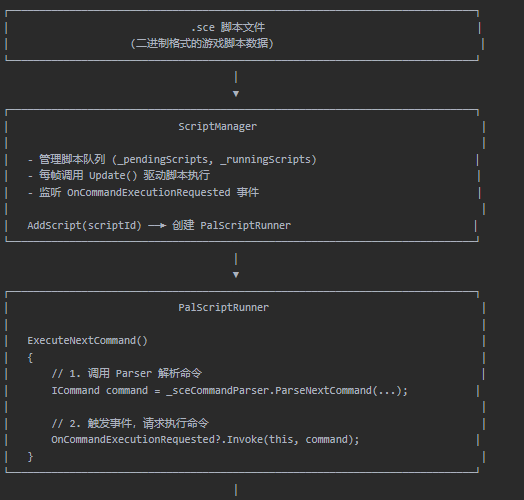
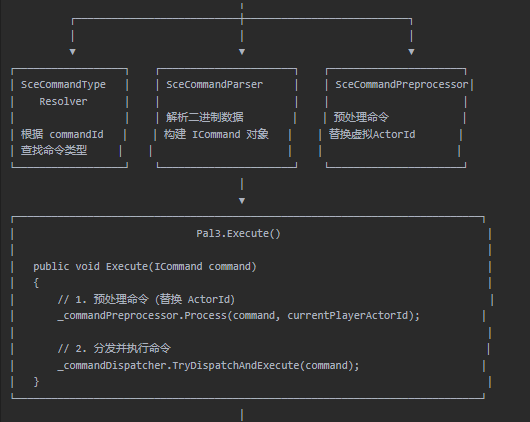
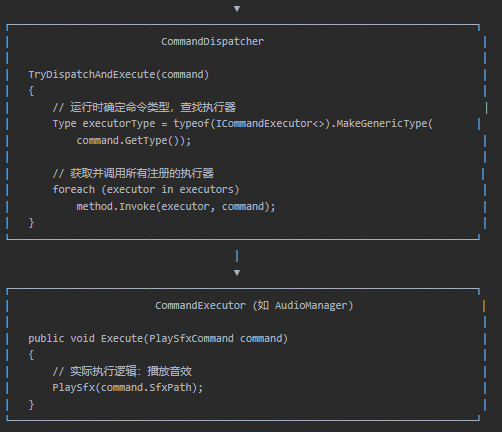
这里的ScriptRunner只负责脚本的二进制解析,
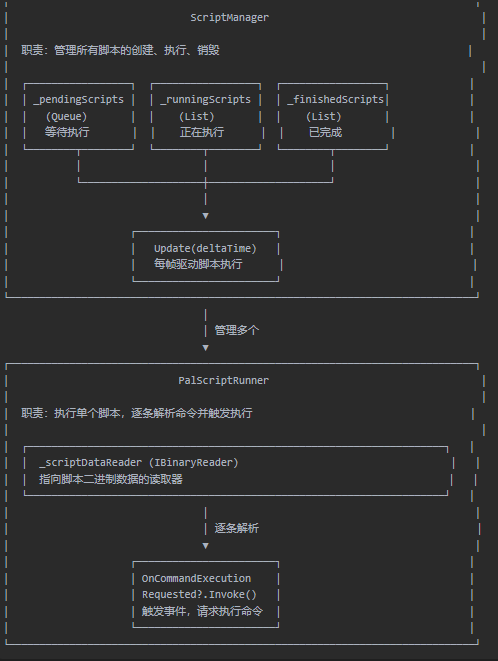
ScriptManager负责管理脚本的生命周期和事件订阅
Pal3.cs中的Execute才是真正负责命令执行的部分(其中组合了preprocessor和dispatcher)
先通过preprocessor预处理,然后通过dispatcher找到对应指令的执行器进行执行。
这里的Execute使用了事件订阅机制(观察者模式)
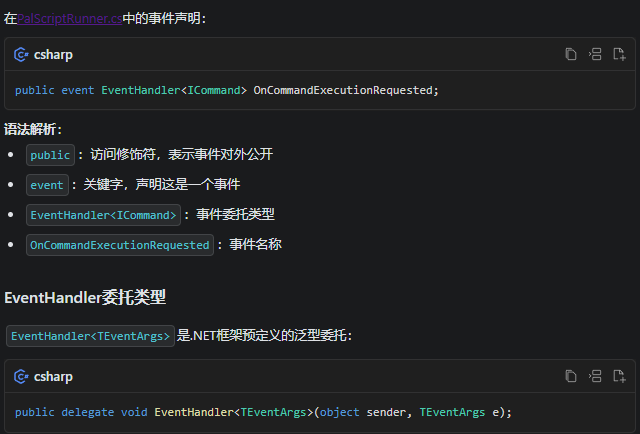
使用scriptRunner.OnCommandExecutionRequested += OnCommandExecutionRequested;来订阅事件,-=来取消订阅
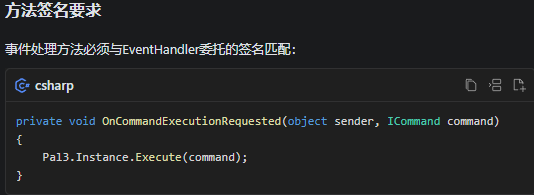
对应的事件必须有sender参数,可以用于判断是谁进行了invoke
cs
OnCommandExecutionRequested?.Invoke(this, command);使用这种订阅机制实现了很好的解耦
只有在ScriptManager中AddScript才会将Pal3.Instance.Execute注册到EventHandler中
*
这一块设计的很好,暂时没有完全理解透
IPalScriptPatcher
脚本修补器,会在ScriptRunner中调用,用于在ScriptRunner执行具体脚本时修补某些指令。
cs
public interface IPalScriptPatcher
{
    public Dictionary<string, ICommand> PatchedCommands { get; }

    public bool TryPatchCommandInScript(PalScriptType scriptType,
        uint scriptId,
        string scriptDescription,
        long positionInScript,
        int codepage,
        ICommand command,
        out ICommand fixedCommand)
    {
        string cmdHashKey = $"{codepage}_{scriptType}_{scriptId}_{scriptDescription}" +
                            $"_{positionInScript}_{command.GetType()}";

        if (PatchedCommands.TryGetValue(cmdHashKey, out ICommand patchedCommand))
        {
            fixedCommand = patchedCommand;
            return true;
        }

        fixedCommand = command;
        return false;
    }
*
这里修补了一些命令,暂时还不知道在干什么
cs
public sealed class PalScriptPatcher : IPalScriptPatcher
{
    public Dictionary<string, ICommand> PatchedCommands => new ()
    {
        {
            $"{936}_{PalScriptType.Scene}_{1284}_韩用-小四_{56}_{typeof(DialogueRenderTextCommand)}",
            new DialogueRenderTextCommand($"知道吗?您现在玩的{GameConstants.AppNameCNFull}是由\\i柒才\\r使用C#/Unity开发(完全重写)的复刻版," +
                                          "免费开源且支持全平台(Win/Mac/Linux/iOS/Android)。" +
                                          "如果您是花钱得到的,那么恭喜您成为盗版游戏的受害者。" +
                                          "当前游戏还在开发中,包括战斗在内的很多功能尚未实现,请耐心等待。" +
                                          "也欢迎加入Q群与作者联系或下载最新版:\\i252315306\\r," +
                                          "您也可以在B站关注Up主\\i@柒才\\r获取最新开发信息!另外,全平台都支持手柄哦~")
        },
        {
            $"{950}_{PalScriptType.Scene}_{1284}_韓用-小四_{56}_{typeof(DialogueRenderTextCommand)}",
            new DialogueRenderTextCommand($"知道嗎?您現在玩的{GameConstants.AppNameCNFull}是由\\i柒才\\r使用C#/Unity開發(完全重寫)的復刻版," +
                                          "免費開源且支持全平台(Win/Mac/Linux/iOS/Android)。" +
                                          "如果您是花錢得到的,那麼恭喜您成為盜版遊戲的受害者。" +
                                          "目前遊戲還在開發中,包括戰鬥在內的很多功能尚未實現,請耐心等待。" +
                                          "也歡迎加入Q群與作者聯絡或下載最新版:\\i252315306\\r," +
                                          "您也可以在B站關注Up主\\i@柒才\\r獲取最新開發信息!另外,全平台都支持摇杆哦~")
        },
        {
            $"{936}_{PalScriptType.Scene}_{1005}_龙葵苏醒2_{3891}_{typeof(ActorPathToCommand)}",
            new ActorPathToCommand(ActorConstants.PlayerActorVirtualID, 288, 20, 0)
        },
        {
            $"{950}_{PalScriptType.Scene}_{1005}_龍葵甦醒2_{3891}_{typeof(ActorPathToCommand)}",
            new ActorPathToCommand(ActorConstants.PlayerActorVirtualID, 288, 20, 0)
        },
        {
            $"{936}_{PalScriptType.Scene}_{1001}_初到镇江_{392}_{typeof(ActorMoveToCommand)}",
            new ActorPathToCommand(1, 318, 142, 0)
        },
        {
            $"{950}_{PalScriptType.Scene}_{1001}_初到鎮江_{392}_{typeof(ActorMoveToCommand)}",
            new ActorPathToCommand(1, 318, 142, 0)
        },
        {
            $"{936}_{PalScriptType.Scene}_{1001}_初到镇江_{688}_{typeof(ActorMoveToCommand)}",
            new ActorPathToCommand(3, 327, 140, 0)
        },
        {
            $"{950}_{PalScriptType.Scene}_{1001}_初到鎮江_{688}_{typeof(ActorMoveToCommand)}",
            new ActorPathToCommand(3, 327, 140, 0)
        },
        {
            $"{936}_{PalScriptType.Scene}_{1001}_初到镇江_{930}_{typeof(ActorMoveToCommand)}",
            new ActorPathToCommand(4, 346, 137, 0)
        },
        {
            $"{950}_{PalScriptType.Scene}_{1001}_初到鎮江_{930}_{typeof(ActorMoveToCommand)}",
            new ActorPathToCommand(4, 346, 137, 0)
        }
    };
}
UserVariableManager :IUserVariableStore<ushort, int>
其中维护了一个游戏运行中变量的字典
cs
private readonly Dictionary<ushort, int> _variables = new ();还实现了若干和变量修改有关的命令,用于存储和改变游戏中的变量(好感度,迷宫,金钱等)
SceCommandTypeResolver
场景指令处理,用于将指令中的CommandID转换为C#中的命令类ICommand,目前的所有指令都是场景指令(排除了作者自己加入的控制台命令,这里的命令不只用于调试,还用于游戏外的游戏设置等),可以理解为这就是游戏全局的指令类型转换器(CommandTypeResolver)。
这里在存储时使用了用户变量掩码和CommandID来计算哈希值,是因为同一个commandID可能对应不同的指令,区别就在于是否有UserVariable。
cs
private static bool _isInitialized;
private static readonly Dictionary<uint, Type> SceCommandTypeCache = new ();
用一个字典Cache存储当前实现ICommand接口且拥有SceCommandAttribute的所有命令。将计算出来的哈希值作为key,对应的commandType作为value存在Cache中。
游戏的二进制脚本文件中同时存有CommandID和UserVariableMask,使用这两个变量进行特殊的计算就可以得到对应的哈希值,从Cache中取出对应的CommandType。
Init
cs
public void Init()
{
    if (!_isInitialized) return;

    // 所有的SceCommand都存在当前的程序集下(Core)
    IEnumerable<Type> commandTypes = Assembly.GetExecutingAssembly().GetTypes()
        .Where(t => t.IsClass && t.GetInterfaces().Contains(typeof(ICommand)));

    foreach (Type commandType in commandTypes)
    {
        if (commandType.GetCustomAttribute(typeof(SceCommandAttribute)) is SceCommandAttribute
            sceCommandAttribute)
        {
            ushort userVariableMask = CalculateUserVariableMask(commandType);
            uint hashCode = GetHashCode(sceCommandAttribute.CommandID, userVariableMask);
            SceCommandTypeCache[hashCode] = commandType;
        }
    }
}
SceCommandParser
脚本解析器,内置了将二进制文件读取成为具体指令的方法(使用反射创建指令实例)
cs
public ICommand ParseNextCommand(IBinaryReader reader, int codepage, out ushort commandId)
{
    // 1. 读取命令头
    commandId = reader.ReadUInt16();           // 2 字节:命令 ID
    ushort userVariableMask = reader.ReadUInt16();  // 2 字节:用户变量掩码

    // 2. 验证命令 ID
    if (commandId > ScriptConstants.CommandIdMax)
    {
        throw new InvalidDataException($"Command Id is invalid: {commandId}");
    }

    // 3. 查找命令类型
    Type commandType = _sceCommandTypeResolver.GetType(commandId, userVariableMask);
    if (commandType == null)
    {
        throw new InvalidDataException($"Command Type not found for id: {commandId}");
    }

    // 4. 读取属性值
    PropertyInfo[] properties = commandType.GetProperties();
    object[] args = new object[properties.Length];

    for (int i = properties.Length - 1; i >= 0; i--)  // 注意:倒序读取
    {
        PropertyInfo property = properties[i];

        // 检查是否是用户变量
        if ((userVariableMask & (ushort)(1 << i)) != 0)
        {
            args[i] = reader.ReadUInt16();  // 用户变量固定 2 字节
        }
        else
        {
            args[i] = ReadPropertyValue(reader, property.PropertyType, codepage);
        }
    }

    // 5. 创建命令实例
    return Activator.CreateInstance(commandType, args) as ICommand;
}
cs
private static object ReadPropertyValue(IBinaryReader reader, Type propertyType, int codepage)
{
    // 1. 数组类型
    if (propertyType.IsArray)
    {
        ushort length = reader.ReadUInt16();  // 先读数组长度
        object[] propertyArray = new object[length];

        for (int i = 0; i < length; i++)
        {
            byte typeCode = reader.ReadByte();  // 每个元素前有类型标识
            Type varType = GetVariableType(typeCode);
            propertyArray[^(i + 1)] = ReadPropertyValue(reader, varType, codepage);  // 倒序填充
        }
        return propertyArray;
    }

    // 2. 字符串类型
    if (propertyType == typeof(string))
    {
        ushort length = reader.ReadUInt16();
        return reader.ReadString(length, codepage);
    }

    // 3. 基本类型
    return reader.Read(propertyType);
}
SceCommandPreprocessor
预处理器,所有的命令执行前都需要执行process()进行预处理,这里就是如果ActorId=-1就将其转换成当前角色的ID
cs
private readonly Dictionary<Type, PropertyInfo[]> _sceCommandToActorIdPropertiesCache = new();这里存储了拥有ActorIdAttribute属性的类->ActorIdAttribute属性的PropertyInfo
cs
public void Init()
{
    if (_isInitialized) return; // 1. 防止重复初始化

    // 2. 查找所有命令类型
    IEnumerable<Type> commandTypes = AppDomain.CurrentDomain.GetAssemblies()
        .SelectMany(assembly => assembly.GetTypes())
        .Where(t => t.IsClass && t.GetInterfaces().Contains(typeof(ICommand)));

    // 3. 遍历每个命令类型
    foreach (Type commandType in commandTypes)
    {
        // 4. 获取所有公共实例属性
        PropertyInfo[] properties = commandType.GetProperties(BindingFlags.Public | BindingFlags.Instance);

        // 5. 筛选出带有 [SceActorIdAttribute] 的属性
        PropertyInfo[] actorIdProperties = properties.Where(
            prop => Attribute.IsDefined(prop, typeof(SceActorIdAttribute))).ToArray();

        // 6. 如果没有找到,则跳过此类型
        if (actorIdProperties is not {Length: > 0}) continue;

        // 7. 健全性检查 (Sanity Checks)
        foreach (PropertyInfo actorIdProperty in actorIdProperties)
        {
            // 检查类型是否为 int
            if (actorIdProperty.PropertyType != typeof(int))
            {
                throw new InvalidDataContractException(...);
            }
            // 检查属性是否可写
            if (!actorIdProperty.CanWrite)
            {
                throw new InvalidOperationException(...);
            }
        }

        // 8. 将结果存入缓存
        _sceCommandToActorIdPropertiesCache[commandType] = actorIdProperties;
    }

    _isInitialized = true; // 9. 标记为已初始化
}
BindingFlags.Public | BindingFlags.Instance 参数
这是这行代码最关键的部分,它是一个位掩码(Bitmask) ,通过按位或(|)操作符组合了两个标志,告诉 GetProperties 方法具体的筛选规则。
a) BindingFlags.Public
- 含义 : 指定只返回**公共(public)**的属性。
- 作用 : 它会排除
private、protected、internal等非公共访问修饰符的属性。 - 这里我们把ICommand中的所有属性都设置为了pulic
b) BindingFlags.Instance
- 含义 : 指定只返回**实例(instance)**属性。
- 作用 : 它会排除**静态(static)**属性。
- 为什么在这里使用? :
- 上下文相关 : 我们要处理的是一个具体的命令实例 (
ICommand command),这个实例是在运行时创建的。静态属性属于类本身,而不是类的某个特定实例。 - 逻辑正确性: 玩家的 Actor ID 是与一个具体的玩家、一个具体的命令实例相关联的,它不可能是一个所有命令实例共享的静态值。因此,我们只关心实例属性。
- 避免错误 : 如果不加这个标志,代码可能会错误地获取到某个静态属性,而后续的
actorIdProperty.GetValue(command)和actorIdProperty.SetValue(command, ...)调用会因为静态属性不接受实例对象作为参数而抛出异常。
- 上下文相关 : 我们要处理的是一个具体的命令实例 (
Attribute.IsDefined(prop, typeof(SceActorIdAttribute)) (判断逻辑)
- 作用 : 检查
prop这个属性上是否挂载了SceActorIdAttribute这个特性。
is not
- 这是 C# 的模式匹配操作符,用于检查一个对象是否不匹配某个模式。
- 它是
is操作符的逻辑反。x is not y等价于!(x is y),但可读性更好。
{Length: > 0}
- 这是最核心的部分,它是一个属性模式 (Property Pattern)。
{ ... }:表示我们要匹配一个对象的内部属性。Length: > 0:这是模式的具体内容。它表示"这个对象必须有一个名为Length的属性,并且该属性的值必须大于 0"。- 因为
actorIdProperties是一个数组,而所有数组都有一个Length属性,所以这个模式是有效的。
cs
public void Process(ICommand command, int currentPlayerActorId)
{
    // 1. 运行时检查,确保已初始化
    if (!_isInitialized)
    {
        throw new InvalidOperationException(...);
    }

    Type commandType = command.GetType();

    // 2. 从缓存中快速查找
    if (_sceCommandToActorIdPropertiesCache.TryGetValue(commandType, out PropertyInfo[] actorIdProperties))
    {
        // 3. 遍历需要处理的属性
        foreach (PropertyInfo actorIdProperty in actorIdProperties)
        {
            // 4. 检查属性当前值是否为虚拟ID
            if (actorIdProperty.GetValue(command) is ActorConstants.PlayerActorVirtualID)
            {
                // 5. 如果是,则替换为真实的玩家ID
                actorIdProperty.SetValue(command, currentPlayerActorId);
            }
        }
    }
}-
actorIdProperty.GetValue(command): 获取该属性在当前command对象实例上的值。 -
is ActorConstants.PlayerActorVirtualID: 使用is模式匹配来判断值是否等于-1。这比==更安全(避免了装箱)且代码更简洁。 -
actorIdProperty.SetValue(command, currentPlayerActorId): 如果值匹配,就调用SetValue方法将其更新为传入的currentPlayerActorId。
WaitUntilTime : IScriptRunnerWaiter
*
这里的waiter是为了实现这样一条命令,实际上还有另外一个waiter,不过是用于控制台命令的,暂时不管。
cs
[SceCommand(1, "脚本在一定时间后才执行下一条指令(不影响游戏系统和其它脚本的执行)," +
               "参数:time(秒)")]
public sealed class ScriptRunnerWaitUntilTimeCommand : ICommand
{
    public ScriptRunnerWaitUntilTimeCommand(float time)
    {
        Time = time;
    }
    public float Time { get; }
}
cs
public void Execute(ScriptRunnerWaitUntilTimeCommand untilTimeCommand)
{
    if (!_isExecuting) return;
    _waiters.Push(new WaitUntilTime(untilTimeCommand.Time));
}
具体的运行逻辑就是在Update中运行脚本时检测是否有新加入的waiter
cs
private void UpdateWaiters(float deltaTime)
{
    if (_waiters.Count <= 0) return;

    if (!_waiters.Peek().ShouldWait(deltaTime))
    {
        _waiters.Pop();
    }
}
如果计时器结束(SholdWait == false)即出栈。
cs
public sealed class WaitUntilTime : IScriptRunnerWaiter
{
    private float _totalTimeInSec;

    public WaitUntilTime(float totalTimeInSec)
    {
        _totalTimeInSec = totalTimeInSec;
    }

    public bool ShouldWait(float deltaTime = 0)
    {
        _totalTimeInSec -= deltaTime;

        // 直接置为-1防止溢出
        if (_totalTimeInSec < 0)
        {
            _totalTimeInSec = -1f;
        }

        return _totalTimeInSec > 0;
    }
}
PalScriptRunner
cs
public sealed class PalScriptRunner : IDisposable,
    ICommandExecutor<ScriptRunnerChangeExecutionModeCommand>,
    ICommandExecutor<ScriptRunnerSetOperatorCommand>,
    ICommandExecutor<ScriptRunnerGotoCommand>,
    ICommandExecutor<ScriptRunnerGotoIfNotCommand>,
    ICommandExecutor<ScriptRunnerWaitUntilTimeCommand>,
    ICommandExecutor<ScriptRunnerAddWaiterRequest>,
    ICommandExecutor<ScriptEvaluateVarIsGreaterThanCommand>,
    ICommandExecutor<ScriptEvaluateVarIsGreaterThanOrEqualToCommand>,
    ICommandExecutor<ScriptEvaluateVarIsGreaterThanOrEqualToAnotherVarCommand>,
    ICommandExecutor<ScriptEvaluateVarIsEqualToCommand>,
    ICommandExecutor<ScriptEvaluateVarIsNotEqualToCommand>,
    ICommandExecutor<ScriptEvaluateVarIsLessThanCommand>,
    ICommandExecutor<ScriptEvaluateVarIsLessThanOrEqualToCommand>,
    ICommandExecutor<ScriptEvaluateVarIsInRangeCommand>,
    ICommandExecutor<ScriptEvaluateVarIfPlayerHaveItemCommand>,
    ICommandExecutor<ScriptEvaluateVarIfActorInTeamCommand>
cs
[SceCommand(6, "判断变量是否大于给定值并与临时变量计算结果")]
public sealed class ScriptEvaluateVarIsGreaterThanCommand : ICommand
{
    public ScriptEvaluateVarIsGreaterThanCommand(ushort variable, int value)
    {
        Variable = variable;
        Value = value;
    }

    [SceUserVariable] public ushort Variable { get; }
    public int Value { get; }
}
*
这里传入的参数是用户自身保存的数值,用SceUserVariableAttribute来进行标记,其中为空,仅作标记作用(推测这里是判定好感度等使用)
cs
public PalScriptType ScriptType { get; }这里将脚本类型分为三种WorldMap,System和Scene,实际上这里的所有指令都被Attribute标记为了SceCommand,判断方法是这样的,WorldMap使用一个bool值在传入的时候控制,默认为false,而脚本ID超过SystemScriptMax的则视为system类型。因为这里的System和WorldMap脚本全游戏都分别只有一个,所以我们在ScriptManager的初始化时直接进行读取。
这里的ScriptType目前看到的只适用于Patcher修正。
cs
public event EventHandler<ICommand> OnCommandExecutionRequested;

public uint ScriptId { get; }              // 脚本 ID
public PalScriptType ScriptType { get; }   // 脚本类型
public string ScriptDescription { get; }   // 脚本描述

private readonly ISceCommandParser _sceCommandParser;    // 命令解析器
private readonly IPalScriptPatcher _scriptPatcher;       // 脚本补丁器
private readonly IUserVariableStore<ushort, int> _userVariableStore;  // 用户变量存储
private readonly int _codepage;                          // 字符编码页

private readonly IBinaryReader _scriptDataReader;  // 二进制读取器
private ScriptExecutionMode _executionMode;        // 执行模式
private readonly Stack<IScriptRunnerWaiter> _waiters = new();  // 等待器栈
private bool _isExecuting;   // 是否正在执行
private bool _isDisposed;    // 是否已释放

// 逻辑运算类型
private ScriptOperatorType _operatorType = ScriptOperatorType.Assign;
private bool _tempVariable = false;
Create
这里将构造函数置为private,对外暴露一个工厂方法Create来创建具体的Runner实例。
cs
private PalScriptRunner(PalScriptType scriptType,
    uint scriptId,
    SceScriptBlock scriptBlock,
    int codepage,
    IUserVariableStore<ushort, int> userVariableStore,
    ISceCommandParser sceCommandParser,
    IPalScriptPatcher scriptPatcher,
    ScriptExecutionMode executionMode = ScriptExecutionMode.Asynchronous) //默认异步
{
    // 初始化脚本信息
    ScriptType = scriptType;
    ScriptId = scriptId;
    ScriptDescription = scriptBlock.Description;
    // 依赖注入
    _userVariableStore = userVariableStore;
    _codepage = codepage;
    _sceCommandParser = sceCommandParser;
    _scriptPatcher = scriptPatcher;
    _executionMode = executionMode;
    // 创建指向脚本数据的二进制读取器
    _scriptDataReader = new SafeBinaryReader(scriptBlock.ScriptData);
    // 注册到命令表
    CommandExecutorRegistry<ICommand>.Instance.Register(this);
}
cs
public static PalScriptRunner Create(SceFile sceFile,
    PalScriptType scriptType,
    uint scriptId,
    IUserVariableStore<ushort, int> userVariableStore,
    ISceCommandParser sceCommandParser,
    IPalScriptPatcher scriptPatcher)
{
    // 如果Sce文件中没有脚本块则为无效脚本
    if (!sceFile.ScriptBlocks.TryGetValue(scriptId, out SceScriptBlock sceScriptBlock))
    {
        throw new ArgumentException($"Invalid script id: {scriptId}");
    }

    Debug.Log($"Create script runner: [{sceScriptBlock.Id} {sceScriptBlock.Description}]");

    return new PalScriptRunner(scriptType,
        scriptId,
        sceScriptBlock,
        sceFile.Codepage,
        userVariableStore,
        sceCommandParser,
        scriptPatcher);
}
Execute
cs
private bool Execute()
{
    // 检查是否已释放
    if (_isDisposed) return false;

    // 检查是否已读完所有数据
    if (_scriptDataReader.Position == _scriptDataReader.Length)
    {
        return false;  // 脚本结束
    }

    // 脚本正在运行中
    _isExecuting = true;

    // 执行指令循环
    while (!_isDisposed && _scriptDataReader.Position < _scriptDataReader.Length)
    {
        ExecuteNextCommand();

        // 异步模式:每帧只执行一条命令就返回
        if (_executionMode == ScriptExecutionMode.Asynchronous) break;
    }

    // 脚本执行完毕
    _isExecuting = false;
    // 脚本成功执行完毕
    return true;
}
private void ExecuteNextCommand()
{
    long cmdPosition = _scriptDataReader.Position;

    // 解析二进制命令
    ICommand command = _sceCommandParser.ParseNextCommand(_scriptDataReader,
        _codepage,
        out ushort commandId);

    // 修正命令(如果有)
    if (_scriptPatcher.TryPatchCommandInScript(ScriptType,
            ScriptId,
            ScriptDescription,
            cmdPosition,
            _codepage,
            command,
            out ICommand fixedCommand))
    {
        command = fixedCommand;
    }

    Debug.Log($"{ScriptType} Script " +
                     $"[{ScriptId} {ScriptDescription} [{cmdPosition}]: " +
                     $"{command.GetType().Name.Replace("Command", "")} [{commandId}] " +
                     $"{JsonConvert.SerializeObject(command)}");
    // 触发命令执行请求事件???
    OnCommandExecutionRequested?.Invoke(this, command);
}
Update
Pal3.Update(ScriptManager.Update(SctriptRunner.Update()))
cs
public bool Update(float deltaTime)
{
    var canExecute = true;

    if (_waiters.Count > 0)
    {
        UpdateWaiters(deltaTime);
    }

    if (_waiters.Count == 0)
    {
        do { canExecute = Execute(); }
        while (canExecute && _waiters.Count == 0);
    }
    // 能够成功执行,在ScriptManager中加入finished队列
    return canExecute;
}

private void UpdateWaiters(float deltaTime)
{
    if (_waiters.Count <= 0) return;

    if (!_waiters.Peek().ShouldWait(deltaTime))
    {
        _waiters.Pop();
    }
}
具体指令Execute
cs
public void Execute(ScriptRunnerSetOperatorCommand command)
{
// 所有的Execute都有,如果脚本不在运行,则直接忽略
    if (!_isExecuting) return;
    _operatorType = (ScriptOperatorType)command.OperatorType;
}
ScriptManager
cs
public sealed class ScriptManager : IDisposable,
    ICommandExecutor<ScriptExecuteCommand>,
    ICommandExecutor<ResetGameStateCommand>
{
}
cs
[SceCommand(16, "调用另一段脚本," +
                "参数:脚本ID")]
public sealed class ScriptExecuteCommand : ICommand
{
    public ScriptExecuteCommand(int scriptId)
    {
        ScriptId = scriptId;
    }

    public int ScriptId { get; }
}
cs
{
    private readonly Queue<PalScriptRunner> _pendingScripts = new ();
    private readonly List<PalScriptRunner> _runningScripts = new ();
    private readonly List<PalScriptRunner> _finishedScripts = new ();
}
这里定义了三个变量,分别是等待执行的脚本的队列(先进先出),正在执行的脚本,已完成的脚本。
cs
private readonly ISceCommandParser _sceCommandParser;      // 命令解析器
private readonly IPalScriptPatcher _scriptPatcher;         // 脚本补丁器
private readonly IUserVariableStore<ushort, int> _userVariableStore;  // 用户变量存储

private readonly SceFile _systemSceFile;     // 系统脚本文件
private readonly SceFile _worldMapSceFile;   // 世界地图脚本文件
private SceFile _currentSceFile;             // 当前场景脚本文件

private bool _pendingSceneScriptExecution = false;
AddScript
cs
public bool AddScript(uint scriptId, bool isWorldMapScript = false)
{
    // 验证 scriptId 有效性
    if (scriptId == ScriptConstants.InvalidScriptId) return false;

    // 检查是否已在队列中运行(防止重复)
    if (_pendingScripts.Any(s => s.ScriptId == scriptId) ||
        _runningScripts.Any(s => s.ScriptId == scriptId))
    {
        Debug.LogError($"Script is already running: {scriptId}");
        return false;
    }

    // 根据脚本 ID 范围确定脚本类型
    PalScriptRunner scriptRunner;
    if (isWorldMapScript)
    {
        Debug.Log($"Add WorldMap script id: {scriptId}");
        scriptRunner = PalScriptRunner.Create(_worldMapSceFile,
            PalScriptType.WorldMap,
            scriptId,
            _userVariableStore,
            _sceCommandParser,
            _scriptPatcher);
    }
    else if (scriptId < ScriptConstants.SystemScriptIdMax)
    {
        Debug.Log($"Add System script id: {scriptId}");
        scriptRunner = PalScriptRunner.Create(_systemSceFile,
            PalScriptType.System,
            scriptId,
            _userVariableStore,
            _sceCommandParser,
            _scriptPatcher);
    }
    else
    {
        Debug.Log($"Add Scene script id: {scriptId}");
        scriptRunner = PalScriptRunner.Create(_currentSceFile,
            PalScriptType.Scene,
            scriptId,
            _userVariableStore,
            _sceCommandParser,
            _scriptPatcher);
    }

    // 订阅事件:当脚本需要执行命令时触发
    // TODO???
    scriptRunner.OnCommandExecutionRequested += OnCommandExecutionRequested;

    // 加入等待队列
    _pendingScripts.Enqueue(scriptRunner);
    return true;
}
private void OnCommandExecutionRequested(object sender, ICommand command)
{
    Pal3.Instance.Execute(command);
}
Update
cs
public void Update(float deltaTime)
{
    // 将等待队列中的脚本移到运行列表
    while (_pendingScripts.Count > 0)
    {
        _runningScripts.Insert(0, _pendingScripts.Dequeue());
    }

    // 如果没有运行的脚本,直接返回
    if (_runningScripts.Count == 0) return;

    // 更新所有运行中的脚本
    foreach (PalScriptRunner script in _runningScripts)
    {
        // script.Update() 返回 false 表示脚本执行完毕
        if (!script.Update(deltaTime))
        {
            _finishedScripts.Add(script);
        }
    }

    // 清理已完成的脚本
    foreach (PalScriptRunner finishedScript in _finishedScripts)
    {
        _runningScripts.Remove(finishedScript);

        // 取消事件订阅
        finishedScript.OnCommandExecutionRequested -= OnCommandExecutionRequested;

        // 释放资源
        finishedScript.Dispose();

        // 发送脚本完成通知
        Debug.Log($"Script [{finishedScript.ScriptId} " +
                         $"{finishedScript.ScriptDescription}] finished running");
        Pal3.Instance.Execute(new ScriptFinishedRunningNotification(
             finishedScript.ScriptId,
             finishedScript.ScriptType));
    }

    _finishedScripts.Clear();

    // 脚本运行时有可能会新增加新待执行脚本
    // 如果有待执行的场景脚本,递归调用
    if (_pendingSceneScriptExecution)
    {
        _pendingSceneScriptExecution = false;
        Update(1f);  // 递归
    }
}
TryAddSceneScript
在SceneManager中使用
cs
// 尝试加入新的场景脚本命令
public bool TryAddSceneScript(SceFile sceFile, string sceneScriptDescription, out uint sceneScriptId)
{
    sceneScriptId = ScriptConstants.InvalidScriptId;

    _currentSceFile = sceFile;

    // 从所有的脚本块中寻找匹配的描述
    foreach (KeyValuePair<uint, SceScriptBlock> scriptBlock in _currentSceFile.ScriptBlocks
                 .Where(scriptBlock =>
                     string.Equals(scriptBlock.Value.Description,
                         sceneScriptDescription,
                         StringComparison.OrdinalIgnoreCase)))
    {
        sceneScriptId = scriptBlock.Key;
        AddScript(sceneScriptId);
        _pendingSceneScriptExecution = true;
        // 这里会让正在运行的脚本强制暂停
        // 先运行我们这里新插入的脚本,然后再继续之前的脚本
        Pal3.Instance.Execute(new ScriptRunnerWaitUntilTimeCommand(0f));
        return true;
    }

    return false;
}
Dispose
cs
public void Dispose()
{
    CommandExecutorRegistry<ICommand>.Instance.UnRegister(this);

    // 等待队列没有订阅事件,直接清理
    _pendingScripts.Clear();

    foreach (PalScriptRunner scriptRunner in _runningScripts)
    {
        scriptRunner.OnCommandExecutionRequested -= OnCommandExecutionRequested;
        scriptRunner.Dispose();
    }

    _runningScripts.Clear();

    foreach (PalScriptRunner finishedScript in _finishedScripts)
    {
        finishedScript.OnCommandExecutionRequested -= OnCommandExecutionRequested;
        finishedScript.Dispose();
    }

    _finishedScripts.Clear();
}
Pal3.cs
在OnEnable时只注册所有游戏内所需要的Manager,并且这些Manager都必须实现IDisposable接口,这里使用了一个容器保存所有的Manager,在游戏退出及OnDisable时进行所有的Manager的Dispose()
cs
private IEnumerable<object> _allDisposableServices;

OnEnable()
{
// Service.Insatance.Register...
    _allDisposableServices = ServiceLocator.Instance.GetAllRegisteredServices().Where(o => o is IDisposable);
}
private void OnDisable()
{
    _gameSettings.OnGameSettingsChanged -= OnGameSettingsChanged;

    foreach (IDisposable service in _allDisposableServices)
    {
        Debug.Log($"Disposing service: [{service.GetType().Name}]");
        service.Dispose();
    }

    Debug.Log("Game exited");
}