本篇介绍Rust解析mp3文件,获取mp3文件的歌曲名,作者,专辑、封面图片等信息,同时记录在工作目录下同时维护多个项目的结构展示。
1.显示mp3文件的基本信息
首先创建工作目录analyzermp3,在该工作目录下新建Cargo.toml文件,内容如下:
[workspace]
resolver = "3"

# 统一依赖版本
[workspace.dependencies]
id3 = "1.16.4"        # ID3标签处理
切换到该目录下,新建工程cargo new mp3demo,这个时候在workspace项目中自动添加mp3demo项目。
PS F:\rustproject\learndemo\analyzermp3> cargo new mp3demo
    Creating binary (application) `mp3demo` package
      Adding `mp3demo` as member of workspace at `F:\rustproject\learndemo\analyzermp3`
note: see more `Cargo.toml` keys and their definitions at https://doc.rust-lang.org/cargo/reference/manifest.html
PS F:\rustproject\learndemo\analyzermp3>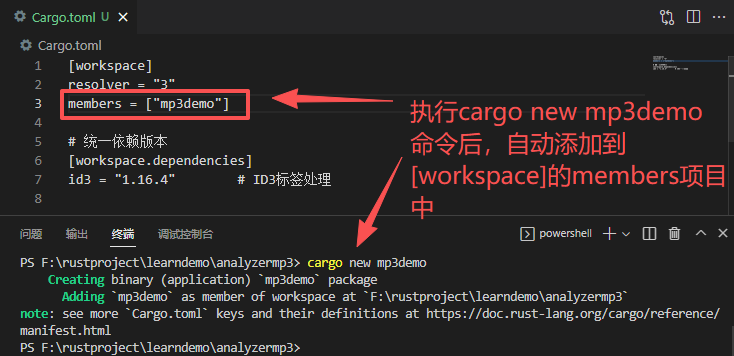
在mp3demo项目配置文件中添加依赖:
mp3demo/Cargo.toml
[package]
name = "mp3demo"
version = "0.1.0"
edition = "2024"

[dependencies]
id3.workspace = true
编译代码 mp3demo/src/main.rs
//使用 id3 crate获取基本信息
use id3::{Tag, TagLike};

fn read_id3_metadata(file_path: &str) -> Result<(), Box<dyn std::error::Error>> {
    let tag = Tag::read_from_path(file_path)?;

    println!("ID3 标签信息: ");
    println!("标题: {:?}", tag.title());
    println!("艺术家: {:?}", tag.artist());
    println!("专辑: {:?}", tag.album());
    println!("年份: {:?}", tag.year());
    println!("曲目: {:?}", tag.track());
    println!("流派: {:?}", tag.genre());
    println!("version: {:?}", tag.version());  //version: Id3v23 v2.3标签
    println!("是否有封面:{:?}", tag.pictures().next().is_some()); //是否有封面
    // 读取所有帧
    // for frame in tag.frames() {
    //     println!("帧 ID: {}, 内容: {:?}", frame.id(), frame.content());
    // }

    Ok(())
}

fn main() {
    let mp3_list = vec!["F:/rustproject/mp3/01shangxintaipingyang.mp3",
                        "F:/rustproject/mp3/id3v24.mp3",
                        "F:/rustproject/mp3/test.mp3",
                        "F:/rustproject/mp3/visualization.raw"];
    for i in 0..mp3_list.len() {
        println!("{} = {}", i, mp3_list[i]);
        let result = read_id3_metadata(mp3_list[i]);
        println!("result = {:?}", result);
    }

    println!("Hello Rust");
}
编译运行:
PS F:\rustproject\learndemo\analyzermp3> cargo run
   Compiling cfg-if v1.0.4
   Compiling simd-adler32 v0.3.8
   Compiling adler2 v2.0.1
   Compiling bitflags v2.11.0
   Compiling byteorder v1.5.0
   Compiling crc32fast v1.5.0
   Compiling miniz_oxide v0.8.9
   Compiling flate2 v1.1.9
   Compiling id3 v1.16.4
   Compiling mp3demo v0.1.0 (F:\rustproject\learndemo\analyzermp3\mp3demo)
    Finished `dev` profile [unoptimized + debuginfo] target(s) in 1.82s
     Running `target\debug\mp3demo.exe`
0 = F:/rustproject/mp3/01shangxintaipingyang.mp3
ID3 标签信息:
标题: Some("伤心太平洋.mp3")
艺术家: Some("焕焕")
专辑: Some("焕焕一直在")
年份: None
曲目: Some(1)
流派: None
version: Id3v23
是否有封面:true
result = Ok(())
1 = F:/rustproject/mp3/id3v24.mp3
ID3 标签信息:
标题: Some("This is a wonderful title isn't it?")
艺术家: Some("Someone/Someone else")
专辑: Some("éൣø§")
年份: None
曲目: Some(1)
流派: Some("(46)")
version: Id3v24
是否有封面:false
result = Ok(())
2 = F:/rustproject/mp3/test.mp3
result = Err(NoTag: reader does not contain an id3 tag)
3 = F:/rustproject/mp3/visualization.raw
result = Err(NoTag: reader does not contain an id3 tag)
Hello Rust
PS F:\rustproject\learndemo\analyzermp3>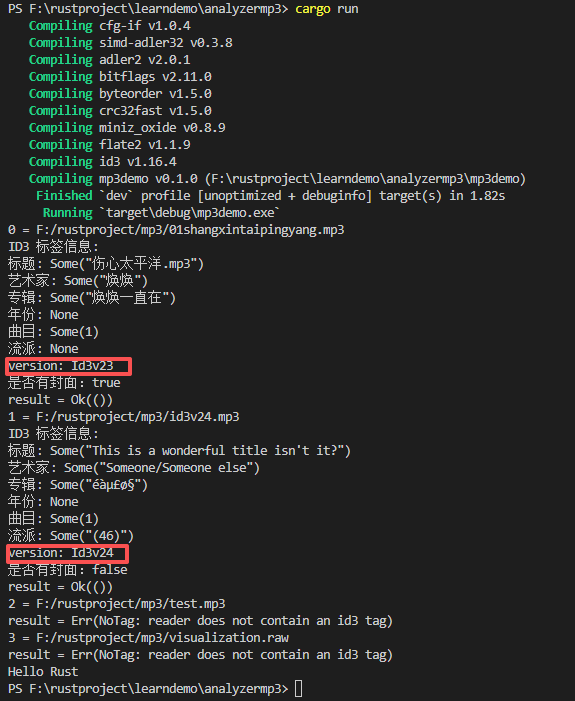
2.把基本信息封装到结构体。
添加第2个项目 cargo new mp3demo2,
Cargo.toml文件:
[workspace]
resolver = "3"
# 列出所有成员   创建项目时 cargo new xxxx 自动添加
members = ["mp3demo", "mp3demo2"]

# 统一依赖版本
[workspace.dependencies]
id3 = "1.16.4"        # ID3标签处理
mp3demo2的配置文件mp3demo2/Cargo.toml
[package]
name = "mp3demo2"
version = "0.1.0"
edition = "2024"

[dependencies]
id3 = "1.16.4"        # ID3标签处理  id3.workspace = true 这样写也可以
编写代码mp3demo2/src/main.rs
//返回结构体信息
use id3::{Tag, TagLike};
use std::path::Path;

fn main() {
    let file_path = "F:/rustproject/mp3/07zhoutianya.mp3";

    match get_mp3_info(file_path) {
        Ok(info) => {
            println!("MP3文件信息:");
            println!("歌曲名: {}", info.title);
            println!("艺术家: {}", info.artist);
            println!("专辑: {}", info.album);
            println!("年份: {}", info.year);
            println!("音轨: {}", info.track);
            println!("流派: {}", info.genre);
            println!("专辑封面: {}", info.has_picture);
        }
        Err(e) => eprintln!("读取MP3信息失败: {}", e),
    }
}

#[derive(Debug, Default)]
struct Mp3Info {
    title: String,
    artist: String,
    album: String,
    year: String,
    track: String,
    genre: String,
    has_picture: bool,
}

fn get_mp3_info<P: AsRef<Path>>(path: P) -> Result<Mp3Info, Box<dyn std::error::Error>> {
    let tag = Tag::read_from_path(path)?;
    let mut info = Mp3Info::default();

    // 获取基本信息
    info.title = tag.title().unwrap_or("未知").to_string();
    info.artist = tag.artist().unwrap_or("未知").to_string();
    info.album = tag.album().unwrap_or("未知").to_string();
    info.year = tag.year()
        .map(|y| y.to_string())
        .unwrap_or_else(|| "未知".to_string());

    // 获取音轨信息
    info.track = tag.track()
        .map(|t| t.to_string())
        .unwrap_or_else(|| "未知".to_string());

    // 获取流派
    info.genre = tag.genre()
        .map(|g| g.to_string())
        .unwrap_or_else(|| "未知".to_string());

    // 检查是否有专辑封面
    info.has_picture = tag.pictures().next().is_some();

    Ok(info)
}
编译运行:

这个时候就不能再执行cargo run命令运行了,因为现在已经有两个项目了,必须指定要运行的项目,cargo build是编译所有项目,cargo run -p xxx是指定运行项目
PS F:\rustproject\learndemo\analyzermp3> cargo build
   Compiling mp3demo2 v0.1.0 (F:\rustproject\learndemo\analyzermp3\mp3demo2)
   Compiling mp3demo v0.1.0 (F:\rustproject\learndemo\analyzermp3\mp3demo)
    Finished `dev` profile [unoptimized + debuginfo] target(s) in 0.37s
PS F:\rustproject\learndemo\analyzermp3> cargo run -p mp3demo2
    Finished `dev` profile [unoptimized + debuginfo] target(s) in 0.01s
     Running `target\debug\mp3demo2.exe`
MP3文件信息:
歌曲名: 走天涯
艺术家: 卓雅
专辑: 走天涯
年份: 未知
音轨: 1
流派: 未知
专辑封面: true
PS F:\rustproject\learndemo\analyzermp3>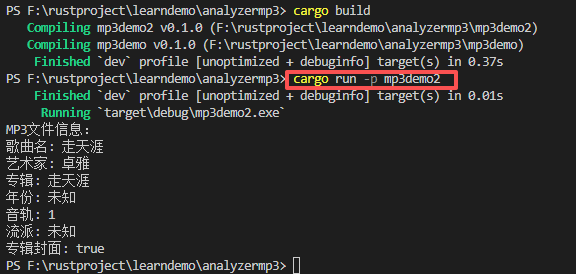
3.提取mp3文件的封面图片
创建第3个项目cargo new mp3demo3
PS F:\rustproject\learndemo\analyzermp3> cargo new mp3demo3
    Creating binary (application) `mp3demo3` package
      Adding `mp3demo3` as member of workspace at `F:\rustproject\learndemo\analyzermp3`
note: see more `Cargo.toml` keys and their definitions at https://doc.rust-lang.org/cargo/reference/manifest.html
PS F:\rustproject\learndemo\analyzermp3>
根目录下的完整配置文件如下:
Cargo.toml
[workspace]
resolver = "3"
# 列出所有成员   创建项目时 cargo new xxxx 自动添加
members = ["mp3demo", "mp3demo2", "mp3demo3"]

#default-members = ["mp3demo"]  # 默认只编译这个

# 统一依赖版本
[workspace.dependencies]
id3 = "1.16.4"        # ID3标签处理

#serde = { version = "1.0", features = ["derive"] }
#tokio = { version = "1.0", features = ["full"] }

# 子 crate 中引用
#[dependencies]
#serde.workspace = true
#tokio.workspace = true

# 在工作空间根目录运行
#cargo clean            #清理
#cargo build          # 编译所有 crate
#cargo build -p xxxx  # 只编译特定 crate
#cargo run -p xxxx    # 运行特定项目

#在工作空间根目录运行
# cargo test --workspace   #运行工作空间中所有 crate 的测试
# cargo test -p xxx         #运行特定测试
mp3demo3的配置文件mp3demo3/Cargo.toml
[package]
name = "mp3demo3"
version = "0.1.0"
edition = "2024"

[dependencies]
id3 = "1.16.4"
image = "0.24"
mp3-metadata = "0.3"
编写代码,提取mp3文件的封面
//提取封面
use id3::Tag;
use std::env;
use std::fs::File;
use std::io::Write;
//use std::path::Path;

fn main() -> Result<(), Box<dyn std::error::Error>> {
    // 获取命令行参数:第一个是 MP3 文件路径,第二个(可选)是输出图片路径
    let args: Vec<String> = env::args().collect();
    if args.len() < 2 {
        eprintln!("用法: {} <MP3文件> [输出图片路径]", args[0]);
        eprintln!("如果未指定输出路径,则默认保存为 cover.jpg");
        return Ok(());
    }

    let mp3_path = &args[1];
    let output_path = if args.len() >= 3 {
        args[2].clone()
    } else {
        "cover.jpg".to_string()
    };

    // 读取 MP3 文件的 ID3 标签
    let tag = Tag::read_from_path(mp3_path)?;

    // 获取所有图片帧
    let mut pictures = tag.pictures();
    let picture = pictures.next().ok_or("该 MP3 文件中没有找到封面图片")?;

    // 将图片数据写入文件
    let mut file = File::create(&output_path)?;
    file.write_all(&picture.data)?;

    println!("封面图片已成功提取到: {}", output_path);
    println!("图片类型: {:?}", picture.picture_type);
    println!("MIME 类型: {:?}", picture.mime_type);
    println!("图片大小: {} 字节", picture.data.len());

    Ok(())
}
//cargo run -p mp3demo3 "F:/rustproject/mp3/07zhoutianya.mp3" cover.jpg
cargo build编译工作目录下的所有工程
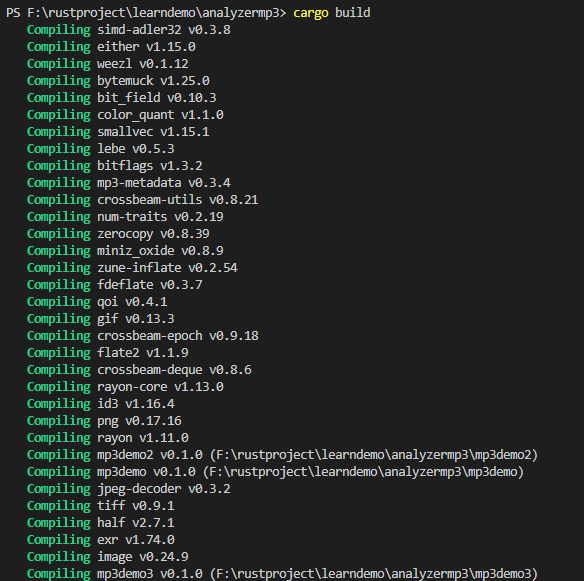
编译成功后都生成在target/debug目录下:
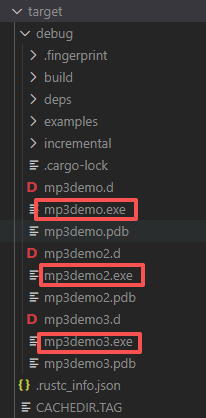
节省编译过程中产生的临时文件目录。
提取封面执行时加上两个参数,文件路径和封面路径
cargo run -p mp3demo3 "F:/rustproject/mp3/07zhoutianya.mp3" cover.jpg
PS F:\rustproject\learndemo\analyzermp3> cargo run -p mp3demo3 "F:/rustproject/mp3/07zhoutianya.mp3" cover.jpg
    Finished `dev` profile [unoptimized + debuginfo] target(s) in 0.03s
     Running `target\debug\mp3demo3.exe F:/rustproject/mp3/07zhoutianya.mp3 cover.jpg`
封面图片已成功提取到: cover.jpg
图片类型: Media
MIME 类型: "image/jpeg"
图片大小: 540407 字节
PS F:\rustproject\learndemo\analyzermp3>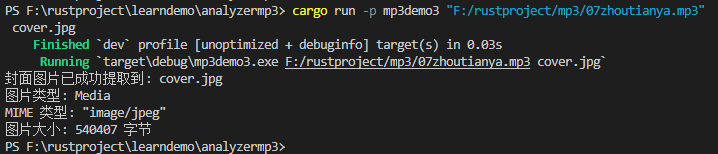
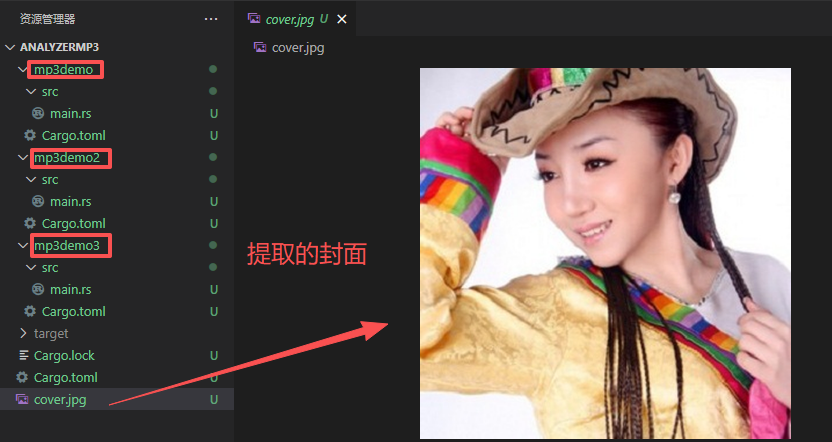
工作目录结构:
以上就是Rust多项目开发实践。