写在前面
接下来我们创建两个 Counter(也就是前面做的小组件),它们分别放置在两个水平并列的 div 中,我们可以通过点击 div 让对应的 Counter 被选中,然后可以通过方向键的上下进行增减,Backspace 用于归零
这里的点击,涉及到 gpui 中组件焦点的管理(使用 FocusHandle),而按键逻辑的处理涉及到 gpui 的 Action 机制
FocusHandle 简单使用
我们先实现根是否获取焦点来更新外观的功能
base_view.rs
rust
use gpui::{
    AppContext, Context, Entity, IntoElement, ParentElement, Render, Styled, Window, div, rgb,
};

use crate::counter::Counter;

pub struct BaseView {
    counter_1: Entity<Counter>,
    counter_2: Entity<Counter>,
}
impl BaseView {
    pub fn new(cx: &mut Context<Self>) -> BaseView {
        let counter_1 = cx.new(|cx| Counter::new(cx));
        let counter_2 = cx.new(|cx| Counter::new(cx));
        BaseView {
            counter_1,
            counter_2,
        }
    }
}

impl Render for BaseView {
    fn render(&mut self, _window: &mut Window, _cx: &mut Context<Self>) -> impl IntoElement {
        div()
            .flex()
            .gap_2()
            .size_full()
            .p_20()
            .items_center()
            .justify_center()
            .bg(rgb(0xffffff))
            .child(self.counter_1.clone())
            .child(self.counter_2.clone())
    }
}
我们把先前构建的 counter 单独抽成一个组件
rust
use gpui::{
    AppContext, Context, Entity, FocusHandle, InteractiveElement, IntoElement, ParentElement,
    Render, Styled, Subscription, Window, div, prelude::FluentBuilder, rgb,
};

use crate::components::button::{Button, ClickButtonEvent};

pub struct Counter {
    button: Entity<Button>,
    count: isize,
    #[allow(dead_code)]
    subscription: Subscription,
    focus_handle: FocusHandle, // gpui 中可以通过 FocusHandle 来跟踪和主动切换/获取焦点
}

impl Counter {
    pub fn new(cx: &mut Context<Self>) -> Counter {
        let button = cx.new(|_| Button::new("click me"));
        let subscription = cx.subscribe(
            &button,
            |base_view, _button, event: &ClickButtonEvent, cx| {
                match event {
                    ClickButtonEvent::LeftClick => {
                        base_view.count = base_view.count.saturating_add(1)
                    }
                    ClickButtonEvent::RightClick => {
                        base_view.count = base_view.count.saturating_sub(1)
                    }
                    ClickButtonEvent::MiddleClick => base_view.count = 0,
                };
                cx.notify();
            },
        );
        Counter {
            button,
            count: 0,
            subscription,
            focus_handle: cx.focus_handle(), // 所有的 FocusHandle 在底层均归 slotmap 管
                                             // 理,可自行查询 Rust 的 slotmap 是什么,这里
                                             // 相当于在该 map 中新增了一个 FocusRef
        }
    }
}

impl Render for Counter {
    fn render(&mut self, window: &mut Window, _cx: &mut Context<Self>) -> impl IntoElement {
        div()
            .flex()
            .flex_col()
            .gap_2()
            .size_full()
            .items_center()
            .justify_center()
            .border_2()
            .border_color(rgb(0x98A7BA))
            .rounded_sm()
            .bg(rgb(0xeeeeee))
            // 我们需要让当前渲染的元素追踪当前组件(Entity)自身的 FocusHandle,底层使用了 gpui
            // 提供的一个封装好的对象 Interactivity,其用于处理各种事件,这里的 Div 实际上也持有
            // 了该对象,并用其接收处理各种用户事件
            .track_focus(&self.focus_handle)
            // 使用 when 方法,在特定条件下进行操作,其实相当于 Vue 的 v-if
            .when(self.focus_handle.is_focused(window), |counter| {
                counter.border_color(rgb(0x8FC9FC))
            })
            .child(format!("当前计数 {}", self.count))
            .child(self.button.clone())
    }
}
main.rs 中添加一下 mod counter
diff
mod base_view;
mod components;
+ mod counter;

use gpui::{AppContext, Application, Bounds, Point, Size, WindowBounds, WindowOptions, px};

use crate::base_view::BaseView;

fn main() {
    let app = Application::new();
    app.run(|cx| {
        cx.open_window(
            WindowOptions {
                window_bounds: Some(WindowBounds::Windowed(Bounds {
                    origin: Point::default(),
                    size: Size::new(px(600.), px(480.)),
                })),
                ..Default::default()
            },
            |_window, cx| cx.new(|cx| BaseView::new(cx)),
        )
        .ok();
    });
}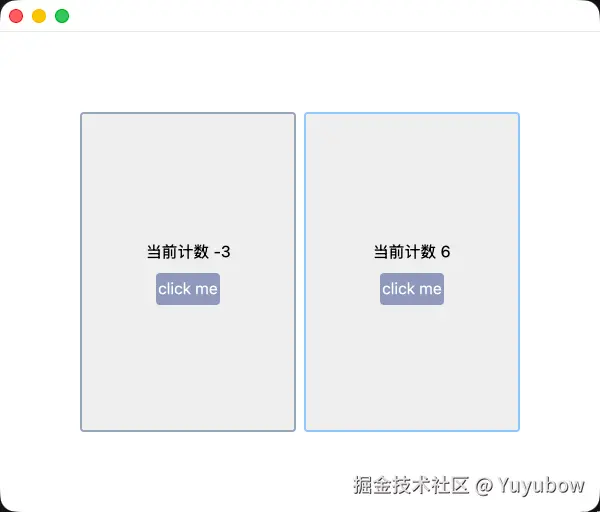
上面只是为了展示获取焦点后的状态,所以添加了外观的变化,实际直接点击 click me 也能增减;但是此时还有一个问题:如果我不想选中任何一个 Counter 该怎么办?
接下来我们增加 BaseView 其他非 Counter 区域的鼠标点击处理回调,在回调中,将焦点从 Counter 转移到 BaseView 上,以达到点击空白区域,Counter 全部失去焦点的效果
我们可以使用 window 或者 focus_handle 主动派发焦点
rust
window.focus(&self.focus_handle);
self.focus_handle.focus(window);
self.focus_handle.focus(window); 实际上内部就是按照第一行的方式进行的调用,实际情况用哪种都行
rust
impl FocusHandle {
    /// Moves the focus to the element associated with this handle.
    pub fn focus(&self, window: &mut Window) {
        window.focus(self)
    }
...
下面是修改后的结果
base_view.rs
rust
use gpui::{
    AppContext, Context, Entity, FocusHandle, InteractiveElement, IntoElement, MouseButton,
    MouseDownEvent, ParentElement, Render, Styled, Window, div, rgb,
};

use crate::counter::Counter;

pub struct BaseView {
    counter_1: Entity<Counter>,
    counter_2: Entity<Counter>,
    focus_handle: FocusHandle,
}
impl BaseView {
    pub fn new(cx: &mut Context<Self>) -> BaseView {
        let counter_1 = cx.new(|cx| Counter::new(cx));
        let counter_2 = cx.new(|cx| Counter::new(cx));
        BaseView {
            counter_1,
            counter_2,
            focus_handle: cx.focus_handle(),
        }
    }
}

impl Render for BaseView {
    fn render(&mut self, _window: &mut Window, cx: &mut Context<Self>) -> impl IntoElement {
        div()
            .flex()
            .gap_2()
            .size_full()
            .p_20()
            .items_center()
            .justify_center()
            .bg(rgb(0xffffff))
            .child(self.counter_1.clone())
            .child(self.counter_2.clone())
            .on_mouse_down(
                MouseButton::Left,
                cx.listener(|this, _: &MouseDownEvent, window, _cx| {
                    window.focus(&this.focus_handle); // 这里没有去调用 track_focus,而是直接手动处理的焦点获取逻辑,将当前窗口的焦点绑定到该组件
                }),
            )
    }
}
除此之外,还需要在 Counter 中阻止点击事件的冒泡传播,因为他是 BaseView 的子组件,渲染范围和点击响应范围重叠了不少,关于冒泡传播可参考:developer.mozilla.org/zh-CN/docs/...
下面只给出 Render 部分的修改
rust
impl Render for Counter {
    fn render(&mut self, window: &mut Window, cx: &mut Context<Self>) -> impl IntoElement {
        div()
            .flex()
            .flex_col()
            .gap_2()
            .size_full()
            .items_center()
            .justify_center()
            .border_2()
            .border_color(rgb(0x98A7BA))
            .rounded_sm()
            .bg(rgb(0xeeeeee))
            .track_focus(&self.focus_handle)
            .when(self.focus_handle.is_focused(window), |counter| {
                counter.border_color(rgb(0x8FC9FC))
            })
            .on_action(cx.listener(Self::count_up))
            .on_action(cx.listener(Self::count_down))
            .on_action(cx.listener(Self::reset))
            .on_mouse_down(
                MouseButton::Left,
                cx.listener(|this, _: &MouseDownEvent, window, cx| {
                    // 阻止鼠标点击事件向上传播,导致点击 Counter 的渲染范围后,点击事件透传到
                    // BaseView,让两个本该获取焦点的 Counter 再次失去焦点
                    cx.stop_propagation();
                    // 手动获取一次焦点
                    window.focus(&this.focus_handle);
                }),
            )
            .child(format!("当前计数 {}", self.count))
            .child(self.button.clone())
    }
}
可自行修改代码后 cargo r 查看结果,这里就不贴图演示了
键盘按键注册 Action
我们之前使用 track_focus 实现了焦点的监听,接下来我们将键盘的按键事件注册成可让 gpui 序列化处理的 Action
注册按键成 Action 用两种方式,一种是使用 action! 宏,另一种是手动实现,后者可以携带额外的数据,而前者的优点是实现简单
使用 action!
rust
use gpui::{
    AppContext, Context, Entity, FocusHandle, InteractiveElement, IntoElement, KeyBinding,
    MouseButton, MouseDownEvent, ParentElement, Render, Styled, Subscription, Window, actions, div,
    prelude::FluentBuilder, rgb,
};

use crate::{
    components::button::{Button, ClickButtonEvent},
    counter,
};

pub struct Counter {
    button: Entity<Button>,
    count: isize,
    #[allow(dead_code)]
    subscription: Subscription,
    focus_handle: FocusHandle,
}

actions!(counter, [CountUp, CountDown, Reset]);

impl Counter {
    pub fn new(cx: &mut Context<Self>) -> Counter {
        let button = cx.new(|_| Button::new("click me"));
        let subscription = cx.subscribe(
            &button,
            |base_view, _button, event: &ClickButtonEvent, cx| {
                match event {
                    ClickButtonEvent::LeftClick => {
                        base_view.count = base_view.count.saturating_add(1)
                    }
                    ClickButtonEvent::RightClick => {
                        base_view.count = base_view.count.saturating_sub(1)
                    }
                    ClickButtonEvent::MiddleClick => base_view.count = 0,
                };
                cx.notify();
            },
        );
        // 我们需要在这里注册相关按键对应的 Action,具体的按键映射感兴趣的可自行查询
        cx.bind_keys([
            KeyBinding::new("up", counter::CountUp, None),
            KeyBinding::new("down", counter::CountDown, None),
            KeyBinding::new("backspace", counter::Reset, None),
        ]);
        Counter {
            button,
            count: 0,
            subscription,
            focus_handle: cx.focus_handle(),
        }
    }

    fn count_up(
        &mut self,
        _action: &counter::CountUp,
        _window: &mut Window,
        cx: &mut Context<Counter>,
    ) {
        self.count = self.count.saturating_add(1);
        cx.notify();
    }

    fn count_down(
        &mut self,
        _action: &counter::CountDown,
        _window: &mut Window,
        cx: &mut Context<Counter>,
    ) {
        self.count = self.count.saturating_sub(1);
        cx.notify();
    }

    fn reset(&mut self, _action: &counter::Reset, _window: &mut Window, cx: &mut Context<Counter>) {
        self.count = 0;
        cx.notify();
    }
}

impl Render for Counter {
    fn render(&mut self, window: &mut Window, cx: &mut Context<Self>) -> impl IntoElement {
        div()
            .flex()
            .flex_col()
            .gap_2()
            .size_full()
            .items_center()
            .justify_center()
            .border_2()
            .border_color(rgb(0x98A7BA))
            .rounded_sm()
            .bg(rgb(0xeeeeee))
            .track_focus(&self.focus_handle)
            .when(self.focus_handle.is_focused(window), |counter| {
                counter.border_color(rgb(0x8FC9FC))
            })
            .on_action(cx.listener(Self::count_up))
            .on_action(cx.listener(Self::count_down))
            .on_action(cx.listener(Self::reset))
            .on_mouse_down(
                MouseButton::Left,
                cx.listener(|this, _: &MouseDownEvent, window, cx| {
                    cx.stop_propagation();
                    window.focus(&this.focus_handle);
                }),
            )
            .child(format!("当前计数 {}", self.count))
            .child(self.button.clone())
    }
}
使用 #derive(Action)
rust
use gpui::{
    Action, AppContext, Context, Entity, FocusHandle, InteractiveElement, IntoElement, KeyBinding,
    MouseButton, MouseDownEvent, ParentElement, Render, Styled, Subscription, Window, div,
    prelude::FluentBuilder, rgb,
};

use crate::components::button::{Button, ClickButtonEvent};

pub struct Counter {
    button: Entity<Button>,
    count: isize,
    #[allow(dead_code)]
    subscription: Subscription,
    focus_handle: FocusHandle,
}

#[derive(Debug, Clone, PartialEq, Eq, Action)]
#[action(namespace = counter, no_json)] // 如果不需要 json 文件进行映射的话,需要指定 no_json,映射实际类似于 VSCode 的 keymap
// #[action(no_json)] 可以不用 namespace
pub enum CounterAction {
    Up,
    Down,
    Reset,
}

impl Counter {
    pub fn new(cx: &mut Context<Self>) -> Counter {
        let button = cx.new(|_| Button::new("click me"));
        let subscription = cx.subscribe(
            &button,
            |base_view, _button, event: &ClickButtonEvent, cx| {
                match event {
                    ClickButtonEvent::LeftClick => {
                        base_view.count = base_view.count.saturating_add(1)
                    }
                    ClickButtonEvent::RightClick => {
                        base_view.count = base_view.count.saturating_sub(1)
                    }
                    ClickButtonEvent::MiddleClick => base_view.count = 0,
                };
                cx.notify();
            },
        );
        cx.bind_keys([
            KeyBinding::new("up", CounterAction::Up, None),
            KeyBinding::new("down", CounterAction::Down, None),
            KeyBinding::new("backspace", CounterAction::Reset, None),
        ]);
        Counter {
            button,
            count: 0,
            subscription,
            focus_handle: cx.focus_handle(),
        }
    }

    fn count_action(
        &mut self,
        counter_action: &CounterAction,
        _window: &mut Window,
        cx: &mut Context<Counter>,
    ) {
        match counter_action {
            CounterAction::Up => self.count = self.count.saturating_add(1),
            CounterAction::Down => self.count = self.count.saturating_sub(1),
            CounterAction::Reset => self.count = 0,
        }
        cx.notify();
    }
}

impl Render for Counter {
    fn render(&mut self, window: &mut Window, cx: &mut Context<Self>) -> impl IntoElement {
        div()
            .flex()
            .flex_col()
            .gap_2()
            .size_full()
            .items_center()
            .justify_center()
            .border_2()
            .border_color(rgb(0x98A7BA))
            .rounded_sm()
            .bg(rgb(0xeeeeee))
            .track_focus(&self.focus_handle)
            .when(self.focus_handle.is_focused(window), |counter| {
                counter.border_color(rgb(0x8FC9FC))
            })
            .on_action(cx.listener(Self::count_action))
            .on_mouse_down(
                MouseButton::Left,
                cx.listener(|this, _: &MouseDownEvent, window, cx| {
                    cx.stop_propagation();
                    window.focus(&this.focus_handle);
                }),
            )
            .child(format!("当前计数 {}", self.count))
            .child(self.button.clone())
    }
}
探究思考题
- 第一节中(FocusHandle 简单使用),我们使用了 track_focus,但实际上在第一部分,移除这个仅通过在 on_mouse_down 的时候手动设置也能完成对应的功能,尝试在第二节中移除 track_focus,观察按键后功能是否符合预期,为什么?
- trait Focusable 是什么?