基础设施
Mac 已经准备好了运行 OpenClaw 所需的所有基础环境和工具(Homebrew 、Node.js 、Git )
如果是使用本地大模型,还需要ollama
命令安装
brew install openclaw-cli输出:
quanyi@MacBook ~ % brew install openclaw-cli
✔︎ JSON API cask.jws.json                             Downloaded   15.3MB/ 15.3MB
✔︎ JSON API formula.jws.json                          Downloaded   32.0MB/ 32.0MB
==> Fetching downloads for: openclaw-cli
✔︎ Bottle Manifest openclaw-cli (2026.2.21-2)         Downloaded   67.3KB/ 67.3KB
✔︎ Bottle Manifest fmt (12.1.0)                       Downloaded    7.3KB/  7.3KB
✔︎ Bottle fmt (12.1.0)                                Downloaded  291.8KB/291.8KB
✔︎ Bottle Manifest ada-url (3.4.2)                    Downloaded    8.5KB/  8.5KB
✔︎ Bottle ada-url (3.4.2)                             Downloaded  348.7KB/348.7KB
✔︎ Bottle Manifest brotli (1.2.0)                     Downloaded    8.0KB/  8.0KB
✔︎ Bottle brotli (1.2.0)                              Downloaded  794.0KB/794.0KB
✔︎ Bottle Manifest c-ares (1.34.6)                    Downloaded    7.5KB/  7.5KB
✔︎ Bottle c-ares (1.34.6)                             Downloaded  304.4KB/304.4KB
✔︎ Bottle Manifest hdrhistogram_c (0.11.9)            Downloaded    7.8KB/  7.8KB
✔︎ Bottle hdrhistogram_c (0.11.9)                     Downloaded   43.8KB/ 43.8KB
✔︎ Bottle Manifest icu4c@78 (78.2)                    Downloaded    9.7KB/  9.7KB
✔︎ Bottle icu4c@78 (78.2)                             Downloaded   32.0MB/ 32.0MB
✔︎ Bottle Manifest libnghttp2 (1.68.0)                Downloaded    7.3KB/  7.3KB
✔︎ Bottle libnghttp2 (1.68.0)                         Downloaded  221.5KB/221.5KB
✔︎ Bottle Manifest libnghttp3 (1.15.0)                Downloaded    7.3KB/  7.3KB
✔︎ Bottle libnghttp3 (1.15.0)                         Downloaded  189.8KB/189.8KB
✔︎ Bottle Manifest libngtcp2 (1.20.0)                 Downloaded    9.3KB/  9.3KB
✔︎ Bottle libngtcp2 (1.20.0)                          Downloaded  399.2KB/399.2KB
✔︎ Bottle Manifest libuv (1.52.0)                     Downloaded    7.5KB/  7.5KB
✔︎ Bottle libuv (1.52.0)                              Downloaded  375.7KB/375.7KB
✔︎ Bottle Manifest llhttp (9.3.1)                     Downloaded    7.2KB/  7.2KB
✔︎ Bottle llhttp (9.3.1)                              Downloaded   36.4KB/ 36.4KB
✔︎ Bottle Manifest simdjson (4.2.4)                   Downloaded    7.4KB/  7.4KB
✔︎ Bottle simdjson (4.2.4)                            Downloaded    1.2MB/  1.2MB
✔︎ Bottle Manifest readline (8.3.3)                   Downloaded   10.0KB/ 10.0KB
✔︎ Bottle readline (8.3.3)                            Downloaded  762.1KB/762.1KB
✔︎ Bottle Manifest sqlite (3.51.2_1)                  Downloaded   11.5KB/ 11.5KB
✔︎ Bottle sqlite (3.51.2_1)                           Downloaded    2.4MB/  2.4MB
✔︎ Bottle Manifest uvwasi (0.0.23)                    Downloaded    8.3KB/  8.3KB
✔︎ Bottle uvwasi (0.0.23)                             Downloaded   72.5KB/ 72.5KB
✔︎ Bottle Manifest lz4 (1.10.0)                       Downloaded   13.8KB/ 13.8KB
✔︎ Bottle lz4 (1.10.0)                                Downloaded  275.2KB/275.2KB
✔︎ Bottle Manifest xz (5.8.2)                         Downloaded   11.8KB/ 11.8KB
✔︎ Bottle xz (5.8.2)                                  Downloaded  766.0KB/766.0KB
✔︎ Bottle Manifest zstd (1.5.7_1)                     Downloaded   13.2KB/ 13.2KB
✔︎ Bottle zstd (1.5.7_1)                              Downloaded  806.4KB/806.4KB
✔︎ Bottle Manifest node (25.6.1)                      Downloaded   27.5KB/ 27.5KB
✔︎ Bottle node (25.6.1)                               Downloaded   19.1MB/ 19.1MB
✔︎ Bottle openclaw-cli (2026.2.21-2)                  Downloaded  130.3MB/130.3MB
==> Installing dependencies for openclaw-cli: fmt, ada-url, brotli, c-ares, hdrhistogram_c, icu4c@78, libnghttp2, libnghttp3, libngtcp2, libuv, llhttp, simdjson, readline, sqlite, uvwasi, lz4, xz, zstd and node
==> Installing openclaw-cli dependency: fmt
==> Pouring fmt--12.1.0.arm64_sonoma.bottle.tar.gz
🍺  /opt/homebrew/Cellar/fmt/12.1.0: 29 files, 1.1MB
==> Installing openclaw-cli dependency: ada-url
==> Pouring ada-url--3.4.2.arm64_sonoma.bottle.tar.gz
🍺  /opt/homebrew/Cellar/ada-url/3.4.2: 55 files, 1.3MB
==> Installing openclaw-cli dependency: brotli
==> Pouring brotli--1.2.0.arm64_sonoma.bottle.tar.gz
🍺  /opt/homebrew/Cellar/brotli/1.2.0: 33 files, 1.9MB
==> Installing openclaw-cli dependency: c-ares
==> Pouring c-ares--1.34.6.arm64_sonoma.bottle.tar.gz
🍺  /opt/homebrew/Cellar/c-ares/1.34.6: 176 files, 1MB
==> Installing openclaw-cli dependency: hdrhistogram_c
==> Pouring hdrhistogram_c--0.11.9.arm64_sonoma.bottle.1.tar.gz
🍺  /opt/homebrew/Cellar/hdrhistogram_c/0.11.9: 22 files, 173.5KB
==> Installing openclaw-cli dependency: icu4c@78
==> Pouring icu4c@78--78.2.arm64_sonoma.bottle.1.tar.gz
🍺  /opt/homebrew/Cellar/icu4c@78/78.2: 279 files, 88.0MB
==> Installing openclaw-cli dependency: libnghttp2
==> Pouring libnghttp2--1.68.0.arm64_sonoma.bottle.tar.gz
🍺  /opt/homebrew/Cellar/libnghttp2/1.68.0: 14 files, 790.6KB
==> Installing openclaw-cli dependency: libnghttp3
==> Pouring libnghttp3--1.15.0.arm64_sonoma.bottle.tar.gz
🍺  /opt/homebrew/Cellar/libnghttp3/1.15.0: 20 files, 606.6KB
==> Installing openclaw-cli dependency: libngtcp2
==> Pouring libngtcp2--1.20.0.arm64_sonoma.bottle.tar.gz
🍺  /opt/homebrew/Cellar/libngtcp2/1.20.0: 21 files, 1.3MB
==> Installing openclaw-cli dependency: libuv
==> Pouring libuv--1.52.0.arm64_sonoma.bottle.tar.gz
🍺  /opt/homebrew/Cellar/libuv/1.52.0: 35 files, 1.3MB
==> Installing openclaw-cli dependency: llhttp
==> Pouring llhttp--9.3.1.arm64_sonoma.bottle.tar.gz
🍺  /opt/homebrew/Cellar/llhttp/9.3.1: 13 files, 160.6KB
==> Installing openclaw-cli dependency: simdjson
==> Pouring simdjson--4.2.4.arm64_sonoma.bottle.tar.gz
🍺  /opt/homebrew/Cellar/simdjson/4.2.4: 19 files, 6.6MB
==> Installing openclaw-cli dependency: readline
==> Pouring readline--8.3.3.arm64_sonoma.bottle.tar.gz
🍺  /opt/homebrew/Cellar/readline/8.3.3: 56 files, 2.7MB
==> Installing openclaw-cli dependency: sqlite
==> Pouring sqlite--3.51.2_1.arm64_sonoma.bottle.tar.gz
🍺  /opt/homebrew/Cellar/sqlite/3.51.2_1: 13 files, 5.3MB
==> Installing openclaw-cli dependency: uvwasi
==> Pouring uvwasi--0.0.23.arm64_sonoma.bottle.1.tar.gz
🍺  /opt/homebrew/Cellar/uvwasi/0.0.23: 15 files, 311KB
==> Installing openclaw-cli dependency: lz4
==> Pouring lz4--1.10.0.arm64_sonoma.bottle.1.tar.gz
🍺  /opt/homebrew/Cellar/lz4/1.10.0: 24 files, 731.3KB
==> Installing openclaw-cli dependency: xz
==> Pouring xz--5.8.2.arm64_sonoma.bottle.tar.gz
🍺  /opt/homebrew/Cellar/xz/5.8.2: 96 files, 2.7MB
==> Installing openclaw-cli dependency: zstd
==> Pouring zstd--1.5.7_1.arm64_sonoma.bottle.tar.gz
🍺  /opt/homebrew/Cellar/zstd/1.5.7_1: 32 files, 2.3MB
==> Installing openclaw-cli dependency: node
==> Pouring node--25.6.1.arm64_sonoma.bottle.1.tar.gz
🍺  /opt/homebrew/Cellar/node/25.6.1: 1,931 files, 79.4MB
==> Installing openclaw-cli
==> Pouring openclaw-cli--2026.2.21-2.arm64_sonoma.bottle.tar.gz
🍺  /opt/homebrew/Cellar/openclaw-cli/2026.2.21-2: 45,592 files, 422.9MB
==> Running `brew cleanup openclaw-cli`...
Disable this behaviour by setting `HOMEBREW_NO_INSTALL_CLEANUP=1`.
Hide these hints with `HOMEBREW_NO_ENV_HINTS=1` (see `man brew`).
quanyi@MacBook ~ %
✅ 安装成功
这就可以使用openclaw命令了
cli引导配置
以配置ollama本地大模型为例:
openclaw onboard输出:
Last login: Sun Feb 22 11:45:31 on ttys002
quanyi@MacBook ~ % openclaw onboard
🦞 OpenClaw 2026.2.21-2 (35a57bc)
I read logs so you can keep pretending you don't have to.
▄▄▄▄▄▄▄▄▄▄▄▄▄▄▄▄▄▄▄▄▄▄▄▄▄▄▄▄▄▄▄▄▄▄▄▄▄▄▄▄▄▄▄▄▄▄▄▄▄▄▄▄
██░▄▄▄░██░▄▄░██░▄▄▄██░▀██░██░▄▄▀██░████░▄▄▀██░███░██
██░███░██░▀▀░██░▄▄▄██░█░█░██░█████░████░▀▀░██░█░█░██
██░▀▀▀░██░█████░▀▀▀██░██▄░██░▀▀▄██░▀▀░█░██░██▄▀▄▀▄██
▀▀▀▀▀▀▀▀▀▀▀▀▀▀▀▀▀▀▀▀▀▀▀▀▀▀▀▀▀▀▀▀▀▀▀▀▀▀▀▀▀▀▀▀▀▀▀▀▀▀▀▀
🦞 OPENCLAW 🦞
┌ OpenClaw onboarding
│
◇ Security ─────────────────────────────────────────────────────────────╮
│ │
│ Security warning --- please read. │
│ │
│ OpenClaw is a hobby project and still in beta. Expect sharp edges. │
│ This bot can read files and run actions if tools are enabled. │
│ A bad prompt can trick it into doing unsafe things. │
│ │
│ If you're not comfortable with basic security and access control, │
│ don't run OpenClaw. │
│ Ask someone experienced to help before enabling tools or exposing it │
│ to the internet. │
│ │
│ Recommended baseline: │
│ - Pairing/allowlists + mention gating. │
│ - Sandbox + least-privilege tools. │
│ - Keep secrets out of the agent's reachable filesystem. │
│ - Use the strongest available model for any bot with tools or │
│ untrusted inboxes. │
│ │
│ Run regularly: │
│ openclaw security audit --deep │
│ openclaw security audit --fix │
│ │
│ Must read: https://docs.openclaw.ai/gateway/security │
│ │
├────────────────────────────────────────────────────────────────────────╯
│
◇ I understand this is powerful and inherently risky. Continue?
│ Yes
│
◇ Onboarding mode
│ QuickStart
│
◇ QuickStart ─────────────────────────╮
│ │
│ Gateway port: 18789 │
│ Gateway bind: Loopback (127.0.0.1) │
│ Gateway auth: Token (default) │
│ Tailscale exposure: Off │
│ Direct to chat channels. │
│ │
├──────────────────────────────────────╯
│
◇ Model/auth provider
│ Custom Provider
│
◇ API Base URL
│ http://127.0.0.1:11434/v1
│
◇ API Key (leave blank if not required)
│
│
◇ Model ID
│ qwen3:14b
│
◇ Verification successful.
│
◇ Endpoint ID
│ ollama
│
◇ Model alias (optional)
│ local
Configured custom provider: ollama/qwen3:14b
│
◇ Model check ────────────────────────────────────────────────────────────╮
│ │
│ Model not found: ollama/qwen3:14b. Update agents.defaults.model or run │
│ /models list. │
│ No auth configured for provider "ollama". The agent may fail until │
│ credentials are added. │
│ │
├──────────────────────────────────────────────────────────────────────────╯
│
◇ Channel status ────────────────────────────╮
│ │
│ Telegram: not configured │
│ WhatsApp: not configured │
│ Discord: not configured │
│ IRC: not configured │
│ Google Chat: not configured │
│ Slack: not configured │
│ Signal: not configured │
│ iMessage: not configured │
│ Feishu: install plugin to enable │
│ Google Chat: install plugin to enable │
│ Nostr: install plugin to enable │
│ Microsoft Teams: install plugin to enable │
│ Mattermost: install plugin to enable │
│ Nextcloud Talk: install plugin to enable │
│ Matrix: install plugin to enable │
│ BlueBubbles: install plugin to enable │
│ LINE: install plugin to enable │
│ Zalo: install plugin to enable │
│ Zalo Personal: install plugin to enable │
│ Tlon: install plugin to enable │
│ │
├─────────────────────────────────────────────╯
│
◇ How channels work ──────────────────────────────────────────────────────╮
│ │
│ DM security: default is pairing; unknown DMs get a pairing code. │
│ Approve with: openclaw pairing approve <channel> <code> │
│ Public DMs require dmPolicy="open" + allowFrom=["*"]. │
│ Multi-user DMs: run: openclaw config set session.dmScope │
│ "per-channel-peer" (or "per-account-channel-peer" for multi-account │
│ channels) to isolate sessions. │
│ Docs: start/pairing │
│ │
│ Telegram: simplest way to get started --- register a bot with @BotFather │
│ and get going. │
│ WhatsApp: works with your own number; recommend a separate phone + │
│ eSIM. │
│ Discord: very well supported right now. │
│ IRC: classic IRC networks with DM/channel routing and pairing │
│ controls. │
│ Google Chat: Google Workspace Chat app with HTTP webhook. │
│ Slack: supported (Socket Mode). │
│ Signal: signal-cli linked device; more setup (David Reagans: "Hop on │
│ Discord."). │
│ iMessage: this is still a work in progress. │
│ Feishu: 飞书/Lark enterprise messaging with doc/wiki/drive tools. │
│ Nostr: Decentralized protocol; encrypted DMs via NIP-04. │
│ Microsoft Teams: Bot Framework; enterprise support. │
│ Mattermost: self-hosted Slack-style chat; install the plugin to │
│ enable. │
│ Nextcloud Talk: Self-hosted chat via Nextcloud Talk webhook bots. │
│ Matrix: open protocol; install the plugin to enable. │
│ BlueBubbles: iMessage via the BlueBubbles mac app + REST API. │
│ LINE: LINE Messaging API bot for Japan/Taiwan/Thailand markets. │
│ Zalo: Vietnam-focused messaging platform with Bot API. │
│ Zalo Personal: Zalo personal account via QR code login. │
│ Tlon: decentralized messaging on Urbit; install the plugin to enable. │
│ │
├──────────────────────────────────────────────────────────────────────────╯
│
◇ Select channel (QuickStart)
│ Skip for now
Updated ~/.openclaw/openclaw.json
Workspace OK: ~/.openclaw/workspace
Sessions OK: ~/.openclaw/agents/main/sessions
│
◇ Skills status ─────────────╮
│ │
│ Eligible: 18 │
│ Missing requirements: 33 │
│ Unsupported on this OS: 0 │
│ Blocked by allowlist: 0 │
│ │
├─────────────────────────────╯
│
◇ Configure skills now? (recommended)
│ No
│
◇ Hooks ──────────────────────────────────────────────────────────────────╮
│ │
│ Hooks let you automate actions when agent commands are issued. │
│ Example: Save session context to memory when you issue /new or /reset. │
│ │
│ Learn more: https://docs.openclaw.ai/automation/hooks │
│ │
├──────────────────────────────────────────────────────────────────────────╯
│
◇ Enable hooks?
│ 🚀 boot-md, 📎 bootstrap-extra-files, 📝 command-logger, 💾 session-memory
│
◇ Hooks Configured ────────────────────────────────────────────────────────────────╮
│ │
│ Enabled 4 hooks: boot-md, bootstrap-extra-files, command-logger, session-memory │
│ │
│ You can manage hooks later with: │
│ openclaw hooks list │
│ openclaw hooks enable <name> │
│ openclaw hooks disable <name> │
│ │
├───────────────────────────────────────────────────────────────────────────────────╯
Config overwrite: /Users/quanyi/.openclaw/openclaw.json (sha256 a2e56d8d283c69095ed896cd619e5229726c1da34697c2dbb56e2bb8c3345866 -> d6d42c513dfb6626a035b0a3134521ad32282aa9a746a8ff69a4aa32cf45b52e, backup=/Users/quanyi/.openclaw/openclaw.json.bak)
│
◇ Gateway service runtime ────────────────────────────────────────────╮
│ │
│ QuickStart uses Node for the Gateway service (stable + supported). │
│ │
├──────────────────────────────────────────────────────────────────────╯
│
◐ Installing Gateway service......
Installed LaunchAgent: /Users/quanyi/Library/LaunchAgents/ai.openclaw.gateway.plist
Logs: /Users/quanyi/.openclaw/logs/gateway.log
◇ Gateway service installed.
│
◇
Health check failed: gateway closed (1006 abnormal closure (no close frame)): no close reason
Gateway target: ws://127.0.0.1:18789
Source: local loopback
Config: /Users/quanyi/.openclaw/openclaw.json
Bind: loopback
│
◇ Health check help ────────────────────────────────╮
│ │
│ Docs: │
│ https://docs.openclaw.ai/gateway/health │
│ https://docs.openclaw.ai/gateway/troubleshooting │
│ │
├────────────────────────────────────────────────────╯
│
◇ Optional apps ────────────────────────╮
│ │
│ Add nodes for extra features: │
│ - macOS app (system + notifications) │
│ - iOS app (camera/canvas) │
│ - Android app (camera/canvas) │
│ │
├────────────────────────────────────────╯
│
◇ Control UI ───────────────────────────────────────────────────────────────────────────────╮
│ │
│ Web UI: http://127.0.0.1:18789/ │
│ Web UI (with token): │
│ http://127.0.0.1:18789/#token=dac7b5d803437faec789c9751dea19430330970a444233d2 │
│ Gateway WS: ws://127.0.0.1:18789 │
│ Gateway: not detected (gateway closed (1006 abnormal closure (no close frame)): no close │
│ reason) │
│ Docs: https://docs.openclaw.ai/web/control-ui │
│ │
├────────────────────────────────────────────────────────────────────────────────────────────╯
│
◇ Workspace backup ────────────────────────────────────────╮
│ │
│ Back up your agent workspace. │
│ Docs: https://docs.openclaw.ai/concepts/agent-workspace │
│ │
├───────────────────────────────────────────────────────────╯
│
◇ Security ──────────────────────────────────────────────────────╮
│ │
│ Running agents on your computer is risky --- harden your setup: │
│ https://docs.openclaw.ai/security │
│ │
├─────────────────────────────────────────────────────────────────╯
│
◇ Shell completion ───────────────────────────────────────────────────────╮
│ │
│ Shell completion installed. Restart your shell or run: source ~/.zshrc │
│ │
├──────────────────────────────────────────────────────────────────────────╯
│
◇ Dashboard ready ────────────────────────────────────────────────────────────────╮
│ │
│ Dashboard link (with token): │
│ http://127.0.0.1:18789/#token=dac7b5d803437faec789c9751dea19430330970a444233d2 │
│ Opened in your browser. Keep that tab to control OpenClaw. │
│ │
├──────────────────────────────────────────────────────────────────────────────────╯
│
◇ Web search (optional) ─────────────────────────────────────────────────────────────────╮
│ │
│ If you want your agent to be able to search the web, you'll need an API key. │
│ │
│ OpenClaw uses Brave Search for the `web_search` tool. Without a Brave Search API key, │
│ web search won't work. │
│ │
│ Set it up interactively: │
│ - Run: openclaw configure --section web │
│ - Enable web_search and paste your Brave Search API key │
│ │
│ Alternative: set BRAVE_API_KEY in the Gateway environment (no config changes). │
│ Docs: https://docs.openclaw.ai/tools/web │
│ │
├─────────────────────────────────────────────────────────────────────────────────────────╯
│
◇ What now ─────────────────────────────────────────────────────────────╮
│ │
│ What now: https://openclaw.ai/showcase ("What People Are Building"). │
│ │
├────────────────────────────────────────────────────────────────────────╯
│
└ Onboarding complete. Dashboard opened; keep that tab to control OpenClaw.
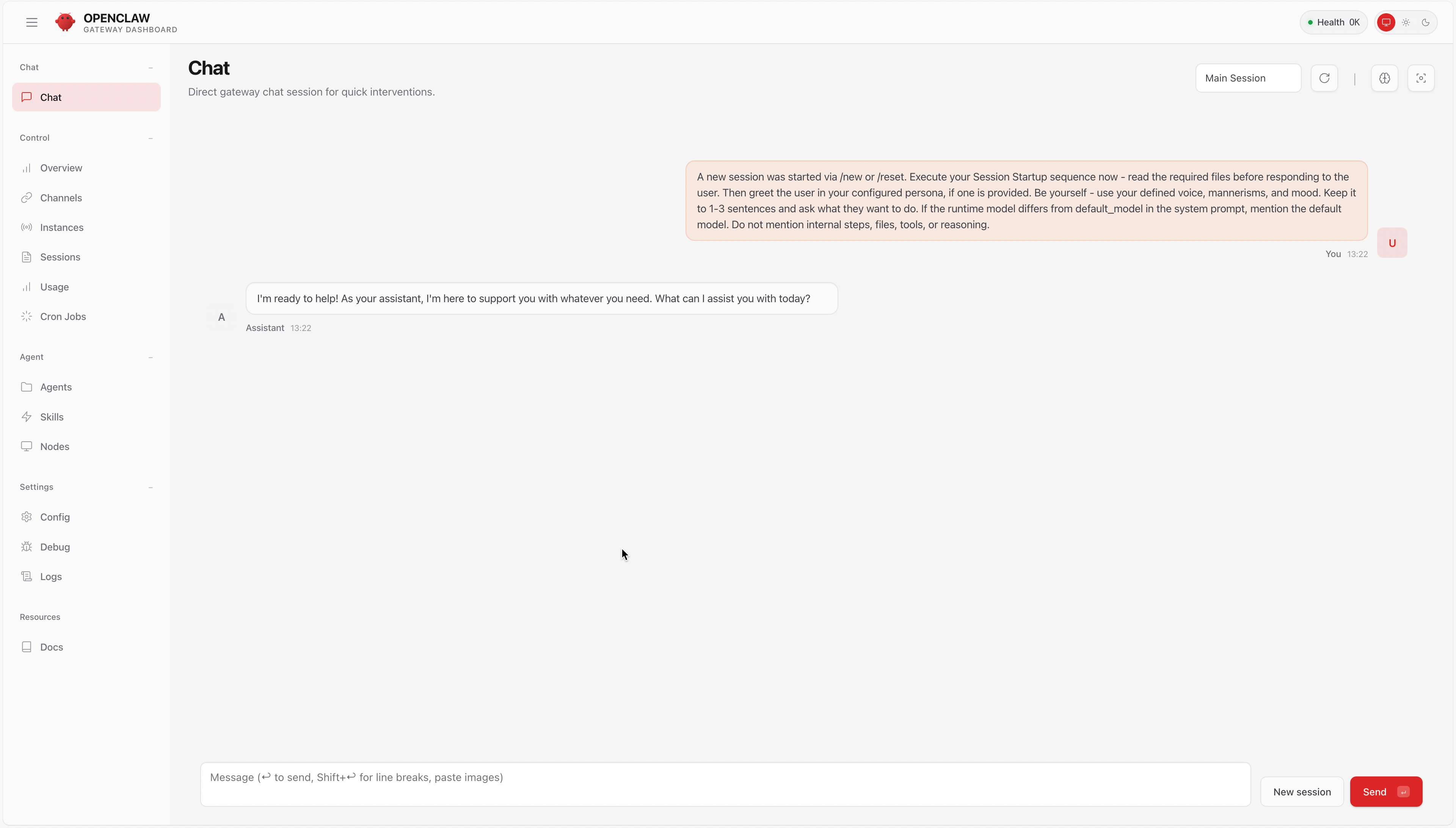
quanyi@MacBook ~ % 配置完就会自动打开web页面:
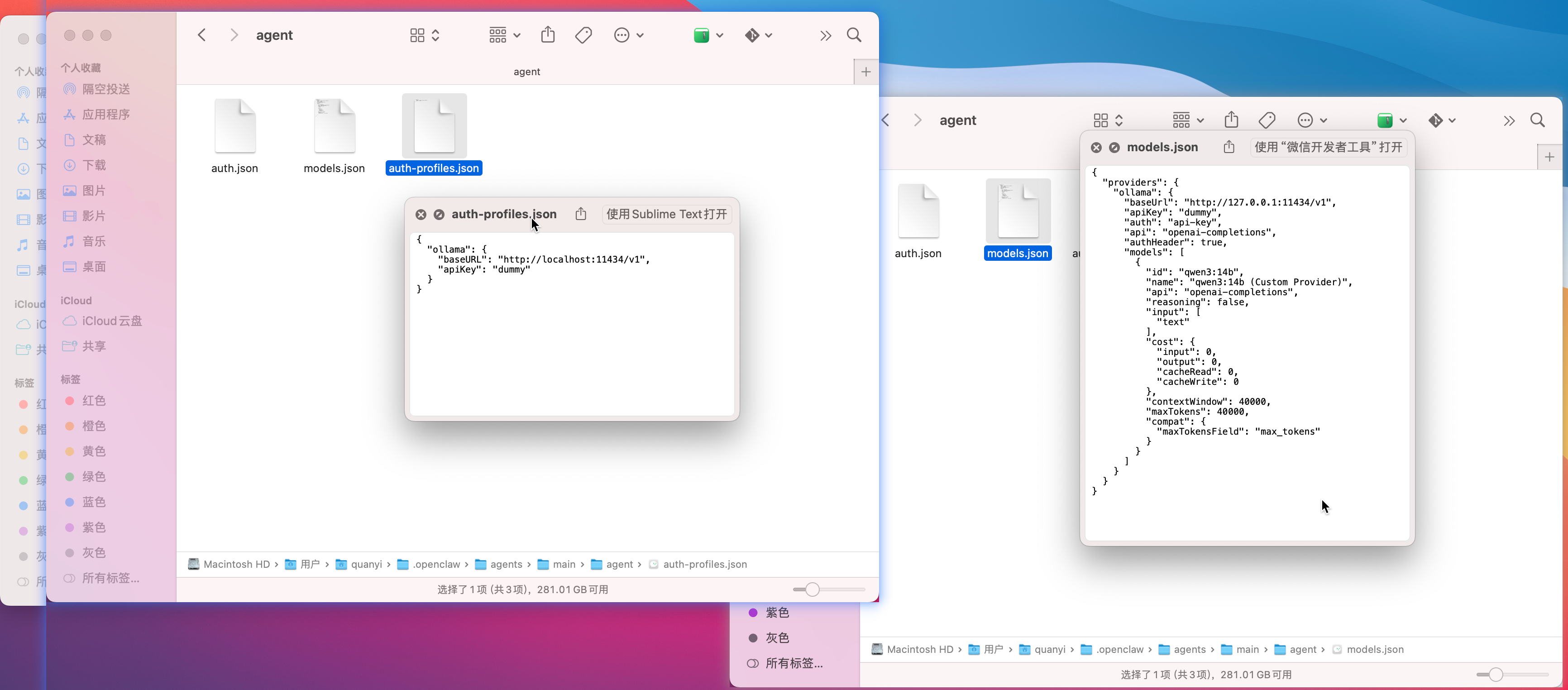
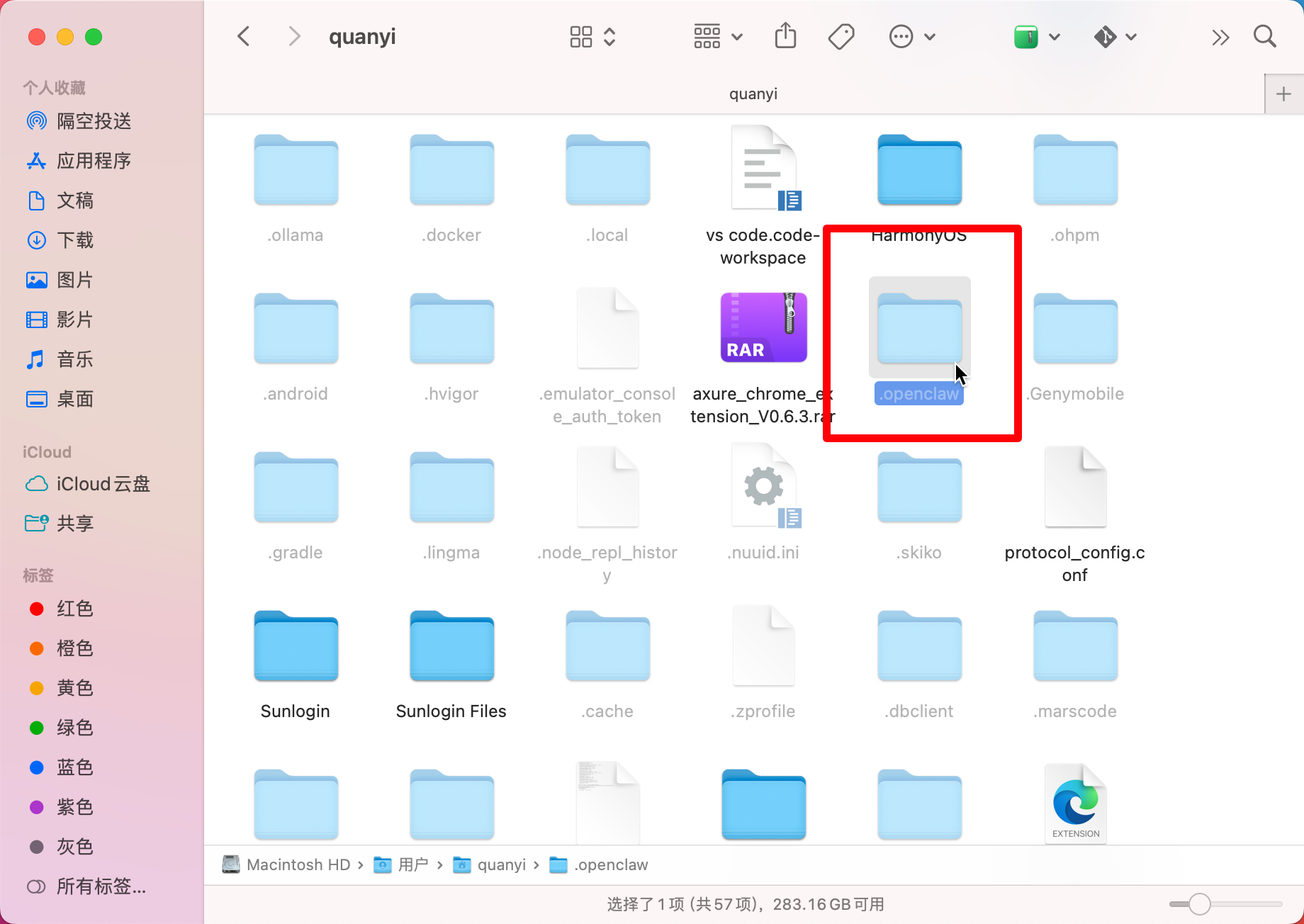
配置文件
在用户${user}目录里
主要文件: