欢迎加入开源鸿蒙跨平台社区:https://openharmonycrossplatform.csdn.net
🎯 一、组件概述与应用场景
📋 1.1 flutter_slidable 简介
在移动应用开发中,列表项的侧滑操作是一种非常常见且直观的交互模式。flutter_slidable 是一个功能强大的 Flutter 插件,专门用于实现列表项的侧滑操作,如侧滑删除、侧滑标记、侧滑归档等。该插件完全使用 Dart 语言实现,不依赖任何原生平台代码,因此可以无缝运行在 OpenHarmony 平台上。
核心特性:
| 特性 | 说明 |
|---|---|
| 🎯 纯 Dart 实现 | 无需原生平台适配,跨平台一致性高 |
| 🎬 多种动画效果 | 支持 Scroll、Drawer、Behind、Stretch 等动画 |
| ↔️ 双向滑动 | 支持从左侧或右侧滑动显示操作菜单 |
| 🎨 自定义操作 | 支持自定义操作按钮、图标、颜色等 |
| 📡 滑动监听 | 支持监听滑动状态和滑动比例 |
| 🗑️ 滑动删除 | 支持滑动直接删除,带确认对话框 |
| ⚙️ 手势控制 | 支持控制滑动灵敏度、阈值等参数 |
| 🔔 通知回调 | 支持滑动开始、结束、取消等事件回调 |
💡 1.2 实际应用场景
邮件应用:侧滑删除、归档、标记已读/未读。
待办事项:侧滑完成、删除、编辑、设置提醒。
聊天列表:侧滑置顶、删除、静音、标记。
购物车:侧滑移除商品、收藏商品、修改数量。
文件管理:侧滑删除、重命名、移动、分享。
🏗️ 1.3 系统架构设计
┌─────────────────────────────────────────────────────────┐
│                    UI 展示层                             │
│  ┌─────────────┐  ┌─────────────┐  ┌─────────────┐     │
│  │ 邮件列表页面 │  │ 待办列表页面 │  │ 购物车页面  │     │
│  └─────────────┘  └─────────────┘  └─────────────┘     │
└─────────────────────────────────────────────────────────┘
                          │
                          ▼
┌─────────────────────────────────────────────────────────┐
│                    Slidable 组件层                       │
│  ┌─────────────────────────────────────────────────┐   │
│  │          Slidable / ActionPane / SlidableAction │   │
│  │  • startActionPane  • endActionPane             │   │
│  │  • ScrollMotion  • DrawerMotion  • BehindMotion │   │
│  └─────────────────────────────────────────────────┘   │
└─────────────────────────────────────────────────────────┘
                          │
                          ▼
┌─────────────────────────────────────────────────────────┐
│                    数据模型层                            │
│  ┌─────────────┐  ┌─────────────┐  ┌─────────────┐     │
│  │ TodoItem    │  │ MailItem    │  │ CartItem    │     │
│  └─────────────┘  └─────────────┘  └─────────────┘     │
└─────────────────────────────────────────────────────────┘
📦 二、项目配置与依赖安装
🔧 2.1 添加依赖配置
打开项目根目录下的 pubspec.yaml 文件,添加以下配置:
yaml
dependencies:
  flutter:
    sdk: flutter

  # flutter_slidable - 列表滑动操作组件
  flutter_slidable: ^3.1.1
配置说明:
- flutter_slidable 是纯 Dart 实现的插件
- 无需 OpenHarmony 平台适配,直接使用 pub.dev 版本即可
- 支持所有 Flutter 平台,包括 OpenHarmony
📥 2.2 下载依赖
配置完成后,在项目根目录执行以下命令:
bash
flutter pub get🔐 2.3 权限配置
flutter_slidable 是纯 Dart 实现的 UI 组件,不需要配置任何平台权限。
📱 2.4 滑动动画类型
| 动画类型 | 说明 |
|---|---|
| ScrollMotion | 操作按钮跟随滑动滚动显示(默认) |
| DrawerMotion | 操作按钮从边缘滑出,类似抽屉效果 |
| BehindMotion | 操作按钮固定在背后,滑动时逐渐显示 |
| StretchMotion | 操作按钮随滑动拉伸变形 |
🔧 三、核心功能详解
🎯 3.1 基本结构
dart
import 'package:flutter_slidable/flutter_slidable.dart';

Slidable(
  key: ValueKey(index),
  startActionPane: ActionPane(
    motion: ScrollMotion(),
    children: [
      SlidableAction(
        onPressed: (context) {},
        backgroundColor: Colors.blue,
        icon: Icons.share,
        label: '分享',
      ),
    ],
  ),
  endActionPane: ActionPane(
    motion: ScrollMotion(),
    children: [
      SlidableAction(
        onPressed: (context) {},
        backgroundColor: Colors.red,
        icon: Icons.delete,
        label: '删除',
      ),
    ],
  ),
  child: ListTile(
    title: Text('列表项'),
  ),
)
📊 3.2 ActionPane 配置
dart
ActionPane({
  required Widget motion,        // 滑动动画类型
  double? extentRatio,           // 操作区域占比(默认 0.25)
  List<Widget> children = const [], // 操作按钮列表
  DismissibleActionPane? dismissible, // 滑动删除配置
})
🔘 3.3 SlidableAction 配置
dart
SlidableAction({
  required void Function(BuildContext)? onPressed, // 点击回调
  Color? backgroundColor,         // 背景颜色
  Color? foregroundColor,         // 前景颜色
  IconData? icon,                 // 图标
  String? label,                  // 文字标签
  bool autoClose = true,          // 点击后是否自动关闭
  double? spacing,                // 图标和文字间距
})
🗑️ 3.4 滑动删除
dart
endActionPane: ActionPane(
  motion: ScrollMotion(),
  dismissible: DismissiblePane(
    onDismissed: () {
      _deleteItem(index);
    },
    confirmDismiss: () async {
      return await showDialog<bool>(
        context: context,
        builder: (context) => AlertDialog(
          title: const Text('确认删除'),
          actions: [
            TextButton(onPressed: () => Navigator.pop(context, false), child: const Text('取消')),
            TextButton(onPressed: () => Navigator.pop(context, true), child: const Text('删除')),
          ],
        ),
      ) ?? false;
    },
  ),
  children: [...],
)
📝 四、完整示例代码
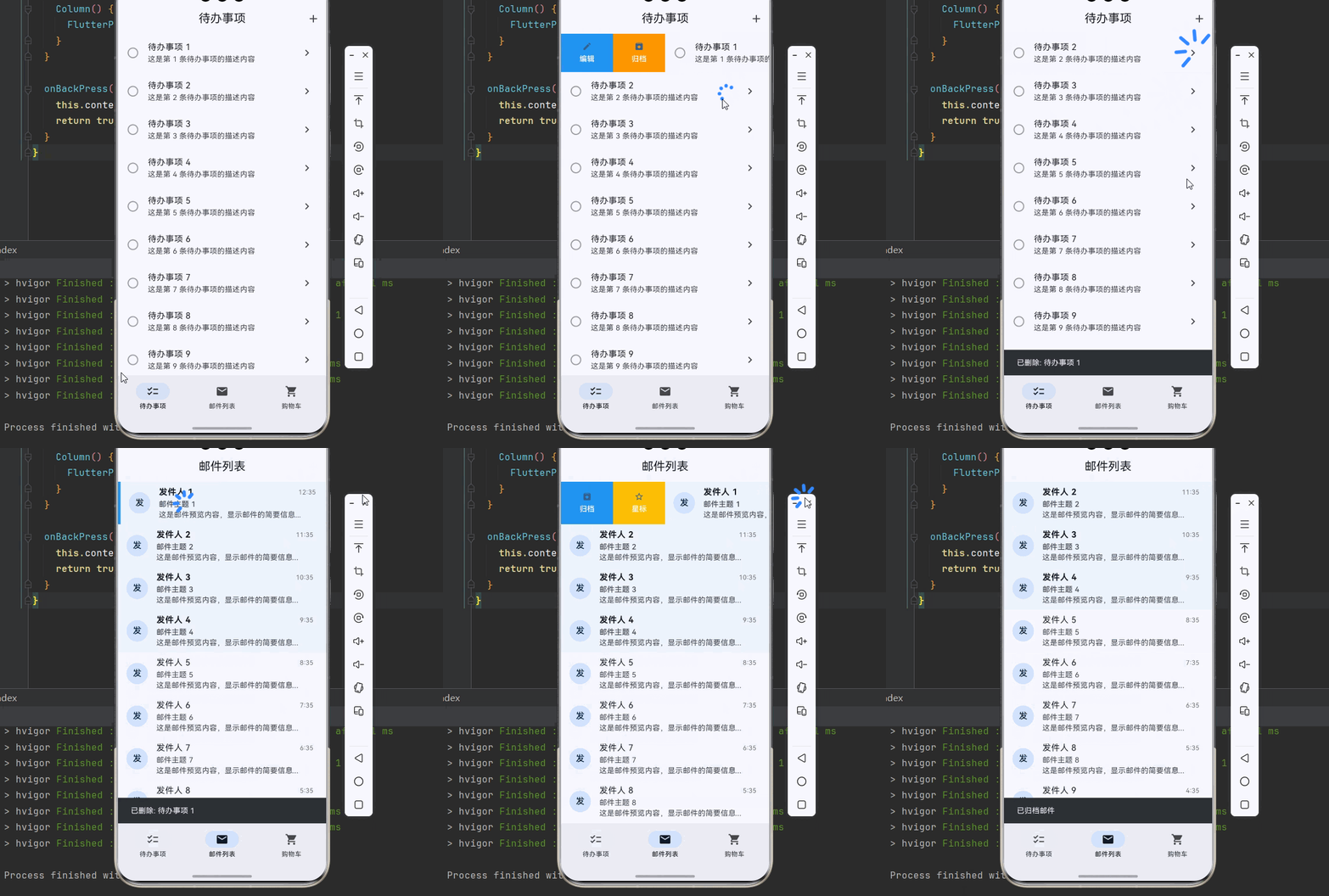
下面是一个完整的列表滑动操作系统示例:
dart
import 'package:flutter/material.dart';
import 'package:flutter_slidable/flutter_slidable.dart';
void main() {
runApp(const SlidableApp());
}
class SlidableApp extends StatelessWidget {
const SlidableApp({super.key});
@override
Widget build(BuildContext context) {
return MaterialApp(
title: '列表滑动操作系统',
debugShowCheckedModeBanner: false,
theme: ThemeData(
colorScheme: ColorScheme.fromSeed(seedColor: Colors.blue),
useMaterial3: true,
),
home: const MainPage(),
);
}
}
class MainPage extends StatefulWidget {
const MainPage({super.key});
@override
State<MainPage> createState() => _MainPageState();
}
class _MainPageState extends State<MainPage> {
int _currentIndex = 0;
final List<Widget> _pages = [
const TodoListPage(),
const MailListPage(),
const CartListPage(),
];
@override
Widget build(BuildContext context) {
return Scaffold(
body: _pages[_currentIndex],
bottomNavigationBar: NavigationBar(
selectedIndex: _currentIndex,
onDestinationSelected: (index) {
setState(() => _currentIndex = index);
},
destinations: const [
NavigationDestination(icon: Icon(Icons.checklist), label: '待办事项'),
NavigationDestination(icon: Icon(Icons.mail), label: '邮件列表'),
NavigationDestination(icon: Icon(Icons.shopping_cart), label: '购物车'),
],
),
);
}
}
// ============ 数据模型 ============
class TodoItem {
final int id;
final String title;
final String subtitle;
bool isCompleted;
TodoItem({
required this.id,
required this.title,
required this.subtitle,
this.isCompleted = false,
});
}
class MailItem {
final int id;
final String sender;
final String subject;
final String preview;
final DateTime time;
bool isRead;
bool isStarred;
MailItem({
required this.id,
required this.sender,
required this.subject,
required this.preview,
required this.time,
this.isRead = false,
this.isStarred = false,
});
}
class CartItem {
final int id;
final String name;
final double price;
int quantity;
CartItem({
required this.id,
required this.name,
required this.price,
this.quantity = 1,
});
}
// ============ 待办事项页面 ============
class TodoListPage extends StatefulWidget {
const TodoListPage({super.key});
@override
State<TodoListPage> createState() => _TodoListPageState();
}
class _TodoListPageState extends State<TodoListPage> {
final List<TodoItem> _items = List.generate(
15,
(index) => TodoItem(
id: index,
title: '待办事项 ${index + 1}',
subtitle: '这是第 ${index + 1} 条待办事项的描述内容',
),
);
void _deleteItem(int index) {
final item = _items[index];
setState(() => _items.removeAt(index));
ScaffoldMessenger.of(context).showSnackBar(
SnackBar(content: Text('已删除: ${item.title}')),
);
}
void _archiveItem(int index) {
final item = _items[index];
setState(() => _items.removeAt(index));
ScaffoldMessenger.of(context).showSnackBar(
SnackBar(content: Text('已归档: ${item.title}')),
);
}
void _editItem(int index) {
showDialog(
context: context,
builder: (context) => AlertDialog(
title: const Text('编辑待办'),
content: Text('编辑: ${_items[index].title}'),
actions: [
TextButton(onPressed: () => Navigator.pop(context), child: const Text('取消')),
TextButton(onPressed: () => Navigator.pop(context), child: const Text('保存')),
],
),
);
}
void _toggleComplete(int index) {
setState(() {
_items[index].isCompleted = !_items[index].isCompleted;
});
}
@override
Widget build(BuildContext context) {
return Scaffold(
appBar: AppBar(
title: const Text('待办事项'),
centerTitle: true,
actions: [
IconButton(icon: const Icon(Icons.add), onPressed: () {}),
],
),
body: _items.isEmpty
? const Center(child: Text('暂无待办事项'))
: ListView.builder(
itemCount: _items.length,
itemBuilder: (context, index) {
final item = _items[index];
return Slidable(
key: ValueKey(item.id),
startActionPane: ActionPane(
motion: const DrawerMotion(),
children: [
SlidableAction(
onPressed: (_) => _editItem(index),
backgroundColor: Colors.blue,
foregroundColor: Colors.white,
icon: Icons.edit,
label: '编辑',
),
SlidableAction(
onPressed: (_) => _archiveItem(index),
backgroundColor: Colors.orange,
foregroundColor: Colors.white,
icon: Icons.archive,
label: '归档',
),
],
),
endActionPane: ActionPane(
motion: const ScrollMotion(),
dismissible: DismissiblePane(
onDismissed: () => _deleteItem(index),
),
children: [
SlidableAction(
onPressed: (_) => _toggleComplete(index),
backgroundColor: Colors.green,
foregroundColor: Colors.white,
icon: item.isCompleted ? Icons.undo : Icons.check,
label: item.isCompleted ? '撤销' : '完成',
),
SlidableAction(
onPressed: (_) => _deleteItem(index),
backgroundColor: Colors.red,
foregroundColor: Colors.white,
icon: Icons.delete,
label: '删除',
),
],
),
child: ListTile(
leading: Icon(
item.isCompleted ? Icons.check_circle : Icons.circle_outlined,
color: item.isCompleted ? Colors.green : Colors.grey,
),
title: Text(
item.title,
style: TextStyle(
decoration: item.isCompleted ? TextDecoration.lineThrough : null,
color: item.isCompleted ? Colors.grey : null,
),
),
subtitle: Text(item.subtitle),
trailing: const Icon(Icons.chevron_right),
),
);
},
),
);
}
}
// ============ 邮件列表页面 ============
class MailListPage extends StatefulWidget {
const MailListPage({super.key});
@override
State<MailListPage> createState() => _MailListPageState();
}
class _MailListPageState extends State<MailListPage> {
final List<MailItem> _items = List.generate(
15,
(index) => MailItem(
id: index,
sender: '发件人 ${index + 1}',
subject: '邮件主题 ${index + 1}',
preview: '这是邮件预览内容,显示邮件的简要信息...',
time: DateTime.now().subtract(Duration(hours: index)),
isRead: index > 3,
),
);
void _deleteMail(int index) {
setState(() => _items.removeAt(index));
ScaffoldMessenger.of(context).showSnackBar(
const SnackBar(content: Text('已删除邮件')),
);
}
void _toggleRead(int index) {
setState(() {
_items[index].isRead = !_items[index].isRead;
});
}
void _toggleStar(int index) {
setState(() {
_items[index].isStarred = !_items[index].isStarred;
});
}
void _archiveMail(int index) {
setState(() => _items.removeAt(index));
ScaffoldMessenger.of(context).showSnackBar(
const SnackBar(content: Text('已归档邮件')),
);
}
@override
Widget build(BuildContext context) {
return Scaffold(
appBar: AppBar(
title: const Text('邮件列表'),
centerTitle: true,
),
body: ListView.builder(
itemCount: _items.length,
itemBuilder: (context, index) {
final item = _items[index];
return Slidable(
key: ValueKey(item.id),
startActionPane: ActionPane(
motion: const BehindMotion(),
children: [
SlidableAction(
onPressed: (_) => _archiveMail(index),
backgroundColor: Colors.blue,
foregroundColor: Colors.white,
icon: Icons.archive,
label: '归档',
),
SlidableAction(
onPressed: (_) => _toggleStar(index),
backgroundColor: Colors.amber,
foregroundColor: Colors.white,
icon: item.isStarred ? Icons.star : Icons.star_border,
label: item.isStarred ? '取消星标' : '星标',
),
],
),
endActionPane: ActionPane(
motion: const StretchMotion(),
children: [
SlidableAction(
onPressed: (_) => _toggleRead(index),
backgroundColor: Colors.green,
foregroundColor: Colors.white,
icon: item.isRead ? Icons.mark_email_unread : Icons.mark_email_read,
label: item.isRead ? '未读' : '已读',
),
SlidableAction(
onPressed: (_) => _deleteMail(index),
backgroundColor: Colors.red,
foregroundColor: Colors.white,
icon: Icons.delete,
label: '删除',
),
],
),
child: Container(
color: item.isRead ? null : Colors.blue.withOpacity(0.05),
child: ListTile(
leading: CircleAvatar(
child: Text(item.sender[0]),
),
title: Row(
children: [
Expanded(
child: Text(
item.sender,
style: TextStyle(
fontWeight: item.isRead ? FontWeight.normal : FontWeight.bold,
),
),
),
Text(
'${item.time.hour}:${item.time.minute.toString().padLeft(2, '0')}',
style: TextStyle(color: Colors.grey.shade600, fontSize: 12),
),
],
),
subtitle: Column(
crossAxisAlignment: CrossAxisAlignment.start,
children: [
Text(
item.subject,
style: TextStyle(
fontWeight: item.isRead ? FontWeight.normal : FontWeight.w500,
),
),
Text(item.preview, maxLines: 1, overflow: TextOverflow.ellipsis),
],
),
trailing: item.isStarred
? const Icon(Icons.star, color: Colors.amber)
: null,
),
),
);
},
),
);
}
}
// ============ 购物车页面 ============
class CartListPage extends StatefulWidget {
const CartListPage({super.key});
@override
State<CartListPage> createState() => _CartListPageState();
}
class _CartListPageState extends State<CartListPage> {
final List<CartItem> _items = List.generate(
8,
(index) => CartItem(
id: index,
name: '商品 ${index + 1}',
price: (index + 1) * 99.9,
quantity: 1,
),
);
void _removeItem(int index) {
setState(() => _items.removeAt(index));
ScaffoldMessenger.of(context).showSnackBar(
const SnackBar(content: Text('已移除商品')),
);
}
void _addToFavorites(int index) {
ScaffoldMessenger.of(context).showSnackBar(
SnackBar(content: Text('已收藏: ${_items[index].name}')),
);
}
void _changeQuantity(int index, int delta) {
setState(() {
_items[index].quantity = (_items[index].quantity + delta).clamp(1, 99);
});
}
double get _totalPrice => _items.fold(0, (sum, item) => sum + item.price * item.quantity);
@override
Widget build(BuildContext context) {
return Scaffold(
appBar: AppBar(
title: const Text('购物车'),
centerTitle: true,
),
body: Column(
children: [
Expanded(
child: ListView.builder(
itemCount: _items.length,
itemBuilder: (context, index) {
final item = _items[index];
return Slidable(
key: ValueKey(item.id),
endActionPane: ActionPane(
motion: const DrawerMotion(),
children: [
SlidableAction(
onPressed: (_) => _addToFavorites(index),
backgroundColor: Colors.pink,
foregroundColor: Colors.white,
icon: Icons.favorite,
label: '收藏',
),
SlidableAction(
onPressed: (_) => _removeItem(index),
backgroundColor: Colors.red,
foregroundColor: Colors.white,
icon: Icons.delete,
label: '删除',
),
],
),
child: Card(
margin: const EdgeInsets.symmetric(horizontal: 16, vertical: 8),
child: Padding(
padding: const EdgeInsets.all(12),
child: Row(
children: [
Container(
width: 60,
height: 60,
decoration: BoxDecoration(
color: Colors.grey.shade200,
borderRadius: BorderRadius.circular(8),
),
child: const Icon(Icons.image, color: Colors.grey),
),
const SizedBox(width: 12),
Expanded(
child: Column(
crossAxisAlignment: CrossAxisAlignment.start,
children: [
Text(item.name, style: const TextStyle(fontWeight: FontWeight.w500)),
Text('¥${item.price.toStringAsFixed(2)}', style: const TextStyle(color: Colors.red)),
],
),
),
Row(
children: [
IconButton(
icon: const Icon(Icons.remove_circle_outline),
onPressed: item.quantity > 1 ? () => _changeQuantity(index, -1) : null,
),
Text('${item.quantity}'),
IconButton(
icon: const Icon(Icons.add_circle_outline),
onPressed: () => _changeQuantity(index, 1),
),
],
),
],
),
),
),
);
},
),
),
Container(
padding: const EdgeInsets.all(16),
decoration: BoxDecoration(
color: Colors.white,
boxShadow: [BoxShadow(color: Colors.black12, blurRadius: 4)],
),
child: Row(
mainAxisAlignment: MainAxisAlignment.spaceBetween,
children: [
Text('合计: ¥${_totalPrice.toStringAsFixed(2)}', style: const TextStyle(fontSize: 18, fontWeight: FontWeight.bold)),
ElevatedButton(
onPressed: _items.isEmpty ? null : () {},
style: ElevatedButton.styleFrom(
backgroundColor: Colors.red,
foregroundColor: Colors.white,
),
child: const Text('结算'),
),
],
),
),
],
),
);
}
}🏆 五、最佳实践与注意事项
⚠️ 5.1 使用唯一 Key
每个 Slidable 必须有唯一的 key,否则会导致状态混乱:
dart
Slidable(
  key: ValueKey(item.id),  // 使用唯一标识
  ...
)
🔄 5.2 自动关闭控制
默认情况下,点击操作按钮后会自动关闭滑动面板。可以通过 autoClose 参数控制:
dart
SlidableAction(
  autoClose: false,  // 点击后不自动关闭
  ...
)
📐 5.3 操作区域比例
通过 extentRatio 控制操作区域占列表项宽度的比例:
dart
ActionPane(
  extentRatio: 0.3,  // 操作区域占 30%
  ...
)
🎨 5.4 自定义操作按钮
除了 SlidableAction,也可以使用自定义 Widget:
dart
ActionPane(
  children: [
    Expanded(
      child: Container(
        color: Colors.purple,
        child: const Center(
          child: Text('自定义按钮'),
        ),
      ),
    ),
  ],
)
📱 5.5 常见问题处理
滑动冲突 :如果列表中有多个 Slidable,建议使用 SlidableAutoCloseBehavior 包裹列表,确保同时只有一个 Slidable 处于打开状态。
dart
SlidableAutoCloseBehavior(
  child: ListView.builder(...),
)
📌 六、总结
本文通过一个完整的列表滑动操作系统案例,深入讲解了 flutter_slidable 插件的使用方法与最佳实践:
基础用法:掌握 Slidable、ActionPane、SlidableAction 的基本配置。
滑动动画:学会使用 ScrollMotion、DrawerMotion、BehindMotion、StretchMotion。
滑动删除:实现带确认对话框的滑动删除功能。
实际应用:了解待办事项、邮件列表、购物车等场景的应用。
掌握这些技巧,你就能构建出流畅、直观的列表交互体验,提升应用的用户体验。