欢迎加入开源鸿蒙跨平台社区:https://openharmonycrossplatform.csdn.net
一、手势系统架构深度解析
在现代移动应用中,手势交互是用户体验的核心组成部分。从简单的点击到复杂的多指手势,Flutter 提供了一套完整的手势识别和处理机制。理解这套机制的底层原理,是构建复杂手势交互系统的基础。
📱 1.1 Flutter 手势识别系统架构
Flutter 的手势系统由三个核心层次组成:
┌─────────────────────────────────────────────────────────────────┐
│                      应用层 (Application Layer)                  │
│  ┌─────────────────────────────────────────────────────────┐    │
│  │  GestureDetector, InkWell, Draggable, Dismissible...   │    │
│  └─────────────────────────────────────────────────────────┘    │
│                              │                                   │
│                              ▼                                   │
│  ┌─────────────────────────────────────────────────────────┐    │
│  │              手势识别器层 (GestureRecognizer Layer)       │    │
│  │  TapGestureRecognizer, PanGestureRecognizer,            │    │
│  │  ScaleGestureRecognizer, LongPressGestureRecognizer...  │    │
│  └─────────────────────────────────────────────────────────┘    │
│                              │                                   │
│                              ▼                                   │
│  ┌─────────────────────────────────────────────────────────┐    │
│  │              手势竞技场 (Gesture Arena)                   │    │
│  │  - 手势竞争与裁决                                         │    │
│  │  - 手势优先级管理                                         │    │
│  │  - 手势冲突解决                                           │    │
│  └─────────────────────────────────────────────────────────┘    │
│                              │                                   │
│                              ▼                                   │
│  ┌─────────────────────────────────────────────────────────┐    │
│  │              原始指针事件层 (Pointer Event Layer)          │    │
│  │  PointerDownEvent, PointerMoveEvent, PointerUpEvent...  │    │
│  └─────────────────────────────────────────────────────────┘    │
└─────────────────────────────────────────────────────────────────┘
🔬 1.2 手势竞技场机制详解
手势竞技场(Gesture Arena)是 Flutter 手势系统的核心机制,用于解决多个手势识别器竞争同一个触摸事件的问题:
竞技场工作流程:
用户触摸屏幕
      │
      ▼
PointerDownEvent 分发
      │
      ├──▶ 所有感兴趣的 GestureRecognizer 加入竞技场
      │
      ▼
竞技场开放 (Arena Open)
      │
      ├──▶ GestureRecognizer 分析手势
      │
      ├──▶ 某个识别器声明胜利 (Declare Victory)
      │     │
      │     └──▶ 竞技场关闭,获胜者处理手势
      │
      └──▶ 或者竞技场强制裁决 (Sweep)
            │
            └──▶ 剩余识别器中优先级最高者获胜
手势竞争规则:
| 手势类型 | 优先级 | 触发条件 | 竞争行为 |
|---|---|---|---|
| Tap | 低 | 短按后抬起 | 容易被其他手势抢占 |
| LongPress | 中 | 长按超过阈值 | 会阻止 Tap |
| Pan | 中 | 移动超过阈值 | 会阻止 Tap |
| Scale | 高 | 多指缩放/旋转 | 会阻止 Pan |
| VerticalDrag | 中 | 垂直移动 | 与 HorizontalDrag 竞争 |
| HorizontalDrag | 中 | 水平移动 | 与 VerticalDrag 竞争 |
🎯 1.3 手势识别器生命周期
每个手势识别器都遵循特定的生命周期:
创建识别器 (Create)
      │
      ▼
添加指针 (addPointer)
      │
      ├──▶ 接受指针 (acceptGesture)
      │     │
      │     └──▶ 处理手势事件
      │           │
      │           └──▶ 手势完成/取消
      │
      └──▶ 拒绝指针 (rejectGesture)
            │
            └──▶ 识别器退出竞技场
二、多点触控处理系统
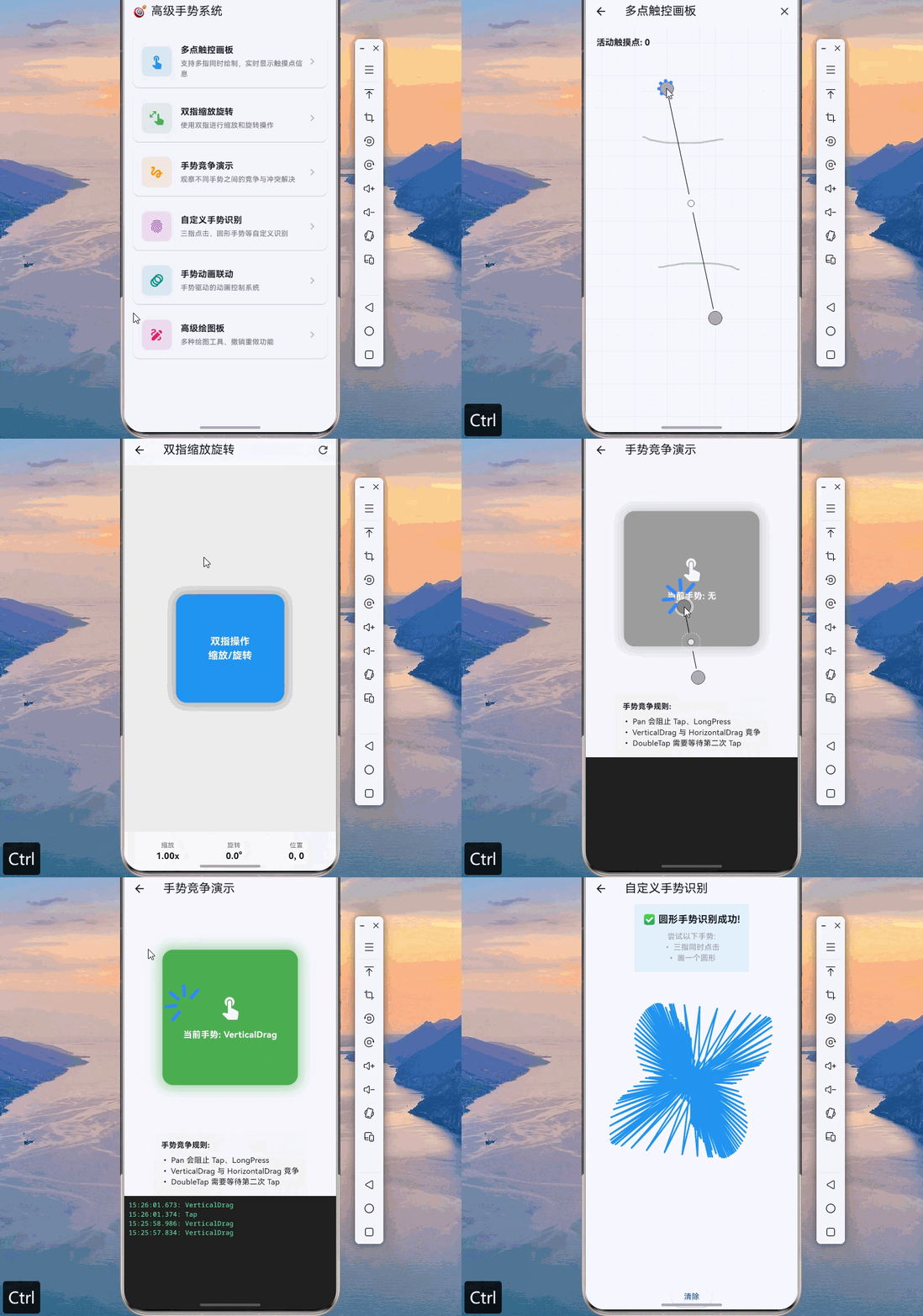
多点触控是现代移动应用的重要特性,支持用户使用多个手指同时进行操作。Flutter 提供了完善的多点触控支持,但需要正确处理指针事件的分发和管理。
👆 2.1 指针事件与多点触控
dart
import 'package:flutter/material.dart';
import 'dart:math' as math;

/// 触摸点信息
class TouchPoint {
  final int pointerId;
  final Offset position;
  final DateTime timestamp;
  final Color color;

  TouchPoint({
    required this.pointerId,
    required this.position,
    required this.timestamp,
    required this.color,
  });

  TouchPoint copyWith({
    int? pointerId,
    Offset? position,
    DateTime? timestamp,
    Color? color,
  }) {
    return TouchPoint(
      pointerId: pointerId ?? this.pointerId,
      position: position ?? this.position,
      timestamp: timestamp ?? this.timestamp,
      color: color ?? this.color,
    );
  }
}

/// 多点触控画板
class MultiTouchCanvas extends StatefulWidget {
  const MultiTouchCanvas({super.key});

  @override
  State<MultiTouchCanvas> createState() => _MultiTouchCanvasState();
}

class _MultiTouchCanvasState extends State<MultiTouchCanvas> {
  final Map<int, TouchPoint> _activePointers = {};
  final List<Offset> _allPoints = [];
  final Map<int, List<Offset>> _pointerTrails = {};
  final List<Color> _pointerColors = [
    Colors.red,
    Colors.blue,
    Colors.green,
    Colors.orange,
    Colors.purple,
    Colors.teal,
    Colors.pink,
    Colors.indigo,
  ];
  int _colorIndex = 0;

  Color _getNextColor() {
    final color = _pointerColors[_colorIndex % _pointerColors.length];
    _colorIndex++;
    return color;
  }

  void _handlePointerDown(PointerDownEvent event) {
    final color = _getNextColor();
    _activePointers[event.pointer] = TouchPoint(
      pointerId: event.pointer,
      position: event.localPosition,
      timestamp: DateTime.now(),
      color: color,
    );
    _pointerTrails[event.pointer] = [event.localPosition];
    setState(() {});
  }

  void _handlePointerMove(PointerMoveEvent event) {
    if (_activePointers.containsKey(event.pointer)) {
      _activePointers[event.pointer] = _activePointers[event.pointer]!.copyWith(
        position: event.localPosition,
        timestamp: DateTime.now(),
      );
      _pointerTrails[event.pointer]?.add(event.localPosition);
      _allPoints.add(event.localPosition);
      setState(() {});
    }
  }

  void _handlePointerUp(PointerUpEvent event) {
    _activePointers.remove(event.pointer);
    setState(() {});
  }

  void _handlePointerCancel(PointerCancelEvent event) {
    _activePointers.remove(event.pointer);
    setState(() {});
  }

  void _clearCanvas() {
    _activePointers.clear();
    _allPoints.clear();
    _pointerTrails.clear();
    _colorIndex = 0;
    setState(() {});
  }

  @override
  Widget build(BuildContext context) {
    return Scaffold(
      appBar: AppBar(
        title: const Text('多点触控画板'),
        actions: [
          IconButton(
            icon: const Icon(Icons.clear),
            onPressed: _clearCanvas,
          ),
        ],
      ),
      body: Listener(
        onPointerDown: _handlePointerDown,
        onPointerMove: _handlePointerMove,
        onPointerUp: _handlePointerUp,
        onPointerCancel: _handlePointerCancel,
        child: CustomPaint(
          painter: MultiTouchPainter(
            activePointers: _activePointers,
            allPoints: _allPoints,
            pointerTrails: _pointerTrails,
          ),
          size: Size.infinite,
        ),
      ),
    );
  }
}

/// 多点触控绘制器
class MultiTouchPainter extends CustomPainter {
  final Map<int, TouchPoint> activePointers;
  final List<Offset> allPoints;
  final Map<int, List<Offset>> pointerTrails;

  MultiTouchPainter({
    required this.activePointers,
    required this.allPoints,
    required this.pointerTrails,
  });

  @override
  void paint(Canvas canvas, Size size) {
    // 绘制背景网格
    _drawGrid(canvas, size);

    // 绘制所有轨迹
    for (final entry in pointerTrails.entries) {
      final points = entry.value;
      if (points.length < 2) continue;

      final color = activePointers[entry.key]?.color ?? Colors.grey;

      final paint = Paint()
        ..color = color.withOpacity(0.6)
        ..strokeWidth = 3
        ..strokeCap = StrokeCap.round
        ..style = PaintingStyle.stroke;

      final path = Path();
      path.moveTo(points.first.dx, points.first.dy);

      for (int i = 1; i < points.length; i++) {
        path.lineTo(points[i].dx, points[i].dy);
      }

      canvas.drawPath(path, paint);
    }

    // 绘制活动触摸点
    for (final point in activePointers.values) {
      _drawTouchPoint(canvas, point);
    }

    // 绘制触摸点数量
    _drawPointerCount(canvas, size);
  }

  void _drawGrid(Canvas canvas, Size size) {
    final paint = Paint()
      ..color = Colors.grey.withOpacity(0.1)
      ..strokeWidth = 1;

    const gridSize = 30.0;

    for (double x = 0; x < size.width; x += gridSize) {
      canvas.drawLine(Offset(x, 0), Offset(x, size.height), paint);
    }

    for (double y = 0; y < size.height; y += gridSize) {
      canvas.drawLine(Offset(0, y), Offset(size.width, y), paint);
    }
  }

  void _drawTouchPoint(Canvas canvas, TouchPoint point) {
    // 外圈
    final outerPaint = Paint()
      ..color = point.color.withOpacity(0.3)
      ..style = PaintingStyle.fill;
    canvas.drawCircle(point.position, 40, outerPaint);

    // 中圈
    final middlePaint = Paint()
      ..color = point.color.withOpacity(0.5)
      ..style = PaintingStyle.fill;
    canvas.drawCircle(point.position, 25, middlePaint);

    // 内圈
    final innerPaint = Paint()
      ..color = point.color
      ..style = PaintingStyle.fill;
    canvas.drawCircle(point.position, 12, innerPaint);

    // 中心点
    final centerPaint = Paint()
      ..color = Colors.white
      ..style = PaintingStyle.fill;
    canvas.drawCircle(point.position, 4, centerPaint);

    // 绘制指针ID
    final textPainter = TextPainter(
      text: TextSpan(
        text: '#${point.pointerId}',
        style: TextStyle(
          color: point.color,
          fontSize: 12,
          fontWeight: FontWeight.bold,
        ),
      ),
      textDirection: TextDirection.ltr,
    );
    textPainter.layout();
    textPainter.paint(
      canvas,
      Offset(point.position.dx + 45, point.position.dy - 10),
    );
  }

  void _drawPointerCount(Canvas canvas, Size size) {
    final textPainter = TextPainter(
      text: TextSpan(
        text: '活动触摸点: ${activePointers.length}',
        style: const TextStyle(
          color: Colors.black87,
          fontSize: 16,
          fontWeight: FontWeight.bold,
        ),
      ),
      textDirection: TextDirection.ltr,
    );
    textPainter.layout();
    textPainter.paint(canvas, const Offset(20, 20));
  }

  @override
  bool shouldRepaint(MultiTouchPainter oldDelegate) {
    return true;
  }
}
🤏 2.2 双指缩放与旋转手势
dart
/// 双指手势信息
class ScaleGestureInfo {
  final Offset focalPoint;
  final double scale;
  final double rotation;
  final int pointerCount;

  const ScaleGestureInfo({
    this.focalPoint = Offset.zero,
    this.scale = 1.0,
    this.rotation = 0.0,
    this.pointerCount = 0,
  });

  ScaleGestureInfo copyWith({
    Offset? focalPoint,
    double? scale,
    double? rotation,
    int? pointerCount,
  }) {
    return ScaleGestureInfo(
      focalPoint: focalPoint ?? this.focalPoint,
      scale: scale ?? this.scale,
      rotation: rotation ?? this.rotation,
      pointerCount: pointerCount ?? this.pointerCount,
    );
  }
}

/// 可缩放旋转的图片查看器
class ScaleRotateImageViewer extends StatefulWidget {
  final String? imageUrl;

  const ScaleRotateImageViewer({super.key, this.imageUrl});

  @override
  State<ScaleRotateImageViewer> createState() => _ScaleRotateImageViewerState();
}

class _ScaleRotateImageViewerState extends State<ScaleRotateImageViewer> {
  double _scale = 1.0;
  double _rotation = 0.0;
  Offset _position = Offset.zero;
  Offset _normalizedOffset = Offset.zero;
  double _previousScale = 1.0;
  double _previousRotation = 0.0;

  void _onScaleStart(ScaleStartDetails details) {
    _previousScale = _scale;
    _previousRotation = _rotation;
    _normalizedOffset = details.localFocalPoint - _position;
  }

  void _onScaleUpdate(ScaleUpdateDetails details) {
    setState(() {
      _scale = (_previousScale * details.scale).clamp(0.5, 4.0);
      _rotation = _previousRotation + details.rotation;
      _position = details.localFocalPoint - _normalizedOffset * _scale;
    });
  }

  void _resetTransform() {
    setState(() {
      _scale = 1.0;
      _rotation = 0.0;
      _position = Offset.zero;
    });
  }

  @override
  Widget build(BuildContext context) {
    return Scaffold(
      appBar: AppBar(
        title: const Text('双指缩放旋转'),
        actions: [
          IconButton(
            icon: const Icon(Icons.refresh),
            onPressed: _resetTransform,
          ),
        ],
      ),
      body: GestureDetector(
        onScaleStart: _onScaleStart,
        onScaleUpdate: _onScaleUpdate,
        onDoubleTap: _resetTransform,
        child: Container(
          color: Colors.grey[200],
          child: Center(
            child: Transform(
              transform: Matrix4.identity()
                ..translate(_position.dx, _position.dy)
                ..rotateZ(_rotation)
                ..scale(_scale),
              alignment: Alignment.center,
              child: Container(
                width: 200,
                height: 200,
                decoration: BoxDecoration(
                  color: Colors.blue,
                  borderRadius: BorderRadius.circular(20),
                  boxShadow: [
                    BoxShadow(
                      color: Colors.black.withOpacity(0.3),
                      blurRadius: 20,
                      spreadRadius: 5,
                    ),
                  ],
                ),
                child: const Center(
                  child: Text(
                    '双指操作\n缩放/旋转',
                    textAlign: TextAlign.center,
                    style: TextStyle(
                      color: Colors.white,
                      fontSize: 18,
                      fontWeight: FontWeight.bold,
                    ),
                  ),
                ),
              ),
            ),
          ),
        ),
      ),
      bottomNavigationBar: _buildInfoBar(),
    );
  }

  Widget _buildInfoBar() {
    return Container(
      padding: const EdgeInsets.all(16),
      color: Colors.grey[100],
      child: Row(
        mainAxisAlignment: MainAxisAlignment.spaceAround,
        children: [
          _buildInfoItem('缩放', '${_scale.toStringAsFixed(2)}x'),
          _buildInfoItem('旋转', '${(_rotation * 180 / math.pi).toStringAsFixed(1)}°'),
          _buildInfoItem('位置', '${_position.dx.toStringAsFixed(0)}, ${_position.dy.toStringAsFixed(0)}'),
        ],
      ),
    );
  }

  Widget _buildInfoItem(String label, String value) {
    return Column(
      mainAxisSize: MainAxisSize.min,
      children: [
        Text(
          label,
          style: TextStyle(
            fontSize: 12,
            color: Colors.grey[600],
          ),
        ),
        Text(
          value,
          style: const TextStyle(
            fontSize: 16,
            fontWeight: FontWeight.bold,
          ),
        ),
      ],
    );
  }
}
三、手势竞争与冲突解决
在实际应用中,多个手势识别器经常需要竞争同一个触摸事件。理解手势竞争机制并正确处理冲突,是构建复杂手势交互的关键。
⚔️ 3.1 手势竞争场景分析
dart
/// 手势竞争演示页面
class GestureArenaDemo extends StatefulWidget {
  const GestureArenaDemo({super.key});

  @override
  State<GestureArenaDemo> createState() => _GestureArenaDemoState();
}

class _GestureArenaDemoState extends State<GestureArenaDemo> {
  final List<String> _gestureLog = [];
  Color _containerColor = Colors.grey;
  String _currentGesture = '无';

  void _addLog(String gesture) {
    setState(() {
      _gestureLog.insert(0, '${DateTime.now().toString().substring(11, 23)}: $gesture');
      if (_gestureLog.length > 20) {
        _gestureLog.removeLast();
      }
      _currentGesture = gesture;
    });
  }

  void _changeColor(Color color) {
    setState(() {
      _containerColor = color;
    });
  }

  @override
  Widget build(BuildContext context) {
    return Scaffold(
      appBar: AppBar(
        title: const Text('手势竞争演示'),
      ),
      body: Column(
        children: [
          // 手势竞争区域
          Expanded(
            flex: 2,
            child: Center(
              child: GestureDetector(
                onTap: () {
                  _addLog('Tap');
                  _changeColor(Colors.blue);
                },
                onDoubleTap: () {
                  _addLog('DoubleTap');
                  _changeColor(Colors.purple);
                },
                onLongPress: () {
                  _addLog('LongPress');
                  _changeColor(Colors.orange);
                },
                onVerticalDragStart: (_) {
                  _addLog('VerticalDrag Start');
                  _changeColor(Colors.green);
                },
                onHorizontalDragStart: (_) {
                  _addLog('HorizontalDrag Start');
                  _changeColor(Colors.teal);
                },
                onPanStart: (_) {
                  _addLog('Pan Start');
                  _changeColor(Colors.red);
                },
                child: AnimatedContainer(
                  duration: const Duration(milliseconds: 200),
                  width: 250,
                  height: 250,
                  decoration: BoxDecoration(
                    color: _containerColor,
                    borderRadius: BorderRadius.circular(20),
                    boxShadow: [
                      BoxShadow(
                        color: _containerColor.withOpacity(0.5),
                        blurRadius: 20,
                        spreadRadius: 5,
                      ),
                    ],
                  ),
                  child: Center(
                    child: Column(
                      mainAxisSize: MainAxisSize.min,
                      children: [
                        const Icon(
                          Icons.touch_app,
                          size: 48,
                          color: Colors.white,
                        ),
                        const SizedBox(height: 16),
                        Text(
                          '当前手势: $_currentGesture',
                          style: const TextStyle(
                            color: Colors.white,
                            fontSize: 16,
                            fontWeight: FontWeight.bold,
                          ),
                        ),
                        const SizedBox(height: 8),
                        const Text(
                          '尝试不同手势\nTap / DoubleTap / LongPress\nDrag / Pan',
                          textAlign: TextAlign.center,
                          style: TextStyle(
                            color: Colors.white70,
                            fontSize: 12,
                          ),
                        ),
                      ],
                    ),
                  ),
                ),
              ),
            ),
          ),

          // 手势竞争说明
          Container(
            padding: const EdgeInsets.all(16),
            color: Colors.grey[100],
            child: const Column(
              crossAxisAlignment: CrossAxisAlignment.start,
              children: [
                Text(
                  '手势竞争规则:',
                  style: TextStyle(fontWeight: FontWeight.bold),
                ),
                SizedBox(height: 8),
                Text('• Pan 会阻止 Tap、LongPress'),
                Text('• VerticalDrag 与 HorizontalDrag 竞争'),
                Text('• DoubleTap 需要等待第二次 Tap'),
                Text('• LongPress 会阻止 Tap'),
              ],
            ),
          ),

          // 日志区域
          Expanded(
            child: Container(
              color: Colors.black87,
              padding: const EdgeInsets.all(8),
              child: ListView.builder(
                itemCount: _gestureLog.length,
                itemBuilder: (context, index) {
                  return Text(
                    _gestureLog[index],
                    style: const TextStyle(
                      color: Colors.greenAccent,
                      fontFamily: 'monospace',
                      fontSize: 12,
                    ),
                  );
                },
              ),
            ),
          ),
        ],
      ),
    );
  }
}
🎛️ 3.2 自定义手势识别器
dart
/// 自定义手势识别器基类
abstract class CustomGestureRecognizer extends GestureRecognizer {
  CustomGestureRecognizer({
    super.debugOwner,
    super.kind,
  });

  @override
  void acceptGesture(int pointer) {
    super.acceptGesture(pointer);
    onAccept?.call();
  }

  @override
  void rejectGesture(int pointer) {
    super.rejectGesture(pointer);
    onReject?.call();
  }

  VoidCallback? onAccept;
  VoidCallback? onReject;
}

/// 三指点击识别器
class TripleTapGestureRecognizer extends GestureRecognizer {
  TripleTapGestureRecognizer({
    super.debugOwner,
    super.kind,
  });

  GestureTapCallback? onTripleTap;

  final Map<int, Offset> _pendingTaps = {};
  DateTime? _firstTapTime;
  static const Duration _tripleTapTimeout = Duration(milliseconds: 500);
  static const double _maxTapDistance = 50.0;

  @override
  void addPointer(PointerDownEvent event) {
    _pendingTaps[event.pointer] = event.position;

    if (_pendingTaps.length == 3) {
      _checkTripleTap();
    }

    resolve(GestureDisposition.accepted);
  }

  void _checkTripleTap() {
    if (_pendingTaps.length != 3) return;

    final positions = _pendingTaps.values.toList();
    final center = Offset(
      (positions[0].dx + positions[1].dx + positions[2].dx) / 3,
      (positions[0].dy + positions[1].dy + positions[2].dy) / 3,
    );

    bool allNearCenter = true;
    for (final pos in positions) {
      if ((pos - center).distance > _maxTapDistance) {
        allNearCenter = false;
        break;
      }
    }

    if (allNearCenter) {
      onTripleTap?.call();
    }

    _pendingTaps.clear();
  }

  @override
  String get debugDescription => 'triple tap';

  @override
  Set<PointerDeviceKind> get supportedDevices => {
    PointerDeviceKind.touch,
    PointerDeviceKind.mouse,
  };
}

/// 圆形手势识别器
class CircleGestureRecognizer extends GestureRecognizer {
  CircleGestureRecognizer({
    super.debugOwner,
    super.kind,
  });

  GestureDragEndCallback? onCircleDetected;

  final List<Offset> _points = [];
  static const int _minPoints = 20;
  static const double _circleThreshold = 0.7;

  @override
  void addPointer(PointerDownEvent event) {
    _points.clear();
    _points.add(event.position);
    resolve(GestureDisposition.accepted);
  }

  void addMove(PointerMoveEvent event) {
    _points.add(event.position);
  }

  void checkCircle() {
    if (_points.length < _minPoints) return;

    final center = _calculateCenter();
    final avgRadius = _calculateAverageRadius(center);
    final variance = _calculateRadiusVariance(center, avgRadius);

    if (variance < _circleThreshold) {
      onCircleDetected?.call(
        DragEndDetails(
          velocity: Velocity.zero,
          primaryVelocity: 0,
        ),
      );
    }
  }

  Offset _calculateCenter() {
    double sumX = 0, sumY = 0;
    for (final point in _points) {
      sumX += point.dx;
      sumY += point.dy;
    }
    return Offset(sumX / _points.length, sumY / _points.length);
  }

  double _calculateAverageRadius(Offset center) {
    double sum = 0;
    for (final point in _points) {
      sum += (point - center).distance;
    }
    return sum / _points.length;
  }

  double _calculateRadiusVariance(Offset center, double avgRadius) {
    double sumSquaredDiff = 0;
    for (final point in _points) {
      final radius = (point - center).distance;
      sumSquaredDiff += (radius - avgRadius) * (radius - avgRadius);
    }
    return sumSquaredDiff / _points.length / (avgRadius * avgRadius);
  }

  @override
  String get debugDescription => 'circle gesture';

  @override
  Set<PointerDeviceKind> get supportedDevices => {
    PointerDeviceKind.touch,
  };
}

/// 自定义手势演示
class CustomGestureDemo extends StatefulWidget {
  const CustomGestureDemo({super.key});

  @override
  State<CustomGestureDemo> createState() => _CustomGestureDemoState();
}

class _CustomGestureDemoState extends State<CustomGestureDemo> {
  String _status = '等待手势...';
  final List<Offset> _drawPoints = [];

  @override
  Widget build(BuildContext context) {
    return Scaffold(
      appBar: AppBar(
        title: const Text('自定义手势识别'),
      ),
      body: Column(
        children: [
          Container(
            padding: const EdgeInsets.all(16),
            color: Colors.blue.shade50,
            child: Column(
              children: [
                Text(
                  _status,
                  style: const TextStyle(
                    fontSize: 18,
                    fontWeight: FontWeight.bold,
                  ),
                ),
                const SizedBox(height: 8),
                const Text(
                  '尝试以下手势:\n• 三指同时点击\n• 画一个圆形',
                  textAlign: TextAlign.center,
                  style: TextStyle(color: Colors.grey),
                ),
              ],
            ),
          ),
          Expanded(
            child: RawGestureDetector(
              gestures: {
                TripleTapGestureRecognizer: GestureRecognizerFactoryWithHandlers<TripleTapGestureRecognizer>(
                  () => TripleTapGestureRecognizer(),
                  (TripleTapGestureRecognizer instance) {
                    instance.onTripleTap = () {
                      setState(() {
                        _status = '✅ 三指点击识别成功!';
                      });
                    };
                  },
                ),
              },
              child: Listener(
                onPointerDown: (event) {
                  _drawPoints.add(event.localPosition);
                  setState(() {});
                },
                onPointerMove: (event) {
                  _drawPoints.add(event.localPosition);
                  setState(() {});
                },
                onPointerUp: (event) {
                  _checkCircleGesture();
                },
                child: CustomPaint(
                  painter: DrawingPainter(points: _drawPoints),
                  size: Size.infinite,
                ),
              ),
            ),
          ),
          ElevatedButton(
            onPressed: () {
              setState(() {
                _drawPoints.clear();
                _status = '等待手势...';
              });
            },
            child: const Text('清除'),
          ),
        ],
      ),
    );
  }

  void _checkCircleGesture() {
    if (_drawPoints.length < 20) return;

    final center = _calculateCenter();
    final avgRadius = _calculateAverageRadius(center);
    final variance = _calculateRadiusVariance(center, avgRadius);

    if (variance < 0.3 && avgRadius > 50) {
      setState(() {
        _status = '✅ 圆形手势识别成功!';
      });
    }
  }

  Offset _calculateCenter() {
    double sumX = 0, sumY = 0;
    for (final point in _drawPoints) {
      sumX += point.dx;
      sumY += point.dy;
    }
    return Offset(sumX / _drawPoints.length, sumY / _drawPoints.length);
  }

  double _calculateAverageRadius(Offset center) {
    double sum = 0;
    for (final point in _drawPoints) {
      sum += (point - center).distance;
    }
    return sum / _drawPoints.length;
  }

  double _calculateRadiusVariance(Offset center, double avgRadius) {
    double sumSquaredDiff = 0;
    for (final point in _drawPoints) {
      final radius = (point - center).distance;
      sumSquaredDiff += (radius - avgRadius) * (radius - avgRadius);
    }
    return sumSquaredDiff / _drawPoints.length / (avgRadius * avgRadius);
  }
}

class DrawingPainter extends CustomPainter {
  final List<Offset> points;

  DrawingPainter({required this.points});

  @override
  void paint(Canvas canvas, Size size) {
    if (points.isEmpty) return;

    final paint = Paint()
      ..color = Colors.blue
      ..strokeWidth = 3
      ..strokeCap = StrokeCap.round;

    for (int i = 1; i < points.length; i++) {
      canvas.drawLine(points[i - 1], points[i], paint);
    }
  }

  @override
  bool shouldRepaint(DrawingPainter oldDelegate) => true;
}
四、复杂手势交互场景
🎮 4.1 手势动画联动系统
dart
/// 手势驱动的动画控制器
class GestureAnimationController {
  final AnimationController controller;
  final double sensitivity;
  final bool reverseOnRelease;

  double _dragOffset = 0;
  bool _isDragging = false;

  GestureAnimationController({
    required this.controller,
    this.sensitivity = 1.0,
    this.reverseOnRelease = false,
  });

  void onDragStart() {
    _isDragging = true;
  }

  void onDragUpdate(double delta) {
    if (!_isDragging) return;

    _dragOffset += delta * sensitivity;
    final newValue = controller.value + _dragOffset / 1000;
    controller.value = newValue.clamp(0.0, 1.0);
    _dragOffset = 0;
  }

  void onDragEnd() {
    _isDragging = false;

    if (reverseOnRelease) {
      if (controller.value > 0.5) {
        controller.forward();
      } else {
        controller.reverse();
      }
    }
  }

  void dispose() {
    controller.dispose();
  }
}

/// 卡片滑动删除与撤销
class SwipeableCard extends StatefulWidget {
  final Widget child;
  final VoidCallback? onDismissed;
  final Color backgroundColor;

  const SwipeableCard({
    super.key,
    required this.child,
    this.onDismissed,
    this.backgroundColor = Colors.white,
  });

  @override
  State<SwipeableCard> createState() => _SwipeableCardState();
}

class _SwipeableCardState extends State<SwipeableCard>
    with SingleTickerProviderStateMixin {
  late AnimationController _controller;
  late Animation<double> _animation;
  double _dragExtent = 0;
  bool _isDismissed = false;

  static const double _dismissThreshold = 150.0;

  @override
  void initState() {
    super.initState();
    _controller = AnimationController(
      duration: const Duration(milliseconds: 300),
      vsync: this,
    );
    _animation = Tween<double>(begin: 0, end: 1).animate(
      CurvedAnimation(parent: _controller, curve: Curves.easeOut),
    );
  }

  @override
  void dispose() {
    _controller.dispose();
    super.dispose();
  }

  void _handleDragUpdate(DragUpdateDetails details) {
    setState(() {
      _dragExtent += details.delta.dx;
    });
  }

  void _handleDragEnd(DragEndDetails details) {
    if (_dragExtent.abs() > _dismissThreshold) {
      _dismiss();
    } else {
      setState(() {
        _dragExtent = 0;
      });
    }
  }

  void _dismiss() {
    setState(() {
      _isDismissed = true;
    });
    _controller.forward().then((_) {
      widget.onDismissed?.call();
    });
  }

  void _undo() {
    _controller.reverse();
    setState(() {
      _isDismissed = false;
      _dragExtent = 0;
    });
  }

  @override
  Widget build(BuildContext context) {
    if (_isDismissed) {
      return AnimatedBuilder(
        animation: _animation,
        builder: (context, child) {
          return Container(
            height: 80,
            margin: const EdgeInsets.symmetric(horizontal: 16, vertical: 8),
            decoration: BoxDecoration(
              color: Colors.green,
              borderRadius: BorderRadius.circular(12),
            ),
            child: Center(
              child: TextButton.icon(
                onPressed: _undo,
                icon: const Icon(Icons.undo, color: Colors.white),
                label: const Text(
                  '撤销删除',
                  style: TextStyle(color: Colors.white),
                ),
              ),
            ),
          );
        },
      );
    }

    return GestureDetector(
      onHorizontalDragUpdate: _handleDragUpdate,
      onHorizontalDragEnd: _handleDragEnd,
      child: AnimatedContainer(
        duration: const Duration(milliseconds: 100),
        transform: Matrix4.translationValues(_dragExtent, 0, 0),
        margin: const EdgeInsets.symmetric(horizontal: 16, vertical: 8),
        decoration: BoxDecoration(
          color: widget.backgroundColor,
          borderRadius: BorderRadius.circular(12),
          boxShadow: [
            BoxShadow(
              color: Colors.black.withOpacity(0.1),
              blurRadius: 8,
              offset: const Offset(0, 2),
            ),
          ],
        ),
        child: Stack(
          children: [
            // 删除指示器
            Positioned.fill(
              child: ClipRRect(
                borderRadius: BorderRadius.circular(12),
                child: Row(
                  children: [
                    Expanded(
                      child: Container(
                        color: Colors.red.withOpacity(
                          (_dragExtent.abs() / _dismissThreshold).clamp(0.0, 1.0),
                        ),
                        child: const Icon(
                          Icons.delete,
                          color: Colors.white,
                        ),
                      ),
                    ),
                    Expanded(child: Container()),
                  ],
                ),
              ),
            ),
            // 内容
            widget.child,
          ],
        ),
      ),
    );
  }
}

/// 手势动画联动演示
class GestureAnimationDemo extends StatefulWidget {
  const GestureAnimationDemo({super.key});

  @override
  State<GestureAnimationDemo> createState() => _GestureAnimationDemoState();
}

class _GestureAnimationDemoState extends State<GestureAnimationDemo>
    with TickerProviderStateMixin {
  late AnimationController _rotationController;
  late AnimationController _scaleController;
  late AnimationController _slideController;

  double _rotation = 0;
  double _scale = 1.0;
  double _slideX = 0;

  @override
  void initState() {
    super.initState();
    _rotationController = AnimationController(
      duration: const Duration(milliseconds: 200),
      vsync: this,
    );
    _scaleController = AnimationController(
      duration: const Duration(milliseconds: 200),
      vsync: this,
    );
    _slideController = AnimationController(
      duration: const Duration(milliseconds: 300),
      vsync: this,
    );
  }

  @override
  void dispose() {
    _rotationController.dispose();
    _scaleController.dispose();
    _slideController.dispose();
    super.dispose();
  }

  @override
  Widget build(BuildContext context) {
    return Scaffold(
      appBar: AppBar(
        title: const Text('手势动画联动'),
      ),
      body: Column(
        children: [
          // 旋转控制
          _buildGestureCard(
            title: '旋转',
            icon: Icons.rotate_right,
            color: Colors.blue,
            child: GestureDetector(
              onHorizontalDragUpdate: (details) {
                setState(() {
                  _rotation += details.delta.dx * 0.01;
                });
              },
              child: Transform.rotate(
                angle: _rotation,
                child: Container(
                  width: 100,
                  height: 100,
                  decoration: BoxDecoration(
                    color: Colors.blue,
                    borderRadius: BorderRadius.circular(16),
                  ),
                  child: const Icon(
                    Icons.rotate_right,
                    color: Colors.white,
                    size: 48,
                  ),
                ),
              ),
            ),
          ),

          // 缩放控制
          _buildGestureCard(
            title: '缩放',
            icon: Icons.zoom_in,
            color: Colors.green,
            child: GestureDetector(
              onVerticalDragUpdate: (details) {
                setState(() {
                  _scale -= details.delta.dy * 0.005;
                  _scale = _scale.clamp(0.5, 2.0);
                });
              },
              child: Transform.scale(
                scale: _scale,
                child: Container(
                  width: 100,
                  height: 100,
                  decoration: BoxDecoration(
                    color: Colors.green,
                    borderRadius: BorderRadius.circular(16),
                  ),
                  child: const Icon(
                    Icons.zoom_in,
                    color: Colors.white,
                    size: 48,
                  ),
                ),
              ),
            ),
          ),

          // 滑动控制
          _buildGestureCard(
            title: '滑动',
            icon: Icons.swipe,
            color: Colors.orange,
            child: GestureDetector(
              onHorizontalDragUpdate: (details) {
                setState(() {
                  _slideX += details.delta.dx;
                  _slideX = _slideX.clamp(-100.0, 100.0);
                });
              },
              onHorizontalDragEnd: (_) {
                setState(() {
                  _slideX = 0;
                });
              },
              child: Transform.translate(
                offset: Offset(_slideX, 0),
                child: Container(
                  width: 100,
                  height: 100,
                  decoration: BoxDecoration(
                    color: Colors.orange,
                    borderRadius: BorderRadius.circular(16),
                  ),
                  child: const Icon(
                    Icons.swipe,
                    color: Colors.white,
                    size: 48,
                  ),
                ),
              ),
            ),
          ),
        ],
      ),
    );
  }

  Widget _buildGestureCard({
    required String title,
    required IconData icon,
    required Color color,
    required Widget child,
  }) {
    return Expanded(
      child: Container(
        margin: const EdgeInsets.all(16),
        decoration: BoxDecoration(
          color: Colors.grey[100],
          borderRadius: BorderRadius.circular(16),
        ),
        child: Column(
          mainAxisAlignment: MainAxisAlignment.center,
          children: [
            Text(
              title,
              style: TextStyle(
                fontSize: 18,
                fontWeight: FontWeight.bold,
                color: color,
              ),
            ),
            const SizedBox(height: 16),
            child,
          ],
        ),
      ),
    );
  }
}
🎨 4.2 手势绘图系统
dart
/// 绘图路径
class DrawingPath {
  final List<Offset> points;
  final Color color;
  final double strokeWidth;
  final DrawingTool tool;

  DrawingPath({
    required this.points,
    required this.color,
    required this.strokeWidth,
    required this.tool,
  });
}

/// 绘图工具类型
enum DrawingTool {
  pen,
  highlighter,
  eraser,
  line,
  rectangle,
  circle,
  arrow,
}

/// 高级绘图板
class AdvancedDrawingBoard extends StatefulWidget {
  const AdvancedDrawingBoard({super.key});

  @override
  State<AdvancedDrawingBoard> createState() => _AdvancedDrawingBoardState();
}

class _AdvancedDrawingBoardState extends State<AdvancedDrawingBoard> {
  final List<DrawingPath> _paths = [];
  final List<DrawingPath> _redoStack = [];

  Color _selectedColor = Colors.black;
  double _strokeWidth = 3.0;
  DrawingTool _selectedTool = DrawingTool.pen;

  List<Offset> _currentPath = [];
  Offset? _startPoint;

  void _onPanStart(DragStartDetails details) {
    _currentPath = [details.localPosition];
    _startPoint = details.localPosition;
  }

  void _onPanUpdate(DragUpdateDetails details) {
    setState(() {
      _currentPath.add(details.localPosition);
    });
  }

  void _onPanEnd(DragEndDetails details) {
    if (_currentPath.isEmpty) return;

    setState(() {
      _paths.add(DrawingPath(
        points: List.from(_currentPath),
        color: _selectedTool == DrawingTool.eraser
            ? Colors.white
            : _selectedColor,
        strokeWidth: _strokeWidth,
        tool: _selectedTool,
      ));
      _redoStack.clear();
      _currentPath = [];
    });
  }

  void _undo() {
    if (_paths.isEmpty) return;
    setState(() {
      _redoStack.add(_paths.removeLast());
    });
  }

  void _redo() {
    if (_redoStack.isEmpty) return;
    setState(() {
      _paths.add(_redoStack.removeLast());
    });
  }

  void _clear() {
    setState(() {
      _paths.clear();
      _redoStack.clear();
    });
  }

  @override
  Widget build(BuildContext context) {
    return Scaffold(
      appBar: AppBar(
        title: const Text('高级绘图板'),
        actions: [
          IconButton(
            icon: const Icon(Icons.undo),
            onPressed: _paths.isEmpty ? null : _undo,
          ),
          IconButton(
            icon: const Icon(Icons.redo),
            onPressed: _redoStack.isEmpty ? null : _redo,
          ),
          IconButton(
            icon: const Icon(Icons.clear),
            onPressed: _clear,
          ),
        ],
      ),
      body: Column(
        children: [
          // 工具栏
          _buildToolbar(),

          // 画布
          Expanded(
            child: GestureDetector(
              onPanStart: _onPanStart,
              onPanUpdate: _onPanUpdate,
              onPanEnd: _onPanEnd,
              child: CustomPaint(
                painter: DrawingBoardPainter(
                  paths: _paths,
                  currentPath: _currentPath,
                  currentColor: _selectedColor,
                  currentStrokeWidth: _strokeWidth,
                  currentTool: _selectedTool,
                ),
                size: Size.infinite,
              ),
            ),
          ),
        ],
      ),
    );
  }

  Widget _buildToolbar() {
    return Container(
      padding: const EdgeInsets.all(8),
      decoration: BoxDecoration(
        color: Colors.grey[100],
        boxShadow: [
          BoxShadow(
            color: Colors.black.withOpacity(0.1),
            blurRadius: 4,
            offset: const Offset(0, 2),
          ),
        ],
      ),
      child: Column(
        children: [
          // 工具选择
          Row(
            mainAxisAlignment: MainAxisAlignment.spaceEvenly,
            children: [
              _buildToolButton(DrawingTool.pen, Icons.edit, '画笔'),
              _buildToolButton(DrawingTool.highlighter, Icons.highlight, '荧光笔'),
              _buildToolButton(DrawingTool.eraser, Icons.cleaning_services, '橡皮擦'),
              _buildToolButton(DrawingTool.line, Icons.show_chart, '直线'),
              _buildToolButton(DrawingTool.rectangle, Icons.rectangle_outlined, '矩形'),
              _buildToolButton(DrawingTool.circle, Icons.circle_outlined, '圆形'),
            ],
          ),
          const SizedBox(height: 8),
          // 颜色选择
          Row(
            mainAxisAlignment: MainAxisAlignment.center,
            children: [
              Colors.black,
              Colors.red,
              Colors.blue,
              Colors.green,
              Colors.orange,
              Colors.purple,
            ].map((color) => _buildColorButton(color)).toList(),
          ),
          const SizedBox(height: 8),
          // 笔触大小
          Row(
            children: [
              const Text('笔触大小: '),
              Expanded(
                child: Slider(
                  value: _strokeWidth,
                  min: 1,
                  max: 20,
                  onChanged: (value) {
                    setState(() {
                      _strokeWidth = value;
                    });
                  },
                ),
              ),
              Text('${_strokeWidth.toStringAsFixed(1)}px'),
            ],
          ),
        ],
      ),
    );
  }

  Widget _buildToolButton(DrawingTool tool, IconData icon, String label) {
    final isSelected = _selectedTool == tool;
    return InkWell(
      onTap: () {
        setState(() {
          _selectedTool = tool;
        });
      },
      child: Container(
        padding: const EdgeInsets.symmetric(horizontal: 12, vertical: 8),
        decoration: BoxDecoration(
          color: isSelected ? Colors.blue : Colors.transparent,
          borderRadius: BorderRadius.circular(8),
        ),
        child: Column(
          mainAxisSize: MainAxisSize.min,
          children: [
            Icon(
              icon,
              color: isSelected ? Colors.white : Colors.grey,
              size: 20,
            ),
            Text(
              label,
              style: TextStyle(
                fontSize: 10,
                color: isSelected ? Colors.white : Colors.grey,
              ),
            ),
          ],
        ),
      ),
    );
  }

  Widget _buildColorButton(Color color) {
    final isSelected = _selectedColor == color;
    return GestureDetector(
      onTap: () {
        setState(() {
          _selectedColor = color;
        });
      },
      child: Container(
        width: 32,
        height: 32,
        margin: const EdgeInsets.symmetric(horizontal: 4),
        decoration: BoxDecoration(
          color: color,
          shape: BoxShape.circle,
          border: Border.all(
            color: isSelected ? Colors.blue : Colors.transparent,
            width: 3,
          ),
        ),
      ),
    );
  }
}

class DrawingBoardPainter extends CustomPainter {
  final List<DrawingPath> paths;
  final List<Offset> currentPath;
  final Color currentColor;
  final double currentStrokeWidth;
  final DrawingTool currentTool;

  DrawingBoardPainter({
    required this.paths,
    required this.currentPath,
    required this.currentColor,
    required this.currentStrokeWidth,
    required this.currentTool,
  });

  @override
  void paint(Canvas canvas, Size size) {
    // 绘制背景
    canvas.drawRect(
      Rect.fromLTWH(0, 0, size.width, size.height),
      Paint()..color = Colors.white,
    );

    // 绘制已完成的路径
    for (final path in paths) {
      _drawPath(canvas, path);
    }

    // 绘制当前路径
    if (currentPath.isNotEmpty) {
      _drawCurrentPath(canvas);
    }
  }

  void _drawPath(Canvas canvas, DrawingPath path) {
    final paint = Paint()
      ..color = path.tool == DrawingTool.highlighter
          ? path.color.withOpacity(0.3)
          : path.color
      ..strokeWidth = path.strokeWidth
      ..strokeCap = StrokeCap.round
      ..strokeJoin = StrokeJoin.round
      ..style = PaintingStyle.stroke;

    switch (path.tool) {
      case DrawingTool.pen:
      case DrawingTool.highlighter:
      case DrawingTool.eraser:
        _drawFreehandPath(canvas, path.points, paint);
        break;
      case DrawingTool.line:
        if (path.points.length >= 2) {
          canvas.drawLine(path.points.first, path.points.last, paint);
        }
        break;
      case DrawingTool.rectangle:
        if (path.points.length >= 2) {
          final rect = Rect.fromPoints(path.points.first, path.points.last);
          canvas.drawRect(rect, paint);
        }
        break;
      case DrawingTool.circle:
        if (path.points.length >= 2) {
          final center = Offset(
            (path.points.first.dx + path.points.last.dx) / 2,
            (path.points.first.dy + path.points.last.dy) / 2,
          );
          final radius = (path.points.first - path.points.last).distance / 2;
          canvas.drawCircle(center, radius, paint);
        }
        break;
      case DrawingTool.arrow:
        if (path.points.length >= 2) {
          _drawArrow(canvas, path.points.first, path.points.last, paint);
        }
        break;
    }
  }

  void _drawCurrentPath(Canvas canvas) {
    final paint = Paint()
      ..color = currentTool == DrawingTool.highlighter
          ? currentColor.withOpacity(0.3)
          : currentColor
      ..strokeWidth = currentStrokeWidth
      ..strokeCap = StrokeCap.round
      ..strokeJoin = StrokeJoin.round
      ..style = PaintingStyle.stroke;

    switch (currentTool) {
      case DrawingTool.pen:
      case DrawingTool.highlighter:
      case DrawingTool.eraser:
        _drawFreehandPath(canvas, currentPath, paint);
        break;
      case DrawingTool.line:
        if (currentPath.length >= 2) {
          canvas.drawLine(currentPath.first, currentPath.last, paint);
        }
        break;
      case DrawingTool.rectangle:
        if (currentPath.length >= 2) {
          final rect = Rect.fromPoints(currentPath.first, currentPath.last);
          canvas.drawRect(rect, paint);
        }
        break;
      case DrawingTool.circle:
        if (currentPath.length >= 2) {
          final center = Offset(
            (currentPath.first.dx + currentPath.last.dx) / 2,
            (currentPath.first.dy + currentPath.last.dy) / 2,
          );
          final radius = (currentPath.first - currentPath.last).distance / 2;
          canvas.drawCircle(center, radius, paint);
        }
        break;
      case DrawingTool.arrow:
        if (currentPath.length >= 2) {
          _drawArrow(canvas, currentPath.first, currentPath.last, paint);
        }
        break;
    }
  }

  void _drawFreehandPath(Canvas canvas, List<Offset> points, Paint paint) {
    if (points.length < 2) return;

    final path = Path();
    path.moveTo(points.first.dx, points.first.dy);

    for (int i = 1; i < points.length; i++) {
      path.lineTo(points[i].dx, points[i].dy);
    }

    canvas.drawPath(path, paint);
  }

  void _drawArrow(Canvas canvas, Offset start, Offset end, Paint paint) {
    canvas.drawLine(start, end, paint);

    const arrowSize = 15.0;
    final angle = (end - start).direction;

    final arrowPath = Path();
    arrowPath.moveTo(end.dx, end.dy);
    arrowPath.lineTo(
      end.dx - arrowSize * math.cos(angle - math.pi / 6),
      end.dy - arrowSize * math.sin(angle - math.pi / 6),
    );
    arrowPath.moveTo(end.dx, end.dy);
    arrowPath.lineTo(
      end.dx - arrowSize * math.cos(angle + math.pi / 6),
      end.dy - arrowSize * math.sin(angle + math.pi / 6),
    );

    canvas.drawPath(arrowPath, paint);
  }

  @override
  bool shouldRepaint(DrawingBoardPainter oldDelegate) => true;
}
五、完整代码示例
下面是一个整合了多点触控、手势竞争、自定义手势识别和手势动画联动的完整示例:
dart
import 'package:flutter/material.dart';
import 'dart:math' as math;
void main() {
runApp(const MyApp());
}
class MyApp extends StatelessWidget {
const MyApp({super.key});
@override
Widget build(BuildContext context) {
return MaterialApp(
debugShowCheckedModeBanner: false,
theme: ThemeData(
colorScheme: ColorScheme.fromSeed(seedColor: Colors.blue),
useMaterial3: true,
),
home: const GestureSystemHomePage(),
);
}
}
/// 手势系统主页
class GestureSystemHomePage extends StatelessWidget {
const GestureSystemHomePage({super.key});
@override
Widget build(BuildContext context) {
return Scaffold(
appBar: AppBar(
title: const Text('🎯 高级手势系统'),
),
body: ListView(
padding: const EdgeInsets.all(16),
children: [
_buildSectionCard(
context,
title: '多点触控画板',
description: '支持多指同时绘制,实时显示触摸点信息',
icon: Icons.touch_app,
color: Colors.blue,
onTap: () => Navigator.push(
context,
MaterialPageRoute(builder: (_) => const MultiTouchCanvas()),
),
),
_buildSectionCard(
context,
title: '双指缩放旋转',
description: '使用双指进行缩放和旋转操作',
icon: Icons.pinch,
color: Colors.green,
onTap: () => Navigator.push(
context,
MaterialPageRoute(builder: (_) => const ScaleRotateImageViewer()),
),
),
_buildSectionCard(
context,
title: '手势竞争演示',
description: '观察不同手势之间的竞争与冲突解决',
icon: Icons.gesture,
color: Colors.orange,
onTap: () => Navigator.push(
context,
MaterialPageRoute(builder: (_) => const GestureArenaDemo()),
),
),
_buildSectionCard(
context,
title: '自定义手势识别',
description: '三指点击、圆形手势等自定义识别',
icon: Icons.fingerprint,
color: Colors.purple,
onTap: () => Navigator.push(
context,
MaterialPageRoute(builder: (_) => const CustomGestureDemo()),
),
),
_buildSectionCard(
context,
title: '手势动画联动',
description: '手势驱动的动画控制系统',
icon: Icons.animation,
color: Colors.teal,
onTap: () => Navigator.push(
context,
MaterialPageRoute(builder: (_) => const GestureAnimationDemo()),
),
),
_buildSectionCard(
context,
title: '高级绘图板',
description: '多种绘图工具、撤销重做功能',
icon: Icons.draw,
color: Colors.pink,
onTap: () => Navigator.push(
context,
MaterialPageRoute(builder: (_) => const AdvancedDrawingBoard()),
),
),
],
),
);
}
Widget _buildSectionCard(
BuildContext context, {
required String title,
required String description,
required IconData icon,
required Color color,
required VoidCallback onTap,
}) {
return Card(
margin: const EdgeInsets.only(bottom: 12),
child: InkWell(
onTap: onTap,
borderRadius: BorderRadius.circular(12),
child: Padding(
padding: const EdgeInsets.all(16),
child: Row(
children: [
Container(
width: 56,
height: 56,
decoration: BoxDecoration(
color: color.withOpacity(0.1),
borderRadius: BorderRadius.circular(12),
),
child: Icon(icon, color: color, size: 28),
),
const SizedBox(width: 16),
Expanded(
child: Column(
crossAxisAlignment: CrossAxisAlignment.start,
children: [
Text(
title,
style: const TextStyle(
fontSize: 16,
fontWeight: FontWeight.bold,
),
),
const SizedBox(height: 4),
Text(
description,
style: TextStyle(
fontSize: 13,
color: Colors.grey[600],
),
),
],
),
),
Icon(Icons.chevron_right, color: Colors.grey[400]),
],
),
),
),
);
}
}
/// 触摸点信息
class TouchPoint {
final int pointerId;
final Offset position;
final DateTime timestamp;
final Color color;
TouchPoint({
required this.pointerId,
required this.position,
required this.timestamp,
required this.color,
});
TouchPoint copyWith({
int? pointerId,
Offset? position,
DateTime? timestamp,
Color? color,
}) {
return TouchPoint(
pointerId: pointerId ?? this.pointerId,
position: position ?? this.position,
timestamp: timestamp ?? this.timestamp,
color: color ?? this.color,
);
}
}
/// 多点触控画板
class MultiTouchCanvas extends StatefulWidget {
const MultiTouchCanvas({super.key});
@override
State<MultiTouchCanvas> createState() => _MultiTouchCanvasState();
}
class _MultiTouchCanvasState extends State<MultiTouchCanvas> {
final Map<int, TouchPoint> _activePointers = {};
final List<Offset> _allPoints = [];
final Map<int, List<Offset>> _pointerTrails = {};
final List<Color> _pointerColors = [
Colors.red, Colors.blue, Colors.green, Colors.orange,
Colors.purple, Colors.teal, Colors.pink, Colors.indigo,
];
int _colorIndex = 0;
Color _getNextColor() {
final color = _pointerColors[_colorIndex % _pointerColors.length];
_colorIndex++;
return color;
}
void _handlePointerDown(PointerDownEvent event) {
final color = _getNextColor();
_activePointers[event.pointer] = TouchPoint(
pointerId: event.pointer,
position: event.localPosition,
timestamp: DateTime.now(),
color: color,
);
_pointerTrails[event.pointer] = [event.localPosition];
setState(() {});
}
void _handlePointerMove(PointerMoveEvent event) {
if (_activePointers.containsKey(event.pointer)) {
_activePointers[event.pointer] = _activePointers[event.pointer]!.copyWith(
position: event.localPosition,
timestamp: DateTime.now(),
);
_pointerTrails[event.pointer]?.add(event.localPosition);
_allPoints.add(event.localPosition);
setState(() {});
}
}
void _handlePointerUp(PointerUpEvent event) {
_activePointers.remove(event.pointer);
setState(() {});
}
void _handlePointerCancel(PointerCancelEvent event) {
_activePointers.remove(event.pointer);
setState(() {});
}
void _clearCanvas() {
_activePointers.clear();
_allPoints.clear();
_pointerTrails.clear();
_colorIndex = 0;
setState(() {});
}
@override
Widget build(BuildContext context) {
return Scaffold(
appBar: AppBar(
title: const Text('多点触控画板'),
actions: [
IconButton(icon: const Icon(Icons.clear), onPressed: _clearCanvas),
],
),
body: Listener(
onPointerDown: _handlePointerDown,
onPointerMove: _handlePointerMove,
onPointerUp: _handlePointerUp,
onPointerCancel: _handlePointerCancel,
child: CustomPaint(
painter: MultiTouchPainter(
activePointers: _activePointers,
allPoints: _allPoints,
pointerTrails: _pointerTrails,
),
size: Size.infinite,
),
),
);
}
}
class MultiTouchPainter extends CustomPainter {
final Map<int, TouchPoint> activePointers;
final List<Offset> allPoints;
final Map<int, List<Offset>> pointerTrails;
MultiTouchPainter({
required this.activePointers,
required this.allPoints,
required this.pointerTrails,
});
@override
void paint(Canvas canvas, Size size) {
_drawGrid(canvas, size);
for (final entry in pointerTrails.entries) {
final points = entry.value;
if (points.length < 2) continue;
final color = activePointers[entry.key]?.color ?? Colors.grey;
final paint = Paint()
..color = color.withOpacity(0.6)
..strokeWidth = 3
..strokeCap = StrokeCap.round
..style = PaintingStyle.stroke;
final path = Path();
path.moveTo(points.first.dx, points.first.dy);
for (int i = 1; i < points.length; i++) {
path.lineTo(points[i].dx, points[i].dy);
}
canvas.drawPath(path, paint);
}
for (final point in activePointers.values) {
_drawTouchPoint(canvas, point);
}
_drawPointerCount(canvas, size);
}
void _drawGrid(Canvas canvas, Size size) {
final paint = Paint()
..color = Colors.grey.withOpacity(0.1)
..strokeWidth = 1;
const gridSize = 30.0;
for (double x = 0; x < size.width; x += gridSize) {
canvas.drawLine(Offset(x, 0), Offset(x, size.height), paint);
}
for (double y = 0; y < size.height; y += gridSize) {
canvas.drawLine(Offset(0, y), Offset(size.width, y), paint);
}
}
void _drawTouchPoint(Canvas canvas, TouchPoint point) {
final outerPaint = Paint()
..color = point.color.withOpacity(0.3)
..style = PaintingStyle.fill;
canvas.drawCircle(point.position, 40, outerPaint);
final middlePaint = Paint()
..color = point.color.withOpacity(0.5)
..style = PaintingStyle.fill;
canvas.drawCircle(point.position, 25, middlePaint);
final innerPaint = Paint()
..color = point.color
..style = PaintingStyle.fill;
canvas.drawCircle(point.position, 12, innerPaint);
final centerPaint = Paint()
..color = Colors.white
..style = PaintingStyle.fill;
canvas.drawCircle(point.position, 4, centerPaint);
final textPainter = TextPainter(
text: TextSpan(
text: '#${point.pointerId}',
style: TextStyle(color: point.color, fontSize: 12, fontWeight: FontWeight.bold),
),
textDirection: TextDirection.ltr,
);
textPainter.layout();
textPainter.paint(canvas, Offset(point.position.dx + 45, point.position.dy - 10));
}
void _drawPointerCount(Canvas canvas, Size size) {
final textPainter = TextPainter(
text: TextSpan(
text: '活动触摸点: ${activePointers.length}',
style: const TextStyle(color: Colors.black87, fontSize: 16, fontWeight: FontWeight.bold),
),
textDirection: TextDirection.ltr,
);
textPainter.layout();
textPainter.paint(canvas, const Offset(20, 20));
}
@override
bool shouldRepaint(MultiTouchPainter oldDelegate) => true;
}
/// 双指缩放旋转查看器
class ScaleRotateImageViewer extends StatefulWidget {
const ScaleRotateImageViewer({super.key});
@override
State<ScaleRotateImageViewer> createState() => _ScaleRotateImageViewerState();
}
class _ScaleRotateImageViewerState extends State<ScaleRotateImageViewer> {
double _scale = 1.0;
double _rotation = 0.0;
Offset _position = Offset.zero;
Offset _normalizedOffset = Offset.zero;
double _previousScale = 1.0;
double _previousRotation = 0.0;
void _onScaleStart(ScaleStartDetails details) {
_previousScale = _scale;
_previousRotation = _rotation;
_normalizedOffset = details.localFocalPoint - _position;
}
void _onScaleUpdate(ScaleUpdateDetails details) {
setState(() {
_scale = (_previousScale * details.scale).clamp(0.5, 4.0);
_rotation = _previousRotation + details.rotation;
_position = details.localFocalPoint - _normalizedOffset * _scale;
});
}
void _resetTransform() {
setState(() {
_scale = 1.0;
_rotation = 0.0;
_position = Offset.zero;
});
}
@override
Widget build(BuildContext context) {
return Scaffold(
appBar: AppBar(
title: const Text('双指缩放旋转'),
actions: [
IconButton(icon: const Icon(Icons.refresh), onPressed: _resetTransform),
],
),
body: GestureDetector(
onScaleStart: _onScaleStart,
onScaleUpdate: _onScaleUpdate,
onDoubleTap: _resetTransform,
child: Container(
color: Colors.grey[200],
child: Center(
child: Transform(
transform: Matrix4.identity()
..translate(_position.dx, _position.dy)
..rotateZ(_rotation)
..scale(_scale),
alignment: Alignment.center,
child: Container(
width: 200,
height: 200,
decoration: BoxDecoration(
color: Colors.blue,
borderRadius: BorderRadius.circular(20),
boxShadow: [
BoxShadow(color: Colors.black.withOpacity(0.3), blurRadius: 20, spreadRadius: 5),
],
),
child: const Center(
child: Text(
'双指操作\n缩放/旋转',
textAlign: TextAlign.center,
style: TextStyle(color: Colors.white, fontSize: 18, fontWeight: FontWeight.bold),
),
),
),
),
),
),
),
bottomNavigationBar: _buildInfoBar(),
);
}
Widget _buildInfoBar() {
return Container(
padding: const EdgeInsets.all(16),
color: Colors.grey[100],
child: Row(
mainAxisAlignment: MainAxisAlignment.spaceAround,
children: [
_buildInfoItem('缩放', '${_scale.toStringAsFixed(2)}x'),
_buildInfoItem('旋转', '${(_rotation * 180 / math.pi).toStringAsFixed(1)}°'),
_buildInfoItem('位置', '${_position.dx.toStringAsFixed(0)}, ${_position.dy.toStringAsFixed(0)}'),
],
),
);
}
Widget _buildInfoItem(String label, String value) {
return Column(
mainAxisSize: MainAxisSize.min,
children: [
Text(label, style: TextStyle(fontSize: 12, color: Colors.grey[600])),
Text(value, style: const TextStyle(fontSize: 16, fontWeight: FontWeight.bold)),
],
);
}
}
/// 手势竞争演示
class GestureArenaDemo extends StatefulWidget {
const GestureArenaDemo({super.key});
@override
State<GestureArenaDemo> createState() => _GestureArenaDemoState();
}
class _GestureArenaDemoState extends State<GestureArenaDemo> {
final List<String> _gestureLog = [];
Color _containerColor = Colors.grey;
String _currentGesture = '无';
void _addLog(String gesture) {
setState(() {
_gestureLog.insert(0, '${DateTime.now().toString().substring(11, 23)}: $gesture');
if (_gestureLog.length > 20) _gestureLog.removeLast();
_currentGesture = gesture;
});
}
void _changeColor(Color color) {
setState(() => _containerColor = color);
}
@override
Widget build(BuildContext context) {
return Scaffold(
appBar: AppBar(title: const Text('手势竞争演示')),
body: Column(
children: [
Expanded(
flex: 2,
child: Center(
child: GestureDetector(
onTap: () { _addLog('Tap'); _changeColor(Colors.blue); },
onDoubleTap: () { _addLog('DoubleTap'); _changeColor(Colors.purple); },
onLongPress: () { _addLog('LongPress'); _changeColor(Colors.orange); },
onVerticalDragStart: (_) { _addLog('VerticalDrag'); _changeColor(Colors.green); },
onHorizontalDragStart: (_) { _addLog('HorizontalDrag'); _changeColor(Colors.teal); },
child: AnimatedContainer(
duration: const Duration(milliseconds: 200),
width: 250,
height: 250,
decoration: BoxDecoration(
color: _containerColor,
borderRadius: BorderRadius.circular(20),
boxShadow: [BoxShadow(color: _containerColor.withOpacity(0.5), blurRadius: 20, spreadRadius: 5)],
),
child: Center(
child: Column(
mainAxisSize: MainAxisSize.min,
children: [
const Icon(Icons.touch_app, size: 48, color: Colors.white),
const SizedBox(height: 16),
Text('当前手势: $_currentGesture', style: const TextStyle(color: Colors.white, fontSize: 16, fontWeight: FontWeight.bold)),
],
),
),
),
),
),
),
Container(
padding: const EdgeInsets.all(16),
color: Colors.grey[100],
child: const Column(
crossAxisAlignment: CrossAxisAlignment.start,
children: [
Text('手势竞争规则:', style: TextStyle(fontWeight: FontWeight.bold)),
SizedBox(height: 8),
Text('• Pan 会阻止 Tap、LongPress'),
Text('• VerticalDrag 与 HorizontalDrag 竞争'),
Text('• DoubleTap 需要等待第二次 Tap'),
],
),
),
Expanded(
child: Container(
color: Colors.black87,
padding: const EdgeInsets.all(8),
child: ListView.builder(
itemCount: _gestureLog.length,
itemBuilder: (context, index) => Text(
_gestureLog[index],
style: const TextStyle(color: Colors.greenAccent, fontFamily: 'monospace', fontSize: 12),
),
),
),
),
],
),
);
}
}
/// 自定义手势演示
class CustomGestureDemo extends StatefulWidget {
const CustomGestureDemo({super.key});
@override
State<CustomGestureDemo> createState() => _CustomGestureDemoState();
}
class _CustomGestureDemoState extends State<CustomGestureDemo> {
String _status = '等待手势...';
final List<Offset> _drawPoints = [];
@override
Widget build(BuildContext context) {
return Scaffold(
appBar: AppBar(title: const Text('自定义手势识别')),
body: Column(
children: [
Container(
padding: const EdgeInsets.all(16),
color: Colors.blue.shade50,
child: Column(
children: [
Text(_status, style: const TextStyle(fontSize: 18, fontWeight: FontWeight.bold)),
const SizedBox(height: 8),
const Text('尝试以下手势:\n• 三指同时点击\n• 画一个圆形', textAlign: TextAlign.center, style: TextStyle(color: Colors.grey)),
],
),
),
Expanded(
child: Listener(
onPointerDown: (event) { _drawPoints.add(event.localPosition); setState(() {}); },
onPointerMove: (event) { _drawPoints.add(event.localPosition); setState(() {}); },
onPointerUp: (event) { _checkCircleGesture(); },
child: CustomPaint(
painter: DrawingPainter(points: _drawPoints),
size: Size.infinite,
),
),
),
ElevatedButton(
onPressed: () { setState(() { _drawPoints.clear(); _status = '等待手势...'; }); },
child: const Text('清除'),
),
],
),
);
}
void _checkCircleGesture() {
if (_drawPoints.length < 20) return;
double sumX = 0, sumY = 0;
for (final point in _drawPoints) { sumX += point.dx; sumY += point.dy; }
final center = Offset(sumX / _drawPoints.length, sumY / _drawPoints.length);
double sumRadius = 0;
for (final point in _drawPoints) { sumRadius += (point - center).distance; }
final avgRadius = sumRadius / _drawPoints.length;
double sumSquaredDiff = 0;
for (final point in _drawPoints) {
final radius = (point - center).distance;
sumSquaredDiff += (radius - avgRadius) * (radius - avgRadius);
}
final variance = sumSquaredDiff / _drawPoints.length / (avgRadius * avgRadius);
if (variance < 0.3 && avgRadius > 50) {
setState(() => _status = '✅ 圆形手势识别成功!');
}
}
}
class DrawingPainter extends CustomPainter {
final List<Offset> points;
DrawingPainter({required this.points});
@override
void paint(Canvas canvas, Size size) {
if (points.isEmpty) return;
final paint = Paint()..color = Colors.blue..strokeWidth = 3..strokeCap = StrokeCap.round;
for (int i = 1; i < points.length; i++) {
canvas.drawLine(points[i - 1], points[i], paint);
}
}
@override
bool shouldRepaint(DrawingPainter oldDelegate) => true;
}
/// 手势动画联动演示
class GestureAnimationDemo extends StatefulWidget {
const GestureAnimationDemo({super.key});
@override
State<GestureAnimationDemo> createState() => _GestureAnimationDemoState();
}
class _GestureAnimationDemoState extends State<GestureAnimationDemo>
with TickerProviderStateMixin {
double _rotation = 0;
double _scale = 1.0;
double _slideX = 0;
@override
Widget build(BuildContext context) {
return Scaffold(
appBar: AppBar(title: const Text('手势动画联动')),
body: Column(
children: [
_buildGestureCard(
title: '旋转',
color: Colors.blue,
child: GestureDetector(
onHorizontalDragUpdate: (details) {
setState(() => _rotation += details.delta.dx * 0.01);
},
child: Transform.rotate(
angle: _rotation,
child: Container(
width: 100,
height: 100,
decoration: BoxDecoration(
color: Colors.blue,
borderRadius: BorderRadius.circular(16),
),
child: const Icon(Icons.rotate_right, color: Colors.white, size: 48),
),
),
),
),
_buildGestureCard(
title: '缩放',
color: Colors.green,
child: GestureDetector(
onVerticalDragUpdate: (details) {
setState(() {
_scale -= details.delta.dy * 0.005;
_scale = _scale.clamp(0.5, 2.0);
});
},
child: Transform.scale(
scale: _scale,
child: Container(
width: 100,
height: 100,
decoration: BoxDecoration(
color: Colors.green,
borderRadius: BorderRadius.circular(16),
),
child: const Icon(Icons.zoom_in, color: Colors.white, size: 48),
),
),
),
),
_buildGestureCard(
title: '滑动',
color: Colors.orange,
child: GestureDetector(
onHorizontalDragUpdate: (details) {
setState(() {
_slideX += details.delta.dx;
_slideX = _slideX.clamp(-100.0, 100.0);
});
},
onHorizontalDragEnd: (_) => setState(() => _slideX = 0),
child: Transform.translate(
offset: Offset(_slideX, 0),
child: Container(
width: 100,
height: 100,
decoration: BoxDecoration(
color: Colors.orange,
borderRadius: BorderRadius.circular(16),
),
child: const Icon(Icons.swipe, color: Colors.white, size: 48),
),
),
),
),
],
),
);
}
Widget _buildGestureCard({
required String title,
required Color color,
required Widget child,
}) {
return Expanded(
child: Container(
margin: const EdgeInsets.all(16),
decoration: BoxDecoration(
color: Colors.grey[100],
borderRadius: BorderRadius.circular(16),
),
child: Column(
mainAxisAlignment: MainAxisAlignment.center,
children: [
Text(title, style: TextStyle(fontSize: 18, fontWeight: FontWeight.bold, color: color)),
const SizedBox(height: 16),
child,
],
),
),
);
}
}
/// 绘图工具类型
enum DrawingTool { pen, highlighter, eraser, line, rectangle, circle }
/// 绘图路径
class DrawingPath {
final List<Offset> points;
final Color color;
final double strokeWidth;
final DrawingTool tool;
DrawingPath({
required this.points,
required this.color,
required this.strokeWidth,
required this.tool,
});
}
/// 高级绘图板
class AdvancedDrawingBoard extends StatefulWidget {
const AdvancedDrawingBoard({super.key});
@override
State<AdvancedDrawingBoard> createState() => _AdvancedDrawingBoardState();
}
class _AdvancedDrawingBoardState extends State<AdvancedDrawingBoard> {
final List<DrawingPath> _paths = [];
final List<DrawingPath> _redoStack = [];
Color _selectedColor = Colors.black;
double _strokeWidth = 3.0;
DrawingTool _selectedTool = DrawingTool.pen;
List<Offset> _currentPath = [];
void _onPanStart(DragStartDetails details) {
_currentPath = [details.localPosition];
}
void _onPanUpdate(DragUpdateDetails details) {
setState(() => _currentPath.add(details.localPosition));
}
void _onPanEnd(DragEndDetails details) {
if (_currentPath.isEmpty) return;
setState(() {
_paths.add(DrawingPath(
points: List.from(_currentPath),
color: _selectedTool == DrawingTool.eraser ? Colors.white : _selectedColor,
strokeWidth: _strokeWidth,
tool: _selectedTool,
));
_redoStack.clear();
_currentPath = [];
});
}
void _undo() {
if (_paths.isEmpty) return;
setState(() => _redoStack.add(_paths.removeLast()));
}
void _redo() {
if (_redoStack.isEmpty) return;
setState(() => _paths.add(_redoStack.removeLast()));
}
void _clear() {
setState(() {
_paths.clear();
_redoStack.clear();
});
}
@override
Widget build(BuildContext context) {
return Scaffold(
appBar: AppBar(
title: const Text('高级绘图板'),
actions: [
IconButton(icon: const Icon(Icons.undo), onPressed: _paths.isEmpty ? null : _undo),
IconButton(icon: const Icon(Icons.redo), onPressed: _redoStack.isEmpty ? null : _redo),
IconButton(icon: const Icon(Icons.clear), onPressed: _clear),
],
),
body: Column(
children: [
_buildToolbar(),
Expanded(
child: GestureDetector(
onPanStart: _onPanStart,
onPanUpdate: _onPanUpdate,
onPanEnd: _onPanEnd,
child: CustomPaint(
painter: _BoardPainter(
paths: _paths,
currentPath: _currentPath,
currentColor: _selectedColor,
currentStrokeWidth: _strokeWidth,
currentTool: _selectedTool,
),
size: Size.infinite,
),
),
),
],
),
);
}
Widget _buildToolbar() {
return Container(
padding: const EdgeInsets.all(8),
decoration: BoxDecoration(color: Colors.grey[100]),
child: Column(
children: [
Row(
mainAxisAlignment: MainAxisAlignment.spaceEvenly,
children: [
_toolBtn(DrawingTool.pen, Icons.edit, '画笔'),
_toolBtn(DrawingTool.highlighter, Icons.highlight, '荧光笔'),
_toolBtn(DrawingTool.eraser, Icons.cleaning_services, '橡皮擦'),
_toolBtn(DrawingTool.line, Icons.show_chart, '直线'),
_toolBtn(DrawingTool.rectangle, Icons.rectangle_outlined, '矩形'),
_toolBtn(DrawingTool.circle, Icons.circle_outlined, '圆形'),
],
),
const SizedBox(height: 8),
Row(
mainAxisAlignment: MainAxisAlignment.center,
children: [Colors.black, Colors.red, Colors.blue, Colors.green, Colors.orange, Colors.purple]
.map((c) => GestureDetector(
onTap: () => setState(() => _selectedColor = c),
child: Container(
width: 32,
height: 32,
margin: const EdgeInsets.symmetric(horizontal: 4),
decoration: BoxDecoration(
color: c,
shape: BoxShape.circle,
border: Border.all(color: _selectedColor == c ? Colors.blue : Colors.transparent, width: 3),
),
),
))
.toList(),
),
Row(
children: [
const Text('笔触: '),
Expanded(
child: Slider(
value: _strokeWidth,
min: 1,
max: 20,
onChanged: (v) => setState(() => _strokeWidth = v),
),
),
Text('${_strokeWidth.toStringAsFixed(1)}px'),
],
),
],
),
);
}
Widget _toolBtn(DrawingTool tool, IconData icon, String label) {
final selected = _selectedTool == tool;
return InkWell(
onTap: () => setState(() => _selectedTool = tool),
child: Container(
padding: const EdgeInsets.symmetric(horizontal: 12, vertical: 8),
decoration: BoxDecoration(
color: selected ? Colors.blue : Colors.transparent,
borderRadius: BorderRadius.circular(8),
),
child: Column(
mainAxisSize: MainAxisSize.min,
children: [
Icon(icon, color: selected ? Colors.white : Colors.grey, size: 20),
Text(label, style: TextStyle(fontSize: 10, color: selected ? Colors.white : Colors.grey)),
],
),
),
);
}
}
class _BoardPainter extends CustomPainter {
final List<DrawingPath> paths;
final List<Offset> currentPath;
final Color currentColor;
final double currentStrokeWidth;
final DrawingTool currentTool;
_BoardPainter({
required this.paths,
required this.currentPath,
required this.currentColor,
required this.currentStrokeWidth,
required this.currentTool,
});
@override
void paint(Canvas canvas, Size size) {
canvas.drawRect(Rect.fromLTWH(0, 0, size.width, size.height), Paint()..color = Colors.white);
for (final path in paths) {
final paint = Paint()
..color = path.tool == DrawingTool.highlighter ? path.color.withOpacity(0.3) : path.color
..strokeWidth = path.strokeWidth
..strokeCap = StrokeCap.round
..style = PaintingStyle.stroke;
_drawPath(canvas, path.points, paint, path.tool);
}
if (currentPath.isNotEmpty) {
final paint = Paint()
..color = currentTool == DrawingTool.highlighter ? currentColor.withOpacity(0.3) : currentColor
..strokeWidth = currentStrokeWidth
..strokeCap = StrokeCap.round
..style = PaintingStyle.stroke;
_drawPath(canvas, currentPath, paint, currentTool);
}
}
void _drawPath(Canvas canvas, List<Offset> pts, Paint paint, DrawingTool tool) {
if (pts.isEmpty) return;
switch (tool) {
case DrawingTool.pen:
case DrawingTool.highlighter:
case DrawingTool.eraser:
if (pts.length < 2) return;
final p = Path()..moveTo(pts.first.dx, pts.first.dy);
for (int i = 1; i < pts.length; i++) p.lineTo(pts[i].dx, pts[i].dy);
canvas.drawPath(p, paint);
break;
case DrawingTool.line:
if (pts.length >= 2) canvas.drawLine(pts.first, pts.last, paint);
break;
case DrawingTool.rectangle:
if (pts.length >= 2) canvas.drawRect(Rect.fromPoints(pts.first, pts.last), paint);
break;
case DrawingTool.circle:
if (pts.length >= 2) {
final c = Offset((pts.first.dx + pts.last.dx) / 2, (pts.first.dy + pts.last.dy) / 2);
canvas.drawCircle(c, (pts.first - pts.last).distance / 2, paint);
}
break;
}
}
@override
bool shouldRepaint(_BoardPainter old) => true;
}六、最佳实践与注意事项
✅ 6.1 性能优化建议
-
避免过度重建 :在手势回调中尽量减少
setState调用,使用ValueNotifier或AnimatedBuilder优化性能。 -
合理使用 Listener vs GestureDetector:
Listener:用于底层指针事件处理,性能更高GestureDetector:用于高级手势识别,功能更丰富
-
手势竞争处理:理解手势竞技场机制,合理设置手势优先级。
-
多点触控优化 :使用
Map<int, TouchPoint>管理多个触摸点,避免内存泄漏。
⚠️ 6.2 常见问题与解决方案
| 问题 | 原因 | 解决方案 |
|---|---|---|
| 手势不响应 | 被其他识别器抢占 | 使用 RawGestureDetector 自定义行为 |
| 滑动卡顿 | 频繁 setState | 使用 RepaintBoundary 隔离重绘 |
| 多指手势冲突 | 手势竞争未正确处理 | 理解竞技场机制,合理设计交互 |
| 自定义手势不识别 | 算法阈值不合适 | 调整识别参数,增加容错范围 |
📝 6.3 代码规范建议
-
分离手势处理逻辑:将手势处理封装到独立的 Service 或 Controller 中。
-
使用状态管理:对于复杂手势交互,使用 Provider 或 BLoC 管理状态。
-
添加手势反馈:为用户提供清晰的视觉反馈,提升用户体验。
-
处理边界情况:考虑手势取消、中断等异常情况。
七、总结
本文深入探讨了 Flutter 的高级手势处理机制,从底层原理到实际应用,帮助你构建专业级的手势交互系统。
核心要点回顾:
📌 手势系统架构:理解指针事件、手势识别器、手势竞技场的三层架构
📌 多点触控处理:使用 Listener 处理原始指针事件,实现多指同时操作
📌 手势竞争机制:理解竞技场裁决规则,正确处理手势冲突
📌 自定义手势识别器:继承 GestureRecognizer 实现特殊手势识别
📌 手势动画联动:将手势与动画系统结合,创建流畅的交互体验
通过本文的学习,你应该能够处理复杂的手势交互场景,并理解 Flutter 手势系统的底层原理。