欢迎加入开源鸿蒙跨平台社区:https://openharmonycrossplatform.csdn.net
一、路由系统架构深度解析
在现代移动应用中,路由管理是核心架构之一。从简单的页面跳转到复杂的深层链接处理,Flutter 提供了灵活的路由系统。理解这套架构的底层原理,是构建可维护、可扩展应用的基础。
📱 1.1 Flutter 路由架构
Flutter 的路由系统由多个核心层次组成,每一层都有其特定的职责:
┌─────────────────────────────────────────────────────────────────┐
│                      应用层 (Application Layer)                  │
│  ┌─────────────────────────────────────────────────────────┐    │
│  │  Navigator, Router, RouteInformationParser...           │    │
│  └─────────────────────────────────────────────────────────┘    │
│                              │                                   │
│                              ▼                                   │
│  ┌─────────────────────────────────────────────────────────┐    │
│  │              路由配置层 (Route Configuration Layer)      │    │
│  │  RouteFactory, onGenerateRoute, routes...               │    │
│  └─────────────────────────────────────────────────────────┘    │
│                              │                                   │
│                              ▼                                   │
│  ┌─────────────────────────────────────────────────────────┐    │
│  │              路由解析层 (Route Parsing Layer)            │    │
│  │  RouteInformationParser, RouteInformationProvider...    │    │
│  └─────────────────────────────────────────────────────────┘    │
│                              │                                   │
│                              ▼                                   │
│  ┌─────────────────────────────────────────────────────────┐    │
│  │              路由代理层 (Route Delegate Layer)           │    │
│  │  RouterDelegate, BackButtonDispatcher...                │    │
│  └─────────────────────────────────────────────────────────┘    │
└─────────────────────────────────────────────────────────────────┘
🔬 1.2 路由核心组件详解
Flutter 路由系统的核心组件包括以下几个部分:
Navigator(导航器)
Navigator 是路由管理的核心,维护着一个路由栈。
dart
Navigator.push(context, MaterialPageRoute(builder: (_) => NextPage()));
Navigator.pop(context);
Route(路由)
Route 表示一个页面,包含进入和退出动画。
dart
class CustomRoute<T> extends PageRoute<T> {
  @override
  Widget buildPage(BuildContext context, Animation<double> animation, Animation<double> secondaryAnimation) {
    return child;
  }
}
Router(路由器)
Router 是声明式路由的核心,配合 RouterDelegate 和 RouteInformationParser 使用。
dart
MaterialApp.router(
  routerDelegate: myRouterDelegate,
  routeInformationParser: myRouteInformationParser,
);
🎯 1.3 命令式与声明式导航对比
理解两种导航模式的区别:
┌─────────────────────────────────────────────────────────────┐
│                    命令式导航 (Imperative)                   │
├─────────────────────────────────────────────────────────────┤
│                                                              │
│  Navigator.push(context, route)                              │
│  Navigator.pop(context)                                      │
│  Navigator.pushNamed(context, '/detail')                     │
│                                                              │
│  特点:                                                       │
│  - 直接操作路由栈                                            │
│  - 简单直观                                                  │
│  - 难以与 URL 同步                                           │
│  - 不适合深层链接                                            │
│                                                              │
└─────────────────────────────────────────────────────────────┘

┌─────────────────────────────────────────────────────────────┐
│                    声明式导航 (Declarative)                   │
├─────────────────────────────────────────────────────────────┤
│                                                              │
│  RouterDelegate:                                             │
│    - currentConfiguration: AppRoute                          │
│    - setNewRoutePath(AppRoute route)                         │
│    - build() => Navigator(pages: [...])                      │
│                                                              │
│  特点:                                                       │
│  - 状态驱动路由                                              │
│  - 与 URL 天然同步                                           │
│  - 支持深层链接                                              │
│  - 适合复杂应用                                              │
│                                                              │
└─────────────────────────────────────────────────────────────┘
导航模式对比:
| 特性 | 命令式导航 | 声明式导航 |
|---|---|---|
| 使用方式 | Navigator API | RouterDelegate |
| 状态管理 | 隐式(路由栈) | 显式(状态对象) |
| URL 同步 | 需要额外处理 | 天然支持 |
| 深层链接 | 复杂 | 简单 |
| 学习曲线 | 低 | 较高 |
| 适用场景 | 简单应用 | 复杂应用、Web 应用 |
二、Navigator 基础导航实现
Navigator 是 Flutter 最基础的导航 API,支持命令式导航操作。
👆 2.1 基础页面跳转
dart
import 'package:flutter/material.dart';

/// Navigator 基础导航示例
class BasicNavigatorDemo extends StatelessWidget {
  const BasicNavigatorDemo({super.key});

  @override
  Widget build(BuildContext context) {
    return Scaffold(
      appBar: AppBar(title: const Text('Navigator 基础')),
      body: Center(
        child: Column(
          mainAxisAlignment: MainAxisAlignment.center,
          children: [
            ElevatedButton(
              onPressed: () {
                Navigator.push(
                  context,
                  MaterialPageRoute(
                    builder: (context) => const DetailPage(title: '详情页'),
                  ),
                );
              },
              child: const Text('跳转到详情页'),
            ),
            const SizedBox(height: 16),
            ElevatedButton(
              onPressed: () {
                Navigator.pushNamed(context, '/settings');
              },
              child: const Text('跳转到设置页'),
            ),
          ],
        ),
      ),
    );
  }
}

class DetailPage extends StatelessWidget {
  final String title;

  const DetailPage({super.key, required this.title});

  @override
  Widget build(BuildContext context) {
    return Scaffold(
      appBar: AppBar(title: Text(title)),
      body: Center(
        child: ElevatedButton(
          onPressed: () {
            Navigator.pop(context, '返回的数据');
          },
          child: const Text('返回'),
        ),
      ),
    );
  }
}
🔄 2.2 带返回值的页面跳转
dart
/// 带返回值的页面跳转示例
class ResultNavigatorDemo extends StatefulWidget {
  const ResultNavigatorDemo({super.key});

  @override
  State<ResultNavigatorDemo> createState() => _ResultNavigatorDemoState();
}

class _ResultNavigatorDemoState extends State<ResultNavigatorDemo> {
  String _result = '等待选择';

  Future<void> _navigateToSelection() async {
    final result = await Navigator.push<String>(
      context,
      MaterialPageRoute(
        builder: (context) => const SelectionPage(),
        fullscreenDialog: true,
      ),
    );

    setState(() {
      _result = result ?? '未选择';
    });
  }

  @override
  Widget build(BuildContext context) {
    return Scaffold(
      appBar: AppBar(title: const Text('带返回值的跳转')),
      body: Center(
        child: Column(
          mainAxisAlignment: MainAxisAlignment.center,
          children: [
            Text(
              '选择结果: $_result',
              style: const TextStyle(fontSize: 18),
            ),
            const SizedBox(height: 24),
            ElevatedButton(
              onPressed: _navigateToSelection,
              child: const Text('选择选项'),
            ),
          ],
        ),
      ),
    );
  }
}

class SelectionPage extends StatelessWidget {
  const SelectionPage({super.key});

  @override
  Widget build(BuildContext context) {
    return Scaffold(
      appBar: AppBar(title: const Text('选择页面')),
      body: ListView(
        children: [
          ListTile(
            title: const Text('选项 A'),
            onTap: () => Navigator.pop(context, '选项 A'),
          ),
          ListTile(
            title: const Text('选项 B'),
            onTap: () => Navigator.pop(context, '选项 B'),
          ),
          ListTile(
            title: const Text('选项 C'),
            onTap: () => Navigator.pop(context, '选项 C'),
          ),
          ListTile(
            title: const Text('取消'),
            onTap: () => Navigator.pop(context),
          ),
        ],
      ),
    );
  }
}
🌊 2.3 路由栈管理
dart
/// 路由栈管理示例
class RouteStackDemo extends StatelessWidget {
  const RouteStackDemo({super.key});

  @override
  Widget build(BuildContext context) {
    return Scaffold(
      appBar: AppBar(title: const Text('路由栈管理')),
      body: Center(
        child: Column(
          mainAxisAlignment: MainAxisAlignment.center,
          children: [
            ElevatedButton(
              onPressed: () {
                Navigator.push(
                  context,
                  MaterialPageRoute(builder: (_) => const PageA()),
                );
              },
              child: const Text('Push Page A'),
            ),
            const SizedBox(height: 12),
            ElevatedButton(
              onPressed: () {
                Navigator.pushNamed(context, '/page-b');
              },
              child: const Text('Push Page B (Named)'),
            ),
            const SizedBox(height: 12),
            ElevatedButton(
              onPressed: () {
                Navigator.pushReplacement(
                  context,
                  MaterialPageRoute(builder: (_) => const PageA()),
                );
              },
              child: const Text('PushReplacement'),
            ),
            const SizedBox(height: 12),
            ElevatedButton(
              onPressed: () {
                Navigator.popUntil(context, (route) => route.isFirst);
              },
              child: const Text('Pop Until First'),
            ),
            const SizedBox(height: 12),
            ElevatedButton(
              onPressed: () {
                Navigator.pushAndRemoveUntil(
                  context,
                  MaterialPageRoute(builder: (_) => const PageA()),
                  (route) => false,
                );
              },
              child: const Text('Push And Remove All'),
            ),
          ],
        ),
      ),
    );
  }
}

class PageA extends StatelessWidget {
  const PageA({super.key});

  @override
  Widget build(BuildContext context) {
    return Scaffold(
      appBar: AppBar(title: const Text('Page A')),
      body: Center(
        child: Column(
          mainAxisAlignment: MainAxisAlignment.center,
          children: [
            const Text('Page A'),
            ElevatedButton(
              onPressed: () => Navigator.push(
                context,
                MaterialPageRoute(builder: (_) => const PageB()),
              ),
              child: const Text('Go to Page B'),
            ),
          ],
        ),
      ),
    );
  }
}

class PageB extends StatelessWidget {
  const PageB({super.key});

  @override
  Widget build(BuildContext context) {
    return Scaffold(
      appBar: AppBar(title: const Text('Page B')),
      body: Center(
        child: Column(
          mainAxisAlignment: MainAxisAlignment.center,
          children: [
            const Text('Page B'),
            ElevatedButton(
              onPressed: () => Navigator.pop(context),
              child: const Text('Back'),
            ),
          ],
        ),
      ),
    );
  }
}
三、自定义 PageRoute 实现
自定义 PageRoute 可以实现独特的页面转场动画效果。
📊 3.1 自定义转场动画
dart
import 'dart:math' as math;

/// 自定义转场动画示例
class CustomTransitionDemo extends StatelessWidget {
  const CustomTransitionDemo({super.key});

  @override
  Widget build(BuildContext context) {
    return Scaffold(
      appBar: AppBar(title: const Text('自定义转场')),
      body: ListView(
        padding: const EdgeInsets.all(16),
        children: [
          _buildTransitionButton(
            context,
            '淡入淡出',
            Colors.blue,
            () => Navigator.push(
              context,
              FadeRoute(page: const TransitionTargetPage(title: '淡入淡出')),
            ),
          ),
          _buildTransitionButton(
            context,
            '缩放转场',
            Colors.green,
            () => Navigator.push(
              context,
              ScaleRoute(page: const TransitionTargetPage(title: '缩放转场')),
            ),
          ),
          _buildTransitionButton(
            context,
            '旋转转场',
            Colors.orange,
            () => Navigator.push(
              context,
              RotationRoute(page: const TransitionTargetPage(title: '旋转转场')),
            ),
          ),
          _buildTransitionButton(
            context,
            '滑动转场',
            Colors.purple,
            () => Navigator.push(
              context,
              SlideRoute(page: const TransitionTargetPage(title: '滑动转场')),
            ),
          ),
          _buildTransitionButton(
            context,
            '组合转场',
            Colors.teal,
            () => Navigator.push(
              context,
              CombinedRoute(page: const TransitionTargetPage(title: '组合转场')),
            ),
          ),
        ],
      ),
    );
  }

  Widget _buildTransitionButton(
    BuildContext context,
    String title,
    Color color,
    VoidCallback onPressed,
  ) {
    return Padding(
      padding: const EdgeInsets.only(bottom: 12),
      child: ElevatedButton(
        style: ElevatedButton.styleFrom(
          backgroundColor: color,
          minimumSize: const Size(double.infinity, 50),
        ),
        onPressed: onPressed,
        child: Text(title, style: const TextStyle(color: Colors.white)),
      ),
    );
  }
}

class TransitionTargetPage extends StatelessWidget {
  final String title;

  const TransitionTargetPage({super.key, required this.title});

  @override
  Widget build(BuildContext context) {
    return Scaffold(
      appBar: AppBar(title: Text(title)),
      body: Center(
        child: ElevatedButton(
          onPressed: () => Navigator.pop(context),
          child: const Text('返回'),
        ),
      ),
    );
  }
}

/// 淡入淡出路由
class FadeRoute<T> extends PageRouteBuilder<T> {
  final Widget page;

  FadeRoute({required this.page})
      : super(
          pageBuilder: (context, animation, secondaryAnimation) => page,
          transitionsBuilder: (context, animation, secondaryAnimation, child) {
            return FadeTransition(
              opacity: animation,
              child: child,
            );
          },
          transitionDuration: const Duration(milliseconds: 300),
        );
}

/// 缩放路由
class ScaleRoute<T> extends PageRouteBuilder<T> {
  final Widget page;

  ScaleRoute({required this.page})
      : super(
          pageBuilder: (context, animation, secondaryAnimation) => page,
          transitionsBuilder: (context, animation, secondaryAnimation, child) {
            return ScaleTransition(
              scale: Tween<double>(begin: 0.0, end: 1.0).animate(
                CurvedAnimation(parent: animation, curve: Curves.easeOutBack),
              ),
              child: child,
            );
          },
          transitionDuration: const Duration(milliseconds: 400),
        );
}

/// 旋转路由
class RotationRoute<T> extends PageRouteBuilder<T> {
  final Widget page;

  RotationRoute({required this.page})
      : super(
          pageBuilder: (context, animation, secondaryAnimation) => page,
          transitionsBuilder: (context, animation, secondaryAnimation, child) {
            return RotationTransition(
              turns: Tween<double>(begin: 0.0, end: 1.0).animate(
                CurvedAnimation(parent: animation, curve: Curves.easeInOut),
              ),
              child: ScaleTransition(
                scale: animation,
                child: child,
              ),
            );
          },
          transitionDuration: const Duration(milliseconds: 500),
        );
}

/// 滑动路由
class SlideRoute<T> extends PageRouteBuilder<T> {
  final Widget page;

  SlideRoute({required this.page})
      : super(
          pageBuilder: (context, animation, secondaryAnimation) => page,
          transitionsBuilder: (context, animation, secondaryAnimation, child) {
            final offsetAnimation = Tween<Offset>(
              begin: const Offset(1.0, 0.0),
              end: Offset.zero,
            ).animate(CurvedAnimation(
              parent: animation,
              curve: Curves.easeInOutCubic,
            ));

            return SlideTransition(
              position: offsetAnimation,
              child: child,
            );
          },
          transitionDuration: const Duration(milliseconds: 300),
        );
}

/// 组合路由
class CombinedRoute<T> extends PageRouteBuilder<T> {
  final Widget page;

  CombinedRoute({required this.page})
      : super(
          pageBuilder: (context, animation, secondaryAnimation) => page,
          transitionsBuilder: (context, animation, secondaryAnimation, child) {
            return FadeTransition(
              opacity: animation,
              child: SlideTransition(
                position: Tween<Offset>(
                  begin: const Offset(0.0, 0.3),
                  end: Offset.zero,
                ).animate(CurvedAnimation(
                  parent: animation,
                  curve: Curves.easeOutCubic,
                )),
                child: ScaleTransition(
                  scale: Tween<double>(begin: 0.9, end: 1.0).animate(
                    CurvedAnimation(parent: animation, curve: Curves.easeOut),
                  ),
                  child: child,
                ),
              ),
            );
          },
          transitionDuration: const Duration(milliseconds: 400),
        );
}
🎨 3.2 自定义 PageRoute
dart
/// 完全自定义的 PageRoute
class CustomPageRoute<T> extends PageRoute<T> {
  final WidgetBuilder builder;
  @override
  final Color? barrierColor;
  @override
  final String? barrierLabel;
  @override
  final bool barrierDismissible;
  @override
  final bool maintainState;

  CustomPageRoute({
    required this.builder,
    this.barrierColor,
    this.barrierLabel,
    this.barrierDismissible = false,
    this.maintainState = true,
    super.settings,
  });

  @override
  Duration get transitionDuration => const Duration(milliseconds: 300);

  @override
  Widget buildPage(
    BuildContext context,
    Animation<double> animation,
    Animation<double> secondaryAnimation,
  ) {
    return builder(context);
  }

  @override
  Widget buildTransitions(
    BuildContext context,
    Animation<double> animation,
    Animation<double> secondaryAnimation,
    Widget child,
  ) {
    final curve = CurvedAnimation(
      parent: animation,
      curve: Curves.easeInOut,
      reverseCurve: Curves.easeInOut,
    );

    return SlideTransition(
      position: Tween<Offset>(
        begin: const Offset(1.0, 0.0),
        end: Offset.zero,
      ).animate(curve),
      child: FadeTransition(
        opacity: curve,
        child: child,
      ),
    );
  }
}

/// 使用自定义 PageRoute
class CustomPageRouteDemo extends StatelessWidget {
  const CustomPageRouteDemo({super.key});

  @override
  Widget build(BuildContext context) {
    return Scaffold(
      appBar: AppBar(title: const Text('自定义 PageRoute')),
      body: Center(
        child: ElevatedButton(
          onPressed: () {
            Navigator.push(
              context,
              CustomPageRoute(
                builder: (_) => const TransitionTargetPage(title: '自定义路由'),
                settings: const RouteSettings(name: '/custom'),
              ),
            );
          },
          child: const Text('使用自定义路由'),
        ),
      ),
    );
  }
}
四、声明式路由实现
声明式路由通过 RouterDelegate 和 RouteInformationParser 实现状态驱动的导航。
🔄 4.1 基础 RouterDelegate 实现
dart
/// 声明式路由示例
class DeclarativeRouterDemo extends StatefulWidget {
  const DeclarativeRouterDemo({super.key});

  @override
  State<DeclarativeRouterDemo> createState() => _DeclarativeRouterDemoState();
}

class _DeclarativeRouterDemoState extends State<DeclarativeRouterDemo> {
  final AppRouterDelegate _routerDelegate = AppRouterDelegate();
  final AppRouteInformationParser _routeInformationParser =
      AppRouteInformationParser();

  @override
  Widget build(BuildContext context) {
    return MaterialApp.router(
      title: '声明式路由',
      routerDelegate: _routerDelegate,
      routeInformationParser: _routeInformationParser,
    );
  }
}

/// 应用路由状态
class AppRouteState {
  final List<Page> pages;
  final String currentPath;

  AppRouteState({
    required this.pages,
    required this.currentPath,
  });

  factory AppRouteState.home() {
    return AppRouteState(
      pages: [const MaterialPage(key: ValueKey('home'), child: HomePage())],
      currentPath: '/',
    );
  }

  AppRouteState copyWith({
    List<Page>? pages,
    String? currentPath,
  }) {
    return AppRouteState(
      pages: pages ?? this.pages,
      currentPath: currentPath ?? this.currentPath,
    );
  }
}

/// 路由配置
class AppRouteConfiguration {
  final String path;
  final Map<String, String> parameters;

  AppRouteConfiguration({
    required this.path,
    this.parameters = const {},
  });

  static AppRouteConfiguration fromUri(Uri uri) {
    final pathSegments = uri.pathSegments;
    final path = pathSegments.isEmpty ? '/' : '/${pathSegments.join('/')}';

    return AppRouteConfiguration(
      path: path,
      parameters: uri.queryParameters,
    );
  }

  Uri toUri() {
    return Uri(path: path, queryParameters: parameters.isNotEmpty ? parameters : null);
  }
}

/// 路由信息解析器
class AppRouteInformationParser extends RouteInformationParser<AppRouteConfiguration> {
  @override
  Future<AppRouteConfiguration> parseRouteInformation(RouteInformation routeInformation) async {
    final uri = Uri.parse(routeInformation.location ?? '/');
    return AppRouteConfiguration.fromUri(uri);
  }

  @override
  RouteInformation restoreRouteInformation(AppRouteConfiguration configuration) {
    return RouteInformation(location: configuration.path);
  }
}

/// 路由代理
class AppRouterDelegate extends RouterDelegate<AppRouteConfiguration>
    with ChangeNotifier, PopNavigatorRouterDelegateMixin<AppRouteConfiguration> {
  @override
  final GlobalKey<NavigatorState> navigatorKey = GlobalKey<NavigatorState>();

  AppRouteState _state = AppRouteState.home();

  AppRouteState get state => _state;

  void navigateTo(String path, {Map<String, String>? parameters}) {
    List<Page> newPages = [];

    switch (path) {
      case '/':
        newPages = [const MaterialPage(key: ValueKey('home'), child: HomePage())];
        break;
      case '/detail':
        newPages = [
          const MaterialPage(key: ValueKey('home'), child: HomePage()),
          MaterialPage(
            key: const ValueKey('detail'),
            child: DetailPage(title: parameters?['title'] ?? '详情'),
          ),
        ];
        break;
      case '/settings':
        newPages = [
          const MaterialPage(key: ValueKey('home'), child: HomePage()),
          const MaterialPage(key: ValueKey('settings'), child: SettingsPage()),
        ];
        break;
      default:
        newPages = [
          const MaterialPage(key: ValueKey('home'), child: HomePage()),
          MaterialPage(key: ValueKey('unknown'), child: UnknownPage(path: path)),
        ];
    }

    _state = _state.copyWith(pages: newPages, currentPath: path);
    notifyListeners();
  }

  void pop() {
    if (_state.pages.length > 1) {
      final newPages = List<Page>.from(_state.pages)..removeLast();
      _state = _state.copyWith(pages: newPages);
      notifyListeners();
    }
  }

  @override
  AppRouteConfiguration get currentConfiguration {
    return AppRouteConfiguration(path: _state.currentPath);
  }

  @override
  Future<void> setNewRoutePath(AppRouteConfiguration configuration) async {
    navigateTo(configuration.path, parameters: configuration.parameters);
  }

  @override
  Widget build(BuildContext context) {
    return Navigator(
      key: navigatorKey,
      pages: _state.pages,
      onPopPage: (route, result) {
        if (!route.didPop(result)) return false;
        pop();
        return true;
      },
    );
  }
}

/// 首页
class HomePage extends StatelessWidget {
  const HomePage({super.key});

  @override
  Widget build(BuildContext context) {
    final routerDelegate = context.findAncestorWidgetOfExactType<MaterialAppRouter>()?.routerDelegate as AppRouterDelegate?;

    return Scaffold(
      appBar: AppBar(title: const Text('声明式路由 - 首页')),
      body: Center(
        child: Column(
          mainAxisAlignment: MainAxisAlignment.center,
          children: [
            ElevatedButton(
              onPressed: () {
                routerDelegate?.navigateTo('/detail', parameters: {'title': '产品详情'});
              },
              child: const Text('前往详情页'),
            ),
            const SizedBox(height: 16),
            ElevatedButton(
              onPressed: () {
                routerDelegate?.navigateTo('/settings');
              },
              child: const Text('前往设置页'),
            ),
          ],
        ),
      ),
    );
  }
}

/// 设置页
class SettingsPage extends StatelessWidget {
  const SettingsPage({super.key});

  @override
  Widget build(BuildContext context) {
    return Scaffold(
      appBar: AppBar(title: const Text('设置')),
      body: const Center(child: Text('设置页面')),
    );
  }
}

/// 未知页面
class UnknownPage extends StatelessWidget {
  final String path;

  const UnknownPage({super.key, required this.path});

  @override
  Widget build(BuildContext context) {
    return Scaffold(
      appBar: AppBar(title: const Text('页面未找到')),
      body: Center(child: Text('路径 $path 不存在')),
    );
  }
}

class MaterialAppRouter extends StatelessWidget {
  final RouterDelegate routerDelegate;

  const MaterialAppRouter({super.key, required this.routerDelegate});

  @override
  Widget build(BuildContext context) {
    return const SizedBox.shrink();
  }
}
📐 4.2 完整的声明式路由系统
dart
/// 完整的声明式路由系统
class AdvancedRouterDemo extends StatefulWidget {
  const AdvancedRouterDemo({super.key});

  @override
  State<AdvancedRouterDemo> createState() => _AdvancedRouterDemoState();
}

class _AdvancedRouterDemoState extends State<AdvancedRouterDemo> {
  late final AdvancedRouterDelegate _routerDelegate;
  late final AdvancedRouteParser _routeParser;

  @override
  void initState() {
    super.initState();
    _routerDelegate = AdvancedRouterDelegate();
    _routeParser = AdvancedRouteParser();
  }

  @override
  Widget build(BuildContext context) {
    return MaterialApp.router(
      title: '高级声明式路由',
      routerDelegate: _routerDelegate,
      routeInformationParser: _routeParser,
    );
  }
}

/// 路由状态管理
class NavigationState extends ChangeNotifier {
  List<RouteConfig> _routes = [];
  RouteConfig? _currentRoute;

  List<RouteConfig> get routes => List.unmodifiable(_routes);
  RouteConfig? get currentRoute => _currentRoute;

  void push(RouteConfig route) {
    _routes.add(route);
    _currentRoute = route;
    notifyListeners();
  }

  void pop() {
    if (_routes.isNotEmpty) {
      _routes.removeLast();
      _currentRoute = _routes.isNotEmpty ? _routes.last : null;
      notifyListeners();
    }
  }

  void replace(RouteConfig route) {
    if (_routes.isNotEmpty) {
      _routes.removeLast();
    }
    _routes.add(route);
    _currentRoute = route;
    notifyListeners();
  }

  void clearAndPush(RouteConfig route) {
    _routes.clear();
    _routes.add(route);
    _currentRoute = route;
    notifyListeners();
  }

  void setRoutes(List<RouteConfig> routes) {
    _routes = routes;
    _currentRoute = routes.isNotEmpty ? routes.last : null;
    notifyListeners();
  }
}

/// 路由配置
class RouteConfig {
  final String name;
  final String path;
  final Map<String, dynamic> arguments;
  final Widget Function(Map<String, dynamic>) builder;

  const RouteConfig({
    required this.name,
    required this.path,
    required this.builder,
    this.arguments = const {},
  });

  Page toPage() {
    return MaterialPage(
      key: ValueKey(name),
      name: name,
      arguments: arguments,
      child: builder(arguments),
    );
  }
}

/// 路由定义
class AppRoutes {
  static RouteConfig home() => RouteConfig(
        name: 'home',
        path: '/',
        builder: (_) => const HomeScreen(),
      );

  static RouteConfig detail({required int id}) => RouteConfig(
        name: 'detail',
        path: '/detail/$id',
        arguments: {'id': id},
        builder: (args) => DetailScreen(id: args['id'] as int),
      );

  static RouteConfig profile({String? userId}) => RouteConfig(
        name: 'profile',
        path: '/profile',
        arguments: {'userId': userId},
        builder: (args) => ProfileScreen(userId: args['userId'] as String?),
      );

  static RouteConfig settings() => RouteConfig(
        name: 'settings',
        path: '/settings',
        builder: (_) => const SettingsScreen(),
      );
}

/// 高级路由代理
class AdvancedRouterDelegate extends RouterDelegate<String>
    with ChangeNotifier, PopNavigatorRouterDelegateMixin<String> {
  @override
  final GlobalKey<NavigatorState> navigatorKey = GlobalKey<NavigatorState>();
  final NavigationState _navigationState = NavigationState();

  NavigationState get navigationState => _navigationState;

  AdvancedRouterDelegate() {
    _navigationState.addListener(notifyListeners);
    _navigationState.push(AppRoutes.home());
  }

  void goToHome() => _navigationState.clearAndPush(AppRoutes.home());
  void goToDetail(int id) => _navigationState.push(AppRoutes.detail(id: id));
  void goToProfile({String? userId}) =>
      _navigationState.push(AppRoutes.profile(userId: userId));
  void goToSettings() => _navigationState.push(AppRoutes.settings());
  void goBack() => _navigationState.pop();

  @override
  String get currentConfiguration =>
      _navigationState.currentRoute?.path ?? '/';

  @override
  Future<void> setNewRoutePath(String path) async {
    final uri = Uri.parse(path);
    final segments = uri.pathSegments;

    if (segments.isEmpty) {
      _navigationState.clearAndPush(AppRoutes.home());
    } else if (segments[0] == 'detail' && segments.length > 1) {
      final id = int.tryParse(segments[1]) ?? 0;
      _navigationState.setRoutes([
        AppRoutes.home(),
        AppRoutes.detail(id: id),
      ]);
    } else if (segments[0] == 'profile') {
      _navigationState.setRoutes([
        AppRoutes.home(),
        AppRoutes.profile(userId: uri.queryParameters['userId']),
      ]);
    } else if (segments[0] == 'settings') {
      _navigationState.setRoutes([
        AppRoutes.home(),
        AppRoutes.settings(),
      ]);
    } else {
      _navigationState.clearAndPush(AppRoutes.home());
    }
  }

  @override
  Widget build(BuildContext context) {
    return Navigator(
      key: navigatorKey,
      pages: _navigationState.routes.map((r) => r.toPage()).toList(),
      onPopPage: (route, result) {
        if (!route.didPop(result)) return false;
        _navigationState.pop();
        return true;
      },
    );
  }
}

/// 高级路由解析器
class AdvancedRouteParser extends RouteInformationParser<String> {
  @override
  Future<String> parseRouteInformation(RouteInformation routeInformation) async {
    return routeInformation.location ?? '/';
  }

  @override
  RouteInformation restoreRouteInformation(String configuration) {
    return RouteInformation(location: configuration);
  }
}

/// 页面组件
class HomeScreen extends StatelessWidget {
  const HomeScreen({super.key});

  @override
  Widget build(BuildContext context) {
    return Scaffold(
      appBar: AppBar(title: const Text('首页')),
      body: Center(
        child: Column(
          mainAxisAlignment: MainAxisAlignment.center,
          children: [
            ElevatedButton(
              onPressed: () => _getRouterDelegate(context)?.goToDetail(1),
              child: const Text('查看详情 1'),
            ),
            ElevatedButton(
              onPressed: () => _getRouterDelegate(context)?.goToDetail(2),
              child: const Text('查看详情 2'),
            ),
            ElevatedButton(
              onPressed: () => _getRouterDelegate(context)?.goToProfile(),
              child: const Text('个人中心'),
            ),
            ElevatedButton(
              onPressed: () => _getRouterDelegate(context)?.goToSettings(),
              child: const Text('设置'),
            ),
          ],
        ),
      ),
    );
  }

  AdvancedRouterDelegate? _getRouterDelegate(BuildContext context) {
    return context.findAncestorStateOfType<_AdvancedRouterDemoState>()?._routerDelegate;
  }
}

class DetailScreen extends StatelessWidget {
  final int id;

  const DetailScreen({super.key, required this.id});

  @override
  Widget build(BuildContext context) {
    return Scaffold(
      appBar: AppBar(title: Text('详情 $id')),
      body: Center(
        child: Column(
          mainAxisAlignment: MainAxisAlignment.center,
          children: [
            Text('详情页面 ID: $id'),
            ElevatedButton(
              onPressed: () => Navigator.of(context).pop(),
              child: const Text('返回'),
            ),
          ],
        ),
      ),
    );
  }
}

class ProfileScreen extends StatelessWidget {
  final String? userId;

  const ProfileScreen({super.key, this.userId});

  @override
  Widget build(BuildContext context) {
    return Scaffold(
      appBar: AppBar(title: const Text('个人中心')),
      body: Center(
        child: Text('用户 ID: ${userId ?? "当前用户"}'),
      ),
    );
  }
}

class SettingsScreen extends StatelessWidget {
  const SettingsScreen({super.key});

  @override
  Widget build(BuildContext context) {
    return Scaffold(
      appBar: AppBar(title: const Text('设置')),
      body: const Center(child: Text('设置页面')),
    );
  }
}
五、深层链接实现
深层链接允许应用响应外部 URL 跳转到特定页面。
🎯 5.1 深层链接基础
dart
/// 深层链接示例
class DeepLinkDemo extends StatefulWidget {
  const DeepLinkDemo({super.key});

  @override
  State<DeepLinkDemo> createState() => _DeepLinkDemoState();
}

class _DeepLinkDemoState extends State<DeepLinkDemo> {
  final DeepLinkRouterDelegate _routerDelegate = DeepLinkRouterDelegate();
  final DeepLinkRouteParser _routeParser = DeepLinkRouteParser();
  String _incomingLink = '无';

  @override
  void initState() {
    super.initState();
    _initDeepLinks();
  }

  void _initDeepLinks() {
    // 模拟深层链接处理
    // 实际项目中需要使用 uni_links 或 app_links 包
  }

  void _simulateDeepLink(String link) {
    setState(() {
      _incomingLink = link;
    });
    _routerDelegate.setNewRoutePath(link);
  }

  @override
  Widget build(BuildContext context) {
    return MaterialApp.router(
      title: '深层链接',
      routerDelegate: _routerDelegate,
      routeInformationParser: _routeParser,
    );
  }
}

/// 深层链接路由代理
class DeepLinkRouterDelegate extends RouterDelegate<String>
    with ChangeNotifier, PopNavigatorRouterDelegateMixin<String> {
  @override
  final GlobalKey<NavigatorState> navigatorKey = GlobalKey<NavigatorState>();

  String _currentPath = '/';
  Map<String, String> _parameters = {};

  String get currentPath => _currentPath;

  @override
  String get currentConfiguration => _currentPath;

  @override
  Future<void> setNewRoutePath(String path) async {
    final uri = Uri.parse(path);
    _currentPath = uri.path;
    _parameters = uri.queryParameters;
    notifyListeners();
  }

  @override
  Widget build(BuildContext context) {
    return Navigator(
      key: navigatorKey,
      pages: _buildPages(),
      onPopPage: (route, result) {
        if (!route.didPop(result)) return false;
        if (_currentPath != '/') {
          _currentPath = '/';
          notifyListeners();
        }
        return true;
      },
    );
  }

  List<Page> _buildPages() {
    final pages = <Page>[
      const MaterialPage(
        key: ValueKey('home'),
        child: DeepLinkHomePage(),
      ),
    ];

    if (_currentPath.startsWith('/product')) {
      final productId = _currentPath.split('/').last;
      pages.add(MaterialPage(
        key: const ValueKey('product'),
        child: ProductDetailPage(
          productId: productId,
          source: _parameters['source'],
        ),
      ));
    } else if (_currentPath == '/profile') {
      pages.add(const MaterialPage(
        key: ValueKey('profile'),
        child: ProfileDetailPage(),
      ));
    } else if (_currentPath == '/settings') {
      pages.add(const MaterialPage(
        key: ValueKey('settings'),
        child: SettingsDetailPage(),
      ));
    }

    return pages;
  }
}

/// 深层链接路由解析器
class DeepLinkRouteParser extends RouteInformationParser<String> {
  @override
  Future<String> parseRouteInformation(RouteInformation routeInformation) async {
    return routeInformation.location ?? '/';
  }

  @override
  RouteInformation restoreRouteInformation(String configuration) {
    return RouteInformation(location: configuration);
  }
}

/// 深层链接首页
class DeepLinkHomePage extends StatelessWidget {
  const DeepLinkHomePage({super.key});

  @override
  Widget build(BuildContext context) {
    return Scaffold(
      appBar: AppBar(title: const Text('深层链接 - 首页')),
      body: Center(
        child: Column(
          mainAxisAlignment: MainAxisAlignment.center,
          children: [
            const Text('支持的深层链接:'),
            const SizedBox(height: 16),
            const Text('myapp://product/123?source=share'),
            const Text('myapp://profile'),
            const Text('myapp://settings'),
            const SizedBox(height: 24),
            ElevatedButton(
              onPressed: () {
                // 模拟打开产品详情
                final delegate = context.findAncestorWidgetOfExactType<MaterialAppRouter>()?.routerDelegate as DeepLinkRouterDelegate?;
                delegate?.setNewRoutePath('/product/123?source=button');
              },
              child: const Text('模拟打开产品 123'),
            ),
          ],
        ),
      ),
    );
  }
}

class ProductDetailPage extends StatelessWidget {
  final String productId;
  final String? source;

  const ProductDetailPage({
    super.key,
    required this.productId,
    this.source,
  });

  @override
  Widget build(BuildContext context) {
    return Scaffold(
      appBar: AppBar(title: Text('产品 $productId')),
      body: Center(
        child: Column(
          mainAxisAlignment: MainAxisAlignment.center,
          children: [
            Text('产品 ID: $productId'),
            if (source != null) Text('来源: $source'),
          ],
        ),
      ),
    );
  }
}

class ProfileDetailPage extends StatelessWidget {
  const ProfileDetailPage({super.key});

  @override
  Widget build(BuildContext context) {
    return Scaffold(
      appBar: AppBar(title: const Text('个人中心')),
      body: const Center(child: Text('个人中心页面')),
    );
  }
}

class SettingsDetailPage extends StatelessWidget {
  const SettingsDetailPage({super.key});

  @override
  Widget build(BuildContext context) {
    return Scaffold(
      appBar: AppBar(title: const Text('设置')),
      body: const Center(child: Text('设置页面')),
    );
  }
}
📊 5.2 路由守卫实现
dart
/// 路由守卫示例
class RouteGuardDemo extends StatefulWidget {
  const RouteGuardDemo({super.key});

  @override
  State<RouteGuardDemo> createState() => _RouteGuardDemoState();
}

class _RouteGuardDemoState extends State<RouteGuardDemo> {
  late final GuardedRouterDelegate _routerDelegate;
  late final GuardedRouteParser _routeParser;
  final AuthService _authService = AuthService();

  @override
  void initState() {
    super.initState();
    _routerDelegate = GuardedRouterDelegate(authService: _authService);
    _routeParser = GuardedRouteParser();
  }

  @override
  Widget build(BuildContext context) {
    return MaterialApp.router(
      title: '路由守卫',
      routerDelegate: _routerDelegate,
      routeInformationParser: _routeParser,
    );
  }
}

/// 认证服务
class AuthService extends ChangeNotifier {
  bool _isAuthenticated = false;
  User? _currentUser;

  bool get isAuthenticated => _isAuthenticated;
  User? get currentUser => _currentUser;

  Future<void> login(String username, String password) async {
    await Future.delayed(const Duration(seconds: 1));
    _isAuthenticated = true;
    _currentUser = User(id: '1', name: username);
    notifyListeners();
  }

  Future<void> logout() async {
    _isAuthenticated = false;
    _currentUser = null;
    notifyListeners();
  }
}

class User {
  final String id;
  final String name;

  User({required this.id, required this.name});
}

/// 路由守卫配置
class RouteGuard {
  final bool Function(AuthService authService) canActivate;

  RouteGuard({required this.canActivate});
}

/// 守卫路由配置
class GuardedRouteConfig {
  final String path;
  final Widget Function() builder;
  final RouteGuard? guard;
  final String? redirectTo;

  GuardedRouteConfig({
    required this.path,
    required this.builder,
    this.guard,
    this.redirectTo,
  });
}

/// 守卫路由代理
class GuardedRouterDelegate extends RouterDelegate<String>
    with ChangeNotifier, PopNavigatorRouterDelegateMixin<String> {
  @override
  final GlobalKey<NavigatorState> navigatorKey = GlobalKey<NavigatorState>();

  final AuthService authService;
  String _currentPath = '/';
  final Map<String, GuardedRouteConfig> _routes = {};

  GuardedRouterDelegate({required this.authService}) {
    authService.addListener(_onAuthChanged);
    _initRoutes();
  }

  void _initRoutes() {
    _routes['/'] = GuardedRouteConfig(
      path: '/',
      builder: () => const GuardedHomePage(),
    );
    _routes['/login'] = GuardedRouteConfig(
      path: '/login',
      builder: () => const LoginPage(),
    );
    _routes['/dashboard'] = GuardedRouteConfig(
      path: '/dashboard',
      builder: () => const DashboardPage(),
      guard: RouteGuard(canActivate: (auth) => auth.isAuthenticated),
      redirectTo: '/login',
    );
    _routes['/profile'] = GuardedRouteConfig(
      path: '/profile',
      builder: () => const ProfilePage(),
      guard: RouteGuard(canActivate: (auth) => auth.isAuthenticated),
      redirectTo: '/login',
    );
    _routes['/settings'] = GuardedRouteConfig(
      path: '/settings',
      builder: () => const SettingsPage(),
      guard: RouteGuard(canActivate: (auth) => auth.isAuthenticated),
      redirectTo: '/login',
    );
  }

  void _onAuthChanged() {
    notifyListeners();
  }

  void navigateTo(String path) {
    setNewRoutePath(path);
  }

  @override
  String get currentConfiguration => _currentPath;

  @override
  Future<void> setNewRoutePath(String path) async {
    final route = _routes[path];

    if (route?.guard != null && !route!.guard!.canActivate(authService)) {
      _currentPath = route.redirectTo ?? '/login';
    } else {
      _currentPath = path;
    }

    notifyListeners();
  }

  @override
  Widget build(BuildContext context) {
    final pages = <Page>[];

    if (_currentPath != '/' && _currentPath != '/login') {
      pages.add(MaterialPage(
        key: const ValueKey('home'),
        child: _routes['/']!.builder(),
      ));
    }

    final currentRoute = _routes[_currentPath];
    if (currentRoute != null) {
      pages.add(MaterialPage(
        key: ValueKey(_currentPath),
        child: currentRoute.builder(),
      ));
    }

    return Navigator(
      key: navigatorKey,
      pages: pages,
      onPopPage: (route, result) {
        if (!route.didPop(result)) return false;
        if (_currentPath != '/') {
          _currentPath = '/';
          notifyListeners();
        }
        return true;
      },
    );
  }
}

/// 守卫路由解析器
class GuardedRouteParser extends RouteInformationParser<String> {
  @override
  Future<String> parseRouteInformation(RouteInformation routeInformation) async {
    return routeInformation.location ?? '/';
  }

  @override
  RouteInformation restoreRouteInformation(String configuration) {
    return RouteInformation(location: configuration);
  }
}

/// 守卫首页
class GuardedHomePage extends StatelessWidget {
  const GuardedHomePage({super.key});

  @override
  Widget build(BuildContext context) {
    return Scaffold(
      appBar: AppBar(title: const Text('路由守卫 - 首页')),
      body: Center(
        child: Column(
          mainAxisAlignment: MainAxisAlignment.center,
          children: [
            ElevatedButton(
              onPressed: () {
                // 导航到需要认证的页面
              },
              child: const Text('前往仪表盘 (需要登录)'),
            ),
            ElevatedButton(
              onPressed: () {
                // 导航到登录页
              },
              child: const Text('登录'),
            ),
          ],
        ),
      ),
    );
  }
}

/// 登录页
class LoginPage extends StatefulWidget {
  const LoginPage({super.key});

  @override
  State<LoginPage> createState() => _LoginPageState();
}

class _LoginPageState extends State<LoginPage> {
  final _usernameController = TextEditingController();
  final _passwordController = TextEditingController();
  bool _isLoading = false;

  @override
  void dispose() {
    _usernameController.dispose();
    _passwordController.dispose();
    super.dispose();
  }

  Future<void> _login() async {
    setState(() => _isLoading = true);

    // 模拟登录
    await Future.delayed(const Duration(seconds: 1));

    setState(() => _isLoading = false);

    // 登录成功后导航
    // Navigator.of(context).pushReplacementNamed('/dashboard');
  }

  @override
  Widget build(BuildContext context) {
    return Scaffold(
      appBar: AppBar(title: const Text('登录')),
      body: Padding(
        padding: const EdgeInsets.all(16),
        child: Column(
          mainAxisAlignment: MainAxisAlignment.center,
          children: [
            TextField(
              controller: _usernameController,
              decoration: const InputDecoration(labelText: '用户名'),
            ),
            const SizedBox(height: 16),
            TextField(
              controller: _passwordController,
              decoration: const InputDecoration(labelText: '密码'),
              obscureText: true,
            ),
            const SizedBox(height: 24),
            ElevatedButton(
              onPressed: _isLoading ? null : _login,
              child: _isLoading
                  ? const CircularProgressIndicator(color: Colors.white)
                  : const Text('登录'),
            ),
          ],
        ),
      ),
    );
  }
}

/// 仪表盘页
class DashboardPage extends StatelessWidget {
  const DashboardPage({super.key});

  @override
  Widget build(BuildContext context) {
    return Scaffold(
      appBar: AppBar(title: const Text('仪表盘')),
      body: const Center(child: Text('仪表盘页面 (需要登录)')),
    );
  }
}

/// 个人中心页
class ProfilePage extends StatelessWidget {
  const ProfilePage({super.key});

  @override
  Widget build(BuildContext context) {
    return Scaffold(
      appBar: AppBar(title: const Text('个人中心')),
      body: const Center(child: Text('个人中心页面 (需要登录)')),
    );
  }
}
六、OpenHarmony 平台适配
📱 6.1 OpenHarmony 路由特性
dart
import 'dart:io';

/// OpenHarmony 路由适配
class OpenHarmonyRouteAdapter {
  static bool get isOpenHarmony {
    try {
      return Platform.operatingSystem == 'openharmony';
    } catch (_) {
      return false;
    }
  }

  static Duration get defaultTransitionDuration {
    return isOpenHarmony ? const Duration(milliseconds: 250) : const Duration(milliseconds: 300);
  }

  static Curve get defaultTransitionCurve {
    return isOpenHarmony ? Curves.easeOutCubic : Curves.easeInOut;
  }
}

/// OpenHarmony 适配的路由
class OpenHarmonyPageRoute<T> extends PageRouteBuilder<T> {
  final Widget page;

  OpenHarmonyPageRoute({required this.page})
      : super(
          pageBuilder: (context, animation, secondaryAnimation) => page,
          transitionsBuilder: (context, animation, secondaryAnimation, child) {
            final curve = CurvedAnimation(
              parent: animation,
              curve: OpenHarmonyRouteAdapter.defaultTransitionCurve,
            );

            if (OpenHarmonyRouteAdapter.isOpenHarmony) {
              return SlideTransition(
                position: Tween<Offset>(
                  begin: const Offset(1.0, 0.0),
                  end: Offset.zero,
                ).animate(curve),
                child: child,
              );
            } else {
              return FadeTransition(
                opacity: curve,
                child: SlideTransition(
                  position: Tween<Offset>(
                    begin: const Offset(0.0, 0.05),
                    end: Offset.zero,
                  ).animate(curve),
                  child: child,
                ),
              );
            }
          },
          transitionDuration: OpenHarmonyRouteAdapter.defaultTransitionDuration,
        );
}

/// OpenHarmony 路由示例
class OpenHarmonyRouteDemo extends StatelessWidget {
  const OpenHarmonyRouteDemo({super.key});

  @override
  Widget build(BuildContext context) {
    return Scaffold(
      appBar: AppBar(title: const Text('OpenHarmony 路由适配')),
      body: Center(
        child: Column(
          mainAxisAlignment: MainAxisAlignment.center,
          children: [
            Text(
              '平台: ${Platform.operatingSystem}',
              style: const TextStyle(fontSize: 16),
            ),
            Text(
              '是否 OpenHarmony: ${OpenHarmonyRouteAdapter.isOpenHarmony}',
              style: const TextStyle(fontSize: 16),
            ),
            const SizedBox(height: 24),
            ElevatedButton(
              onPressed: () {
                Navigator.push(
                  context,
                  OpenHarmonyPageRoute(
                    page: const _TargetPage(title: 'OpenHarmony 适配页面'),
                  ),
                );
              },
              child: const Text('使用适配路由'),
            ),
          ],
        ),
      ),
    );
  }
}

class _TargetPage extends StatelessWidget {
  final String title;

  const _TargetPage({required this.title});

  @override
  Widget build(BuildContext context) {
    return Scaffold(
      appBar: AppBar(title: Text(title)),
      body: Center(
        child: ElevatedButton(
          onPressed: () => Navigator.pop(context),
          child: const Text('返回'),
        ),
      ),
    );
  }
}
七、最佳实践与调试技巧
🎯 7.1 路由管理最佳实践
┌─────────────────────────────────────────────────────────────┐
│                  路由管理最佳实践                            │
├─────────────────────────────────────────────────────────────┤
│  ┌─────────────────────────────────────────────────────┐   │
│  │  1. 使用命名路由提高可维护性                          │   │
│  └─────────────────────────────────────────────────────┘   │
│  ┌─────────────────────────────────────────────────────┐   │
│  │  2. 复杂应用使用声明式路由                            │   │
│  └─────────────────────────────────────────────────────┘   │
│  ┌─────────────────────────────────────────────────────┐   │
│  │  3. 实现路由守卫保护敏感页面                          │   │
│  └─────────────────────────────────────────────────────┘   │
│  ┌─────────────────────────────────────────────────────┐   │
│  │  4. 深层链接需要处理异常情况                          │   │
│  └─────────────────────────────────────────────────────┘   │
│  ┌─────────────────────────────────────────────────────┐   │
│  │  5. 路由参数使用类型安全的方式                        │   │
│  └─────────────────────────────────────────────────────┘   │
│  ┌─────────────────────────────────────────────────────┐   │
│  │  6. 避免在路由中传递大量数据                          │   │
│  └─────────────────────────────────────────────────────┘   │
│  ┌─────────────────────────────────────────────────────┐   │
│  │  7. 为每个页面设置唯一的 key                          │   │
│  └─────────────────────────────────────────────────────┘   │
└─────────────────────────────────────────────────────────────┘
🔧 7.2 常见问题与解决方案
| 问题 | 解决方案 |
|---|---|
| 路由栈溢出 | 使用 pushReplacement 或 popUntil |
| 页面重建问题 | 为 Page 设置唯一的 key |
| 返回键处理 | 使用 WillPopScope 或 BackButtonInterceptor |
| 路由参数丢失 | 使用 RouteSettings 传递参数 |
| 深层链接失效 | 检查平台配置和 URL Scheme |
| 转场动画卡顿 | 减少动画复杂度,使用 RepaintBoundary |
📊 7.3 调试工具
dart
/// 路由调试工具
class RouteDebugTools {
  static void printRouteStack(NavigatorState navigator) {
    print('=== 路由栈信息 ===');
    navigator.widget.pages.asMap().forEach((index, page) {
      print('$index: ${page.name} - ${page.key}');
    });
    print('==================');
  }

  static void printCurrentRoute(BuildContext context) {
    final route = ModalRoute.of(context);
    if (route != null) {
      print('当前路由: ${route.settings.name}');
      print('是否首页: ${route.isFirst}');
      print('是否当前: ${route.isCurrent}');
      print('是否活跃: ${route.isActive}');
    }
  }
}

/// 路由观察者
class AppRouteObserver extends NavigatorObserver {
  final List<String> _routeHistory = [];

  List<String> get routeHistory => List.unmodifiable(_routeHistory);

  @override
  void didPush(Route route, Route? previousRoute) {
    _routeHistory.add(route.settings.name ?? 'unknown');
    print('路由入栈: ${route.settings.name}');
    print('当前路由栈: $_routeHistory');
  }

  @override
  void didPop(Route route, Route? previousRoute) {
    if (_routeHistory.isNotEmpty) {
      _routeHistory.removeLast();
    }
    print('路由出栈: ${route.settings.name}');
    print('当前路由栈: $_routeHistory');
  }

  @override
  void didReplace({Route? newRoute, Route? oldRoute}) {
    if (oldRoute != null && _routeHistory.isNotEmpty) {
      _routeHistory.removeLast();
    }
    if (newRoute != null) {
      _routeHistory.add(newRoute.settings.name ?? 'unknown');
    }
    print('路由替换: ${oldRoute?.settings.name} -> ${newRoute?.settings.name}');
  }

  @override
  void didRemove(Route route, Route? previousRoute) {
    if (_routeHistory.isNotEmpty) {
      _routeHistory.remove(route.settings.name ?? 'unknown');
    }
    print('路由移除: ${route.settings.name}');
  }
}
八、完整示例代码
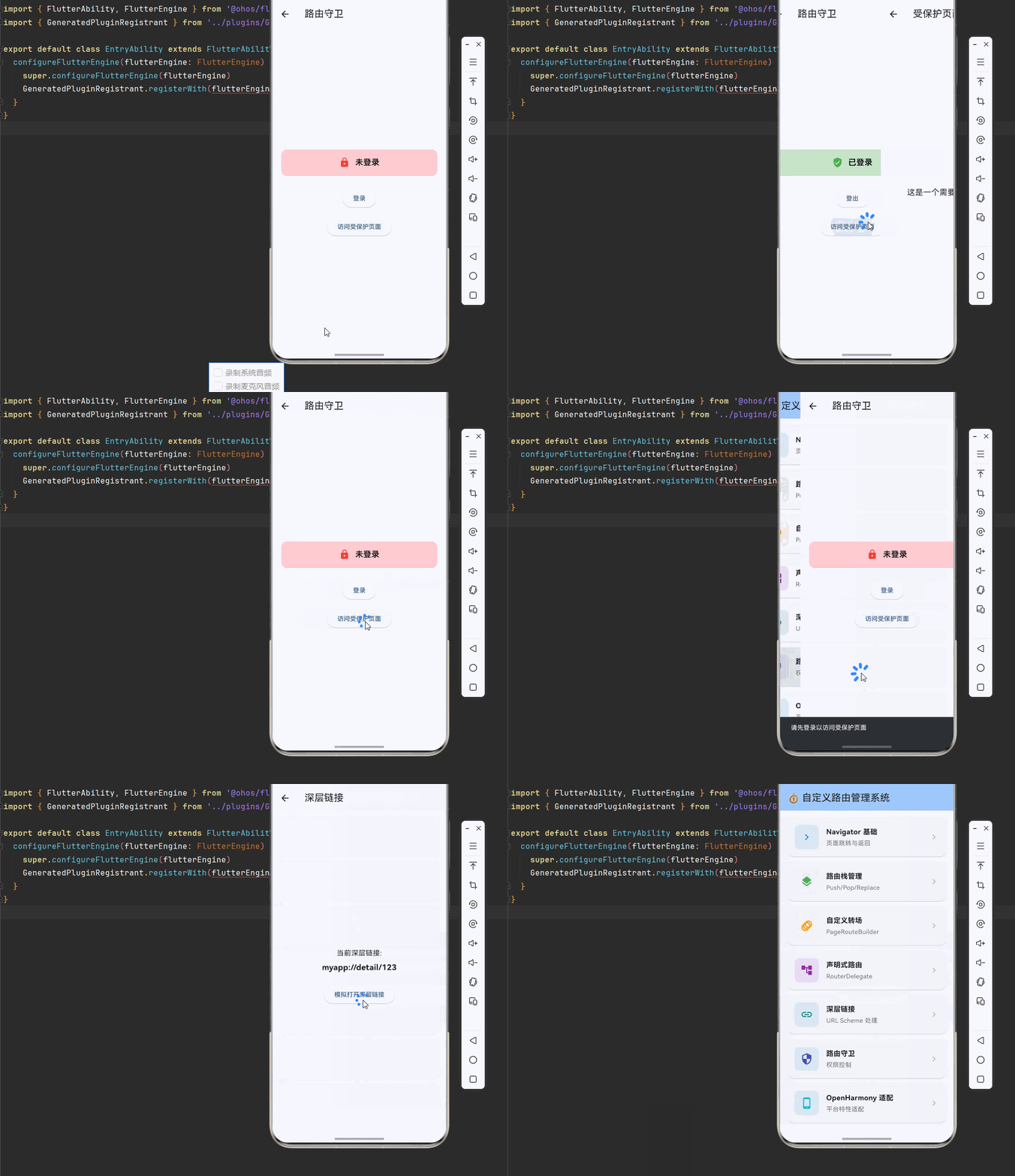
以下是完整的自定义路由管理系统示例代码:
dart
import 'package:flutter/material.dart';
import 'package:flutter/foundation.dart';
import 'dart:async';
import 'dart:io';

void main() {
  runApp(const MyApp());
}

class MyApp extends StatelessWidget {
  const MyApp({super.key});

  @override
  Widget build(BuildContext context) {
    return MaterialApp(
      title: '自定义路由管理系统',
      theme: ThemeData(
        colorScheme: ColorScheme.fromSeed(seedColor: Colors.blue),
        useMaterial3: true,
      ),
      home: const RouteHomePage(),
      debugShowCheckedModeBanner: false,
      navigatorObservers: [AppRouteObserver()],
    );
  }
}

class RouteHomePage extends StatelessWidget {
  const RouteHomePage({super.key});

  @override
  Widget build(BuildContext context) {
    return Scaffold(
      appBar: AppBar(
        title: const Text('🧭 自定义路由管理系统'),
        backgroundColor: Theme.of(context).colorScheme.inversePrimary,
      ),
      body: ListView(
        padding: const EdgeInsets.all(16),
        children: [
          _buildSectionCard(
            context,
            title: 'Navigator 基础',
            description: '页面跳转与返回',
            icon: Icons.navigate_next,
            color: Colors.blue,
            onTap: () => Navigator.push(
              context,
              MaterialPageRoute(builder: (_) => const BasicNavigatorDemo()),
            ),
          ),
          _buildSectionCard(
            context,
            title: '路由栈管理',
            description: 'Push/Pop/Replace',
            icon: Icons.layers,
            color: Colors.green,
            onTap: () => Navigator.push(
              context,
              MaterialPageRoute(builder: (_) => const RouteStackDemo()),
            ),
          ),
          _buildSectionCard(
            context,
            title: '自定义转场',
            description: 'PageRouteBuilder',
            icon: Icons.animation,
            color: Colors.orange,
            onTap: () => Navigator.push(
              context,
              MaterialPageRoute(builder: (_) => const CustomTransitionDemo()),
            ),
          ),
          _buildSectionCard(
            context,
            title: '声明式路由',
            description: 'RouterDelegate',
            icon: Icons.account_tree,
            color: Colors.purple,
            onTap: () => Navigator.push(
              context,
              MaterialPageRoute(builder: (_) => const DeclarativeRouterDemo()),
            ),
          ),
          _buildSectionCard(
            context,
            title: '深层链接',
            description: 'URL Scheme 处理',
            icon: Icons.link,
            color: Colors.teal,
            onTap: () => Navigator.push(
              context,
              MaterialPageRoute(builder: (_) => const DeepLinkDemo()),
            ),
          ),
          _buildSectionCard(
            context,
            title: '路由守卫',
            description: '权限控制',
            icon: Icons.security,
            color: Colors.indigo,
            onTap: () => Navigator.push(
              context,
              MaterialPageRoute(builder: (_) => const RouteGuardDemo()),
            ),
          ),
          _buildSectionCard(
            context,
            title: 'OpenHarmony 适配',
            description: '平台特性适配',
            icon: Icons.phone_android,
            color: Colors.cyan,
            onTap: () => Navigator.push(
              context,
              MaterialPageRoute(builder: (_) => const OpenHarmonyRouteDemo()),
            ),
          ),
        ],
      ),
    );
  }

  Widget _buildSectionCard(
    BuildContext context, {
    required String title,
    required String description,
    required IconData icon,
    required Color color,
    required VoidCallback onTap,
  }) {
    return Card(
      margin: const EdgeInsets.only(bottom: 12),
      shape: RoundedRectangleBorder(borderRadius: BorderRadius.circular(16)),
      child: InkWell(
        onTap: onTap,
        borderRadius: BorderRadius.circular(16),
        child: Padding(
          padding: const EdgeInsets.all(16),
          child: Row(
            children: [
              Container(
                width: 56,
                height: 56,
                decoration: BoxDecoration(
                  color: color.withOpacity(0.1),
                  borderRadius: BorderRadius.circular(12),
                ),
                child: Icon(icon, color: color, size: 28),
              ),
              const SizedBox(width: 16),
              Expanded(
                child: Column(
                  crossAxisAlignment: CrossAxisAlignment.start,
                  children: [
                    Text(
                      title,
                      style: const TextStyle(
                        fontSize: 16,
                        fontWeight: FontWeight.bold,
                      ),
                    ),
                    const SizedBox(height: 4),
                    Text(
                      description,
                      style: TextStyle(color: Colors.grey[600], fontSize: 14),
                    ),
                  ],
                ),
              ),
              Icon(Icons.chevron_right, color: Colors.grey[400]),
            ],
          ),
        ),
      ),
    );
  }
}

class BasicNavigatorDemo extends StatelessWidget {
  const BasicNavigatorDemo({super.key});

  @override
  Widget build(BuildContext context) {
    return Scaffold(
      appBar: AppBar(title: const Text('Navigator 基础')),
      body: Center(
        child: Column(
          mainAxisAlignment: MainAxisAlignment.center,
          children: [
            ElevatedButton(
              onPressed: () {
                Navigator.push(
                  context,
                  MaterialPageRoute(builder: (_) => const DetailPage(title: '页面 A')),
                );
              },
              child: const Text('跳转到页面 A'),
            ),
            const SizedBox(height: 16),
            ElevatedButton(
              onPressed: () {
                Navigator.push(
                  context,
                  MaterialPageRoute(builder: (_) => const DetailPage(title: '页面 B')),
                );
              },
              child: const Text('跳转到页面 B'),
            ),
          ],
        ),
      ),
    );
  }
}

class DetailPage extends StatelessWidget {
  final String title;
  const DetailPage({super.key, required this.title});

  @override
  Widget build(BuildContext context) {
    return Scaffold(
      appBar: AppBar(title: Text(title)),
      body: Center(
        child: ElevatedButton(
          onPressed: () => Navigator.pop(context),
          child: const Text('返回'),
        ),
      ),
    );
  }
}

class RouteStackDemo extends StatelessWidget {
  const RouteStackDemo({super.key});

  @override
  Widget build(BuildContext context) {
    return Scaffold(
      appBar: AppBar(title: const Text('路由栈管理')),
      body: Center(
        child: Column(
          mainAxisAlignment: MainAxisAlignment.center,
          children: [
            ElevatedButton(
              onPressed: () {
                Navigator.push(context, MaterialPageRoute(builder: (_) => const StackPage(index: 1)));
              },
              child: const Text('Push'),
            ),
            const SizedBox(height: 16),
            ElevatedButton(
              onPressed: () {
                Navigator.pushReplacement(context, MaterialPageRoute(builder: (_) => const StackPage(index: 2)));
              },
              child: const Text('PushReplacement'),
            ),
            const SizedBox(height: 16),
            ElevatedButton(
              onPressed: () {
                Navigator.pushAndRemoveUntil(
                  context,
                  MaterialPageRoute(builder: (_) => const StackPage(index: 3)),
                  (route) => route.isFirst,
                );
              },
              child: const Text('PushAndRemoveUntil'),
            ),
          ],
        ),
      ),
    );
  }
}

class StackPage extends StatelessWidget {
  final int index;
  const StackPage({super.key, required this.index});

  @override
  Widget build(BuildContext context) {
    return Scaffold(
      appBar: AppBar(title: Text('页面 $index')),
      body: Center(
        child: Text('当前页面索引: $index', style: const TextStyle(fontSize: 24)),
      ),
    );
  }
}

class CustomTransitionDemo extends StatelessWidget {
  const CustomTransitionDemo({super.key});

  @override
  Widget build(BuildContext context) {
    return Scaffold(
      appBar: AppBar(title: const Text('自定义转场')),
      body: Center(
        child: ElevatedButton(
          onPressed: () {
            Navigator.push(
              context,
              PageRouteBuilder(
                pageBuilder: (context, animation, secondaryAnimation) => const TransitionPage(),
                transitionsBuilder: (context, animation, secondaryAnimation, child) {
                  return SlideTransition(
                    position: Tween<Offset>(
                      begin: const Offset(1, 0),
                      end: Offset.zero,
                    ).animate(CurvedAnimation(parent: animation, curve: Curves.easeInOut)),
                    child: child,
                  );
                },
              ),
            );
          },
          child: const Text('显示自定义转场'),
        ),
      ),
    );
  }
}

class TransitionPage extends StatelessWidget {
  const TransitionPage({super.key});

  @override
  Widget build(BuildContext context) {
    return Scaffold(
      appBar: AppBar(title: const Text('转场页面')),
      body: const Center(child: Text('这是带自定义转场的页面')),
    );
  }
}

class DeclarativeRouterDemo extends StatefulWidget {
  const DeclarativeRouterDemo({super.key});

  @override
  State<DeclarativeRouterDemo> createState() => _DeclarativeRouterDemoState();
}

class _DeclarativeRouterDemoState extends State<DeclarativeRouterDemo> {
  String _currentPage = 'home';

  void _navigateTo(String page) {
    setState(() => _currentPage = page);
  }

  @override
  Widget build(BuildContext context) {
    return Scaffold(
      appBar: AppBar(title: const Text('声明式路由')),
      body: Navigator(
        pages: [
          const MaterialPage(child: HomePage()),
          if (_currentPage == 'detail')
            const MaterialPage(child: DetailPage(title: '声明式详情')),
        ],
        onPopPage: (route, result) {
          if (!route.didPop(result)) return false;
          setState(() => _currentPage = 'home');
          return true;
        },
      ),
      floatingActionButton: FloatingActionButton(
        onPressed: () => _navigateTo(_currentPage == 'home' ? 'detail' : 'home'),
        child: const Icon(Icons.swap_horiz),
      ),
    );
  }
}

class HomePage extends StatelessWidget {
  const HomePage({super.key});

  @override
  Widget build(BuildContext context) {
    return const Center(child: Text('首页', style: TextStyle(fontSize: 24)));
  }
}

class DeepLinkDemo extends StatefulWidget {
  const DeepLinkDemo({super.key});

  @override
  State<DeepLinkDemo> createState() => _DeepLinkDemoState();
}

class _DeepLinkDemoState extends State<DeepLinkDemo> {
  String _deepLink = '等待深层链接...';

  @override
  void initState() {
    super.initState();
    _checkInitialLink();
  }

  Future<void> _checkInitialLink() async {
    // 模拟深层链接检测
    setState(() => _deepLink = 'myapp://detail/123');
  }

  @override
  Widget build(BuildContext context) {
    return Scaffold(
      appBar: AppBar(title: const Text('深层链接')),
      body: Center(
        child: Column(
          mainAxisAlignment: MainAxisAlignment.center,
          children: [
            const Text('当前深层链接:', style: TextStyle(fontSize: 16)),
            const SizedBox(height: 8),
            Text(_deepLink, style: const TextStyle(fontSize: 18, fontWeight: FontWeight.bold)),
            const SizedBox(height: 24),
            ElevatedButton(
              onPressed: () {
                Navigator.push(context, MaterialPageRoute(builder: (_) => const DetailPage(title: '深层链接页面')));
              },
              child: const Text('模拟打开深层链接'),
            ),
          ],
        ),
      ),
    );
  }
}

class RouteGuardDemo extends StatefulWidget {
  const RouteGuardDemo({super.key});

  @override
  State<RouteGuardDemo> createState() => _RouteGuardDemoState();
}

class _RouteGuardDemoState extends State<RouteGuardDemo> {
  bool _isAuthenticated = false;

  void _login() {
    setState(() => _isAuthenticated = true);
  }

  void _logout() {
    setState(() => _isAuthenticated = false);
  }

  void _navigateToProtected() {
    if (_isAuthenticated) {
      Navigator.push(
        context,
        MaterialPageRoute(builder: (_) => const ProtectedPage()),
      );
    } else {
      ScaffoldMessenger.of(context).showSnackBar(
        const SnackBar(content: Text('请先登录以访问受保护页面')),
      );
    }
  }

  @override
  Widget build(BuildContext context) {
    return Scaffold(
      appBar: AppBar(title: const Text('路由守卫')),
      body: Padding(
        padding: const EdgeInsets.all(16),
        child: Column(
          mainAxisAlignment: MainAxisAlignment.center,
          children: [
            Card(
              color: _isAuthenticated ? Colors.green.shade100 : Colors.red.shade100,
              child: Padding(
                padding: const EdgeInsets.all(16),
                child: Row(
                  mainAxisAlignment: MainAxisAlignment.center,
                  children: [
                    Icon(
                      _isAuthenticated ? Icons.verified_user : Icons.lock,
                      color: _isAuthenticated ? Colors.green : Colors.red,
                    ),
                    const SizedBox(width: 12),
                    Text(
                      _isAuthenticated ? '已登录' : '未登录',
                      style: const TextStyle(fontSize: 18, fontWeight: FontWeight.bold),
                    ),
                  ],
                ),
              ),
            ),
            const SizedBox(height: 24),
            ElevatedButton(
              onPressed: _isAuthenticated ? _logout : _login,
              child: Text(_isAuthenticated ? '登出' : '登录'),
            ),
            const SizedBox(height: 16),
            ElevatedButton(
              onPressed: _navigateToProtected,
              child: const Text('访问受保护页面'),
            ),
          ],
        ),
      ),
    );
  }
}

class ProtectedPage extends StatelessWidget {
  const ProtectedPage({super.key});

  @override
  Widget build(BuildContext context) {
    return Scaffold(
      appBar: AppBar(title: const Text('受保护页面')),
      body: const Center(
        child: Text('这是一个需要登录才能访问的页面', style: TextStyle(fontSize: 18)),
      ),
    );
  }
}

class OpenHarmonyRouteDemo extends StatefulWidget {
  const OpenHarmonyRouteDemo({super.key});

  @override
  State<OpenHarmonyRouteDemo> createState() => _OpenHarmonyRouteDemoState();
}

class _OpenHarmonyRouteDemoState extends State<OpenHarmonyRouteDemo> {
  String _platformInfo = '';
  bool _isOhos = false;

  @override
  void initState() {
    super.initState();
    _checkPlatform();
  }

  void _checkPlatform() {
    setState(() {
      _isOhos = !kIsWeb && Platform.operatingSystem == 'ohos';
      _platformInfo = '平台: ${Platform.operatingSystem}\n'
          '路由特性: ${_isOhos ? "OpenHarmony 原生路由支持" : "标准 Flutter 路由"}';
    });
  }

  @override
  Widget build(BuildContext context) {
    return Scaffold(
      appBar: AppBar(title: const Text('OpenHarmony 路由')),
      body: Padding(
        padding: const EdgeInsets.all(16),
        child: Column(
          crossAxisAlignment: CrossAxisAlignment.start,
          children: [
            Card(
              color: _isOhos ? Colors.green.shade100 : Colors.blue.shade100,
              child: Padding(
                padding: const EdgeInsets.all(16),
                child: Row(
                  children: [
                    Icon(_isOhos ? Icons.phone_android : Icons.computer,
                        color: _isOhos ? Colors.green : Colors.blue),
                    const SizedBox(width: 12),
                    Text(
                      _isOhos ? 'OpenHarmony 环境' : '其他平台环境',
                      style: const TextStyle(fontSize: 18, fontWeight: FontWeight.bold),
                    ),
                  ],
                ),
              ),
            ),
            const SizedBox(height: 16),
            const Text('平台信息:', style: TextStyle(fontSize: 16, fontWeight: FontWeight.bold)),
            const SizedBox(height: 8),
            Container(
              padding: const EdgeInsets.all(12),
              decoration: BoxDecoration(
                color: Colors.grey.shade100,
                borderRadius: BorderRadius.circular(8),
              ),
              child: Text(_platformInfo, style: const TextStyle(fontFamily: 'monospace')),
            ),
          ],
        ),
      ),
    );
  }
}

class AppRouteObserver extends NavigatorObserver {
  @override
  void didPush(Route route, Route? previousRoute) {
    debugPrint('Route pushed: ${route.settings.name}');
  }

  @override
  void didPop(Route route, Route? previousRoute) {
    debugPrint('Route popped: ${route.settings.name}');
  }

  @override
  void didReplace({Route? newRoute, Route? oldRoute}) {
    debugPrint('Route replaced: ${newRoute?.settings.name}');
  }

  @override
  void didRemove(Route route, Route? previousRoute) {
    debugPrint('Route removed: ${route.settings.name}');
  }
}
九、总结
本文深入探讨了 Flutter for OpenHarmony 的自定义路由管理系统,从架构原理到具体实现,涵盖了以下核心内容:
📚 核心知识点回顾
- 路由架构:理解 Navigator、Route、Router 三层架构的协作机制
- Navigator 导航:掌握命令式导航的 push、pop、replace 等操作
- 自定义 PageRoute:实现独特的页面转场动画效果
- 声明式路由:使用 RouterDelegate 和 RouteInformationParser 构建状态驱动的导航
- 深层链接:实现 URL Scheme 和外部链接的处理
- 路由守卫:保护需要认证的页面和实现权限控制
🎯 最佳实践要点
- 简单应用使用命令式导航,复杂应用使用声明式路由
- 为每个 Page 设置唯一的 key 避免重建问题
- 实现路由守卫保护敏感页面
- 深层链接需要处理各种异常情况
- 使用路由观察者进行调试和日志记录
🚀 进阶方向
- 深入研究 go_router 等第三方路由库
- 实现更复杂的路由动画效果
- 探索 Web 应用的路由历史管理
- 优化深层链接的用户体验
通过掌握这些技术,你可以构建出灵活、可维护的路由系统,为用户提供流畅的导航体验。
💡 提示:在实际项目中,建议使用 go_router 等成熟的路由库简化开发。