欢迎加入开源鸿蒙跨平台社区:https://openharmonycrossplatform.csdn.net
一、RenderObject 渲染系统架构深度解析
Flutter 的渲染系统是其核心架构之一,RenderObject 作为渲染树的基本单元,负责布局计算、绘制和事件处理。深入理解这套架构,是构建高性能自定义组件的基础。
📱 1.1 Flutter 渲染管线架构
Flutter 的渲染管线由多个阶段组成,每个阶段都有明确的职责:
┌─────────────────────────────────────────────────────────────────┐
│                    Flutter 渲染管线架构                          │
├─────────────────────────────────────────────────────────────────┤
│                                                                 │
│  ┌─────────────┐    ┌─────────────┐    ┌─────────────┐         │
│  │   Widget    │───▶│   Element   │───▶│ RenderObject│         │
│  │   (配置)    │    │   (生命周期) │    │   (渲染)    │         │
│  └─────────────┘    └─────────────┘    └─────────────┘         │
│         │                  │                  │                 │
│         ▼                  ▼                  ▼                 │
│  ┌─────────────┐    ┌─────────────┐    ┌─────────────┐         │
│  │  不可变配置  │    │  状态管理   │    │  布局计算   │         │
│  │  声明式UI   │    │  树结构维护  │    │  绘制输出   │         │
│  └─────────────┘    └─────────────┘    └─────────────┘         │
│                                                                 │
└─────────────────────────────────────────────────────────────────┘
🔬 1.2 RenderObject 核心组件详解
Flutter 渲染系统的核心组件包括以下几个部分:
RenderObject(渲染对象)
RenderObject 是渲染树的基本单元,负责布局、绘制和命中测试。
dart
abstract class RenderObject {
  void performLayout();
  void paint(PaintingContext context, Offset offset);
  bool hitTest(HitTestResult result, { required Offset position });
}
RenderBox(盒子渲染对象)
RenderBox 是最常用的 RenderObject 子类,实现了基于盒子模型的布局系统。
dart
abstract class RenderBox extends RenderObject {
  BoxConstraints get constraints;
  Size get size;

  double computeMinIntrinsicWidth(double height);
  double computeMaxIntrinsicWidth(double height);
  double computeMinIntrinsicHeight(double width);
  double computeMaxIntrinsicHeight(double width);
}
ParentData(父节点数据)
ParentData 用于存储子节点在父节点中的布局信息。
dart
class ParentData {
  Offset offset = Offset.zero;
}

class ContainerParentDataMixin<ChildType extends RenderObject> {
  ChildType? previousSibling;
  ChildType? nextSibling;
}
🎯 1.3 布局协议设计原则
Flutter 使用约束向下传递、尺寸向上返回的双向协议:
┌─────────────────────────────────────────────────────────────────┐
│                    布局协议流程图                                │
├─────────────────────────────────────────────────────────────────┤
│                                                                 │
│                    ┌───────────────┐                            │
│                    │   Parent      │                            │
│                    │  RenderBox    │                            │
│                    └───────┬───────┘                            │
│                            │                                    │
│         ┌──────────────────┼──────────────────┐                │
│         │                  │                  │                │
│         ▼                  ▼                  ▼                │
│   ┌───────────┐     ┌───────────┐     ┌───────────┐           │
│   │  Child 1  │     │  Child 2  │     │  Child 3  │           │
│   │ RenderBox │     │ RenderBox │     │ RenderBox │           │
│   └───────────┘     └───────────┘     └───────────┘           │
│                                                                 │
│   1. 父节点向下传递约束 (Constraints)                            │
│   2. 子节点根据约束计算自身大小 (Size)                           │
│   3. 子节点向上返回尺寸给父节点                                  │
│   4. 父节点根据子节点尺寸设置子节点位置                          │
│                                                                 │
└─────────────────────────────────────────────────────────────────┘
RenderObject 类型对比:
| 类型 | 特点 | 适用场景 |
|---|---|---|
| RenderBox | 盒子模型布局 | 大多数组件 |
| RenderSliver | 滑动布局协议 | ListView, GridView |
| RenderEditable | 文本编辑支持 | TextField |
| RenderImage | 图片渲染优化 | Image |
| RenderParagraph | 文本段落渲染 | Text |
二、基础 RenderObject 实现
基础 RenderObject 实现包括简单自定义渲染、颜色渐变渲染和尺寸计算布局。
👆 2.1 简单自定义渲染对象
简单自定义渲染对象是最基础的 RenderObject 实现形式。
dart
import 'package:flutter/rendering.dart';

/// 简单自定义渲染对象示例
class SimpleRenderBox extends RenderBox {
  Color _color = Colors.blue;

  Color get color => _color;
  set color(Color value) {
    if (_color != value) {
      _color = value;
      markNeedsPaint();
    }
  }

  @override
  void performLayout() {
    size = constraints.biggest;
  }

  @override
  void paint(PaintingContext context, Offset offset) {
    final canvas = context.canvas;
    final paint = Paint()..color = _color;
    canvas.drawRect(offset & size, paint);
  }
}
🔄 2.2 颜色渐变渲染对象
颜色渐变渲染对象实现动态颜色变化的渲染效果。
dart
/// 颜色渐变渲染对象示例
class GradientRenderBox extends RenderBox {
  double _progress = 0.0;
  Color _startColor = Colors.blue;
  Color _endColor = Colors.purple;

  double get progress => _progress;
  set progress(double value) {
    if (_progress != value) {
      _progress = value;
      markNeedsPaint();
    }
  }

  @override
  void performLayout() {
    size = constraints.constrain(
      Size(double.infinity, double.infinity),
    );
  }

  @override
  void paint(PaintingContext context, Offset offset) {
    final canvas = context.canvas;
    final rect = offset & size;

    final gradient = LinearGradient(
      begin: Alignment.topLeft,
      end: Alignment.bottomRight,
      colors: [
        Color.lerp(_startColor, _endColor, _progress)!,
        Color.lerp(_endColor, _startColor, _progress)!,
      ],
    );

    final paint = Paint()
      ..shader = gradient.createShader(rect);

    canvas.drawRect(rect, paint);

    final borderPaint = Paint()
      ..color = Colors.white.withOpacity(0.3)
      ..style = PaintingStyle.stroke
      ..strokeWidth = 2;
    canvas.drawRect(rect, borderPaint);
  }
}
🌊 2.3 固有尺寸计算
固有尺寸计算实现组件的固有宽高计算。
dart
/// 固有尺寸计算示例
class IntrinsicSizeRenderBox extends RenderBox {
  double _preferredWidth = 100.0;
  double _preferredHeight = 100.0;

  double get preferredWidth => _preferredWidth;
  set preferredWidth(double value) {
    if (_preferredWidth != value) {
      _preferredWidth = value;
      markNeedsLayout();
    }
  }

  double get preferredHeight => _preferredHeight;
  set preferredHeight(double value) {
    if (_preferredHeight != value) {
      _preferredHeight = value;
      markNeedsLayout();
    }
  }

  @override
  double computeMinIntrinsicWidth(double height) {
    return _preferredWidth;
  }

  @override
  double computeMaxIntrinsicWidth(double height) {
    return _preferredWidth;
  }

  @override
  double computeMinIntrinsicHeight(double width) {
    return _preferredHeight;
  }

  @override
  double computeMaxIntrinsicHeight(double width) {
    return _preferredHeight;
  }

  @override
  void performLayout() {
    size = constraints.constrain(
      Size(_preferredWidth, _preferredHeight),
    );
  }

  @override
  void paint(PaintingContext context, Offset offset) {
    final canvas = context.canvas;
    final paint = Paint()
      ..color = Colors.teal
      ..style = PaintingStyle.fill;
    canvas.drawRRect(
      RRect.fromRectAndRadius(
        offset & size,
        const Radius.circular(12),
      ),
      paint,
    );
  }
}
三、高级 RenderObject 实现
高级 RenderObject 实现包括多子节点布局、自定义 ParentData 和命中测试优化。
📊 3.1 圆形布局 RenderObject
圆形布局 RenderObject 实现子节点围绕圆心排列。
dart
import 'dart:math' as math;

/// 圆形布局 ParentData
class CircleLayoutParentData extends ParentData
    with ContainerParentDataMixin<RenderBox> {
  double angle = 0.0;
  Offset offset = Offset.zero;
}

/// 圆形布局 RenderObject
class RenderCircleLayout extends RenderBox
    with ContainerRenderObjectMixin<RenderBox, CircleLayoutParentData> {

  double _radius = 100.0;
  double get radius => _radius;
  set radius(double value) {
    if (_radius != value) {
      _radius = value;
      markNeedsLayout();
    }
  }

  double _startAngle = -math.pi / 2;
  double get startAngle => _startAngle;
  set startAngle(double value) {
    if (_startAngle != value) {
      _startAngle = value;
      markNeedsLayout();
    }
  }

  @override
  void setupParentData(RenderBox child) {
    if (child.parentData is! CircleLayoutParentData) {
      child.parentData = CircleLayoutParentData();
    }
  }

  @override
  void performLayout() {
    int childCount = 0;
    RenderBox? child = firstChild;
    while (child != null) {
      childCount++;
      child = childAfter(child);
    }

    if (childCount == 0) {
      size = constraints.smallest;
      return;
    }

    final angleStep = 2 * math.pi / childCount;
    double maxChildSize = 0.0;

    child = firstChild;
    int index = 0;
    while (child != null) {
      child.layout(constraints, parentUsesSize: true);
      maxChildSize = math.max(
        maxChildSize,
        math.max(child.size.width, child.size.height),
      );

      final parentData = child.parentData as CircleLayoutParentData;
      parentData.angle = _startAngle + angleStep * index;

      index++;
      child = childAfter(child);
    }

    final diameter = _radius * 2 + maxChildSize;
    size = constraints.constrain(Size(diameter, diameter));

    child = firstChild;
    while (child != null) {
      final parentData = child.parentData as CircleLayoutParentData;
      final angle = parentData.angle;

      final centerX = size.width / 2;
      final centerY = size.height / 2;

      final x = centerX + _radius * math.cos(angle) - child.size.width / 2;
      final y = centerY + _radius * math.sin(angle) - child.size.height / 2;

      parentData.offset = Offset(x, y);
      child = childAfter(child);
    }
  }

  @override
  void paint(PaintingContext context, Offset offset) {
    final canvas = context.canvas;
    final center = Offset(size.width / 2, size.height / 2);

    final circlePaint = Paint()
      ..color = Colors.grey.withOpacity(0.1)
      ..style = PaintingStyle.stroke
      ..strokeWidth = 1;
    canvas.drawCircle(center, _radius, circlePaint);

    RenderBox? child = firstChild;
    while (child != null) {
      final parentData = child.parentData as CircleLayoutParentData;
      context.paintChild(child, offset + parentData.offset);
      child = childAfter(child);
    }
  }

  @override
  bool hitTestChildren(BoxHitTestResult result, {required Offset position}) {
    RenderBox? child = lastChild;
    while (child != null) {
      final parentData = child.parentData as CircleLayoutParentData;
      final transformedPosition = position - parentData.offset;
      if (child.hitTest(result, position: transformedPosition)) {
        return true;
      }
      child = childBefore(child);
    }
    return false;
  }
}
🎨 3.2 瀑布流布局 RenderObject
瀑布流布局 RenderObject 实现多列不等高的瀑布流效果。
dart
/// 瀑布流布局 ParentData
class WaterfallParentData extends ParentData
    with ContainerParentDataMixin<RenderBox> {
  int column = 0;
  Offset offset = Offset.zero;
}

/// 瀑布流布局 RenderObject
class RenderWaterfallFlow extends RenderBox
    with ContainerRenderObjectMixin<RenderBox, WaterfallParentData> {

  int _columnCount = 2;
  int get columnCount => _columnCount;
  set columnCount(int value) {
    if (_columnCount != value) {
      _columnCount = value;
      markNeedsLayout();
    }
  }

  double _spacing = 8.0;
  double get spacing => _spacing;
  set spacing(double value) {
    if (_spacing != value) {
      _spacing = value;
      markNeedsLayout();
    }
  }

  double _runSpacing = 8.0;
  double get runSpacing => _runSpacing;
  set runSpacing(double value) {
    if (_runSpacing != value) {
      _runSpacing = value;
      markNeedsLayout();
    }
  }

  @override
  void setupParentData(RenderBox child) {
    if (child.parentData is! WaterfallParentData) {
      child.parentData = WaterfallParentData();
    }
  }

  @override
  void performLayout() {
    if (firstChild == null) {
      size = constraints.smallest;
      return;
    }

    final columnWidth = (constraints.maxWidth - _spacing * (_columnCount - 1)) / _columnCount;
    final columnHeights = List<double>.filled(_columnCount, 0.0);

    RenderBox? child = firstChild;
    while (child != null) {
      final shortestColumn = columnHeights.indexOf(columnHeights.reduce(math.min));

      final childConstraints = BoxConstraints(
        minWidth: columnWidth,
        maxWidth: columnWidth,
        minHeight: 0.0,
        maxHeight: constraints.maxHeight,
      );

      child.layout(childConstraints, parentUsesSize: true);

      final parentData = child.parentData as WaterfallParentData;
      parentData.column = shortestColumn;

      final x = shortestColumn * (columnWidth + _spacing);
      final y = columnHeights[shortestColumn];

      parentData.offset = Offset(x, y);
      columnHeights[shortestColumn] += child.size.height + _runSpacing;

      child = childAfter(child);
    }

    final maxHeight = columnHeights.reduce(math.max) - _runSpacing;
    size = constraints.constrain(Size(constraints.maxWidth, maxHeight));
  }

  @override
  void paint(PaintingContext context, Offset offset) {
    RenderBox? child = firstChild;
    while (child != null) {
      final parentData = child.parentData as WaterfallParentData;
      context.paintChild(child, offset + parentData.offset);
      child = childAfter(child);
    }
  }

  @override
  bool hitTestChildren(BoxHitTestResult result, {required Offset position}) {
    RenderBox? child = lastChild;
    while (child != null) {
      final parentData = child.parentData as WaterfallParentData;
      final transformedPosition = position - parentData.offset;
      if (child.hitTest(result, position: transformedPosition)) {
        return true;
      }
      child = childBefore(child);
    }
    return false;
  }
}
🎯 3.3 自定义命中测试
自定义命中测试实现非矩形区域的触摸响应。
dart
/// 圆形命中测试 RenderObject
class CircleHitTestRenderBox extends RenderBox {
  @override
  bool hitTest(HitTestResult result, {required Offset position}) {
    final center = Offset(size.width / 2, size.height / 2);
    final radius = math.min(size.width, size.height) / 2;
    final distance = (position - center).distance;

    if (distance <= radius) {
      result.add(BoxHitTestEntry(this, position));
      return true;
    }
    return false;
  }

  @override
  void performLayout() {
    size = constraints.biggest;
  }

  @override
  void paint(PaintingContext context, Offset offset) {
    final canvas = context.canvas;
    final center = Offset(size.width / 2, size.height / 2);
    final radius = math.min(size.width, size.height) / 2;

    final paint = Paint()
      ..color = Colors.blue
      ..style = PaintingStyle.fill;
    canvas.drawCircle(center, radius, paint);
  }
}

/// 多边形命中测试 RenderObject
class PolygonHitTestRenderBox extends RenderBox {
  int _sides = 6;
  int get sides => _sides;
  set sides(int value) {
    if (_sides != value) {
      _sides = value;
      markNeedsPaint();
    }
  }

  Path _createPolygonPath(Size size) {
    final path = Path();
    final center = Offset(size.width / 2, size.height / 2);
    final radius = math.min(size.width, size.height) / 2;

    for (int i = 0; i < _sides; i++) {
      final angle = (i * 2 * math.pi / _sides) - math.pi / 2;
      final x = center.dx + radius * math.cos(angle);
      final y = center.dy + radius * math.sin(angle);

      if (i == 0) {
        path.moveTo(x, y);
      } else {
        path.lineTo(x, y);
      }
    }
    path.close();
    return path;
  }

  @override
  bool hitTest(HitTestResult result, {required Offset position}) {
    final path = _createPolygonPath(size);
    if (path.contains(position)) {
      result.add(BoxHitTestEntry(this, position));
      return true;
    }
    return false;
  }

  @override
  void performLayout() {
    size = constraints.biggest;
  }

  @override
  void paint(PaintingContext context, Offset offset) {
    final canvas = context.canvas;
    final path = _createPolygonPath(size);

    final paint = Paint()
      ..color = Colors.purple
      ..style = PaintingStyle.fill;
    canvas.drawPath(path, paint);
  }
}
四、Widget 封装与集成
🔗 4.1 LeafRenderObjectWidget 封装
LeafRenderObjectWidget 用于封装没有子节点的 RenderObject。
dart
/// 自定义颜色渲染 Widget
class CustomColorBox extends LeafRenderObjectWidget {
  final double colorValue;

  const CustomColorBox({
    super.key,
    required this.colorValue,
  });

  @override
  RenderObject createRenderObject(BuildContext context) {
    return RenderCustomColorBox(colorValue: colorValue);
  }

  @override
  void updateRenderObject(
    BuildContext context,
    RenderCustomColorBox renderObject,
  ) {
    renderObject.colorValue = colorValue;
  }
}

class RenderCustomColorBox extends RenderBox {
  double _colorValue;

  RenderCustomColorBox({required double colorValue})
      : _colorValue = colorValue;

  double get colorValue => _colorValue;
  set colorValue(double value) {
    if (_colorValue != value) {
      _colorValue = value;
      markNeedsPaint();
    }
  }

  @override
  void performLayout() {
    size = constraints.biggest;
  }

  @override
  void paint(PaintingContext context, Offset offset) {
    final canvas = context.canvas;
    final paint = Paint()
      ..color = Color.lerp(Colors.blue, Colors.red, _colorValue)!;
    canvas.drawRect(offset & size, paint);
  }
}
🔗 4.2 SingleChildRenderObjectWidget 封装
SingleChildRenderObjectWidget 用于封装单个子节点的 RenderObject。
dart
/// 单子节点变换 Widget
class TransformBox extends SingleChildRenderObjectWidget {
  final double scale;
  final double rotation;

  const TransformBox({
    super.key,
    required this.scale,
    required this.rotation,
    super.child,
  });

  @override
  RenderObject createRenderObject(BuildContext context) {
    return RenderTransformBox()
      ..scale = scale
      ..rotation = rotation;
  }

  @override
  void updateRenderObject(
    BuildContext context,
    RenderTransformBox renderObject,
  ) {
    renderObject
      ..scale = scale
      ..rotation = rotation;
  }
}

class RenderTransformBox extends RenderBox
    with RenderObjectWithChildMixin<RenderBox> {
  double _scale = 1.0;
  double _rotation = 0.0;

  double get scale => _scale;
  set scale(double value) {
    if (_scale != value) {
      _scale = value;
      markNeedsLayout();
    }
  }

  double get rotation => _rotation;
  set rotation(double value) {
    if (_rotation != value) {
      _rotation = value;
      markNeedsPaint();
    }
  }

  @override
  void performLayout() {
    if (child != null) {
      child!.layout(constraints, parentUsesSize: true);
      size = child!.size;
    } else {
      size = constraints.smallest;
    }
  }

  @override
  void paint(PaintingContext context, Offset offset) {
    if (child != null) {
      final transform = Matrix4.identity()
        ..translate(size.width / 2, size.height / 2)
        ..rotateZ(_rotation)
        ..scale(_scale)
        ..translate(-size.width / 2, -size.height / 2);

      context.pushTransform(
        needsCompositing,
        offset,
        transform,
        (context, offset) => context.paintChild(child!, offset),
      );
    }
  }
}
🔗 4.3 MultiChildRenderObjectWidget 封装
MultiChildRenderObjectWidget 用于封装多个子节点的 RenderObject。
dart
/// 圆形布局 Widget
class CircleLayout extends MultiChildRenderObjectWidget {
  final double radius;
  final double startAngle;

  const CircleLayout({
    super.key,
    required this.radius,
    this.startAngle = -math.pi / 2,
    super.children,
  });

  @override
  RenderObject createRenderObject(BuildContext context) {
    return RenderCircleLayout()
      ..radius = radius
      ..startAngle = startAngle;
  }

  @override
  void updateRenderObject(
    BuildContext context,
    RenderCircleLayout renderObject,
  ) {
    renderObject
      ..radius = radius
      ..startAngle = startAngle;
  }
}
五、性能优化策略
⚡ 5.1 布局缓存优化
布局缓存优化避免不必要的布局计算。
dart
/// 布局缓存 RenderObject
class CachedLayoutRenderBox extends RenderBox {
  bool _needsLayout = true;
  Size _cachedSize = Size.zero;
  BoxConstraints? _lastConstraints;

  @override
  void markNeedsLayout() {
    if (!_needsLayout) {
      _needsLayout = true;
      super.markNeedsLayout();
    }
  }

  @override
  void performLayout() {
    if (!_needsLayout &&
        _lastConstraints != null &&
        _lastConstraints == constraints) {
      size = _cachedSize;
      return;
    }

    size = constraints.biggest;
    _cachedSize = size;
    _lastConstraints = constraints;
    _needsLayout = false;
  }
}
⚡ 5.2 绘制缓存优化
绘制缓存优化避免不必要的绘制操作。
dart
/// 绘制缓存 RenderObject
class CachedPaintRenderBox extends RenderBox {
  Picture? _cachedPicture;
  bool _needsPaint = true;

  @override
  void markNeedsPaint() {
    _needsPaint = true;
    _cachedPicture?.dispose();
    _cachedPicture = null;
    super.markNeedsPaint();
  }

  @override
  void paint(PaintingContext context, Offset offset) {
    if (!_needsPaint && _cachedPicture != null) {
      context.canvas.drawPicture(_cachedPicture!);
      return;
    }

    final recorder = PictureRecorder();
    final canvas = Canvas(recorder);

    _drawContent(canvas, offset);

    _cachedPicture = recorder.endRecording();
    _needsPaint = false;

    context.canvas.drawPicture(_cachedPicture!);
  }

  void _drawContent(Canvas canvas, Offset offset) {
    final paint = Paint()..color = Colors.blue;
    canvas.drawRect(offset & size, paint);
  }

  @override
  void performLayout() {
    size = constraints.biggest;
  }
}
⚡ 5.3 RepaintBoundary 优化
RepaintBoundary 隔离重绘范围,提升渲染性能。
dart
/// 重绘边界 RenderObject
class IsolatedRenderBox extends RenderBox {
  @override
  bool get isRepaintBoundary => true;

  @override
  bool get alwaysNeedsCompositing => false;
}

/// 使用示例
class OptimizedWidget extends StatelessWidget {
  @override
  Widget build(BuildContext context) {
    return Column(
      children: [
        const Text('静态内容'),
        RepaintBoundary(
          child: AnimatedBuilder(
            animation: _controller,
            builder: (context, child) {
              return CustomPaint(
                painter: AnimatedPainter(_controller.value),
              );
            },
          ),
        ),
      ],
    );
  }
}
六、OpenHarmony 适配说明
📱 6.1 平台差异处理
OpenHarmony 平台可能需要特殊的渲染优化。
dart
import 'dart:io' show Platform;

/// 平台感知 RenderObject
class PlatformAwareRenderBox extends RenderBox {
  bool get isPlatformOpenHarmony {
    try {
      return Platform.operatingSystem == 'ohos';
    } catch (_) {
      return false;
    }
  }

  @override
  void paint(PaintingContext context, Offset offset) {
    if (isPlatformOpenHarmony) {
      _paintForOpenHarmony(context, offset);
    } else {
      _paintForOtherPlatforms(context, offset);
    }
  }

  void _paintForOpenHarmony(PaintingContext context, Offset offset) {
    final canvas = context.canvas;
    final paint = Paint()
      ..color = Colors.blue
      ..isAntiAlias = false;
    canvas.drawRect(offset & size, paint);
  }

  void _paintForOtherPlatforms(PaintingContext context, Offset offset) {
    final canvas = context.canvas;
    final paint = Paint()
      ..color = Colors.blue
      ..isAntiAlias = true;
    canvas.drawRect(offset & size, paint);
  }

  @override
  void performLayout() {
    size = constraints.biggest;
  }
}
📱 6.2 性能监控集成
集成性能监控帮助识别渲染瓶颈。
dart
/// 性能监控 RenderObject
class PerformanceTrackedRenderBox extends RenderBox {
  final String debugName;

  PerformanceTrackedRenderBox({required this.debugName});

  @override
  void performLayout() {
    final stopwatch = Stopwatch()..start();
    super.performLayout();
    stopwatch.stop();

    if (stopwatch.elapsedMilliseconds > 16) {
      debugPrint('[$debugName] Layout took ${stopwatch.elapsedMilliseconds}ms');
    }
  }

  @override
  void paint(PaintingContext context, Offset offset) {
    final stopwatch = Stopwatch()..start();
    super.paint(context, offset);
    stopwatch.stop();

    if (stopwatch.elapsedMilliseconds > 8) {
      debugPrint('[$debugName] Paint took ${stopwatch.elapsedMilliseconds}ms');
    }
  }
}
七、最佳实践总结
✅ 7.1 RenderObject 开发清单
┌─────────────────────────────────────────────────────────────────┐
│                   RenderObject 开发清单                          │
├─────────────────────────────────────────────────────────────────┤
│                                                                 │
│  □ 1. 正确实现 performLayout()                                  │
│      - 必须设置 size 属性                                       │
│      - 正确处理 constraints                                     │
│      - 子节点布局时传递正确的约束                                │
│                                                                 │
│  □ 2. 正确实现 paint()                                          │
│      - 使用 context.canvas 进行绘制                              │
│      - 正确处理 offset 参数                                     │
│      - 子节点使用 context.paintChild()                          │
│                                                                 │
│  □ 3. 正确实现 hitTest()                                        │
│      - 检查触摸点是否在范围内                                    │
│      - 添加 BoxHitTestEntry 到结果集                            │
│      - 正确实现 hitTestChildren()                               │
│                                                                 │
│  □ 4. 正确使用 ParentData                                       │
│      - 实现 setupParentData()                                   │
│      - 使用 ContainerParentDataMixin                            │
│      - 存储子节点位置信息                                        │
│                                                                 │
│  □ 5. 性能优化                                                  │
│      - 避免不必要的 markNeedsLayout()                           │
│      - 避免不必要的 markNeedsPaint()                            │
│      - 考虑使用 RepaintBoundary                                │
│                                                                 │
└─────────────────────────────────────────────────────────────────┘
✅ 7.2 调试技巧
dart
/// 调试 RenderObject
class DebugRenderBox extends RenderBox {
  @override
  void performLayout() {
    debugPrint('performLayout: constraints=$constraints');
    super.performLayout();
    debugPrint('performLayout: size=$size');
  }

  @override
  void paint(PaintingContext context, Offset offset) {
    debugPaintSize(context.canvas, offset);
    super.paint(context, offset);
  }

  void debugPaintSize(Canvas canvas, Offset offset) {
    final paint = Paint()
      ..color = Colors.red.withOpacity(0.3)
      ..style = PaintingStyle.stroke
      ..strokeWidth = 1.0;

    canvas.drawRect(offset & size, paint);

    final textPainter = TextPainter(
      text: TextSpan(
        text: '${size.width.toInt()}x${size.height.toInt()}',
        style: const TextStyle(
          color: Colors.red,
          fontSize: 10,
        ),
      ),
      textDirection: TextDirection.ltr,
    );
    textPainter.layout();
    textPainter.paint(canvas, offset);
  }
}
八、完整示例代码
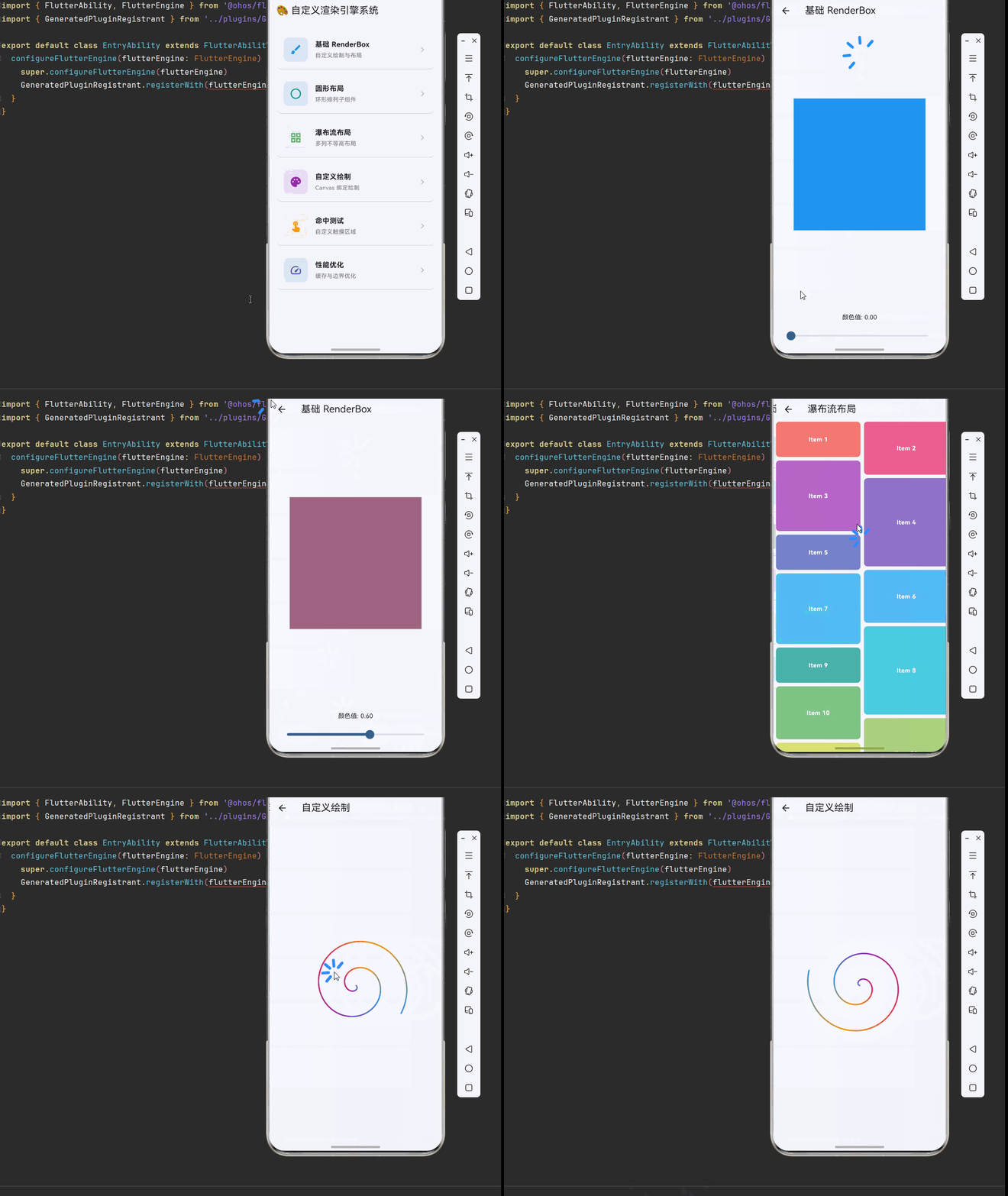
以下是完整的自定义渲染引擎系统示例代码:
dart
import 'dart:math' as math;
import 'package:flutter/material.dart';
import 'package:flutter/rendering.dart';
void main() {
runApp(const MyApp());
}
class MyApp extends StatelessWidget {
const MyApp({super.key});
@override
Widget build(BuildContext context) {
return MaterialApp(
debugShowCheckedModeBanner: false,
theme: ThemeData(
colorScheme: ColorScheme.fromSeed(seedColor: Colors.blue),
useMaterial3: true,
),
home: const RenderObjectHomePage(),
);
}
}
class RenderObjectHomePage extends StatelessWidget {
const RenderObjectHomePage({super.key});
@override
Widget build(BuildContext context) {
return Scaffold(
appBar: AppBar(title: const Text('🎨 自定义渲染引擎系统')),
body: ListView(
padding: const EdgeInsets.all(16),
children: [
_buildSectionCard(
context,
title: '基础 RenderBox',
description: '自定义绘制与布局',
icon: Icons.brush,
color: Colors.blue,
onTap: () => Navigator.push(
context,
MaterialPageRoute(builder: (_) => const BasicRenderBoxDemo()),
),
),
_buildSectionCard(
context,
title: '圆形布局',
description: '环形排列子组件',
icon: Icons.circle_outlined,
color: Colors.teal,
onTap: () => Navigator.push(
context,
MaterialPageRoute(builder: (_) => const CircleLayoutDemo()),
),
),
_buildSectionCard(
context,
title: '瀑布流布局',
description: '多列不等高布局',
icon: Icons.grid_view,
color: Colors.green,
onTap: () => Navigator.push(
context,
MaterialPageRoute(builder: (_) => const WaterfallFlowDemo()),
),
),
_buildSectionCard(
context,
title: '自定义绘制',
description: 'Canvas 绑定绘制',
icon: Icons.palette,
color: Colors.purple,
onTap: () => Navigator.push(
context,
MaterialPageRoute(builder: (_) => const CustomPaintDemo()),
),
),
_buildSectionCard(
context,
title: '命中测试',
description: '自定义触摸区域',
icon: Icons.touch_app,
color: Colors.orange,
onTap: () => Navigator.push(
context,
MaterialPageRoute(builder: (_) => const HitTestDemo()),
),
),
_buildSectionCard(
context,
title: '性能优化',
description: '缓存与边界优化',
icon: Icons.speed,
color: Colors.indigo,
onTap: () => Navigator.push(
context,
MaterialPageRoute(builder: (_) => const PerformanceDemo()),
),
),
],
),
);
}
Widget _buildSectionCard(
BuildContext context, {
required String title,
required String description,
required IconData icon,
required Color color,
required VoidCallback onTap,
}) {
return Card(
margin: const EdgeInsets.only(bottom: 12),
child: InkWell(
onTap: onTap,
borderRadius: BorderRadius.circular(12),
child: Padding(
padding: const EdgeInsets.all(16),
child: Row(
children: [
Container(
width: 56,
height: 56,
decoration: BoxDecoration(
color: color.withOpacity(0.1),
borderRadius: BorderRadius.circular(12),
),
child: Icon(icon, color: color, size: 28),
),
const SizedBox(width: 16),
Expanded(
child: Column(
crossAxisAlignment: CrossAxisAlignment.start,
children: [
Text(
title,
style: const TextStyle(
fontSize: 16,
fontWeight: FontWeight.bold,
),
),
const SizedBox(height: 4),
Text(
description,
style: TextStyle(
fontSize: 13,
color: Colors.grey[600],
),
),
],
),
),
Icon(Icons.chevron_right, color: Colors.grey[400]),
],
),
),
),
);
}
}
class BasicRenderBoxDemo extends StatefulWidget {
const BasicRenderBoxDemo({super.key});
@override
State<BasicRenderBoxDemo> createState() => _BasicRenderBoxDemoState();
}
class _BasicRenderBoxDemoState extends State<BasicRenderBoxDemo> {
double _colorValue = 0.0;
@override
Widget build(BuildContext context) {
return Scaffold(
appBar: AppBar(title: const Text('基础 RenderBox')),
body: Column(
children: [
Expanded(
child: Center(
child: SizedBox(
width: 300,
height: 300,
child: CustomColorRenderBox(colorValue: _colorValue),
),
),
),
Padding(
padding: const EdgeInsets.all(16),
child: Column(
children: [
Text('颜色值: ${_colorValue.toStringAsFixed(2)}'),
const SizedBox(height: 8),
Slider(
value: _colorValue,
onChanged: (value) => setState(() => _colorValue = value),
),
],
),
),
],
),
);
}
}
class CustomColorRenderBox extends LeafRenderObjectWidget {
final double colorValue;
const CustomColorRenderBox({
super.key,
required this.colorValue,
});
@override
RenderObject createRenderObject(BuildContext context) {
return RenderCustomColorBox(colorValue: colorValue);
}
@override
void updateRenderObject(
BuildContext context,
RenderCustomColorBox renderObject,
) {
renderObject.colorValue = colorValue;
}
}
class RenderCustomColorBox extends RenderBox {
double _colorValue;
RenderCustomColorBox({required double colorValue}) : _colorValue = colorValue;
double get colorValue => _colorValue;
set colorValue(double value) {
if (_colorValue != value) {
_colorValue = value;
markNeedsPaint();
}
}
@override
void performLayout() {
size = constraints.biggest;
}
@override
void paint(PaintingContext context, Offset offset) {
final canvas = context.canvas;
final paint = Paint()
..color = Color.lerp(Colors.blue, Colors.red, _colorValue)!;
canvas.drawRect(offset & size, paint);
final borderPaint = Paint()
..color = Colors.white.withOpacity(0.5)
..style = PaintingStyle.stroke
..strokeWidth = 2;
canvas.drawRect(offset & size, borderPaint);
}
}
class CircleLayoutDemo extends StatelessWidget {
const CircleLayoutDemo({super.key});
@override
Widget build(BuildContext context) {
return Scaffold(
appBar: AppBar(title: const Text('圆形布局')),
body: Center(
child: SizedBox(
width: 350,
height: 350,
child: CustomCircleLayout(
radius: 120,
children: List.generate(
8,
(index) => Container(
width: 60,
height: 60,
decoration: BoxDecoration(
color: Colors.primaries[index % Colors.primaries.length],
borderRadius: BorderRadius.circular(12),
),
child: Center(
child: Text(
'${index + 1}',
style: const TextStyle(
color: Colors.white,
fontSize: 20,
fontWeight: FontWeight.bold,
),
),
),
),
),
),
),
),
);
}
}
class CustomCircleLayout extends MultiChildRenderObjectWidget {
final double radius;
const CustomCircleLayout({
super.key,
required this.radius,
super.children,
});
@override
RenderObject createRenderObject(BuildContext context) {
return RenderCustomCircleLayout(radius: radius);
}
@override
void updateRenderObject(
BuildContext context,
RenderCustomCircleLayout renderObject,
) {
renderObject.radius = radius;
}
}
class CircleParentData extends ParentData
with ContainerParentDataMixin<RenderBox> {
double angle = 0.0;
}
class RenderCustomCircleLayout extends RenderBox
with ContainerRenderObjectMixin<RenderBox, CircleParentData> {
double _radius;
RenderCustomCircleLayout({required double radius}) : _radius = radius;
double get radius => _radius;
set radius(double value) {
if (_radius != value) {
_radius = value;
markNeedsLayout();
}
}
@override
void setupParentData(RenderBox child) {
if (child.parentData is! CircleParentData) {
child.parentData = CircleParentData();
}
}
@override
void performLayout() {
int childCount = 0;
RenderBox? child = firstChild;
while (child != null) {
childCount++;
child = childAfter(child);
}
if (childCount == 0) {
size = constraints.smallest;
return;
}
final angleStep = 2 * math.pi / childCount;
double maxChildSize = 0.0;
child = firstChild;
int index = 0;
while (child != null) {
child.layout(constraints, parentUsesSize: true);
maxChildSize = math.max(
maxChildSize,
math.max(child.size.width, child.size.height),
);
final parentData = child.parentData as CircleParentData;
parentData.angle = -math.pi / 2 + angleStep * index;
index++;
child = childAfter(child);
}
final diameter = _radius * 2 + maxChildSize;
size = constraints.constrain(Size(diameter, diameter));
child = firstChild;
while (child != null) {
final parentData = child.parentData as CircleParentData;
final angle = parentData.angle;
final centerX = size.width / 2;
final centerY = size.height / 2;
final x = centerX + _radius * math.cos(angle) - child.size.width / 2;
final y = centerY + _radius * math.sin(angle) - child.size.height / 2;
parentData.offset = Offset(x, y);
child = childAfter(child);
}
}
@override
void paint(PaintingContext context, Offset offset) {
final canvas = context.canvas;
final center = Offset(size.width / 2, size.height / 2);
final circlePaint = Paint()
..color = Colors.grey.withOpacity(0.1)
..style = PaintingStyle.stroke
..strokeWidth = 1;
canvas.drawCircle(center, _radius, circlePaint);
RenderBox? child = firstChild;
while (child != null) {
final parentData = child.parentData as CircleParentData;
context.paintChild(child, offset + parentData.offset);
child = childAfter(child);
}
}
@override
bool hitTestChildren(HitTestResult result, {required Offset position}) {
RenderBox? child = lastChild;
while (child != null) {
final parentData = child.parentData as CircleParentData;
final transformedPosition = position - parentData.offset;
if (child.hitTest(result, position: transformedPosition)) {
return true;
}
child = childBefore(child);
}
return false;
}
}
class WaterfallFlowDemo extends StatelessWidget {
const WaterfallFlowDemo({super.key});
@override
Widget build(BuildContext context) {
return Scaffold(
appBar: AppBar(title: const Text('瀑布流布局')),
body: CustomWaterfallFlow(
columnCount: 2,
spacing: 8,
runSpacing: 8,
children: List.generate(
20,
(index) => Container(
decoration: BoxDecoration(
color: Colors.primaries[index % Colors.primaries.length]
.withOpacity(0.7),
borderRadius: BorderRadius.circular(8),
),
height: 80 + (index % 4) * 40.0,
child: Center(
child: Text(
'Item ${index + 1}',
style: const TextStyle(
color: Colors.white,
fontWeight: FontWeight.bold,
),
),
),
),
),
),
);
}
}
class CustomWaterfallFlow extends MultiChildRenderObjectWidget {
final int columnCount;
final double spacing;
final double runSpacing;
const CustomWaterfallFlow({
super.key,
required this.columnCount,
this.spacing = 8,
this.runSpacing = 8,
super.children,
});
@override
RenderObject createRenderObject(BuildContext context) {
return RenderCustomWaterfallFlow(
columnCount: columnCount,
spacing: spacing,
runSpacing: runSpacing,
);
}
@override
void updateRenderObject(
BuildContext context,
RenderCustomWaterfallFlow renderObject,
) {
renderObject
..columnCount = columnCount
..spacing = spacing
..runSpacing = runSpacing;
}
}
class WaterfallParentData extends ParentData
with ContainerParentDataMixin<RenderBox> {}
class RenderCustomWaterfallFlow extends RenderBox
with ContainerRenderObjectMixin<RenderBox, WaterfallParentData> {
int _columnCount;
double _spacing;
double _runSpacing;
RenderCustomWaterfallFlow({
required int columnCount,
required double spacing,
required double runSpacing,
}) : _columnCount = columnCount,
_spacing = spacing,
_runSpacing = runSpacing;
int get columnCount => _columnCount;
set columnCount(int value) {
if (_columnCount != value) {
_columnCount = value;
markNeedsLayout();
}
}
double get spacing => _spacing;
set spacing(double value) {
if (_spacing != value) {
_spacing = value;
markNeedsLayout();
}
}
double get runSpacing => _runSpacing;
set runSpacing(double value) {
if (_runSpacing != value) {
_runSpacing = value;
markNeedsLayout();
}
}
@override
void setupParentData(RenderBox child) {
if (child.parentData is! WaterfallParentData) {
child.parentData = WaterfallParentData();
}
}
@override
void performLayout() {
if (firstChild == null) {
size = constraints.smallest;
return;
}
final columnWidth =
(constraints.maxWidth - _spacing * (_columnCount - 1)) / _columnCount;
final columnHeights = List<double>.filled(_columnCount, 0.0);
RenderBox? child = firstChild;
while (child != null) {
final shortestColumn =
columnHeights.indexOf(columnHeights.reduce(math.min));
final childConstraints = BoxConstraints(
minWidth: columnWidth,
maxWidth: columnWidth,
minHeight: 0.0,
maxHeight: constraints.maxHeight,
);
child.layout(childConstraints, parentUsesSize: true);
final parentData = child.parentData as WaterfallParentData;
final x = shortestColumn * (columnWidth + _spacing);
final y = columnHeights[shortestColumn];
parentData.offset = Offset(x, y);
columnHeights[shortestColumn] += child.size.height + _runSpacing;
child = childAfter(child);
}
final maxHeight = columnHeights.reduce(math.max) - _runSpacing;
size = constraints.constrain(Size(constraints.maxWidth, maxHeight));
}
@override
void paint(PaintingContext context, Offset offset) {
RenderBox? child = firstChild;
while (child != null) {
final parentData = child.parentData as WaterfallParentData;
context.paintChild(child, offset + parentData.offset);
child = childAfter(child);
}
}
@override
bool hitTestChildren(HitTestResult result, {required Offset position}) {
RenderBox? child = lastChild;
while (child != null) {
final parentData = child.parentData as WaterfallParentData;
final transformedPosition = position - parentData.offset;
if (child.hitTest(result, position: transformedPosition)) {
return true;
}
child = childBefore(child);
}
return false;
}
}
class CustomPaintDemo extends StatefulWidget {
const CustomPaintDemo({super.key});
@override
State<CustomPaintDemo> createState() => _CustomPaintDemoState();
}
class _CustomPaintDemoState extends State<CustomPaintDemo>
with SingleTickerProviderStateMixin {
late AnimationController _controller;
@override
void initState() {
super.initState();
_controller = AnimationController(
vsync: this,
duration: const Duration(seconds: 3),
)..repeat();
}
@override
void dispose() {
_controller.dispose();
super.dispose();
}
@override
Widget build(BuildContext context) {
return Scaffold(
appBar: AppBar(title: const Text('自定义绘制')),
body: Center(
child: AnimatedBuilder(
animation: _controller,
builder: (context, child) {
return CustomPaint(
size: const Size(300, 300),
painter: SpiralPainter(_controller.value),
);
},
),
),
);
}
}
class SpiralPainter extends CustomPainter {
final double progress;
SpiralPainter(this.progress);
@override
void paint(Canvas canvas, Size size) {
final center = Offset(size.width / 2, size.height / 2);
final paint = Paint()
..style = PaintingStyle.stroke
..strokeWidth = 3
..strokeCap = StrokeCap.round;
final path = Path();
for (double i = 0; i < 720; i++) {
final angle = (i + progress * 360) * math.pi / 180;
final radius = i / 720 * 120;
final x = center.dx + radius * math.cos(angle);
final y = center.dy + radius * math.sin(angle);
if (i == 0) {
path.moveTo(x, y);
} else {
path.lineTo(x, y);
}
}
final gradient = SweepGradient(
center: Alignment.center,
colors: [
Colors.blue,
Colors.purple,
Colors.pink,
Colors.orange,
Colors.blue,
],
stops: const [0.0, 0.25, 0.5, 0.75, 1.0],
transform: GradientRotation(progress * 2 * math.pi),
);
paint.shader =
gradient.createShader(Rect.fromCircle(center: center, radius: 120));
canvas.drawPath(path, paint);
}
@override
bool shouldRepaint(SpiralPainter oldDelegate) =>
progress != oldDelegate.progress;
}
class HitTestDemo extends StatefulWidget {
const HitTestDemo({super.key});
@override
State<HitTestDemo> createState() => _HitTestDemoState();
}
class _HitTestDemoState extends State<HitTestDemo> {
String _lastHit = '点击任意形状';
@override
Widget build(BuildContext context) {
return Scaffold(
appBar: AppBar(title: const Text('命中测试')),
body: Column(
mainAxisAlignment: MainAxisAlignment.center,
children: [
Text(
_lastHit,
style: const TextStyle(fontSize: 18, fontWeight: FontWeight.bold),
),
const SizedBox(height: 32),
Row(
mainAxisAlignment: MainAxisAlignment.spaceEvenly,
children: [
GestureDetector(
onTap: () => setState(() => _lastHit = '点击了圆形'),
child: CustomPaint(
size: const Size(100, 100),
painter: CircleShapePainter(Colors.blue),
),
),
GestureDetector(
onTap: () => setState(() => _lastHit = '点击了星形'),
child: CustomPaint(
size: const Size(100, 100),
painter: StarShapePainter(Colors.orange),
),
),
GestureDetector(
onTap: () => setState(() => _lastHit = '点击了心形'),
child: CustomPaint(
size: const Size(100, 100),
painter: HeartShapePainter(Colors.red),
),
),
],
),
],
),
);
}
}
class CircleShapePainter extends CustomPainter {
final Color color;
CircleShapePainter(this.color);
@override
void paint(Canvas canvas, Size size) {
final paint = Paint()..color = color;
canvas.drawCircle(
Offset(size.width / 2, size.height / 2),
size.width / 2 - 5,
paint,
);
}
@override
bool shouldRepaint(CircleShapePainter oldDelegate) => color != oldDelegate.color;
}
class StarShapePainter extends CustomPainter {
final Color color;
StarShapePainter(this.color);
@override
void paint(Canvas canvas, Size size) {
final paint = Paint()..color = color;
final path = Path();
final center = Offset(size.width / 2, size.height / 2);
final outerRadius = size.width / 2 - 5;
final innerRadius = outerRadius * 0.4;
for (int i = 0; i < 10; i++) {
final radius = i.isEven ? outerRadius : innerRadius;
final angle = (i * 36 - 90) * math.pi / 180;
final x = center.dx + radius * math.cos(angle);
final y = center.dy + radius * math.sin(angle);
if (i == 0) {
path.moveTo(x, y);
} else {
path.lineTo(x, y);
}
}
path.close();
canvas.drawPath(path, paint);
}
@override
bool shouldRepaint(StarShapePainter oldDelegate) => color != oldDelegate.color;
}
class HeartShapePainter extends CustomPainter {
final Color color;
HeartShapePainter(this.color);
@override
void paint(Canvas canvas, Size size) {
final paint = Paint()..color = color;
final path = Path();
final center = Offset(size.width / 2, size.height / 2);
final scale = size.width / 100;
path.moveTo(center.dx, center.dy + 15 * scale);
path.cubicTo(
center.dx - 35 * scale,
center.dy - 15 * scale,
center.dx - 35 * scale,
center.dy - 40 * scale,
center.dx,
center.dy - 20 * scale,
);
path.cubicTo(
center.dx + 35 * scale,
center.dy - 40 * scale,
center.dx + 35 * scale,
center.dy - 15 * scale,
center.dx,
center.dy + 15 * scale,
);
path.close();
canvas.drawPath(path, paint);
}
@override
bool shouldRepaint(HeartShapePainter oldDelegate) => color != oldDelegate.color;
}
class PerformanceDemo extends StatefulWidget {
const PerformanceDemo({super.key});
@override
State<PerformanceDemo> createState() => _PerformanceDemoState();
}
class _PerformanceDemoState extends State<PerformanceDemo>
with SingleTickerProviderStateMixin {
late AnimationController _controller;
bool _useCache = true;
@override
void initState() {
super.initState();
_controller = AnimationController(
vsync: this,
duration: const Duration(seconds: 2),
)..repeat();
}
@override
void dispose() {
_controller.dispose();
super.dispose();
}
@override
Widget build(BuildContext context) {
return Scaffold(
appBar: AppBar(title: const Text('性能优化')),
body: Column(
children: [
Padding(
padding: const EdgeInsets.all(16),
child: Row(
mainAxisAlignment: MainAxisAlignment.spaceBetween,
children: [
const Text('使用缓存'),
Switch(
value: _useCache,
onChanged: (value) => setState(() => _useCache = value),
),
],
),
),
Expanded(
child: Center(
child: SizedBox(
width: 300,
height: 300,
child: RepaintBoundary(
child: AnimatedBuilder(
animation: _controller,
builder: (context, child) {
return CustomPaint(
size: const Size(300, 300),
painter: PerformancePainter(
_controller.value,
_useCache,
),
);
},
),
),
),
),
),
const Padding(
padding: EdgeInsets.all(16),
child: Text('RepaintBoundary 可以隔离重绘范围,提升性能'),
),
],
),
);
}
}
class PerformancePainter extends CustomPainter {
final double progress;
final bool useCache;
PerformancePainter(this.progress, this.useCache);
@override
void paint(Canvas canvas, Size size) {
final center = Offset(size.width / 2, size.height / 2);
for (int i = 0; i < 100; i++) {
final angle = (i * 3.6 + progress * 360) * math.pi / 180;
final radius = 50 + i * 0.5;
final x = center.dx + radius * math.cos(angle);
final y = center.dy + radius * math.sin(angle);
final paint = Paint()
..color = Colors.primaries[i % Colors.primaries.length]
.withOpacity(0.7);
canvas.drawCircle(Offset(x, y), 3, paint);
}
}
@override
bool shouldRepaint(PerformancePainter oldDelegate) =>
progress != oldDelegate.progress || useCache != oldDelegate.useCache;
}九、总结
本文深入探讨了 Flutter 的自定义渲染引擎系统,从 RenderObject 的底层原理到高级布局实现,涵盖了以下核心内容:
- 渲染管线架构:理解 Widget、Element、RenderObject 三层架构
- 基础 RenderObject:实现简单的自定义渲染对象
- 高级布局系统:圆形布局、瀑布流布局等复杂布局实现
- 命中测试:自定义触摸区域响应
- Widget 封装:LeafRenderObjectWidget、SingleChildRenderObjectWidget、MultiChildRenderObjectWidget
- 性能优化:布局缓存、绘制缓存、RepaintBoundary
- OpenHarmony 适配:平台差异处理和性能监控
通过掌握这些技术,你可以构建高性能、可定制的自定义组件,为 Flutter 应用提供更丰富的视觉效果和交互体验。
💡 提示:RenderObject 开发需要深入理解 Flutter 的渲染机制,建议先从简单的自定义绘制开始,逐步掌握布局协议和命中测试。
⚠️ 注意:自定义 RenderObject 时要注意性能优化,避免不必要的布局和绘制计算。