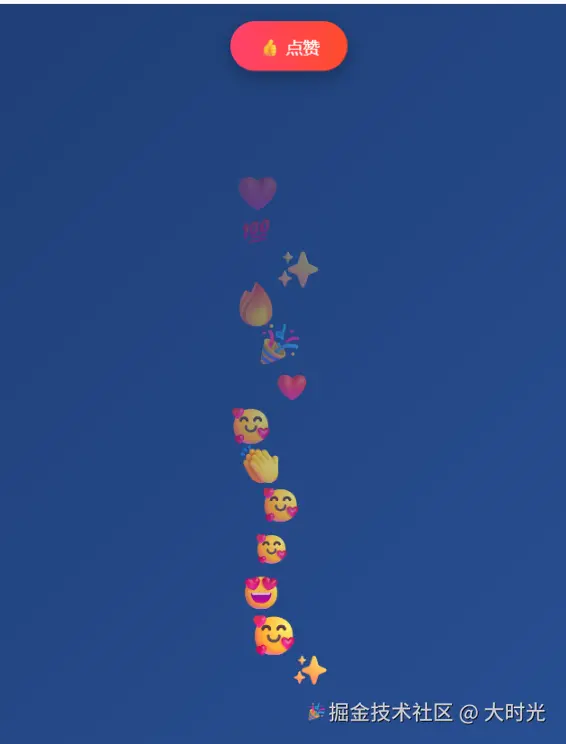
javascript
<!DOCTYPE html>
<html lang="zh-CN">
<head>
    <meta charset="UTF-8">
    <meta name="viewport" content="width=device-width, initial-scale=1.0">
    <title>直播间点赞动画无拖影版</title>
    <style>
        body {
            margin: 0;
            padding: 0;
            background: linear-gradient(135deg, #1e3c72, #2a5298);
            font-family: Arial, sans-serif;
            overflow: hidden;
            height: 100vh;
            display: flex;
            flex-direction: column;
            align-items: center;
            justify-content: center;
        }

        .container {
            position: relative;
            width: 100%;
            height: 100vh;
            overflow: hidden;
        }

        #canvas {
            position: absolute;
            top: 0;
            left: 0;
            width: 100%;
            height: 100%;
            background: transparent;
        }

        .controls {
            position: absolute;
            top: 20px;
            left: 50%;
            transform: translateX(-50%);
            z-index: 100;
        }

        .like-button {
            background: linear-gradient(to right, #ff416c, #ff4b2b);
            color: white;
            border: none;
            padding: 15px 30px;
            font-size: 18px;
            border-radius: 50px;
            cursor: pointer;
            box-shadow: 0 4px 15px rgba(0,0,0,0.2);
            transition: all 0.3s ease;
        }

        .like-button:hover {
            transform: scale(1.05);
            box-shadow: 0 6px 20px rgba(0,0,0,0.3);
        }

        .like-button:active {
            transform: scale(0.95);
        }

        .counter {
            position: absolute;
            top: 20px;
            right: 20px;
            background: rgba(0,0,0,0.6);
            color: white;
            padding: 10px 15px;
            border-radius: 20px;
            font-size: 16px;
            z-index: 100;
        }

        .instructions {
            position: absolute;
            bottom: 20px;
            color: white;
            text-align: center;
            width: 100%;
            font-size: 14px;
            opacity: 0.7;
        }
    </style>
</head>
<body>
    <div class="container">
        <canvas id="canvas"></canvas>

        <div class="controls">
            <button class="like-button" id="likeButton">👍 点赞</button>
        </div>

        <div class="counter">
            点赞数: <span id="likeCount">0</span>
        </div>

        <div class="instructions">
            点击按钮生成点赞动画 | 表情从底部升起,逐渐消失
        </div>
    </div>

    <script>
        class LikeAnimation {
            constructor() {
                this.canvas = document.getElementById('canvas');
                this.ctx = this.canvas.getContext('2d');
                this.likes = [];
                this.likeCount = 0;
                this.emojis = ['👍', '❤️', '🔥', '✨', '🎉', '💯', '😍', '🤩', '🥰', '👏'];
                this.maxLikes = 50; // 限制最大点赞数量

                this.init();
                this.setupEventListeners();
                this.animate();
            }

            init() {
                this.resizeCanvas();
                window.addEventListener('resize', () => this.resizeCanvas());
            }

            resizeCanvas() {
                this.canvas.width = window.innerWidth;
                this.canvas.height = window.innerHeight;
            }

            setupEventListeners() {
                const button = document.getElementById('likeButton');

                // 使用节流,防止快速点击
                let isThrottled = false;
                button.addEventListener('click', () => {
                    if (!isThrottled) {
                        this.createLike();
                        isThrottled = true;
                        setTimeout(() => {
                            isThrottled = false;
                        }, 100); // 100ms节流时间
                    }
                });
            }

            createLike() {
                // 每次点击中心点偏移 5-10 像素
                const baseCenterX = this.canvas.width / 2;
                const offsetX = (Math.random() - 0.5) * 20; // -10 到 10 像素偏移
                const centerX = baseCenterX + offsetX;

                const size = Math.random() * 20 + 30; // 30-50px

                // 如果超过最大数量,移除最老的一个
                if (this.likes.length >= this.maxLikes) {
                    this.likes.shift();
                }

                const like = {
                    x: centerX,
                    y: this.canvas.height, // 从底部开始
                    baseX: centerX, // 基础X位置用于摇摆计算
                    size: 0, // 初始大小为0
                    targetSize: size,
                    opacity: 1,
                    emoji: this.emojis[Math.floor(Math.random() * this.emojis.length)],
                    speed: 2, // 固定速度
                    sway: Math.random() * 0.5 + 0.2, // 摇摆幅度
                    swaySpeed: Math.random() * 0.05 + 0.02, // 摇摆速度
                    swayOffset: Math.random() * Math.PI * 2, // 摇摆偏移
                    startTime: Date.now()
                };

                this.likes.push(like);
                this.likeCount++;
                document.getElementById('likeCount').textContent = this.likeCount;
            }

            updateLikes() {
                const now = Date.now();

                for (let i = this.likes.length - 1; i >= 0; i--) {
                    const like = this.likes[i];
                    const elapsed = (now - like.startTime) / 1000; // 秒为单位

                    // 更新垂直位置
                    like.y = this.canvas.height - (elapsed * like.speed * 100);

                    // 计算进度 (0-1)
                    const progress = Math.max(0, Math.min(1, 1 - (like.y / this.canvas.height)));

                    // 计算摇摆效果(使用sin函数,基于基础X位置)
                    const swayValue = Math.sin(elapsed * like.swaySpeed * 100 + like.swayOffset) * like.sway * 100;
                    like.x = like.baseX + swayValue;

                    // 根据进度调整大小和透明度
                    if (progress <= 0.2) {
                        // 0-20%阶段:大小从0变到1,透明度保持1
                        like.size = like.targetSize * (progress / 0.2);
                        like.opacity = 1;
                    } else {
                        like.size = like.targetSize;

                        // 20-100%阶段:透明度从1变到0
                        if (progress > 0.2) {
                            like.opacity = 1 - ((progress - 0.2) / 0.8);
                        } else {
                            like.opacity = 1;
                        }
                    }

                    // 移除超出屏幕的元素
                    if (like.y < -50 || progress >= 1) {
                        this.likes.splice(i, 1);
                    }
                }
            }

            renderLikes() {
                this.likes.forEach(like => {
                    if (like.opacity > 0 && like.size > 0) {
                        this.ctx.save();
                        this.ctx.globalAlpha = like.opacity;

                        // 设置字体大小
                        this.ctx.font = `${like.size}px Arial`;
                        this.ctx.textAlign = 'center';
                        this.ctx.textBaseline = 'middle';

                        // 绘制emoji
                        this.ctx.fillText(like.emoji, like.x, like.y);

                        this.ctx.restore();
                    }
                });
            }

            animate() {
                // 完全清空画布
                this.ctx.clearRect(0, 0, this.canvas.width, this.canvas.height);

                // 更新和渲染点赞动画
                this.updateLikes();
                this.renderLikes();

                // 继续动画循环
                requestAnimationFrame(() => this.animate());
            }
        }

        // 初始化点赞动画
        window.addEventListener('DOMContentLoaded', () => {
            new LikeAnimation();
        });
    </script>
</body>
</html>
代码逻辑解析
1. 整体架构
这个点赞动画使用了面向对象编程 的方式,创建了一个 LikeAnimation 类来管理所有动画相关的功能。
2. 核心思路
代码的核心是游戏循环模式,分为三个主要部分:
- 创建:点击按钮时生成新的点赞表情
- 更新:每一帧更新所有表情的位置、大小、透明度
- 渲染:在Canvas上绘制所有表情
3. 详细实现逻辑
A. 初始化阶段
javascript
constructor() {
  this.canvas = document.getElementById('canvas');
  this.ctx = this.canvas.getContext('2d');
  this.likes = []; // 存储所有正在动画的表情
  this.likeCount = 0; // 点赞计数
  this.emojis = ['👍', '❤️', '🔥', '✨', '🎉', '💯', '😍', '🤩', '🥰', '👏'];
}- 获取Canvas画布和绘图上下文
- 创建数组存储所有正在运动的表情
- 定义可用的表情符号
B. 点赞创建逻辑
javascript
createLike() {
  // 1. 计算随机偏移的起始位置
  const baseCenterX = this.canvas.width / 2;
  const offsetX = (Math.random() - 0.5) * 20; // -10到10像素的随机偏移
  const centerX = baseCenterX + offsetX;

  // 2. 创建表情对象
  const like = {
    x: centerX,           // 水平位置
    y: this.canvas.height, // 垂直位置(从底部开始)
    baseX: centerX,       // 基础位置用于摇摆计算
    size: 0,              // 初始大小为0
    targetSize: size,     // 目标大小
    opacity: 1,           // 初始透明度为1
    // ...其他属性
  };

  // 3. 添加到数组中
  this.likes.push(like);
}
C. 动画更新逻辑
这是最核心的部分,每次调用都会更新所有表情的状态:
javascript
updateLikes() {
  const now = Date.now(); // 获取当前时间

  for (let i = this.likes.length - 1; i >= 0; i--) {
    const like = this.likes[i];
    const elapsed = (now - like.startTime) / 1000; // 计算经过的秒数

    // 1. 更新垂直位置(向上移动)
    like.y = this.canvas.height - (elapsed * like.speed * 100);

    // 2. 计算移动进度(0到1之间)
    const progress = Math.max(0, Math.min(1, 1 - (like.y / this.canvas.height)));

    // 3. 计算摇摆效果(使用sin函数实现左右摆动)
    const swayValue = Math.sin(elapsed * like.swaySpeed * 100 + like.swayOffset) * like.sway * 100;
    like.x = like.baseX + swayValue;

    // 4. 根据进度调整大小和透明度
    if (progress <= 0.2) {
      // 0-20%阶段:大小从0变到目标大小,透明度保持1
      like.size = like.targetSize * (progress / 0.2);
      like.opacity = 1;
    } else {
      like.size = like.targetSize;
      // 20-100%阶段:透明度从1变到0
      like.opacity = 1 - ((progress - 0.2) / 0.8);
    }

    // 5. 移除超出屏幕的表情
    if (like.y < -50 || progress >= 1) {
      this.likes.splice(i, 1);
    }
  }
}
D. 渲染逻辑
javascript
renderLikes() {
  this.likes.forEach(like => {
    if (like.opacity > 0 && like.size > 0) {
      // 保存当前绘图状态
      this.ctx.save();
      this.ctx.globalAlpha = like.opacity; // 设置透明度

      // 设置字体大小
      this.ctx.font = `${like.size}px Arial`;
      this.ctx.textAlign = 'center';
      this.ctx.textBaseline = 'middle';

      // 绘制表情
      this.ctx.fillText(like.emoji, like.x, like.y);

      // 恢复绘图状态
      this.ctx.restore();
    }
  });
}
4. 动画效果实现
摇摆效果
使用数学中的正弦函数实现左右摆动:
javascript
const swayValue = Math.sin(elapsed * frequency + offset) * amplitude;
like.x = baseX + swayValue;Math.sin()产生 -1 到 1 之间的周期性变化- 乘以幅度值实现左右摆动
- 随时间推移产生连续摆动效果
透明度变化
javascript
// 0-20%阶段:透明度保持1
if (progress <= 0.2) {
  like.opacity = 1;
}
// 20-100%阶段:透明度从1变到0
else {
  like.opacity = 1 - ((progress - 0.2) / 0.8);
}
大小变化
javascript
// 0-20%阶段:大小从0放大到目标大小
like.size = like.targetSize * (progress / 0.2);
5. 性能优化措施
- 节流机制:防止用户快速点击导致性能问题
- 数量限制:最多只保留50个表情,超出时移除最老的
- 及时清理:表情移出屏幕后立即从数组中删除
- 条件渲染:只绘制可见的表情(opacity > 0)
6. 游戏循环
javascript
animate() {
  // 1. 清空画布
  this.ctx.clearRect(0, 0, this.canvas.width, this.canvas.height);

  // 2. 更新所有表情状态
  this.updateLikes();

  // 3. 渲染所有表情
  this.renderLikes();

  // 4. 请求下一帧
  requestAnimationFrame(() => this.animate());
}
这个循环每秒执行约60次,创造出流畅的动画效果。
总的来说,这个实现将复杂的动画分解为简单的步骤:创建 → 更新 → 渲染 → 循环,通过数学计算精确控制每个表情的运动轨迹和视觉效果。