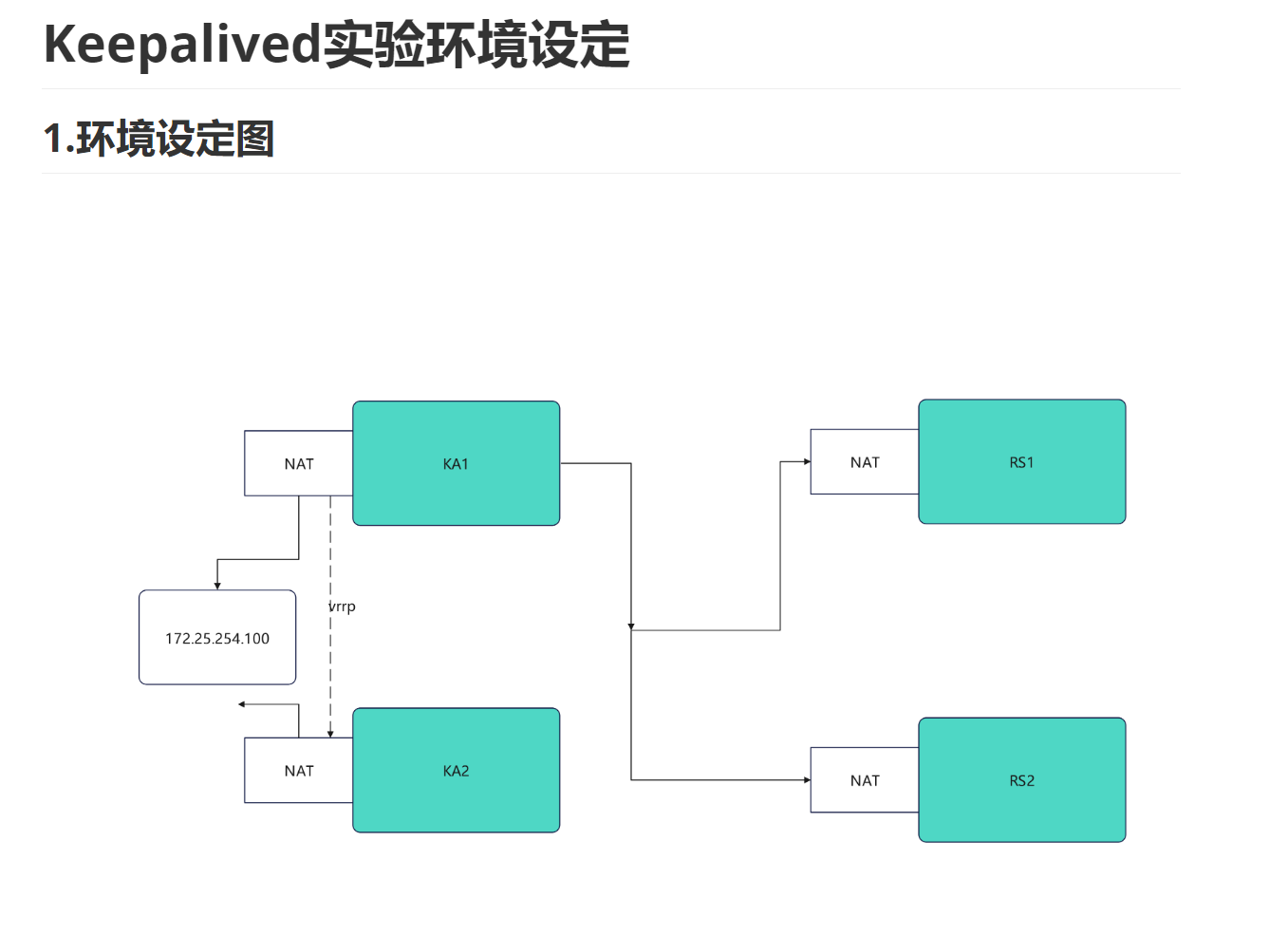
2.环境设定
#部署rs1和rh2(单网卡NAT模式)
root@rs1 \~# vmset.sh eth0 172.25.254.10 rs1
root@rs1 \~# dnf install httpd -y
root@rs1 \~# echo RS1 - 172.25.254.10 > /var/www/html/index.html
root@rs1 \~# systemctl enable --now httpd
root@rs2 \~# vmset.sh eth0 172.25.254.20 rs2
root@rs2 \~# dnf install httpd -y
root@rs2 \~# echo RS2 - 172.25.254.20 > /var/www/html/index.html
root@rs2 \~# systemctl enable --now httpd
#测试:
Administrator.DESKTOP-VJ307M3 ➤ curl 172.25.254.10
RS1 - 172.25.254.10
✔
─────────────────────────────────────────────────────────────────────────────────────────────────────
2026-01-28 10:36.42 ~
Administrator.DESKTOP-VJ307M3 ➤ curl 172.25.254.20
RS2 - 172.25.254.20
#设定ka1和ka2
root@KA1 \~# vmset.sh eth0 172.25.254.50 KA1
root@KA2 \~# vmset.sh eth0 172.25.254.60 KA6
#设定本地解析
root@KA1 \~# vim /etc/hosts
127.0.0.1 localhost localhost.localdomain localhost4 localhost4.localdomain4
::1 localhost localhost.localdomain localhost6 localhost6.localdomain6
172.25.254.50 KA1
172.25.254.60 KA2
172.25.254.10 rs1
172.25.254.20 rs2
root@KA1 \~# for i in 60 10 20
> do
> scp /etc/hosts 172.25.254.$i:/etc/hosts
> done
#在所有主机中查看/etc/hosts
#在ka1中开启时间同步服务
root@KA1 \~# vim /etc/chrony.conf
26 allow 0.0.0.0/0
29 local stratum 10
root@KA1 \~# systemctl restart chronyd
root@KA1 \~# systemctl enable --now chronyd
#在ka2中使用ka1的时间同步服务
root@KA2 \~# vim /etc/chrony.conf
pool 172.25.254.50 iburst
root@KA2 \~# systemctl restart chronyd
root@KA2 \~# systemctl enable --now chronyd
root@KA2 \~# chronyc sources -v
.-- Source mode '^' = server, '=' = peer, '#' = local clock.
/ .- Source state '*' = current best, '+' = combined, '-' = not combined,
| / 'x' = may be in error, '~' = too variable, '?' = unusable.
|| .- xxxx yyyy +/- zzzz
|| Reachability register (octal) -. | xxxx = adjusted offset,
|| Log2(Polling interval) --. | | yyyy = measured offset,
|| \ | | zzzz = estimated error.
|| | | \
MS Name/IP address Stratum Poll Reach LastRx Last sample
===============================================================================
^* KA1 3 6 17 13 +303ns+6125ns +/- 69ms
1.抢占模式( 默认的,谁优先级高就把vip放到哪里)
2.非抢占模式(持有vip只要vrrp通告正常就不做vip迁移)
#kA1中
root@KA1 \~# vim /etc/keepalived/keepalived.conf
vrrp_instance WEB_VIP {
state BACKUP #非抢占模式互为backup
interface eth0
virtual_router_id 51
nopreempt #启动非抢占模式
priority 100
advert_int 1
authentication {
auth_type PASS
auth_pass 1111
}
virtual_ipaddress {
172.25.254.100/24 dev eth0 label eth0:0
}
}
root@KA1 \~# systemctl stop keepalived.service
#KA2中
root@KA2 \~# vim /etc/keepalived/keepalived.conf
vrrp_instance WEB_VIP {
state BACKUP
interface eth0
virtual_router_id 51
nopreempt #开启非抢占模式
priority 80
advert_int 1
authentication {
auth_type PASS
auth_pass 1111
}
virtual_ipaddress {
172.25.254.100/24 dev eth0 label eth0:0
}
}
root@KA2 \~# systemctl stop keepalived.service
#测试:
root@KA1 \~# systemctl start keepalived.service
root@KA2 \~# systemctl start keepalived.service
root@KA1 \~# ifconfig
eth0: flags=4163<UP,BROADCAST,RUNNING,MULTICAST> mtu 1500
inet 172.25.254.50 netmask 255.255.255.0 broadcast 172.25.254.255
inet6 fe80::3901:aeea:786a:7227 prefixlen 64 scopeid 0x20<link>
ether 00:0c:29:26:33:d9 txqueuelen 1000 (Ethernet)
RX packets 18917 bytes 1546417 (1.4 MiB)
RX errors 0 dropped 0 overruns 0 frame 0
TX packets 34775 bytes 3349412 (3.1 MiB)
TX errors 0 dropped 0 overruns 0 carrier 0 collisions 0
eth0:0: flags=4163<UP,BROADCAST,RUNNING,MULTICAST> mtu 1500
inet 172.25.254.100 netmask 255.255.255.0 broadcast 0.0.0.0
ether 00:0c:29:26:33:d9 txqueuelen 1000 (Ethernet)
lo: flags=73<UP,LOOPBACK,RUNNING> mtu 65536
inet 127.0.0.1 netmask 255.0.0.0
inet6 ::1 prefixlen 128 scopeid 0x10<host>
loop txqueuelen 1000 (Local Loopback)
RX packets 162 bytes 9028 (8.8 KiB)
RX errors 0 dropped 0 overruns 0 frame 0
TX packets 162 bytes 9028 (8.8 KiB)
TX errors 0 dropped 0 overruns 0 carrier 0 collisions 0
root@KA1 \~# systemctl stop keepalived.service
root@KA2 \~# ifconfig
eth0: flags=4163<UP,BROADCAST,RUNNING,MULTICAST> mtu 1500
inet 172.25.254.60 netmask 255.255.255.0 broadcast 172.25.254.255
inet6 fe80::26df:35e5:539:56bc prefixlen 64 scopeid 0x20<link>
ether 00:0c:29:1e:fd:7a txqueuelen 1000 (Ethernet)
RX packets 22521 bytes 1553701 (1.4 MiB)
RX errors 0 dropped 0 overruns 0 frame 0
TX packets 18517 bytes 1535122 (1.4 MiB)
TX errors 0 dropped 0 overruns 0 carrier 0 collisions 0
eth0:0: flags=4163<UP,BROADCAST,RUNNING,MULTICAST> mtu 1500
inet 172.25.254.100 netmask 255.255.255.0 broadcast 0.0.0.0
ether 00:0c:29:1e:fd:7a txqueuelen 1000 (Ethernet)
lo: flags=73<UP,LOOPBACK,RUNNING> mtu 65536
inet 127.0.0.1 netmask 255.0.0.0
inet6 ::1 prefixlen 128 scopeid 0x10<host>
loop txqueuelen 1000 (Local Loopback)
RX packets 84 bytes 5128 (5.0 KiB)
RX errors 0 dropped 0 overruns 0 frame 0
TX packets 84 bytes 5128 (5.0 KiB)
TX errors 0 dropped 0 overruns 0 carrier 0 collisions 0
#开启KA1的服务ip不会被抢占到1中
root@KA1 \~# ifconfig
eth0: flags=4163<UP,BROADCAST,RUNNING,MULTICAST> mtu 1500
inet 172.25.254.50 netmask 255.255.255.0 broadcast 172.25.254.255
inet6 fe80::3901:aeea:786a:7227 prefixlen 64 scopeid 0x20<link>
ether 00:0c:29:26:33:d9 txqueuelen 1000 (Ethernet)
RX packets 19102 bytes 1561277 (1.4 MiB)
RX errors 0 dropped 0 overruns 0 frame 0
TX packets 35034 bytes 3375682 (3.2 MiB)
TX errors 0 dropped 0 overruns 0 carrier 0 collisions 0
lo: flags=73<UP,LOOPBACK,RUNNING> mtu 65536
inet 127.0.0.1 netmask 255.0.0.0
inet6 ::1 prefixlen 128 scopeid 0x10<host>
loop txqueuelen 1000 (Local Loopback)
RX packets 162 bytes 9028 (8.8 KiB)
RX errors 0 dropped 0 overruns 0 frame 0
TX packets 162 bytes 9028 (8.8 KiB)
TX errors 0 dropped 0 overruns 0 carrier 0 collisions 0
3.延迟抢占
#kA1中
root@KA1 \~# vim /etc/keepalived/keepalived.conf
vrrp_instance WEB_VIP {
state BACKUP #非抢占模式互为backup
interface eth0
virtual_router_id 51
preempt_delay 10 #启动延迟抢占,延迟10s抢占
priority 100
advert_int 1
authentication {
auth_type PASS
auth_pass 1111
}
virtual_ipaddress {
172.25.254.100/24 dev eth0 label eth0:0
}
}
root@KA1 \~# systemctl stop keepalived.service
#KA2中
root@KA2 \~# vim /etc/keepalived/keepalived.conf
vrrp_instance WEB_VIP {
state BACKUP
interface eth0
virtual_router_id 51
preempt_delay 10 #启动延迟抢占,延迟10s抢占
priority 80
advert_int 1
authentication {
auth_type PASS
auth_pass 1111
}
virtual_ipaddress {
172.25.254.100/24 dev eth0 label eth0:0
}
}
root@KA2 \~# systemctl stop keepalived.service
#测试:
root@KA1 \~# systemctl start keepalived.service
root@KA2 \~# systemctl start keepalived.service
#在一个独立的shell中开启ip的监控
root@KA1 \~# watch -n 1 ifconfig
#在KA1另外的shell中关闭keepalived
root@KA1 \~# systemctl stop keepalived.service
root@KA1 \~# systemctl start keepalived.service
#操作完毕后观察监控中vip的迁移延迟过程
keepalived的单播模式
#在KA1中
root@KA1 \~# vim /etc/keepalived/keepalived.conf
! Configuration File for keepalived
global_defs {
notification_email {
}
notification_email_from timinglee_zln@163.com
smtp_server 127.0.0.1
smtp_connect_timeout 30
router_id KA1
vrrp_skip_check_adv_addr
#vrrp_strict
vrrp_garp_interval 1
vrrp_gna_interval 1
#vrrp_mcast_group4 224.0.0.44 #关闭组播
}
vrrp_instance WEB_VIP {
state MASTER
interface eth0
virtual_router_id 51
priority 100
advert_int 1
unicast_src_ip 172.25.254.50 #指定单播源地址,通常是本机IP
unicast_peer {
172.25.254.60 #指定单播接收地址
}
authentication {
auth_type PASS
auth_pass 1111
}
virtual_ipaddress {
172.25.254.100/24 dev eth0 label eth0:0
}
}
#在KA2中
root@KA2 \~# vim /etc/keepalived/keepalived.conf
! Configuration File for keepalived
global_defs {
notification_email {
}
notification_email_from timinglee_zln@163.com
smtp_server 127.0.0.1
smtp_connect_timeout 30
router_id KA1
vrrp_skip_check_adv_addr
#vrrp_strict
vrrp_garp_interval 1
vrrp_gna_interval 1
#vrrp_mcast_group4 224.0.0.44 #关闭组播
}
vrrp_instance WEB_VIP {
state MASTER
interface eth0
virtual_router_id 51
priority 100
advert_int 1
unicast_src_ip 172.25.254.60 #指定单播源地址,通常是本机IP
unicast_peer {
172.25.254.50 #指定单播接收地址
}
authentication {
auth_type PASS
auth_pass 1111
}
virtual_ipaddress {
172.25.254.100/24 dev eth0 label eth0:0
}
}
root@KA1 \~# systemctl restart keepalived.service
root@KA2 \~# systemctl restart keepalived.service
#测试
#在KA1中开启独立shell监控播报信息
root@KA1 \~# tcpdump -i eth0 -nn src host 172.25.254.50 and dst 172.25.254.60
#在KA2中开启独立shell监控播报信息
root@KA2 \~# tcpdump -i eth0 -nn src host 172.25.254.60 and dst 172.25.254.50
#在KA1正常时
#ka2播报信息不显示通告内容
root@KA1 \~# systemctl stop keepalived.service
#vip会被迁移到KA2,KA2上开始显示播报内容
root@KA1 \~# systemctl start keepalived.service
#vip因为优先级被KA1抢占,KA2中播报停止
Keepalived双主模式
#在KA1中
root@KA1 \~# vim /etc/keepalived/keepalived.conf
vrrp_instance WEB_VIP { #第一个虚拟路由,以master身份设定
state MASTER
interface eth0
virtual_router_id 51
priority 100
advert_int 1
authentication {
auth_type PASS
auth_pass 1111
}
virtual_ipaddress {
172.25.254.100/24 dev eth0 label eth0:0
}
}
vrrp_instance DB_VIP { #第二个虚拟路由。以backup身份设定
state BACKUP
interface eth0
virtual_router_id 52
priority 80
advert_int 1
authentication {
auth_type PASS
auth_pass 1111
}
virtual_ipaddress {
172.25.254.200/24 dev eth0 label eth0:1
}
}
#KA2中
root@KA2 \~# vim /etc/keepalived/keepalived.conf
vrrp_instance WEB_VIP {
state BACKUP
interface eth0
virtual_router_id 51
preempt_delay 10
priority 80
advert_int 1
authentication {
auth_type PASS
auth_pass 1111
}
virtual_ipaddress {
172.25.254.100/24 dev eth0 label eth0:0
}
}
vrrp_instance DB_VIP {
state MASTER
interface eth0
virtual_router_id 52
preempt_delay 10
priority 100
advert_int 1
authentication {
auth_type PASS
auth_pass 1111
}
virtual_ipaddress {
172.25.254.200/24 dev eth0 label eth0:1
}
}
root@KA1 \~# systemctl restart keepalived.service
root@KA2 \~# systemctl restart keepalived.service
#测试
root@KA1 \~# ifconfig
eth0: flags=4163<UP,BROADCAST,RUNNING,MULTICAST> mtu 1500
inet 172.25.254.50 netmask 255.255.255.0 broadcast 172.25.254.255
inet6 fe80::3901:aeea:786a:7227 prefixlen 64 scopeid 0x20<link>
ether 00:0c:29:26:33:d9 txqueuelen 1000 (Ethernet)
RX packets 38766 bytes 3548249 (3.3 MiB)
RX errors 0 dropped 0 overruns 0 frame 0
TX packets 67456 bytes 6209788 (5.9 MiB)
TX errors 0 dropped 2 overruns 0 carrier 0 collisions 0
eth0:0: flags=4163<UP,BROADCAST,RUNNING,MULTICAST> mtu 1500
inet 172.25.254.100 netmask 255.255.255.0 broadcast 0.0.0.0
ether 00:0c:29:26:33:d9 txqueuelen 1000 (Ethernet)
lo: flags=73<UP,LOOPBACK,RUNNING> mtu 65536
inet 127.0.0.1 netmask 255.0.0.0
inet6 ::1 prefixlen 128 scopeid 0x10<host>
loop txqueuelen 1000 (Local Loopback)
RX packets 782 bytes 60465 (59.0 KiB)
RX errors 0 dropped 0 overruns 0 frame 0
TX packets 782 bytes 60465 (59.0 KiB)
TX errors 0 dropped 0 overruns 0 carrier 0 collisions 0
root@KA2 \~# ifconfig
eth0: flags=4163<UP,BROADCAST,RUNNING,MULTICAST> mtu 1500
inet 172.25.254.60 netmask 255.255.255.0 broadcast 172.25.254.255
inet6 fe80::26df:35e5:539:56bc prefixlen 64 scopeid 0x20<link>
ether 00:0c:29:1e:fd:7a txqueuelen 1000 (Ethernet)
RX packets 46164 bytes 3559703 (3.3 MiB)
RX errors 0 dropped 0 overruns 0 frame 0
TX packets 38170 bytes 3306899 (3.1 MiB)
TX errors 0 dropped 0 overruns 0 carrier 0 collisions 0
eth0:1: flags=4163<UP,BROADCAST,RUNNING,MULTICAST> mtu 1500
inet 172.25.254.200 netmask 255.255.255.0 broadcast 0.0.0.0
ether 00:0c:29:1e:fd:7a txqueuelen 1000 (Ethernet)
lo: flags=73<UP,LOOPBACK,RUNNING> mtu 65536
inet 127.0.0.1 netmask 255.0.0.0
inet6 ::1 prefixlen 128 scopeid 0x10<host>
loop txqueuelen 1000 (Local Loopback)
RX packets 532 bytes 39588 (38.6 KiB)
RX errors 0 dropped 0 overruns 0 frame 0
TX packets 532 bytes 39588 (38.6 KiB)
TX errors 0 dropped 0 overruns 0 carrier 0 collisions 0
root@KA1 \~# systemctl stop keepalived.service
root@KA2 \~# ifconfig
eth0: flags=4163<UP,BROADCAST,RUNNING,MULTICAST> mtu 1500
inet 172.25.254.60 netmask 255.255.255.0 broadcast 172.25.254.255
inet6 fe80::26df:35e5:539:56bc prefixlen 64 scopeid 0x20<link>
ether 00:0c:29:1e:fd:7a txqueuelen 1000 (Ethernet)
RX packets 46204 bytes 3562823 (3.3 MiB)
RX errors 0 dropped 0 overruns 0 frame 0
TX packets 38240 bytes 3313319 (3.1 MiB)
TX errors 0 dropped 0 overruns 0 carrier 0 collisions 0
eth0:0: flags=4163<UP,BROADCAST,RUNNING,MULTICAST> mtu 1500
inet 172.25.254.100 netmask 255.255.255.0 broadcast 0.0.0.0
ether 00:0c:29:1e:fd:7a txqueuelen 1000 (Ethernet)
eth0:1: flags=4163<UP,BROADCAST,RUNNING,MULTICAST> mtu 1500
inet 172.25.254.200 netmask 255.255.255.0 broadcast 0.0.0.0
ether 00:0c:29:1e:fd:7a txqueuelen 1000 (Ethernet)
root@KA2 \~# systemctl stop keepalived.service
root@KA1 \~# ifconfig
eth0: flags=4163<UP,BROADCAST,RUNNING,MULTICAST> mtu 1500
inet 172.25.254.50 netmask 255.255.255.0 broadcast 172.25.254.255
inet6 fe80::3901:aeea:786a:7227 prefixlen 64 scopeid 0x20<link>
ether 00:0c:29:26:33:d9 txqueuelen 1000 (Ethernet)
RX packets 39277 bytes 3653121 (3.4 MiB)
RX errors 0 dropped 0 overruns 0 frame 0
TX packets 67902 bytes 6264989 (5.9 MiB)
TX errors 0 dropped 2 overruns 0 carrier 0 collisions 0
eth0:0: flags=4163<UP,BROADCAST,RUNNING,MULTICAST> mtu 1500
inet 172.25.254.100 netmask 255.255.255.0 broadcast 0.0.0.0
ether 00:0c:29:26:33:d9 txqueuelen 1000 (Ethernet)
eth0:1: flags=4163<UP,BROADCAST,RUNNING,MULTICAST> mtu 1500
inet 172.25.254.200 netmask 255.255.255.0 broadcast 0.0.0.0
ether 00:0c:29:26:33:d9 txqueuelen 1000 (Ethernet)