前言
欢迎加入开源鸿蒙跨平台社区:https://openharmonycrossplatform.csdn.net
从这篇开始正式进入 OpenHarmony 适配的核心内容。第一步是搭建插件工程------创建 ohos 目录、配置各种 json5 文件、写好入口导出。这些看起来是"脚手架"工作,但配置错一个字段就可能导致插件加载失败,排查起来非常痛苦。
一、ohos 目录结构
1.1 完整目录树
flutter_web_auth/
├── lib/                          # Dart 源码
├── android/                      # Android 插件
├── ios/                          # iOS 插件
├── macos/                        # macOS 插件
├── ohos/                         # OpenHarmony 插件
│   ├── src/
│   │   └── main/
│   │       ├── ets/
│   │       │   └── components/
│   │       │       └── plugin/
│   │       │           └── FlutterWebAuthPlugin.ets  ← 核心实现
│   │       └── module.json5                          ← 模块声明
│   ├── build-profile.json5                           ← 构建配置
│   ├── hvigorfile.ts                                 ← 构建脚本
│   ├── index.ets                                     ← 入口导出
│   ├── oh-package.json5                              ← 包配置
│   └── .gitignore                                    ← Git 忽略
├── pubspec.yaml                  # Flutter 包配置
└── example/                      # 示例应用
1.2 各文件职责
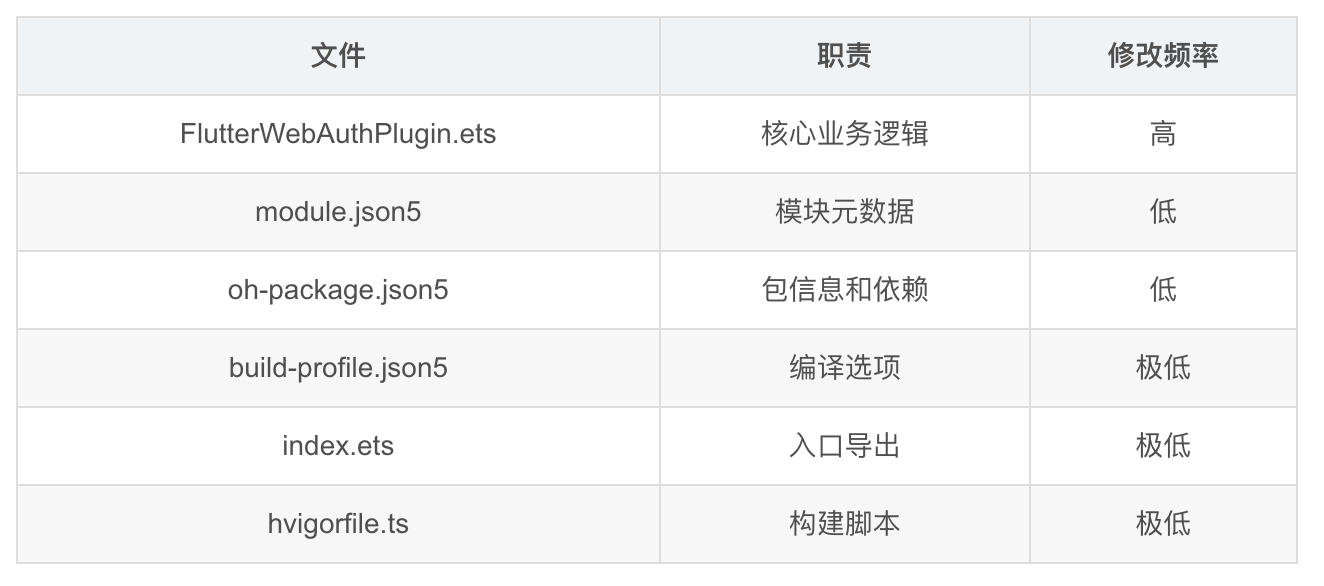
二、oh-package.json5 包配置
2.1 完整内容
json5
{
  "name": "flutter_web_auth",
  "version": "1.0.0",
  "description": "Please describe the basic information.",
  "main": "index.ets",
  "author": "",
  "license": "Apache-2.0",
  "dependencies": {}
}
2.2 字段说明
| 字段 | 值 | 说明 |
|---|---|---|
| name | flutter_web_auth | 包名,必须与 pubspec.yaml 中的 name 一致 |
| version | 1.0.0 | OpenHarmony 包版本 |
| main | index.ets | 入口文件路径 |
| license | Apache-2.0 | 许可证 |
| dependencies | {} | 无额外依赖 |
2.3 与 pubspec.yaml 的对应
yaml
# pubspec.yaml
name: flutter_web_auth
version: 0.6.0
json5
// oh-package.json5
"name": "flutter_web_auth",  // 必须一致
"version": "1.0.0",          // 可以不同
📌 name 必须一致,否则 Flutter-OHOS 框架找不到插件。version 可以独立管理。
三、build-profile.json5 构建配置
3.1 完整内容
json5
{
  "apiType": "stageMode",
  "targets": [
    {
      "name": "default",
      "runtimeOS": "OpenHarmony"
    }
  ]
}
3.2 字段说明
| 字段 | 值 | 说明 |
|---|---|---|
| apiType | stageMode | Stage 模型(当前标准) |
| targets.name | default | 默认构建目标 |
| targets.runtimeOS | OpenHarmony | 目标操作系统 |
3.3 Stage 模型 vs FA 模型
| 模型 | 状态 | 说明 |
|---|---|---|
| Stage 模型 | 当前标准 | Flutter-OHOS 使用 |
| FA 模型 | 已废弃 | 早期 HarmonyOS |
💡 所有 Flutter-OHOS 插件都使用 Stage 模型。如果你看到 FA 模型的教程,那是过时的。
四、module.json5 模块声明
4.1 完整内容
json5
{
  "module": {
    "name": "flutter_web_auth",
    "type": "har",
    "deviceTypes": [
      "default",
      "tablet"
    ]
  }
}
4.2 字段说明
| 字段 | 值 | 说明 |
|---|---|---|
| name | flutter_web_auth | 模块名称 |
| type | har | HAR(HarmonyOS Archive)类型 |
| deviceTypes | default, tablet | 支持的设备类型 |
4.3 模块类型
| 类型 | 说明 | 用途 |
|---|---|---|
| har | 静态共享包 | Flutter 插件使用 |
| hap | 应用包 | 可安装的应用 |
| hsp | 动态共享包 | 运行时加载 |
4.4 与 secure_application 的对比
json5
// flutter_web_auth 的 module.json5
{
  "module": {
    "name": "flutter_web_auth",
    "type": "har",
    "deviceTypes": ["default", "tablet"]
  }
}

// secure_application 的 module.json5(完全相同的结构)
{
  "module": {
    "name": "secure_application",
    "type": "har",
    "deviceTypes": ["default", "tablet"]
  }
}
📌 所有 Flutter-OHOS 插件的 module.json5 结构都一样,只有 name 不同。
五、index.ets 入口文件
5.1 完整内容
typescript
import FlutterWebAuthPlugin from './src/main/ets/components/plugin/FlutterWebAuthPlugin';
export default FlutterWebAuthPlugin;
5.2 作用
index.ets 是 oh-package.json5 中 main 字段指向的文件。Flutter-OHOS 框架通过这个文件找到插件类。
5.3 导入路径
index.ets
    ↓ import from
./src/main/ets/components/plugin/FlutterWebAuthPlugin.ets
    ↓ export default
FlutterWebAuthPlugin 类
5.4 常见错误
| 错误 | 症状 | 解决 |
|---|---|---|
| 路径拼写错误 | 插件加载失败 | 检查文件路径是否正确 |
| 没有 export default | 框架找不到类 | 确保 export default |
| 类名不匹配 | 注册失败 | 确保与 pubspec.yaml 中的 pluginClass 一致 |
六、hvigorfile.ts 构建脚本
6.1 完整内容
typescript
import { harTasks } from '@ohos/hvigor-ohos-plugin';

export default {
    system: harTasks,
    plugins: []
}
6.2 作用
hvigorfile.ts 是 Hvigor 构建系统的配置文件,类似 Android 的 build.gradle。对于 Flutter 插件,使用默认的 harTasks 就够了。
七、.gitignore 配置
7.1 完整内容
/node_modules
/oh_modules
/build
/oh-package-lock.json5
/.preview
7.2 说明
| 路径 | 说明 |
|---|---|
| node_modules | Node.js 依赖(Hvigor 使用) |
| oh_modules | OpenHarmony 模块依赖 |
| build | 构建输出 |
| oh-package-lock.json5 | 依赖锁定文件 |
| .preview | 预览缓存 |
八、pubspec.yaml 中的 ohos 平台声明
8.1 配置
yaml
flutter:
  plugin:
    platforms:
      android:
        package: com.linusu.flutter_web_auth
        pluginClass: FlutterWebAuthPlugin
      ohos:
        package: com.linusu.flutter_web_auth
        pluginClass: FlutterWebAuthPlugin
      ios:
        pluginClass: FlutterWebAuthPlugin
      macos:
        pluginClass: FlutterWebAuthPlugin
      web:
        pluginClass: FlutterWebAuthWeb
        fileName: flutter_web_auth_web.dart
8.2 ohos 平台字段
| 字段 | 值 | 说明 |
|---|---|---|
| package | com.linusu.flutter_web_auth | 包名(与 Android 相同) |
| pluginClass | FlutterWebAuthPlugin | ArkTS 类名 |
8.3 与其他插件的对比
| 插件 | 需要 package | 需要 fileName |
|---|---|---|
| flutter_web_auth | ✅ | ❌ |
| secure_application | ❌ | ✅ |
| flutter_speech | ✅ | ❌ |
💡 不同插件的 ohos 平台配置方式不完全一样。有的需要 package,有的需要 fileName,取决于 Flutter-OHOS 框架的版本和插件的注册方式。
九、工程搭建检查清单
9.1 文件检查
-
ohos/oh-package.json5存在且 name 正确 -
ohos/build-profile.json5存在且 apiType 为 stageMode -
ohos/src/main/module.json5存在且 type 为 har -
ohos/index.ets存在且导出路径正确 -
ohos/hvigorfile.ts存在 -
ohos/src/main/ets/components/plugin/FlutterWebAuthPlugin.ets存在
9.2 配置一致性检查
- oh-package.json5 的 name 与 pubspec.yaml 的 name 一致
- pubspec.yaml 中 ohos.pluginClass 与 ArkTS 类名一致
- index.ets 的 import 路径指向正确的文件
9.3 常见搭建错误
| 错误 | 原因 | 解决 |
|---|---|---|
| 插件未被识别 | pubspec.yaml 缺少 ohos 平台 | 添加 ohos 配置 |
| 编译失败 | module.json5 格式错误 | 检查 json5 语法 |
| 类找不到 | index.ets 导出路径错误 | 修正 import 路径 |
| 注册失败 | pluginClass 名称不匹配 | 确保名称一致 |
总结
本文详细讲解了 flutter_web_auth 的 OpenHarmony 插件工程搭建:
- 目录结构:标准的 ohos/ 目录布局,6个关键文件
- oh-package.json5:包名必须与 pubspec.yaml 一致
- module.json5:type 为 har,支持 default 和 tablet
- index.ets:入口导出,路径必须正确
- pubspec.yaml:ohos 平台声明 pluginClass
下一篇我们讲 FlutterPlugin 与 AbilityAware 双接口实现------flutter_web_auth 为什么需要 AbilityAware。
如果这篇文章对你有帮助,欢迎点赞👍、收藏⭐、关注🔔,你的支持是我持续创作的动力!
相关资源: