前言
欢迎加入开源鸿蒙跨平台社区:https://openharmonycrossplatform.csdn.net
MethodCallHandler 接口是 Flutter 插件处理 Dart 方法调用的核心机制 ,定义了原生侧接收和响应 Dart 层请求的标准方式。在 Flutter 的跨平台通信架构中,Dart 代码通过 MethodChannel 发送方法调用请求,原生侧正是通过实现 MethodCallHandler 接口来接收这些请求并返回处理结果。本文将以 apple_product_name 库为实例,从接口定义到参数处理、结果返回和错误处理,全面剖析消息处理机制的每一个细节。
先给出结论式摘要:
- MethodCallHandler 只有 1 个方法 :
onMethodCall(call, result)是所有 Dart 调用在原生侧的统一入口 - MethodResult 三种返回方式 :
success(成功)、error(错误)、notImplemented(未实现),每次调用必须且只能使用一种 - apple_product_name 路由 3 个方法:getMachineId、getProductName、lookup,通过 switch 语句分发
提示:本文所有源码来源于 apple_product_name 库的
AppleProductNamePlugin.ets文件,建议对照源码阅读。
目录
- [MethodCallHandler 接口定义](#MethodCallHandler 接口定义)
- [MethodCall 对象详解](#MethodCall 对象详解)
- [MethodResult 对象详解](#MethodResult 对象详解)
- [onMethodCall 路由实现](#onMethodCall 路由实现)
- [switch 路由 vs Map 路由](#switch 路由 vs Map 路由)
- [getMachineId 消息处理流程](#getMachineId 消息处理流程)
- [getProductName 消息处理流程](#getProductName 消息处理流程)
- [lookup 参数提取与校验](#lookup 参数提取与校验)
- [result.success 返回值类型](#result.success 返回值类型)
- [result.error 结构化错误](#result.error 结构化错误)
- [result.notImplemented 防御机制](#result.notImplemented 防御机制)
- [Dart 侧 invokeMethod 对应关系](#Dart 侧 invokeMethod 对应关系)
- 完整消息传递时序
- 参数序列化与类型映射
- 异步消息处理模式
- 错误处理统一模式
- 日志记录与调试技巧
- 消息处理性能优化
- [Dart 侧消息处理验证页面](#Dart 侧消息处理验证页面)
- 常见问题与排查
- 总结
一、MethodCallHandler 接口定义
1.1 接口源码
MethodCallHandler 接口定义在 @ohos/flutter_ohos 包中,是 Flutter 插件消息处理的核心契约:
typescript
interface MethodCallHandler {
  onMethodCall(call: MethodCall, result: MethodResult): void;
}
1.2 极简设计哲学
与 FlutterPlugin 接口的三个方法不同,MethodCallHandler 只有一个方法。这种极简设计的意图是:
- 单一入口:所有 Dart 层的方法调用都经过同一个入口,便于集中管理
- 统一路由:在一个方法内完成方法名分发,逻辑清晰
- 横切关注点:日志记录、权限检查、性能监控等可以在入口处统一实现
1.3 apple_product_name 的实现
typescript
export default class AppleProductNamePlugin
  implements FlutterPlugin, MethodCallHandler {

  onMethodCall(call: MethodCall, result: MethodResult): void {
    switch (call.method) {
      case "getMachineId":
        this.getMachineId(result);
        break;
      case "getProductName":
        this.getProductName(result);
        break;
      case "lookup":
        this.lookup(call, result);
        break;
      default:
        result.notImplemented();
        break;
    }
  }
}
提示:
MethodCallHandler接口与FlutterPlugin接口是独立的,可以由同一个类实现(如apple_product_name),也可以分离到不同的类中。详见 Flutter Platform Channels 官方文档。
二、MethodCall 对象详解
2.1 接口结构
MethodCall 对象封装了 Dart 层方法调用的完整信息:
typescript
interface MethodCall {
  // 方法名称 --- 对应 Dart 侧 invokeMethod 的第一个参数
  method: string;

  // 按键名获取单个参数
  argument<T>(key: string): T | null;

  // 获取完整参数对象
  arguments: any;
}
2.2 属性与方法说明
| 成员 | 类型 | 用途 | 示例 |
|---|---|---|---|
| method | string | 方法名称 | "getMachineId"、"lookup" |
| argument(key) | T | null | 按键提取参数 | call.argument("machineId") |
| arguments | any | 完整参数对象 | {"machineId": "ALN-AL00"} |
2.3 在 apple_product_name 中的使用
typescript
// getMachineId --- 不需要参数
case "getMachineId":
  // 只使用 call.method 进行路由,不提取参数
  this.getMachineId(result);
  break;

// lookup --- 需要提取 machineId 参数
case "lookup":
  const machineId = call.argument("machineId") as string;
  // machineId = "ALN-AL00"
  break;
注意:
call.argument()返回的类型是T | null,当键不存在时返回 null。跨平台传递的参数类型信息可能丢失,因此通常需要使用as string进行类型断言。
三、MethodResult 对象详解
3.1 接口结构
MethodResult 是原生侧向 Dart 层返回处理结果的唯一通道:
typescript
interface MethodResult {
  // 返回成功结果
  success(result: any): void;

  // 返回结构化错误
  error(errorCode: string, errorMessage: string | null, errorDetails: any): void;

  // 方法未实现
  notImplemented(): void;
}
3.2 三种返回方式对比
| 方法 | Dart 侧行为 | 适用场景 | apple_product_name 使用 |
|---|---|---|---|
| success(data) | Future 正常完成,返回 data | 业务处理成功 | getMachineId、getProductName、lookup |
| error(code, msg, details) | Future 以 PlatformException 完成 | 业务处理失败 | 参数校验失败、系统 API 异常 |
| notImplemented() | Future 以 MissingPluginException 完成 | 方法未实现 | default 分支 |
3.3 必须调用且只能调用一次
每次 onMethodCall 被触发时,必须且只能调用 result 的三个方法之一:
typescript
// 正确:调用了一次
onMethodCall(call: MethodCall, result: MethodResult): void {
  result.success("data"); // ✓
}

// 错误:忘记调用 --- Dart 侧 Future 永远 pending
onMethodCall(call: MethodCall, result: MethodResult): void {
  // 什么都没做 ✗
}

// 错误:调用了两次 --- 运行时异常
onMethodCall(call: MethodCall, result: MethodResult): void {
  result.success("data");
  result.success("data2"); // ✗ 重复调用
}
提示:如果忘记调用 result 的任何方法,Dart 侧的
invokeMethod返回的 Future 将永远不会完成,导致调用方无限等待。这是 Flutter 插件开发中最常见的 bug 之一。
四、onMethodCall 路由实现
4.1 完整路由源码
typescript
onMethodCall(call: MethodCall, result: MethodResult): void {
  switch (call.method) {
    case "getMachineId":
      this.getMachineId(result);
      break;
    case "getProductName":
      this.getProductName(result);
      break;
    case "lookup":
      this.lookup(call, result);
      break;
    default:
      result.notImplemented();
      break;
  }
}
4.2 路由分发表
| case 值 | 处理函数 | 传递参数 | 功能 |
|---|---|---|---|
| "getMachineId" | getMachineId(result) | 仅 result | 获取设备型号标识符 |
| "getProductName" | getProductName(result) | 仅 result | 获取产品名称(三级降级) |
| "lookup" | lookup(call, result) | call + result | 按型号查询映射表 |
| default | result.notImplemented() | --- | 未知方法防御 |
4.3 参数传递差异
三个业务方法的参数传递存在差异:
getMachineId和getProductName:只需要result参数,因为它们不接收 Dart 侧的输入lookup:需要call和result两个参数,因为它需要从call中提取machineId参数
typescript
// 无输入参数的方法 --- 只传 result
this.getMachineId(result);

// 有输入参数的方法 --- 传 call + result
this.lookup(call, result);
注意:将
call参数只传递给需要它的方法,而非所有方法都传递,是一种最小权限原则的体现------每个方法只接收它实际需要的参数。
五、switch 路由 vs Map 路由
5.1 switch 路由(apple_product_name 采用)
typescript
onMethodCall(call: MethodCall, result: MethodResult): void {
  switch (call.method) {
    case "getMachineId": this.getMachineId(result); break;
    case "getProductName": this.getProductName(result); break;
    case "lookup": this.lookup(call, result); break;
    default: result.notImplemented();
  }
}
5.2 Map 路由(适用于复杂插件)
typescript
private handlers = new Map<string, Function>();

constructor() {
  this.handlers.set("getMachineId", (c: MethodCall, r: MethodResult) => {
    this.getMachineId(r);
  });
  this.handlers.set("getProductName", (c: MethodCall, r: MethodResult) => {
    this.getProductName(r);
  });
  this.handlers.set("lookup", (c: MethodCall, r: MethodResult) => {
    this.lookup(c, r);
  });
}

onMethodCall(call: MethodCall, result: MethodResult): void {
  const handler = this.handlers.get(call.method);
  handler ? handler(call, result) : result.notImplemented();
}
5.3 两种方式对比
| 维度 | switch 路由 | Map 路由 |
|---|---|---|
| 代码量 | 少 | 多 |
| 可读性 | 高 | 中 |
| 动态注册 | 不支持 | 支持 |
| 适用方法数 | < 10 个 | 10+ 个 |
| 性能 | O(n) 最坏 | O(1) 哈希查找 |
| 推荐场景 | 简单插件 | 复杂插件 |
apple_product_name 只有 3 个方法,switch 路由是最合适的选择。
提示:当插件方法数量超过 10 个时,建议切换到 Map 路由,既能提升查找性能,也能支持运行时动态注册新方法。
六、getMachineId 消息处理流程
6.1 完整处理源码
typescript
private getMachineId(result: MethodResult): void {
  try {
    result.success(deviceInfo.productModel);
  } catch (e) {
    const errorMsg = e instanceof Error ? e.message : String(e);
    result.error("GET_MACHINE_ID_ERROR", errorMsg, null);
  }
}
6.2 端到端流程
Dart 侧                              原生侧
─────────                             ─────────
invokeMethod('getMachineId')
    │
    ▼
MethodChannel 编码
    │
    ▼
BinaryMessenger 传递 ──────────→ BinaryMessenger 接收
                                      │
                                      ▼
                                MethodChannel 解码
                                      │
                                      ▼
                                onMethodCall(call, result)
                                      │
                                      ▼
                                call.method == "getMachineId"
                                      │
                                      ▼
                                getMachineId(result)
                                      │
                                      ▼
                                deviceInfo.productModel → "ALN-AL00"
                                      │
                                      ▼
                                result.success("ALN-AL00")
                                      │
BinaryMessenger 接收 ←──────────  BinaryMessenger 传递
    │
    ▼
Future 完成,返回 "ALN-AL00"
6.3 Dart 侧对应代码
dart
Future<String> getMachineId() async {
  final String? machineId = await _channel.invokeMethod('getMachineId');
  return machineId ?? 'Unknown';
}注意:整个流程是异步 的,Dart 侧的
invokeMethod返回 Future,不会阻塞 UI 线程。原生侧的getMachineId虽然是同步执行的,但通信过程本身是异步的。
七、getProductName 消息处理流程
7.1 完整处理源码
typescript
private getProductName(result: MethodResult): void {
  try {
    const model = deviceInfo.productModel;
    let productName = HUAWEI_DEVICE_MAP[model];
    if (!productName) {
      productName = deviceInfo.marketName || model;
    }
    result.success(productName);
  } catch (e) {
    const errorMsg = e instanceof Error ? e.message : String(e);
    result.error("GET_PRODUCT_NAME_ERROR", errorMsg, null);
  }
}
7.2 三级降级在消息处理中的体现
getProductName 的消息处理包含了业务逻辑(三级降级),而不仅仅是简单的数据获取:
result.success() 的参数来源:
│
├── 第一级:HUAWEI_DEVICE_MAP[model]  → "HUAWEI Mate 60 Pro"
│
├── 第二级:deviceInfo.marketName     → "HUAWEI Mate 60 Pro"
│
└── 第三级:model (productModel)      → "ALN-AL00"
7.3 与 getMachineId 的对比
| 维度 | getMachineId | getProductName |
|---|---|---|
| 数据来源 | deviceInfo.productModel | 映射表 + marketName + productModel |
| 业务逻辑 | 无(直接返回) | 三级降级策略 |
| 返回值示例 | "ALN-AL00" | "HUAWEI Mate 60 Pro" |
| 可能返回 null | 否 | 否(总有降级值) |
提示:
getProductName的三级降级策略保证了任何设备 都能返回有意义的名称,即使映射表中没有该设备。详见第 17 篇文章 AppleProductNamePlugin 源码分析。
八、lookup 参数提取与校验
8.1 完整处理源码
typescript
private lookup(call: MethodCall, result: MethodResult): void {
  try {
    const machineId = call.argument("machineId") as string;
    if (!machineId) {
      result.error("INVALID_ARGUMENT", "machineId is required", null);
      return;
    }
    const productName = HUAWEI_DEVICE_MAP[machineId];
    result.success(productName);
  } catch (e) {
    const errorMsg = e instanceof Error ? e.message : String(e);
    result.error("LOOKUP_ERROR", errorMsg, null);
  }
}
8.2 参数提取过程
typescript
// Dart 侧传参
await _channel.invokeMethod('lookup', {'machineId': 'ALN-AL00'});
//                                      ↓
// 原生侧提取
const machineId = call.argument("machineId") as string;
// machineId = "ALN-AL00"
8.3 参数校验的三种结果
| 场景 | machineId 值 | 处理方式 | result 调用 |
|---|---|---|---|
| 正常传参 | "ALN-AL00" | 查询映射表 | success("HUAWEI Mate 60 Pro") |
| 参数为空 | "" 或 null | 快速失败 | error("INVALID_ARGUMENT", ...) |
| 映射表未命中 | "UNKNOWN" | 返回 undefined | success(undefined) → Dart 侧 null |
8.4 快速失败策略
typescript
if (!machineId) {
  result.error("INVALID_ARGUMENT", "machineId is required", null);
  return; // 提前退出,不执行后续逻辑
}
return 语句确保在参数无效时立即退出方法,避免在无效输入上执行不必要的映射表查询。
注意:
lookup方法将"映射表未命中"视为正常业务结果 (返回 null),而非错误。只有参数缺失或系统异常才会触发result.error()。
九、result.success 返回值类型
9.1 支持的数据类型
result.success() 支持多种可序列化的数据类型:
typescript
// 字符串
result.success("HUAWEI Mate 60 Pro");

// null / undefined
result.success(null);       // Dart 侧接收 null
result.success(undefined);  // Dart 侧接收 null

// 数字
result.success(42);
result.success(3.14);

// 布尔值
result.success(true);

// Map(对象)
result.success({
  "machineId": "ALN-AL00",
  "productName": "HUAWEI Mate 60 Pro"
});

// 数组
result.success(["Mate 70", "Mate 60", "Mate X5"]);
9.2 类型映射关系
| 原生侧类型 | Dart 侧类型 | 示例 |
|---|---|---|
| string | String | "HUAWEI Mate 60 Pro" |
| number | int / double | 42 / 3.14 |
| boolean | bool | true |
| null / undefined | null | null |
| object | Map<String, dynamic> | {"key": "value"} |
| array | List<dynamic> | "a", "b" |
9.3 apple_product_name 的返回值
typescript
// getMachineId --- 返回字符串
result.success(deviceInfo.productModel);  // "ALN-AL00"

// getProductName --- 返回字符串
result.success(productName);  // "HUAWEI Mate 60 Pro"

// lookup --- 返回字符串或 undefined
result.success(HUAWEI_DEVICE_MAP[machineId]); // "HUAWEI Mate 60 Pro" 或 undefined提示:传递的数据必须是可序列化 的基本类型或其组合,不能传递函数、类实例等不可序列化的对象。详见 MethodChannel API 文档。
十、result.error 结构化错误
10.1 三参数结构
typescript
result.error(errorCode, errorMessage, errorDetails);
//           │          │              │
//           │          │              └── 额外错误详情(any)
//           │          └── 人类可读描述(string | null)
//           └── 程序化错误码(string)
10.2 apple_product_name 的错误码
| 错误码 | 触发方法 | 触发条件 |
|---|---|---|
| GET_MACHINE_ID_ERROR | getMachineId | deviceInfo API 异常 |
| GET_PRODUCT_NAME_ERROR | getProductName | deviceInfo API 异常 |
| INVALID_ARGUMENT | lookup | machineId 参数缺失 |
| LOOKUP_ERROR | lookup | 查询过程异常 |
10.3 Dart 侧错误捕获
dart
try {
  final name = await OhosProductName().getProductName();
} on PlatformException catch (e) {
  // result.error 的三个参数映射到 PlatformException 的属性
  print('code: ${e.code}');       // "GET_PRODUCT_NAME_ERROR"
  print('message: ${e.message}'); // 具体错误描述
  print('details: ${e.details}'); // null
}
10.4 错误码命名规范
错误码采用大写下划线命名风格,便于程序化处理:
dart
// Dart 侧根据错误码进行差异化处理
on PlatformException catch (e) {
  switch (e.code) {
    case 'INVALID_ARGUMENT':
      print('参数错误,请检查输入');
      break;
    case 'GET_PRODUCT_NAME_ERROR':
      print('系统 API 异常,使用默认值');
      break;
    default:
      print('未知错误: ${e.code}');
  }
}
注意:错误码是 Dart 侧进行程序化错误分类 的基础。建议为每个可能的错误场景定义独立的错误码,避免使用通用的 "ERROR" 码。详见 PlatformException API 文档。
十一、result.notImplemented 防御机制
11.1 使用场景
typescript
onMethodCall(call: MethodCall, result: MethodResult): void {
  switch (call.method) {
    case "getMachineId":
      this.getMachineId(result);
      break;
    // ... 其他 case
    default:
      result.notImplemented(); // 未知方法
      break;
  }
}
11.2 触发条件
result.notImplemented() 在以下场景被触发:
- 方法名拼写错误 :Dart 侧调用
invokeMethod('getMachineID')而非'getMachineId' - 版本不匹配:Dart 侧升级后调用了原生侧尚未实现的新方法
- 插件未注册:原生侧插件类未被 Flutter 框架加载
11.3 Dart 侧异常
dart
try {
  await MethodChannel('apple_product_name')
      .invokeMethod('nonExistentMethod');
} on MissingPluginException catch (e) {
  // "No implementation found for method nonExistentMethod
  //  on channel apple_product_name"
  print(e.message);
}
11.4 为什么 default 分支不能省略
typescript
// 错误:省略 default 分支
switch (call.method) {
  case "getMachineId": this.getMachineId(result); break;
  // 如果 Dart 侧调用了未知方法,result 永远不会被调用
  // Dart 侧 Future 永远 pending!
}

// 正确:始终包含 default 分支
switch (call.method) {
  case "getMachineId": this.getMachineId(result); break;
  default: result.notImplemented(); break;
}
提示:
default: result.notImplemented()是 Flutter 插件开发的强制最佳实践,确保任何未预期的方法调用都能得到明确反馈,而非被静默忽略。
十二、Dart 侧 invokeMethod 对应关系
12.1 完整调用映射
dart
// Dart 侧 --- apple_product_name_ohos.dart
class OhosProductName {
  static const MethodChannel _channel = MethodChannel('apple_product_name');

  // 对应原生侧 getMachineId
  Future<String> getMachineId() async {
    final String? machineId = await _channel.invokeMethod('getMachineId');
    return machineId ?? 'Unknown';
  }

  // 对应原生侧 getProductName
  Future<String> getProductName() async {
    final String? productName = await _channel.invokeMethod('getProductName');
    return productName ?? 'Unknown';
  }

  // 对应原生侧 lookup(两个 Dart 方法共用一个原生方法)
  Future<String> lookup(String machineId) async {
    final String? productName = await _channel.invokeMethod('lookup', {
      'machineId': machineId,
    });
    return productName ?? machineId;
  }

  Future<String?> lookupOrNull(String machineId) async {
    final String? productName = await _channel.invokeMethod('lookup', {
      'machineId': machineId,
    });
    return productName;
  }
}
12.2 方法数量不对称
| Dart 侧方法 | 原生侧方法 | 说明 |
|---|---|---|
| getMachineId() | getMachineId | 1:1 对应 |
| getProductName() | getProductName | 1:1 对应 |
| lookup(id) | lookup | 2:1 共用 |
| lookupOrNull(id) | lookup | 2:1 共用 |
Dart 侧有 4 个方法,原生侧只有 3 个方法。lookup 和 lookupOrNull 共用原生侧的同一个 lookup 方法,区别仅在于 Dart 侧的空值处理逻辑。
注意:这种设计减少了原生侧的代码量,同时为 Dart 开发者提供了灵活的 API 选择------
lookup在未命中时返回原始 machineId,lookupOrNull返回 null。
十三、完整消息传递时序
13.1 时序图
Dart VM                    Flutter Engine              Native Runtime
────────                   ──────────────              ──────────────
[1] invokeMethod('lookup',
    {'machineId':'ALN-AL00'})
    │
    ▼
[2] StandardMethodCodec
    编码为二进制
    │
    ▼
[3] ─────────────────→ BinaryMessenger ─────────────→
                        传递二进制数据
                                                      [4] StandardMethodCodec
                                                          解码为 MethodCall
                                                          │
                                                          ▼
                                                      [5] onMethodCall(call, result)
                                                          │
                                                          ▼
                                                      [6] switch("lookup")
                                                          │
                                                          ▼
                                                      [7] lookup(call, result)
                                                          │
                                                          ▼
                                                      [8] call.argument("machineId")
                                                          → "ALN-AL00"
                                                          │
                                                          ▼
                                                      [9] HUAWEI_DEVICE_MAP["ALN-AL00"]
                                                          → "HUAWEI Mate 60 Pro"
                                                          │
                                                          ▼
                                                      [10] result.success(
                                                           "HUAWEI Mate 60 Pro")
                                                      │
[13] Future 完成      [12] BinaryMessenger ←──────────[11] StandardMethodCodec
     返回                   传递二进制数据                    编码返回值
     "HUAWEI Mate 60 Pro"
13.2 各阶段耗时
| 阶段 | 操作 | 耗时 |
|---|---|---|
| 2 编码 | StandardMethodCodec 序列化 | < 0.1ms |
| 3 传递 | BinaryMessenger 跨 VM 通信 | < 1ms |
| 4 解码 | StandardMethodCodec 反序列化 | < 0.1ms |
| 5-10 处理 | 路由 + 参数提取 + 映射表查询 | < 0.1ms |
| 11-13 返回 | 编码 + 传递 + Future 完成 | < 1ms |
| 总计 | < 3ms |
提示:单次 MethodChannel 调用的总耗时通常在 1-3ms 之间,对于大多数应用场景来说性能完全足够。但如果需要高频调用(如每帧调用),应考虑使用 EventChannel 或批量查询接口。
十四、参数序列化与类型映射
14.1 StandardMethodCodec 支持的类型
Flutter 的 StandardMethodCodec 定义了跨平台参数传递的类型映射规则:
| Dart 类型 | 原生侧类型 | 编码标识 |
|---|---|---|
| null | null | 0x00 |
| bool | boolean | 0x01 / 0x02 |
| int (< 32bit) | number | 0x03 |
| int (< 64bit) | number | 0x04 |
| double | number | 0x06 |
| String | string | 0x07 |
| Uint8List | Uint8Array | 0x08 |
| Int32List | Int32Array | 0x09 |
| Int64List | Int64Array | 0x0A |
| Float64List | Float64Array | 0x0B |
| List | Array | 0x0C |
| Map | Object | 0x0D |
14.2 apple_product_name 的参数类型
dart
// Dart 侧传参 --- Map<String, String>
await _channel.invokeMethod('lookup', {'machineId': 'ALN-AL00'});
typescript
// 原生侧接收 --- 从 Map 中提取 String
const machineId = call.argument("machineId") as string;
14.3 类型安全注意事项
跨平台传递时类型信息可能丢失,需要在原生侧进行类型断言 或类型检查:
typescript
// 类型断言(简洁但不安全)
const machineId = call.argument("machineId") as string;

// 类型检查(安全但冗长)
const raw = call.argument("machineId");
if (typeof raw !== 'string') {
  result.error("TYPE_ERROR", "machineId must be a string", null);
  return;
}
const machineId: string = raw;
注意:
apple_product_name使用类型断言as string是因为 Dart 侧的调用是受控的(由OhosProductName类封装),参数类型是确定的。对于公开的插件 API,建议使用更严格的类型检查。
十五、异步消息处理模式
15.1 同步处理(apple_product_name 采用)
apple_product_name 的所有方法都是同步执行的:
typescript
private getMachineId(result: MethodResult): void {
  // deviceInfo.productModel 是同步 API
  result.success(deviceInfo.productModel);
}
15.2 异步处理模式
对于需要异步操作的插件(如网络请求、文件读写):
typescript
private async fetchDeviceInfo(result: MethodResult): Promise<void> {
  try {
    const data = await networkRequest('/api/device');
    result.success(data);
  } catch (e) {
    const errorMsg = e instanceof Error ? e.message : String(e);
    result.error("NETWORK_ERROR", errorMsg, null);
  }
}

onMethodCall(call: MethodCall, result: MethodResult): void {
  switch (call.method) {
    case "fetchDeviceInfo":
      this.fetchDeviceInfo(result); // 不需要 await
      break;
  }
}
15.3 异步处理的关键规则
onMethodCall本身是同步的,但处理函数可以是异步的- 异步函数中必须确保
result的某个方法最终被调用 - 异步异常必须被 try-catch 捕获,否则 result 永远不会被调用
提示:
apple_product_name选择同步处理是因为deviceInfoAPI 和映射表查询都是同步操作,不需要异步。同步处理的优势是代码更简单、不存在异步异常遗漏的风险。
十六、错误处理统一模式
16.1 apple_product_name 的统一模式
所有业务方法都遵循同一套错误处理模板:
typescript
private someMethod(result: MethodResult): void {
  try {
    // 业务逻辑
    result.success(data);
  } catch (e) {
    const errorMsg = e instanceof Error ? e.message : String(e);
    result.error("ERROR_CODE", errorMsg, null);
  }
}
16.2 模式的三个组成部分
| 部分 | 代码 | 作用 |
|---|---|---|
| try 块 | 业务逻辑 + result.success | 正常处理路径 |
| instanceof 守卫 | e instanceof Error ? e.message : String(e) |
安全提取错误信息 |
| catch 块 | result.error(code, msg, null) | 异常处理路径 |
16.3 instanceof 类型守卫的必要性
在 ArkTS 运行时中,catch 捕获的异常不一定是 Error 类型:
typescript
// 可能捕获的异常类型
try {
  throw new Error("standard error");     // Error 实例
  throw "string error";                   // 字符串
  throw 42;                               // 数字
  throw { code: 500 };                    // 对象
} catch (e) {
  // e 的类型是 unknown,需要类型判断
  const msg = e instanceof Error ? e.message : String(e);
}
16.4 一致性的价值
统一的错误处理模式带来以下好处:
- 可预测性:所有方法的错误行为一致,Dart 侧可以用统一的方式处理
- 可维护性:新增方法时只需复制模板,降低出错概率
- 可审查性:代码审查时只需确认模板是否正确应用
提示:错误处理的一致性比复杂性更重要。简单但统一的模式,比每个方法都有不同错误处理逻辑的复杂实现更可靠。
十七、日志记录与调试技巧
17.1 入口日志
在 onMethodCall 入口处添加日志,记录每次方法调用:
typescript
const TAG = "AppleProductNamePlugin";

onMethodCall(call: MethodCall, result: MethodResult): void {
  console.log(TAG, `onMethodCall: ${call.method}`);

  switch (call.method) {
    case "getMachineId":
      console.log(TAG, "→ getMachineId");
      this.getMachineId(result);
      break;
    // ...
    default:
      console.warn(TAG, `Unknown method: ${call.method}`);
      result.notImplemented();
  }
}
17.2 参数日志
对于带参数的方法,记录参数值有助于调试:
typescript
private lookup(call: MethodCall, result: MethodResult): void {
  const machineId = call.argument("machineId") as string;
  console.log(TAG, `lookup: machineId=${machineId}`);

  // ... 业务逻辑
}
17.3 DevEco Studio 日志过滤
在 DevEco Studio 的日志面板中,使用 TAG 过滤插件日志:
过滤条件: AppleProductNamePlugin这样可以在大量系统日志中快速定位到插件相关的日志条目。
17.4 生产环境日志策略
| 阶段 | 日志级别 | 记录内容 | 性能影响 |
|---|---|---|---|
| 开发阶段 | DEBUG | 方法调用 + 参数 + 返回值 | 可接受 |
| 测试阶段 | INFO | 方法调用 + 错误 | 较小 |
| 生产阶段 | WARN/ERROR | 仅错误和警告 | 极小 |
注意:日志中不要记录用户的敏感信息(如设备序列号、用户 ID 等)。
apple_product_name的当前实现没有添加日志输出,保持了代码的简洁性。
十八、消息处理性能优化
18.1 当前性能特征
apple_product_name 的消息处理性能非常优秀:
| 方法 | 操作 | 时间复杂度 | 实际耗时 |
|---|---|---|---|
| getMachineId | 读取系统属性 | O(1) | < 0.01ms |
| getProductName | 映射表查询 + 系统属性 | O(1) | < 0.01ms |
| lookup | 映射表查询 | O(1) | < 0.01ms |
18.2 性能瓶颈在通信而非处理
对于 apple_product_name,性能瓶颈不在原生侧的业务处理,而在 MethodChannel 的跨平台通信开销(约 1-3ms/次)。
18.3 批量查询优化思路
如果需要高频查询,可以考虑添加批量查询接口:
typescript
// 批量查询 --- 一次通信完成多个查询
case "batchLookup":
  const ids = call.argument("machineIds") as string[];
  const results: Record<string, string | null> = {};
  for (const id of ids) {
    results[id] = HUAWEI_DEVICE_MAP[id] ?? null;
  }
  result.success(results);
  break;
dart
// Dart 侧 --- 一次调用查询多个型号
final results = await _channel.invokeMethod('batchLookup', {
  'machineIds': ['CFR-AN00', 'ALN-AL00', 'HBN-AL00'],
});
// results = {"CFR-AN00": "HUAWEI Mate 70", "ALN-AL00": "HUAWEI Mate 60 Pro", ...}
提示:批量查询将 N 次 MethodChannel 通信减少为 1 次,在需要查询大量设备型号时可以显著提升性能。详见 Dart asynchronous programming。
十九、Dart 侧消息处理验证页面
19.1 验证页面概述
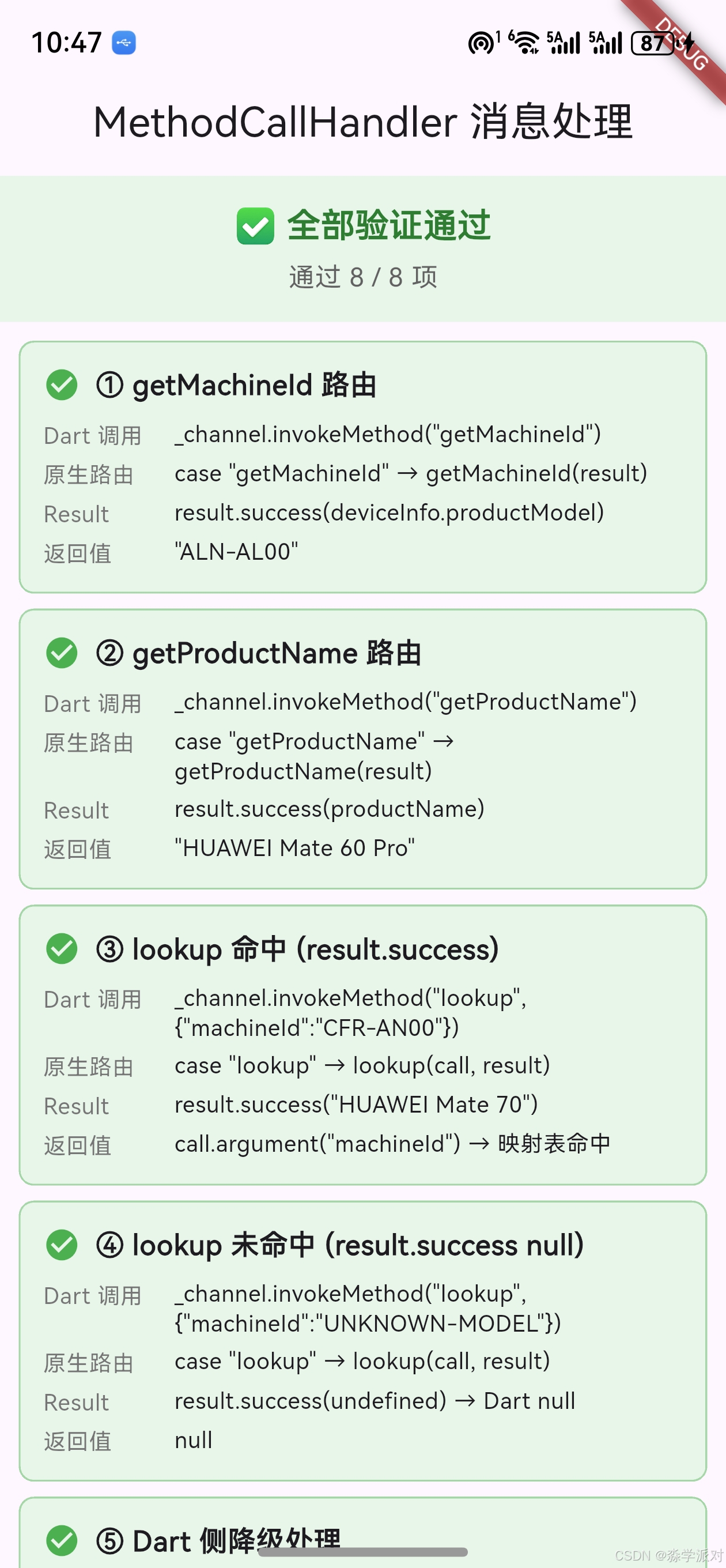
在 example/lib/main.dart 中,Article19DemoPage 页面组件会自动执行 8 项消息处理验证,覆盖 onMethodCall 路由分发、参数提取、三种 MethodResult 返回方式的完整流程。每项验证以卡片形式展示 Dart 调用语句、原生路由路径、Result 类型和实际返回值。
19.2 验证页面完整代码
dart
import 'package:apple_product_name/apple_product_name_ohos.dart';
import 'package:flutter/material.dart';
import 'package:flutter/services.dart';

void main() {
  runApp(const MyApp());
}

class MyApp extends StatelessWidget {
  const MyApp({Key? key}) : super(key: key);

  @override
  Widget build(BuildContext context) {
    return MaterialApp(
      title: 'MethodCallHandler 消息处理',
      theme: ThemeData(primarySwatch: Colors.indigo),
      home: const Article19DemoPage(),
    );
  }
}

/// 第19篇文章演示页面:MethodCallHandler 消息处理机制
class Article19DemoPage extends StatefulWidget {
  const Article19DemoPage({Key? key}) : super(key: key);

  @override
  State<Article19DemoPage> createState() => _Article19DemoPageState();
}

class _Article19DemoPageState extends State<Article19DemoPage> {
  final List<_MessageItem> _messages = [];
  bool _isRunning = true;

  @override
  void initState() {
    super.initState();
    _runAllTests();
  }

  void _addMessage({
    required String title,
    required String dartCall,
    required String nativeRoute,
    required String resultType,
    required String returnValue,
    required bool success,
  }) {
    setState(() {
      _messages.add(_MessageItem(
        title: title, dartCall: dartCall,
        nativeRoute: nativeRoute, resultType: resultType,
        returnValue: returnValue, success: success,
      ));
    });
  }

  Future<void> _runAllTests() async {
    final ohos = OhosProductName();
    const channel = MethodChannel('apple_product_name');

    // ① getMachineId --- 无参数方法路由
    try {
      final id = await ohos.getMachineId();
      _addMessage(
        title: '① getMachineId 路由',
        dartCall: '_channel.invokeMethod("getMachineId")',
        nativeRoute: 'case "getMachineId" → getMachineId(result)',
        resultType: 'result.success(deviceInfo.productModel)',
        returnValue: '"$id"', success: true,
      );
    } catch (e) {
      _addMessage(title: '① getMachineId 路由',
        dartCall: '_channel.invokeMethod("getMachineId")',
        nativeRoute: 'case "getMachineId"',
        resultType: 'result.error', returnValue: '异常: $e', success: false);
    }

    // ② getProductName --- 三级降级路由
    try {
      final name = await ohos.getProductName();
      _addMessage(
        title: '② getProductName 路由',
        dartCall: '_channel.invokeMethod("getProductName")',
        nativeRoute: 'case "getProductName" → getProductName(result)',
        resultType: 'result.success(productName)',
        returnValue: '"$name"', success: true,
      );
    } catch (e) {
      _addMessage(title: '② getProductName 路由',
        dartCall: '_channel.invokeMethod("getProductName")',
        nativeRoute: 'case "getProductName"',
        resultType: 'result.error', returnValue: '异常: $e', success: false);
    }

    // ③ lookup 命中 --- 带参数方法路由 + result.success
    try {
      final hit = await ohos.lookup('CFR-AN00');
      _addMessage(
        title: '③ lookup 命中 (result.success)',
        dartCall: 'invokeMethod("lookup", {"machineId":"CFR-AN00"})',
        nativeRoute: 'case "lookup" → lookup(call, result)',
        resultType: 'result.success("$hit")',
        returnValue: 'call.argument("machineId") → 映射表命中',
        success: true,
      );
    } catch (e) {
      _addMessage(title: '③ lookup 命中',
        dartCall: 'invokeMethod("lookup", ...)', nativeRoute: 'case "lookup"',
        resultType: 'result.error', returnValue: '异常: $e', success: false);
    }

    // ④ lookup 未命中 --- result.success(null)
    try {
      final nullResult = await ohos.lookupOrNull('UNKNOWN-MODEL');
      _addMessage(
        title: '④ lookup 未命中 (result.success null)',
        dartCall: 'invokeMethod("lookup", {"machineId":"UNKNOWN-MODEL"})',
        nativeRoute: 'case "lookup" → lookup(call, result)',
        resultType: 'result.success(undefined) → Dart null',
        returnValue: '$nullResult',
        success: nullResult == null,
      );
    } catch (e) {
      _addMessage(title: '④ lookup 未命中',
        dartCall: 'invokeMethod("lookup", ...)', nativeRoute: 'case "lookup"',
        resultType: 'result.error', returnValue: '异常: $e', success: false);
    }

    // ⑤ Dart 侧降级处理 --- lookup vs lookupOrNull
    try {
      final fallback = await ohos.lookup('UNKNOWN-MODEL');
      _addMessage(
        title: '⑤ Dart 侧降级处理',
        dartCall: 'ohos.lookup("UNKNOWN-MODEL")',
        nativeRoute: '原生侧返回 null → Dart 侧 ?? machineId',
        resultType: 'productName ?? machineId',
        returnValue: '"$fallback"',
        success: fallback == 'UNKNOWN-MODEL',
      );
    } catch (e) {
      _addMessage(title: '⑤ Dart 侧降级处理',
        dartCall: 'ohos.lookup("UNKNOWN-MODEL")', nativeRoute: '-',
        resultType: 'error', returnValue: '异常: $e', success: false);
    }

    // ⑥ notImplemented --- 未知方法触发 default 分支
    try {
      await channel.invokeMethod('nonExistentMethod');
      _addMessage(title: '⑥ notImplemented (default 分支)',
        dartCall: '_channel.invokeMethod("nonExistentMethod")',
        nativeRoute: 'default → result.notImplemented()',
        resultType: '意外成功', returnValue: '未触发 MissingPluginException',
        success: false);
    } on MissingPluginException {
      _addMessage(
        title: '⑥ notImplemented (default 分支)',
        dartCall: '_channel.invokeMethod("nonExistentMethod")',
        nativeRoute: 'default → result.notImplemented()',
        resultType: 'MissingPluginException',
        returnValue: '未知方法被正确拦截', success: true,
      );
    } catch (e) {
      _addMessage(title: '⑥ notImplemented (default 分支)',
        dartCall: '_channel.invokeMethod("nonExistentMethod")',
        nativeRoute: 'default', resultType: 'error',
        returnValue: '异常: $e', success: false);
    }

    // ⑦ 批量路由稳定性验证
    try {
      final r1 = await ohos.lookup('ALN-AL00');
      final r2 = await ohos.lookup('HBN-AL00');
      final r3 = await ohos.lookup('BAL-AL00');
      _addMessage(
        title: '⑦ 批量路由稳定性验证',
        dartCall: '连续 3 次 invokeMethod("lookup", ...)',
        nativeRoute: 'switch 路由 3 次命中 case "lookup"',
        resultType: 'result.success × 3',
        returnValue: '"$r1" / "$r2" / "$r3"', success: true,
      );
    } catch (e) {
      _addMessage(title: '⑦ 批量路由稳定性验证',
        dartCall: '连续 3 次 lookup', nativeRoute: '-',
        resultType: 'error', returnValue: '异常: $e', success: false);
    }

    // ⑧ MethodCall.argument 参数提取验证
    try {
      final name = await ohos.lookupOrNull('CFS-AN00');
      _addMessage(
        title: '⑧ MethodCall.argument 参数提取',
        dartCall: 'invokeMethod("lookup", {"machineId":"CFS-AN00"})',
        nativeRoute: 'call.argument("machineId") as string',
        resultType: 'result.success("$name")',
        returnValue: '参数正确提取并查询成功',
        success: name != null,
      );
    } catch (e) {
      _addMessage(title: '⑧ MethodCall.argument 参数提取',
        dartCall: 'invokeMethod("lookup", ...)',
        nativeRoute: 'call.argument("machineId")',
        resultType: 'error', returnValue: '异常: $e', success: false);
    }

    setState(() => _isRunning = false);
  }

  @override
  Widget build(BuildContext context) {
    final passCount = _messages.where((m) => m.success).length;
    final total = _messages.length;
    return Scaffold(
      appBar: AppBar(
        title: const Text('MethodCallHandler 消息处理'),
        centerTitle: true,
      ),
      body: Column(
        children: [
          // 顶部统计栏
          Container(
            width: double.infinity,
            padding: const EdgeInsets.symmetric(vertical: 14, horizontal: 16),
            color: _isRunning ? Colors.orange.shade50
                : (passCount == total
                    ? Colors.green.shade50 : Colors.red.shade50),
            child: Column(children: [
              Text(
                _isRunning ? '⏳ 消息处理验证中...'
                    : (passCount == total ? '✅ 全部验证通过' : '⚠️ 部分验证失败'),
                style: TextStyle(fontSize: 18, fontWeight: FontWeight.bold,
                  color: _isRunning ? Colors.orange.shade800
                      : (passCount == total
                          ? Colors.green.shade800 : Colors.red.shade800)),
              ),
              const SizedBox(height: 4),
              Text('通过 $passCount / $total 项',
                style: TextStyle(fontSize: 14, color: Colors.grey.shade700)),
            ]),
          ),
          // 消息验证列表
          Expanded(
            child: ListView.separated(
              padding: const EdgeInsets.all(10),
              itemCount: _messages.length,
              separatorBuilder: (_, __) => const SizedBox(height: 8),
              itemBuilder: (context, index) {
                final item = _messages[index];
                return Container(
                  padding: const EdgeInsets.all(12),
                  decoration: BoxDecoration(
                    color: item.success
                        ? Colors.green.shade50 : Colors.red.shade50,
                    borderRadius: BorderRadius.circular(8),
                    border: Border.all(color: item.success
                        ? Colors.green.shade200 : Colors.red.shade200),
                  ),
                  child: Column(
                    crossAxisAlignment: CrossAxisAlignment.start,
                    children: [
                      Row(children: [
                        Icon(item.success ? Icons.check_circle : Icons.error,
                          color: item.success ? Colors.green : Colors.red,
                          size: 20),
                        const SizedBox(width: 8),
                        Expanded(child: Text(item.title,
                          style: const TextStyle(
                            fontSize: 15, fontWeight: FontWeight.w600))),
                      ]),
                      const SizedBox(height: 8),
                      _buildRow('Dart 调用', item.dartCall),
                      const SizedBox(height: 4),
                      _buildRow('原生路由', item.nativeRoute),
                      const SizedBox(height: 4),
                      _buildRow('Result', item.resultType),
                      const SizedBox(height: 4),
                      _buildRow('返回值', item.returnValue),
                    ],
                  ),
                );
              },
            ),
          ),
        ],
      ),
    );
  }

  Widget _buildRow(String label, String value) {
    return Row(
      crossAxisAlignment: CrossAxisAlignment.start,
      children: [
        SizedBox(width: 70, child: Text(label,
          style: TextStyle(fontSize: 12, color: Colors.grey.shade600,
            fontWeight: FontWeight.w500))),
        Expanded(child: Text(value,
          style: const TextStyle(fontSize: 12, height: 1.3))),
      ],
    );
  }
}

class _MessageItem {
  final String title;
  final String dartCall;
  final String nativeRoute;
  final String resultType;
  final String returnValue;
  final bool success;
  const _MessageItem({required this.title, required this.dartCall,
    required this.nativeRoute, required this.resultType,
    required this.returnValue, required this.success});
}
19.3 验证项说明
| 序号 | 验证项 | 覆盖的消息处理机制 |
|---|---|---|
| ① | getMachineId 路由 | switch 路由 + 无参数方法 + result.success |
| ② | getProductName 路由 | switch 路由 + 三级降级逻辑 + result.success |
| ③ | lookup 命中 | 带参数路由 + call.argument + 映射表命中 |
| ④ | lookup 未命中 | result.success(undefined) → Dart null |
| ⑤ | Dart 侧降级 | lookup vs lookupOrNull 空值处理差异 |
| ⑥ | notImplemented | default 分支 + MissingPluginException |
| ⑦ | 批量路由稳定性 | 连续多次 switch 路由分发 |
| ⑧ | 参数提取 | call.argument("machineId") as string |
19.4 页面展示效果
页面启动后自动执行 8 项验证,每项验证以卡片形式展示四行信息:
- Dart 调用 :显示 Dart 侧的
invokeMethod调用语句 - 原生路由:显示原生侧 switch 路由命中的 case 分支
- Result :显示
MethodResult的调用方式(success/error/notImplemented) - 返回值:显示实际返回的数据
顶部统计栏显示"通过 X / 8 项",全部通过时显示绿色"✅ 全部验证通过"。
提示:验证页面应在鸿蒙真机上运行以获取真实的设备信息。模拟器上
deviceInfo.productModel返回的是模拟器型号。详见 Dart async/await 文档。
二十、常见问题与排查
20.1 FAQ
| 问题 | 原因 | 解决方案 |
|---|---|---|
| Future 永远不完成 | 忘记调用 result 的方法 | 确保每个分支都调用 success/error/notImplemented |
| MissingPluginException | 方法名不匹配或插件未注册 | 检查 call.method 与 Dart 侧 invokeMethod 参数 |
| PlatformException | 原生侧 result.error 被调用 | 根据 error code 定位具体错误 |
| 参数为 null | 键名不匹配或 Dart 侧未传参 | 检查 argument() 的键名与 Dart 侧传参的键名 |
| 类型转换异常 | as 断言类型不匹配 | 使用 typeof 检查后再断言 |
20.2 调试清单
排查消息处理问题时,按以下顺序检查:
- Dart 侧
invokeMethod的方法名是否与原生侧 case 值一致 - Dart 侧传参的键名是否与原生侧
call.argument()的键名一致 - 原生侧每个 switch 分支是否都调用了 result 的某个方法
- default 分支是否调用了
result.notImplemented() - try-catch 是否覆盖了所有可能抛出异常的代码
20.3 常见拼写错误
typescript
// 错误:方法名大小写不一致
case "GetMachineId":  // Dart 侧是 'getMachineId'

// 错误:参数键名不一致
call.argument("machine_id")  // Dart 侧传的是 'machineId'

// 错误:错误码格式不统一
result.error("error", msg, null) // 应该用 "LOOKUP_ERROR"提示:方法名和参数键名都是大小写敏感 的。建议在 Dart 侧和原生侧使用相同的命名风格(camelCase),并在代码审查时重点检查名称一致性。详见 Flutter 插件开发指南。
总结
MethodCallHandler 接口通过单一的 onMethodCall 方法实现了 Dart 层与原生层之间的完整消息处理机制。apple_product_name 的实现展示了标准的消息处理模式:switch 路由分发 3 个业务方法、MethodCall 提取参数并进行校验、MethodResult 的三种返回方式覆盖成功/错误/未实现三种场景、统一的 try-catch 错误处理模板保证了异常安全。核心要点是每次 onMethodCall 被调用时必须且只能 调用 result 的一个方法来返回结果,以及 default 分支的 notImplemented() 是不可省略的防御机制。
下一篇文章将介绍 deviceInfo 系统 API 的调用方法,敬请期待。
如果这篇文章对你有帮助,欢迎点赞👍、收藏⭐、关注🔔,你的支持是我持续创作的动力!
相关资源:
- OpenHarmony适配仓库:flutter_apple_product_name
- 开源鸿蒙跨平台社区:openharmonycrossplatform
- Flutter Platform Channels:官方文档
- Flutter MethodChannel API:MethodChannel class
- PlatformException:API 文档
- Dart async/await:Dart asynchronous programming
- Flutter 插件开发指南:Developing packages & plugins
- OpenHarmony 设备信息 API:deviceInfo 文档
- 华为开发者联盟:官方网站
- Flutter 测试文档:Testing Flutter apps