1. 什么是 Keepalived?
Keepalived 是一个用 C 语言编写的路由软件,其主要目标是实现高性能高可用性 。它通过 VRRP(虚拟路由冗余协议) 实现,能够解决负载均衡器中存在的单点故障问题。
2. 核心功能
| 功能模块 | 作用 | 关键技术 |
|---|---|---|
| 高可用 | 提供系统级的高可用性,防止单点故障 | VRRP协议、虚拟IP漂移 |
| 健康检查 | 监控后端服务器状态,自动剔除故障节点 | TCP/HTTP检查、自定义脚本 |
| 负载均衡 | 集成了LVS的IPVS模块,可直接配置LVS | LVS(Linux Virtual Server) |
第二部分:VRRP 协议详解
1. VRRP 核心原理
VRRP 是一种网络协议,允许多台路由器共享一个虚拟IP地址,实现路由器的高可用。
工作模式:
-
Master(主节点):实际持有虚拟IP,处理所有发往该IP的请求
-
Backup(备节点):监控Master状态,当Master故障时接管VIP
-
虚拟路由器:由一组路由器组成的逻辑实体,对外表现为一个具有固定IP的路由器
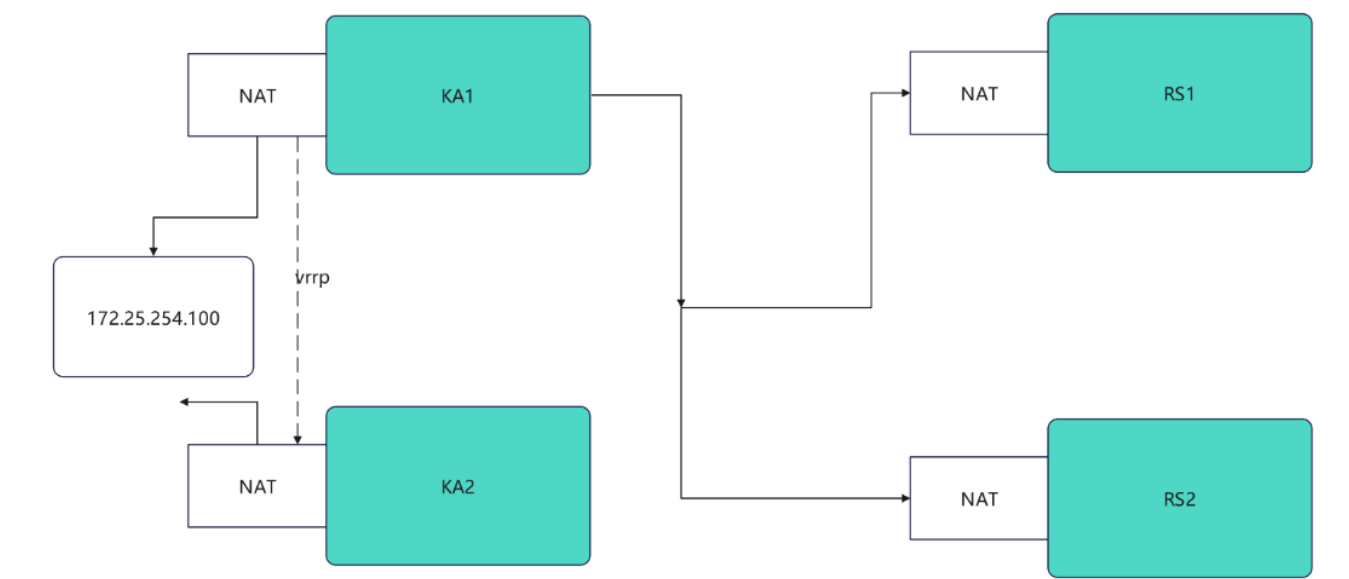
Keepalived虚拟路由配置
1.Keepalived安装
root@KA1 \~# dnf install keepalived.x86_64 -y
root@KA2 \~# dnf install keepalived.x86_64 -y
2.配置虚拟路由
#在master
root@KA1 \~# vim /etc/keepalived/keepalived.conf
global_defs {
notification_email {
}
notification_email_from timinglee_zln@163.com
smtp_server 127.0.0.1
smtp_connect_timeout 30
router_id KA1
vrrp_skip_check_adv_addr
#vrrp_strict
vrrp_garp_interval 1
vrrp_gna_interval 1
vrrp_mcast_group4 224.0.0.44
}
vrrp_instance WEB_VIP {
state MASTER
interface eth0
virtual_router_id 51
priority 100
advert_int 1
authentication {
auth_type PASS
auth_pass 1111
}
virtual_ipaddress {
172.25.254.100/24 dev eth0 label eth0:0
}
}
root@KA1 \~# systemctl enable --now keepalived.service
Created symlink /etc/systemd/system/multi-user.target.wants/keepalived.service → /usr/lib/systemd/system/keepalived.service.
#在KA2中设定
root@KA2 \~# vim /etc/keepalived/keepalived.conf
global_defs {
notification_email {
}
notification_email_from timinglee_zln@163.com
smtp_server 127.0.0.1
smtp_connect_timeout 30
router_id KA1
vrrp_skip_check_adv_addr
#vrrp_strict
vrrp_garp_interval 1
vrrp_gna_interval 1
vrrp_mcast_group4 224.0.0.44
}
vrrp_instance WEB_VIP {
state BACKUP
interface eth0
virtual_router_id 51
priority 80
advert_int 1
authentication {
auth_type PASS
auth_pass 1111
}
virtual_ipaddress {
172.25.254.100/24 dev eth0 label eth0:0
}
}
root@KA2 \~# systemctl enable --now keepalived.service
Created symlink /etc/systemd/system/multi-user.target.wants/keepalived.service → /usr/lib/systemd/system/keepalived.service.
验证
[root@KA1 ~]# tcpdump -i eth0 -nn host 224.0.0.44
11:38:46.183386 IP 172.25.254.50 > 224.0.0.44: VRRPv2, Advertisement, vrid 51, prio 100, authtype simple, intvl 1s, length 20
11:38:47.184051 IP 172.25.254.50 > 224.0.0.44: VRRPv2, Advertisement, vrid 51, prio 100, authtype simple, intvl 1s, length 20
11:38:48.184610 IP 172.25.254.50 > 224.0.0.44: VRRPv2, Advertisement, vrid 51, prio 100, authtype simple, intvl 1s, length 20
11:38:49.185084 IP 172.25.254.50 > 224.0.0.44: VRRPv2, Advertisement, vrid 51, prio 100, authtype simple, intvl 1s, length 20
测试故障
在一个独立的shell中执行
root@KA1 \~# tcpdump -i eth0 -nn host 224.0.0.44
在kA1中模拟故障
root@KA1 \~# systemctl stop keepalived.service
在KA2中看vip是否被迁移到当前主机
root@KA2 \~# ifconfig
eth0: flags=4163<UP,BROADCAST,RUNNING,MULTICAST> mtu 1500
inet 172.25.254.60 netmask 255.255.255.0 broadcast 172.25.254.255
inet6 fe80::26df:35e5:539:56bc prefixlen 64 scopeid 0x20<link>
ether 00:0c:29:1e:fd:7a txqueuelen 1000 (Ethernet)
RX packets 2668 bytes 237838 (232.2 KiB)
RX errors 0 dropped 0 overruns 0 frame 0
TX packets 2229 bytes 280474 (273.9 KiB)
TX errors 0 dropped 0 overruns 0 carrier 0 collisions 0
eth0:0: flags=4163<UP,BROADCAST,RUNNING,MULTICAST> mtu 1500
inet 172.25.254.100 netmask 255.255.255.0 broadcast 0.0.0.0
ether 00:0c:29:1e:fd:7a txqueuelen 1000 (Ethernet)
lo: flags=73<UP,LOOPBACK,RUNNING> mtu 65536
inet 127.0.0.1 netmask 255.0.0.0
inet6 ::1 prefixlen 128 scopeid 0x10<host>
loop txqueuelen 1000 (Local Loopback)
RX packets 52 bytes 3528 (3.4 KiB)
RX errors 0 dropped 0 overruns 0 frame 0
TX packets 52 bytes 3528 (3.4 KiB)
TX errors 0 dropped 0 overruns 0 carrier 0 collisions 0
双主模式代理不同业务实现高可用
实验环境
#在rs中设定lo添加vip2 172.25.254.200/32
#在rs中搭建数据库
[root@rs1 ~]# dnf install mariadb-server -y
[root@rs1 ~]# systemctl enable --now mariadb
Created symlink /etc/systemd/system/mysql.service → /usr/lib/systemd/system/mariadb.service.
Created symlink /etc/systemd/system/mysqld.service → /usr/lib/systemd/system/mariadb.service.
Created symlink /etc/systemd/system/multi-user.target.wants/mariadb.service → /usr/lib/systemd/system/mariadb.service.
[root@rs1 ~]# mysql
Welcome to the MariaDB monitor.  Commands end with ; or \g.
Your MariaDB connection id is 3
Server version: 10.5.27-MariaDB MariaDB Server

Copyright (c) 2000, 2018, Oracle, MariaDB Corporation Ab and others.

Type 'help;' or '\h' for help. Type '\c' to clear the current input statement.

MariaDB [(none)]> CREATE USER lee@'%' identified by 'lee';
Query OK, 0 rows affected (0.001 sec)

MariaDB [(none)]> GRANT ALL ON *.* TO lee@'%';
Query OK, 0 rows affected (0.000 sec)

MariaDB [(none)]> quit
Bye
[root@rs2 ~]# dnf install mariadb-server -y
[root@rs2 ~]# systemctl enable --now mariadb
Created symlink /etc/systemd/system/mysql.service → /usr/lib/systemd/system/mariadb.service.
Created symlink /etc/systemd/system/mysqld.service → /usr/lib/systemd/system/mariadb.service.
Created symlink /etc/systemd/system/multi-user.target.wants/mariadb.service → /usr/lib/systemd/system/mariadb.service.
[root@rs2 ~]# mysql
Welcome to the MariaDB monitor.  Commands end with ; or \g.
Your MariaDB connection id is 3
Server version: 10.5.27-MariaDB MariaDB Server

Copyright (c) 2000, 2018, Oracle, MariaDB Corporation Ab and others.

Type 'help;' or '\h' for help. Type '\c' to clear the current input statement.

MariaDB [(none)]> CREATE USER lee@'%' identified by 'lee';
Query OK, 0 rows affected (0.001 sec)

MariaDB [(none)]> GRANT ALL ON *.* TO lee@'%';
Query OK, 0 rows affected (0.000 sec)

MariaDB [(none)]> quit
Bye

#测试
[root@rs1 ~]# mysql -ulee -plee -h172.25.254.10
Welcome to the MariaDB monitor.  Commands end with ; or \g.
Your MariaDB connection id is 4
Server version: 10.5.27-MariaDB MariaDB Server

Copyright (c) 2000, 2018, Oracle, MariaDB Corporation Ab and others.

Type 'help;' or '\h' for help. Type '\c' to clear the current input statement.

MariaDB [(none)]> quit
Bye
[root@rs2 ~]# mysql -ulee -plee -h172.25.254.20
Welcome to the MariaDB monitor.  Commands end with ; or \g.
Your MariaDB connection id is 4
Server version: 10.5.27-MariaDB MariaDB Server

Copyright (c) 2000, 2018, Oracle, MariaDB Corporation Ab and others.

Type 'help;' or '\h' for help. Type '\c' to clear the current input statement.

MariaDB [(none)]> quit
Bye
实现不同vip代理不同业务
KA1和KA2
[root@KA1]# vim /etc/keepalived/keepalived.conf
include /etc/keepalived/conf.d/webserver.conf
include /etc/keepalived/conf.d/datebase.conf
[root@KA2]# vim /etc/keepalived/keepalived.conf
include /etc/keepalived/conf.d/webserver.conf
include /etc/keepalived/conf.d/datebase.conf
[root@KA1]# vim /etc/keepalived/conf.d/webserver.conf
virtual_server 172.25.254.100 80 {
    delay_loop 6
    lb_algo rr
    lb_kind DR
    protocol TCP

    real_server 172.25.254.10 80 {
        weight 1
        HTTP_GET {
            url {
              path /
              status_code 200
            }
            connect_timeout 1
            retry 3
            delay_before_retry 1
      }
    }

    real_server 172.25.254.20 80 {
        weight 1
        TCP_CHECK {
          connect_timeout 5
          retry 3
          delay_before_retry 3
          connect_port 80
      }
    }
}
[root@KA2]# vim /etc/keepalived/conf.d/webserver.conf
virtual_server 172.25.254.100 80 {
    delay_loop 6
    lb_algo rr
    lb_kind DR
    protocol TCP

    real_server 172.25.254.10 80 {
        weight 1
        HTTP_GET {
            url {
              path /
              status_code 200
            }
            connect_timeout 1
            retry 3
            delay_before_retry 1
      }
    }

    real_server 172.25.254.20 80 {
        weight 1
        TCP_CHECK {
          connect_timeout 5
          retry 3
          delay_before_retry 3
          connect_port 80
      }
    }
}
[root@KA1]# vim /etc/keepalived/conf.d/datebase.conf
virtual_server 172.25.254.200 3306 {
    delay_loop 6
    lb_algo rr
    lb_kind DR
    protocol TCP

    real_server 172.25.254.10 3306 {
        weight 1
        TCP_CHECK {
          connect_timeout 5
          retry 3
          delay_before_retry 3
          connect_port 3306
      }
    }

    real_server 172.25.254.20 3306 {
        weight 1
        TCP_CHECK {
          connect_timeout 5
          retry 3
          delay_before_retry 3
          connect_port 3306
      }
    }
}
[root@KA1]# systemctl restart keepalived.service
[root@KA2]# systemctl restart keepalived.service
测试
root@rs2 \~# mysql -ulee -plee -h172.25.254.200
Welcome to the MariaDB monitor. Commands end with ; or \g.
Your MariaDB connection id is 18
Server version: 10.5.27-MariaDB MariaDB Server
Copyright (c) 2000, 2018, Oracle, MariaDB Corporation Ab and others.
Type 'help;' or '\h' for help. Type '\c' to clear the current input statement.
MariaDB (none)> quit
Bye
root@test# curl 172.25.254.100
RS1 - 172.25.254.10
root@test# curl 172.25.254.100
RS2 - 172.25.254.20
利用VRRP Script 实现全能高可用
实验环境
#在KA1和KA2中安装haproxy
[root@KA1]# dnf install haproxy-2.4.22-4.el9.x86_64  -y
[root@KA1]# vim /etc/sysctl.conf
net.ipv4.ip_nonlocal_bind=1
[root@KA1]# vim /etc/haproxy/haproxy.cfg
listen webserver
    bind 172.25.254.100:80
    mode http
    server web1 172.25.254.10:80 check
    server web2 172.25.254.20:80 check
[root@KA1]# systemctl enable --now haproxy.service
Created symlink /etc/systemd/system/multi-user.target.wants/haproxy.service → /usr/lib/systemd/system/haproxy.service.
[root@KA2]# dnf install haproxy-2.4.22-4.el9.x86_64  -y
[root@KA2]# vim /etc/sysctl.conf
net.ipv4.ip_nonlocal_bind=1
[root@KA1]# vim /etc/haproxy/haproxy.cfg
listen webserver
    bind 172.25.254.200:80
    mode http
    server web1 172.25.254.10:80 check
    server web2 172.25.254.20:80 check
[root@KA2]# systemctl enable --now haproxy.service
Created symlink /etc/systemd/system/multi-user.target.wants/haproxy.service → /usr/lib/systemd/system/haproxy.service.
vrrp_scripts
#在KA1主机中
[root@KA1]# vim /etc/keepalived/scripts/test.sh
#!/bin/bash
[ ! -f "/mnt/lee" ]

[root@KA1 ~]# vim /etc/keepalived/keepalived.conf
vrrp_script check_lee {
    script "/etc/keepalived/scripts/test.sh"
    interval 1
    weight -30
    fall 2
    rise 2
    timeout 2
    user root
}
vrrp_instance DB_VIP {
    state MASTER
    interface eth0
    virtual_router_id 51
    priority 100
    advert_int 1
    authentication {
        auth_type PASS
        auth_pass 1111
    }
    virtual_ipaddress {
        172.25.254.100/24 dev eth0 label eth0:1
    }
    track_script {
        check_lee
    }
}
[root@KA1]# systemctl restart keepalived.service

#测试
[root@KA1]# ifconfig
eth0: flags=4163<UP,BROADCAST,RUNNING,MULTICAST>  mtu 1500
        inet 172.25.254.50  netmask 255.255.255.0  broadcast 172.25.254.255
        inet6 fe80::2548:cded:e9d2:8517  prefixlen 64  scopeid 0x20<link>
        ether 00:0c:29:8b:6e:34  txqueuelen 1000  (Ethernet)
        RX packets 11923  bytes 1112762 (1.0 MiB)
        RX errors 0  dropped 0  overruns 0  frame 0
        TX packets 14839  bytes 1002385 (978.8 KiB)
        TX errors 0  dropped 0 overruns 0  carrier 0  collisions 0

eth0:0: flags=4163<UP,BROADCAST,RUNNING,MULTICAST>  mtu 1500
        inet 172.25.254.100  netmask 255.255.255.0  broadcast 0.0.0.0
        ether 00:0c:29:8b:6e:34  txqueuelen 1000  (Ethernet)

lo: flags=73<UP,LOOPBACK,RUNNING>  mtu 65536
        inet 127.0.0.1  netmask 255.0.0.0
        inet6 ::1  prefixlen 128  scopeid 0x10<host>
        loop  txqueuelen 1000  (Local Loopback)
        RX packets 4746  bytes 243658 (237.9 KiB)
        RX errors 0  dropped 0  overruns 0  frame 0
        TX packets 4746  bytes 243658 (237.9 KiB)
        TX errors 0  dropped 0 overruns 0  carrier 0  collisions 0
[root@KA1]# touch /mnt/lee
[root@KA1]# ifconfig
eth0: flags=4163<UP,BROADCAST,RUNNING,MULTICAST>  mtu 1500
        inet 172.25.254.50  netmask 255.255.255.0  broadcast 172.25.254.255
        inet6 fe80::2548:cded:e9d2:8517  prefixlen 64  scopeid 0x20<link>
        ether 00:0c:29:8b:6e:34  txqueuelen 1000  (Ethernet)
        RX packets 12110  bytes 1131044 (1.0 MiB)
        RX errors 0  dropped 0  overruns 0  frame 0
        TX packets 15105  bytes 1020669 (996.7 KiB)
        TX errors 0  dropped 0 overruns 0  carrier 0  collisions 0

lo: flags=73<UP,LOOPBACK,RUNNING>  mtu 65536
        inet 127.0.0.1  netmask 255.0.0.0
        inet6 ::1  prefixlen 128  scopeid 0x10<host>
        loop  txqueuelen 1000  (Local Loopback)
        RX packets 4918  bytes 252258 (246.3 KiB)
        RX errors 0  dropped 0  overruns 0  frame 0
        TX packets 4918  bytes 252258 (246.3 KiB)
        TX errors 0  dropped 0 overruns 0  carrier 0  collisions 0

[root@KA1]# rm -fr /mnt/lee
[root@KA1]# ifconfig
eth0: flags=4163<UP,BROADCAST,RUNNING,MULTICAST>  mtu 1500
        inet 172.25.254.50  netmask 255.255.255.0  broadcast 172.25.254.255
        inet6 fe80::2548:cded:e9d2:8517  prefixlen 64  scopeid 0x20<link>
        ether 00:0c:29:8b:6e:34  txqueuelen 1000  (Ethernet)
        RX packets 12333  bytes 1152856 (1.0 MiB)
        RX errors 0  dropped 0  overruns 0  frame 0
        TX packets 15423  bytes 1042531 (1018.0 KiB)
        TX errors 0  dropped 0 overruns 0  carrier 0  collisions 0

eth0:0: flags=4163<UP,BROADCAST,RUNNING,MULTICAST>  mtu 1500
        inet 172.25.254.100  netmask 255.255.255.0  broadcast 0.0.0.0
        ether 00:0c:29:8b:6e:34  txqueuelen 1000  (Ethernet)

lo: flags=73<UP,LOOPBACK,RUNNING>  mtu 65536
        inet 127.0.0.1  netmask 255.0.0.0
        inet6 ::1  prefixlen 128  scopeid 0x10<host>
        loop  txqueuelen 1000  (Local Loopback)
        RX packets 5128  bytes 262758 (256.5 KiB)
        RX errors 0  dropped 0  overruns 0  frame 0
        TX packets 5128  bytes 262758 (256.5 KiB)
        TX errors 0  dropped 0 overruns 0  carrier 0  collisions 0
keepalived + haproxy
[root@KA1]# vim /etc/keepalived/scripts/haproxy_check.sh
#!/bin/bash
killall -0 haproxy &> /dev/null

[root@KA1 ~]# chmod +x /etc/keepalived/scripts/haproxy_check.sh
vrrp_script haporxy_check {
    script "/etc/keepalived/scripts/haproxy_check.sh"
    interval 1
    weight -30
    fall 2
    rise 2
    timeout 2
    user root
}
vrrp_instance WEB_VIP {
    state MASTER
    interface eth0
    virtual_router_id 51
    priority 100
    advert_int 1
    authentication {
        auth_type PASS
        auth_pass 1111
    }
    virtual_ipaddress {
        172.25.254.100/24 dev eth0 label eth0:0
    }
    track_script {
        haporxy_check
    }
}
[root@KA1]# systemctl restart keepalived.service

#测试
#通过关闭和开启haproxy来观察vip是否迁移
[root@KA1]# systemctl stop haproxy.service
[root@KA2 ~]# ifconfig
eth0: flags=4163<UP,BROADCAST,RUNNING,MULTICAST>  mtu 1500
        inet 172.25.254.60  netmask 255.255.255.0  broadcast 172.25.254.255
        inet6 fe80::7a00:745:7105:ccf3  prefixlen 64  scopeid 0x20<link>
        ether 00:0c:29:94:28:97  txqueuelen 1000  (Ethernet)
        RX packets 10667  bytes 987449 (964.3 KiB)
        RX errors 0  dropped 0  overruns 0  frame 0
        TX packets 12493  bytes 853825 (833.8 KiB)
        TX errors 0  dropped 0 overruns 0  carrier 0  collisions 0

eth0:0: flags=4163<UP,BROADCAST,RUNNING,MULTICAST>  mtu 1500
        inet 172.25.254.100  netmask 255.255.255.0  broadcast 0.0.0.0
        ether 00:0c:29:8b:6e:34  txqueuelen 1000  (Ethernet)

eth0:1: flags=4163<UP,BROADCAST,RUNNING,MULTICAST>  mtu 1500
        inet 172.25.254.200  netmask 255.255.255.0  broadcast 0.0.0.0
        ether 00:0c:29:94:28:97  txqueuelen 1000  (Ethernet)

lo: flags=73<UP,LOOPBACK,RUNNING>  mtu 65536
        inet 127.0.0.1  netmask 255.0.0.0
        inet6 ::1  prefixlen 128  scopeid 0x10<host>
        loop  txqueuelen 1000  (Local Loopback)
        RX packets 2062  bytes 110074 (107.4 KiB)
        RX errors 0  dropped 0  overruns 0  frame 0
        TX packets 2062  bytes 110074 (107.4 KiB)
        TX errors 0  dropped 0 overruns 0  carrier 0  collisions 0

[root@KA2 ~]# systemctl stop haproxy.service
[root@KA1]# ifconfig
eth0: flags=4163<UP,BROADCAST,RUNNING,MULTICAST>  mtu 1500
        inet 172.25.254.50  netmask 255.255.255.0  broadcast 172.25.254.255
        inet6 fe80::2548:cded:e9d2:8517  prefixlen 64  scopeid 0x20<link>
        ether 00:0c:29:8b:6e:34  txqueuelen 1000  (Ethernet)
        RX packets 13418  bytes 1260313 (1.2 MiB)
        RX errors 0  dropped 0  overruns 0  frame 0
        TX packets 16911  bytes 1144704 (1.0 MiB)
        TX errors 0  dropped 0 overruns 0  carrier 0  collisions 0

eth0:0: flags=4163<UP,BROADCAST,RUNNING,MULTICAST>  mtu 1500
        inet 172.25.254.100  netmask 255.255.255.0  broadcast 0.0.0.0
        ether 00:0c:29:8b:6e:34  txqueuelen 1000  (Ethernet)

eth0:1: flags=4163<UP,BROADCAST,RUNNING,MULTICAST>  mtu 1500
        inet 172.25.254.200  netmask 255.255.255.0  broadcast 0.0.0.0
        ether 00:0c:29:94:28:97  txqueuelen 1000  (Ethernet)

lo: flags=73<UP,LOOPBACK,RUNNING>  mtu 65536
        inet 127.0.0.1  netmask 255.0.0.0
        inet6 ::1  prefixlen 128  scopeid 0x10<host>
        loop  txqueuelen 1000  (Local Loopback)
        RX packets 5798  bytes 298808 (291.8 KiB)
        RX errors 0  dropped 0  overruns 0  frame 0
        TX packets 5798  bytes 298808 (291.8 KiB)
        TX errors 0  dropped 0 overruns 0  carrier 0  collisions 0