去年五月的的时候,我们通过《Android 16 的 Appfunctions API ,应用级 MCP 支持为 AI 场景打通最后一层壁垒》 聊了 Android 正在规划 Appfunctions API ,为 AI 应用提供系统级的 MCP 支持。
而现在官方正式官宣了 Appfunctions ,并展示了在 Galaxy S26 系列上与 Gemini 的三星图库集成的功能支持,例如用户只需要告诉 Gemini "从三星图库里找找我猫的照片",Gemini 会接收用户的查询,智能识别并触发相应的功能,将三星图库中的照片直接显示在 Gemini ,并且支持通过语音或文字完成:

谷歌表示 AppFunctions 目前会先在 Galaxy S26 系列和部分 Pixel 10 设备上推出早期预览版,用户只需长按电源键,就可将复杂任务直接交给 Gemini,早起会先支持美国和韩国精选的外卖、百货和网约车等场景:

对于 AppFunctions 支持,官方预计 Android 17 会全面拓展推广。
那什么是 AppFunctions 呢?简单来说就是 :让你的 App 能被 AI 当成工具调用。
应用把一部分能力(数据/动作)以"自描述函数"的方式暴露出来,AI agent(例如 Gemini)能发现并执行这些函数,从而完成跨 App 的任务,而这个过程,不需要打开目标 App ,类似于一个本地 MCP 。
这里有个有趣的是,它不一定要 App 本身做了支持:
对还没做 AppFunctions 的应用,Google 在做一套"AI 代理 UI 自动化框架",由系统/助手去操作 UI 完成多步骤任务,并提供通知 "live view" 让用户随时接管,对敏感操作(如支付)会在完成前提醒。
这个降级操作,等于是 Google 在系统层做了一套自动操作 App 的行为,这就有点「强人所难」的味道了,不过也可以看出 Google 强推 Gemini 的决心。
而对于 AppFunctions 的实际原理,其实就是在系统建立了一套可索引、可执行的本地函数体系:
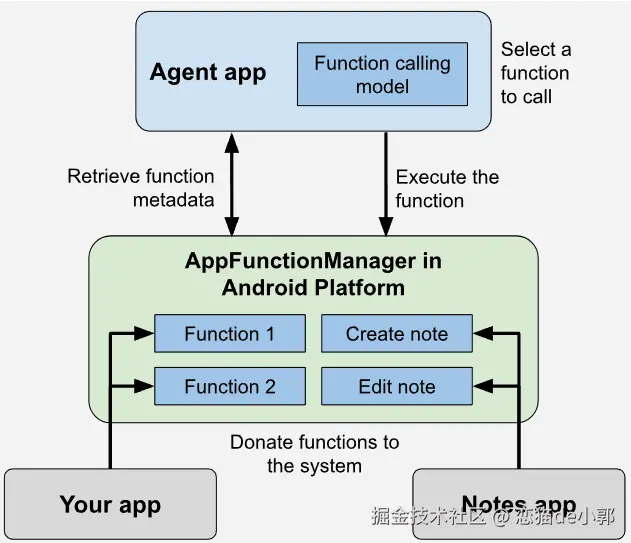
AppFunctions 在 API 是一个 Jetpack 体系的包支持,开发者可以用注解(@AppFunction 和 @AppFunctionSerializable )标记要暴露的函数和数据结构,让函数参数/返回值变成可以被 agent 理解为 schema 。
之后系统会把可用函数的 metadata 索引到本地 AppSearch ,形成 AppFunctionStaticMetadata 文档,里面包含:
functionIdentifier(后续执行要用的唯一标识)- 函数实现的 schema 信息(让 agent 知道这函数能做什么、需要什么参数)
最后 agent 用 functionIdentifier 发起执行请求,调用方(agent app / assistant)拿到 functionIdentifier 后构造 ExecuteAppFunctionRequest,再通过平台侧的 AppFunctionManager.executeAppFunction(...) 执行,结果通过 OutcomeReceiver 回调返回成功/失败。
对于开发者,主要是通过 AndroidX AppFunctions 库进行集成:
-
核心库:
androidx.appfunctions:appfunctions:客户端 API,用于管理和查询androidx.appfunctions:appfunctions-service:服务端 API,用于 App 内部暴露功能androidx.appfunctions:appfunctions-compiler:基于 KSP 的编译器,处理注解
-
关键元素:
@AppFunction注解:标记在 Kotlin 函数上AppFunctionService:一种特殊的 Bound Service,系统通过它与 App 通信AppFunctionSerializable:用于定义 AI 可理解的复杂参数类型
-
权限模型:
- 调用方(如 Gemini)必须持有
EXECUTE_APP_FUNCTIONS权限 - App 可以通过配置决定哪些函数需要用户显式授权才能运行
- 调用方(如 Gemini)必须持有
例如下方就是一个笔记应用的 AppFunctions 示例,对外支持创建、编辑和列出笔记的功能:
kotlin
class NoteFunctions(
private val noteRepository: NoteRepository
) {
/**
* A note.
*
* @param id The note's ID.
* @param title The note's title.
* @param content The note's content.
*/
@AppFunctionSerializable(isDescribedByKDoc = true)
data class Note(val id: Int, val title: String, val content: String)
/**
* Lists all available notes.
*
* @param appFunctionContext The context in which the AppFunction is executed.
*/
@AppFunction(isDescribedByKDoc = true)
suspend fun listNotes(appFunctionContext: AppFunctionContext): List<Note>? {
return if (noteRepository.appNotes.isEmpty()) null else viewModel.appNotes
}
/**
* Adds a new note to the app.
*
* @param appFunctionContext The context in which the AppFunction is executed.
* @param title The title of the note.
* @param content The note's content.
*/
@AppFunction(isDescribedByKDoc = true)
suspend fun createNote(
appFunctionContext: AppFunctionContext,
title: String,
content: String
): Note {
return noteRepository.createNote(title, content)
}
/**
* Edits a single note.
*
* @param appFunctionContext The context in which the AppFunction is executed.
* @param noteId The target note's ID.
* @param title The new title if it should be updated.
* @param content The new content if it should be updated.
*/
@AppFunction(isDescribedByKDoc = true)
suspend fun editNote(
appFunctionContext: AppFunctionContext,
noteId: String,
title: String?,
content: String,
): Note? {
return noteRepository.updateNote(noteId, title, content)
}
}一般情况下,应用不需要验证是否支持 AppFunction ,因为 Jetpack 会自动处理这个问题,AppFunctionManager 会帮你判断功能是否可用。
最后,可以看到这更多属于一个协议,比起粗暴打开 App 进行模拟操作,这种不需要唤起 App 的 MCP 操作显得更加规范,最主要 App 本身也可以选择性公开支持,用户也可以直接在一个界面下完成所有任务,这才是符合手机 Agent 的一个理想形态。