引言
本文介绍了在 Kotlin Multiplatform 项目中集成和使用 Protobuf 的方法,重点通过 Wire 库实现数据序列化。
对于 Protobuf 的介绍和原理,可以参考前文 juejin.cn/post/757536...
一、KMP 工程中集成
1.1 wire 介绍
在 KMP 开发中,推荐使用 Wire 库来处理 Protobuf 序列化任务。Wire 是由 Square 公司开发的,专为 Android 和 Java 平台设计,在 Kotlin 生态中也有广泛应用。Wire 在 GitHub 上拥有超过 4.4k stars,比较可靠。
Wire 的 GitHub 主页:github.com/square/wire
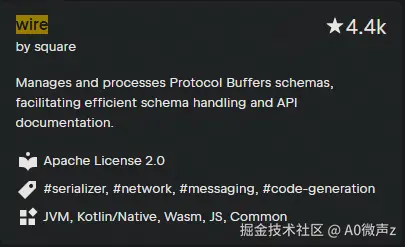
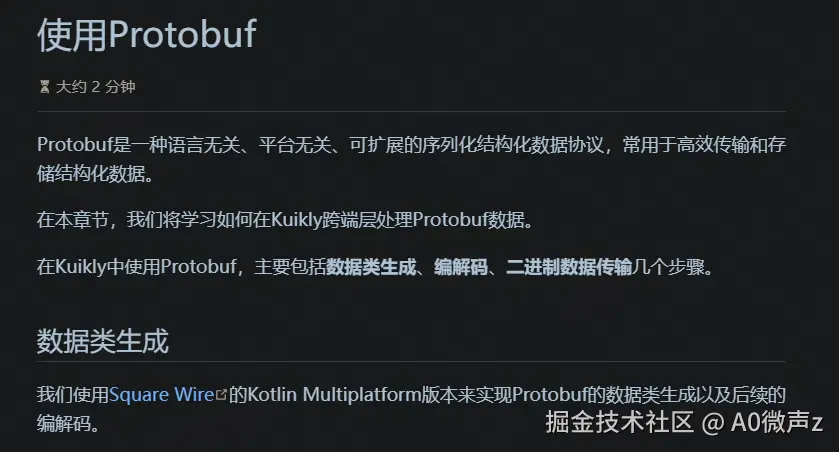
此外,腾讯在 kuikly 文档的 Protobuf 部分也明确采用了 Wire,进一步证明了它在实际项目中的实用性。
kuikly Protobuf 使用文档:kuikly.tds.qq.com/DevGuide/pr...
1.2 KMP 中集成 wire
wire 开发文档:square.github.io/wire/
首先,我们需要在项目的 libs.versions.toml 文件里声明 Wire 的依赖版本和库引用。添加以下内容:
ini
[versions]
wire = "4.9.2" # 指定我们使用的 Wire 版本

[libraries]
# 声明运行时需要的库
wire = { module = "com.squareup.wire:wire-runtime", version.ref = "wire" }

[plugins]
# 声明 Wire Gradle 插件
wire = { id = "com.squareup.wire", version.ref = "wire" }
接下来,在公共模块(common module)的 build.gradle.kts 文件中,我们需要做三件事:应用插件、添加运行时依赖和配置 Wire。
scss
//添加插件 在文件顶部或 plugins 块内启用 Wire Gradle 插件。
plugins {
    alias(libs.plugins.wire)
}

//运行时依赖 确保公共模块的代码能访问 Wire 的运行时库
kotlin {
    sourceSets {
        val commonMain by getting {
            dependencies {
                api(libs.wire)
            }
        }
    }
}

//配置
wire {
    sourcePath {
        srcDir("src/commonMain/kotlin") // 指定 .proto 文件所在的目录
    }
    kotlin {
        includes = listOf("com.example.mylibrary.proto.*") // 指定要生成代码的 .proto 包路径
        out = "${buildDir}/generated/wire" // 指定生成的 Kotlin 代码的输出目录
    }
}
使用wire的好处:
- 自动生成: 配置好之后,Wire Gradle 插件会在构建过程中自动处理 .proto 文件,为你生成对应的 Kotlin 数据实体类。不需要手动运行额外的脚本或命令。
- 简化流程: 通过直接在 Gradle 中配置源目录和输出目录,整个开发流程变得更加简单和集成。
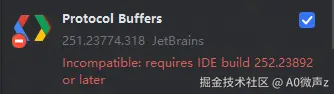
- IDE 支持: 添加了 Wire 插件后,像 Android Studio 或 IntelliJ IDEA 这样的 IDE 通常会自动识别 .proto 文件并提供语法高亮显示,这能显著改善你编辑这些文件的体验。
二、KMP 中使用
2.1 实体类生成
在配置好 Wire 后,我们可以在指定的 proto 源目录下创建 .proto 文件。这些文件定义了我们的数据结构协议。
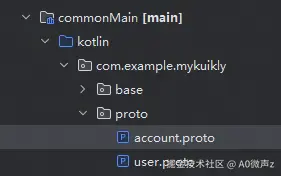
这里是一个简单的 proto 文件示例,它定义了一个账户消息类型:
ini
syntax = "proto3"; // 指定使用proto3版本

package com.example.mykuikly.proto;// 确保包名与配置匹配

message Account {
  int32 id = 1;
  string name = 2;
  string email = 3;
  AccountType accountType = 4;

  enum AccountType {
    TYPE_1 = 0;
    TYPE_2 = 1;
    TYPE_3 = 2;
    TYPE_4 = 3;
  }
}
在这个示例中,我们使用最成熟的 proto3 语法。
要确保 package 包名声明必须与 Gradle 配置中的 package 路径完全一致,如果包名错误,Protobuf 编译器可能无法生成对应的实体类文件。
构建项目后,Wire 会自动在配置的输出目录生成对应的 Kotlin 实体类。我们不需要手动执行任何额外命令。
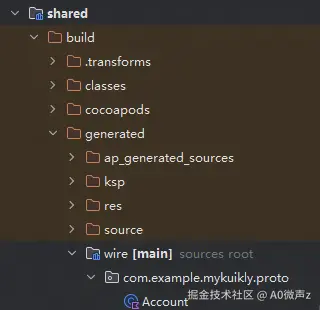
生成的实体类大致如下(已简化,关键部分):
kotlin
public class KAccount(
  @field:WireField(tag = 1,adapter = "com.squareup.wire.ProtoAdapter#INT32",label = WireField.Label.OMIT_IDENTITY,schemaIndex = 0,)
  public val id: Int = 0,
  @field:WireField(tag = 2,adapter = "com.squareup.wire.ProtoAdapter#STRING",label = WireField.Label.OMIT_IDENTITY,schemaIndex = 1,)
  public val email: String = "",
  @field:WireField(tag = 3,adapter = "com.squareup.wire.ProtoAdapter#STRING",label = WireField.Label.OMIT_IDENTITY,schemaIndex = 2,)
  public val mainEmail: String = "",
  @field:WireField(tag = 4,adapter = "com.netease.mail.mmsharedkmp.proto.KAccount${'$'}AccountType#ADAPTER",label = WireField.Label.OMIT_IDENTITY,schemaIndex = 3,)
  public val accountType: AccountType = AccountType.NETEASE_FREE,
  unknownFields: ByteString = ByteString.EMPTY,
) : Message<KAccount, Nothing>(ADAPTER, unknownFields) {

public companion object {
    @JvmField
    public val ADAPTER: ProtoAdapter<KAccount> = object : ProtoAdapter<KAccount>(
      FieldEncoding.LENGTH_DELIMITED,
      KAccount::class,
      "type.googleapis.com/com.netease.mail.mmsharedkmp.proto.KAccount",
      PROTO_3,
      null,
      "com/netease/mail/mmsharedkmp/proto/account.proto"
    ) {
      override fun encodedSize(`value`: KAccount): Int {//省略}

      override fun encode(writer: ProtoWriter, `value`: KAccount) {//省略}

      override fun encode(writer: ReverseProtoWriter, `value`: KAccount) {//省略}

      override fun decode(reader: ProtoReader): KAccount {//省略}

      override fun redact(`value`: KAccount): KAccount = //省略
    }
  }
  //其他部分省略
}
生成完成后,我们就可以直接使用这些实体类进行数据序列化和反序列化操作:
ini
 // 创建账户对象
val account = UserAccount(
    id = 1001,
    name = "张三",
    email = "zhangsan@example.com",
    accountType = UserAccount.AccountType.PREMIUM
)

// 序列化为字节数组
val encodedData = UserAccount.ADAPTER.encode(account)

// 从字节数组反序列化
val decodedAccount = UserAccount.ADAPTER.decode(encodedData)
2.2 跨平台调用
在理解了 Wire 如何生成实体类并进行编解码后,我们会遇到一个跨平台开发的常见问题:KMP 共享模块生成的 Kotlin ByteArray 数据需要被 Android 和 iOS 主工程使用,Android 可以直接使用,而 iOS 使用的是 NSData 类型,这里有两种实现策略:
- 方法一:iOS 主工程处理转换
在 KMP 共享模块中直接返回 ByteArray,由 iOS 主工程负责转换:
kotlin
// KMP 共享模块编码函数
fun encodeAccountData(): ByteArray {
    val account = Account(
        id = 1,
        name = "test",
        email = "test@example.com"
    )
    return Account.ADAPTER.encode(account)
}
iOS 主工程需要添加转换工具:
ini
// 工具函数:NSData → MmsharedkmpKotlinByteArray
+ (MmsharedkmpKotlinByteArray *)kotlinByteArrayFromData:(NSData *)data {
    MmsharedkmpKotlinByteArray *arr = [MmsharedkmpKotlinByteArray arrayWithSize:(int32_t)data.length];
    const uint8_t *bytes = (const uint8_t *)[data bytes];
    for (int32_t i = 0; i < data.length; i++) {
        [arr setIndex:i value:(int8_t)bytes[i]];
    }
    return arr;
}


// 工具函数:MmsharedkmpKotlinByteArray → NSData
+ (NSData *)dataFromKotlinByteArray:(MmsharedkmpKotlinByteArray *)arr {
    NSMutableData *data = [NSMutableData dataWithLength:arr.size];
    uint8_t *buffer = (uint8_t *)[data mutableBytes];
    for (int32_t i = 0; i < arr.size; i++) {
        buffer[i] = (uint8_t)[arr getIndex:i];
    }
    return data;
}
这种方法实现简单,但需要在每个 iOS 调用点手动处理类型转换。
- 方法二:使用 KMP 的 expect/actual 机制统一处理平台差异
首先,在公共模块中定义 expect 接口,作为跨平台的统一契约。这包括一个抽象字节数组类型和转换函数,通过扩展方法简化调用。
kotlin
expect class PlatformByteArray


expect object PlatformByteArrayConverter {
    fun fromByteArray(byteArray: ByteArray): PlatformByteArray
    fun toByteArray(data: PlatformByteArray): ByteArray
}

fun PlatformByteArray.toByteArray(): ByteArray {
    return PlatformByteArrayConverter.toByteArray(this)
}

fun ByteArray.toPlatformByteArray(): PlatformByteArray {
    return PlatformByteArrayConverter.fromByteArray(this)
}
在 Android 平台上,由于原生支持 ByteArray,实现非常简单:使用类型别名直接映射,转换函数直接返回输入值,避免额外开销。
kotlin
/**
 * Android 平台的ByteArray类型实现
 * 在 Android 平台直接使用 ByteArray
 */
actual typealias PlatformByteArray = ByteArray

actual object PlatformByteArrayConverter {
    actual fun fromByteArray(byteArray: ByteArray): PlatformByteArray {
        return byteArray
    }

    actual fun toByteArray(data: PlatformByteArray): ByteArray {
        return data
    }
}
在 iOS 平台上,需要处理 NSData 的转换。这里使用 pinned 内存操作来安全拷贝数据,确保跨平台兼容性。
kotlin
/**
 * iOS 平台的ByteArray类型实现
 * 在 iOS 平台使用 NSData
 */
actual typealias PlatformByteArray = platform.Foundation.NSData


actual object PlatformByteArrayConverter {
    @OptIn(ExperimentalForeignApi::class)
    actual fun fromByteArray(byteArray: ByteArray): PlatformByteArray {
        return byteArray.usePinned { pinnedBytes ->
            platform.Foundation.NSData.create(
                bytes = pinnedBytes.addressOf(0),
                length = byteArray.size.toULong()
            )
        }
    }

    @OptIn(ExperimentalForeignApi::class)
    actual fun toByteArray(data: PlatformByteArray): ByteArray {
        return ByteArray(data.length.toInt()).apply {
            usePinned { pinnedBytes ->
                memcpy(pinnedBytes.addressOf(0), data.bytes, data.length)
            }
        }
    }
}
这种方法通过类型别名和转换器封装了平台差异,避免了平台侧重复编写转换逻辑。
提升代码可维护性和跨平台一致性,这样业务逻辑代码可以保持简洁统一,Android 和 iOS 主工程都不需要额外干预。
三、总结
总之,Protobuf 结合 Wire 库在 KMP 开发中提供了简洁高效的数据序列化方案。其自动生成代码和跨平台兼容机制显著降低了开发复杂度,是一种实用且可靠的技术选择,能有效优化多平台项目的性能和维护性。