背景
我们经常使用TextView的drawableStart、drawableEnd等属性来为文字添加图标。但有时会遇到这样的问题:
xml
<TextView
    android:layout_width="wrap_content"
    android:layout_height="wrap_content"
    android:layout_gravity="center"
    android:drawableStartCompat="@drawable/icon_left_arrow"
    android:includeFontPadding="false"
    android:drawablePadding="2dp"
    android:text="我是文字"
    android:textColor="@color/red"
    android:textSize="18sp" />
执行结果:
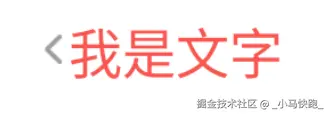
当图标尺寸大于或小于文字高度时,有时会出现图标位置偏移、视觉不居中的问题,而XML中又没有直接调整图标上下位置的属性,这时候该咋办呢?
注 :上述效果也可以通过代码来实现,XML中不再设置drawableXXX等属性:
ini
<TextView
    android:id="@+id/tv_text"
    android:layout_width="wrap_content"
    android:layout_height="wrap_content"
    android:layout_gravity="center"
    android:text="我是文字"
    android:includeFontPadding="false"
    android:textColor="@color/red"
    android:textSize="18sp" />
代码中动态设置:
kotlin
//扩展函数
fun TextView.setLeftDrawable(leftDrawableRes: Int, widthInDp: Int = 10, heightInDp: Int = 10) {
    val drawable = ContextCompat.getDrawable(context, leftDrawableRes)

    val scale = context.resources.displayMetrics.density
    val widthPx = (widthInDp * scale + 0.5f).toInt() //dp to px
    val heightPx = (heightInDp * scale + 0.5f).toInt() //dp to px
    drawable?.setBounds(0, 0, widthPx, heightPx)
    compoundDrawablePadding = (2 * scale + 0.5f).toInt() //设置padding
    setCompoundDrawables(drawable, null, null, null)
}

//使用
mTvText.setCenteredDrawable(R.drawable.icon_left_arrow, 6, 10)
执行效果同上。
优化方式
方案1:分成两个控件
ini
<LinearLayout xmlns:android="http://schemas.android.com/apk/res/android"
    android:layout_width="match_parent"
    android:layout_height="match_parent"
    android:gravity="center">

    <ImageView
        android:layout_width="wrap_content"
        android:layout_height="wrap_content"
        android:layout_gravity="center"
        android:layout_marginEnd="2dp"
        android:src="@drawable/icon_left_arrow" />

    <TextView
        android:layout_width="wrap_content"
        android:layout_height="wrap_content"
        android:layout_gravity="center"
        android:includeFontPadding="false"
        android:text="我是文字"
        android:textColor="@color/red"
        android:textSize="18sp" />
</LinearLayout>
执行结果:
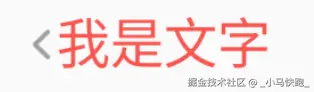
把箭头单独拆成一个控件来处理,如果不居中还可以自由调整。
方案2:使用LayerList来控制(推荐)
LayerList(层叠列表)是一种Drawable资源,它允许我们将多个drawable组合在一起,并精确控制每个元素的位置、尺寸和对齐方式。实现步骤如下:
- 创建LayerList Drawable
在res/drawable/目录下创建layer_arrow_icon:
xml
<?xml version="1.0" encoding="utf-8"?>
<layer-list xmlns:android="http://schemas.android.com/apk/res/android">
    <item
        android:width="6dp"
        android:height="10dp"
        android:gravity="center"
        android:drawable="@drawable/icon_left_arrow"
        android:top="1dp">
    </item>
</layer-list>android:drawable:引用的原始图标资源,android:width/height:精确控制图标尺寸,android:top/bottom等可以调整图标上下间距。
- 在TextView中应用优化后的Drawable
xml
<TextView
    app:drawableStartCompat="@drawable/layer_arrow_icon"
    android:layout_width="wrap_content"
    android:layout_height="wrap_content"
    android:layout_gravity="center"
    android:text="我是文字"
    android:drawablePadding="2dp"
    android:textColor="@color/red"
    android:textSize="18sp" />
执行效果同上面居中样式的,不再贴了。
扩展:多图层控制
比如现在需要对图标加个背景,依然可以使用多层LayerList:
xml
<?xml version="1.0" encoding="utf-8"?>
<layer-list xmlns:android="http://schemas.android.com/apk/res/android">
    <!-- 背景层 -->
    <item
        android:width="16dp"
        android:height="16dp"
        android:gravity="center"
        android:top="1dp">
        <shape android:shape="oval">
            <solid android:color="#33000000" />
        </shape>
    </item>

    <item
        android:width="6dp"
        android:height="10dp"
        android:drawable="@drawable/icon_left_arrow"
        android:gravity="center"
        android:top="1dp" />
</layer-list>
执行结果:
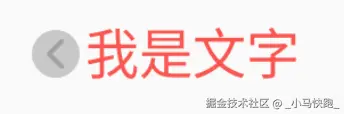
通过LayerList优化TextView中drawable的位置和尺寸,可以动态调整图标尺寸,避免尺寸不匹配,优化居中效果,且无需修改现有布局结构。