在前面的文章中,我们学习了组件渲染、生命周期、依赖注入等核心概念。今天,我们将探索 Vue3 中一个特殊的组件:
Teleport。它允许我们将一段 DOM 内容"传送"到指定的 DOM 节点,突破组件树的限制。理解它的实现原理,将帮助我们更好地处理模态框、全局提示等场景。
前言:Teleport 要解决的问题
在传统的 Vue 应用开发中,组件的渲染是严格按照组件树结构进行的,即组件的 DOM 树结构和组件树结构是完全一致的: 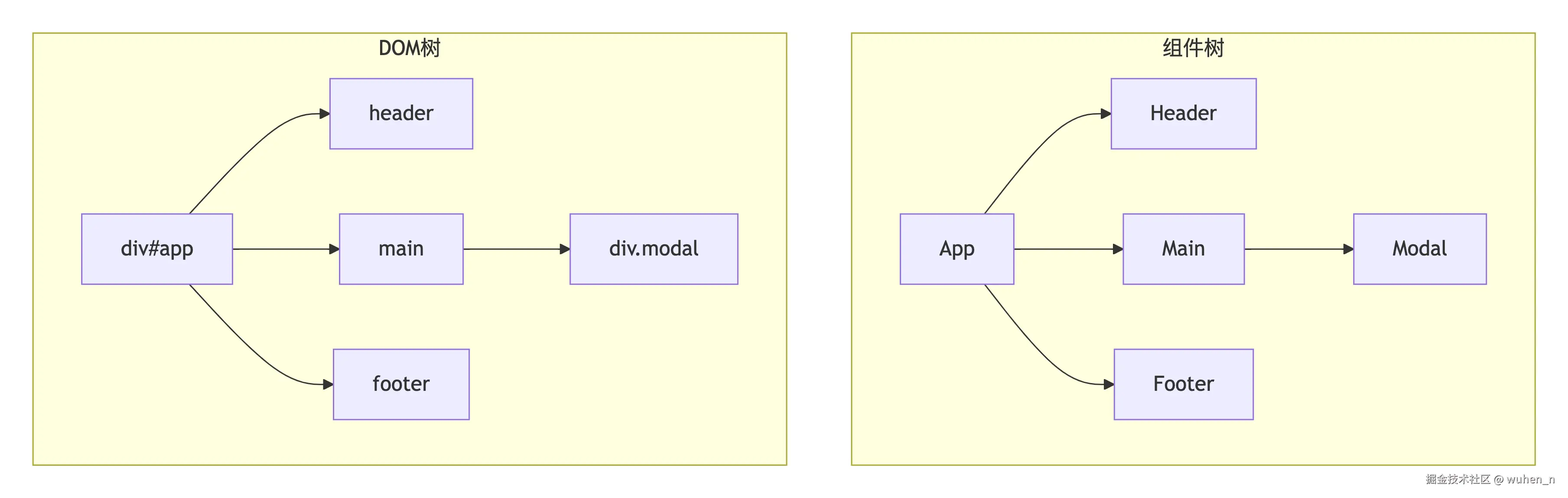 这种结构虽然直观,但会带来一些问题,比如下面一段代码,我们想创建一个模态对话框:
html
<template>
  <div class="main">
    <div class="content" id="content">
      <Modal class="modal">
        <!-- 模态框内容 -->
      </Modal>
    </div>
  </div>
</template>在这段代码中,<Modal> 组件会被渲染到 id 为 content 的 div 标签下,但这其实并不是我们所想要的。因为对于模态对话框而言,其本质是一个"蒙层"组件,即该组件会渲染一个"蒙层",并遮挡页面上的所有元素,此时最好的处理方式是:将<Modal> 组件的 z-index 设置到最高。
于是,问题就产生了:假如id 为 content 的 div 有一个内联样式:z-index: -1 ,此时即使把 <Modal> 组件的 z-index 设置成无穷大,也无法实现遮挡功能。
Teleport 的解决方案
Teleport 组件允许我们指定要渲染的目标,即 to 属性的值,该组件就会直接把 Teleport 组件的内容渲染到指定的目标下:
javascript
<template>
  <div class="main">
    <button @click="openModal">打开模态框</button>
    <Teleport to="body">
      <div class="modal">
        <h3>模态框标题</h3>
        <p>模态框内容</p>
      </div>
    </Teleport>
  </div>
</template>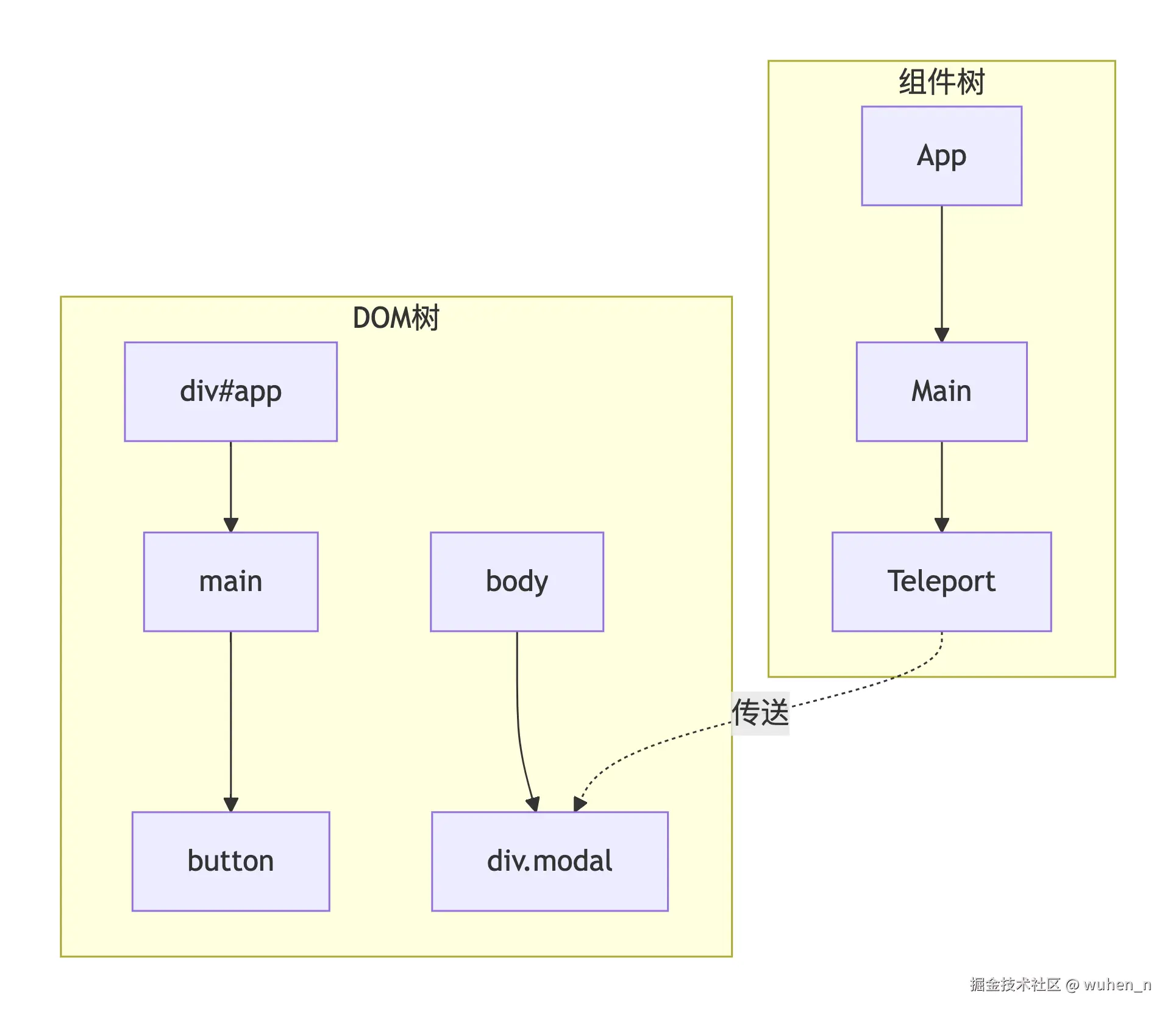
Teleport的目标定位
目标的多种形式
- CSS选择器:
<Teleport to="body"></Teleport> - DOM元素:
<Teleport :to="targetElement"></Teleport> - 动态目标:
<Teleport :to="showModal ? 'body' : null"></Teleport> - 禁用传送:
<Teleport :to="target" :disabled="!isReady"></Teleport>
目标解析的实现
javascript
/**
 * 解析目标
 */
function resolveTarget(target, component) {
  if (typeof target === 'string') {
    // CSS选择器
    const el = document.querySelector(target);
    if (!el) {
      console.warn(`Teleport target "${target}" not found`);
      return document.body; // 降级到body
    }
    return el;
  } else if (target instanceof HTMLElement) {
    // 直接传入DOM元素
    return target;
  } else if (target?.$el) {
    // Vue组件实例
    return target.$el;
  } else if (target === null) {
    return null; // 禁用传送
  }

  return document.body; // 默认降级
}

/**
 * Teleport组件定义
 */
const Teleport = {
  name: 'Teleport',
  __isTeleport: true,

  props: {
    to: {
      type: [String, Object],
      required: true
    },
    disabled: {
      type: Boolean,
      default: false
    }
  },

  setup(props, { slots }) {
    const target = ref(null);

    // 监听to变化
    watch(() => props.to, (newTo) => {
      target.value = resolveTarget(newTo);
    }, { immediate: true });

    // 返回插槽内容
    return () => {
      if (props.disabled || !target.value) {
        // 禁用时在当前位置渲染
        return slots.default?.();
      }

      // 启用时使用Teleport渲染
      return h(TeleportImpl, {
        to: target.value,
        disabled: false
      }, slots.default?.());
    };
  }
};
目标容器的缓存
javascript
/**
 * 目标容器缓存
 */
class TargetCache {
  constructor() {
    this.targets = new Map();
  }

  /**
   * 获取目标容器
   */
  getTarget(to, component) {
    const key = typeof to === 'string' ? to : to?.__v_skip ? null : to;

    if (key && this.targets.has(key)) {
      return this.targets.get(key);
    }

    const target = this.resolveTarget(to, component);

    if (key) {
      this.targets.set(key, target);
    }

    return target;
  }

  /**
   * 解析目标容器
   */
  resolveTarget(to, component) {
    if (typeof to === 'string') {
      // 尝试在组件上下文中查找
      if (to.startsWith('#')) {
        const id = to.slice(1);
        // 先在当前组件的模板中查找
        const contextEl = component?.vnode?.el?.ownerDocument;
        if (contextEl) {
          const el = contextEl.getElementById(id);
          if (el) return el;
        }
      }

      return document.querySelector(to) || document.body;
    }

    if (to instanceof HTMLElement) {
      return to;
    }

    if (to?.$el) {
      return to.$el;
    }

    return document.body;
  }

  /**
   * 清空缓存
   */
  clear() {
    this.targets.clear();
  }
}

const targetCache = new TargetCache();
父子组件关系维护
组件树 vs DOM树
Teleport 的一个重要特性就是:可以保持组件树的关系不变,仅仅只改变 DOM 树的关系。我们可以看下面一个示例:
javascript
// 父组件
const Parent = {
  setup() {
    const count = ref(0);

    provide('parentCount', count);

    return { count };
  },
  template: `
    <div class="parent">
      <button @click="count++">增加</button>
      <Teleport to="body">
        <Child />
      </Teleport>
    </div>
  `
};

// 子组件(被传送到body)
const Child = {
  inject: ['parentCount'],
  template: `
    <div class="child">
      父组件count: {{ parentCount }}
    </div>
  `
};
上述示例的 DOM 树与组件树关系图如下: 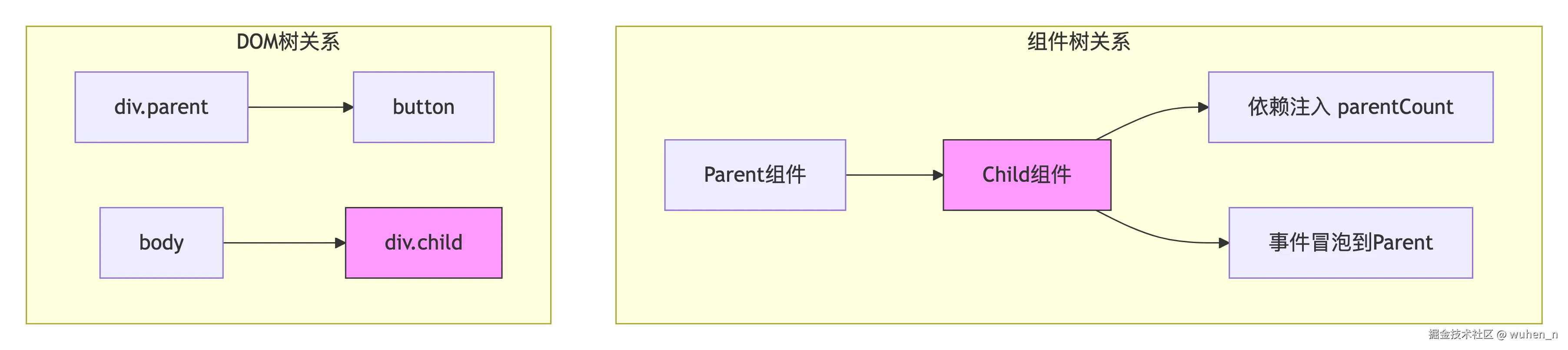
组件实例的关联
javascript
/**
 * 维护组件实例关系
 */
function createTeleportVNode(component, props, children) {
  const vnode = {
    type: Teleport,
    props,
    children,
    shapeFlag: ShapeFlags.TELEPORT,

    // 组件实例(即使DOM分离,组件关系仍在)
    component: null,
    parent: component,

    // DOM引用
    el: null,
    anchor: null,

    // Teleport特有属性
    target: null,
    disabled: false
  };

  return vnode;
}

/**
 * 在渲染器中处理Teleport的父子关系
 */
class Renderer {
  patch(oldVNode, newVNode, container, anchor) {
    const { type } = newVNode;

    if (type === Teleport) {
      // Teleport特殊处理
      if (oldVNode == null) {
        this.mountTeleport(newVNode, container, anchor);
      } else {
        this.updateTeleport(oldVNode, newVNode, container, anchor);
      }

      // 维护组件实例关系
      if (newVNode.component) {
        newVNode.component.parent = this.currentInstance;
      }

      return;
    }

    // 普通节点处理...
  }

  /**
   * 挂载Teleport
   */
  mountTeleport(vnode, container, anchor) {
    // 创建组件实例(如果vnode包含组件)
    if (vnode.type !== Teleport && vnode.shapeFlag & ShapeFlags.COMPONENT) {
      const instance = createComponentInstance(vnode);
      vnode.component = instance;

      // 设置父组件
      if (this.currentInstance) {
        instance.parent = this.currentInstance;
      }
    }

    // 调用Teleport的处理逻辑
    Teleport.process(null, vnode, container, anchor, {
      patch: this.patch.bind(this),
      move: this.move.bind(this),
      unmount: this.unmount.bind(this)
    });
  }
}
事件冒泡的处理
html
/**
 * Teleport中的事件冒泡
 */
<template>
  <div class="parent" @click="handleParentClick">
    <Teleport to="body">
      <div class="child" @click="handleChildClick">
        <button @click.stop="handleButtonClick">按钮</button>
      </div>
    </Teleport>
  </div>
</template>

<script>
export default {
  methods: {
    handleParentClick() {
      console.log('父组件点击'); // 仍然会被触发
    },
    handleChildClick() {
      console.log('子组件点击'); // 会被触发
    },
    handleButtonClick() {
      console.log('按钮点击'); // 会被触发,且冒泡到child和parent
    }
  }
}
</script>
手写实现:完整Teleport组件
完整实现
javascript
/**
 * Teleport 完整实现
 */
const Teleport = {
  name: 'Teleport',
  __isTeleport: true,

  props: {
    to: {
      type: [String, Object],
      required: true,
      validator(value) {
        if (typeof value === 'string') return true;
        if (value instanceof HTMLElement) return true;
        if (value && value.$el) return true;
        return false;
      }
    },
    disabled: {
      type: Boolean,
      default: false
    }
  },

  setup(props, { slots }) {
    // 目标容器
    const target = ref(null);

    // 目标解析错误处理
    const error = ref(null);

    // 解析目标
    const resolveTarget = () => {
      try {
        if (props.disabled) return null;

        if (typeof props.to === 'string') {
          const el = document.querySelector(props.to);
          if (!el) {
            throw new Error(`Teleport target "${props.to}" not found`);
          }
          return el;
        }

        if (props.to instanceof HTMLElement) {
          return props.to;
        }

        if (props.to?.$el) {
          return props.to.$el;
        }

        return null;
      } catch (err) {
        error.value = err.message;
        return null;
      }
    };

    // 监听to变化
    watch(() => props.to, () => {
      target.value = resolveTarget();
    }, { immediate: true, deep: true });

    // 提供错误信息(可选)
    provide('teleportError', error);

    // 返回渲染函数
    return () => {
      if (error.value) {
        console.error(`Teleport error: ${error.value}`);
      }

      // 返回一个占位注释节点和实际内容
      // 这样可以在DOM中标记位置
      return [
        h(Comment, `teleport-start-${props.to}`),
        props.disabled || !target.value
          ? slots.default?.()
          : h(TeleportWrapper, {
              to: target.value,
              disabled: false
            }, slots.default?.()),
        h(Comment, `teleport-end-${props.to}`)
      ];
    };
  }
};

/**
 * Teleport包装器(内部使用)
 */
const TeleportWrapper = {
  name: 'TeleportWrapper',
  __isTeleportWrapper: true,

  props: {
    to: {
      type: HTMLElement,
      required: true
    },
    disabled: Boolean
  },

  setup(props, { slots }) {
    const container = ref(null);
    const teleportContent = ref(null);

    onMounted(() => {
      if (!props.disabled && props.to && teleportContent.value) {
        // 将内容移动到目标容器
        while (teleportContent.value.firstChild) {
          props.to.appendChild(teleportContent.value.firstChild);
        }
      }
    });

    onUpdated(() => {
      if (!props.disabled && props.to && teleportContent.value) {
        // 更新时重新移动
        while (teleportContent.value.firstChild) {
          props.to.appendChild(teleportContent.value.firstChild);
        }
      }
    });

    onBeforeUnmount(() => {
      // 清理
      if (teleportContent.value) {
        teleportContent.value.innerHTML = '';
      }
    });

    return () => {
      if (props.disabled) {
        // 禁用时直接渲染
        return slots.default?.();
      }

      // 渲染到一个隐藏容器,然后移动到目标
      return h('div', {
        ref: teleportContent,
        style: { display: 'none' }
      }, slots.default?.());
    };
  }
};

// 注册Teleport
app.component('Teleport', Teleport);
增强版本(支持多个目标)
javascript
/**
 * 多目标Teleport
 */
const MultiTeleport = {
  name: 'MultiTeleport',

  props: {
    targets: {
      type: Array,
      required: true
    },
    distribution: {
      type: Array,
      default: () => [] // 指定每个子节点去哪个target
    }
  },

  setup(props, { slots }) {
    const children = slots.default?.() || [];

    // 分配子节点到不同target
    const distributions = props.distribution.length
      ? props.distribution
      : children.map((_, i) => i % props.targets.length);

    // 为每个target创建Teleport
    const teleports = props.targets.map((target, index) => {
      const targetChildren = children.filter((_, i) => distributions[i] === index);

      return h(Teleport, {
        to: target,
        key: index
      }, () => targetChildren);
    });

    return () => teleports;
  }
};
条件 Teleport
javascript
/**
 * 条件Teleport
 */
const ConditionalTeleport = {
  name: 'ConditionalTeleport',

  props: {
    to: [String, Object],
    condition: {
      type: Function,
      default: () => true
    },
    fallbackTo: {
      type: [String, Object],
      default: null
    }
  },

  setup(props, { slots }) {
    const currentTarget = ref(null);

    const updateTarget = () => {
      const shouldTeleport = props.condition();
      currentTarget.value = shouldTeleport ? props.to : props.fallbackTo;
    };

    // 初始更新
    updateTarget();

    // 监听条件变化(需要在组件中触发)
    // 可以通过事件或响应式数据触发

    return () => {
      if (!currentTarget.value) {
        return slots.default?.();
      }

      return h(Teleport, {
        to: currentTarget.value
      }, slots.default?.());
    };
  }
};
应用场景:模态框
基础模态框
html
<template>
  <div class="app">
    <button @click="showModal = true">打开模态框</button>

    <Teleport to="body">
      <div v-if="showModal" class="modal-overlay" @click="showModal = false">
        <div class="modal-container" @click.stop>
          <div class="modal-header">
            <h3>{{ title }}</h3>
            <button class="close" @click="showModal = false">×</button>
          </div>
          <div class="modal-body">
            <slot></slot>
          </div>
          <div class="modal-footer">
            <button @click="showModal = false">取消</button>
            <button class="primary" @click="confirm">确认</button>
          </div>
        </div>
      </div>
    </Teleport>
  </div>
</template>

<script>
export default {
  props: ['title'],
  emits: ['confirm'],
  data() {
    return {
      showModal: false
    };
  },
  methods: {
    open() {
      this.showModal = true;
    },
    close() {
      this.showModal = false;
    },
    confirm() {
      this.$emit('confirm');
      this.close();
    }
  }
};
</script>

<style scoped>
.modal-overlay {
  position: fixed;
  top: 0;
  left: 0;
  width: 100%;
  height: 100%;
  background-color: rgba(0, 0, 0, 0.5);
  display: flex;
  align-items: center;
  justify-content: center;
  z-index: 1000;
}

.modal-container {
  background-color: white;
  border-radius: 8px;
  min-width: 400px;
  max-width: 90%;
  box-shadow: 0 4px 12px rgba(0, 0, 0, 0.15);
}
</style>
可拖拽模态框
javascript
const DraggableModal = {
  props: ['title'],
  setup(props, { emit }) {
    const show = ref(false);
    const position = ref({ x: 100, y: 100 });
    const dragging = ref(false);
    const dragStart = ref({ x: 0, y: 0 });

    const startDrag = (e) => {
      dragging.value = true;
      dragStart.value = {
        x: e.clientX - position.value.x,
        y: e.clientY - position.value.y
      };
    };

    const onDrag = (e) => {
      if (!dragging.value) return;
      position.value = {
        x: e.clientX - dragStart.value.x,
        y: e.clientY - dragStart.value.y
      };
    };

    const stopDrag = () => {
      dragging.value = false;
    };

    onMounted(() => {
      window.addEventListener('mousemove', onDrag);
      window.addEventListener('mouseup', stopDrag);
    });

    onUnmounted(() => {
      window.removeEventListener('mousemove', onDrag);
      window.removeEventListener('mouseup', stopDrag);
    });

    const open = () => show.value = true;
    const close = () => show.value = false;

    return {
      show,
      position,
      dragging,
      startDrag,
      open,
      close
    };
  }
};
模态框管理器
javascript
class ModalManager {
  constructor() {
    this.modals = [];
    this.container = null;
  }

  init() {
    // 创建容器
    this.container = document.createElement('div');
    this.container.id = 'modal-manager';
    document.body.appendChild(this.container);
  }

  open(component, props = {}) {
    const id = Symbol('modal');
    const modal = {
      id,
      component,
      props,
      resolve: null,
      reject: null
    };

    const promise = new Promise((resolve, reject) => {
      modal.resolve = resolve;
      modal.reject = reject;
    });

    this.modals.push(modal);
    this.update();

    return promise;
  }

  close(id, result) {
    const index = this.modals.findIndex(m => m.id === id);
    if (index !== -1) {
      const modal = this.modals[index];
      modal.resolve(result);
      this.modals.splice(index, 1);
      this.update();
    }
  }

  update() {
    // 触发重新渲染
    if (this.app) {
      this.app.config.globalProperties.$modals = this.modals;
    }
  }
}
结语
Teleport 是 Vue3 中一个强大的特性,它打破了 DOM 树的限制,让我们可以更灵活地组织组件。理解它的实现原理,不仅能帮助我们更好地使用它,也能在遇到复杂场景时找到合适的解决方案。
对于文章中错误的地方或有任何疑问,欢迎在评论区留言讨论!