大家好,我是王嗨皮,一名
主业前端,副业全栈的程序员,如果我的文章能让您有所收获,欢迎一键三连(评论,点赞,关注),感谢!
年前业务部门的同事提了一个需求,将公司PC端询价系统的报价单导出功能移植到到小程序上。
最初接到这个任务时,有点小崩溃,主要问题有两个:
- 小程序无法操作DOM元素,因此不能使用 html2Canvas 像PC端一样直接将DOM元素生成图片。
- 如果用Canvas自己画,只能手写大量代码,可读性差,拓展困难。
在对着uni-app文档思考了一段时间之后,决定尝试一下小程序与webview双向通信这个解决方案。
解决思路
其实思路也不复杂,就是利用 uni-app 的 <webview> 组件嵌入一个部署在服务器上的 H5 页面,借助小程序与 H5 之间的通信机制,将图片生成的工作转移到 H5 端完成,然后将生成的 base64 图片文件返回给小程序并保存到本地相册。
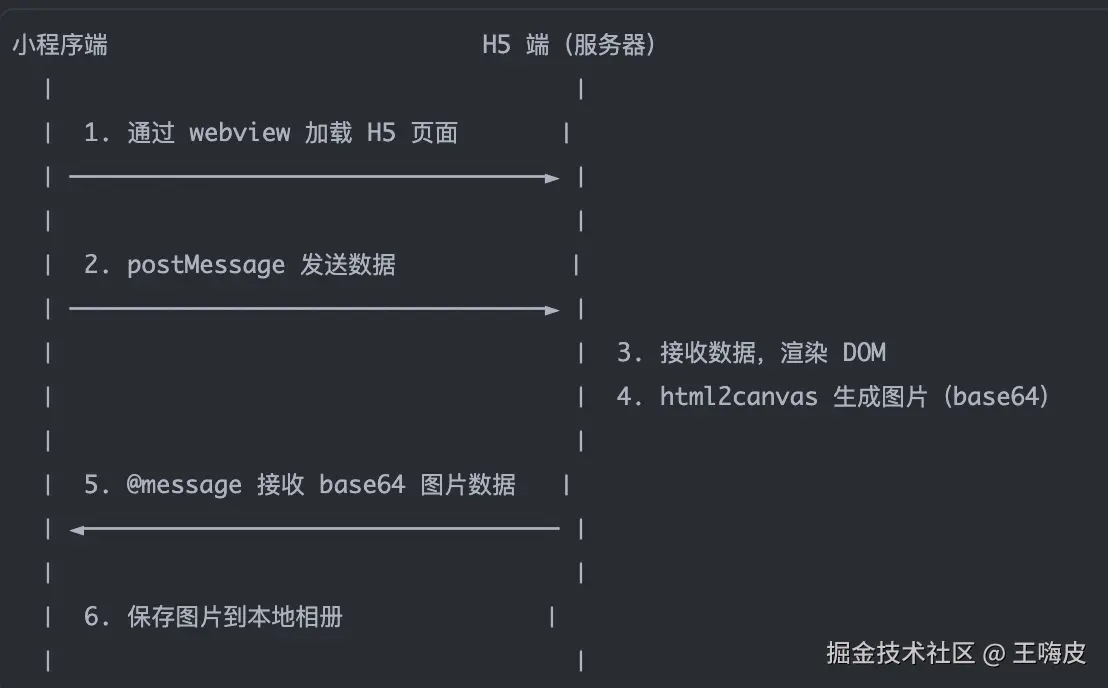
完整方案代码
简单说一下这个方案的优势:
- 解决了小程序的DOM限制:H5的环境下可以操作DOM,使用 html2canvas 可以正常运行。
- 可读性/拓展性强:页面直接用传统的三件套(HTML/CSS/JS)构建,容易理解。同时针对不同业务板块可以拓展多个模板。
- 职责分离:小程序只负责传递数据,H5负责渲染页面和截图。
当然,在这个过程中我也需要和后端同事提前做好沟通,H5页面的数据是需要通过接口传参获取的。
小程序端代码:
Html
<template>
  <view class="container">
    <web-view :src="url" @message="handleMessage"></web-view>
  </view>
</template>

<script>
  export default {
    data() {
      return {
        url: '' ,
        isShow: '',
        imgUrl: '',
        priceId: '',
        priceType: '',
        tokenId: '',
      }
    },

    onLoad(options) {
      this.priceId = options.feeId
      this.priceType = options.Type
      this.tokenId = uni.getStorageSync('loginInfo').F_WxToken

      //跳转的url并传递参数
      this.url = 'https://wxa.xxxx.com/index/index/lclindex?priceId=' + this.priceId + '&priceType=' + this.priceType + '&tokenId=' + this.tokenId
    },

    methods: {
      // 保存相册
      savePoster() {
        // 获取用户的当前设置
        uni.getSetting({
          success: (res) => {
            // 验证用户是否授权可以访问相册
            if (res.authSetting['scope.writePhotosAlbum']) {
              this.saveImageToMobilePhotos()
            } else {
              uni.authorize({
                scope: 'scope.writePhotosAlbum',
                success: () => {
                  this.saveImageToMobilePhotos()
                },
                fail: () => {
                  uni.showToast({
                    title: this.$t('pub.author'),
                    icon: 'none',
                    duration: 2000
                  })
                  setTimeout(() => {
                    uni.openSetting({
                      // 调起客户端小程序,让用户开启访问相册
                      success: (res2) => {
                        console.log(res2.authSetting)
                      }
                    })
                  }, 3000)
                }
              })
            }
          }
        })
      },

      // 接收webview传回参数
      handleMessage(e) {
        if(e.detail.data[0].url) {
          this.imgUrl = e.detail.data[0].url
          let base64 = this.imgUrl.replace(/^data:image\/\w+;base64,/, "")
          let filePath = wx.env.USER_DATA_PATH + '/worldjaguar_lclprice.jpg'

          uni.getFileSystemManager().writeFile({
            filePath: filePath,
            data: base64,
            encoding: 'base64',
            success: res => {
              uni.saveImageToPhotosAlbum({
                filePath: filePath,
                success: res2 => {
                  uni.hideLoading()
                  uni.showToast({
                    title: this.$t('pub.saveimageauthor'),
                    icon: "none",
                    duration: 3000
                  })
                },
                fail: err => {
                  uni.hideLoading()
                  console.log(err)
                }
              })
            },
            fail: err => {
              uni.hideLoading()
              console.log(err)
            }
          })
        }
      }
    }
  }
</script>
H5页面代码
在H5页面中兼容小程序并调用uni-app部分API需要分别引入 jweixin.js 和 uni.webview.js。
与小程序端完成信息通信则使用 uni.postMessage
html
<!DOCTYPE html>
<html>
  <head>
    <meta charset="utf-8" />
    <meta http-equiv="content-type" content="application/json; charset=UTF-8">
    <meta name="viewport" content="width=device-width, initial-scale=1.0, user-scalable=0, viewport-fit=cover">
    <title>生成报价单</title>
    <link rel="stylesheet" href="./css/common.css">
    <link rel="shortcut icon" type="image/x-icon" href="./favicon.ico" />
  </head>

  <body>
    <div id="app">
      <!-- 添加一层Loading页面遮罩 -->
      <div class="pub-mask" v-show="showMask">
        <div class="pub-mask-box">
          <img src="./images/loading.gif" alt="">
          <span>报价图片生成中...</span>
        </div>
      </div>
      <div class="savebox" id="savebox">
       ......布局代码
      </div>
      <!-- 点击保存图片触发postMessage -->
      <button type="button" @click="postMessage" id="postMessage" class="savebox-image">保存图片</button>
    </div>
    <script type="text/javascript" src="https://cdn.bootcdn.net/ajax/libs/vue/2.7.9/vue.min.js"></script>
    <script type="text/javascript" src="https://cdn.bootcdn.net/ajax/libs/html2canvas/1.4.1/html2canvas.min.js"></script>
    <!-- 兼容小程序 -->
    <script type="text/javascript" src="https://res.wx.qq.com/open/js/jweixin-1.4.0.js"></script>
    <!-- 必须引入 -->
    <script type="text/javascript" src="https://js.cdn.aliyun.dcloud.net.cn/dev/uni-app/uni.webview.1.5.2.js"></script>
    <script type="text/javascript" src="https://cdn.bootcdn.net/ajax/libs/axios/1.5.0/axios.min.js"></script>
    <script type="text/javascript">
      var App = new Vue({
        el: '#app',
        data: {
          priceId: '',
          priceType: '',
          tokenId: '',
          dataInfo: {},
          userInfo: {},
          freightArr: [],
          polArr: [],
          podArr: [],
          showMask: true,
          dateNumber: ''
        },

        mounted() {
          console.log(document.title)
          this.$nextTick(() => {
            document.addEventListener('UniAppJSBridgeReady', function () {
              uni.getEnv(function (res) {
                console.log('当前环境:' + JSON.stringify(res));
              })
            })
          })
        },

        created() {
          this.priceId = this.getQuery('priceId')? this.getQuery('priceId') : ''
          this.priceType = this.getQuery('priceType')? this.getQuery('priceType') : ''
          this.tokenId = this.getQuery('tokenId')? this.getQuery('tokenId') : ''

          document.title = this.priceType == 1? '生成海出拼箱报价单' : '生成海进拼箱报价单'

          this.getSaveImageData()
        },

        methods: {
          // 接收uni-app小程序传递的参数
          getQuery(name) {
            let reg = new RegExp("(^|&)" + name + "=([^&]*)(&|$)");
            let r = window.location.search.substr(1).match(reg);
            if (r != null) {
              // 对参数值进行解码
              return decodeURIComponent(r[2]);
            }
            return null;
          },

          postMessage() {
            html2canvas(document.querySelector('#savebox'), {
              allowTaint: true,
              scale: 2,
              dpi: 300,
              useCORS: true
            }).then(canvas => {
              let imgUrl = canvas.toDataURL('image/jpeg', 1.0)
              // 注意:base64大图可能导致通信超时,如果是海报或高清图片需求建议上传服务器后返回URL
              uni.postMessage({
                data: {
                  url: imgUrl
                }
              })
              uni.navigateBack({
                url: '/pages/saveimage/saveimage'
              })
            })
          },

          getSaveImageData() {
            axios({
              method: 'post',
              url: 'https://wxa.worldjaguar.com/apis/Lclquote/getLclImgInfo',
              data: {
                QuoteId: 'xxxxxxxx',
                Type: 1,
                ApiType: 2,
                wxAuthorization: 'xxxxxxxx'
              }
            })
            .then(res => {
              if(res.data.code == 200) {
                this.dataInfo = res.data.data
                this.userInfo = res.data.data.Contact

                this.freightArr = res.data.data.freightSurcharge
                this.polArr = res.data.data.departurePortCharges
                this.podArr = res.data.data.destinationPorts

                this.createdPriceNumber()

                setTimeout(() => {
                  this.showMask = false
                }, 2600)
              }else {
                alert(res.data.info)
                this.showMask = false
              }
            })
          }
        }
      })
    </script>
  </body>
</html>
注意事项
<webview> 组件中的 @message 只会在组件销毁 、页面回退 和分享时进行触发,不会立刻收到消息,由于我的系统业务逻辑相对简单,所以采用了回退的方式。
比较推荐的做法是将生成的图片上传给服务器接口,然后将生成的URL传递给小程序,这样既能保证同步性,也能解决如果图片过大直接返回小程序造成卡顿的问题。
另外,由于每次生成图片都需要加载一个H5页面, 用户等待时会出现白屏或中间态等影响体验的问题,最好添加一个loading遮罩,优化用户体验。
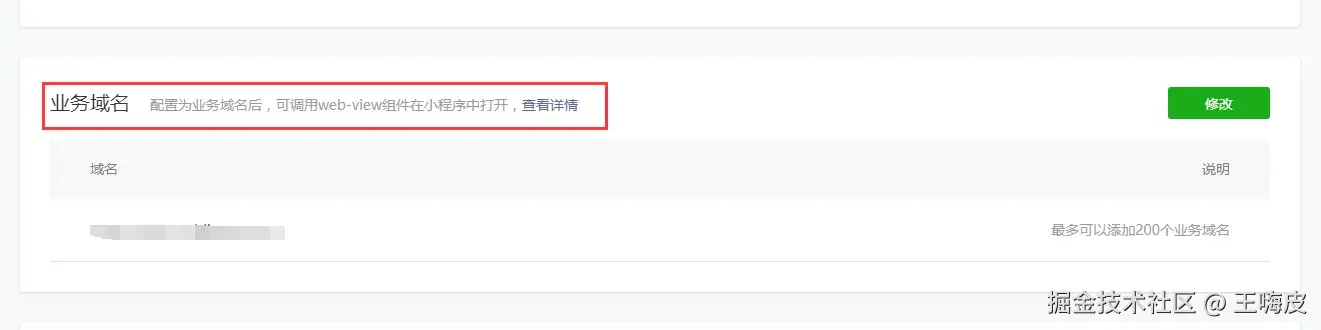
最后,不要忘记在小程序后台将访问域名配置到白名单,域名确认为HTTPS,确保 <webview> H5页面URL可以正常访问。
后续思考
这个案例本身并不复杂,但在实际落地过程中,我们仍然经历了近两个小时的讨论与权衡。从技术深度的角度来看,Canvas 方案无疑更能体现开发者的深层技术能力;但在真实的业务场景下,我们更倾向于选择一个可读性强、易于维护、迭代成本低的务实方案。
如果你有更好的方案或建议,欢迎分享交流,感谢🙏!!