大家好,我是锋哥。最近连载更新《嵌入模型与Chroma向量数据库 AI大模型应用开发必备知识》技术专题。
 本课程主要介绍和讲解嵌入模型与向量数据库简介,Qwen3嵌入模型使用,Chroma向量数据库使用,Chroma安装,Client-Server模式,集合添加,修改,删除,查询操作以及自定义Embedding Functions。。。 同时也配套视频教程 《1天学会 嵌入模型与Chroma向量数据库 AI大模型应用开发必备知识 视频教程》
查询Query API支持在稠密嵌入上进行最近邻相似性搜索。当您想要检索记录而不进行相似性排名时,请使用获取Get API。
Query
您可以使用 .query 查询集合以运行相似性搜索:
ini
collection.query(
    query_texts=["thus spake zarathustra", "the oracle speaks"]
)
Chroma将使用该集合的嵌入功能来嵌入您的文本查询,并使用输出结果对您的集合进行向量相似性搜索。 你可以直接提供query_embeddings,而不是query_texts。如果你的集合没有附加嵌入函数,则必须这样做。你的查询嵌入的维度必须与集合中嵌入的维度相匹配。 Python还支持将query_images和query_uris作为查询输入。
lua
collection.query(
    query_embeddings=[[11.1, 12.1, 13.1], [1.1, 2.3, 3.2]]
)
默认情况下,Chroma每次输入查询会返回10个结果。您可以使用n_results参数来修改这个数字:
lua
collection.query(
    query_embeddings=[[11.1, 12.1, 13.1], [1.1, 2.3, 3.2]],
    n_results=100
)
ids参数允许您将搜索范围限制在仅包含所提供列表中ID的记录:
ini
collection.query(
    query_embeddings=[[11.1, 12.1, 13.1], [1.1, 2.3, 3.2]],
    n_results=100,
    ids=["id1", "id2"]
)查询和获取支持,其中where用于元数据过滤,where_document用于全文搜索,regex用于正则表达式:
ini
collection.query(
    query_embeddings=[[11.1, 12.1, 13.1], [1.1, 2.3, 3.2]],
    n_results=100,
    where={"page": 10}, # query records with metadata field 'page' equal to 10
    where_document={"$contains": "search string"} # query records with the search string in the records' document
)
Get
使用.get方法通过ID和/或过滤器检索记录,无需进行相似度排序:
ini
collection.get(ids=["id1", "id2"]) # by IDs
collection.get(limit=100, offset=0) # with paginationquery和get实例:
ini
import chromadb
chroma_client = chromadb.Client() # 创建Chroma客户端
collection = chroma_client.create_collection(name="my_collection")
# 添加
collection.add(
ids=["id1", "id2", "id3"],
documents=["lorem ipsum...", "doc2", "doc3"],
metadatas=[{"chapter": 3, "verse": 16}, {"chapter": 3, "verse": 5}, {"chapter": 29, "verse": 11}],
)
# query查询
results = collection.query(
query_texts=["doc"],
where={"chapter": 3}
)
print(results)
# get查询
results = collection.get(ids=["id1", "id3"])
print(results)运行输出:

查询返回结果格式定制
Chroma以列优先的形式返回.query和.get结果(每个字段一个数组)。.query结果按输入查询进行分组;.get结果为记录的扁平列表。
yaml
class QueryResult(TypedDict):
ids: List[IDs]
embeddings: Optional[List[Embeddings]]
documents: Optional[List[List[Document]]]
uris: Optional[List[List[URI]]]
metadatas: Optional[List[List[Metadata]]]
distances: Optional[List[List[float]]]
included: Include
class GetResult(TypedDict):
ids: List[ID]
embeddings: Optional[Embeddings]
documents: Optional[List[Document]]
uris: Optional[URIs]
metadatas: Optional[List[Metadata]]
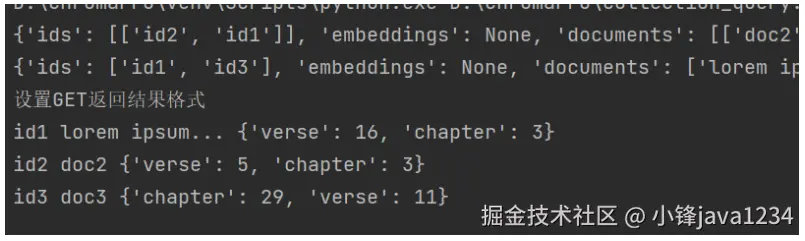
included: Include在 Get 操作的结果中,每个数组中的对应元素都属于同一个文档。
python
# 设置GET返回结果格式
print("设置GET返回结果格式")
result = collection.get(include=["documents", "metadatas"])
for id, document, metadata in zip(result["ids"], result["documents"], result["metadatas"]):
    print(id, document, metadata)
运行输出:
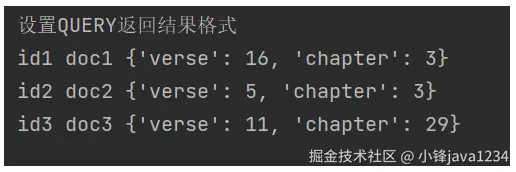
Query是一个批处理API,返回按输入分组的结果。一种常见模式是遍历每个查询的"批处理"结果,然后在该批处理结果内进行迭代。
python
# 设置QUERY返回结果格式
print("设置QUERY返回结果格式")
result = collection.query(query_texts=["doc"])
for ids, documents, metadatas in zip(result["ids"], result["documents"], result["metadatas"]):
    for id, document, metadata in zip(ids, documents, metadatas):
        print(id, document, metadata)
运行输出:
设置返回数据
默认情况下,Query返回文档、元数据和距离,而Get返回文档和元数据。使用include来控制返回的内容。id始终会被返回。
ini
collection.query(
query_texts=["my query"],
include=["documents", "metadatas", "embeddings"],
)
collection.get(include=["documents"])完整实例:
ini
import chromadb
chroma_client = chromadb.Client() # 创建Chroma客户端
collection = chroma_client.create_collection(name="my_collection")
# 添加
collection.add(
ids=["id1", "id2", "id3"],
documents=["doc1", "doc2", "doc3"],
metadatas=[{"chapter": 3, "verse": 16}, {"chapter": 3, "verse": 5}, {"chapter": 29, "verse": 11}],
)
# query查询
results = collection.query(
query_texts=["doc"]
)
print(results)
results =collection.query(
query_texts=["doc"],
include=["documents", "metadatas", "embeddings"],
)
print(results)
results =collection.get(include=["documents"])
print(results)运行输出:
lua
{'ids': [['id1', 'id2', 'id3']], 'embeddings': None, 'documents': [['doc1', 'doc2', 'doc3']], 'uris': None, 'included': ['metadatas', 'documents', 'distances'], 'data': None, 'metadatas': [[{'chapter': 3, 'verse': 16}, {'chapter': 3, 'verse': 5}, {'chapter': 29, 'verse': 11}]], 'distances': [[0.43373435735702515, 0.45694848895072937, 0.46765562891960144]]}
{'ids': [['id1', 'id2', 'id3']], 'embeddings': [array([[-0.08946741,  0.02690166,  0.0714293 , ...,  0.02614263,
         0.07775341,  0.04677901],
       [-0.05917228,  0.03088627,  0.05787703, ...,  0.07566307,
         0.06910366,  0.04536708],
       [-0.071605  ,  0.01184757,  0.01126055, ...,  0.04132259,
         0.06954481,  0.04966979]], shape=(3, 384))], 'documents': [['doc1', 'doc2', 'doc3']], 'uris': None, 'included': ['documents', 'metadatas', 'embeddings'], 'data': None, 'metadatas': [[{'chapter': 3, 'verse': 16}, {'verse': 5, 'chapter': 3}, {'verse': 11, 'chapter': 29}]], 'distances': None}
{'ids': ['id1', 'id2', 'id3'], 'embeddings': None, 'documents': ['doc1', 'doc2', 'doc3'], 'uris': None, 'included': ['documents'], 'data': None, 'metadatas': None}