问题背景:多平台文档链接的困境
我们的产品同时部署在国内和海外平台,配套的产品文档也分散在不同的域名下。应用中存在大量指向这些文档的链接,而同一篇文档在不同平台的 URL 不同,仅 hash 锚点保持一致。
原始方案的问题:
最初,我们手动维护了一个 getDocsLink 函数,通过文档 ID 动态拼接最终 URL:
ts
// getDocsLink.ts
import docsMap from "./docs-map.json"; // 体积巨大,数千条映射

export function getDocsLink(
  id: string,
  hash: string,
  lang: "zh" | "en" = "zh",
) {
  const entry = docsMap[id];
  const baseUrl = typeof entry === "string" ? entry : entry?.[lang];
  return hash ? `${baseUrl}#${hash}` : baseUrl;
}
使用示例:
tsx
<a href={getDocsLink("quickstart", "install")}>快速开始</a>但这个方案带来了严重的性能问题:
- JSON 体积庞大:映射表包含数千条记录,而且凡是产品同学系统维护了的映射,JSON里都会存在
- 无法 Tree Shaking:只要引入函数,整个 JSON 都会被强制打包
- 首屏负担重:首屏组件若使用此函数,直接影响加载性能
解决思路: 重新审视这个问题,既然 getDocsLink('quickstart', 'install') 的返回值在编译时就能确定,为何不直接在构建阶段将其内联成字符串字面量?
理想情况下,上述代码应该在构建后被"折叠"为:
html
<a href="https://docs.example.com/quickstart#install">快速开始</a>方案设计:编译期常量折叠
核心思路借鉴编译器优化中的 Constant Folding(常量折叠):
ini
源代码:  const url = getDocsLink('quickstart', 'install');
            ↓ 构建时转换
输出代码: const url = "https://docs.example.com/zh/quickstart#install";
关键优势:
- 运行时零开销:无需加载映射表,无需函数调用
- 代码自解释:构建后的代码直接展示最终 URL
- 自动 Tree Shaking:原函数变为未引用,打包器自动移除
实现细节:docs-link-inline-loader
1. 整体架构
这是一个典型的源码转换型 Loader,工作于 Webpack/Rspack 的模块解析阶段:
makefile
输入: 模块源码字符串
  ↓
处理: 扫描 → 解析参数 → 查表 → 替换
  ↓
输出: 转换后的源码字符串
2. 核心实现
阶段一:快速剪枝
typescript
// 如果文件连 import ... getDocsLink 都没有,直接跳过
const hasImport = lines.some(
  (line) => isImportLine(line) && line.includes(functionName),
);
if (!hasImport) return input;
阶段二:源码扫描与替换
采用字符串扫描而非 AST 方案(权衡性能与复杂度):
typescript
while (cursor < input.length) {
  const callStart = input.indexOf(functionName, cursor);
  // ... 边界检查(避免匹配 mygetDocsLink 等)

  // 提取参数:getDocsLink('id', 'hash') → ['id', 'hash']
  const argsContent = input.slice(openParenIndex + 1, closeParenIndex);
  const parsed = parseLiteralArgsWithJson(argsContent);

  // 查表并替换为 URL 字面量
  const url = resolveUrl(mapping, docId, lang);
  output += JSON.stringify(applyHash(url, hash));
}
阶段三:参数解析的巧思
利用 JSON.parse 处理 JavaScript 字面量(简化版):
typescript
function parseLiteralArgsWithJson(argsContent: string) {
  // "'id123', 'hash'" → '["id123", "hash"]' → JSON.parse
  const jsonText = `[${argsContent.trim()}]`.replace(/'/g, '"');
  return JSON.parse(jsonText);
}
阶段四:Watch 模式支持
通过 addDependency 注册映射文件,实现热更新:
typescript
this.addDependency(absMappingPath); // docs-map.json 变更 → 自动重编译3. 健壮性设计
| 场景 | 策略 | 行为 |
|---|---|---|
| 文档 ID 不存在 | onMissing: 'fallback' |
替换为 "" 或保留原调用 |
| 非字面量参数 | onNonConstant: 'warn' |
告警提示,跳过此调用 |
| 参数数量错误 | 同 onNonConstant |
防止运行时错误 |
| 语言参数校验 | 严格检查 `'zh' | 'en'` |
效果验证:前后对比
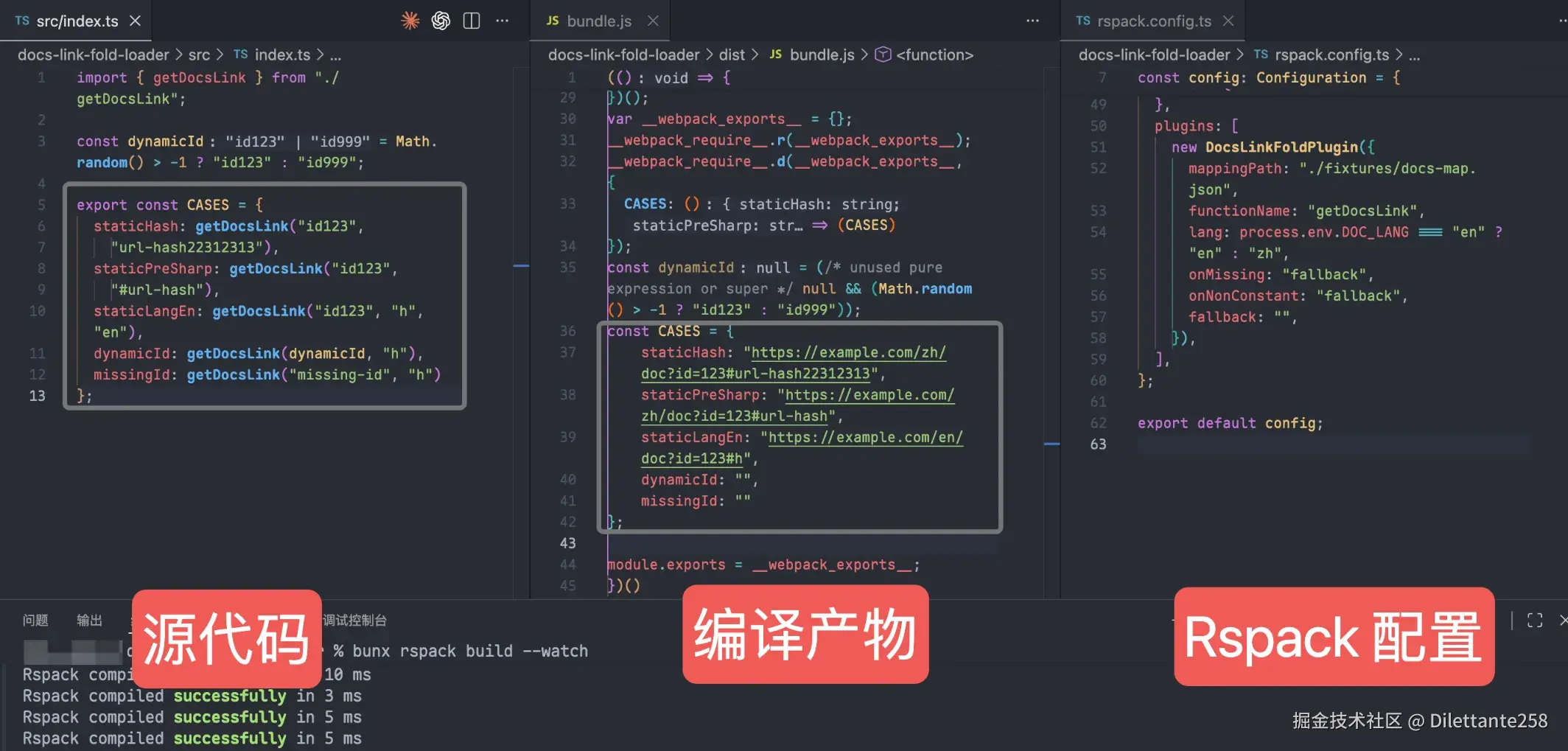
打包前的源代码:
typescript
import { getDocsLink } from "./getDocsLink";

export const CASES = {
  staticHash: getDocsLink("id123", "url-hash22312313"),
  staticPreSharp: getDocsLink("id123", "#url-hash"),
  staticLangEn: getDocsLink("id123", "h", "en"),
  dynamicId: getDocsLink(dynamicId, "h"),
  missingId: getDocsLink("missing-id", "h"),
};
经过 Loader 转换后:
typescript
import { getDocsLink } from "./getDocsLink"; // 将由 Tree Shaking 移除

export const CASES = {
  staticHash: "https://example.com/zh/doc?id=123#url-hash22312313",
  staticPreSharp: "https://example.com/zh/doc?id=123#url-hash",
  staticLangEn: "https://example.com/en/doc?id=123#h",
  dynamicId: "",
  missingId: "",
};
构建产物对比:
工程化考量
为何选择字符串扫描而非 AST?
| 方案 | 优点 | 缺点 | 选择 |
|---|---|---|---|
| 字符串扫描 | 零依赖、速度快、实现简单 | 无法处理复杂表达式、边界 case 多 | PoC 阶段 ✅ |
| Babel AST | 精准、可处理任意表达式 | 需引入 @babel/core,构建速度受影响 | 后续迭代 |
| SWC | 极速、Rust 编写 | 学习成本高,需写 Rust 插件 | 大规模应用时 |
当前约束(仅支持字面量参数)在业务场景下已覆盖 100% 的用例,且通过 onNonConstant: 'error' 可确保不符合规范的调用在 CI 阶段即暴露。
Import 语句清理策略
Loader 仅负责调用点替换,不处理 import 语句:
typescript
// 转换后:getDocsLink 变为未引用变量
import { getDocsLink } from "./getDocsLink"; // 死代码

const url = "https://..."; // 直接使用字面量
生产构建时,Webpack/Rspack 的 Tree Shaking 会自动识别并移除未引用导入,无需 Loader 介入。
使用方式
typescript
// rspack.config.ts
module.exports = {
  module: {
    rules: [
      {
        test: /\.tsx?$/,
        use: {
          loader: "docs-link-inline-loader",
          options: {
            mappingPath: path.resolve(__dirname, "docs-map.json"),
            functionName: "getDocsLink",
            lang: "zh",
            onMissing: "fallback",
            onNonConstant: "warn",
            fallback: "",
          },
        },
      },
    ],
  },
};
总结与展望
通过自定义 Loader,我们将运行时数据查找 转化为构建期代码生成,在零运行时开销的前提下解决了多平台文档链接问题。
完整代码实现:docs-link-inline-loader