Multi-Agent + Skills + Spring AI 构建自主决策智能体
引言
随着大语言模型(LLM)的快速发展,智能体(Agent)技术成为AI应用开发的热点。智能体不仅能够理解自然语言,还能自主规划、执行任务、协同工作。本文将从基础概念出发,循序渐进地介绍如何使用Multi-Agent、Skills模式和Spring AI构建具备自主决策能力的智能体系统。
一、智能体基础概念
1.1 什么是智能体
智能体是一个能够感知环境、做出决策并执行动作的软件实体。与传统AI应用不同,智能体具备以下核心特征:
- 自主性:能够独立做出决策,无需人工持续干预
- 感知能力:能够接收和处理外部信息
- 决策能力:基于当前状态和目标选择最优行动
- 执行能力:能够执行决策并影响环境
- 学习能力:能够从经验中优化决策策略
1.2 智能体的核心组件
一个典型的智能体由以下核心组件构成:
scss
智能体组件架构:

┌─────────────────────────────────────────┐
│         感知层 (Perception)         │
│  ┌──────┐  ┌──────┐  ┌──────┐ │
│  │ 消息 │  │ 传感器│  │ 配置 │ │
│  │ 接收 │  │ 数据  │  │ 数据  │ │
│  └──────┘  └──────┘  └──────┘ │
└─────────────────────────────────────────┘
                 ↓
┌─────────────────────────────────────────┐
│        决策层 (Decision)           │
│  ┌──────────────────────────────┐     │
│  │   决策策略引擎            │     │
│  │  - 规则引擎              │     │
│  │  - AI分析                │     │
│  │  - 强化学习              │     │
│  └──────────────────────────────┘     │
└─────────────────────────────────────────┘
                 ↓
┌─────────────────────────────────────────┐
│        执行层 (Action)             │
│  ┌──────┐  ┌──────┐  ┌──────┐ │
│  │ 技能 │  │ 工具  │  │ 接口 │ │
│  │ 调用 │  │ 调用  │  │ 调用 │ │
│  └──────┘  └──────┘  └──────┘ │
└─────────────────────────────────────────┘
                 ↓
┌─────────────────────────────────────────┐
│        记忆层 (Memory)            │
│  ┌──────┐  ┌──────┐  ┌──────┐ │
│  │ 工作 │  │ 长期 │  │ 语义 │ │
│  │ 记忆 │  │ 记忆 │  │ 记忆 │ │
│  └──────┘  └──────┘  └──────┘ │
└─────────────────────────────────────────┘
1.3 智能体状态机
智能体在运行过程中会经历不同的状态,通过状态机管理其生命周期:
java
/**
 * 智能体状态枚举
 */
public enum AgentState {
    IDLE,       // 空闲 - 等待新任务
    PROCESSING, // 处理中 - 正在处理用户请求
    EXECUTING,  // 执行中 - 正在执行技能或工具
    WAITING,    // 等待中 - 等待外部响应或用户反馈
    ERROR       // 错误 - 处理过程发生异常
}
二、Skills技能模式
2.1 什么是Skills模式
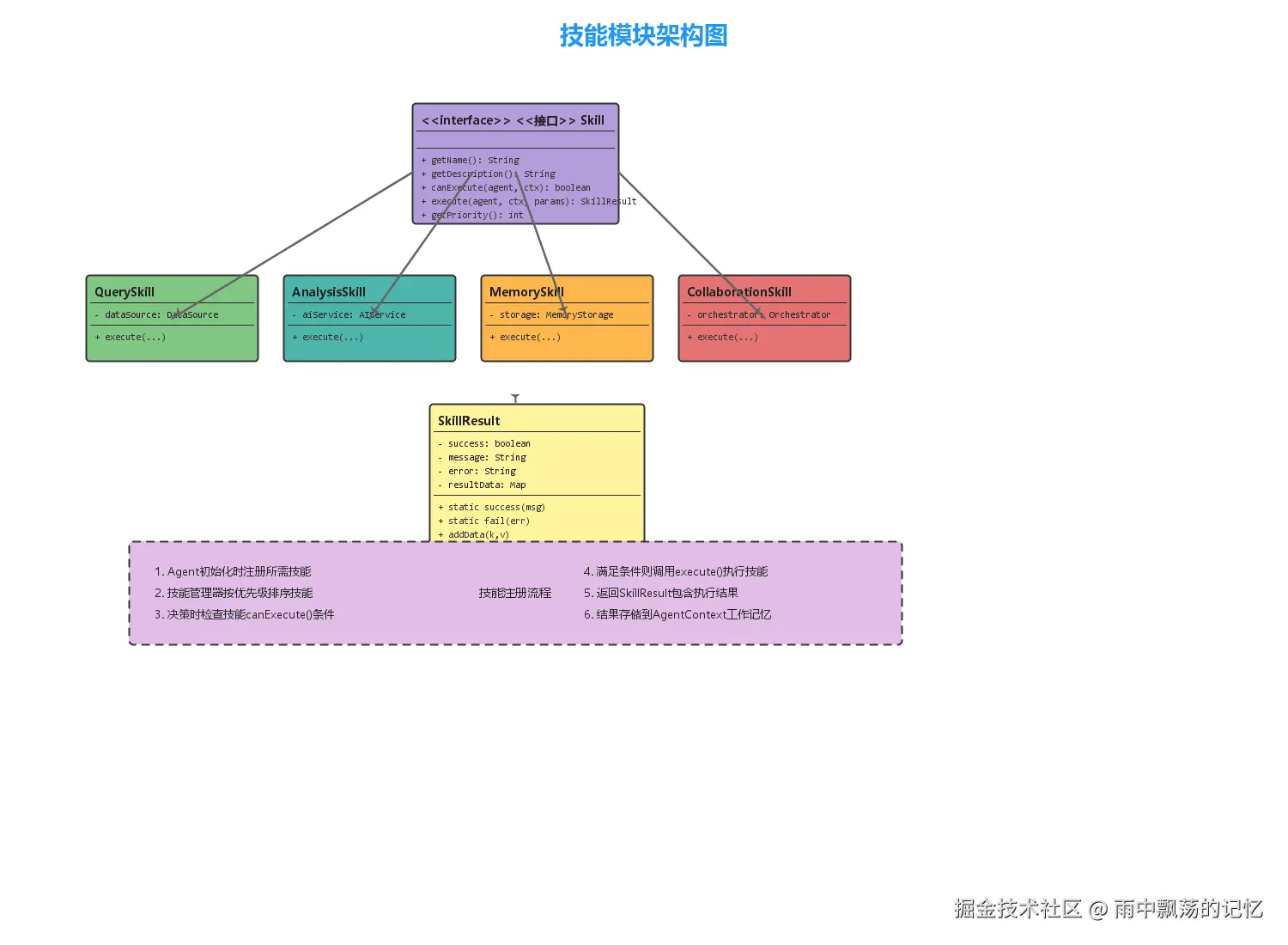
Skills模式是一种模块化智能体能力的设计方法。每个Skill代表一种特定的能力或功能,智能体可以根据需要动态加载和执行不同的技能。
Skills模式的优势:
- 模块化:每个技能独立开发、测试和部署
- 可扩展:新增能力只需添加新的Skill实现
- 可组合:多个技能可以组合完成复杂任务
- 可重用:同一技能可在不同智能体间共享
2.2 Skill接口设计
核心Skill接口定义如下:
java
/**
 * 智能体技能接口
 */
public interface Skill {

    /**
     * 获取技能名称
     */
    String getName();

    /**
     * 获取技能描述
     */
    String getDescription();

    /**
     * 检查技能是否可执行
     *
     * @param agent 当前智能体
     * @param context 上下文信息
     * @return 是否可执行
     */
    boolean canExecute(Agent agent, AgentContext context);

    /**
     * 执行技能
     *
     * @param agent 当前智能体
     * @param context 上下文信息
     * @param parameters 执行参数
     * @return 执行结果
     */
    SkillResult execute(Agent agent, AgentContext context,
                     Map<String, Object> parameters);

    /**
     * 获取技能优先级
     */
    int getPriority();
}
2.3 常见技能类型
2.3.1 查询技能(QuerySkill)
查询技能允许智能体从外部数据源获取信息:
java
/**
 * 查询技能
 */
public class QuerySkill implements Skill {

    private DataSource dataSource;

    public QuerySkill(DataSource dataSource) {
        this.dataSource = dataSource;
    }

    @Override
    public String getName() {
        return "查询技能";
    }

    @Override
    public SkillResult execute(Agent agent, AgentContext context,
                             Map<String, Object> parameters) {
        String queryType = parameters.getOrDefault("type", "default").toString();
        String queryKey = parameters.getOrDefault("key", "").toString();

        // 从数据源查询
        Object result = dataSource.query(queryType, queryKey);

        // 存储到上下文
        context.storeInWorkingMemory("query_result_" + queryKey, result);

        return SkillResult.success("查询成功")
                .addData("result", result);
    }
}
2.3.2 记忆技能(MemorySkill)
记忆技能管理智能体的短期和长期记忆:
java
/**
 * 记忆技能
 */
public class MemorySkill implements Skill {

    private MemoryStorage storage;

    public MemorySkill(MemoryStorage storage) {
        this.storage = storage;
    }

    @Override
    public SkillResult execute(Agent agent, AgentContext context,
                             Map<String, Object> parameters) {
        String operation = parameters.getOrDefault("operation", "store").toString();

        switch (operation) {
            case "store":
                storage.store(
                    parameters.get("key").toString(),
                    parameters.get("value")
                );
                return SkillResult.success("存储成功");

            case "retrieve":
                Object value = storage.retrieve(parameters.get("key").toString());
                return SkillResult.success("检索成功")
                        .addData("value", value);

            case "search":
                List<Map.Entry<String, Object>> results =
                    storage.search(parameters.get("keyword").toString());
                return SkillResult.success("搜索成功")
                        .addData("count", results.size())
                        .addData("results", results);

            default:
                return SkillResult.fail("不支持的操作: " + operation);
        }
    }
}
2.3.3 协作技能(CollaborationSkill)
协作技能支持多个智能体之间的通信与协调:
java
/**
 * 协作技能
 */
public class CollaborationSkill implements Skill {

    private AgentOrchestrator orchestrator;

    @Override
    public SkillResult execute(Agent agent, AgentContext context,
                             Map<String, Object> parameters) {
        // 广播消息给其他智能体
        String message = parameters.get("message").toString();
        List<Future<AgentMessage>> futures =
            orchestrator.broadcast(createMessage(message));

        // 等待所有智能体响应
        List<AgentDecision> decisions = collectDecisions(futures);

        // 协调决策
        AgentDecision finalDecision =
            orchestrator.coordinateDecisions(decisions);

        return SkillResult.success("协作完成")
                .addData("decision", finalDecision);
    }
}
三、决策策略模式
3.1 决策策略的作用
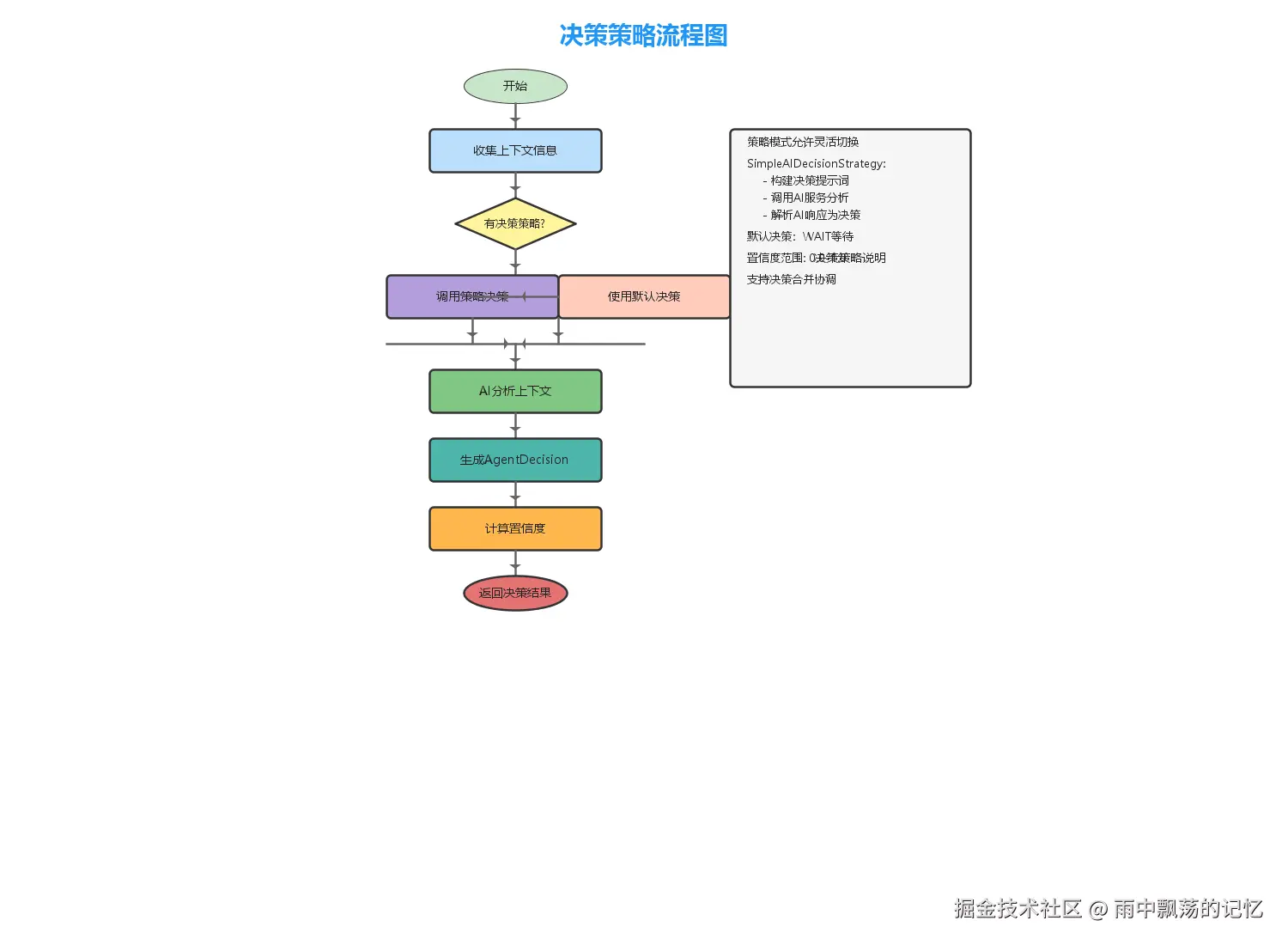
决策策略定义了智能体如何根据当前状态和上下文做出最优决策。通过策略模式,我们可以灵活切换不同的决策逻辑,而不修改智能体本身。
java
/**
 * 决策策略接口
 */
public interface DecisionStrategy {

    /**
     * 做出决策
     */
    AgentDecision makeDecision(Agent agent, AgentContext context);
}
3.2 AI驱动的决策策略
利用AI的强大推理能力,可以构建智能的决策策略:
java
/**
 * AI决策策略
 */
public class SimpleAIDecisionStrategy implements DecisionStrategy {

    private AIService aiService;

    @Override
    public AgentDecision makeDecision(Agent agent, AgentContext context) {
        // 构建决策提示词
        String prompt = buildDecisionPrompt(agent, context);

        // 调用AI获取决策
        String aiResponse = aiService.chat(prompt);

        // 解析AI响应为决策
        return parseAIDecision(aiResponse);
    }

    private String buildDecisionPrompt(Agent agent, AgentContext context) {
        StringBuilder sb = new StringBuilder();
        sb.append("你是一个智能决策助手。\n\n");
        sb.append("智能体名称: ").append(agent.getAgentName()).append("\n");
        sb.append("当前状态: ").append(agent.getState().getDesc()).append("\n");
        sb.append("可选择的动作:\n");
        sb.append("  1. QUERY - 查询更多信息\n");
        sb.append("  2. EXECUTE - 执行任务\n");
        sb.append("  3. ANALYZE - 分析情况\n");
        sb.append("  4. COMPLETE - 任务完成\n\n");
        sb.append("请以JSON格式返回决策:\n");
        sb.append("{\"action\": \"动作\", \"reason\": \"理由\"}");

        return sb.toString();
    }
}
3.3 决策协调
当多个智能体参与决策时,需要进行协调:
java
/**
 * 智能体协调器
 */
public class AgentOrchestrator {

    /**
     * 协调多个决策
     */
    public AgentDecision coordinateDecisions(List<AgentDecision> decisions) {
        // 按置信度排序
        List<AgentDecision> sorted = decisions.stream()
            .sorted((a, b) -> Double.compare(
                b.getConfidence(),
                a.getConfidence()))
            .collect(Collectors.toList());

        // 如果最高置信度明显大于次高,则采用最高
        if (sorted.size() >= 2) {
            double topConfidence = sorted.get(0).getConfidence();
            double secondConfidence = sorted.get(1).getConfidence();

            if (topConfidence - secondConfidence > 0.2) {
                return sorted.get(0);
            }
        }

        // 否则合并决策
        return mergeDecisions(decisions);
    }
}
四、上下文管理
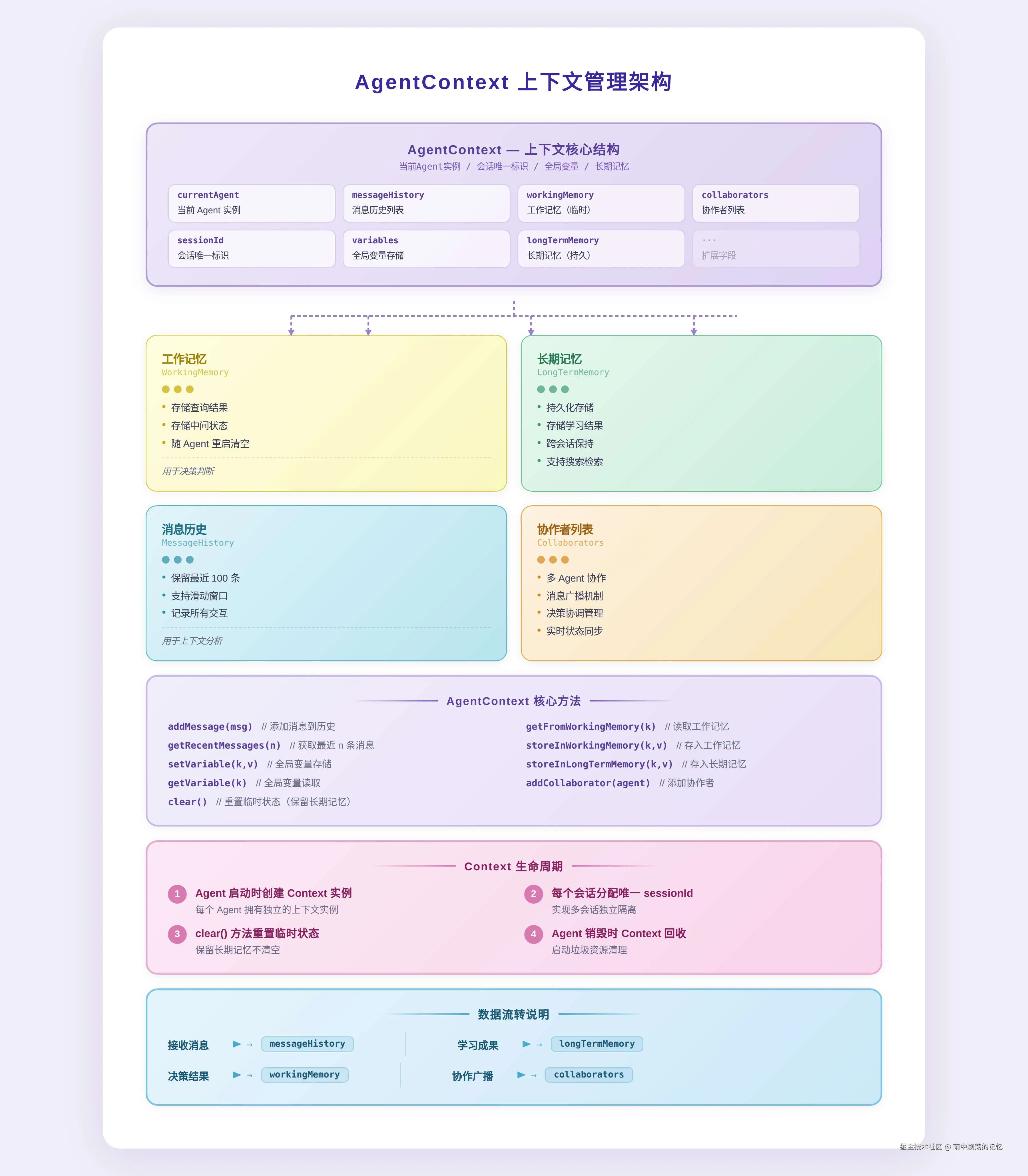
4.1 AgentContext的作用
AgentContext是智能体的"大脑记忆",维护所有运行时状态和信息:
java
/**
 * 智能体上下文
 */
public class AgentContext {

    // 当前智能体
    private Agent currentAgent;

    // 消息历史(保留最近100条)
    private List<AgentMessage> messageHistory;

    // 全局变量
    private Map<String, Object> variables;

    // 工作记忆(短期)
    private Map<String, Object> workingMemory;

    // 长期记忆
    private Map<String, Object> longTermMemory;

    // 协作智能体列表
    private List<Agent> collaborators;

    // 用户会话ID
    private String sessionId;

    /**
     * 添加消息到历史
     */
    public void addMessage(AgentMessage message) {
        messageHistory.add(message);
        if (messageHistory.size() > 100) {
            messageHistory.remove(0);
        }
    }

    /**
     * 获取最近的消息
     */
    public List<AgentMessage> getRecentMessages(int count) {
        int start = Math.max(0, messageHistory.size() - count);
        return new ArrayList<>(
            messageHistory.subList(start, messageHistory.size())
        );
    }

    /**
     * 存储到工作记忆
     */
    public void storeInWorkingMemory(String key, Object value) {
        workingMemory.put(key, value);
    }

    /**
     * 从工作记忆获取
     */
    public Object getFromWorkingMemory(String key) {
        return workingMemory.get(key);
    }

    /**
     * 清除上下文
     */
    public void clear() {
        messageHistory.clear();
        workingMemory.clear();
        variables.clear();
    }
}
4.2 记忆层次
kotlin
记忆层次结构:

┌─────────────────────────────────────┐
│      感知记忆 (Perceptual)       │
│   - 最近的感知输入                │
│   - 临时缓存                      │
│   - 寿命: 毫秒级               │
└─────────────────────────────────────┘
                ↓
┌─────────────────────────────────────┐
│      工作记忆 (Working)           │
│   - 当前任务相关的信息            │
│   - 中间计算结果                │
│   - 寿命: 会话级               │
└─────────────────────────────────────┘
                ↓
┌─────────────────────────────────────┐
│      长期记忆 (Long-term)         │
│   - 知识库                      │
│   - 历史经验                    │
│   - 用户偏好                     │
│   - 寿命: 永久/可配置           │
└─────────────────────────────────────┘
                ↓
┌─────────────────────────────────────┐
│      语义记忆 (Semantic)          │
│   - 向量索引                     │
│   - 语义检索                     │
│   - 寿命: 永久                 │
└─────────────────────────────────────┘
五、消息处理机制
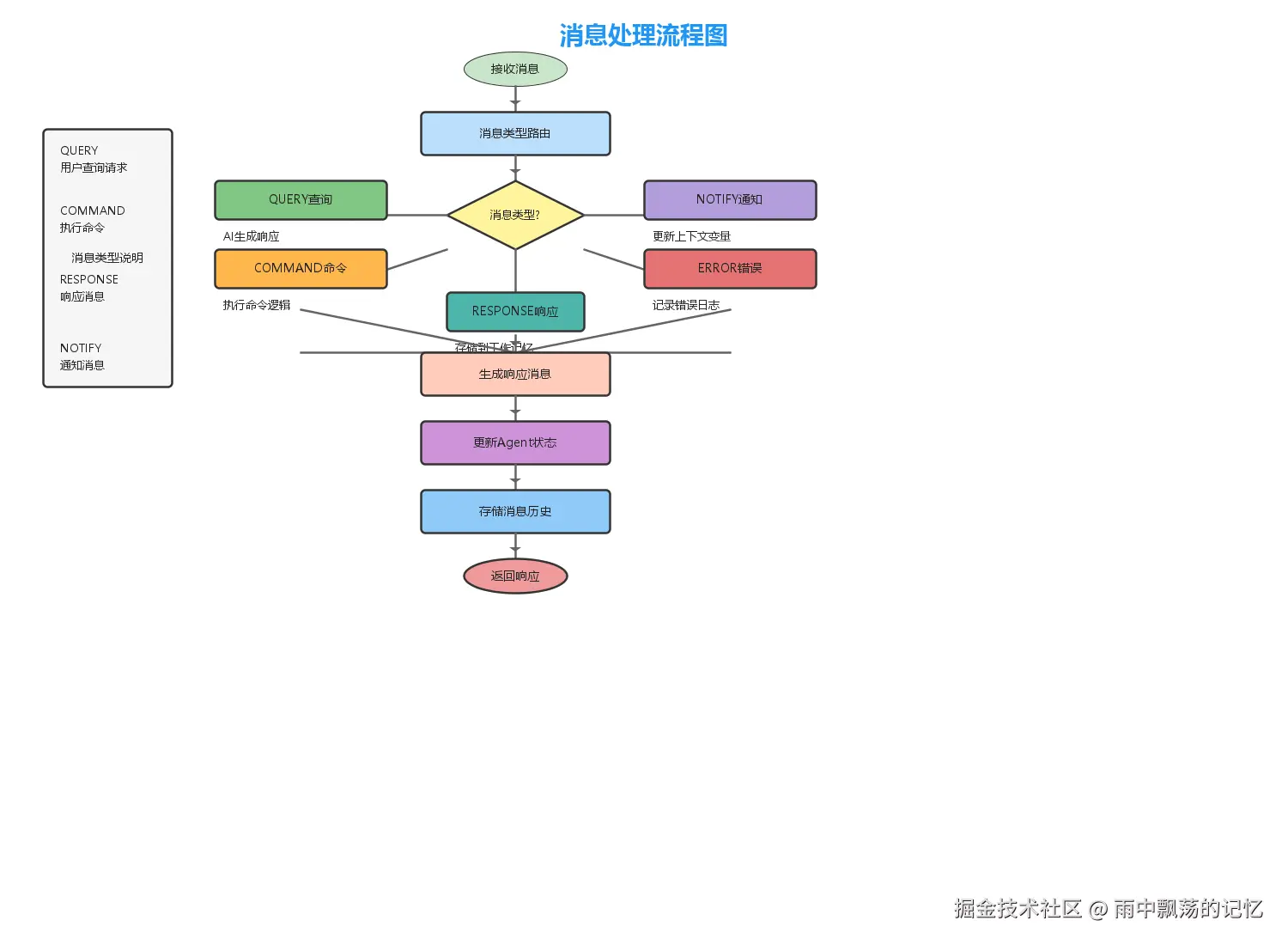
5.1 消息类型
智能体需要处理多种类型的消息:
java
/**
 * 消息类型枚举
 */
public enum MessageType {
    QUERY,    // 查询 - 请求信息
    COMMAND,  // 命令 - 执行指令
    RESPONSE, // 响应 - 回复消息
    NOTIFY,   // 通知 - 系统通知
    ERROR     // 错误 - 错误报告
}
5.2 消息处理流程
java
/**
 * 智能体消息处理
 */
public abstract class Agent {

    /**
     * 处理消息(模板方法)
     */
    public final void processMessage(AgentMessage message,
                                 AgentContext context) {
        // 1. 子类实现具体处理逻辑
        AgentMessage response = handleMessage(message, context);

        if (response != null) {
            // 2. 存储到消息历史
            context.addMessage(response);
        }

        // 3. 更新智能体状态
        updateState(message, context);
    }

    /**
     * 处理消息的具体实现(子类覆盖)
     */
    protected abstract AgentMessage handleMessage(
        AgentMessage message, AgentContext context
    );

    /**
     * 更新状态
     */
    protected void updateState(AgentMessage message,
                             AgentContext context) {
        this.state = calculateNewState(message, context);
    }

    /**
     * 计算新状态(子类可覆盖)
     */
    protected AgentState calculateNewState(AgentMessage message,
                                       AgentContext context) {
        switch (message.getType()) {
            case QUERY:
                return AgentState.PROCESSING;
            case COMMAND:
                return AgentState.EXECUTING;
            case RESPONSE:
                return AgentState.IDLE;
            default:
                return this.state;
        }
    }
}
六、Spring Boot集成
6.1 依赖配置
xml
<dependencies>
    <!-- Spring Boot Web -->
    <dependency>
        <groupId>org.springframework.boot</groupId>
        <artifactId>spring-boot-starter-web</artifactId>
        <version>2.7.14</version>
    </dependency>

    <!-- Lombok -->
    <dependency>
        <groupId>org.projectlombok</groupId>
        <artifactId>lombok</artifactId>
        <version>1.18.26</version>
    </dependency>

    <!-- 测试 -->
    <dependency>
        <groupId>org.junit.jupiter</groupId>
        <artifactId>junit-jupiter</artifactId>
        <version>5.9.2</version>
        <scope>test</scope>
    </dependency>

    <dependency>
        <groupId>org.mockito</groupId>
        <artifactId>mockito-core</artifactId>
        <version>4.11.0</version>
        <scope>test</scope>
    </dependency>

    <dependency>
        <groupId>org.assertj</groupId>
        <artifactId>assertj-core</artifactId>
        <version>3.24.2</version>
        <scope>test</scope>
    </dependency>
</dependencies>
6.2 配置类
java
/**
 * 系统配置
 */
@Configuration
public class SystemConfiguration {

    @Bean
    public AgentOrchestrator agentOrchestrator() {
        return new AgentOrchestrator();
    }

    @Bean
    public AIService aiService() {
        return new MockAIService();
    }

    @Bean
    public SimpleAIDecisionStrategy aiDecisionStrategy(
            AIService aiService) {
        return new SimpleAIDecisionStrategy(aiService);
    }

    @Bean
    public CollaborationSkill collaborationSkill() {
        return new CollaborationSkill();
    }

    @Bean
    public MemorySkill memorySkill() {
        return new MemorySkill(new SimpleMemoryStorage());
    }
}
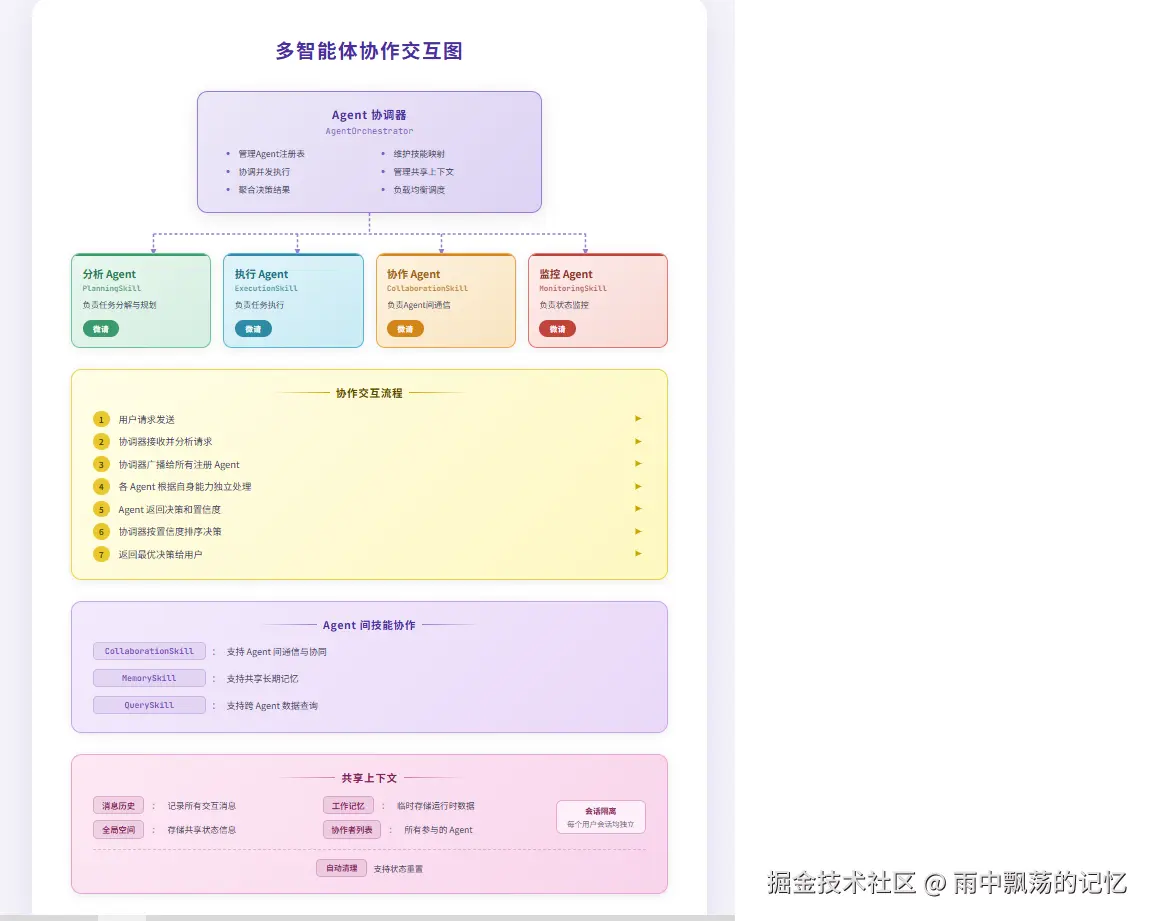
七、多智能体协作
7.1 协作场景
多智能体协作适用于以下场景:
- 任务分解:复杂任务分解为子任务,分配给不同智能体
- 角色分工:每个智能体承担特定角色(分析、执行、验证等)
- 信息互补:不同智能体拥有不同知识或能力
- 冗余验证:多个智能体处理同一任务,交叉验证结果
7.2 协作模式
7.2.1 层次协作
markdown
用户请求
    ↓
主控智能体(Orchestrator)
    ↓
    ├→ 分析智能体(任务分解)
    ├→ 执行智能体1(子任务1)
    ├→ 执行智能体2(子任务2)
    └→ 执行智能体3(子任务3)
    ↓
结果汇总与整合
7.2.2 平等协作
css
用户请求
    ↓
消息广播
    ↓
    ├→ 智能体A(独立决策)
    ├→ 智能体B(独立决策)
    └→ 智能体C(独立决策)
    ↓
决策协调(投票、加权等)
    ↓
最终结果
7.3 协调器实现
java
/**
 * 智能体协调器
 */
public class AgentOrchestrator {

    // 注册的智能体
    private Map<String, Agent> agents;

    // 共享上下文
    private AgentContext sharedContext;

    // 线程池
    private ExecutorService executorService;

    /**
     * 注册智能体
     */
    public void registerAgent(Agent agent) {
        agents.put(agent.getAgentId(), agent);
        sharedContext.addCollaborator(agent);
    }

    /**
     * 广播消息到所有智能体
     */
    public List<Future<AgentMessage>> broadcast(
            AgentMessage message) {
        List<Future<AgentMessage>> futures = new ArrayList<>();

        for (Agent agent : agents.values()) {
            Future<AgentMessage> future =
                executorService.submit(() -> {
                    agent.processMessage(message, sharedContext);
                    return message;
                });
            futures.add(future);
        }

        return futures;
    }

    /**
     * 协调决策
     */
    public AgentDecision coordinateDecisions(
            List<AgentDecision> decisions) {
        // 按置信度排序
        List<AgentDecision> sorted = decisions.stream()
            .sorted((a, b) -> Double.compare(
                b.getConfidence(), a.getConfidence()))
            .collect(Collectors.toList());

        // 合并决策
        return mergeDecisions(sorted);
    }
}
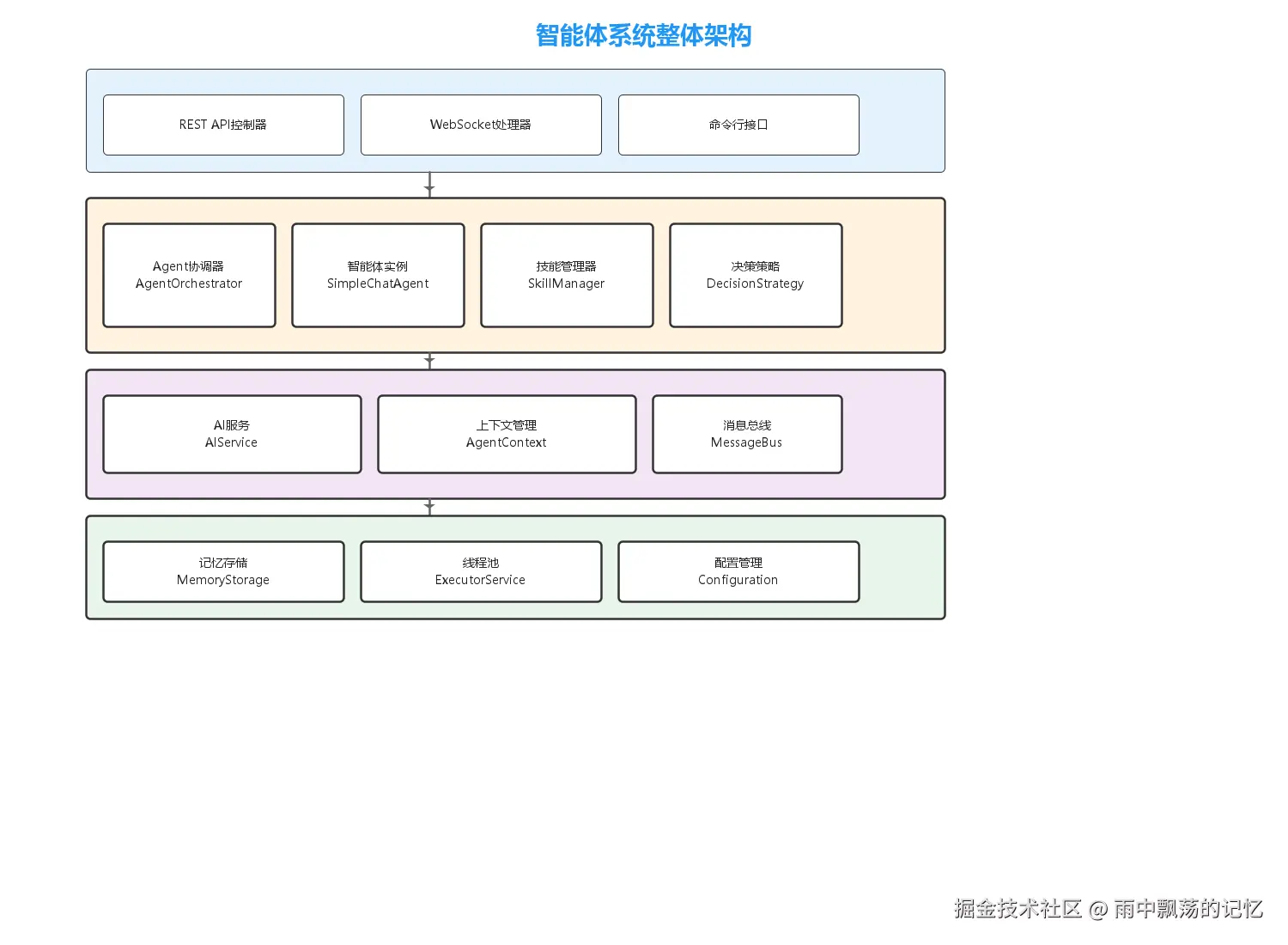
八、系统整体架构
九、完整示例:SimpleChatAgent
9.1 实现代码
java
/**
 * 简单聊天智能体
 */
public class SimpleChatAgent extends Agent {

    private AIService aiService;

    public SimpleChatAgent(String agentId, String agentName,
                         AIService aiService) {
        super(agentId, agentName);
        this.aiService = aiService;
    }

    @Override
    protected AgentMessage handleMessage(
            AgentMessage message, AgentContext context) {

        switch (message.getType()) {
            case QUERY:
                return handleQuery(message, context);

            case COMMAND:
                return handleCommand(message, context);

            case RESPONSE:
                return handleResponse(message, context);

            case NOTIFY:
                return handleNotification(message, context);

            default:
                return createErrorResponse("未知消息类型");
        }
    }

    private AgentMessage handleQuery(AgentMessage message,
                                    AgentContext context) {
        // 使用AI生成响应
        String aiResponse = aiService.chat(message.getContent());

        return createResponseMessage(agentId, aiResponse);
    }

    private AgentMessage handleCommand(AgentMessage message,
                                     AgentContext context) {
        String content = message.getContent().toLowerCase();

        if (content.contains("clear")) {
            context.clear();
            return createResponseMessage(agentId, "上下文已清除");
        } else if (content.contains("help")) {
            return createResponseMessage(agentId,
                    "可用命令: clear(清除), help(帮助), status(状态)");
        } else if (content.contains("status")) {
            return createResponseMessage(agentId,
                    String.format("当前状态: %s", state.getDesc()));
        }

        return createResponseMessage(agentId, "命令已处理");
    }

    @Override
    protected AgentDecision makeDefaultDecision(AgentContext context) {
        Object lastResponse = context.getFromWorkingMemory("last_response");

        if (lastResponse != null) {
            return new AgentDecision(AgentAction.WAIT, "等待用户反馈");
        }

        return new AgentDecision(AgentAction.QUERY, "需要更多信息");
    }
}
9.2 REST API接口
java
/**
 * 智能体控制器
 */
@RestController
@RequestMapping("/api/agent")
public class AgentController {

    @Resource
    private AgentOrchestrator orchestrator;

    @Resource
    private AIService aiService;

    /**
     * 创建智能体
     */
    @PostMapping("/create")
    public ApiResponse createAgent(@RequestBody CreateAgentRequest request) {
        SimpleChatAgent agent = new SimpleChatAgent(
                request.getAgentId(),
                request.getAgentName(),
                aiService
        );

        orchestrator.registerAgent(agent);

        return ApiResponse.success("智能体创建成功")
                .addData("agentId", agent.getAgentId());
    }

    /**
     * 发送消息到智能体
     */
    @PostMapping("/message")
    public ApiResponse sendMessage(@RequestBody MessageRequest request) {
        AgentMessage message = new AgentMessage(
                MessageType.QUERY,
                request.getSenderId(),
                request.getContent()
        );

        Future<AgentMessage> future =
                orchestrator.sendMessage(request.getAgentId(), message);

        AgentMessage response = future.get(10, TimeUnit.SECONDS);

        return ApiResponse.success("消息已处理")
                .addData("content", response.getContent());
    }

    /**
     * 智能体决策
     */
    @PostMapping("/decision")
    public ApiResponse makeDecision(@RequestBody DecisionRequest request) {
        Agent agent = findAgent(request.getAgentId());
        AgentDecision decision = agent.decide(orchestrator.getSharedContext());

        return ApiResponse.success("决策完成")
                .addData("action", decision.getAction())
                .addData("reason", decision.getReason())
                .addData("confidence", decision.getConfidence());
    }
}
十、总结
本文介绍了基于Multi-Agent、Skills模式和Spring AI的自主决策智能体架构。核心要点包括:
- 模块化设计:通过Skills模式实现能力模块化
- 策略模式:通过决策策略实现决策逻辑可插拔
- 上下文管理:通过AgentContext维护完整运行状态
- 多智能体协作:通过协调器实现智能体间协作