npm i swper 安装 下载 swper 插件
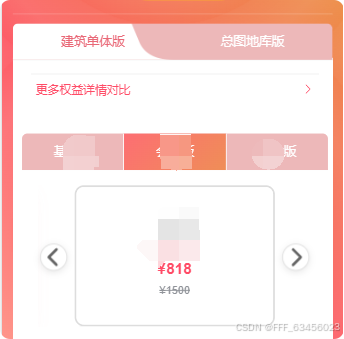
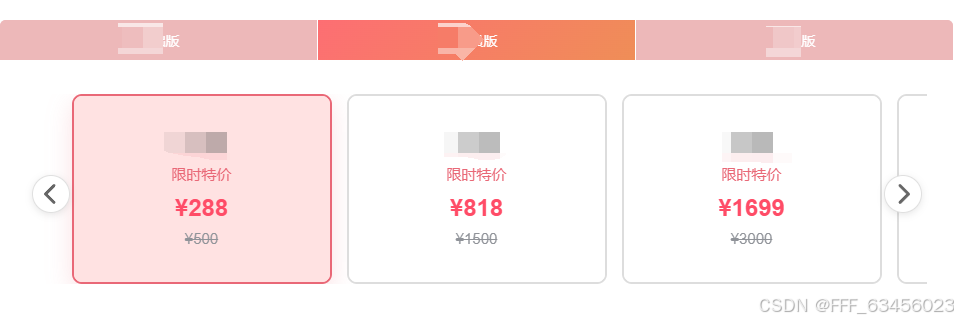
父组件
<div class="carouse-box" v-if="itemsDataList.length > 0">
<carouselss :images="itemsDataList" :mealVipTypeCodeItem="mealVipTypeCodeItem" :items-to-show="3"
@switchHandler="switchHandler">
</carouselss>
</div>
javascript
<template>
  <div class="membership-page">
    <h2>会员套餐</h2>
    <CarouselComponent
      :images="mixedData"
      @switchHandler="handlePackageSelect"
    />
  </div>
</template>

<script setup>
import { ref } from 'vue'
import CarouselComponent from '@/components/CarouselComponent.vue'
import businessCard from '@/assets/images/businessCard.png'

// 混合数据 - 包含普通卡片和企业卡片
const mixedData = ref([
  {
    number: 1,
    unit: 'month',
    factualCost: 29.9,
    originalCost: 39.9,
    typeCode: 'A1'
  },
  {
    number: 3,
    unit: 'month',
    factualCost: 79.9,
    originalCost: 119.7,
    typeCode: 'A2'
  },
  {
    number: 6,
    unit: 'month',
    factualCost: 149.9,
    originalCost: 239.4,
    typeCode: 'A3'
  },
  {
    number: 12,
    unit: 'year',
    factualCost: 299.9,
    originalCost: 479.9,
    typeCode: 'A4'
  },
  {
    // 企业卡片 - 使用imageUrl
    imageUrl: businessCard,
    typeCode: 'A5'
  }
])

// 处理套餐选择
const handlePackageSelect = (selectedPackage) => {
  if (selectedPackage.typeCode && selectedPackage.typeCode === 'A5') {
    console.log('点击了企业卡片,不处理选择')
    return
  }
  console.log('选择的套餐:', selectedPackage)
  // 这里可以处理套餐选择的业务逻辑
}
</script>
javascript
<template>
  <div class="carousel-container">
    <swiper
      :modules="modules"
      :slides-per-view="slidesPerView"
      :space-between="spaceBetween"
      :navigation="false"
      :pagination="false"
      :loop="false"
      class="carousel-swiper"
      @swiper="onSwiperInit"
    >
      <swiper-slide v-for="(item, index) in images" :key="index">
        <div
          class="carousel-item"
          :class="{ 'active': currentIndex === index }"
          @click="switchItem(index, item)"
        >
          <!-- 普通卡片 -->
          <div class="carousel-content" v-if="!item.imageUrl">
            <div class="month">{{ item.number }}{{ item.unit === 'month' ? '个月' : '年' }}</div>
            <div class="special" :class="{ 'hidden': item.originalCost === item.factualCost }">
              限时特价
            </div>
            <div class="price">¥{{ item.factualCost }}</div>
            <div class="old-price" :class="{ 'hidden': item.originalCost === item.factualCost }">
              ¥{{ item.originalCost }}
            </div>
          </div>
          <!-- 企业卡片 -->
          <div class="carousel-content" v-else>
            <img class="business-card-img" :src="item.imageUrl || businessCard" alt="">
          </div>
        </div>
      </swiper-slide>
    </swiper>

    <!-- 导航按钮 -->
    <div class="nav-button prev" :class="{ 'hidden-nav': images.length <= slidesPerView }" @click="prevSlide">
      <el-icon :size="24">
        <ArrowLeftBold />
      </el-icon>
    </div>
    <div class="nav-button next" :class="{ 'hidden-nav': images.length <= slidesPerView }" @click="nextSlide">
      <el-icon :size="24">
        <ArrowRightBold />
      </el-icon>
    </div>
  </div>
</template>

<script setup>
import { ref, computed, onMounted, onUnmounted } from 'vue'
import { Swiper, SwiperSlide } from 'swiper/vue'
import { Navigation } from 'swiper/modules'
import { ElIcon } from "element-plus";
import { ArrowLeftBold, ArrowRightBold } from '@element-plus/icons-vue'
import businessCard from '@/assets/images/businessCard.png'
import { useMembershipStore } from '@/store/modules/membershipStore'

// 导入 Swiper 样式
import 'swiper/css'

const membershipStore = useMembershipStore()
const props = defineProps({
  images: {
    type: Array,
    default: () => []
  }
})
const emits = defineEmits()

const currentIndex = ref(0)
const swiperInstance = ref(null)
const windowWidth = ref(window.innerWidth)
const modules = [Navigation]

// 响应式配置
const slidesPerView = computed(() => {
  if (windowWidth.value < 650) return 1
  if (windowWidth.value < 768) return 2
  if (windowWidth.value <= 1024) return 2
  return 3
})

const spaceBetween = computed(() => {
  if (windowWidth.value <= 480) return 6
  if (windowWidth.value <= 640) return 8
  if (windowWidth.value <= 768) return 10
  if (windowWidth.value <= 1024) return 12
  return 15
})

// 卡片最大宽度 - 详细的响应式设置
const cardMaxWidth = computed(() => {
  if (windowWidth.value <= 375) return '220px'
  if (windowWidth.value <= 480) return '240px'
  if (windowWidth.value <= 640) return '250px'
  if (windowWidth.value <= 768) return '260px'
  if (windowWidth.value <= 900) return '270px'
  if (windowWidth.value <= 1024) return '280px'
  if (windowWidth.value <= 1200) return '290px'
  return '300px'
})

// 更新窗口宽度
const updateWidth = () => {
  windowWidth.value = window.innerWidth
}

onMounted(() => {
  window.addEventListener('resize', updateWidth)
})

onUnmounted(() => {
  window.removeEventListener('resize', updateWidth)
})

// Swiper 初始化
const onSwiperInit = (swiper) => {
  swiperInstance.value = swiper
}

// 导航方法
const prevSlide = () => {
  if (swiperInstance.value) {
    swiperInstance.value.slidePrev()
  }
}

const nextSlide = () => {
  if (swiperInstance.value) {
    swiperInstance.value.slideNext()
  }
}

// 点击卡片
const switchItem = (index, item) => {
  if (item.typeCode && item.typeCode == 'A5') return
  currentIndex.value = index
  membershipStore.setSelectedPackage(null)
  membershipStore.setSelectedPackage(item)
  emits('switchHandler', item)
}
</script>

<style scoped lang="scss">
// .carousel-container {
//   position: relative;
//   width: 100%;
//   max-width: 900px;
//   margin: 0 auto;
//   padding: 20px 0 30px;
//   box-sizing: border-box;

//   @media (max-width: 1024px) {
//     max-width: 850px;
//     padding: 18px 0 25px;
//   }
//   @media (max-width: 1000px) {
//     max-width: 810px;
//     padding: 18px 0 25px;
//   }

//   @media (max-width: 900px) {
//     max-width:550px;
//     padding: 16px 0 22px;
//   }
//   @media (max-width: 910px) {
//     max-width:640px;
//     padding: 16px 0 22px;
//   }
//   @media (max-width: 920px) {
//     max-width:640px;
//     padding: 16px 0 22px;
//   }
//   @media (max-width: 930px) {
//     max-width:640px;
//     padding: 16px 0 22px;
//   }
//   @media (max-width: 940px) {
//     max-width:650px;
//     padding: 16px 0 22px;
//   }
//   @media (max-width: 950px) {
//     max-width:650px;
//     padding: 16px 0 22px;
//   }

//   @media (max-width: 768px) {
//     max-width: 525px;
//     padding: 15px 0 20px;
//   }

//   @media (max-width: 640px) {
//     padding: 12px 0 18px;
//   }

//   @media (max-width: 480px) {
//     padding: 10px 0 15px;
//   }
// }
 .carousel-container {
  position: relative;
  width: 100%;
  max-width: 900px;
  margin: 0 auto;
  padding: 20px 0 30px;
  box-sizing: border-box;

  // 1200px 以上保持默认 900px

  // 1025px - 1200px
  @media (max-width: 1200px) and (min-width: 1025px) {
    max-width:755px;
    padding: 20px 0 28px;
  }

  // 977px - 1024px
  @media (max-width: 1024px) and (min-width: 977px) {
    max-width: 705px;
    padding: 19px 0 26px;
  }

  // 951px - 976px
  @media (max-width: 976px) and (min-width: 951px) {
    max-width: 700px;
    padding: 18px 0 25px;
  }

  // 921px - 950px
  @media (max-width: 950px) and (min-width: 921px) {
    max-width: 645px;
    padding: 18px 0 24px;
  }

  // 901px - 920px
  @media (max-width: 920px) and (min-width: 901px) {
    max-width: 640px;
    padding: 17px 0 23px;
  }

  // 861px - 900px
  @media (max-width: 900px) and (min-width: 861px) {
    max-width: 620px;
    padding: 17px 0 23px;
  }

  // 821px - 860px
  @media (max-width: 860px) and (min-width: 821px) {
    max-width:68vw;
    padding: 16px 0 22px;
  }

  // 769px - 820px
  @media (max-width: 820px) and (min-width: 769px) {
    max-width: 525px;
    padding: 16px 0 22px;
  }

  // 641px - 768px
  @media (max-width: 768px) and (min-width: 641px) {
    max-width: 65vw;
    padding: 15px 0 20px;
  }

  // 481px - 640px
  @media (max-width: 640px) and (min-width: 481px) {
    max-width: 420px;
    padding: 12px 0 18px;
  }

  // 375px - 480px
  @media (max-width: 480px) and (min-width: 376px) {
    max-width: 340px;
    padding: 10px 0 15px;
  }

  // 374px 以下
  @media (max-width: 375px) {
    max-width: 300px;
    padding: 8px 0 12px;
  }
}
.carousel-swiper {
  padding: 0 45px;
  width: 100%;
  box-sizing: border-box;

  @media (max-width: 1024px) {
    padding: 0 40px;
  }

  @media (max-width: 900px) {
    padding: 0 35px;
  }

  @media (max-width: 768px) {
    padding: 0 30px;
  }

  @media (max-width: 640px) {
    padding: 0 25px;
  }

  @media (max-width: 480px) {
    padding: 0 20px;
  }

  @media (max-width: 375px) {
    padding: 0 15px;
  }

  :deep(.swiper-wrapper) {
    display: flex;
    align-items: stretch;
  }

  :deep(.swiper-slide) {
    height: auto;
    display: flex;
    justify-content: center;
  }
}

// 卡片样式
.carousel-item {
  width: 100%;
  max-width: v-bind(cardMaxWidth);
  height: 190px;
  border-radius: 10px;
  cursor: pointer;
  border: 2px solid #ddd;
  background: #ffffff;
  box-sizing: border-box;
  overflow: hidden;
  transition: all 0.3s ease;

  @media (max-width: 1024px) {
    height: 180px;
  }

  @media (max-width: 900px) {
    height: 175px;
  }

  @media (max-width: 768px) {
    height: 170px;
  }

  @media (max-width: 640px) {
    height: 165px;
  }

  @media (max-width: 480px) {
    height: 160px;
  }

  @media (max-width: 375px) {
    height: 155px;
  }

  &:hover {
    transform: translateY(0px);
    box-shadow: 0 4px 12px rgba(0, 0, 0, 0.1);
  }

  &.active {
    border-color: #e96877;
    background-color: #ffe2e2;
    box-shadow: 0 8px 24px rgba(233, 104, 119, 0.2);
  }
}

// 卡片内容
.carousel-content {
  width: 100%;
  height: 100%;
  display: flex;
  flex-direction: column;
  justify-content: center;
  align-items: center;
  padding: 15px 10px;
  box-sizing: border-box;
  background: inherit;

  .month {
    font-weight: 600;
    font-size: 18px;
    color: #333;
    margin-bottom: 8px;
    text-align: center;

    @media (max-width: 1024px) {
      font-size: 17px;
      margin-bottom: 7px;
    }

    @media (max-width: 900px) {
      font-size: 16.5px;
    }

    @media (max-width: 768px) {
      font-size: 16px;
      margin-bottom: 6px;
    }

    @media (max-width: 640px) {
      font-size: 15.5px;
    }

    @media (max-width: 480px) {
      font-size: 15px;
    }

    @media (max-width: 375px) {
      font-size: 14px;
    }
  }

  .special {
    color: #e96877;
    font-size: 15px;
    margin-bottom: 10px;
    text-align: center;

    @media (max-width: 1024px) {
      font-size: 14px;
      margin-bottom: 9px;
    }

    @media (max-width: 900px) {
      font-size: 13.5px;
    }

    @media (max-width: 768px) {
      font-size: 13px;
      margin-bottom: 8px;
    }

    @media (max-width: 640px) {
      font-size: 12.5px;
    }

    @media (max-width: 480px) {
      font-size: 12px;
    }

    &.hidden {
      visibility: hidden;
    }
  }

  .price {
    font-weight: 700;
    font-size: 24px;
    color: #ff4c67;
    margin-bottom: 8px;
    text-align: center;

    @media (max-width: 1024px) {
      font-size: 22px;
      margin-bottom: 7px;
    }

    @media (max-width: 900px) {
      font-size: 21px;
    }

    @media (max-width: 768px) {
      font-size: 20px;
      margin-bottom: 6px;
    }

    @media (max-width: 640px) {
      font-size: 19px;
    }

    @media (max-width: 480px) {
      font-size: 18px;
    }

    @media (max-width: 375px) {
      font-size: 17px;
    }
  }

  .old-price {
    color: #909399;
    font-size: 15px;
    text-decoration: line-through;
    text-align: center;

    @media (max-width: 1024px) {
      font-size: 14px;
    }

    @media (max-width: 900px) {
      font-size: 13.5px;
    }

    @media (max-width: 768px) {
      font-size: 13px;
    }

    @media (max-width: 640px) {
      font-size: 12.5px;
    }

    @media (max-width: 480px) {
      font-size: 12px;
    }

    &.hidden {
      visibility: hidden;
    }
  }

  .business-card-img {
    width: 100%;
    height: 100%;
    object-fit: contain;
    max-width: 100%;
    max-height: 100%;
  }
}

// 导航按钮
.nav-button {
  position: absolute;
  top: 50%;
  transform: translateY(-50%);
  width: 38px;
  height: 38px;
  background: white;
  border-radius: 50%;
  display: flex;
  align-items: center;
  justify-content: center;
  cursor: pointer;
  z-index: 1;
  border: 1px solid #e0e0e0;
  box-shadow: 0 2px 8px rgba(0, 0, 0, 0.1);
  transition: all 0.3s ease;

  @media (max-width: 1024px) {
    width: 36px;
    height: 36px;
  }

  @media (max-width: 900px) {
    width: 35px;
    height: 35px;
  }

  @media (max-width: 768px) {
    width: 34px;
    height: 34px;
  }

  @media (max-width: 640px) {
    width: 32px;
    height: 32px;
  }

  @media (max-width: 480px) {
    width: 30px;
    height: 30px;
  }

  &.prev {
    left: 5px;

    @media (max-width: 768px) {
      left: 3px;
    }

    @media (max-width: 480px) {
      left: 2px;
    }
  }

  &.next {
    right: 5px;

    @media (max-width: 768px) {
      right: 3px;
    }

    @media (max-width: 480px) {
      right: 2px;
    }
  }

  &.hidden-nav {
    opacity: 0;
    pointer-events: none;
  }

  &:hover {
    background: #f5f5f5;
    transform: translateY(-50%) scale(1.1);
    box-shadow: 0 4px 12px rgba(0, 0, 0, 0.15);

    .el-icon {
      color: #e96877;
    }
  }

  .el-icon {
    transition: color 0.3s ease;
    color: #666;
    font-size: 24px;

    @media (max-width: 1024px) {
      font-size: 22px;
    }

    @media (max-width: 900px) {
      font-size: 21px;
    }

    @media (max-width: 768px) {
      font-size: 20px;
    }

    @media (max-width: 640px) {
      font-size: 19px;
    }

    @media (max-width: 480px) {
      font-size: 18px;
    }
  }
}

.hidden {
  visibility: hidden;
}

.hidden-nav {
  opacity: 0;
  pointer-events: none;
}
</style>