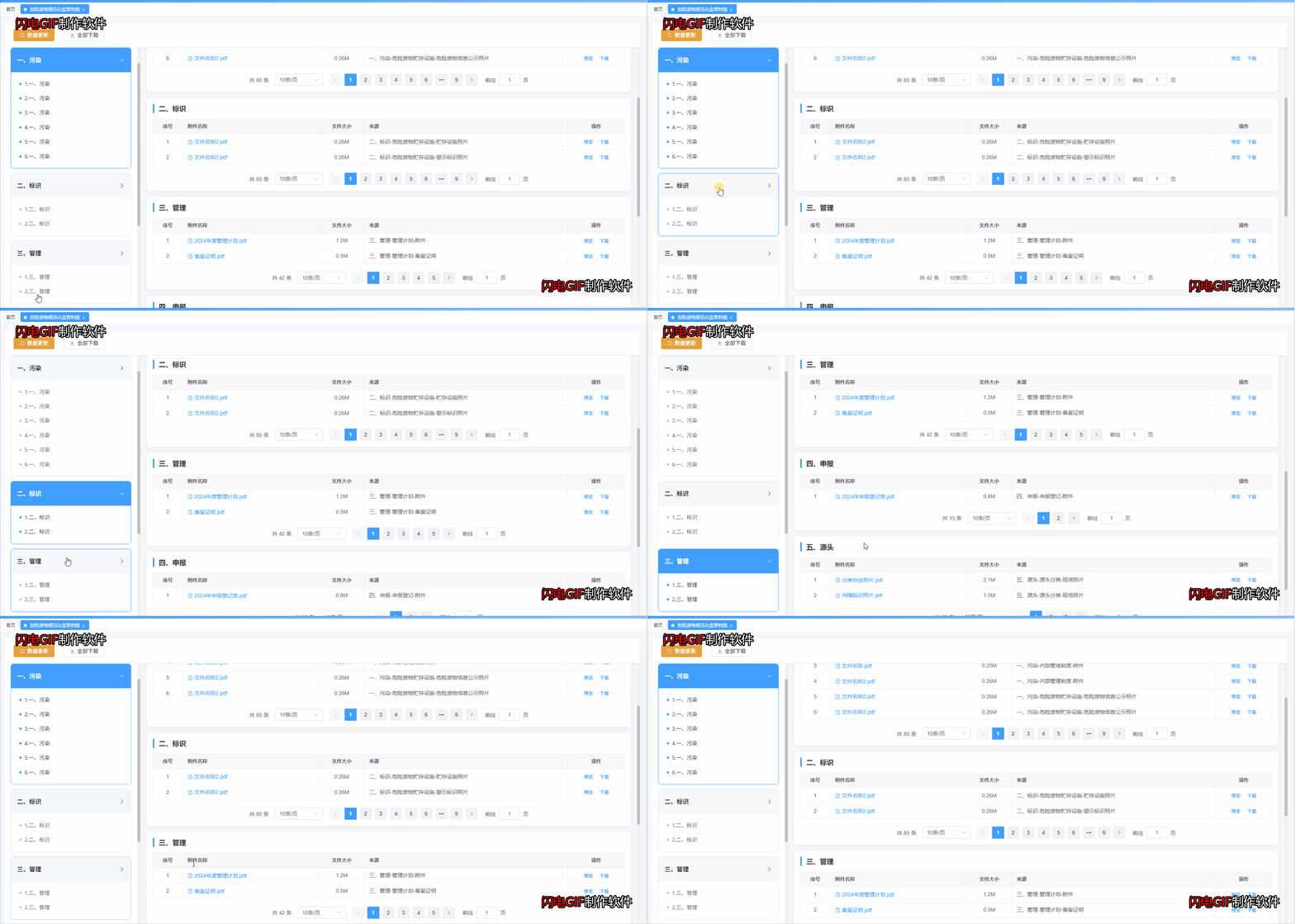
<template>
  <div class="app-container">
    <!-- 顶部工具栏 -->
    <div class="toolbar">
      <el-button type="warning" :icon="Refresh">数据更新</el-button>
      <el-button :icon="Download">全部下载</el-button>
    </div>

    <!-- 主体内容 -->
    <div class="main-layout">
      <!-- 左侧目录 -->
      <aside ref="sidebarRef" class="sidebar">
        <h2 class="sidebar-title">危险废物规范化台账</h2>
        <div v-for="(item, index) in catalogData" :key="index" :ref="el => setMenuItemRef(el, index)"
          :class="['menu-item', { active: activeIndex === index }]" @click="handleMenuClick(index)">
          <div class="menu-header">
            <span>{{ item.title }}</span>
            <el-icon>
              <ArrowRight v-if="activeIndex !== index" />
              <ArrowDown v-else />
            </el-icon>
          </div>
          <div v-if="item.children && item.children.length" class="menu-content">
            <ul>
              <li v-for="(child, cIndex) in item.children" :key="cIndex">
                {{ child }}
              </li>
            </ul>
          </div>
        </div>
      </aside>

      <!-- 右侧内容 -->
      <main ref="contentRef" class="content-area" @scroll="handleScroll">
        <div v-for="(item, index) in catalogData" :id="'section-' + index" :key="index" class="section">
          <div class="section-title">{{ item.title }}</div>

          <el-table :data="item.tableData" border class="custom-table">
            <el-table-column type="index" label="序号" width="80" align="center" />
            <el-table-column prop="name" label="附件名称" min-width="200">
              <template #default="{ row }">
                <el-link type="primary" :underline="false" class="file-link">
                  <el-icon class="file-icon">
                    <Document />
                  </el-icon>
                  {{ row.name }}
                </el-link>
              </template>
            </el-table-column>
            <el-table-column prop="size" label="文件大小" width="120" align="center" />
            <el-table-column prop="source" label="来源" min-width="300" show-overflow-tooltip />
            <el-table-column label="操作" width="150" align="center" fixed="right">
              <template #default>
                <el-button link type="primary" size="small">预览</el-button>
                <el-button link type="primary" size="small">下载</el-button>
              </template>
            </el-table-column>
          </el-table>

          <div class="pagination-wrapper">
            <el-pagination v-model:current-page="item.currentPage" v-model:page-size="item.pageSize"
              :page-sizes="[10, 20, 50, 100]" :total="item.total" layout="total, sizes, prev, pager, next, jumper"
              background />
          </div>
        </div>
      </main>
    </div>
  </div>
</template>

<script setup>
import { ref, onMounted, onUnmounted, nextTick } from 'vue'
import { Refresh, Download, ArrowRight, ArrowDown, Document } from '@element-plus/icons-vue'
import {

} from '@/api/ledger/hazard'
const contentRef = ref(null)
const sidebarRef = ref(null)
const activeIndex = ref(0)
const menuItemRefs = ref([])
const isManualClick = ref(false)
let clickTimer = null

// 设置菜单项引用
const setMenuItemRef = (el, index) => {
  if (el) {
    menuItemRefs.value[index] = el
  }
}

// 模拟数据
const catalogData = ref([
  {
    title: '一、污染',
    children: [
      '1.一、污染',
      '2.一、污染',
      '3.一、污染',
      '4.一、污染',
      '5.一、污染',
      '6.一、污染'
    ],
    tableData: [
      { name: '文件名称.pdf', size: '0.25M', source: '一、污染-内部管理制度-附件' },
      { name: '文件名称2.pdf', size: '0.26M', source: '一、污染-内部管理制度-附件' },
      { name: '文件名称.pdf', size: '0.25M', source: '一、污染-内部管理制度-附件' },
      { name: '文件名称2.pdf', size: '0.26M', source: '一、污染-内部管理制度-附件' },
      { name: '文件名称2.pdf', size: '0.26M', source: '一、污染-危险废物贮存设施-危险废物信息公示照片' },
      { name: '文件名称2.pdf', size: '0.26M', source: '一、污染-危险废物贮存设施-危险废物信息公示照片' }
    ],
    currentPage: 1,
    pageSize: 10,
    total: 85
  },
  {
    title: '二、标识',
    children: [
      '1.二、标识',
      '2.二、标识'
    ],
    tableData: [
      { name: '文件名称2.pdf', size: '0.26M', source: '二、标识-危险废物贮存设施-贮存设施照片' },
      { name: '文件名称2.pdf', size: '0.26M', source: '二、标识-危险废物贮存设施-警示标识照片' }
    ],
    currentPage: 1,
    pageSize: 10,
    total: 85
  },
  {
    title: '三、管理',
    children: [
      '1.三、管理',
      '2.三、管理'
    ],
    tableData: [
      { name: '2024年度管理计划.pdf', size: '1.2M', source: '三、管理-管理计划-附件' },
      { name: '备案证明.pdf', size: '0.5M', source: '三、管理-管理计划-备案证明' }
    ],
    currentPage: 1,
    pageSize: 10,
    total: 42
  },
  {
    title: '四、申报',
    children: ['四、申报'],
    tableData: [
      { name: '2024年申报登记表.pdf', size: '0.8M', source: '四、申报-申报登记-附件' }
    ],
    currentPage: 1,
    pageSize: 10,
    total: 15
  },
  {
    title: '五、源头',
    children: ['五、源头'],
    tableData: [
      { name: '分类存放照片.pdf', size: '2.1M', source: '五、源头-源头分类-现场照片' },
      { name: '间隔标识照片.pdf', size: '1.5M', source: '五、源头-源头分类-现场照片' }
    ],
    currentPage: 1,
    pageSize: 10,
    total: 28
  },
  {
    title: '六、转移',
    children: [
      '1.六、转移',
      '2.六、转移',
    ],
    tableData: [
      { name: '转移联单-2024-001.pdf', size: '0.3M', source: '六、转移-转移联单-附件' },
      { name: '转移联单-2024-002.pdf', size: '0.3M', source: '六、转移-转移联单-附件' },
    ],
    currentPage: 1,
    pageSize: 10,
    total: 56
  },
])

// 获取所有章节元素
const getSections = () => {
  return document.querySelectorAll('.section')
}

// 计算当前应该激活的索引
const calculateActiveIndex = () => {
  if (!contentRef.value) return 0

  const scrollTop = contentRef.value.scrollTop
  const scrollHeight = contentRef.value.scrollHeight
  const clientHeight = contentRef.value.clientHeight
  const sections = getSections()

  if (sections.length === 0) return 0

  // 判断是否滚动到底部(允许10px误差)
  const isAtBottom = scrollTop + clientHeight >= scrollHeight - 10

  // 如果滚动到底部,直接返回最后一个索引
  if (isAtBottom) {
    return sections.length - 1
  }

  // 找到当前滚动位置所在的章节
  // 从后往前遍历,找到第一个顶部在视口上方的章节
  for (let i = sections.length - 1; i >= 0; i--) {
    const section = sections[i]
    const offsetTop = section.offsetTop

    // 当滚动位置超过章节顶部减去一个偏移量(提前触发)
    if (scrollTop >= offsetTop - 80) {
      return i
    }
  }

  return 0
}

// 滚动左侧菜单到可视区域
const scrollMenuToView = (index) => {
  if (!sidebarRef.value || !menuItemRefs.value[index]) return

  const sidebar = sidebarRef.value
  const menuItem = menuItemRefs.value[index]

  const sidebarRect = sidebar.getBoundingClientRect()
  const itemRect = menuItem.getBoundingClientRect()

  // 判断元素是否在可视区域内
  const isAbove = itemRect.top < sidebarRect.top + 20
  const isBelow = itemRect.bottom > sidebarRect.bottom - 20
  if (isAbove) {
    menuItem.scrollIntoView({ behavior: 'smooth', block: 'start' })
  } else if (isBelow) {
    menuItem.scrollIntoView({ behavior: 'smooth', block: 'start' })
  }
}

// 处理菜单点击
const handleMenuClick = (index) => {
  isManualClick.value = true

  // 立即更新激活状态
  activeIndex.value = index

  // 滚动右侧到对应位置
  const element = document.getElementById(`section-${index}`)
  if (element && contentRef.value) {
    // 如果是最后一个,滚动到底部
    if (index === catalogData.value.length - 1) {
      contentRef.value.scrollTo({
        top: contentRef.value.scrollHeight,
        behavior: 'smooth'
      })
    } else {
      contentRef.value.scrollTo({
        top: element.offsetTop - 80,
        behavior: 'smooth'
      })
    }
  }

  // 滚动左侧菜单到可视区域
  scrollMenuToView(index)

  // 清除之前的定时器
  if (clickTimer) {
    clearTimeout(clickTimer)
  }

  // 延迟恢复滚动监听,避免冲突
  clickTimer = setTimeout(() => {
    isManualClick.value = false
  }, 800)
}

// 处理右侧滚动
const handleScroll = () => {
  // 如果是手动点击触发的滚动,不处理
  if (isManualClick.value) return

  const newIndex = calculateActiveIndex()
  console.log('滚动位置:', newIndex)
  if (activeIndex.value !== newIndex) {
    activeIndex.value = newIndex
    scrollMenuToView(newIndex)
  }
}

onMounted(() => {
  // 初始化时计算一次当前位置
  nextTick(() => {
    const index = calculateActiveIndex()
    if (index !== activeIndex.value) {
      activeIndex.value = index
    }
  })
})

onUnmounted(() => {
  if (clickTimer) {
    clearTimeout(clickTimer)
  }
})
</script>

<style scoped>
.app-container {
  height: calc(100vh - 84px);
  display: flex;
  flex-direction: column;
  background-color: #f5f7fa;
  padding: 20px;
}

/* 顶部工具栏 */
.toolbar {
  background: #fff;
  padding: 16px 24px;
  border-bottom: 1px solid #e4e7ed;
  display: flex;
  gap: 12px;
  box-shadow: 0 2px 4px rgba(0, 0, 0, 0.05);
}

/* 主体布局 */
.main-layout {
  flex: 1;
  display: flex;
  overflow: hidden;
}

/* 左侧目录 */
.sidebar {
  width: 360px;
  background: #fff;
  border-right: 1px solid #e4e7ed;
  overflow-y: auto;
  padding: 16px;
  scroll-behavior: smooth;
  margin-bottom: 0;
}

.sidebar-title {
  margin-bottom: 16px;
  color: #303133;
  font-size: 20px;
  font-weight: 600;
}

.menu-item {
  margin-bottom: 12px;
  border: 1px solid #e4e7ed;
  border-radius: 8px;
  overflow: hidden;
  transition: all 0.3s;
  cursor: pointer;
}

.menu-item:hover {
  border-color: #409eff;
  box-shadow: 0 2px 12px rgba(64, 158, 255, 0.1);
}

.menu-item.active {
  border-color: #409eff;
  background: #ecf5ff;
}

.menu-header {
  padding: 16px;
  background: #f5f7fa;
  font-weight: 600;
  color: #303133;
  display: flex;
  align-items: center;
  justify-content: space-between;
  gap: 8px;
}

.menu-item.active .menu-header {
  background: #409eff;
  color: #fff;
}

.menu-content {
  padding: 12px 16px;
  background: #fff;
}

.menu-content ul {
  list-style: none;
  margin: 0;
  padding: 0;
}

.menu-content li {
  padding: 8px 0;
  padding-left: 20px;
  color: #606266;
  font-size: 14px;
  line-height: 1.6;
  position: relative;
}

.menu-content li::before {
  content: '';
  position: absolute;
  left: 6px;
  top: 16px;
  width: 6px;
  height: 6px;
  background: #c0c4cc;
  border-radius: 50%;
}

.menu-item.active .menu-content li {
  color: #303133;
}

.menu-item.active .menu-content li::before {
  background: #409eff;
}

/* 右侧内容区 */
.content-area {
  flex: 1;
  overflow-y: auto;
  padding: 16px 16px 0 16px;
  scroll-behavior: smooth;
}

.section {
  margin-bottom: 16px;
  background: #fff;
  border-radius: 8px;
  padding: 16px;
  box-shadow: 0 2px 12px rgba(0, 0, 0, 0.05);
}

.section:last-child {
  margin-bottom: 0px;
}

.section-title {
  font-size: 18px;
  font-weight: 600;
  color: #303133;
  margin-bottom: 16px;
  padding-left: 12px;
  border-left: 4px solid #409eff;
}

/* 表格样式优化 */
.custom-table {
  margin-top: 16px;
}

.file-link {
  display: inline-flex;
  align-items: center;
}

.file-icon {
  margin-right: 4px;
}

/* 分页居中 */
.pagination-wrapper {
  margin-top: 20px;
  display: flex;
  justify-content: center;
}

/* 滚动条美化 */
.sidebar::-webkit-scrollbar,
.content-area::-webkit-scrollbar {
  width: 8px;
  height: 8px;
}

.sidebar::-webkit-scrollbar-track,
.content-area::-webkit-scrollbar-track {
  background: #f1f1f1;
}

.sidebar::-webkit-scrollbar-thumb,
.content-area::-webkit-scrollbar-thumb {
  background: #c1c1c1;
  border-radius: 4px;
}

.sidebar::-webkit-scrollbar-thumb:hover,
.content-area::-webkit-scrollbar-thumb:hover {
  background: #a8a8a8;
}
</style>