gitee的套路在github一样适用
目录
[1. SSH秘钥配置](#1. SSH秘钥配置)
[1.1 通过命令 ssh-keygen 生成 SSH Key](#1.1 通过命令 ssh-keygen 生成 SSH Key)
[1.2 查看生成的 SSH 公钥和私钥:](#1.2 查看生成的 SSH 公钥和私钥:)
[1.3 读取公钥文件](#1.3 读取公钥文件)
[1.4 设置账户 SSH 公钥](#1.4 设置账户 SSH 公钥)
[2. 推送代码到仓库](#2. 推送代码到仓库)
[2.2 获取仓库的地址。](#2.2 获取仓库的地址。)
[2.3 推送代码](#2.3 推送代码)
[2.3.1 推送到全新仓库](#2.3.1 推送到全新仓库)
[2.3.2 推送到旧代码仓库](#2.3.2 推送到旧代码仓库)
[3. 拉取仓库代码](#3. 拉取仓库代码)
[3.1 拉取代码](#3.1 拉取代码)
[3.2 创建分支](#3.2 创建分支)
[3.3 推送代码](#3.3 推送代码)
[3.4 解决冲突](#3.4 解决冲突)
[4. gitee合并代码(pr工作流)](#4. gitee合并代码(pr工作流))
1. SSH秘钥配置
使用SSH访问代码仓库可以不用每次都输入用户名和密码,可以提高便捷性。软件开发过程中,git使用频率高,推荐一开始时配置SSH秘钥
1.1 通过命令 ssh-keygen 生成 SSH Key
bash
ssh-keygen -t ed25519 -C "Gitee SSH Key"-tkey 类型-C注释
输出,如:
bash
Generating public/private ed25519 key pair.
Enter file in which to save the key (/home/git/.ssh/id_ed25519):
Enter passphrase (empty for no passphrase):
Enter same passphrase again:
Your identification has been saved in /home/git/.ssh/id_ed25519
Your public key has been saved in /home/git/.ssh/id_ed25519.pub
The key fingerprint is:
SHA256:ohDd0OK5WG2dx4gST/j35HjvlJlGHvihyY+Msl6IC8I Gitee SSH Key
The key's randomart image is:
+--[ED25519 256]--+
|    .o           |
|   .+oo          |
|  ...O.o +       |
|   .= * = +.     |
|  .o +..S*. +    |
|. ...o o..+* *   |
|.E. o . ..+.O    |
| . . ... o =.    |
|    ..oo. o.o    |
+----[SHA256]-----+- 中间通过三次回车键确定
1.2 查看生成的 SSH 公钥和私钥:
bash
ls ~/.ssh/输出:
bash
id_ed25519 id_ed25519.pub- 私钥文件
id_ed25519 - 公钥文件
id_ed25519.pub
1.3 读取公钥文件
bash
cat ~/.ssh/id_ed25519.pub输出,如:
bash
ssh-ed25519 AAAA***5B Gitee SSH Key复制终端输出的公钥
1.4 设置账户 SSH 公钥
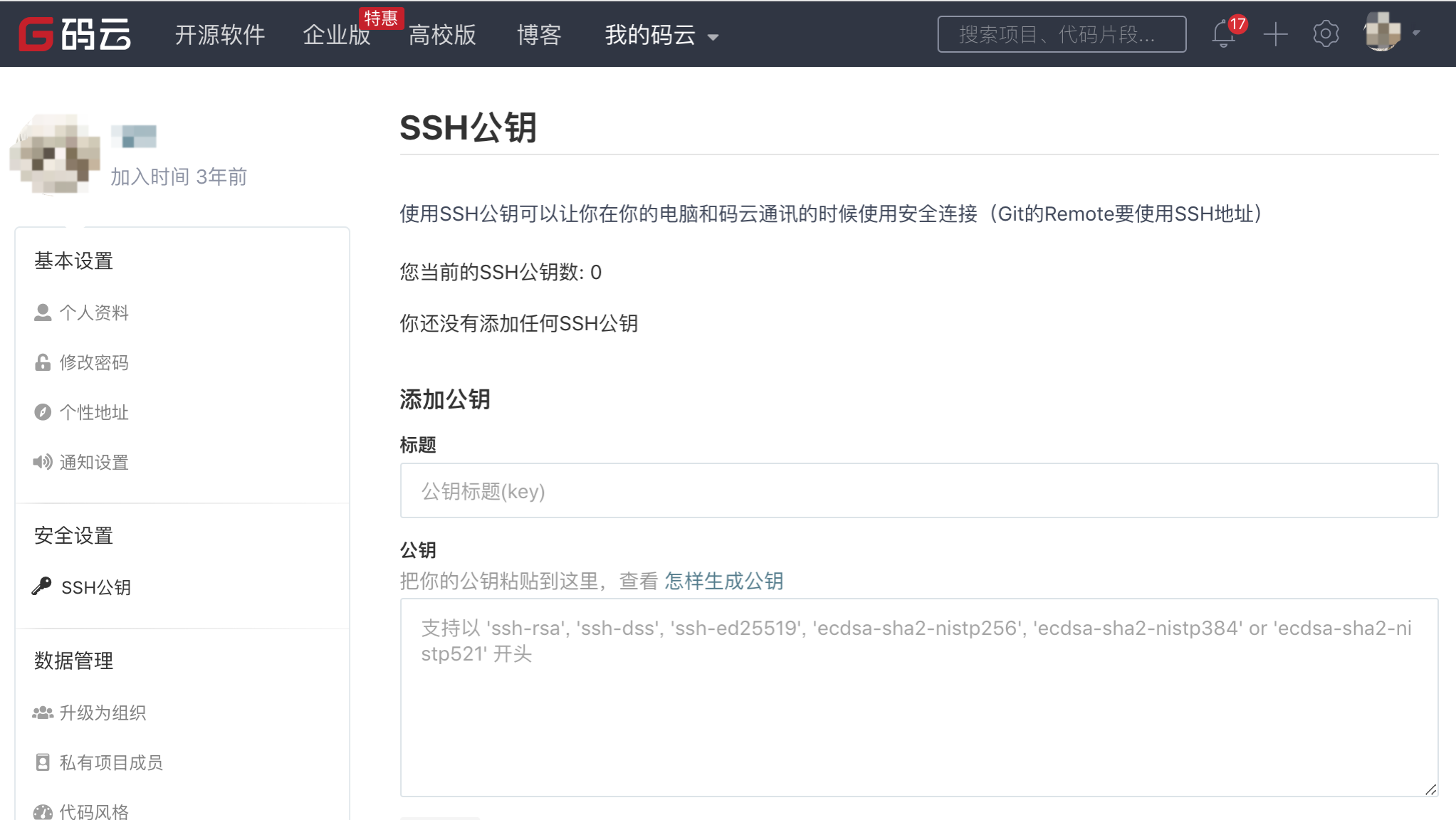
稍等几分钟,通过 ssh -T 测试,输出 SSH Key 绑定的用户名:
bash
ssh -T git@gitee.com
Hi USERNAME! You've successfully authenticated, but GITEE.COM does not provide shell access.
仓库的 SSH Key 和账户 SSH Key 的区别
账户的 SSH Key 和账户绑定,当账户具有 推送/拉取 权限时可通过 SSH 方式 推送/拉取 的仓库。
仓库的 SSH key 只针对仓库,且我们仅对仓库提供了部署公钥,即仓库下的公钥仅能拉取仓库,这通常用于生产服务器拉取仓库的代码。
2. 推送代码到仓库
2.1在Gitee上新建仓库
在gitee上新建一个仓库
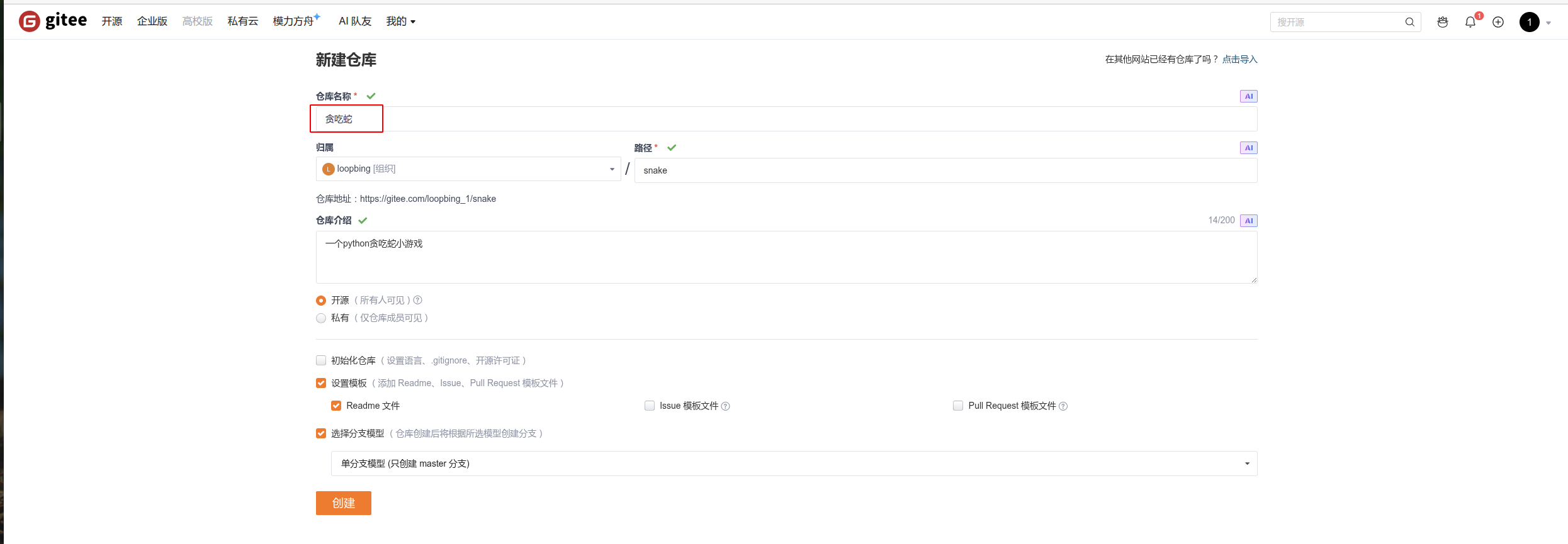
注意仓库的名称需要和本地代码库的名称一致。
2.2 获取仓库的地址。
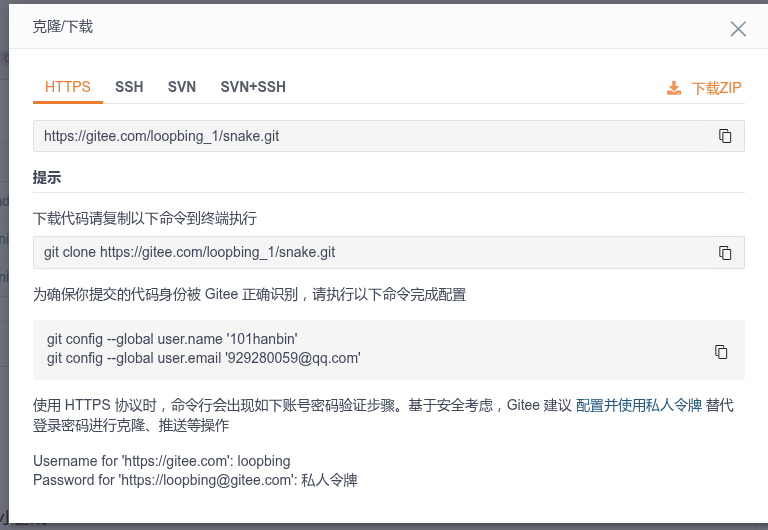
点击仓库页面的克隆或下载,获取仓库的地址。
1.使用HTTPS地址
2.使用SSH地址
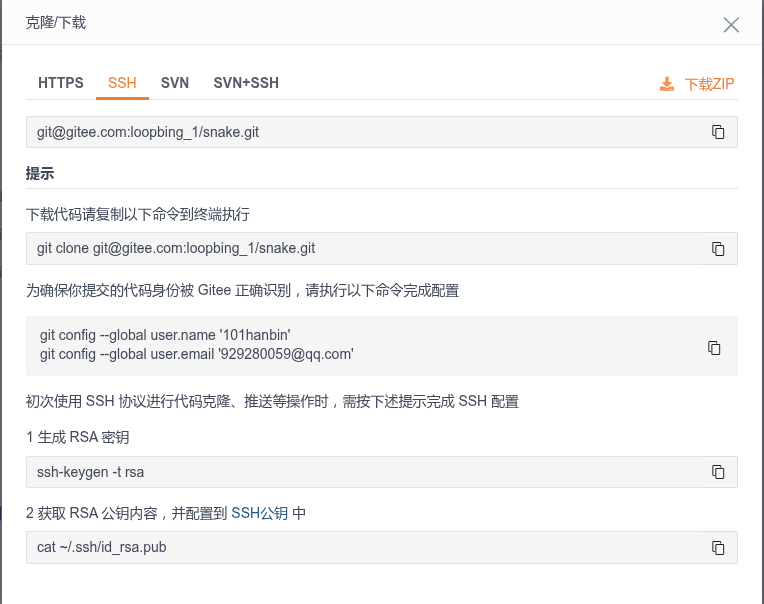
这里的SSH地址和HTTPS地址的区别,在于HTTPS地址需要每次输入账号密码
2.3 推送代码
2.3.1 推送到全新仓库
bash
# 初始化Git仓库
git init
# 将项目添加到仓库中
git add .
# 提交更改
git commit -m "Initial commit"
# 添加远程仓库
git remote add origin <远程仓库URL>
# 推送更改到Gitee
git push origin master


# 如果提示冲突,可以先拉取线上仓库的readme文件等的修改
git pull origin master
# 如果拒绝合并无关历史,可以使用下面这条命令(--allow-unrelated-histories 参数来允许合并不相关的历史)
git pull origin master --allow-unrelated-histories
# 修改完文件后,再次推送
git add .
git commit -m "修改冲突"
git push origin master
2.3.2 推送到旧代码仓库
bash
# 将项目添加到仓库中
git add .
# 提交更改
git commit -m "Initial commit"
# 添加远程仓库
git remote add origin <远程仓库URL>
# 推送更改到Gitee
git push origin master


# 如果提示冲突,可以先拉取线上仓库的readme文件等的修改
git pull origin master
# 如果拒绝合并无关历史,可以使用下面这条命令(--allow-unrelated-histories 参数来允许合并不相关的历史)
git pull origin master --allow-unrelated-histories
# 修改完文件后,再次推送
git add .
git commit -m "修改冲突"
git push origin master
3. 拉取仓库代码
3.1 拉取代码
bash
# 默认拉取master或main分支代码
git clone <远程仓库URL>
# 也可以拉取指定分支代码,这里的develop为分支地址
git clone -b develop <远程仓库URL>
3.2 创建分支
默认线上只有master分支,很多时候master分支是不让推送的,可以自己创建新分支,把代码推送到自己创建的新分支上,然后请求审阅合并
bash
# 创建新分支
git branch develop
# 切换到新分支
git checkout -b develop
根据自己的情况修改代码
3.3 推送代码
bash
# 查看改动了哪些文件
git status
# 添加所有文件到改动,这里的.表示所有文件,也可以添加单个文件
git add .
# 提交更改
git commit -m "修改了用户名和备注"
# 推送更改到Gitee
git push origin develop
3.4 解决冲突
bash
# 如果提示冲突,可以先拉取线上仓库的readme文件等的修改
git pull origin master
# 如果拒绝合并无关历史,可以使用下面这条命令(--allow-unrelated-histories 参数来允许合并不相关的历史)
git pull origin master --allow-unrelated-histories

# 修改完文件后,再次推送
git add .
git commit -m "修改冲突"
git push origin master
4. gitee合并代码(pr工作流)
pr工作流一般由员工在自己的分支提交代码,项目组长负责审核后合并到master
选择审查人员,并输入修改描述,后创建 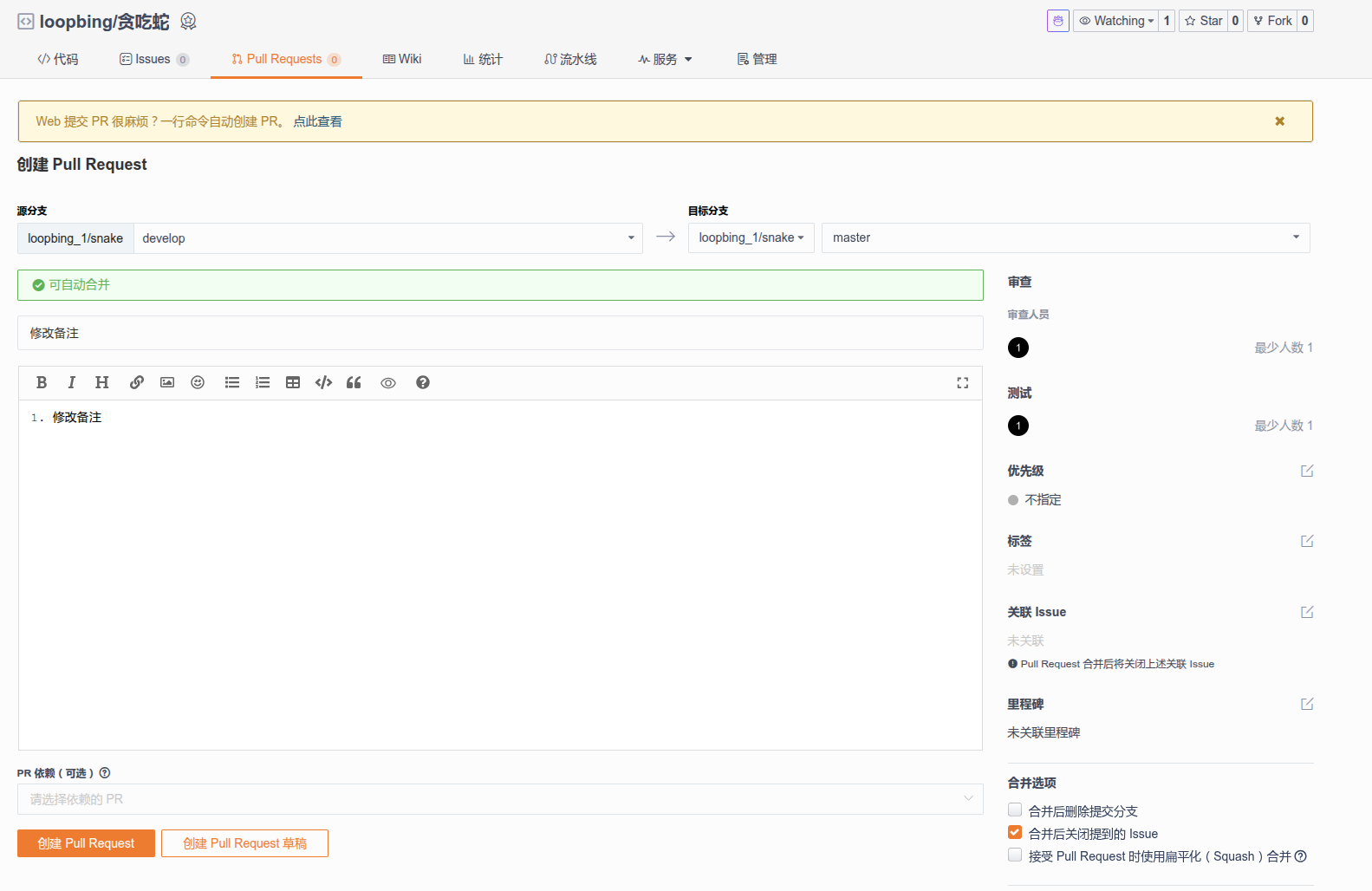
 https://gitee.com/all-about-git