Markdown生成思维导图(html 开源)
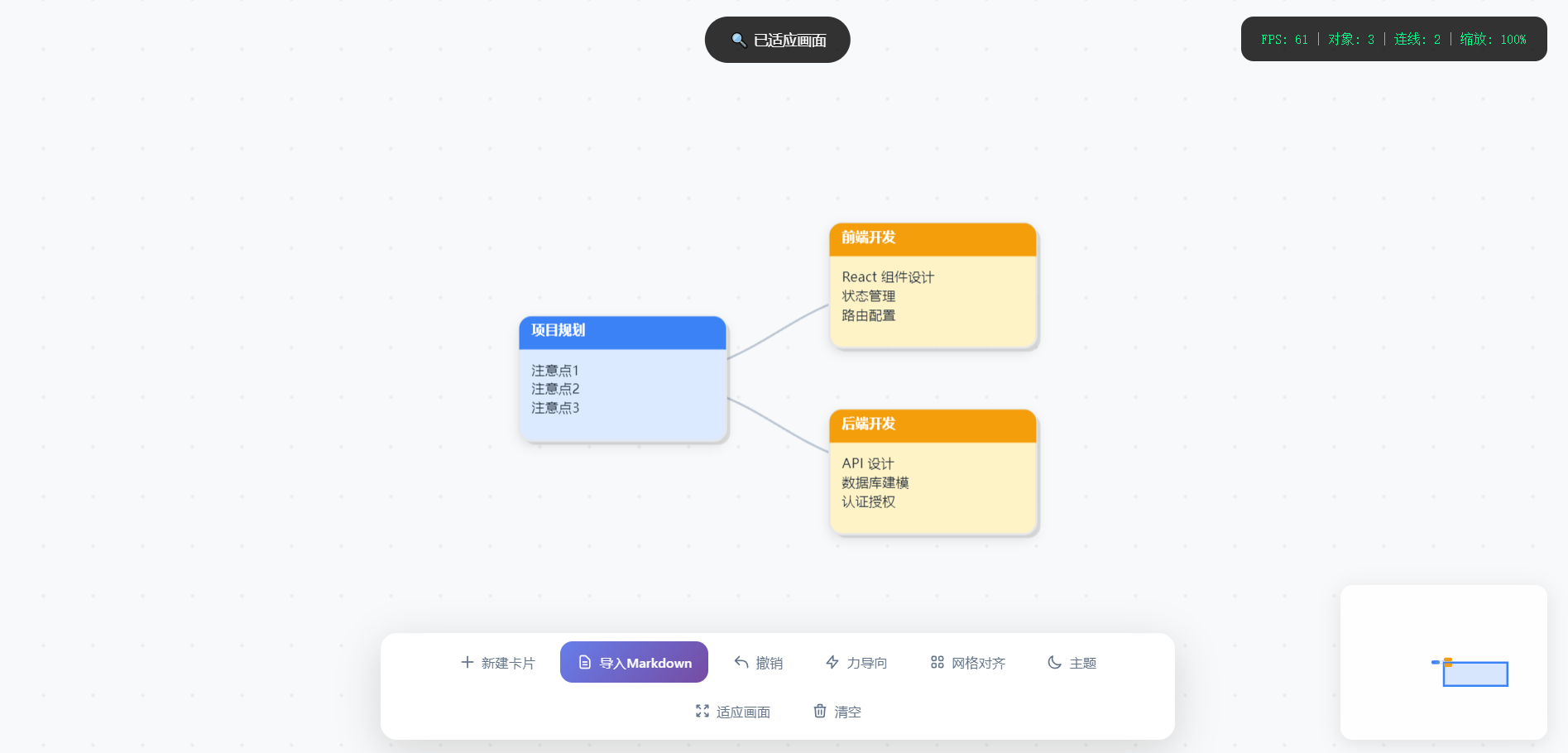
导入内容:
# 项目规划

- 注意点1
- 注意点2
- 注意点3

## 前端开发

- React 组件设计
- 状态管理
- 路由配置

## 后端开发

- API 设计
- 数据库建模
- 认证授权
✨ 核心特性
🧠 Markdown 思维导图生成
一键导入 Markdown 文档,自动解析为层级化思维导图
智能识别标题层级(# ## ###),自动分配颜色和布局
列表项自动聚合为卡片内容
支持自动连线构建树形结构
🎨 专业视觉设计
日间/夜间双主题:一键切换,保护视力
卡片式节点:圆角阴影、渐变标题栏、精致排版
贝塞尔曲线连线:平滑优雅的连接效果
动态网格背景:无限画布,流畅导航
⚡ 高效交互体验
无限画布:鼠标滚轮缩放、拖拽平移
多选操作:Ctrl/Shift + 点击多选,Ctrl+A 全选
拖拽连点:从节点端口拖拽创建连接
右键菜单:快速访问常用操作
属性面板:实时编辑卡片样式和内容
🔧 高级功能
力导向布局:物理模拟自动排列节点
网格对齐:一键对齐到网格,整齐美观
适应画面:自动缩放展示全部内容
撤销重做:支持 50 步历史记录
小地图导航:全局视图,快速定位
🚀 快速开始
在线体验
直接在浏览器中打开 HTML 文件即可使用,无需安装任何依赖。
本地运行
# 克隆仓库 git clone https://github.com/yourusername/pro-node-editor.git # 进入目录 cd pro-node-editor # 打开文件(任选一种方式) open index.html # macOS start index.html # Windows xdg-open index.html # Linux或者使用本地服务器:
# Python 3 python -m http.server 8000 # Node.js npx serve . # 然后访问 http://localhost:8000📖 使用指南
基础操作
操作 快捷键 说明 新建卡片 双击空白处/N在鼠标位置创建新卡片 拖动画布 按住空格 + 拖拽平移整个画布 缩放画布 滚轮以鼠标位置为中心缩放 多选卡片 Ctrl + 点击添加/移除选中状态 全选 Ctrl + A选中所有卡片 删除 Delete删除选中卡片或连线 撤销 Ctrl + Z撤销上一步操作 切换主题 L日间/夜间模式切换 Markdown 导入格式
# 项目规划(一级标题 - 蓝色主节点) - 项目目标定义 - 里程碑规划 - 风险评估 ## 前端开发(二级标题 - 黄色分支) - React 组件设计 - 状态管理方案 - 路由配置 ### 组件库(三级标题 - 绿色子分支) - Button 组件 - Modal 对话框 - Form 表单 ## 后端开发(二级标题) - API 设计规范 - 数据库建模 - 认证授权导入规则:
#一级标题 → 蓝色主节点
##二级标题 → 黄色分支节点
###三级标题 → 绿色子分支
####+更深标题 → 粉色/灰色节点
- 列表项→ 自动归集到上方标题卡片的内容区卡片编辑
修改内容:选中卡片 → 右侧面板编辑标题和内容
更改颜色:属性面板提供 7 种卡片底色、6 种标题色、4 种文字色
调整位置:直接拖拽卡片,连线自动跟随
层级调整:右键菜单选择"置顶"或"置底"
连线管理
创建连接:鼠标悬停卡片 → 显示蓝色连接点 → 拖拽到目标卡片
删除连线:点击连线选中(变蓝色)→ 按 Delete 键
自动布局:开启"力导向"功能,节点自动排列
🏗️ 项目结构
pro-node-editor/
├── index.html          # 主入口文件(单文件应用)
├── README.md           # 项目文档
└── assets/             # 可选资源目录
    └── screenshots/    # 截图预览
技术栈:
Konva.js - 2D Canvas 渲染引擎,高性能图形操作
Tailwind CSS - 原子化 CSS 框架,快速构建 UI
原生 JavaScript - 无框架依赖,轻量高效
🎯 应用场景
项目管理 - 用 Markdown 编写项目计划,一键可视化
知识整理 - 笔记结构化,构建个人知识图谱
系统设计 - 绘制架构图、流程图、ER 图
头脑风暴 - 快速记录想法,自动布局整理
教学演示 - 课程大纲可视化,层级清晰
🛠️ 开发计划
- Markdown 导入生成思维导图
- 力导向布局算法
- 撤销重做系统
- 主题切换
- 小地图导航
- 导出 PNG/PDF
- 本地文件保存/打开
- 多人实时协作
- 自定义主题配置
- 插件系统
html
<!DOCTYPE html>
<html lang="zh-CN">
<head>
<meta charset="UTF-8">
<meta name="viewport" content="width=device-width, initial-scale=1.0">
<title>Pro Node Editor - Markdown思维导图</title>
<script src="https://cdn.tailwindcss.com"></script>
<script src="https://unpkg.com/konva@9.2.0/konva.min.js"></script>
<style>
:root {
--bg-color: #f8f9fa;
--grid-color: rgba(209, 213, 219, 0.4);
--primary: #3b82f6;
}
body.dark-mode {
--bg-color: #0f172a;
--grid-color: rgba(255, 255, 255, 0.08);
}
* { margin: 0; padding: 0; box-sizing: border-box; }
body {
width: 100vw;
height: 100vh;
overflow: hidden;
background: var(--bg-color);
font-family: -apple-system, BlinkMacSystemFont, 'Segoe UI', Roboto, sans-serif;
transition: background-color 0.3s;
}
#container {
width: 100%;
height: 100%;
position: relative;
cursor: default;
}
#container.space-pressed {
cursor: grab;
}
#container.space-pressed:active {
cursor: grabbing;
}
.toolbar {
position: fixed;
bottom: 24px;
left: 50%;
transform: translateX(-50%);
z-index: 1000;
display: flex;
gap: 8px;
background: rgba(255, 255, 255, 0.95);
padding: 8px;
border-radius: 16px;
box-shadow: 0 10px 40px rgba(0,0,0,0.15);
backdrop-filter: blur(10px);
flex-wrap: wrap;
max-width: 90vw;
justify-content: center;
}
body.dark-mode .toolbar {
background: rgba(30, 41, 59, 0.95);
}
.toolbar-btn {
border: none;
background: transparent;
padding: 10px 16px;
border-radius: 12px;
cursor: pointer;
font-size: 13px;
font-weight: 500;
color: #64748b;
transition: all 0.2s;
display: flex;
align-items: center;
gap: 6px;
white-space: nowrap;
}
body.dark-mode .toolbar-btn {
color: #94a3b8;
}
.toolbar-btn:hover {
background: rgba(59, 130, 246, 0.1);
color: var(--primary);
transform: translateY(-1px);
}
.toolbar-btn.active {
background: var(--primary);
color: white;
}
#stats {
position: fixed;
top: 24px;
right: 24px;
background: rgba(0,0,0,0.8);
color: #00ff88;
padding: 12px 20px;
border-radius: 12px;
font-family: monospace;
font-size: 13px;
z-index: 1000;
pointer-events: none;
}
#toast {
position: fixed;
top: 24px;
left: 50%;
transform: translateX(-50%);
background: rgba(0,0,0,0.8);
color: white;
padding: 12px 24px;
border-radius: 30px;
font-size: 14px;
z-index: 3000;
opacity: 0;
transition: opacity 0.3s;
pointer-events: none;
}
#toast.show { opacity: 1; }
.context-menu {
position: fixed;
display: none;
background: rgba(255, 255, 255, 0.98);
border: 1px solid #e5e7eb;
box-shadow: 0 20px 50px rgba(0,0,0,0.15);
padding: 6px;
border-radius: 12px;
z-index: 2000;
min-width: 200px;
backdrop-filter: blur(10px);
}
body.dark-mode .context-menu {
background: rgba(30, 41, 59, 0.98);
border-color: #334155;
}
.menu-item {
padding: 10px 16px;
font-size: 14px;
cursor: pointer;
color: #1f2937;
border-radius: 8px;
display: flex;
align-items: center;
justify-content: space-between;
transition: all 0.15s;
}
body.dark-mode .menu-item {
color: #e2e8f0;
}
.menu-item:hover {
background: rgba(59, 130, 246, 0.1);
color: var(--primary);
}
.menu-shortcut {
font-size: 12px;
color: #9ca3af;
font-family: monospace;
}
.menu-divider {
height: 1px;
background: #e5e7eb;
margin: 6px 0;
}
body.dark-mode .menu-divider {
background: #334155;
}
#minimap {
position: fixed;
bottom: 24px;
right: 24px;
width: 200px;
height: 150px;
background: rgba(255,255,255,0.9);
border-radius: 12px;
box-shadow: 0 4px 20px rgba(0,0,0,0.1);
z-index: 1000;
overflow: hidden;
}
body.dark-mode #minimap {
background: rgba(30, 41, 59, 0.9);
}
#property-panel {
position: fixed;
top: 24px;
left: 24px;
width: 280px;
background: rgba(255,255,255,0.98);
border-radius: 16px;
box-shadow: 0 10px 40px rgba(0,0,0,0.15);
z-index: 1000;
padding: 20px;
display: none;
backdrop-filter: blur(10px);
border: 1px solid rgba(0,0,0,0.05);
max-height: 80vh;
overflow-y: auto;
}
body.dark-mode #property-panel {
background: rgba(30, 41, 59, 0.98);
border-color: rgba(255,255,255,0.1);
}
.panel-header {
font-size: 14px;
font-weight: 600;
color: #3b82f6;
margin-bottom: 16px;
text-transform: uppercase;
letter-spacing: 0.5px;
}
.property-group {
margin-bottom: 16px;
}
.property-label {
font-size: 12px;
color: #64748b;
margin-bottom: 6px;
display: block;
}
body.dark-mode .property-label {
color: #94a3b8;
}
.property-input {
width: 100%;
padding: 8px 12px;
border: 1px solid #e5e7eb;
border-radius: 8px;
font-size: 13px;
background: transparent;
color: #1f2937;
}
body.dark-mode .property-input {
border-color: #334155;
color: #e2e8f0;
}
.property-input:focus {
outline: none;
border-color: #3b82f6;
}
.color-picker-wrapper {
display: flex;
gap: 8px;
flex-wrap: wrap;
}
.color-btn {
width: 32px;
height: 32px;
border-radius: 8px;
border: 2px solid transparent;
cursor: pointer;
transition: all 0.2s;
}
.color-btn:hover {
transform: scale(1.1);
}
.color-btn.active {
border-color: #3b82f6;
box-shadow: 0 0 0 2px rgba(59, 130, 246, 0.3);
}
textarea.property-input {
resize: vertical;
min-height: 80px;
font-family: inherit;
}
/* Markdown导入弹窗 */
#markdown-modal {
position: fixed;
top: 0;
left: 0;
width: 100%;
height: 100%;
background: rgba(0,0,0,0.5);
z-index: 4000;
display: none;
justify-content: center;
align-items: center;
backdrop-filter: blur(5px);
}
#markdown-modal.show {
display: flex;
}
.modal-content {
background: white;
border-radius: 20px;
padding: 24px;
width: 90%;
max-width: 600px;
max-height: 80vh;
display: flex;
flex-direction: column;
box-shadow: 0 25px 50px -12px rgba(0, 0, 0, 0.25);
}
body.dark-mode .modal-content {
background: #1e293b;
color: #e2e8f0;
}
.modal-header {
font-size: 18px;
font-weight: 600;
margin-bottom: 16px;
display: flex;
justify-content: space-between;
align-items: center;
}
.modal-close {
background: none;
border: none;
font-size: 24px;
cursor: pointer;
color: #64748b;
padding: 4px;
line-height: 1;
}
.modal-close:hover {
color: #1f2937;
}
body.dark-mode .modal-close:hover {
color: #e2e8f0;
}
#markdown-input {
width: 100%;
min-height: 300px;
padding: 16px;
border: 2px solid #e5e7eb;
border-radius: 12px;
font-family: monospace;
font-size: 14px;
resize: vertical;
background: #f9fafb;
}
body.dark-mode #markdown-input {
background: #0f172a;
border-color: #334155;
color: #e2e8f0;
}
#markdown-input:focus {
outline: none;
border-color: #3b82f6;
}
.modal-actions {
display: flex;
gap: 12px;
margin-top: 16px;
justify-content: flex-end;
}
.btn-primary {
background: #3b82f6;
color: white;
border: none;
padding: 10px 20px;
border-radius: 10px;
font-size: 14px;
font-weight: 500;
cursor: pointer;
transition: all 0.2s;
}
.btn-primary:hover {
background: #2563eb;
transform: translateY(-1px);
}
.btn-secondary {
background: #f3f4f6;
color: #374151;
border: none;
padding: 10px 20px;
border-radius: 10px;
font-size: 14px;
font-weight: 500;
cursor: pointer;
transition: all 0.2s;
}
body.dark-mode .btn-secondary {
background: #334155;
color: #e2e8f0;
}
.btn-secondary:hover {
background: #e5e7eb;
}
body.dark-mode .btn-secondary:hover {
background: #475569;
}
.help-text {
font-size: 12px;
color: #6b7280;
margin-top: 8px;
line-height: 1.5;
}
body.dark-mode .help-text {
color: #94a3b8;
}
</style>
</head>
<body>
<div id="container"></div>
<!-- Markdown导入弹窗 -->
<div id="markdown-modal">
<div class="modal-content">
<div class="modal-header">
<span>📄 导入 Markdown 生成思维导图</span>
<button class="modal-close" onclick="app.closeMarkdownModal()">×</button>
</div>
<textarea id="markdown-input" placeholder="# 项目规划
- 注意点1
- 注意点2
- 注意点3
# 前端开发
- React 组件设计
- 状态管理
- 路由配置
# 后端开发
- API 设计
- 数据库建模
- 认证授权"></textarea>
<div class="help-text">
格式说明:每个标题(<code>#</code> <code>##</code> <code>###</code> 等)会生成一张卡片,标题下面的 <code>- 列表项</code> 会成为该卡片的内容。
</div>
<div style="margin-top: 16px; display: flex; align-items: center; gap: 8px;">
<input type="checkbox" id="auto-connect" checked style="width: 18px; height: 18px; cursor: pointer;">
<label for="auto-connect" style="font-size: 14px; color: #6b7280; cursor: pointer;">
自动连接卡片(按顺序)
</label>
</div>
<div class="modal-actions">
<button class="btn-secondary" onclick="app.closeMarkdownModal()">取消</button>
<button class="btn-primary" onclick="app.importMarkdown()">生成思维导图</button>
</div>
</div>
</div>
<!-- 属性面板 -->
<div id="property-panel">
<div class="panel-header">🎨 卡片属性</div>
<div class="property-group">
<label class="property-label">标题</label>
<input type="text" class="property-input" id="prop-title" placeholder="输入标题...">
</div>
<div class="property-group">
<label class="property-label">内容</label>
<textarea class="property-input" id="prop-content" placeholder="输入内容..."></textarea>
</div>
<div class="property-group">
<label class="property-label">卡片背景色</label>
<div class="color-picker-wrapper" id="card-colors">
<div class="color-btn active" style="background: #ffffff" data-color="#ffffff"></div>
<div class="color-btn" style="background: #fef3c7" data-color="#fef3c7"></div>
<div class="color-btn" style="background: #dbeafe" data-color="#dbeafe"></div>
<div class="color-btn" style="background: #d1fae5" data-color="#d1fae5"></div>
<div class="color-btn" style="background: #fce7f3" data-color="#fce7f3"></div>
<div class="color-btn" style="background: #f3f4f6" data-color="#f3f4f6"></div>
<div class="color-btn" style="background: #1e293b" data-color="#1e293b"></div>
</div>
</div>
<div class="property-group">
<label class="property-label">标题背景色</label>
<div class="color-picker-wrapper" id="title-colors">
<div class="color-btn active" style="background: #3b82f6" data-color="#3b82f6"></div>
<div class="color-btn" style="background: #ef4444" data-color="#ef4444"></div>
<div class="color-btn" style="background: #10b981" data-color="#10b981"></div>
<div class="color-btn" style="background: #f59e0b" data-color="#f59e0b"></div>
<div class="color-btn" style="background: #8b5cf6" data-color="#8b5cf6"></div>
<div class="color-btn" style="background: #64748b" data-color="#64748b"></div>
</div>
</div>
<div class="property-group">
<label class="property-label">文字颜色</label>
<div class="color-picker-wrapper" id="text-colors">
<div class="color-btn active" style="background: #1f2937" data-color="#1f2937"></div>
<div class="color-btn" style="background: #ffffff" data-color="#ffffff"></div>
<div class="color-btn" style="background: #3b82f6" data-color="#3b82f6"></div>
<div class="color-btn" style="background: #ef4444" data-color="#ef4444"></div>
</div>
</div>
</div>
<div class="toolbar">
<button class="toolbar-btn" onclick="app.createCardAtCenter()">
<svg width="16" height="16" fill="none" stroke="currentColor" viewBox="0 0 24 24"><path stroke-linecap="round" stroke-linejoin="round" stroke-width="2" d="M12 4v16m8-8H4"/></svg>
新建卡片
</button>
<button class="toolbar-btn" onclick="app.openMarkdownModal()" style="background: linear-gradient(135deg, #667eea 0%, #764ba2 100%); color: white;">
<svg width="16" height="16" fill="none" stroke="currentColor" viewBox="0 0 24 24"><path stroke-linecap="round" stroke-linejoin="round" stroke-width="2" d="M9 12h6m-6 4h6m2 5H7a2 2 0 01-2-2V5a2 2 0 012-2h5.586a1 1 0 01.707.293l5.414 5.414a1 1 0 01.293.707V19a2 2 0 01-2 2z"/></svg>
导入Markdown
</button>
<button class="toolbar-btn" onclick="app.undo()" id="undo-btn" disabled>
<svg width="16" height="16" fill="none" stroke="currentColor" viewBox="0 0 24 24"><path stroke-linecap="round" stroke-linejoin="round" stroke-width="2" d="M3 10h10a8 8 0 018 8v2M3 10l6 6m-6-6l6-6"/></svg>
撤销
</button>
<button class="toolbar-btn" onclick="app.toggleForceLayout()">
<svg width="16" height="16" fill="none" stroke="currentColor" viewBox="0 0 24 24"><path stroke-linecap="round" stroke-linejoin="round" stroke-width="2" d="M13 10V3L4 14h7v7l9-11h-7z"/></svg>
力导向
</button>
<button class="toolbar-btn" onclick="app.alignToGrid()">
<svg width="16" height="16" fill="none" stroke="currentColor" viewBox="0 0 24 24"><path stroke-linecap="round" stroke-linejoin="round" stroke-width="2" d="M4 6a2 2 0 012-2h2a2 2 0 012 2v2a2 2 0 01-2 2H6a2 2 0 01-2-2V6zM14 6a2 2 0 012-2h2a2 2 0 012 2v2a2 2 0 01-2 2h-2a2 2 0 01-2-2V6zM4 16a2 2 0 012-2h2a2 2 0 012 2v2a2 2 0 01-2 2H6a2 2 0 01-2-2v-2zM14 16a2 2 0 012-2h2a2 2 0 012 2v2a2 2 0 01-2 2h-2a2 2 0 01-2-2v-2z"/></svg>
网格对齐
</button>
<button class="toolbar-btn" onclick="app.toggleTheme()">
<svg width="16" height="16" fill="none" stroke="currentColor" viewBox="0 0 24 24"><path stroke-linecap="round" stroke-linejoin="round" stroke-width="2" d="M20.354 15.354A9 9 0 018.646 3.646 9.003 9.003 0 0012 21a9.003 9.003 0 008.354-5.646z"/></svg>
主题
</button>
<button class="toolbar-btn" onclick="app.zoomToFit()">
<svg width="16" height="16" fill="none" stroke="currentColor" viewBox="0 0 24 24"><path stroke-linecap="round" stroke-linejoin="round" stroke-width="2" d="M4 8V4m0 0h4M4 4l5 5m11-1V4m0 0h-4m4 0l-5 5M4 16v4m0 0h4m-4 0l5-5m11 5l-5-5m5 5v-4m0 4h-4"/></svg>
适应画面
</button>
<button class="toolbar-btn" onclick="app.clearAll()">
<svg width="16" height="16" fill="none" stroke="currentColor" viewBox="0 0 24 24"><path stroke-linecap="round" stroke-linejoin="round" stroke-width="2" d="M19 7l-.867 12.142A2 2 0 0116.138 21H7.862a2 2 0 01-1.995-1.858L5 7m5 4v6m4-6v6m1-10V4a1 1 0 00-1-1h-4a1 1 0 00-1 1v3M4 7h16"/></svg>
清空
</button>
</div>
<div id="stats">
FPS: <span id="fps">60</span> |
对象: <span id="objects">0</span> |
连线: <span id="connections">0</span> |
缩放: <span id="zoom">100%</span>
</div>
<div id="toast"></div>
<div class="context-menu" id="contextMenu">
<div class="menu-item" onclick="app.createCardAtMouse()">
<span>✨ 新建卡片</span>
<span class="menu-shortcut">双击</span>
</div>
<div class="menu-divider"></div>
<div class="menu-item" onclick="app.deleteSelected()">
<span>🗑 删除卡片</span>
<span class="menu-shortcut">Delete</span>
</div>
<div class="menu-item" onclick="app.deleteSelectedConnections()">
<span>✂️ 删除连线</span>
</div>
<div class="menu-divider"></div>
<div class="menu-item" onclick="app.bringToFront()">
<span>⬆️ 置顶</span>
</div>
<div class="menu-item" onclick="app.sendToBack()">
<span>⬇️ 置底</span>
</div>
</div>
<div id="minimap"></div>
<script>
class NodeEditor {
constructor() {
this.width = window.innerWidth;
this.height = window.innerHeight;
this.cards = new Map();
this.connections = [];
this.selectedCards = new Set();
this.selectedConnection = null;
this.scale = 1;
this.isDragging = false;
this.isSpacePressed = false;
this.isConnecting = false;
this.connectStart = null;
this.tempLine = null;
this.mousePos = { x: 0, y: 0 };
this.cardIdCounter = 0;
this.isForceLayout = false;
// 画布拖拽相关
this.lastPointerPosition = null;
this.isPanning = false;
// 历史记录
this.history = [];
this.historyIndex = -1;
this.maxHistory = 50;
// 当前编辑的卡片
this.editingCard = null;
// 性能监控
this.fps = 60;
this.lastTime = performance.now();
this.frameCount = 0;
this.init();
}
init() {
this.stage = new Konva.Stage({
container: 'container',
width: this.width,
height: this.height,
draggable: false
});
this.gridLayer = new Konva.Layer({ listening: false });
this.lineLayer = new Konva.Layer();
this.cardLayer = new Konva.Layer();
this.uiLayer = new Konva.Layer();
this.dragLayer = new Konva.Layer();
this.stage.add(this.gridLayer, this.lineLayer, this.cardLayer, this.uiLayer, this.dragLayer);
this.drawGrid();
this.initEvents();
this.initPropertyPanel();
this.initMinimap();
this.saveState();
window.addEventListener('resize', () => this.handleResize());
this.startRenderLoop();
}
// 修复:画布拖拽功能
initEvents() {
const container = this.stage.container();
// 鼠标按下 - 开始画布拖拽或准备其他操作
container.addEventListener('mousedown', (e) => {
// 只有左键且按下空格键时才拖动画布
if (e.button === 0 && this.isSpacePressed) {
this.isPanning = true;
this.lastPointerPosition = { x: e.clientX, y: e.clientY };
container.style.cursor = 'grabbing';
e.preventDefault();
}
});
// 鼠标移动 - 处理画布拖拽
window.addEventListener('mousemove', (e) => {
// 处理画布拖拽
if (this.isPanning && this.isSpacePressed) {
const dx = e.clientX - this.lastPointerPosition.x;
const dy = e.clientY - this.lastPointerPosition.y;
this.stage.x(this.stage.x() + dx);
this.stage.y(this.stage.y() + dy);
this.lastPointerPosition = { x: e.clientX, y: e.clientY };
this.updateMinimap();
}
// 处理连线时的临时线
if (this.isConnecting && this.tempLine) {
const pos = this.stage.getPointerPosition();
if (pos) {
const startPos = this.connectStart.node.getAbsolutePosition(this.stage);
this.tempLine.points([startPos.x, startPos.y, pos.x, pos.y]);
this.dragLayer.batchDraw();
}
}
});
// 鼠标释放
window.addEventListener('mouseup', () => {
if (this.isPanning) {
this.isPanning = false;
container.style.cursor = this.isSpacePressed ? 'grab' : 'default';
}
});
// 滚轮缩放
this.stage.on('wheel', (e) => {
e.evt.preventDefault();
const oldScale = this.scale;
const pointer = this.stage.getPointerPosition();
const mousePointTo = {
x: (pointer.x - this.stage.x()) / oldScale,
y: (pointer.y - this.stage.y()) / oldScale,
};
const newScale = e.evt.deltaY > 0 ? oldScale * 0.9 : oldScale * 1.1;
const clampedScale = Math.max(0.1, Math.min(3, newScale));
this.scale = clampedScale;
this.stage.scale({ x: clampedScale, y: clampedScale });
const newPos = {
x: pointer.x - mousePointTo.x * clampedScale,
y: pointer.y - mousePointTo.y * clampedScale,
};
this.stage.position(newPos);
this.updateStats();
this.updateMinimap();
});
// 键盘事件
window.addEventListener('keydown', (e) => this.handleKeyDown(e));
window.addEventListener('keyup', (e) => this.handleKeyUp(e));
// 右键菜单
this.stage.on('contextmenu', (e) => {
e.evt.preventDefault();
const menu = document.getElementById('contextMenu');
const pos = this.stage.getPointerPosition();
menu.style.left = pos.x + 'px';
menu.style.top = pos.y + 'px';
menu.style.display = 'block';
this.mousePos = this.stage.getRelativePointerPosition();
});
window.addEventListener('click', (e) => {
if (!e.target.closest('.context-menu') && !e.target.closest('#property-panel') && !e.target.closest('#markdown-modal')) {
document.getElementById('contextMenu').style.display = 'none';
}
});
// 舞台点击取消选择
this.stage.on('click tap', (e) => {
if (e.target === this.stage || e.target.getLayer() === this.gridLayer) {
this.clearSelection();
this.hidePropertyPanel();
}
});
// 双击创建卡片
this.stage.on('dblclick', (e) => {
if (e.target === this.stage || e.target.getLayer() === this.gridLayer) {
const pos = this.stage.getRelativePointerPosition();
this.createCard(pos.x - 100, pos.y - 60);
this.saveState();
}
});
}
handleKeyDown(e) {
if (e.code === 'Space') {
e.preventDefault(); // 防止滚动
this.isSpacePressed = true;
this.stage.container().classList.add('space-pressed');
if (!this.isPanning) {
this.stage.container().style.cursor = 'grab';
}
}
if (e.ctrlKey && e.key === 'z') {
e.preventDefault();
this.undo();
}
if (e.ctrlKey && e.key === 'a') {
e.preventDefault();
this.cards.forEach((_, id) => {
this.selectedCards.add(id);
const card = this.cards.get(id);
card.rect.stroke('#3b82f6');
card.rect.strokeWidth(3);
});
this.cardLayer.batchDraw();
}
if (e.key === 'Delete' || e.key === 'Backspace') {
if (this.selectedConnection !== null) {
this.deleteSelectedConnections();
} else if (this.selectedCards.size > 0) {
this.deleteSelected();
}
}
if (e.key.toLowerCase() === 'l') {
this.toggleTheme();
}
}
handleKeyUp(e) {
if (e.code === 'Space') {
this.isSpacePressed = false;
this.stage.container().classList.remove('space-pressed');
if (!this.isPanning) {
this.stage.container().style.cursor = 'default';
}
}
}
// Markdown导入功能
openMarkdownModal() {
document.getElementById('markdown-modal').classList.add('show');
document.getElementById('markdown-input').focus();
}
closeMarkdownModal() {
document.getElementById('markdown-modal').classList.remove('show');
}
importMarkdown() {
const text = document.getElementById('markdown-input').value.trim();
if (!text) {
this.showToast('⚠️ 请输入Markdown内容');
return;
}
// 获取是否自动连线
const autoConnect = document.getElementById('auto-connect').checked;
// 解析Markdown - 树形结构
const lines = text.split('\n');
const nodes = [];
const stack = [];
let idCounter = 0;
lines.forEach((line, index) => {
const trimmed = line.trim();
if (!trimmed) return;
// 计算层级
let level = 0;
let content = trimmed;
let type = 'normal';
// 标题(# ## ### 等)
const headingMatch = trimmed.match(/^(#{1,6})\s+(.+)$/);
if (headingMatch) {
level = headingMatch[1].length - 1; // #=0, ##=1, ###=2
content = headingMatch[2].trim();
// 根据层级设置类型
if (level === 0) type = 'root';
else if (level === 1) type = 'section';
else if (level === 2) type = 'subsection';
else type = 'item';
const node = {
id: `md-${idCounter++}`,
level,
title: content,
listItems: [],
type,
children: [],
parent: null
};
// 找到父节点
while (stack.length > 0 && stack[stack.length - 1].level >= level) {
stack.pop();
}
if (stack.length > 0) {
node.parent = stack[stack.length - 1].id;
stack[stack.length - 1].children.push(node.id);
}
stack.push(node);
nodes.push(node);
}
// 列表项(- 或 * 或 数字)- 作为内容,不创建节点
else if (trimmed.startsWith('- ') || trimmed.startsWith('* ')) {
// 找到当前应该归属的标题节点
if (stack.length > 0) {
const itemText = trimmed.substring(2).trim();
stack[stack.length - 1].listItems.push(itemText);
}
} else if (trimmed.match(/^\d+\.\s/)) {
// 找到当前应该归属的标题节点
if (stack.length > 0) {
const itemText = trimmed.replace(/^\d+\.\s/, '').trim();
stack[stack.length - 1].listItems.push(itemText);
}
} else {
// 普通文本作为内容附加到当前节点
if (stack.length > 0) {
stack[stack.length - 1].listItems.push(trimmed);
}
}
});
if (nodes.length === 0) {
this.showToast('⚠️ 未能解析到有效内容');
return;
}
// 清空现有内容
this.clearAll(false);
// 计算布局位置(层级布局)
const levelWidth = 300;
const nodeHeight = 140;
const verticalGap = 40;
// 按层级分组
const levelGroups = {};
nodes.forEach(node => {
if (!levelGroups[node.level]) levelGroups[node.level] = [];
levelGroups[node.level].push(node);
});
// 计算每个节点的位置
const positions = {};
Object.keys(levelGroups).sort((a, b) => a - b).forEach(level => {
const group = levelGroups[level];
const totalHeight = group.length * nodeHeight + (group.length - 1) * verticalGap;
const startY = -totalHeight / 2;
group.forEach((node, index) => {
positions[node.id] = {
x: level * levelWidth - (Object.keys(levelGroups).length * levelWidth) / 2,
y: startY + index * (nodeHeight + verticalGap)
};
});
});
// 创建卡片
const colorMap = {
root: { card: '#dbeafe', title: '#3b82f6', text: '#1e2937' },
section: { card: '#fef3c7', title: '#f59e0b', text: '#1e2937' },
subsection: { card: '#d1fae5', title: '#10b981', text: '#1e2937' },
item: { card: '#fce7f3', title: '#ec4899', text: '#1e2937' },
listitem: { card: '#f3f4f6', title: '#64748b', text: '#1f2937' },
normal: { card: '#ffffff', title: '#64748b', text: '#1f2937' }
};
nodes.forEach(node => {
const pos = positions[node.id];
const colors = colorMap[node.type] || colorMap.normal;
// 将列表项作为内容
const contentText = node.listItems.join('\n');
this.createCard(
pos.x,
pos.y,
contentText,
node.title,
node.id,
colors.card,
colors.title,
colors.text
);
});
// 创建连接(树形结构:父节点连接子节点)
if (autoConnect) {
nodes.forEach(node => {
if (node.parent) {
this.createConnection(node.parent, node.id, false);
}
});
this.updateConnections();
}
this.updateStats();
this.updateMinimap();
this.saveState();
this.closeMarkdownModal();
this.showToast(`✅ 已生成 ${nodes.length} 个卡片的思维导图${autoConnect ? '(已自动连线)' : ''}`);
// 自动适应画面
setTimeout(() => this.zoomToFit(), 100);
}
saveState() {
const state = {
cards: Array.from(this.cards.entries()).map(([id, card]) => ({
id,
x: card.node.x(),
y: card.node.y(),
title: card.title.text(),
content: card.text.text(),
cardColor: card.rect.fill(),
titleColor: card.titleBg.fill(),
textColor: card.text.fill()
})),
connections: this.connections.map(c => ({
from: c.from,
to: c.to
}))
};
this.history = this.history.slice(0, this.historyIndex + 1);
this.history.push(JSON.stringify(state));
if (this.history.length > this.maxHistory) {
this.history.shift();
}
this.historyIndex = this.history.length - 1;
this.updateUndoButton();
}
undo() {
if (this.historyIndex <= 0) return;
this.historyIndex--;
const state = JSON.parse(this.history[this.historyIndex]);
this.cards.forEach(card => card.node.destroy());
this.cards.clear();
this.selectedCards.clear();
this.connections = [];
state.cards.forEach(c => {
this.createCard(c.x, c.y, c.content, c.title, c.id, c.cardColor, c.titleColor, c.textColor);
});
state.connections.forEach(conn => {
this.createConnection(conn.from, conn.to, false);
});
this.updateLines();
this.updateStats();
this.updateMinimap();
this.hidePropertyPanel();
this.updateUndoButton();
this.showToast('↩️ 已撤销');
}
updateUndoButton() {
const btn = document.getElementById('undo-btn');
btn.disabled = this.historyIndex <= 0;
btn.style.opacity = this.historyIndex <= 0 ? '0.5' : '1';
}
drawGrid() {
const gridSize = 24;
const width = 5000;
const height = 5000;
const canvas = document.createElement('canvas');
canvas.width = gridSize * 2;
canvas.height = gridSize * 2;
const ctx = canvas.getContext('2d');
ctx.fillStyle = getComputedStyle(document.body).getPropertyValue('--bg-color') || '#f8f9fa';
ctx.fillRect(0, 0, gridSize * 2, gridSize * 2);
ctx.fillStyle = getComputedStyle(document.body).getPropertyValue('--grid-color') || 'rgba(209, 213, 219, 0.4)';
ctx.beginPath();
ctx.arc(gridSize/2, gridSize/2, 1.5, 0, Math.PI * 2);
ctx.fill();
const image = new Image();
image.src = canvas.toDataURL();
const gridRect = new Konva.Rect({
x: -width/2,
y: -height/2,
width: width,
height: height,
fillPatternImage: image,
fillPatternRepeat: 'repeat'
});
this.gridLayer.add(gridRect);
this.gridLayer.batchDraw();
}
initPropertyPanel() {
document.getElementById('prop-title').addEventListener('input', (e) => {
if (this.editingCard) {
this.editingCard.title.text(e.target.value || '未命名');
this.editingCard.titleBg.width(Math.max(200, (e.target.value || '未命名').length * 8 + 32));
this.cardLayer.batchDraw();
}
});
document.getElementById('prop-content').addEventListener('input', (e) => {
if (this.editingCard) {
this.editingCard.text.text(e.target.value || '双击编辑...');
this.cardLayer.batchDraw();
}
});
const setupColorPicker = (containerId, callback) => {
const container = document.getElementById(containerId);
container.querySelectorAll('.color-btn').forEach(btn => {
btn.addEventListener('click', () => {
container.querySelectorAll('.color-btn').forEach(b => b.classList.remove('active'));
btn.classList.add('active');
callback(btn.dataset.color);
});
});
};
setupColorPicker('card-colors', (color) => {
if (this.editingCard) {
this.editingCard.rect.fill(color);
this.cardLayer.batchDraw();
}
});
setupColorPicker('title-colors', (color) => {
if (this.editingCard) {
this.editingCard.titleBg.fill(color);
this.cardLayer.batchDraw();
}
});
setupColorPicker('text-colors', (color) => {
if (this.editingCard) {
this.editingCard.text.fill(color);
this.cardLayer.batchDraw();
}
});
}
showPropertyPanel(card) {
this.editingCard = card;
const panel = document.getElementById('property-panel');
panel.style.display = 'block';
document.getElementById('prop-title').value = card.title.text();
document.getElementById('prop-content').value = card.text.text() === '双击编辑...' ? '' : card.text.text();
const updateColorPicker = (containerId, currentColor) => {
const container = document.getElementById(containerId);
container.querySelectorAll('.color-btn').forEach(btn => {
btn.classList.toggle('active', btn.dataset.color === currentColor);
});
};
updateColorPicker('card-colors', card.rect.fill());
updateColorPicker('title-colors', card.titleBg.fill());
updateColorPicker('text-colors', card.text.fill());
}
hidePropertyPanel() {
if (this.editingCard) {
this.saveState();
}
this.editingCard = null;
document.getElementById('property-panel').style.display = 'none';
}
createCard(x, y, content = '', title = null, id = null,
cardColor = null, titleColor = null, textColor = null) {
const cardId = id || `card-${this.cardIdCounter++}`;
const isDark = document.body.classList.contains('dark-mode');
const defaultCardColor = cardColor || (isDark ? '#1e293b' : '#ffffff');
const defaultTitleColor = titleColor || '#3b82f6';
const defaultTextColor = textColor || (isDark ? '#e2e8f0' : '#1f2937');
const group = new Konva.Group({
x: x,
y: y,
draggable: true,
id: cardId
});
const cardWidth = 200;
const cardHeight = 120;
const titleHeight = 32;
const shadow = new Konva.Rect({
width: cardWidth,
height: cardHeight,
fill: 'rgba(0,0,0,0.1)',
blurRadius: 10,
offsetX: -4,
offsetY: -4,
cornerRadius: 12
});
const rect = new Konva.Rect({
width: cardWidth,
height: cardHeight,
fill: defaultCardColor,
stroke: isDark ? '#334155' : '#e5e7eb',
strokeWidth: 2,
cornerRadius: 12,
shadowColor: 'black',
shadowBlur: 10,
shadowOffset: { x: 0, y: 4 },
shadowOpacity: 0.1
});
const titleBg = new Konva.Rect({
width: cardWidth,
height: titleHeight,
fill: defaultTitleColor,
cornerRadius: [12, 12, 0, 0]
});
const titleText = new Konva.Text({
text: title || `Card ${this.cardIdCounter}`,
fontSize: 13,
fontFamily: 'sans-serif',
fill: '#ffffff',
fontStyle: 'bold',
x: 12,
y: 8,
width: cardWidth - 24,
ellipsis: true
});
const contentText = new Konva.Text({
text: content || '双击编辑...',
fontSize: 13,
fontFamily: 'sans-serif',
fill: defaultTextColor,
x: 12,
y: titleHeight + 12,
width: cardWidth - 24,
height: cardHeight - titleHeight - 24,
lineHeight: 1.4
});
const createPort = (px, py) => {
return new Konva.Circle({
x: px,
y: py,
radius: 6,
fill: '#3b82f6',
stroke: '#ffffff',
strokeWidth: 2,
visible: false,
listening: true
});
};
const ports = {
top: createPort(cardWidth/2, 0),
right: createPort(cardWidth, cardHeight/2),
bottom: createPort(cardWidth/2, cardHeight),
left: createPort(0, cardHeight/2)
};
Object.values(ports).forEach(port => group.add(port));
group.add(shadow, rect, titleBg, titleText, contentText);
const cardData = {
node: group,
rect: rect,
titleBg: titleBg,
title: titleText,
text: contentText,
ports: ports,
connections: []
};
group.on('dragstart', () => {
this.selectCard(cardId);
this.showPropertyPanel(cardData);
});
group.on('dragmove', () => {
this.updateConnections();
this.updateMinimap();
});
group.on('dragend', () => {
this.saveState();
});
group.on('click tap', (e) => {
e.cancelBubble = true;
if (e.evt.ctrlKey || e.evt.shiftKey) {
this.toggleSelection(cardId);
} else {
this.selectCard(cardId);
this.showPropertyPanel(cardData);
}
});
group.on('mouseenter', () => {
Object.values(ports).forEach(p => p.visible(true));
this.cardLayer.batchDraw();
});
group.on('mouseleave', () => {
if (!this.isConnecting) {
Object.values(ports).forEach(p => p.visible(false));
this.cardLayer.batchDraw();
}
});
Object.entries(ports).forEach(([pos, port]) => {
port.on('mousedown touchstart', (e) => {
e.cancelBubble = true;
this.startConnection(cardId, pos, port);
});
port.on('mouseenter', () => {
port.radius(8);
port.fill('#60a5fa');
this.cardLayer.batchDraw();
});
port.on('mouseleave', () => {
port.radius(6);
port.fill('#3b82f6');
this.cardLayer.batchDraw();
});
});
this.cardLayer.add(group);
this.cards.set(cardId, cardData);
group.scale({ x: 0.8, y: 0.8 });
group.opacity(0);
new Konva.Tween({
node: group,
scaleX: 1,
scaleY: 1,
opacity: 1,
duration: 0.3,
easing: Konva.Easings.BackEaseOut
}).play();
this.updateStats();
this.updateMinimap();
return cardId;
}
startConnection(fromId, fromPort, portNode) {
this.isConnecting = true;
this.connectStart = { cardId: fromId, port: fromPort, node: portNode };
const pos = portNode.getAbsolutePosition(this.stage);
this.tempLine = new Konva.Line({
points: [pos.x, pos.y, pos.x, pos.y],
stroke: '#3b82f6',
strokeWidth: 2,
dash: [5, 5],
listening: false
});
this.dragLayer.add(this.tempLine);
const handleUp = (e) => {
window.removeEventListener('mouseup', handleUp);
const pos = this.stage.getPointerPosition();
const shape = this.stage.getIntersection(pos);
if (shape && shape.getParent()) {
const targetGroup = shape.getParent();
const targetId = targetGroup.id();
if (targetId && targetId !== fromId && this.cards.has(targetId)) {
const targetCard = this.cards.get(targetId);
const targetPort = Object.entries(targetCard.ports).find(([k, v]) => v === shape);
if (targetPort) {
this.createConnection(fromId, targetId);
}
}
}
this.tempLine.destroy();
this.tempLine = null;
this.isConnecting = false;
this.connectStart = null;
this.cards.forEach(card => {
Object.values(card.ports).forEach(p => p.visible(false));
});
this.dragLayer.batchDraw();
this.cardLayer.batchDraw();
};
window.addEventListener('mouseup', handleUp);
}
createConnection(fromId, toId, save = true) {
const exists = this.connections.some(c =>
(c.from === fromId && c.to === toId) ||
(c.from === toId && c.to === fromId)
);
if (exists) return;
this.connections.push({ from: fromId, to: toId });
const fromCard = this.cards.get(fromId);
const toCard = this.cards.get(toId);
if (fromCard) fromCard.connections.push(toId);
if (toCard) toCard.connections.push(fromId);
this.updateConnections();
this.updateStats();
if (save) {
this.saveState();
this.showToast('🔗 已创建连接');
}
}
updateConnections() {
this.lineLayer.destroyChildren();
const isDark = document.body.classList.contains('dark-mode');
this.connections.forEach((conn, index) => {
const fromCard = this.cards.get(conn.from);
const toCard = this.cards.get(conn.to);
if (!fromCard || !toCard) return;
const fromPos = {
x: fromCard.node.x() + 100,
y: fromCard.node.y() + 60
};
const toPos = {
x: toCard.node.x() + 100,
y: toCard.node.y() + 60
};
const dx = toPos.x - fromPos.x;
const dy = toPos.y - fromPos.y;
const cp1 = {
x: fromPos.x + dx * 0.5,
y: fromPos.y
};
const cp2 = {
x: toPos.x - dx * 0.5,
y: toPos.y
};
const path = new Konva.Path({
data: `M ${fromPos.x} ${fromPos.y} C ${cp1.x} ${cp1.y}, ${cp2.x} ${cp2.y}, ${toPos.x} ${toPos.y}`,
stroke: this.selectedConnection === index ? '#3b82f6' : (isDark ? 'rgba(148, 163, 184, 0.4)' : 'rgba(148, 163, 184, 0.6)'),
strokeWidth: this.selectedConnection === index ? 3 : 2,
listening: true
});
path.on('click', (e) => {
e.cancelBubble = true;
this.selectedConnection = index;
this.updateConnections();
});
this.lineLayer.add(path);
const angle = Math.atan2(toPos.y - cp2.y, toPos.x - cp2.x);
const arrowSize = 10;
const arrow = new Konva.RegularPolygon({
x: toPos.x - Math.cos(angle) * 10,
y: toPos.y - Math.sin(angle) * 10,
sides: 3,
radius: arrowSize,
fill: isDark ? 'rgba(148, 163, 184, 0.6)' : 'rgba(148, 163, 184, 0.8)',
rotation: angle * 180 / Math.PI + 90
});
this.lineLayer.add(arrow);
});
this.lineLayer.batchDraw();
}
selectCard(id) {
this.clearSelection();
this.selectedCards.add(id);
const card = this.cards.get(id);
if (card) {
card.rect.stroke('#3b82f6');
card.rect.strokeWidth(3);
card.rect.shadowOpacity(0.2);
}
this.cardLayer.batchDraw();
}
toggleSelection(id) {
if (this.selectedCards.has(id)) {
this.selectedCards.delete(id);
const card = this.cards.get(id);
if (card) {
card.rect.stroke(document.body.classList.contains('dark-mode') ? '#334155' : '#e5e7eb');
card.rect.strokeWidth(2);
card.rect.shadowOpacity(0.1);
}
} else {
this.selectedCards.add(id);
const card = this.cards.get(id);
if (card) {
card.rect.stroke('#3b82f6');
card.rect.strokeWidth(3);
card.rect.shadowOpacity(0.2);
}
}
this.cardLayer.batchDraw();
}
clearSelection() {
this.selectedCards.forEach(id => {
const card = this.cards.get(id);
if (card) {
card.rect.stroke(document.body.classList.contains('dark-mode') ? '#334155' : '#e5e7eb');
card.rect.strokeWidth(2);
card.rect.shadowOpacity(0.1);
}
});
this.selectedCards.clear();
this.selectedConnection = null;
this.cardLayer.batchDraw();
this.updateConnections();
}
deleteSelected() {
if (this.selectedCards.size === 0) return;
this.connections = this.connections.filter(conn => {
const shouldKeep = !this.selectedCards.has(conn.from) && !this.selectedCards.has(conn.to);
if (!shouldKeep) {
const fromCard = this.cards.get(conn.from);
const toCard = this.cards.get(conn.to);
if (fromCard) fromCard.connections = fromCard.connections.filter(id => id !== conn.to);
if (toCard) toCard.connections = toCard.connections.filter(id => id !== conn.from);
}
return shouldKeep;
});
this.selectedCards.forEach(id => {
const card = this.cards.get(id);
if (card) {
card.node.destroy();
this.cards.delete(id);
}
});
this.selectedCards.clear();
this.hidePropertyPanel();
this.updateConnections();
this.updateStats();
this.updateMinimap();
this.saveState();
document.getElementById('contextMenu').style.display = 'none';
}
deleteSelectedConnections() {
if (this.selectedConnection !== null) {
const conn = this.connections[this.selectedConnection];
const fromCard = this.cards.get(conn.from);
const toCard = this.cards.get(conn.to);
if (fromCard) fromCard.connections = fromCard.connections.filter(id => id !== conn.to);
if (toCard) toCard.connections = toCard.connections.filter(id => id !== conn.from);
this.connections.splice(this.selectedConnection, 1);
this.selectedConnection = null;
this.updateConnections();
this.updateStats();
this.saveState();
}
document.getElementById('contextMenu').style.display = 'none';
}
bringToFront() {
this.selectedCards.forEach(id => {
const card = this.cards.get(id);
if (card) card.node.moveToTop();
});
this.cardLayer.batchDraw();
document.getElementById('contextMenu').style.display = 'none';
}
sendToBack() {
this.selectedCards.forEach(id => {
const card = this.cards.get(id);
if (card) card.node.moveToBottom();
});
this.cardLayer.batchDraw();
document.getElementById('contextMenu').style.display = 'none';
}
alignToGrid() {
const gridSize = 24;
this.cards.forEach(card => {
const node = card.node;
const x = Math.round(node.x() / gridSize) * gridSize;
const y = Math.round(node.y() / gridSize) * gridSize;
new Konva.Tween({
node: node,
x: x,
y: y,
duration: 0.3,
easing: Konva.Easings.EaseOut,
onFinish: () => {
this.updateConnections();
this.saveState();
}
}).play();
});
this.showToast('⊞ 已对齐网格');
}
zoomToFit() {
if (this.cards.size === 0) return;
let minX = Infinity, minY = Infinity, maxX = -Infinity, maxY = -Infinity;
this.cards.forEach(card => {
const node = card.node;
minX = Math.min(minX, node.x());
minY = Math.min(minY, node.y());
maxX = Math.max(maxX, node.x() + 200);
maxY = Math.max(maxY, node.y() + 120);
});
const padding = 100;
const contentWidth = maxX - minX + padding * 2;
const contentHeight = maxY - minY + padding * 2;
const scaleX = this.width / contentWidth;
const scaleY = this.height / contentHeight;
const newScale = Math.min(scaleX, scaleY, 1);
this.zoomTo(newScale, this.width / 2, this.height / 2);
this.stage.position({
x: this.width / 2 - (minX + maxX) / 2 * newScale,
y: this.height / 2 - (minY + maxY) / 2 * newScale
});
this.showToast('🔍 已适应画面');
}
zoomTo(scale, x, y) {
const oldScale = this.scale;
this.scale = scale;
const mousePointTo = {
x: (x - this.stage.x()) / oldScale,
y: (y - this.stage.y()) / oldScale,
};
const newPos = {
x: x - mousePointTo.x * scale,
y: y - mousePointTo.y * scale,
};
this.stage.scale({ x: scale, y: scale });
this.stage.position(newPos);
this.updateStats();
this.updateMinimap();
}
toggleTheme() {
document.body.classList.toggle('dark-mode');
const isDark = document.body.classList.contains('dark-mode');
this.cards.forEach(card => {
card.rect.stroke(isDark ? '#334155' : '#e5e7eb');
});
this.gridLayer.destroyChildren();
this.drawGrid();
this.updateConnections();
this.cardLayer.batchDraw();
this.showToast(isDark ? '🌙 夜间模式' : '☀️ 日间模式');
}
clearAll(confirmDialog = true) {
if (confirmDialog && !confirm('确定要清空所有内容吗?')) return;
this.cards.forEach(card => card.node.destroy());
this.cards.clear();
this.connections = [];
this.selectedCards.clear();
this.hidePropertyPanel();
this.updateConnections();
this.updateStats();
this.updateMinimap();
this.saveState();
if (confirmDialog) this.showToast('🗑 已清空画布');
}
createCardAtCenter() {
const pos = this.stage.getRelativePointerPosition() || {
x: -this.stage.x() / this.scale + this.width / 2 / this.scale,
y: -this.stage.y() / this.scale + this.height / 2 / this.scale
};
this.createCard(pos.x - 100, pos.y - 60);
this.saveState();
}
createCardAtMouse() {
if (this.mousePos) {
this.createCard(this.mousePos.x - 100, this.mousePos.y - 60);
this.saveState();
}
document.getElementById('contextMenu').style.display = 'none';
}
toggleForceLayout() {
this.isForceLayout = !this.isForceLayout;
if (this.isForceLayout) {
this.startForceLayout();
this.showToast('⚡ 力导向布局已开启');
} else {
this.stopForceLayout();
this.showToast('⏹ 力导向布局已停止');
}
}
startForceLayout() {
const cardList = Array.from(this.cards.values());
const animate = () => {
if (!this.isForceLayout) return;
cardList.forEach((card, i) => {
const node = card.node;
let fx = 0, fy = 0;
cardList.forEach((other, j) => {
if (i === j) return;
const dx = node.x() - other.node.x();
const dy = node.y() - other.node.y();
const dist = Math.sqrt(dx * dx + dy * dy) || 1;
if (dist < 300) {
const force = 3000 / (dist * dist);
fx += (dx / dist) * force;
fy += (dy / dist) * force;
}
});
card.connections.forEach(targetId => {
const target = this.cards.get(targetId);
if (!target) return;
const dx = target.node.x() - node.x();
const dy = target.node.y() - node.y();
const dist = Math.sqrt(dx * dx + dy * dy) || 1;
if (dist > 200) {
fx += dx * 0.005;
fy += dy * 0.005;
}
});
node.x(node.x() + fx);
node.y(node.y() + fy);
});
this.updateConnections();
this.updateMinimap();
requestAnimationFrame(animate);
};
animate();
}
stopForceLayout() {
this.isForceLayout = false;
this.saveState();
}
initMinimap() {
const minimapStage = new Konva.Stage({
container: 'minimap',
width: 200,
height: 150
});
this.minimapLayer = new Konva.Layer();
minimapStage.add(this.minimapLayer);
this.minimapStage = minimapStage;
this.updateMinimap();
}
updateMinimap() {
this.minimapLayer.destroyChildren();
const scaleX = 200 / 5000;
const scaleY = 150 / 5000;
const viewRect = new Konva.Rect({
x: (-this.stage.x() / this.scale) * scaleX + 100,
y: (-this.stage.y() / this.scale) * scaleY + 75,
width: (this.width / this.scale) * scaleX,
height: (this.height / this.scale) * scaleY,
stroke: '#3b82f6',
strokeWidth: 2,
fill: 'rgba(59, 130, 246, 0.2)'
});
this.minimapLayer.add(viewRect);
this.cards.forEach(card => {
const miniRect = new Konva.Rect({
x: card.node.x() * scaleX + 100,
y: card.node.y() * scaleY + 75,
width: 200 * scaleX,
height: 120 * scaleY,
fill: card.titleBg.fill(),
cornerRadius: 2
});
this.minimapLayer.add(miniRect);
});
this.connections.forEach(conn => {
const fromCard = this.cards.get(conn.from);
const toCard = this.cards.get(conn.to);
if (!fromCard || !toCard) return;
const line = new Konva.Line({
points: [
fromCard.node.x() * scaleX + 100 + 100 * scaleX,
fromCard.node.y() * scaleY + 75 + 60 * scaleY,
toCard.node.x() * scaleX + 100 + 100 * scaleX,
toCard.node.y() * scaleY + 75 + 60 * scaleY
],
stroke: 'rgba(148, 163, 184, 0.4)',
strokeWidth: 1
});
this.minimapLayer.add(line);
});
this.minimapLayer.batchDraw();
}
handleResize() {
this.width = window.innerWidth;
this.height = window.innerHeight;
this.stage.size({ width: this.width, height: this.height });
this.drawGrid();
}
startRenderLoop() {
const loop = (time) => {
this.frameCount++;
if (time - this.lastTime >= 1000) {
this.fps = this.frameCount;
this.frameCount = 0;
this.lastTime = time;
document.getElementById('fps').textContent = this.fps;
}
this.stage.batchDraw();
requestAnimationFrame(loop);
};
requestAnimationFrame(loop);
}
updateStats() {
document.getElementById('objects').textContent = this.cards.size;
document.getElementById('connections').textContent = this.connections.length;
document.getElementById('zoom').textContent = Math.round(this.scale * 100) + '%';
}
showToast(message) {
const toast = document.getElementById('toast');
toast.textContent = message;
toast.classList.add('show');
setTimeout(() => toast.classList.remove('show'), 3000);
}
}
// 初始化
const app = new NodeEditor();
app.showToast('🚀 节点编辑器已就绪!按住空格键拖动画布,或点击"导入Markdown"生成思维导图');
</script>
</body>
</html>