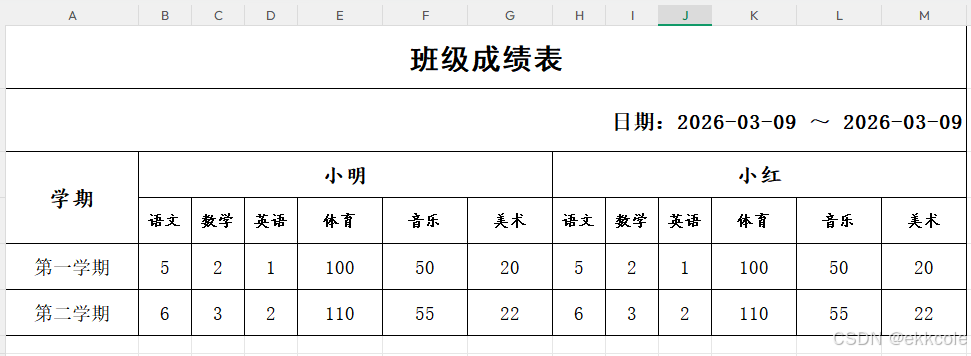
图一是我动态表头生成的本地数据,使用下面的工具类处理成了图二
动态表头可参考这篇文章:动态表头

java
package org.springblade.modules.api.controller;

import org.apache.poi.ss.usermodel.*;
import org.apache.poi.xssf.usermodel.XSSFWorkbook;

import java.io.File;
import java.io.FileInputStream;
import java.io.FileOutputStream;
import java.io.IOException;
import java.util.HashMap;
import java.util.Map;

/**
 * 2.2.10版本:修改本地Excel文件的行样式 + 动态列宽度 + 文本自动换行
 * 列宽度动态规则:
 * - 第1列(日期列,索引0)= 16
 * - 从第2列开始,每6列为1个完整组(如揽月湾/翡丽蓝湾):
 *   → 每组内前3列 = 6
 *   → 每组内后3列 = 10
 * 支持无限新增组(自动适配)
 * 所有行统一使用细实线边框(BorderStyle.THIN)+ 黑色边框颜色
 */
public class LocalExcelRowStyleModifier {

    // 定义行样式配置类:封装单行的所有样式属性(包含边框+换行配置)
    public static class RowStyleConfig {
        private boolean bold;                // 是否加粗
        private String fontName;            // 字体名称
        private short fontSize;             // 字号
        private short fontColor;            // 字体颜色
        private short bgColor;              // 背景色
        private float rowHeight;            // 行高(磅)
        private HorizontalAlignment horizontalAlign; // 水平对齐
        private VerticalAlignment verticalAlign;     // 垂直对齐
        // 边框配置(所有行统一为细实线边框)
        private BorderStyle borderStyle;    // 边框样式(当前全量为细实线THIN)
        private short borderColor;          // 边框颜色(当前全量为黑色)
        // 新增:文本是否自动换行
        private boolean wrapText;           // true=自动换行,false=不换行

        // 全参构造器(新增 wrapText 参数)
        public RowStyleConfig(boolean bold, String fontName, short fontSize, short fontColor, short bgColor,
                              float rowHeight, HorizontalAlignment horizontalAlign, VerticalAlignment verticalAlign,
                              BorderStyle borderStyle, short borderColor, boolean wrapText) {
            this.bold = bold;
            this.fontName = fontName;
            this.fontSize = fontSize;
            this.fontColor = fontColor;
            this.bgColor = bgColor;
            this.rowHeight = rowHeight;
            this.horizontalAlign = horizontalAlign;
            this.verticalAlign = verticalAlign;
            this.borderStyle = borderStyle;
            this.borderColor = borderColor;
            this.wrapText = wrapText;
        }

        // Getter方法
        public boolean isBold() { return bold; }
        public String getFontName() { return fontName; }
        public short getFontSize() { return fontSize; }
        public short getFontColor() { return fontColor; }
        public short getBgColor() { return bgColor; }
        public float getRowHeight() { return rowHeight; }
        public HorizontalAlignment getHorizontalAlign() { return horizontalAlign; }
        public VerticalAlignment getVerticalAlign() { return verticalAlign; }
        public BorderStyle getBorderStyle() { return borderStyle; }
        public short getBorderColor() { return borderColor; }
        public boolean isWrapText() { return wrapText; }
    }

    /**
     * 动态列宽度设置(核心优化)
     * 规则:
     * 1. 首列(索引0)固定16
     * 2. 从索引1开始,每6列为1组:
     *    - 组内索引0-2(对应整体索引1-3/7-9/13-15...)→ 宽度6
     *    - 组内索引3-5(对应整体索引4-6/10-12/16-18...)→ 宽度10
     * 3. 自动适配任意数量的组(新增XX湾无需改代码)
     * @param sheet 工作表对象
     * @param maxColNum 需要设置的最大列数
     */
    private static void setColumnWidths(Sheet sheet, int maxColNum) {
        // 基础配置:Excel显示的目标宽度(不是POI字符数)
        final int FIRST_COL_DISPLAY_WIDTH = 16;
        final int GROUP_FIRST_3_DISPLAY_WIDTH = 6;
        final int GROUP_LAST_3_DISPLAY_WIDTH = 10;
        final int GROUP_TOTAL_COL = 6; // 每组固定6列

        // POI换算系数:显示宽度 = POI字符数 - 0.62 → POI字符数 = 显示宽度 + 0.62
        final double POI_CONVERT_RATIO = 0.62;

        // 遍历所有需要设置的列
        for (int colIndex = 0; colIndex < maxColNum; colIndex++) {
            double poiCharWidth; // POI需要的字符宽度
            if (colIndex == 0) {
                // 首列:目标显示16 → POI字符数=16+0.62
                poiCharWidth = FIRST_COL_DISPLAY_WIDTH + POI_CONVERT_RATIO;
            } else {
                int relativeIndex = colIndex - 1;
                int groupInnerIndex = relativeIndex % GROUP_TOTAL_COL;
                if (groupInnerIndex >= 0 && groupInnerIndex <= 2) {
                    // 组内前3列:目标显示6 → POI字符数=6+0.62
                    poiCharWidth = GROUP_FIRST_3_DISPLAY_WIDTH + POI_CONVERT_RATIO;
                } else {
                    // 组内后3列:目标显示10 → POI字符数=10+0.62
                    poiCharWidth = GROUP_LAST_3_DISPLAY_WIDTH + POI_CONVERT_RATIO;
                }
            }
            // 转换为POI的宽度单位(1单位=1/256字符)
            int poiWidth = (int) (poiCharWidth * 256);
            sheet.setColumnWidth(colIndex, poiWidth);
            // 打印日志:显示目标宽度 vs 实际设置的POI值
            System.out.printf("列索引%d → 目标显示宽度:%.0f → POI设置值:%d → Excel最终显示≈%.0f\n",
                    colIndex, poiCharWidth - POI_CONVERT_RATIO, poiWidth, poiCharWidth - POI_CONVERT_RATIO);
        }
        System.out.println("动态列宽度设置完成!Excel显示宽度:首列16,每组前3列6、后3列10");
    }

    /**
     * 核心方法:为多行设置不同样式(所有行统一应用细实线边框)+ 自定义列宽度 + 文本换行
     * @param sourceFilePath 原Excel路径
     * @param targetFilePath 保存路径
     * @param sheetIndex 工作表索引(0开始)
     * @param rowStyleMap 行号-样式配置的映射(key=行号,value=该行的样式)
     * @throws IOException 文件异常
     */
    public static void modifyMultiRowWithDifferentStyle(String sourceFilePath, String targetFilePath,
                                                       int sheetIndex, Map<Integer, RowStyleConfig> rowStyleMap) throws IOException {
        // 1. 读取Excel文件
        File sourceFile = new File(sourceFilePath);
        if (!sourceFile.exists()) {
            throw new IOException("原文件不存在:" + sourceFilePath);
        }
        FileInputStream fis = new FileInputStream(sourceFile);
        Workbook workbook = new XSSFWorkbook(fis); // 仅支持.xlsx,.xls替换为HSSFWorkbook
        Sheet sheet = workbook.getSheetAt(sheetIndex);

        // ========== 新增逻辑:获取Excel实际最大行号 ==========
        int maxRowNum = sheet.getLastRowNum();
        // ========== 新增逻辑:定义第四行及以后的统一样式 ==========
        RowStyleConfig defaultRowConfig = new RowStyleConfig(
                false,          // 不加粗
                "宋体",         // 宋体
                (short) 14,     // 14号字体
                IndexedColors.BLACK.getIndex(),
                IndexedColors.WHITE.getIndex(),
                34.8f,          // 行高34.8
                HorizontalAlignment.CENTER, // 水平居中
                VerticalAlignment.CENTER,   // 垂直居中
                BorderStyle.THIN,
                IndexedColors.BLACK.getIndex(),
                false           // 不换行
        );

        // 2. 遍历每一行,应用对应的样式(含细边框+换行)
        int maxColNum = 0; // 记录Excel中最大列数,用于后续设置列宽度
        // 遍历所有行(包括第四行及以后的行)
        for (int rowNum = 0; rowNum <= maxRowNum; rowNum++) {
            RowStyleConfig styleConfig;
            // 判断是否是已配置的行(0-3行),否则使用第四行及以后的统一样式
            if (rowStyleMap.containsKey(rowNum)) {
                styleConfig = rowStyleMap.get(rowNum);
            } else {
                styleConfig = defaultRowConfig;
            }

            // 定位目标行(不存在则创建)
            Row targetRow = sheet.getRow(rowNum);
            if (targetRow == null) {
                targetRow = sheet.createRow(rowNum);
            }

            // 3. 根据配置创建该行专属的字体和单元格样式
            Font font = workbook.createFont();
            font.setBold(styleConfig.isBold());
            font.setFontName(styleConfig.getFontName());
            font.setFontHeightInPoints(styleConfig.getFontSize());
            font.setColor(styleConfig.getFontColor());

            CellStyle cellStyle = workbook.createCellStyle();
            cellStyle.setFont(font);
            cellStyle.setFillForegroundColor(styleConfig.getBgColor());
            cellStyle.setFillPattern(FillPatternType.SOLID_FOREGROUND);
            cellStyle.setAlignment(styleConfig.getHorizontalAlign());
            cellStyle.setVerticalAlignment(styleConfig.getVerticalAlign());
            // 应用文本自动换行配置
            cellStyle.setWrapText(styleConfig.isWrapText());

            // 设置边框样式(上下左右统一为细实线边框)
            cellStyle.setBorderTop(styleConfig.getBorderStyle());
            cellStyle.setBorderBottom(styleConfig.getBorderStyle());
            cellStyle.setBorderLeft(styleConfig.getBorderStyle());
            cellStyle.setBorderRight(styleConfig.getBorderStyle());
            // 设置边框颜色(统一为黑色)
            cellStyle.setTopBorderColor(styleConfig.getBorderColor());
            cellStyle.setBottomBorderColor(styleConfig.getBorderColor());
            cellStyle.setLeftBorderColor(styleConfig.getBorderColor());
            cellStyle.setRightBorderColor(styleConfig.getBorderColor());

            // 4. 设置行高
            targetRow.setHeightInPoints(styleConfig.getRowHeight());

            // 5. 应用样式到该行所有单元格(含空单元格)
            int lastCellNum = targetRow.getLastCellNum();
            // 更新最大列数(确保列宽度覆盖所有单元格)
            if (lastCellNum > maxColNum) {
                maxColNum = lastCellNum;
            }
            // 处理已存在的单元格
            for (int i = 0; i < (lastCellNum == -1 ? 0 : lastCellNum); i++) {
                Cell cell = targetRow.getCell(i);
                if (cell == null) {
                    cell = targetRow.createCell(i);
                }
                cell.setCellStyle(cellStyle);
            }
        }

        // 6. 设置列宽度(核心新增逻辑)
        // 确保至少覆盖13列(2组:揽月湾+翡丽蓝湾),新增组自动扩展
        maxColNum = Math.max(maxColNum, 13);
        setColumnWidths(sheet, maxColNum);

        // 7. 保存并关闭资源
        FileOutputStream fos = new FileOutputStream(targetFilePath);
        workbook.write(fos);

        // 关闭流(按逆序关闭)
        fos.close();
        workbook.close();
        fis.close();

        System.out.println("多行多样式(全量细边框)+ 自定义列宽度 + 文本换行修改完成!修改后文件路径:" + targetFilePath);
    }

    // 保留原有单一行修改方法(兼容旧逻辑,默认细实线边框+不换行)
    public static void modifyRowStyle(String sourceFilePath, String targetFilePath, int sheetIndex, int targetRowNum) throws IOException {
        // 构建默认样式(含细实线边框:黑色细边框 + 不换行)
        RowStyleConfig defaultConfig = new RowStyleConfig(
                true, "黑体", (short)22, IndexedColors.BLACK.getIndex(),
                IndexedColors.WHITE.getIndex(), 47.6f,
                HorizontalAlignment.CENTER, VerticalAlignment.CENTER,
                BorderStyle.THIN, IndexedColors.BLACK.getIndex(), false // 默认不换行
        );
        Map<Integer, RowStyleConfig> rowStyleMap = new HashMap<>();
        rowStyleMap.put(targetRowNum, defaultConfig);
        modifyMultiRowWithDifferentStyle(sourceFilePath, targetFilePath, sheetIndex, rowStyleMap);
    }

    public static void main(String[] args) {
        try {
            String sourcePath = "F:\\machine\\noModelWrite1773206416743.xlsx";
            String targetPath = "F:\\machine\\test_modified_" + System.currentTimeMillis() + ".xlsx";

            Map<Integer, RowStyleConfig> rowStyleMap = new HashMap<>();

            // 第0行(表头):黑体、22号、加粗、白色背景、居中、行高47.6 + 黑色细边框 + 不换行
            rowStyleMap.put(0, new RowStyleConfig(
                    true,
                    "黑体",
                    (short) 22,
                    IndexedColors.BLACK.getIndex(),
                    IndexedColors.WHITE.getIndex(),
                    47.6f,
                    HorizontalAlignment.CENTER,
                    VerticalAlignment.CENTER,
                    BorderStyle.THIN, // 细实线边框
                    IndexedColors.BLACK.getIndex(), // 黑色边框
                    false // 不换行
            ));

            // 第1行:宋体、16号、加粗、白色背景、右对齐、行高47.6 + 黑色细边框 + 不换行
            rowStyleMap.put(1, new RowStyleConfig(
                    true,
                    "宋体",
                    (short) 16,
                    IndexedColors.BLACK.getIndex(),
                    IndexedColors.WHITE.getIndex(),
                    47.6f,
                    HorizontalAlignment.RIGHT,
                    VerticalAlignment.CENTER,
                    BorderStyle.THIN, // 细实线边框
                    IndexedColors.BLACK.getIndex(), // 黑色边框
                    false // 不换行(修正注释错误)
            ));

            // 第2行:楷体、16号、加粗、白色背景、居中、行高34.8 + 黑色细边框 + 不换行
            rowStyleMap.put(2, new RowStyleConfig(
                    true,
                    "楷体_GB2312",
                    (short) 16,
                    IndexedColors.BLACK.getIndex(),
                    IndexedColors.WHITE.getIndex(),
                    34.8f,
                    HorizontalAlignment.CENTER,
                    VerticalAlignment.CENTER,
                    BorderStyle.THIN, // 细实线边框
                    IndexedColors.BLACK.getIndex(), // 黑色边框
                    false // 不换行(修正注释错误)
            ));

            // 第3行:楷体、12号、加粗、白色背景、居中、行高34.8 + 黑色细边框 + 不换行
            rowStyleMap.put(3, new RowStyleConfig(
                    true,
                    "楷体_GB2312",
                    (short) 12,
                    IndexedColors.BLACK.getIndex(),
                    IndexedColors.WHITE.getIndex(),
                    34.8f,
                    HorizontalAlignment.CENTER,
                    VerticalAlignment.CENTER,
                    BorderStyle.THIN, // 细实线边框
                    IndexedColors.BLACK.getIndex(), // 黑色边框
                    true // 换行
            ));

            // 第4行:及以后统一样式(宋体14、不加粗、居中、行高34.8)
            rowStyleMap.put(4, new RowStyleConfig(
                    false, // 不加粗
                    "宋体", // 宋体
                    (short) 14, // 14号
                    IndexedColors.BLACK.getIndex(),
                    IndexedColors.WHITE.getIndex(),
                    34.8f, // 行高34.8
                    HorizontalAlignment.CENTER, // 居中
                    VerticalAlignment.CENTER,
                    BorderStyle.THIN, // 细实线边框
                    IndexedColors.BLACK.getIndex(), // 黑色边框
                    false // 不换行(修正注释错误)
            ));

            modifyMultiRowWithDifferentStyle(sourcePath, targetPath, 0, rowStyleMap);

        } catch (IOException e) {
            e.printStackTrace();
            System.out.println("修改失败:" + e.getMessage());
        }
    }
}