实测结论如下:
• 要快速拿到干净JSON数据→ Web Scraper API(推荐新手/小团队)
• 要渲染后的原始HTML自己解析→ Web Unlocker API(推荐中型技术团队)
• 有完整爬虫工程师团队需深度定制 → 住宅代理网络**(** Residential Proxies**)**
免费注册试用,可联系客服延长试用期,用折扣码API30可再打7折
https://get.brightdata.com/mbipvd
前言
上上周我的自建爬虫又在Amazon上集体"阵亡"。服务器日志里满屏的403错误,团队熬了三个通宵写的反爬逻辑,在对方一次前端改版后彻底失效。这种无力感,做过数据采集的应该都懂。如果你不想也这样,可以直接用Web Scraper API ,注册免费试用https://get.brightdata.com/mbipvd
经此一事,我决定系统测试市面上主流方案。经过两周深度实测写出了这篇不吹不黑的决策指南,或许能帮你少走弯路。本文主要测评爬虫API(Web Unlocker API)、网页抓取API(Web Scraper API)与代理服务器**(** Residential Proxies**)**。
一、先说人话:三种工具到底差在哪?
别被术语绕晕,我用修车厂打个比方:
- 代理服务器( Residential Proxies**) = 租扳手**
亮数据提供1.5亿+真实住宅IP(覆盖195国),但扳手给你了,拆轮胎、换机油全得自己来。适合老司机团队:有爬虫工程师、熟悉Selenium/Playwright、愿意折腾反爬逻辑。我测试时用住宅代理跑简单新闻站,成功率从自建代理池的68%提到93%,但遇到Cloudflare人机验证时,仍需手动加验证码识别模块。
- 爬虫API( Web Unlocker API ) = 请技师帮你拆车
你递上车钥匙(URL),技师自动处理IP轮换、JS渲染、绕过基础反爬,最后把拆解好的发动机(原始HTML)交给你。上周测试Zillow房产页时,它3秒内返回了完整渲染后的HTML------而我自建的Puppeteer脚本因触发滑块验证卡了20分钟。关键点:它不帮你修车,只保证零件干净。
- 网页抓取API ( Web Scraper API )= 直接送你一辆翻新车
网页抓取API(Web Scraper API)是亮数据的王牌(产品直达)。最可靠的网页抓取 API。支持自动代理轮换、反机器人绕过和 JavaScript 渲染,轻松抓取任何网站。内置 120 多个适用于热门平台的现成抓取工具,助您快速上手。例如我想抓取亚马逊上关于"iphone"的关键词,他会返回JSON、VSC等类型的文件,包含所有"iphone"商品的标签、价格、评论等各种信息。
二、血泪总结:一张表决定你的选择
|--------|----------|----------------------|---------------------|
| 维度 | 住宅代理 | Web Unlocker API | Web Scraper API |
| 上手难度 | 高 | 中 | 低 |
| 返回格式 | 自定义 | 原始HTML | 结构化JSON |
| 内置反爬 | ❌ | ✅ | ✅ |
| 适合团队规模 | 10人+ | 2-5人 | 1-3人 |
| 起步价格 | 按量 | 按量 | 按量 |
💡 记住这个口诀:
要HTML自己解析 → 爬虫API( Web Unlocker API )
要现成JSON字段 → 网页抓取API( Web Scraper API )
有技术团队且求掌控感 → 代理服务器( Residential Proxies )
如果你只是偶尔抓取公开静态页面、每日请求量在500次以内,免费开源工具(如 Scrapy + 免费代理池)已经够用,无需为亮数据付费。
三、亮数据产品深度测评
Web Scraper API抓取亚马逊关于"iPhone"关键词的商品信息
1、进入爬虫库
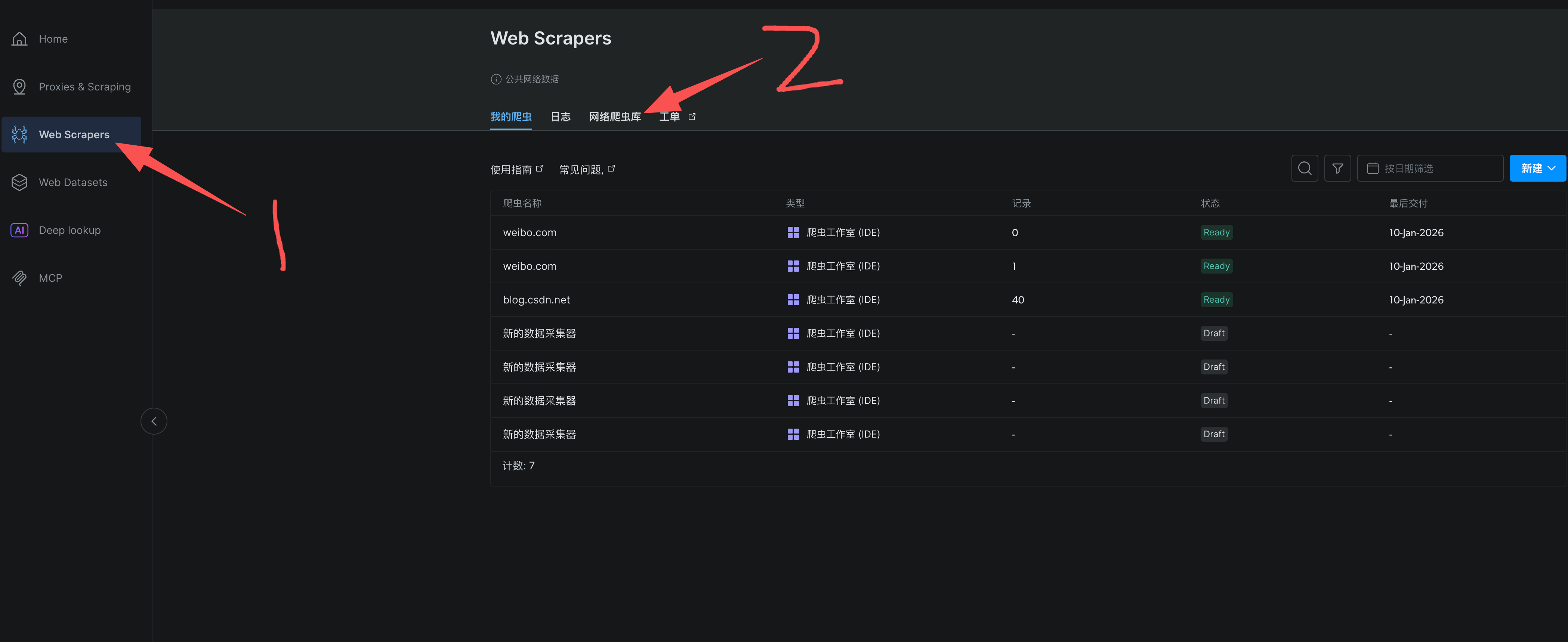
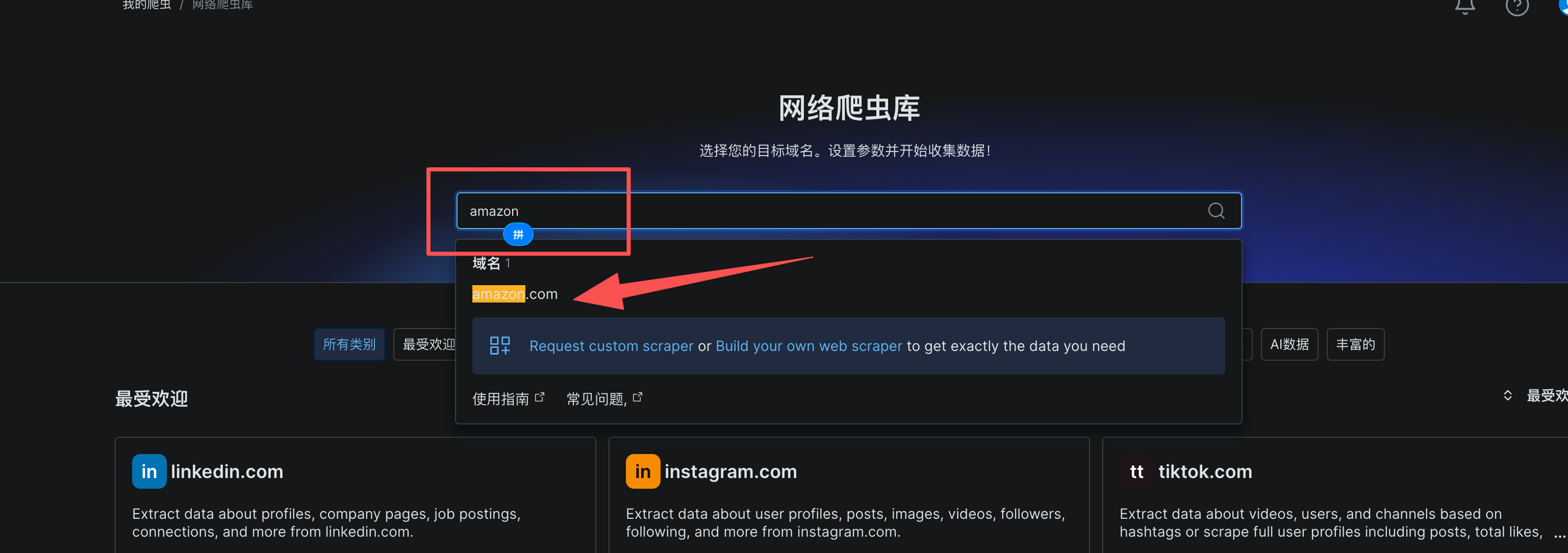
2、搜索amazon
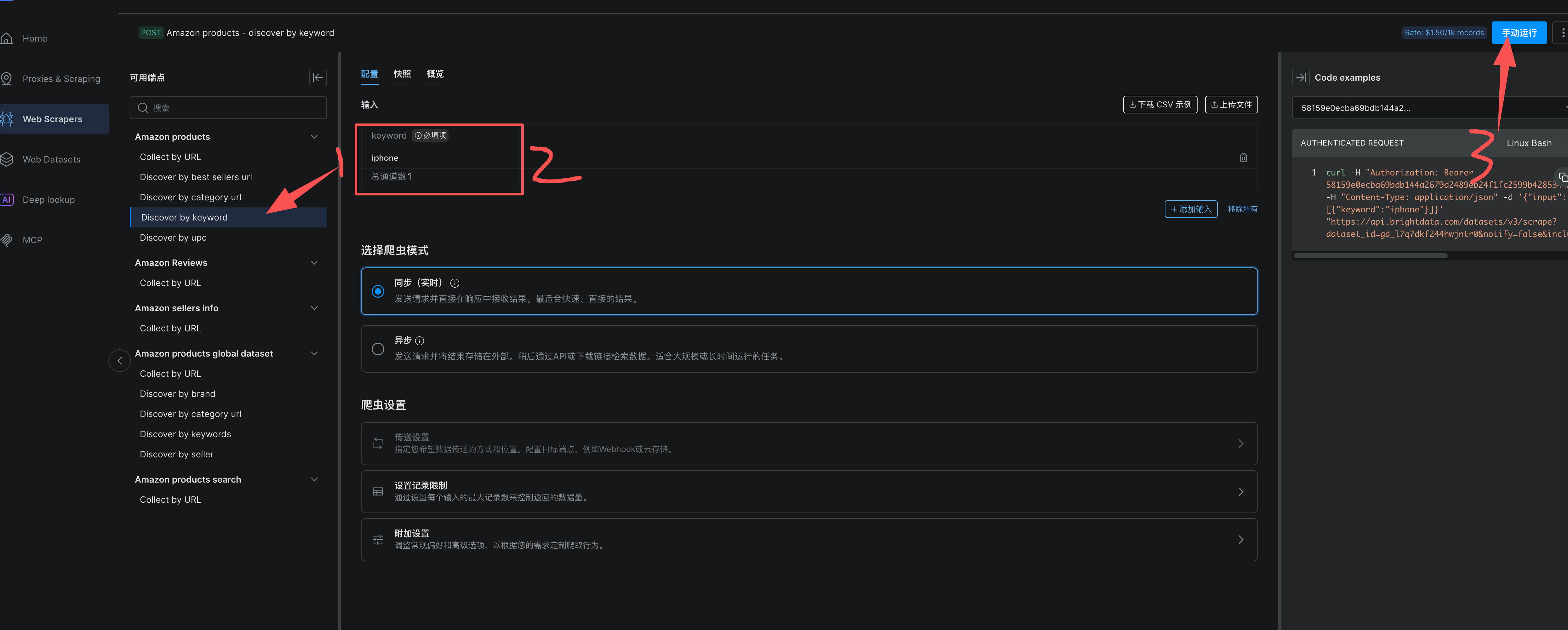
3、点击Discover by keyword 爬虫,输入iPhone 点击运行
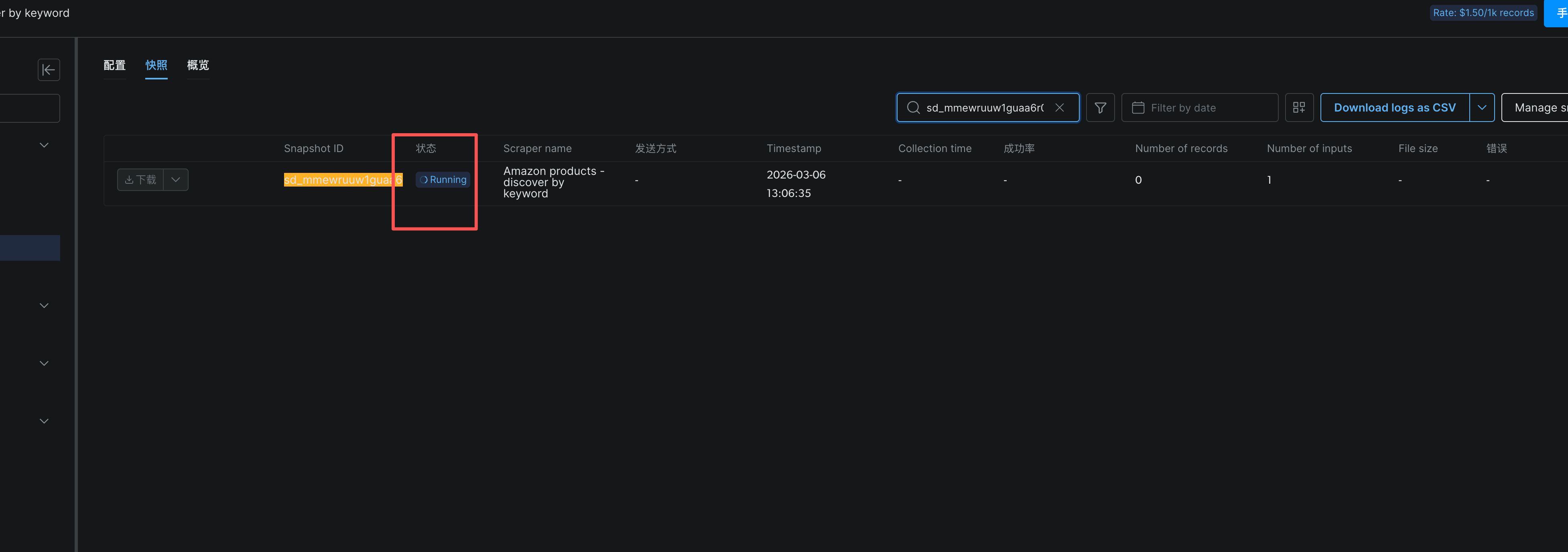
4、等待运行完成
5、下载数据查看
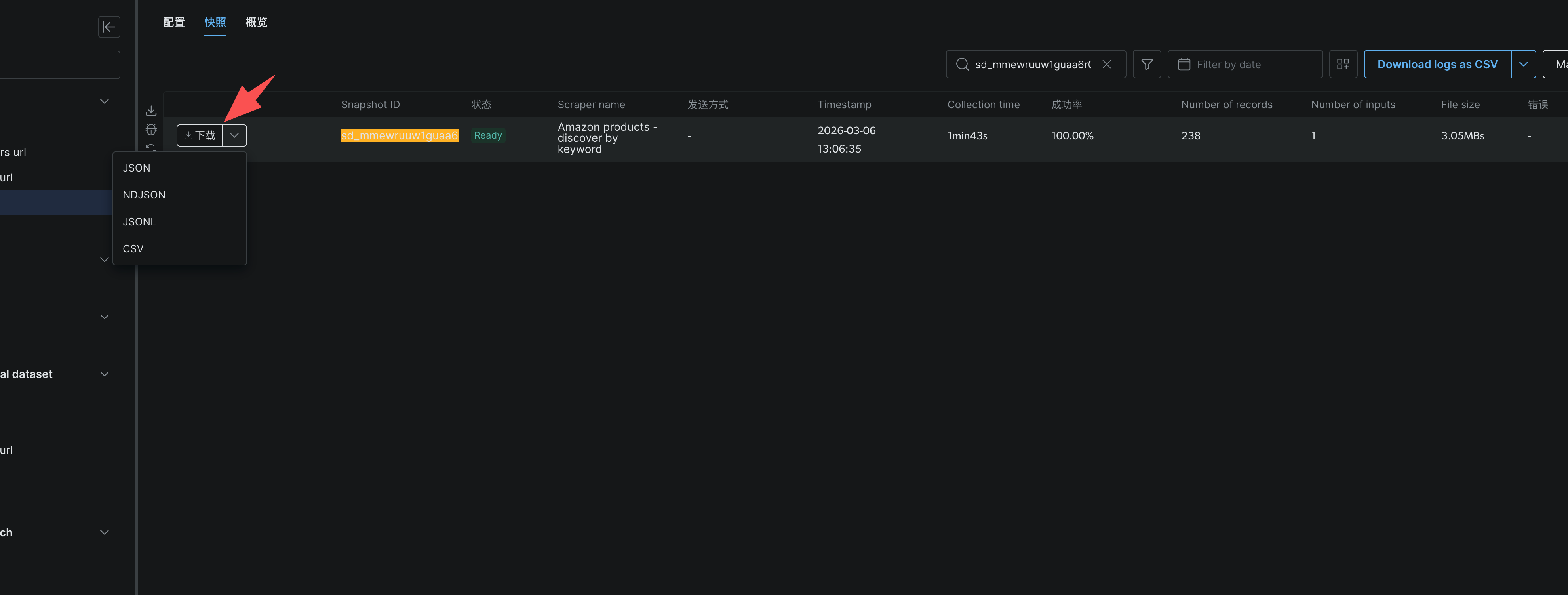
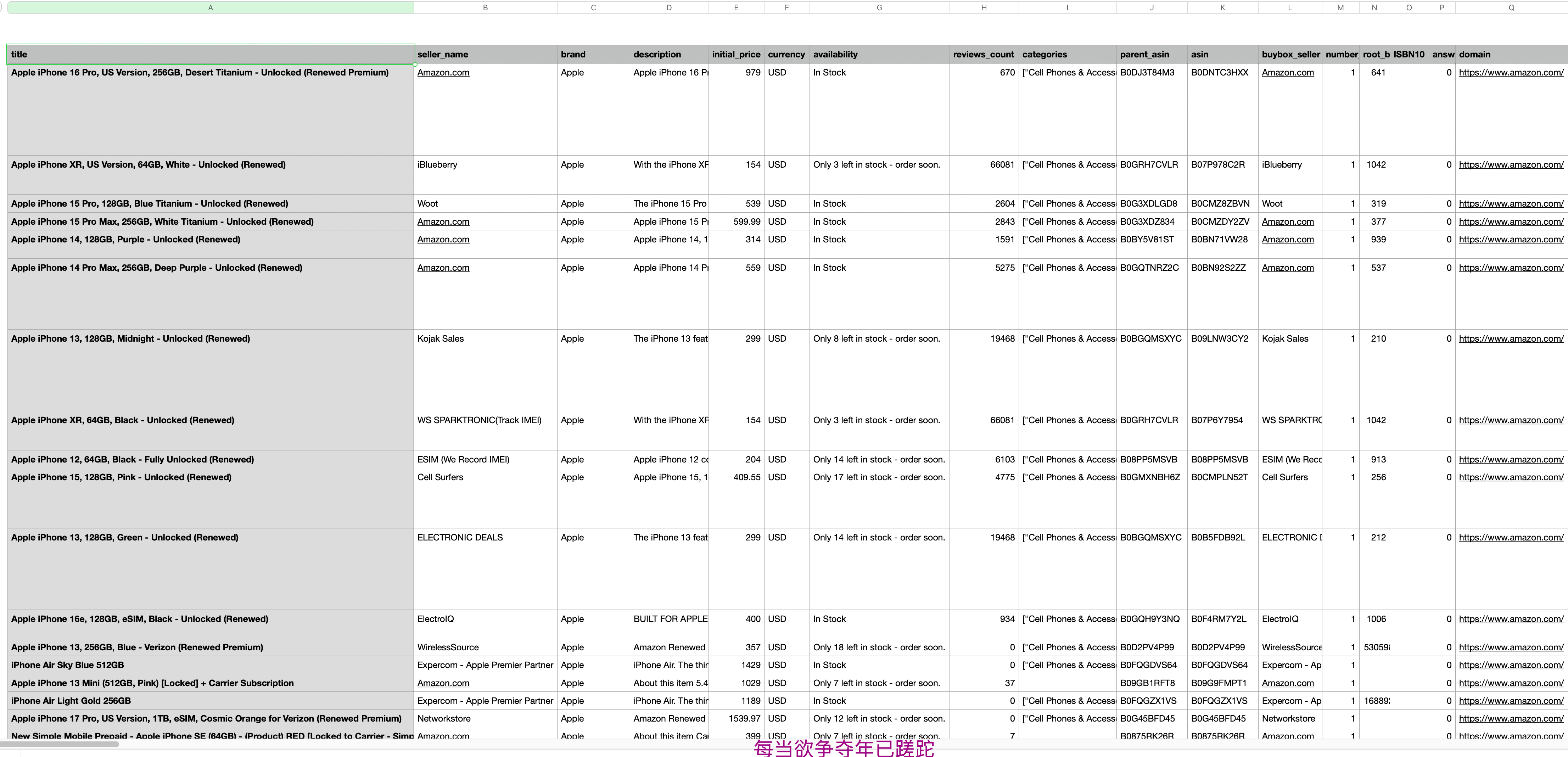
2. SERP爬取亚马逊首页
- 点击Proxies,选择搜索引擎爬虫SERP(SERP API)
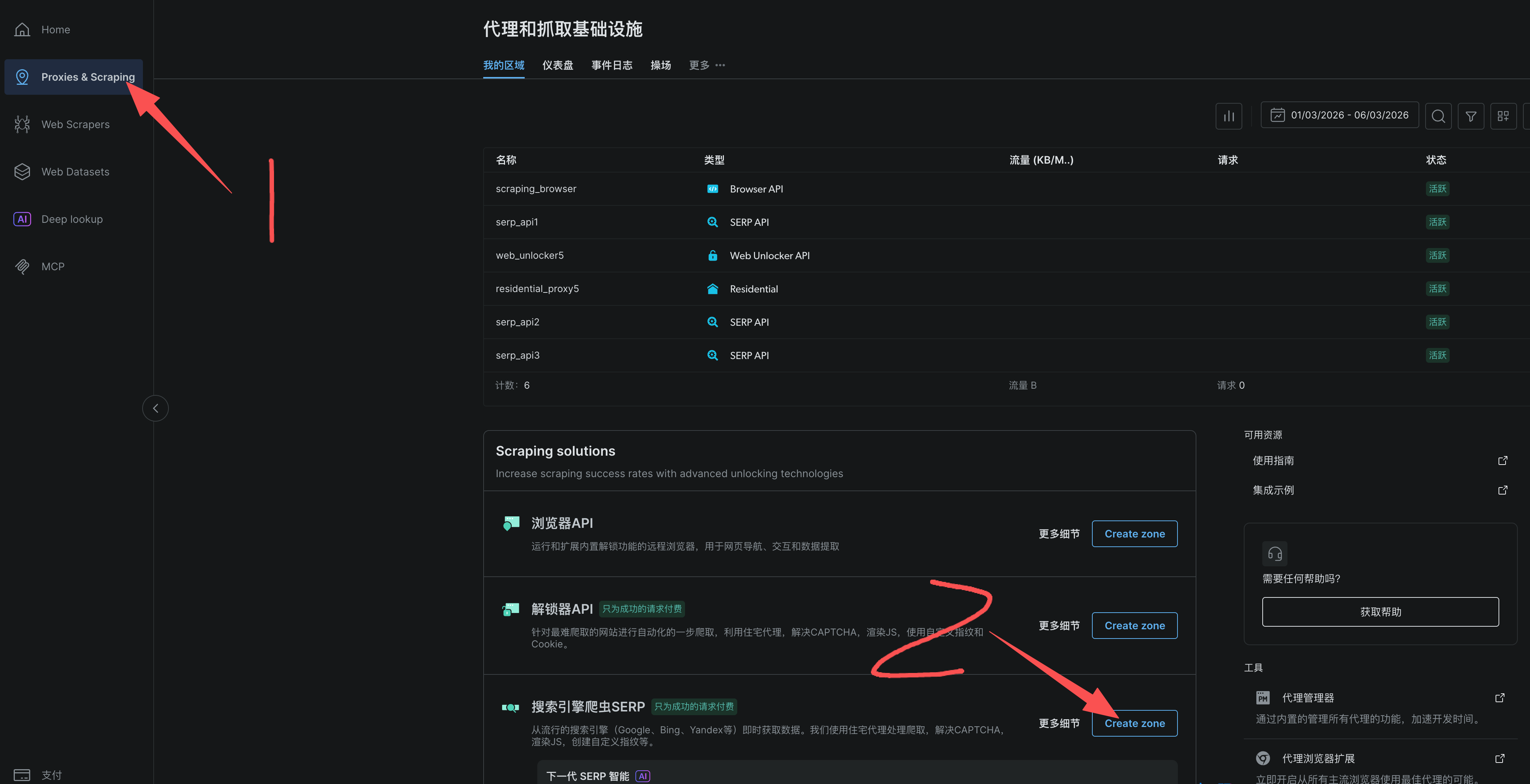
2、选择原始HTML,添加
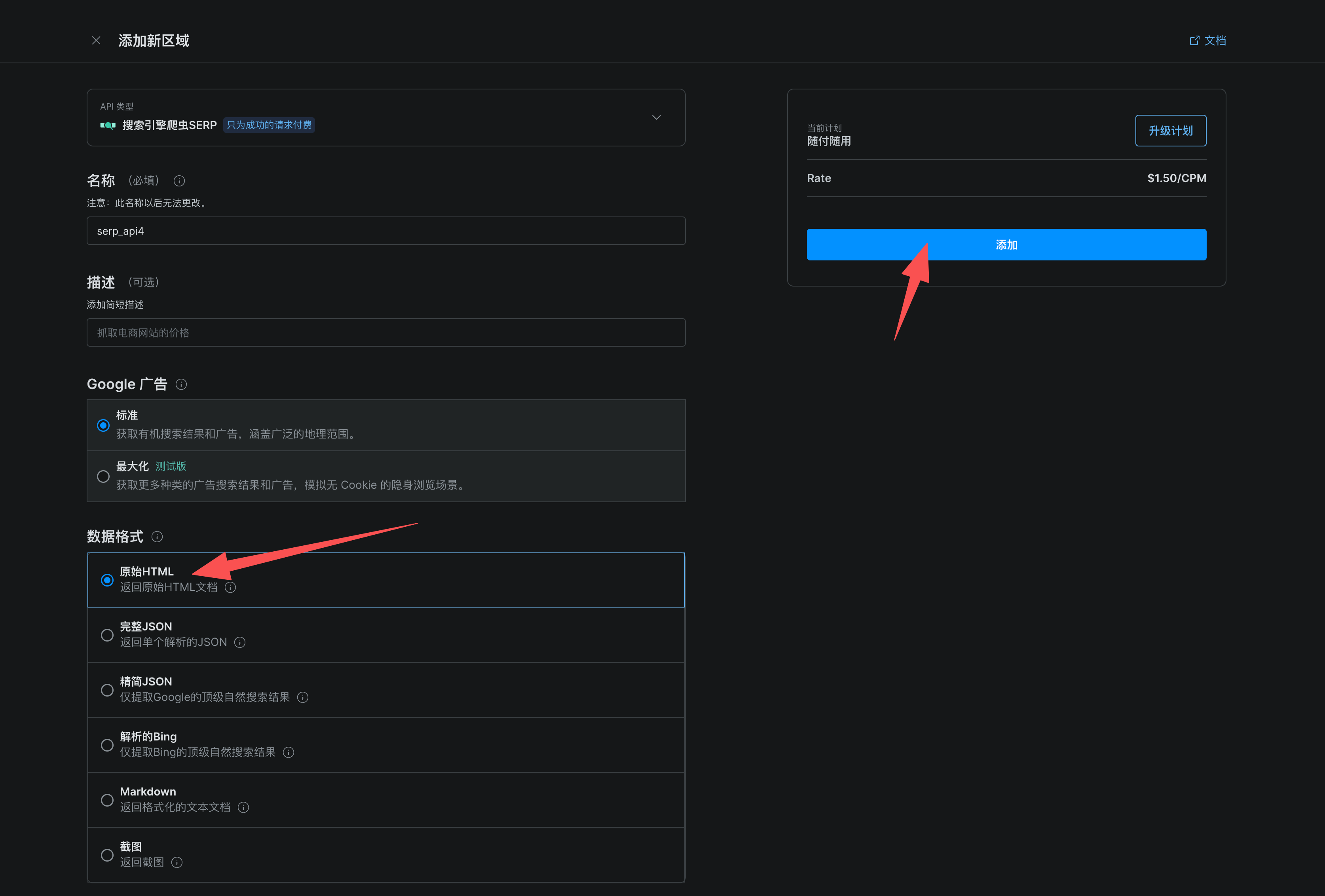
3、点击概览,根据自己的需求修改一下选项。
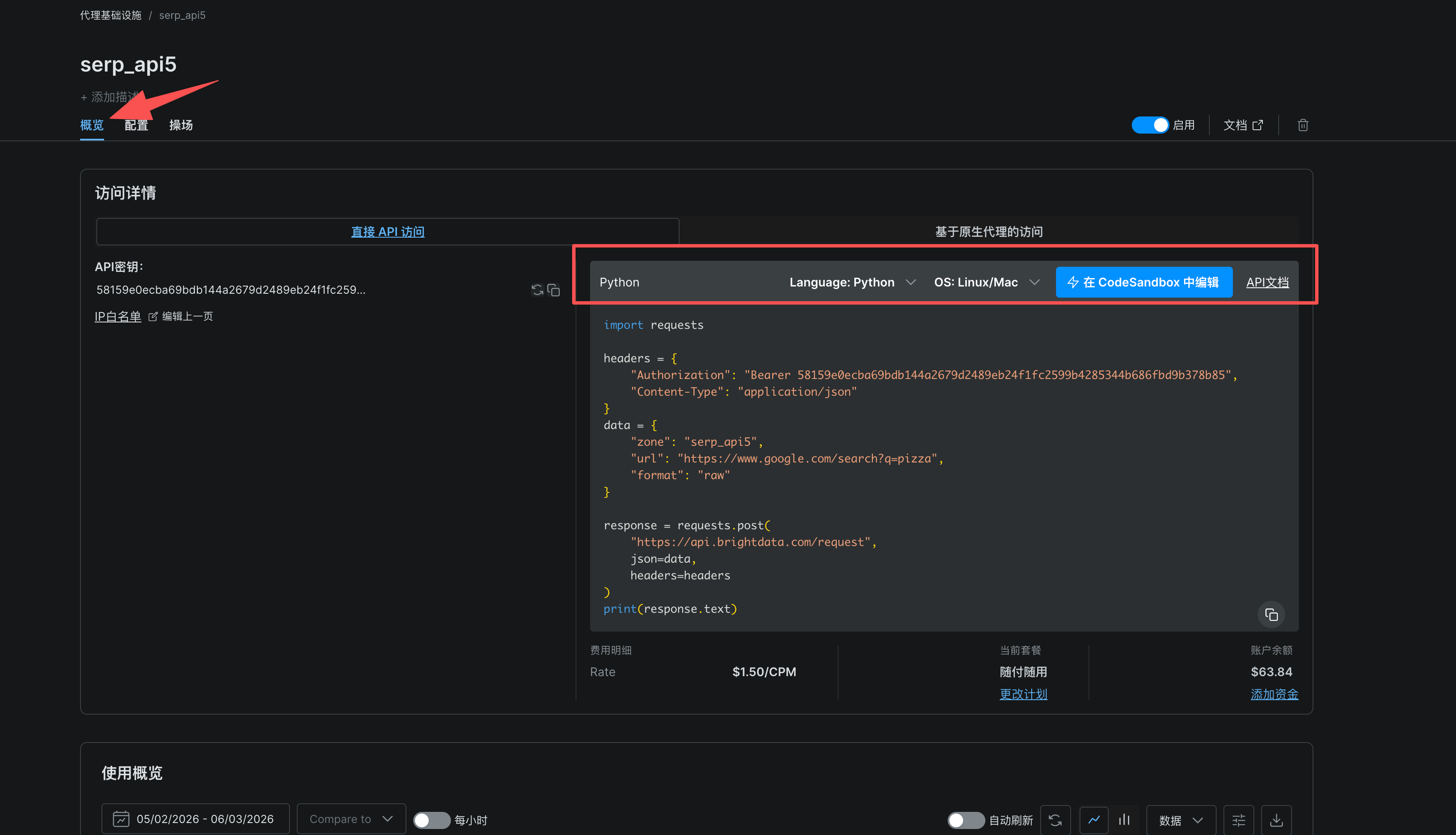
4、修改示例代码,爬取亚马逊网站
python代码如下:
import requests

headers = {
    "Authorization": "Bearer YOUR_API_TOKEN",
    "Content-Type": "application/json"
}

data = {
    "zone": "web_unlocker7",
    "url": "https://www.amazon.com/",
    "format": "raw",
    "country": "us"
}

response = requests.post(
    "https://api.brightdata.com/request",
    json=data,
    headers=headers
)
print(response.text)复制上面的代码就能跑?先去注册获取你的API Token →https://get.brightdata.com/mbipvd
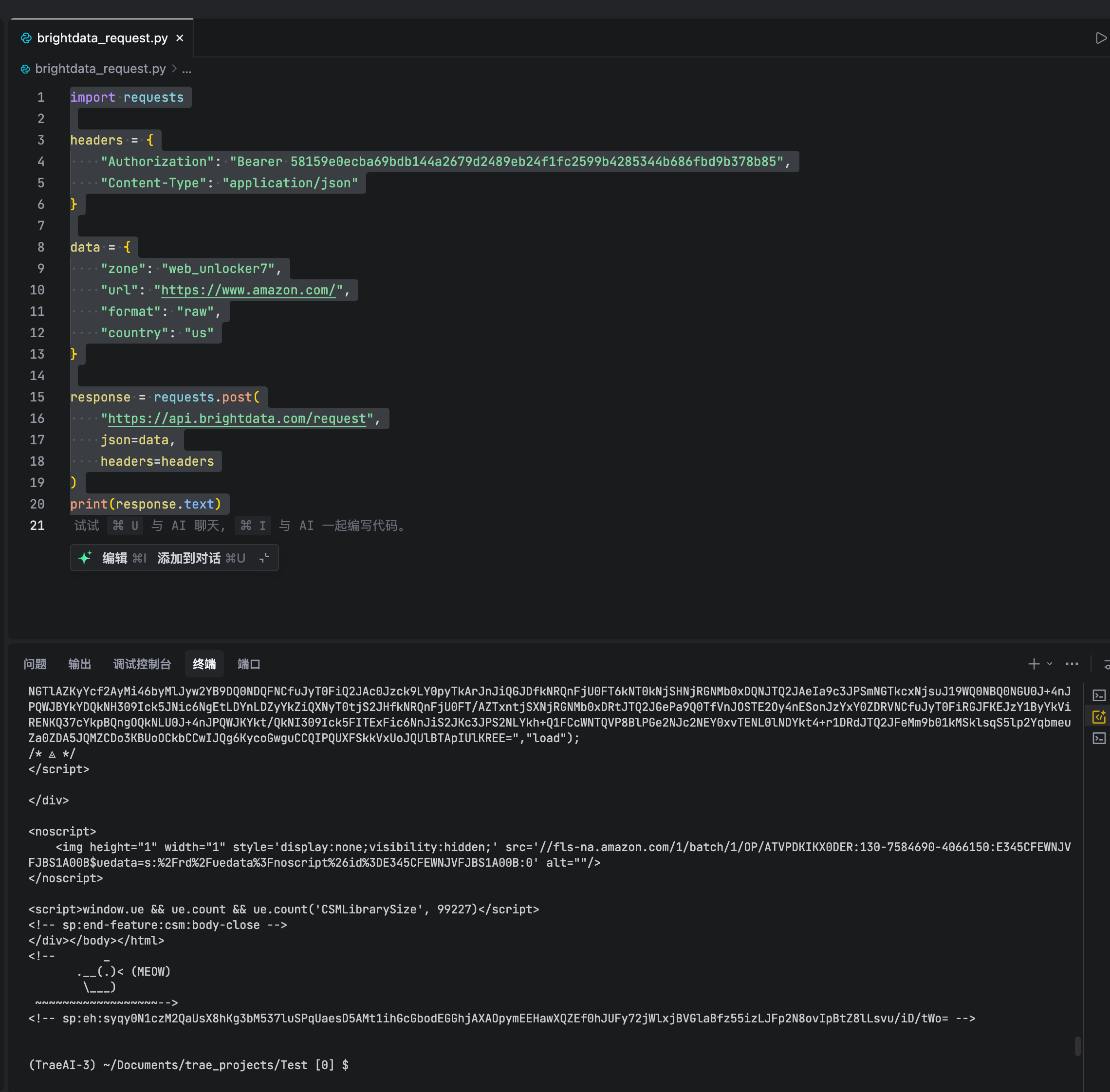
5、运行结果
3. 代理网络:细节见真章
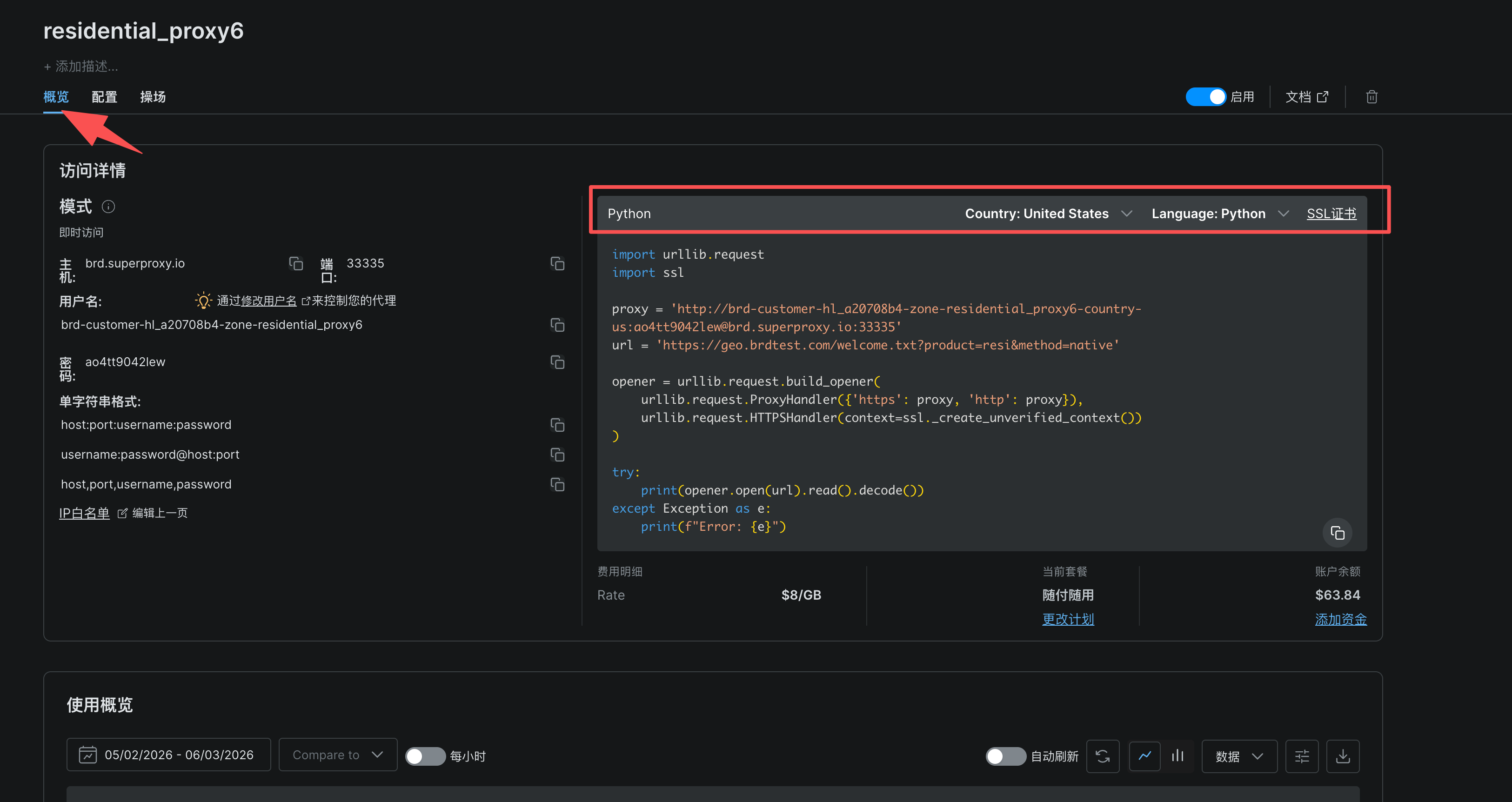
1、点击Proxies,选择住宅代理**(** Residential Proxies**)**
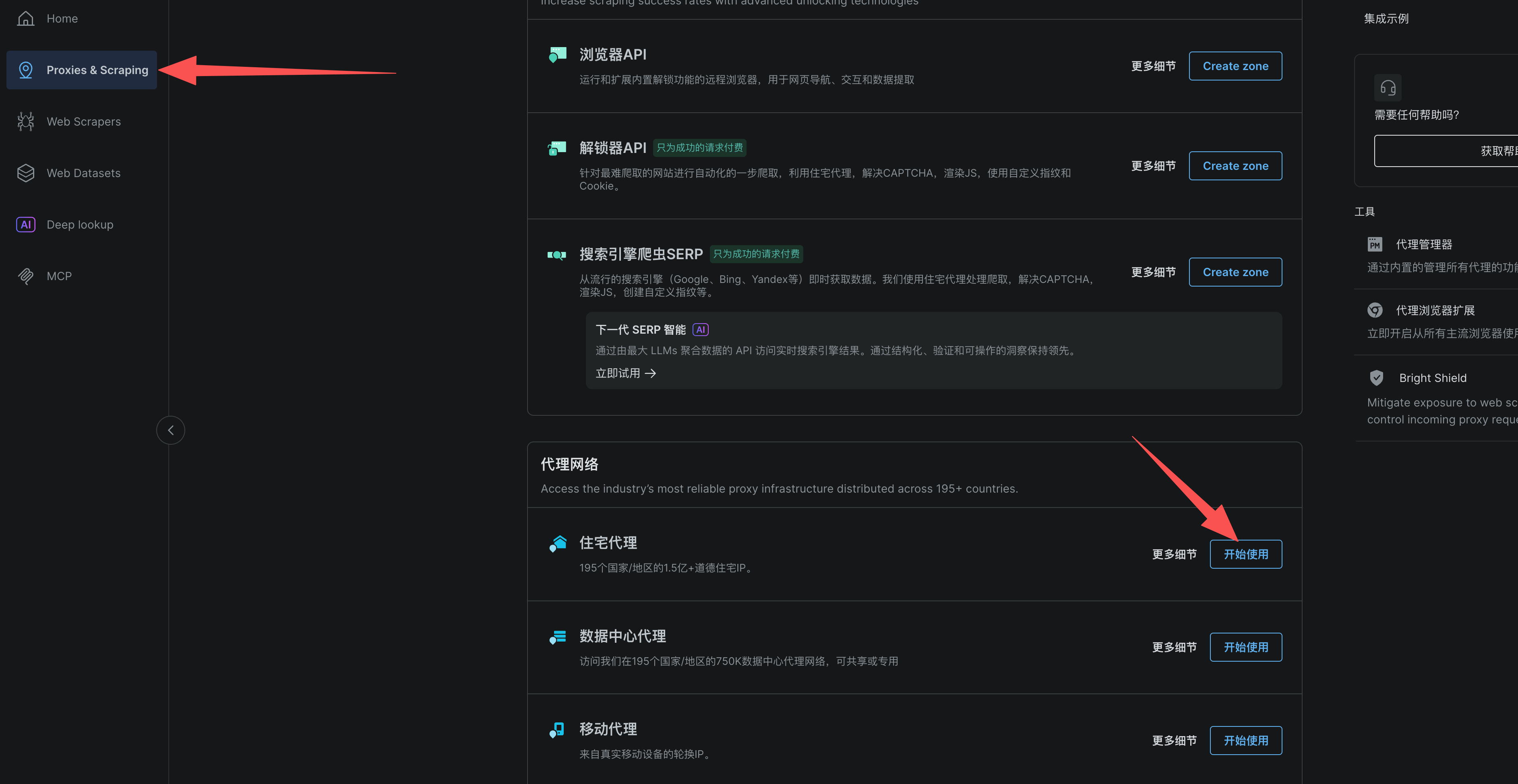
2、根据需求配置,点击添加
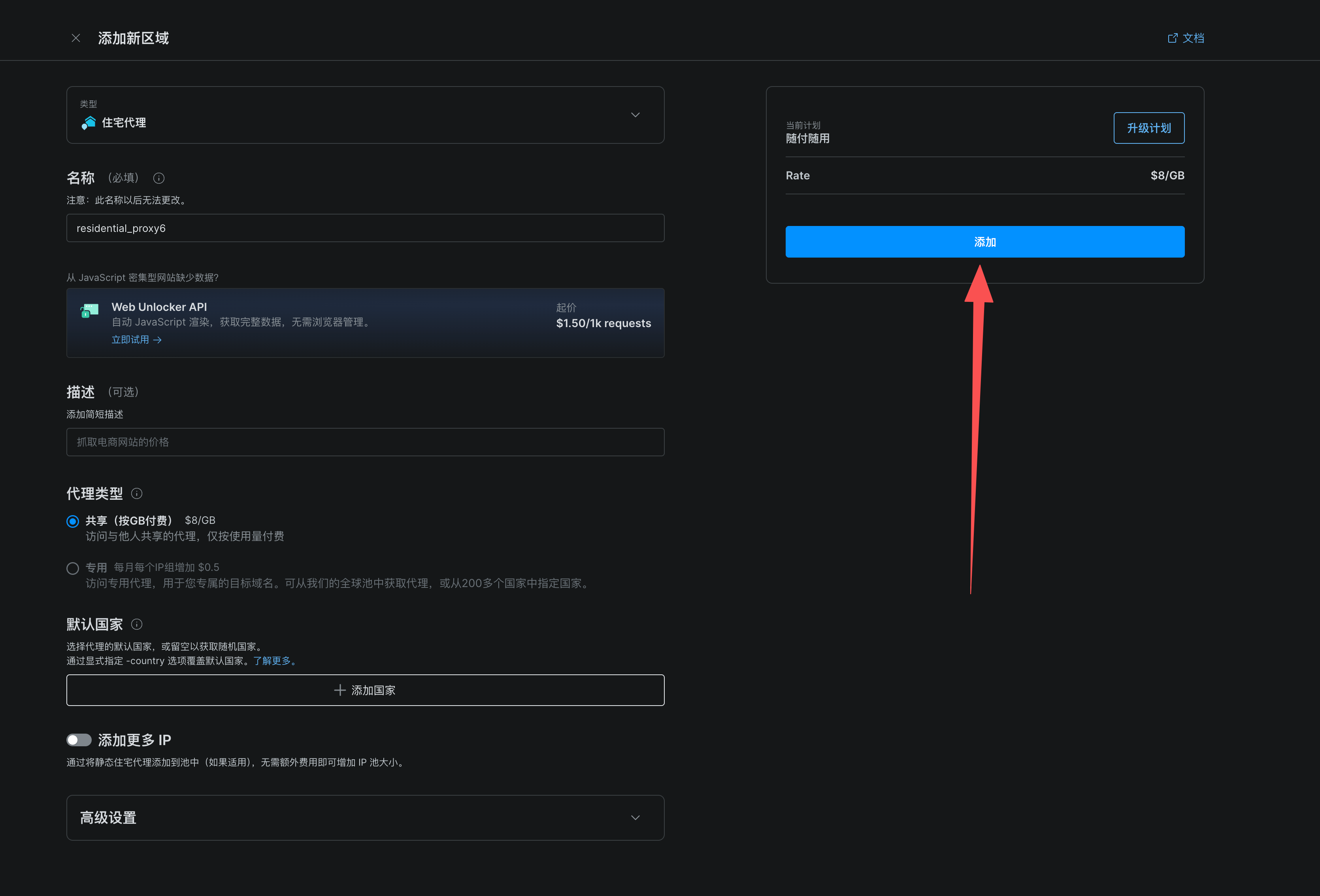
3、选择编程语言和国家
这里给出的示例代码是通过住宅代理网络发送HTTP请求,并获取响应内容
4、编写脚本
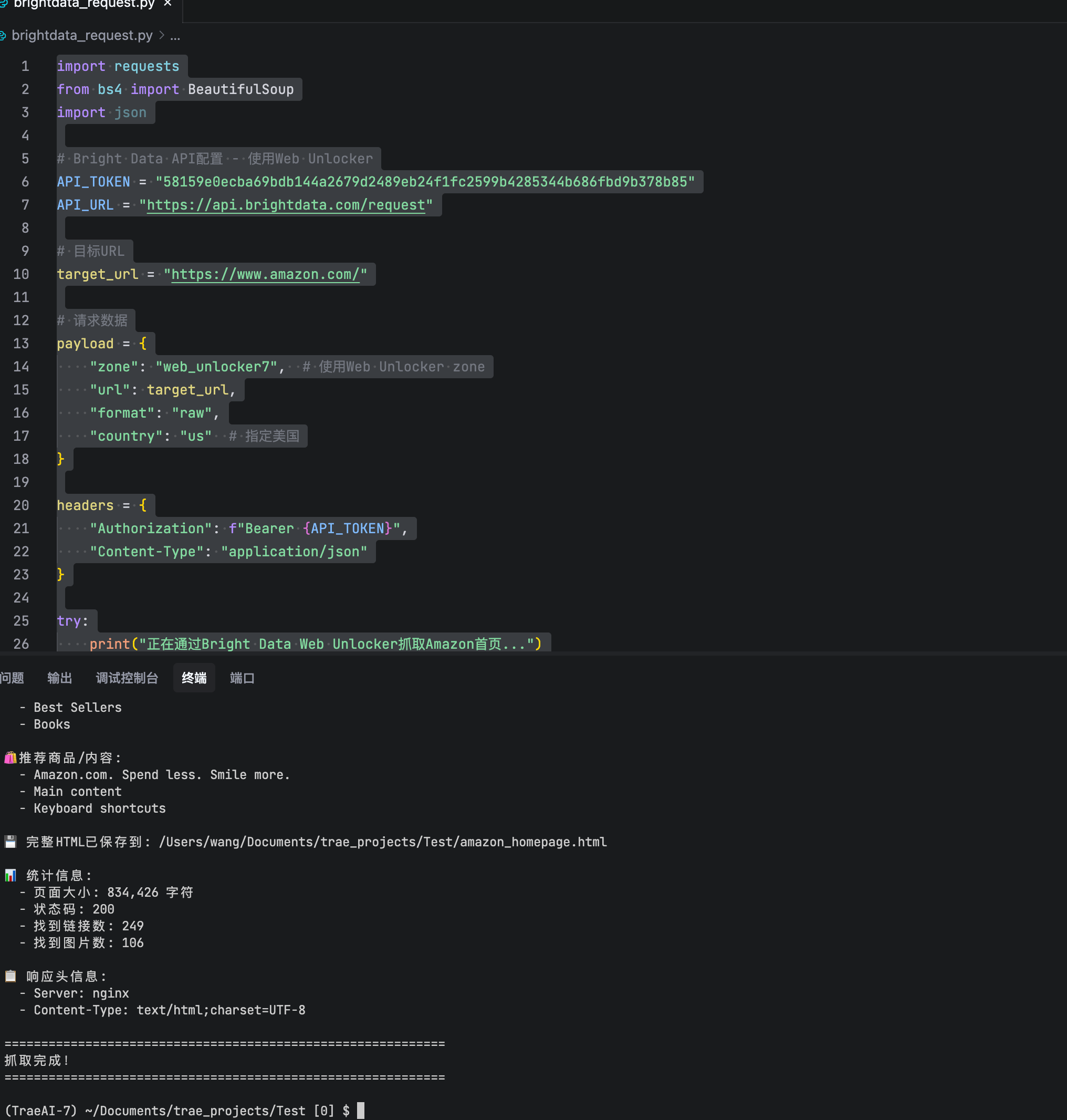
下面是我写的一个通过住宅代理网络爬取亚马逊首页的脚本
import requests
from bs4 import BeautifulSoup
import json

# Bright Data API配置 - 使用Web Unlocker
API_TOKEN = "YOUR_API_TOKEN"
API_URL = "https://api.brightdata.com/request"

# 目标URL
target_url = "https://www.amazon.com/"

# 请求数据
payload = {
    "zone": "web_unlocker7",  # 使用Web Unlocker zone
    "url": target_url,
    "format": "raw",
    "country": "us"  # 指定美国
}

headers = {
    "Authorization": f"Bearer {API_TOKEN}",
    "Content-Type": "application/json"
}

try:
    print("正在通过Bright Data Web Unlocker抓取Amazon首页...")
    response = requests.post(API_URL, json=payload, headers=headers, timeout=120)
    response.raise_for_status()

    html_text = response.text

    # 使用BeautifulSoup解析
    soup = BeautifulSoup(html_text, 'html.parser')

    print("\n" + "="*60)
    print("Amazon首页抓取结果")
    print("="*60)

    # 1. 获取页面标题
    title = soup.find('title')
    if title:
        print(f"\n📄 页面标题: {title.text.strip()}")

    # 2. 检查是否是验证页面
    if "awsWaf" in html_text or "challenge" in html_text.lower():
        print("\n⚠️ 警告: 页面包含WAF验证,Web Unlocker正在处理...")

    # 3. 获取导航栏分类
    print("\n📚 主要分类:")
    nav_categories = soup.find_all('a', {'class': 'nav-a'})
    categories = []
    for cat in nav_categories[:10]:
        text = cat.text.strip()
        if text and len(text) > 1 and text not in categories:
            categories.append(text)
            print(f"  - {text}")

    if not categories:
        # 尝试其他选择器
        nav_items = soup.select('[data-menu-id], .nav-item, .nav-link')
        for item in nav_items[:10]:
            text = item.text.strip()
            if text and len(text) > 1 and text not in categories:
                categories.append(text)
                print(f"  - {text}")

    # 4. 获取推荐商品
    print("\n🛍️ 推荐商品/内容:")
    products = []

    # 尝试多种可能的选择器
    product_selectors = [
        '[data-component-type="s-search-result"]',
        '.s-result-item',
        '.a-section.a-spacing-base',
        '.s-card-container',
        '[data-cy="title-recipe-title"]',
        '.a-size-base-plus',
        '.a-size-medium'
    ]

    for selector in product_selectors:
        items = soup.select(selector)
        if items:
            for item in items[:8]:
                title_elem = item.select_one('h2, .a-size-base-plus, .a-size-medium, span[dir="auto"]')
                if title_elem:
                    title_text = title_elem.text.strip()
                    if title_text and len(title_text) > 5 and title_text not in products:
                        products.append(title_text)
                        print(f"  - {title_text[:80]}")
            if products:
                break

    if not products:
        # 尝试获取任何文本内容
        all_text = soup.stripped_strings
        for text in list(all_text)[:20]:
            if len(text) > 10 and len(text) < 100 and text not in products:
                products.append(text)
                print(f"  - {text[:80]}")

    # 5. 保存完整HTML到文件
    output_file = '/Users/wang/Documents/trae_projects/Test/amazon_homepage.html'
    with open(output_file, 'w', encoding='utf-8') as f:
        f.write(html_text)
    print(f"\n💾 完整HTML已保存到: {output_file}")

    # 6. 统计信息
    print("\n📊 统计信息:")
    print(f"  - 页面大小: {len(html_text):,} 字符")
    print(f"  - 状态码: {response.status_code}")
    print(f"  - 找到链接数: {len(soup.find_all('a'))}")
    print(f"  - 找到图片数: {len(soup.find_all('img'))}")

    # 7. 检查响应头
    print("\n📋 响应头信息:")
    for key, value in response.headers.items():
        if key.lower() in ['content-type', 'server', 'x-brd-', 'x-proxy']:
            print(f"  - {key}: {value}")

    print("\n" + "="*60)
    print("抓取完成!")
    print("="*60)

except Exception as e:
    print(f"❌ 错误: {e}")
    import traceback
traceback.print_exc()复制上面的代码就能跑?先去注册获取你的API Token →https://get.brightdata.com/mbipvd
5、爬取结果
写在最后
如果你:
- ✅ 需要快速拿到干净数据(而非折腾技术)
- ✅ 目标是LinkedIn/Amazon等高反爬网站
- ✅ 团队人力宝贵,不愿陷入"爬虫-反爬"消耗战
直接试Web Scraper API。工具没有高下,只有合不合适。上周我已把核心业务迁至Web Scraper API,凌晨两点终于能安心睡觉------毕竟,我们的价值不该消耗在和验证码搏斗上。
亮数据直达https://get.brightdata.com/mbipvd
新用户$5额度试用
FAQ
网页抓取API(Web Scraper API)和代理服务器(Residential Proxies)有什么区别?
网页抓取API是端到端服务,自动处理请求、渲染、解析并返回结构化数据,开箱即用;代理服务器仅转发流量、隐藏IP,需自行编写爬虫逻辑、应对反爬。前者适合快速获取数据、技术门槛低;后者灵活性高,适合有开发能力的团队定制流程。核心区别:API解决"怎么做",代理解决"用谁的IP"。
Web Scraper API支持哪些平台?
Web Scraper API(如Bright Data)支持抓取电商、社交媒体、搜索引擎等动态/JS网站,兼容Python、Node.js等语言通过HTTP调用。但覆盖范围受目标站反爬策略影响,无服务能100%保证所有站点。使用前务必查阅官方文档,并确认目标网站robots.txt及服务条款允许抓取,避免合规风险。
怎么避免被亚马逊封IP?
技术上:用高质量住宅代理轮换IP、模拟人类行为(延迟、UA)、严格限流。但关键提醒:亚马逊服务条款明确禁止未授权爬虫,封禁风险高。强烈建议优先使用其官方Product Advertising API。商业用途务必咨询法律意见,技术手段仅为辅助,合规是前提。
亮数据的价格贵吗?适合小团队吗?
价格按请求量/代理类型计费,住宅代理成本较高。小团队若月预算有限(如<500美元)且需求简单,可能偏贵;但若数据关键、自建维护成本更高,则具性价比。建议先试用免费额度测算实际成本,对比隐性成本(维护、失败率)。适合重视稳定性、有明确数据价值的小团队。
什么情况下我不需要用亮数据?
如果你只是偶尔抓取公开静态页面、每日请求量在500 次以内,免费开源工具(如*Scrapy +*免费代理池)已经够用,无需为亮数据付费。