1.Nginx简介
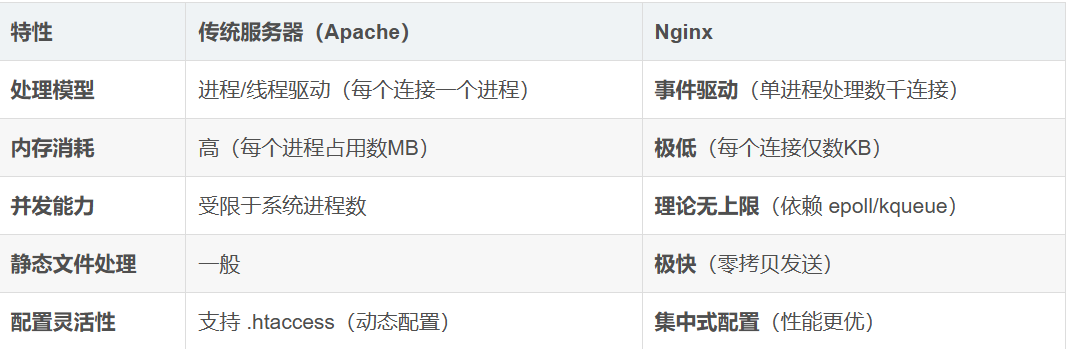
Nginx以其高并发、低内存消耗和高扩展性著称,如今已成为全球最流行的 Web 服务器之一
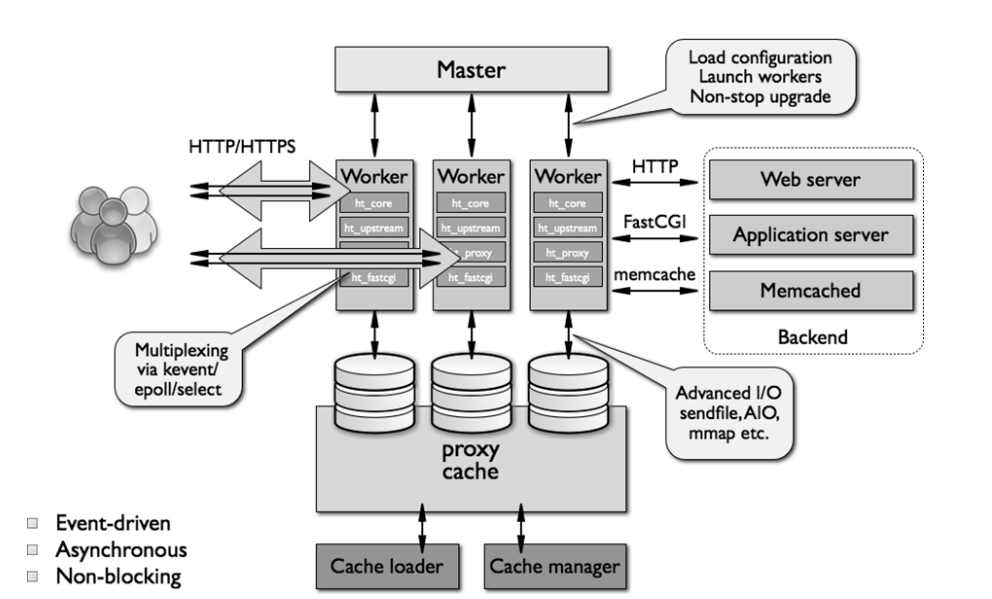
Nginx 之所以能处理百万级并发,源于其独特的架构设计,如图
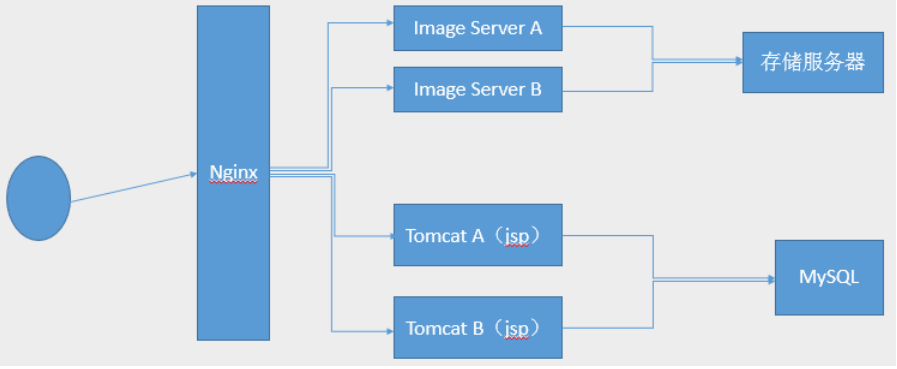
基于Nginx的工作场景:
Nginx 架构和进程
2.Nginx的源码编译
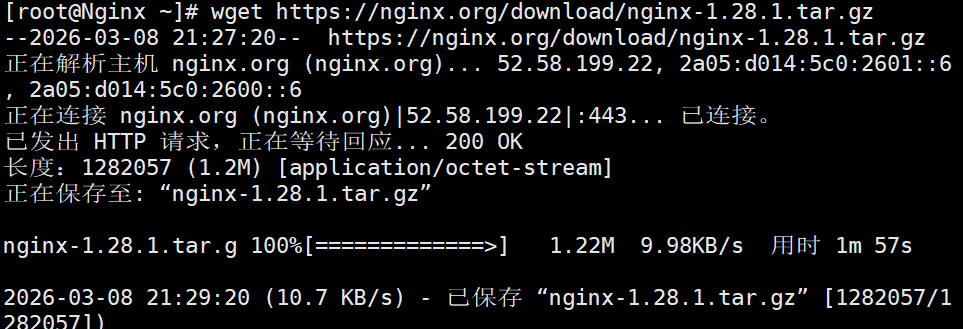
2.1.下载软件
root@Nginx \~# wget https://nginx.org/download/nginx-1.28.1.tar.gz
2.2解压
root@Nginx \~# tar zxf nginx-1.28.1.tar.gz
root@Nginx \~# cd nginx-1.28.1/
root@Nginx nginx-1.28.1# ls

2.3.检测环境
#安装依赖性
root@Nginx \~# dnf install gcc openssl-devel.x86_64 pcre2-devel.x86_64 zlib-devel -y
root@Nginx nginx-1.28.1# ./configure --prefix=/usr/local/nginx --user=nginx --group=nginx --with-http_ssl_module --with-http_v2_module --with-http_realip_module --with-http_stub_status_module --with-http_gzip_static_module --with-pcre --with-stream --with-stream_ssl_module --with-stream_realip_module
2.4.编译
root@Nginx nginx-1.28.1# make
root@Nginx nginx-1.28.1# make install
2.5.nginx启动
#设定环境变量
root@Nginx sbin# vim ~/.bash_profile
export PATH=$PATH:/usr/local/nginx/sbin
root@Nginx sbin# source ~/.bash_profile

root@Nginx sbin# source ~/.bash_profile
root@Nginx logs# useradd -s /sbin/nologin -M nginx
root@Nginx logs# nginx
root@Nginx logs# ps aux | grep nginx
#测试
root@Nginx logs# echo timinglee > /usr/local/nginx/html/index.html
root@Nginx logs# curl 192.168.186.132
timinglee

2.6.编写启动文件
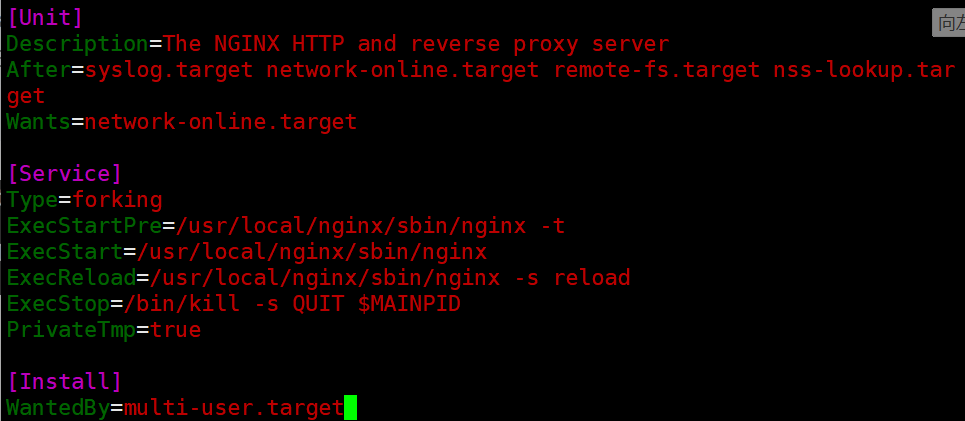
root@Nginx \~# vim /lib/systemd/system/nginx.service
Unit
Description=The NGINX HTTP and reverse proxy server
After=syslog.target network-online.target remote-fs.target nss-lookup.target
Wants=network-online.target
Service
Type=forking
ExecStartPre=/usr/local/nginx/sbin/nginx -t
ExecStart=/usr/local/nginx/sbin/nginx
ExecReload=/usr/local/nginx/sbin/nginx -s reload
ExecStop=/bin/kill -s QUIT $MAINPID
PrivateTmp=true
Install
WantedBy=multi-user.target
root@Nginx \~# systemctl daemon-reload
#验证
root@Nginx \~# systemctl status nginx.service
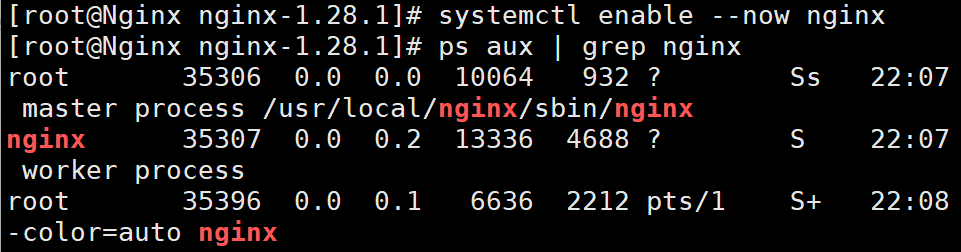
root@Nginx \~# systemctl enable --now nginx
root@Nginx \~# ps aux | grep nginx
root@Nginx \~# reboot
root@Nginx \~# systemctl status nginx.service
3.Nginx的平滑升级及回滚
3.1.下载高版本的软件
root@Nginx \~# wget https://nginx.org/download/nginx-1.29.4.tar.gz
3.2.对于新版本的软件进行源码编译并进行平滑升级
#编译nginx隐藏版本
root@Nginx \~# tar zxf nginx-1.29.4.tar.gz
root@Nginx \~# cd nginx-1.29.4/src/core/
root@Nginx core# vim nginx.h
#define nginx_version 1029004
#define NGINX_VERSION ""
#define NGINX_VER "TIMINGLEE/" NGINX_VERSION
#文件编辑完成后进行源码编译即可
root@Nginx core# cd ../../
root@Nginx nginx-1.29.4# ./configure --prefix=/usr/local/nginx --user=nginx --group=nginx --with-http_ssl_module --with-http_v2_module --with-http_realip_module --with-http_stub_status_module --with-http_gzip_static_module --with-pcre --with-stream --with-stream_ssl_module --with-stream_realip_module
root@Nginx nginx-1.29.4# makeroot@Nginx nginx-1.29.4# cd objs/
root@Nginx objs# ls
autoconf.err nginx ngx_auto_config.h ngx_modules.c src
Makefile nginx.8 ngx_auto_headers.h ngx_modules.o
root@Nginx objs# cd /usr/local/nginx/sbin/
root@Nginx sbin# ls
nginx
root@Nginx sbin# \cp -f /root/nginx-1.29.4/objs/nginx /usr/local/nginx/sbin/nginx
root@Nginx sbin# ls /usr/local/nginx/logs/
access.log error.log nginx.pid
root@Nginx sbin# ps aux | grep nginx
root 1643 0.0 0.1 14688 2360 ? Ss 09:55 0:00 nginx: master process /usr/local/nginx/sbin/nginx
nginx 1644 0.0 0.2 14888 3896 ? S 09:55 0:00 nginx: worker process
root@Nginx sbin# kill -USR2 1643 #nginx master进程id
root@Nginx sbin# ps aux | grep nginx
root 1643 0.0 0.1 14688 2744 ? Ss 09:55 0:00 nginx: master process /usr/local/nginx/sbin/nginx
nginx 1644 0.0 0.2 14888 3896 ? S 09:55 0:00 nginx: worker process
root 4919 0.0 0.4 14716 7936 ? S 10:24 0:00 nginx: master process /usr/local/nginx/sbin/nginx
nginx 4921 0.0 0.2 14916 4156 ? S 10:24 0:00 nginx: worker process
root 4923 0.0 0.1 6636 2176 pts/0 S+ 10:25 0:00 grep --color=auto nginx
root@Nginx sbin# ls /usr/local/nginx/logs/
access.log error.log nginx.pid nginx.pid.oldbin
#测试效果
root@Nginx sbin# nginx -V
nginx version: TIMINGLEE/
built by gcc 11.5.0 20240719 (Red Hat 11.5.0-5) (GCC)
built with OpenSSL 3.2.2 4 Jun 2024
TLS SNI support enabled
configure arguments: --prefix=/usr/local/nginx --user=nginx --group=nginx --with-http_ssl_module --with-http_v2_module --with-http_realip_module --with-http_stub_status_module --with-http_gzip_static_module --with-pcre --with-stream --with-stream_ssl_module --with-stream_realip_module
#回收旧版本子进程
root@Nginx sbin# ps aux | grep nginx
root 1643 0.0 0.1 14688 2744 ? Ss 09:55 0:00 nginx: master process /usr/local/nginx/sbin/nginx
nginx 1644 0.0 0.2 14888 3896 ? S 09:55 0:00 nginx: worker process
root 4919 0.0 0.4 14716 7936 ? S 10:24 0:00 nginx: master process /usr/local/nginx/sbin/nginx
nginx 4921 0.0 0.2 14916 4156 ? S 10:24 0:00 nginx: worker process
root 4929 0.0 0.1 6636 2176 pts/0 S+ 10:27 0:00 grep --color=auto nginx
root@Nginx sbin# kill -WINCH 1643
root@Nginx sbin# ps aux | grep nginx
root 1643 0.0 0.1 14688 2744 ? Ss 09:55 0:00 nginx: master process /usr/local/nginx/sbin/nginx
root 4919 0.0 0.4 14716 7936 ? S 10:24 0:00 nginx: master process /usr/local/nginx/sbin/nginx
nginx 4921 0.0 0.2 14916 4156 ? S 10:24 0:00 nginx: worker process
root 4932 0.0 0.1 6636 2176 pts/0 S+ 10:28 0:00 grep --color=auto nginx
3.3.版本回退|版本回滚
root@Nginx sbin# cd /usr/local/nginx/sbin/
root@Nginx sbin# cp nginx nginx.new -p
root@Nginx sbin# \cp nginx.old nginx -pf
root@Nginx sbin# ps aux | grep nginx
root 1643 0.0 0.1 14688 2744 ? Ss 09:55 0:00 nginx: master process /usr/local/nginx/sbin/nginx
root 4919 0.0 0.4 14716 7936 ? S 10:24 0:00 nginx: master process /usr/local/nginx/sbin/nginx
nginx 4921 0.0 0.2 14916 4156 ? S 10:24 0:00 nginx: worker process
root@Nginx sbin# kill -HUP 1643
root@Nginx sbin# ps aux | grep nginx
root 1643 0.0 0.1 14688 2744 ? Ss 09:55 0:00 nginx: master process /usr/local/nginx/sbin/nginx
root 4919 0.0 0.4 14716 7936 ? S 10:24 0:00 nginx: master process /usr/local/nginx/sbin/nginx
nginx 4921 0.0 0.2 14916 4156 ? S 10:24 0:00 nginx: worker process
nginx 4963 0.0 0.2 14888 3896 ? S 10:32 0:00 nginx: worker process
root 4965 0.0 0.1 6636 2176 pts/0 S+ 10:32 0:00 grep --color=auto nginx
root@Nginx sbin# nginx -V
nginx version: nginx/1.28.1
built by gcc 11.5.0 20240719 (Red Hat 11.5.0-5) (GCC)
built with OpenSSL 3.2.2 4 Jun 2024
TLS SNI support enabled
configure arguments: --prefix=/usr/local/nginx --user=nginx --group=nginx --with-http_ssl_module --with-http_v2_module --with-http_realip_module --with-http_stub_status_module --with-http_gzip_static_module --with-pcre --with-stream --with-stream_ssl_module --with-stream_realip_module
#回收新版本进程
root@Nginx sbin# kill -WINCH 4919
root@Nginx sbin# ps aux | grep nginx
root 1643 0.0 0.1 14688 2744 ? Ss 09:55 0:00 nginx: master process /usr/local/nginx/sbin/nginx
root 4919 0.0 0.4 14716 7936 ? S 10:24 0:00 nginx: master process /usr/local/nginx/sbin/nginx
nginx 4963 0.0 0.2 14888 3896 ? S 10:32 0:00 nginx: worker process
root 4969 0.0 0.1 6636 2176 pts/0 S+ 10:34 0:00 grep --color=auto nginx