<!DOCTYPE html>
<html lang="en">
<head>
<meta charset="UTF-8">
<meta name="viewport" content="width=device-width, initial-scale=1.0">
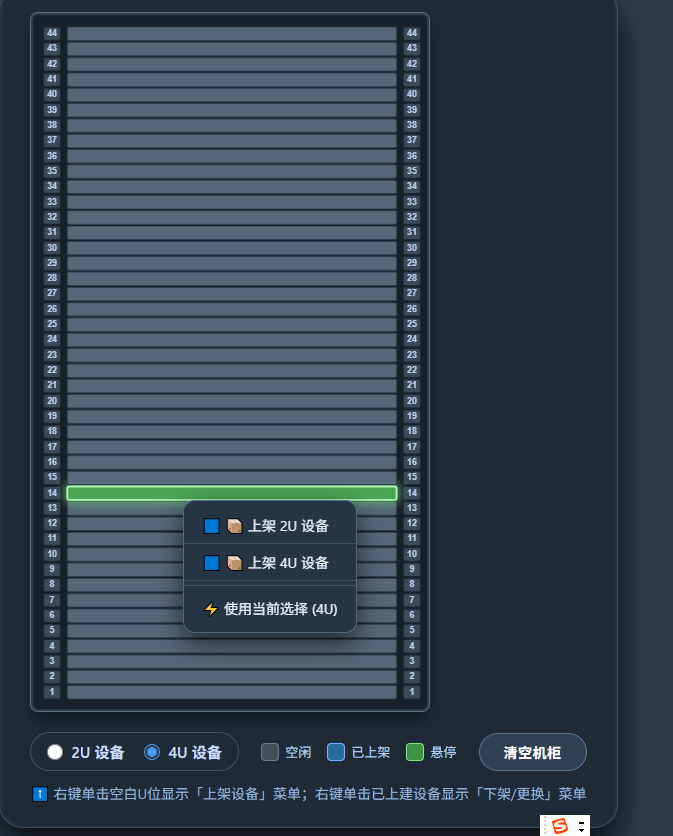
<title>G6 机柜 · 右键菜单 (上架/下架/更换)</title>
<!-- 引入 G6 -->
<script src="https://gw.alipayobjects.com/os/lib/antv/g6/4.8.24/dist/g6.min.js"></script>
<style>
* {
margin: 0;
padding: 0;
box-sizing: border-box;
user-select: none;
}
body {
background: #2d3a4a;
display: flex;
justify-content: center;
align-items: center;
min-height: 100vh;
font-family: 'Segoe UI', Roboto, sans-serif;
}
.cabinet-wrapper {
background: #1e2a36;
border-radius: 24px;
padding: 24px 30px 24px 30px;
box-shadow: 0 20px 30px rgba(0,0,0,0.7), inset 0 1px 4px rgba(255,255,255,0.1);
border: 1px solid #3f4f5e;
}
#container {
width: 400px;
height: 700px;
background: #17212b;
border-radius: 8px;
box-shadow: inset 0 0 0 2px #2b3a47, 0 10px 15px -5px #0f151c;
position: relative;
border: 1px solid #5e6f7e;
}
.info-panel {
margin-top: 20px;
display: flex;
align-items: center;
justify-content: space-between;
color: #bcd3f0;
}
.device-selector {
display: flex;
gap: 20px;
background: #1f2c38;
padding: 8px 16px;
border-radius: 40px;
border: 1px solid #3f5568;
}
.device-selector label {
display: flex;
align-items: center;
gap: 8px;
cursor: pointer;
font-weight: 600;
font-size: 15px;
color: #ccdeff;
}
.device-selector input[type="radio"] {
accent-color: #3f9eff;
width: 16px;
height: 16px;
}
.reset-btn {
background: #2f4053;
border: none;
color: white;
padding: 8px 24px;
border-radius: 40px;
font-weight: bold;
font-size: 14px;
cursor: pointer;
border: 1px solid #5b748b;
transition: all 0.2s;
letter-spacing: 0.5px;
}
.reset-btn:hover {
background: #3e536a;
border-color: #7f9ec7;
}
.legend {
display: flex;
gap: 16px;
font-size: 13px;
align-items: center;
}
.legend-item {
display: flex;
align-items: center;
gap: 6px;
}
.color-dot {
width: 18px;
height: 18px;
border-radius: 4px;
background: gray;
}
.dot-blue {
background: #2b6c9e;
border: 1px solid #7ab0e6;
}
.dot-gray {
background: #464f5a;
border: 1px solid #6f7d8c;
}
.dot-green {
background: #3f9142;
border: 1px solid #8fdd92;
}
/* 自定义右键菜单样式 */
.context-menu {
position: fixed;
background: #253544;
border: 1px solid #4f6b84;
border-radius: 12px;
box-shadow: 0 10px 25px rgba(0,0,0,0.6);
padding: 6px 0;
min-width: 160px;
z-index: 1000;
backdrop-filter: blur(4px);
color: #eaf2ff;
font-size: 14px;
}
.context-menu .menu-item {
padding: 8px 18px;
cursor: pointer;
transition: 0.1s;
display: flex;
align-items: center;
gap: 10px;
border-bottom: 1px solid #3e5568;
}
.context-menu .menu-item:last-child {
border-bottom: none;
}
.context-menu .menu-item:hover {
background: #3f5e7a;
}
.context-menu .menu-item.disabled {
opacity: 0.4;
pointer-events: none;
}
.context-menu .divider {
height: 1px;
background: #3e5568;
margin: 4px 0;
}
</style>
</head>
<body>
<div class="cabinet-wrapper">
<div id="container"></div>
<div class="info-panel">
<div class="device-selector">
<label><input type="radio" name="deviceSize" value="2" checked> 2U 设备</label>
<label><input type="radio" name="deviceSize" value="4"> 4U 设备</label>
</div>
<div class="legend">
<span class="legend-item"><span class="color-dot dot-gray"></span>空闲</span>
<span class="legend-item"><span class="color-dot dot-blue"></span>已上架</span>
<span class="legend-item"><span class="color-dot dot-green"></span>悬停</span>
</div>
<button class="reset-btn" id="resetBtn">清空机柜</button>
</div>
<div style="color:#9bb7d4; text-align:center; margin-top: 12px; font-size: 14px; font-weight: 400;">
⬆️ 右键单击空白U位显示「上架设备」菜单;右键单击已上建设备显示「下架/更换」菜单
</div>
</div>
<!-- 自定义右键菜单容器 (默认隐藏) -->
<div id="contextMenu" class="context-menu" style="display: none;"></div>
<script>
(function() {
// 容器
const container = document.getElementById('container');
// 机柜总U数
const TOTAL_U = 44;
// 每个U占的高度 (px)
const U_HEIGHT = 16;
// 左右刻度区域宽度
const SCALE_WIDTH = 24;
// 中间设备区域宽度
const SLOT_WIDTH = 352; // 400 - 2*24
// 存储当前上架设备: 键为起始U (1-based), 值为U数
const mountedDevices = new Map(); // 例如 { 20: 2, 30: 4 }
// 当前选择的设备U数 (用于上架)
let selectedSize = 2;
// 右键菜单DOM
const menuEl = document.getElementById('contextMenu');
// 当前右键点击的节点信息 (用于菜单操作)
let currentContextNode = null; // 存储 { type, uIdx, startU, sizeU, model }
// 监听radio变化
document.querySelectorAll('input[name="deviceSize"]').forEach(radio => {
radio.addEventListener('change', (e) => {
selectedSize = parseInt(e.target.value, 10);
});
});
// 清空按钮
document.getElementById('resetBtn').addEventListener('click', () => {
mountedDevices.clear();
hideContextMenu();
renderG6Graph();
});
// 隐藏右键菜单
function hideContextMenu() {
menuEl.style.display = 'none';
currentContextNode = null;
}
// 显示菜单并设置位置
function showContextMenu(x, y, items) {
// 构建菜单HTML
let html = '';
items.forEach(item => {
if (item.type === 'divider') {
html += '<div class="divider"></div>';
} else {
const disabledClass = item.disabled ? 'disabled' : '';
html += `<div class="menu-item ${disabledClass}" data-action="${item.action}">${item.icon || ''} ${item.label}</div>`;
}
});
menuEl.innerHTML = html;
menuEl.style.display = 'block';
menuEl.style.left = x + 'px';
menuEl.style.top = y + 'px';
// 绑定菜单项点击事件 (委托)
const onMenuItemClick = (e) => {
const target = e.target.closest('.menu-item');
if (!target || target.classList.contains('disabled')) return;
const action = target.dataset.action;
if (action && currentContextNode) {
handleMenuAction(action, currentContextNode);
}
hideContextMenu();
e.stopPropagation();
};
menuEl.addEventListener('click', onMenuItemClick, { once: true });
}
// 处理菜单动作
function handleMenuAction(action, nodeInfo) {
if (action === 'mount') {
// 上架设备 (使用当前selectedSize)
const u = nodeInfo.uIdx;
if (canPlace(u, selectedSize)) {
mountedDevices.set(u, selectedSize);
renderG6Graph();
} else {
alert(`无法在U${u}放置${selectedSize}U设备,位置冲突或超出边界`);
}
}
else if (action === 'mount2') {
// 上架2U (强制)
if (canPlace(nodeInfo.uIdx, 2)) {
mountedDevices.set(nodeInfo.uIdx, 2);
renderG6Graph();
} else alert('无法放置2U设备');
}
else if (action === 'mount4') {
// 上架4U (强制)
if (canPlace(nodeInfo.uIdx, 4)) {
mountedDevices.set(nodeInfo.uIdx, 4);
renderG6Graph();
} else alert('无法放置4U设备');
}
else if (action === 'unmount') {
// 下架设备
const startU = nodeInfo.startU;
if (mountedDevices.has(startU)) {
mountedDevices.delete(startU);
renderG6Graph();
}
}
else if (action === 'replace') {
// 更换位置 -> 简单起见,先下架再提示用户点击新U位 (这里我们打开一个"待更换"状态)
// 为了简化交互,这里先移除原设备,然后弹提示让用户选择新位置
const oldStart = nodeInfo.startU;
const oldSize = nodeInfo.sizeU;
mountedDevices.delete(oldStart);
renderG6Graph();
alert(`请右键单击新的起始U位 (需连续${oldSize}U空闲) 并选择「上架设备」`);
}
}
// 检查放置可行性
function canPlace(startU, sizeU) {
if (startU < 1 || startU + sizeU - 1 > TOTAL_U) return false;
for (let u = startU; u < startU + sizeU; u++) {
for (let [occStart, occSize] of mountedDevices.entries()) {
if (u >= occStart && u < occStart + occSize) return false;
}
}
return true;
}
// 构建G6数据
function buildGraphData() {
const nodes = [];
const edges = [];
// 左右刻度
for (let i = 1; i <= TOTAL_U; i++) {
// 左侧刻度
nodes.push({
id: `left-${i}`,
type: 'rect',
label: `${i}`,
size: [SCALE_WIDTH - 6, U_HEIGHT - 2],
style: {
fill: '#3e4f5e',
stroke: '#1b2a36',
lineWidth: 1,
radius: 2,
fillOpacity: 0.9,
shadowBlur: 2,
shadowColor: '#00000040',
},
labelCfg: {
style: { fill: '#b9cfec', fontSize: 9, fontWeight: 'bold' },
position: 'center',
},
x: SCALE_WIDTH / 2,
y: (TOTAL_U - i + 0.5) * U_HEIGHT,
});
// 右侧刻度
nodes.push({
id: `right-${i}`,
type: 'rect',
label: `${i}`,
size: [SCALE_WIDTH - 6, U_HEIGHT - 2],
style: {
fill: '#3e4f5e',
stroke: '#1b2a36',
lineWidth: 1,
radius: 2,
fillOpacity: 0.9,
},
labelCfg: {
style: { fill: '#b9cfec', fontSize: 9, fontWeight: 'bold' },
position: 'center',
},
x: 400 - SCALE_WIDTH / 2,
y: (TOTAL_U - i + 0.5) * U_HEIGHT,
});
}
// 中间槽位灰色节点(每个U)
for (let i = 1; i <= TOTAL_U; i++) {
nodes.push({
id: `slot-${i}`,
type: 'rect',
label: '',
size: [SLOT_WIDTH - 8, U_HEIGHT - 2],
style: {
fill: '#5d6f82',
stroke: '#2e3f4f',
lineWidth: 1,
radius: 2,
fillOpacity: 0.9,
cursor: 'pointer',
},
data: {
uIndex: i,
type: 'slot',
},
x: SCALE_WIDTH + SLOT_WIDTH / 2,
y: (TOTAL_U - i + 0.5) * U_HEIGHT,
});
}
// 已上架的设备节点 (蓝色)
for (let [startU, sizeU] of mountedDevices.entries()) {
const centerY = (TOTAL_U - startU + 0.5 - (sizeU - 1) / 2) * U_HEIGHT;
nodes.push({
id: `dev-${startU}`,
type: 'rect',
label: `${sizeU}U`,
size: [SLOT_WIDTH - 8, sizeU * U_HEIGHT - 2],
style: {
fill: '#1e5a9b',
stroke: '#7ab8f0',
lineWidth: 2,
radius: 4,
fillOpacity: 0.95,
shadowBlur: 6,
shadowColor: '#1e3a5f',
cursor: 'pointer',
},
labelCfg: {
style: { fill: 'white', fontSize: 14, fontWeight: 'bold', shadowBlur: 4, shadowColor: 'black' },
position: 'center',
},
data: {
type: 'device',
startU: startU,
sizeU: sizeU,
},
x: SCALE_WIDTH + SLOT_WIDTH / 2,
y: centerY,
});
}
return { nodes, edges };
}
let graph = null;
function renderG6Graph() {
const data = buildGraphData();
if (graph) {
graph.changeData(data);
return;
}
graph = new G6.Graph({
container: 'container',
width: 400,
height: 700,
modes: {
default: ['drag-canvas', 'click-select'], // 允许拖拽,但右键会阻止默认
},
defaultNode: {
type: 'rect',
anchorPoints: [[0, 0.5], [1, 0.5]],
},
nodeStateStyles: {
hover: {
fill: '#3f9e4d',
stroke: '#b0f7b5',
lineWidth: 2,
shadowBlur: 10,
shadowColor: '#73d97b',
},
},
enabledStack: false,
});
graph.data(data);
graph.render();
// 监听节点右键事件 (contextmenu)
graph.on('node:contextmenu', (evt) => {
// 阻止浏览器默认右键菜单
evt.originalEvent.preventDefault();
const node = evt.item;
const model = node.getModel();
const nodeData = model.data || {};
// 获取鼠标坐标用于定位菜单
const canvasPoint = evt.canvasX + 10, canvasY = evt.canvasY + 10; // 偏移一点
// 转换为页面坐标 (需要简单估算,因为G6画布可能偏移)
const containerRect = document.getElementById('container').getBoundingClientRect();
const pageX = containerRect.left + canvasPoint;
const pageY = containerRect.top + canvasY;
// 根据节点类型构造菜单项
let menuItems = [];
if (nodeData.type === 'slot') {
const u = nodeData.uIndex;
// 检查这个U是否已被设备占用 (理论上slot不会被占用,但如果有蓝色覆盖但slot还在下层,右键可能点到slot? 由于设备节点在上层,右键设备会触发device,所以这里一定是空闲slot)
// 但为了安全,二次确认是否空闲
let occupied = false;
for (let [start, size] of mountedDevices.entries()) {
if (u >= start && u < start + size) { occupied = true; break; }
}
if (!occupied) {
// 空闲U位: 上架菜单
menuItems = [
{ label: '📦 上架 2U 设备', action: 'mount2', icon: '🟦' },
{ label: '📦 上架 4U 设备', action: 'mount4', icon: '🟦' },
{ type: 'divider' },
{ label: `使用当前选择 (${selectedSize}U)`, action: 'mount', icon: '⚡' },
];
currentContextNode = { type: 'slot', uIdx: u };
} else {
// 极少数情况被占用
menuItems = [ { label: '⚠️ 该U位已被占用', action: '', disabled: true } ];
currentContextNode = null;
}
}
else if (nodeData.type === 'device') {
const startU = nodeData.startU;
const sizeU = nodeData.sizeU;
// 设备节点: 下架、更换菜单
menuItems = [
{ label: '❌ 下架设备', action: 'unmount', icon: '⏏️' },
{ label: '🔄 更换U位置', action: 'replace', icon: '📌' },
];
currentContextNode = { type: 'device', startU, sizeU };
}
if (menuItems.length > 0) {
showContextMenu(pageX, pageY, menuItems);
}
});
// 点击空白区域隐藏菜单
graph.on('canvas:click', () => {
hideContextMenu();
});
// 鼠标移入移出悬停效果
graph.on('node:mouseenter', (evt) => {
const node = evt.item;
graph.setItemState(node, 'hover', true);
});
graph.on('node:mouseleave', (evt) => {
const node = evt.item;
graph.setItemState(node, 'hover', false);
});
graph.fitView();
}
// 全局点击隐藏菜单 (点击其他区域)
document.addEventListener('click', (e) => {
if (!menuEl.contains(e.target)) {
hideContextMenu();
}
});
// 阻止浏览器默认右键菜单在整个页面
document.addEventListener('contextmenu', (e) => {
if (!e.target.closest('#container')) return; // 仅阻止画布区域的默认右键,也可以全局阻止
e.preventDefault();
});
// 初始化渲染
renderG6Graph();
setTimeout(() => {
if (graph) graph.fitView();
}, 100);
})();
</script>
</body>
</html>