在企业系统开发中,Excel 常常被用作 配置模板,例如:
- API接口配置模板
- 系统集成配置模板
- 自动化任务配置模板
- 运维参数配置模板
这类 Excel 通常具有以下特点:
- 包含 标签说明
- 数据位置 不固定
- Excel 内存在 多个数据区域
- 不是简单的二维数据表
例如:
| A列 | B列 |
|---|---|
| 接口名称 | 用户查询接口 |
| 请求方法 | GET |
| 请求地址 | /api/user |
以及:
请求头配置

开始配置【下列内容需填写】

Authorization     Bearer token
Content-Type      application/json

请求体配置
如果用传统的 逐行解析表格 的方式,很容易出现问题。
因此,企业系统通常采用:
标签定位 + 偏移读取 + 区域解析
本文将通过完整示例介绍一套 稳定、可维护的 Excel 解析方案。
一、依赖环境
Maven 依赖:
xml
<dependency>
    <groupId>org.apache.poi</groupId>
    <artifactId>poi-ooxml</artifactId>
    <version>5.2.5</version>
</dependency>
二、资源管理:使用 try-with-resources
解析 Excel 文件属于 IO 操作,因此必须确保资源被正确关闭。
推荐使用:
java
try-with-resources示例:
java
public static ApiConfig parseExcel(String filePath) throws IOException {
    System.out.println("开始解析 Excel 文件:" + filePath);

    try (FileInputStream fis = new FileInputStream(filePath);
         Workbook workbook = new XSSFWorkbook(fis)) {

        Sheet sheet = getSheetByIndexOrName(workbook, 0, "接口配置");
        if (sheet == null) {
            throw new IllegalArgumentException("未找到任何可解析的 Sheet");
        }

        ApiConfig config = new ApiConfig();

        // 1. 基础信息解析
        config.setApiName(findCellValueByOffset(sheet, "接口名称", 1));
        config.setMethod(findCellValueByOffset(sheet, "请求方法", 1));
        config.setUrl(findCellValueByOffset(sheet, "请求地址", 1));
        config.setDescription(findCellValueBelowLabel(sheet, "接口说明", 1));

        // 2. 请求头配置解析
        List<HeaderConfig> headers = parseHeaderConfigs(sheet);
        config.setHeaders(headers);

        // 3. 请求体配置解析
        List<BodyParam> bodyParams = parseBodyParams(sheet);
        config.setBodyParams(bodyParams);

        return config;
    }
}
优点:
FileInputStream自动关闭Workbook自动关闭- 避免资源泄漏
需要注意:
.xlsx 文件本质上是一个 ZIP 压缩包 ,Apache POI 内部通过 ZipInputStream 解析。
三、Sheet 获取策略:名称优先 + 索引兜底
在企业模板中:
- Sheet 名称可能会修改
- Sheet 顺序可能变化
因此推荐:
java
private static Sheet getSheetByIndexOrName(Workbook wb, int index, String name) {
    Sheet sheet = wb.getSheet(name);
    if (sheet != null) {
        return sheet;
    }

    if (wb.getNumberOfSheets() > index) {
        return wb.getSheetAt(index);
    }

    return wb.getNumberOfSheets() > 0 ? wb.getSheetAt(0) : null;
}
优点:
- 防止模板改名导致解析失败
- 提高代码稳定性
四、单元格定位:标签 + 偏移模式
Excel 模板通常不是纯表格,而是:
| A列 | B列 |
|---|---|
| 接口名称 | 用户查询接口 |
| 请求方法 | GET |
| 请求地址 | /api/user |
因此可以通过:
找到标签 → 偏移定位4.1 同行偏移读取
java
/**
 * 查找包含指定文本的单元格,并返回其右侧第 offset 列的值
 */
private static String findCellValueByOffset(Sheet sheet, String labelText, int offset) {
    for (Row row : sheet) {
        for (Cell cell : row) {
            if (labelText.equals(getCellVal(cell))) {
                Cell targetCell = row.getCell(cell.getColumnIndex() + offset);
                if (targetCell != null) {
                    return getCellVal(targetCell);
                }
            }
        }
    }
    return null;
}
调用示例:
java
String apiName = findCellValueByOffset(sheet, "接口名称", 1);4.2 跨行偏移读取
有些模板结构是:
| A列 | B列 |
|---|---|
| 接口说明 | |
| 查询用户信息接口 |
解析方式:
java
/**
 * 查找包含指定文本的单元格,并返回其下方第 rowOffset 行的值
 */
private static String findCellValueBelowLabel(Sheet sheet, String labelText, int rowOffset) {
    for (Row row : sheet) {
        for (Cell cell : row) {
            if (labelText.equals(getCellVal(cell))) {
                int targetRowIndex = row.getRowNum() + rowOffset;
                Row targetRow = sheet.getRow(targetRowIndex);
                if (targetRow != null) {
                    Cell targetCell = targetRow.getCell(cell.getColumnIndex());
                    if (targetCell != null) {
                        String val = getCellVal(targetCell);
                        return val == null ? null : val.trim();
                    }
                }
                return null;
            }
        }
    }
    return null;
}
调用示例:
java
String description = findCellValueBelowLabel(sheet, "接口说明", 1);五、区域解析:三层定位模式
对于 表格型数据区域,推荐使用:
区域标题
↓
起始标记
↓
数据区域
↓
结束标记
示例 Excel:
请求头配置

开始配置【下列内容需填写】

Authorization     Bearer token
Content-Type      application/json

请求体配置
查找区域起始行
java
/**
 * 查找区域起始行:先找到区域标题,再在附近找到开始标记
 */
private static int findRegionStartRow(Sheet sheet, String sectionKeyword, String startMarker) {
    int sectionRow = findRowEqualsText(sheet, sectionKeyword);
    if (sectionRow == -1) {
        return -1;
    }

    for (int i = sectionRow; i <= Math.min(sectionRow + 50, sheet.getLastRowNum()); i++) {
        Row row = sheet.getRow(i);
        if (rowEqualsText(row, startMarker)) {
            return i;
        }
    }
    return -1;
}
查找区域结束行
java
/**
 * 查找区域结束行:从 startRow 开始向下找结束标记
 */
private static int findRegionEndRow(Sheet sheet, int startRow, String endMarker) {
    if (startRow == -1) {
        return -1;
    }

    for (int i = startRow + 1; i <= Math.min(startRow + 50, sheet.getLastRowNum()); i++) {
        Row row = sheet.getRow(i);
        if (rowEqualsText(row, endMarker)) {
            return i;
        }
    }

    return sheet.getLastRowNum() + 1;
}
区域读取示例
java
int startRow = findRegionStartRow(sheet, "请求头配置", "开始配置【下列内容需填写】");
int endRow = findRegionEndRow(sheet, startRow, "请求体配置");

if (startRow == -1 || endRow == -1) {
    return headers;
}

// 跳过开始标记行和表头行,从真正数据行开始
for (int i = startRow + 2; i < endRow; i++) {
    Row row = sheet.getRow(i);
    if (row == null) {
        continue;
    }

    String name = getCellVal(row.getCell(0));
    String value = getCellVal(row.getCell(1));
    String remark = getCellVal(row.getCell(2));

    if (isAllBlank(name, value, remark)) {
        continue;
    }

    headers.add(new HeaderConfig(name, value, remark));
}
六、统一单元格读取
Excel 单元格可能包含多种类型:
- STRING
- NUMERIC
- BOOLEAN
- FORMULA
统一处理:
java
private static String getCellVal(Cell cell) {
    if (cell == null) {
        return null;
    }

    return switch (cell.getCellType()) {
        case STRING -> cell.getStringCellValue().trim();
        case NUMERIC -> {
            if (DateUtil.isCellDateFormatted(cell)) {
                yield cell.getDateCellValue().toString();
            }
            double num = cell.getNumericCellValue();
            if (num == (long) num) {
                yield String.valueOf((long) num);
            }
            yield String.valueOf(num);
        }
        case BOOLEAN -> String.valueOf(cell.getBooleanCellValue());
        case FORMULA -> cell.getCellFormula();
        case BLANK -> null;
        default -> null;
    };
}
要点:
- 必须先判空
- 使用
trim()去除空格 - 数值型注意精度问题
七、总结
本文介绍了一种 企业级 Excel 模板解析模式,核心思想:
| 模块 | 技术 |
|---|---|
| 资源管理 | try-with-resources |
| Sheet 获取 | 名称优先 + 索引兜底 |
| 单元格定位 | 标签 + 偏移 |
| 区域解析 | 标题 → 起始标记 → 数据 → 结束标记 |
| 数据读取 | 统一 Cell 类型处理 |
这种解析方式相比简单的逐行解析:
- 更稳定
- 更适合复杂模板
- 可维护性更高
适用于:
- API配置导入
- 系统集成配置
- 运维任务模板
- 自动化配置模板
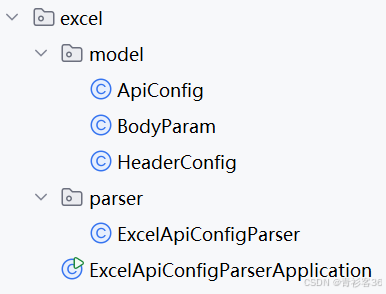
附:项目完整代码
Excel文件示例(内容如下):
当前sheet名为"接口配置"
| 接口基础信息 | |||
|---|---|---|---|
| 接口名称 | 用户查询接口 | ||
| 请求方法 | GET | ||
| 请求地址 | /api/user/query | ||
| 接口说明 | |||
| 查询指定用户的详细信息 | |||
| 请求头配置 | |||
| 开始配置【下列内容需填写】 | |||
| HeaderName | HeaderValue | 说明 | |
| Authorization | Bearer test-token | 鉴权令牌 | |
| Content-Type | application/json | 内容类型 | |
| X-Trace-Id | trace-demo-001 | 跟踪ID | |
| 请求体配置 | |||
| 开始配置【下列内容需填写】 | |||
| 参数名 | 参数值 | 类型 | 必填 |
| userId | 10001 | String | 是 |
| includeDetail | true | Boolean | 否 |
| source | portal | String | 否 |
| 响应示例 |
java
package per.mjn.aiops.excel.model;

import java.util.ArrayList;
import java.util.List;

public class ApiConfig {

    private String apiName;
    private String method;
    private String url;
    private String description;

    private List<HeaderConfig> headers = new ArrayList<>();
    private List<BodyParam> bodyParams = new ArrayList<>();

    public String getApiName() {
        return apiName;
    }

    public void setApiName(String apiName) {
        this.apiName = apiName;
    }

    public String getMethod() {
        return method;
    }

    public void setMethod(String method) {
        this.method = method;
    }

    public String getUrl() {
        return url;
    }

    public void setUrl(String url) {
        this.url = url;
    }

    public String getDescription() {
        return description;
    }

    public void setDescription(String description) {
        this.description = description;
    }

    public List<HeaderConfig> getHeaders() {
        return headers;
    }

    public void setHeaders(List<HeaderConfig> headers) {
        this.headers = headers;
    }

    public List<BodyParam> getBodyParams() {
        return bodyParams;
    }

    public void setBodyParams(List<BodyParam> bodyParams) {
        this.bodyParams = bodyParams;
    }

    @Override
    public String toString() {
        return "ApiConfig{" +
                "apiName='" + apiName + '\'' +
                ", method='" + method + '\'' +
                ", url='" + url + '\'' +
                ", description='" + description + '\'' +
                ", headers=" + headers +
                ", bodyParams=" + bodyParams +
                '}';
    }
}
java
package per.mjn.aiops.excel.model;

public class BodyParam {

    private String paramName;
    private String paramValue;
    private String type;
    private String required;

    public BodyParam() {
    }

    public BodyParam(String paramName, String paramValue, String type, String required) {
        this.paramName = paramName;
        this.paramValue = paramValue;
        this.type = type;
        this.required = required;
    }

    public String getParamName() {
        return paramName;
    }

    public void setParamName(String paramName) {
        this.paramName = paramName;
    }

    public String getParamValue() {
        return paramValue;
    }

    public void setParamValue(String paramValue) {
        this.paramValue = paramValue;
    }

    public String getType() {
        return type;
    }

    public void setType(String type) {
        this.type = type;
    }

    public String getRequired() {
        return required;
    }

    public void setRequired(String required) {
        this.required = required;
    }

    @Override
    public String toString() {
        return "BodyParam{" +
                "paramName='" + paramName + '\'' +
                ", paramValue='" + paramValue + '\'' +
                ", type='" + type + '\'' +
                ", required='" + required + '\'' +
                '}';
    }
}
java
package per.mjn.aiops.excel.model;

public class HeaderConfig {

    private String name;
    private String value;
    private String remark;

    public HeaderConfig() {
    }

    public HeaderConfig(String name, String value, String remark) {
        this.name = name;
        this.value = value;
        this.remark = remark;
    }

    public String getName() {
        return name;
    }

    public void setName(String name) {
        this.name = name;
    }

    public String getValue() {
        return value;
    }

    public void setValue(String value) {
        this.value = value;
    }

    public String getRemark() {
        return remark;
    }

    public void setRemark(String remark) {
        this.remark = remark;
    }

    @Override
    public String toString() {
        return "HeaderConfig{" +
                "name='" + name + '\'' +
                ", value='" + value + '\'' +
                ", remark='" + remark + '\'' +
                '}';
    }
}
java
package per.mjn.aiops.excel.parser;

import org.apache.poi.ss.usermodel.*;
import org.apache.poi.xssf.usermodel.XSSFWorkbook;
import per.mjn.aiops.excel.model.ApiConfig;
import per.mjn.aiops.excel.model.BodyParam;
import per.mjn.aiops.excel.model.HeaderConfig;

import java.io.FileInputStream;
import java.io.IOException;
import java.util.ArrayList;
import java.util.List;

public class ExcelApiConfigParser {

    public static ApiConfig parseExcel(String filePath) throws IOException {
        System.out.println("开始解析 Excel 文件:" + filePath);

        try (FileInputStream fis = new FileInputStream(filePath);
             Workbook workbook = new XSSFWorkbook(fis)) {

            Sheet sheet = getSheetByIndexOrName(workbook, 0, "接口配置");
            if (sheet == null) {
                throw new IllegalArgumentException("未找到任何可解析的 Sheet");
            }

            ApiConfig config = new ApiConfig();

            // 1. 基础信息解析
            config.setApiName(findCellValueByOffset(sheet, "接口名称", 1));
            config.setMethod(findCellValueByOffset(sheet, "请求方法", 1));
            config.setUrl(findCellValueByOffset(sheet, "请求地址", 1));
            config.setDescription(findCellValueBelowLabel(sheet, "接口说明", 1));

            // 2. 请求头配置解析
            List<HeaderConfig> headers = parseHeaderConfigs(sheet);
            config.setHeaders(headers);

            // 3. 请求体配置解析
            List<BodyParam> bodyParams = parseBodyParams(sheet);
            config.setBodyParams(bodyParams);

            return config;
        }
    }

    private static List<HeaderConfig> parseHeaderConfigs(Sheet sheet) {
        List<HeaderConfig> headers = new ArrayList<>();

        int startRow = findRegionStartRow(sheet, "请求头配置", "开始配置【下列内容需填写】");
        int endRow = findRegionEndRow(sheet, startRow, "请求体配置");

        if (startRow == -1 || endRow == -1) {
            return headers;
        }

        // 跳过开始标记行和表头行,从真正数据行开始
        for (int i = startRow + 2; i < endRow; i++) {
            Row row = sheet.getRow(i);
            if (row == null) {
                continue;
            }

            String name = getCellVal(row.getCell(0));
            String value = getCellVal(row.getCell(1));
            String remark = getCellVal(row.getCell(2));

            if (isAllBlank(name, value, remark)) {
                continue;
            }

            headers.add(new HeaderConfig(name, value, remark));
        }

        return headers;
    }

    private static List<BodyParam> parseBodyParams(Sheet sheet) {
        List<BodyParam> params = new ArrayList<>();

        int startRow = findRegionStartRow(sheet, "请求体配置", "开始配置【下列内容需填写】");
        int endRow = findRegionEndRow(sheet, startRow, "响应示例");

        if (startRow == -1 || endRow == -1) {
            return params;
        }

        // 跳过开始标记行和表头行,从真正数据行开始
        for (int i = startRow + 2; i < endRow; i++) {
            Row row = sheet.getRow(i);
            if (row == null) {
                continue;
            }

            String paramName = getCellVal(row.getCell(0));
            String paramValue = getCellVal(row.getCell(1));
            String type = getCellVal(row.getCell(2));
            String required = getCellVal(row.getCell(3));

            if (isAllBlank(paramName, paramValue, type, required)) {
                continue;
            }

            params.add(new BodyParam(paramName, paramValue, type, required));
        }

        return params;
    }

    private static Sheet getSheetByIndexOrName(Workbook wb, int index, String name) {
        Sheet sheet = wb.getSheet(name);
        if (sheet != null) {
            return sheet;
        }

        if (wb.getNumberOfSheets() > index) {
            return wb.getSheetAt(index);
        }

        return wb.getNumberOfSheets() > 0 ? wb.getSheetAt(0) : null;
    }

    /**
     * 查找包含指定文本的单元格,并返回其右侧第 offset 列的值
     */
    private static String findCellValueByOffset(Sheet sheet, String labelText, int offset) {
        for (Row row : sheet) {
            for (Cell cell : row) {
                if (labelText.equals(getCellVal(cell))) {
                    Cell targetCell = row.getCell(cell.getColumnIndex() + offset);
                    if (targetCell != null) {
                        return getCellVal(targetCell);
                    }
                }
            }
        }
        return null;
    }

    /**
     * 查找包含指定文本的单元格,并返回其下方第 rowOffset 行的值
     */
    private static String findCellValueBelowLabel(Sheet sheet, String labelText, int rowOffset) {
        for (Row row : sheet) {
            for (Cell cell : row) {
                if (labelText.equals(getCellVal(cell))) {
                    int targetRowIndex = row.getRowNum() + rowOffset;
                    Row targetRow = sheet.getRow(targetRowIndex);
                    if (targetRow != null) {
                        Cell targetCell = targetRow.getCell(cell.getColumnIndex());
                        if (targetCell != null) {
                            String val = getCellVal(targetCell);
                            return val == null ? null : val.trim();
                        }
                    }
                    return null;
                }
            }
        }
        return null;
    }

    /**
     * 查找区域起始行:先找到区域标题,再在附近找到开始标记
     */
    private static int findRegionStartRow(Sheet sheet, String sectionKeyword, String startMarker) {
        int sectionRow = findRowEqualsText(sheet, sectionKeyword);
        if (sectionRow == -1) {
            return -1;
        }

        for (int i = sectionRow; i <= Math.min(sectionRow + 50, sheet.getLastRowNum()); i++) {
            Row row = sheet.getRow(i);
            if (rowEqualsText(row, startMarker)) {
                return i;
            }
        }
        return -1;
    }

    /**
     * 查找区域结束行:从 startRow 开始向下找结束标记
     */
    private static int findRegionEndRow(Sheet sheet, int startRow, String endMarker) {
        if (startRow == -1) {
            return -1;
        }

        for (int i = startRow + 1; i <= Math.min(startRow + 50, sheet.getLastRowNum()); i++) {
            Row row = sheet.getRow(i);
            if (rowEqualsText(row, endMarker)) {
                return i;
            }
        }

        return sheet.getLastRowNum() + 1;
    }

    private static int findRowEqualsText(Sheet sheet, String text) {
        for (Row row : sheet) {
            if (rowEqualsText(row, text)) {
                return row.getRowNum();
            }
        }
        return -1;
    }

    private static boolean rowEqualsText(Row row, String text) {
        if (row == null) {
            return false;
        }

        for (Cell cell : row) {
            String val = getCellVal(cell);
            if (text.equals(val)) {
                return true;
            }
        }
        return false;
    }

    private static String getCellVal(Cell cell) {
        if (cell == null) {
            return null;
        }

        return switch (cell.getCellType()) {
            case STRING -> cell.getStringCellValue().trim();
            case NUMERIC -> {
                if (DateUtil.isCellDateFormatted(cell)) {
                    yield cell.getDateCellValue().toString();
                }
                double num = cell.getNumericCellValue();
                if (num == (long) num) {
                    yield String.valueOf((long) num);
                }
                yield String.valueOf(num);
            }
            case BOOLEAN -> String.valueOf(cell.getBooleanCellValue());
            case FORMULA -> cell.getCellFormula();
            case BLANK -> null;
            default -> null;
        };
    }

    private static boolean isAllBlank(String... values) {
        for (String value : values) {
            if (value != null && !value.trim().isEmpty()) {
                return false;
            }
        }
        return true;
    }
}
java
package per.mjn.aiops.excel;

import per.mjn.aiops.excel.model.ApiConfig;
import per.mjn.aiops.excel.parser.ExcelApiConfigParser;

public class ExcelApiConfigParserApplication {

    public static void main(String[] args) throws Exception {
        String filePath = "D://api_config.xlsx";

        ApiConfig config = ExcelApiConfigParser.parseExcel(filePath);

        System.out.println("===== 解析结果 =====");
        System.out.println(config);
    }
}
程序运行结果:
开始解析 Excel 文件:D://api_config.xlsx
===== 解析结果 =====
ApiConfig{apiName='用户查询接口', method='GET', url='/api/user/query', description='查询指定用户的详细信息', headers=[HeaderConfig{name='Authorization', value='Bearer test-token', remark='鉴权令牌'}, HeaderConfig{name='Content-Type', value='application/json', remark='内容类型'}, HeaderConfig{name='X-Trace-Id', value='trace-demo-001', remark='跟踪ID'}], bodyParams=[BodyParam{paramName='userId', paramValue='10001', type='String', required='是'}, BodyParam{paramName='includeDetail', paramValue='true', type='Boolean', required='否'}, BodyParam{paramName='source', paramValue='portal', type='String', required='否'}]}