一、Redis的安装
官方下载地址:http://download.redis.io/releases/
1.rpm包方式安装
[root@redis-node1 ~]# dnf install redis -y
正在更新 Subscription Management 软件仓库。
无法读取客户身份
This system is not registered with an entitlement server. You can use "rhc" or "subscription-manager" to register.
上次元数据过期检查:0:01:14 前,执行于 2024年08月05日 星期一 13时30分23秒。
依赖关系解决。
=================================================================================================================
软件包 架构 版本 仓库 大小
=================================================================================================================
安装:
redis x86_64 6.2.7-1.el9 AppStream 1.3 M
事务概要
=================================================================================================================
安装 1 软件包
总计:1.3 M
安装大小:4.7 M2.源码安装
!WARNING
在一台主机中不能既用rpm安装又用源码安装
#解压源码包
wget https://download.redis.io/releases/redis-7.4.8.tar.gz
[root@redis-node1 ~]# tar zxf redis-7.4.8.tar.gz
[root@redis-node1 ~]# ls
redis-7.4.0 redis-7.4.0.tar.gz
#安装编译工具
[root@redis-node1 redis-7.4.0]# dnf install make gcc initscripts-10.11.6-1.el9.x86_64 -y
#执行编译命令
[root@redis-node1 redis-7.4.0]# make
[root@redis-node1 redis-7.4.0]# make install
#启动Redis
[root@redis-node1 redis-7.4.0]# cd utils/
[root@redis-node1 utils]# ./install_server.sh
Welcome to the redis service installer
This script will help you easily set up a running redis server
This systems seems to use systemd. #提示系统使用的是systemd的初始化方式
Please take a look at the provided example service unit files in this directory, and adapt and install them. Sorry!
[root@redis-node1 utils]# vim install_server.sh #解决报错问题
#bail if this system is managed by systemd
#_pid_1_exe="$(readlink -f /proc/1/exe)"
#if [ "${_pid_1_exe##*/}" = systemd ]
#then
# echo "This systems seems to use systemd."
# echo "Please take a look at the provided example service unit files in this directory, and adapt and install them. Sorry!"
# exit 1
#fi
[root@redis-node1 utils]# ./install_server.sh
Welcome to the redis service installer
This script will help you easily set up a running redis server
Please select the redis port for this instance: [6379] #端口号
Selecting default: 6379
Please select the redis config file name [/etc/redis/6379.conf] #配置文件
Selected default - /etc/redis/6379.conf
Please select the redis log file name [/var/log/redis_6379.log] #日志
Selected default - /var/log/redis_6379.log
Please select the data directory for this instance [/var/lib/redis/6379] #数据目录
Selected default - /var/lib/redis/6379
Please select the redis executable path [/usr/local/bin/redis-server] #命令路径
Selected config:
Port : 6379
Config file : /etc/redis/6379.conf
Log file : /var/log/redis_6379.log
Data dir : /var/lib/redis/6379
Executable : /usr/local/bin/redis-server
Cli Executable : /usr/local/bin/redis-cli
Is this ok? Then press ENTER to go on or Ctrl-C to abort.
Copied /tmp/6379.conf => /etc/init.d/redis_6379
Installing service...
Successfully added to chkconfig!
Successfully added to runlevels 345!
Starting Redis server...
Installation successful!root@node1 utils# systemctl daemon-reload
root@node1 utils# systemctl status redis_6379.service
○ redis_6379.service - LSB: start and stop redis_6379
Loaded: loaded (/etc/rc.d/init.d/redis_6379; generated)
Active: inactive (dead)
Docs: man:systemd-sysv-generator(8)
root@node1 utils# systemctl start redis_6379.service
root@node1 utils# systemctl status redis_6379.service
● redis_6379.service - LSB: start and stop redis_6379
Loaded: loaded (/etc/rc.d/init.d/redis_6379; generated)
Active: active (exited) since Sun 2026-03-08 15:28:20 CST; 4s ago
Docs: man:systemd-sysv-generator(8)
Process: 35787 ExecStart=/etc/rc.d/init.d/redis_6379 start (code=exited, status=0/SUCCESS)
CPU: 2ms
3月 08 15:28:20 node1 systemd1: Starting LSB: start and stop redis_6379...
3月 08 15:28:20 node1 redis_637935787: /var/run/redis_6379.pid exists, process is already runnin>
3月 08 15:28:20 node1 systemd1: Started LSB: start and stop redis_6379.
root@node1 utils# netstat -antlpe | grep redis
tcp 0 0 127.0.0.1:6379 0.0.0.0:* LISTEN 0 70841 35686/redis-server
tcp6 0 0 ::1:6379 :::* LISTEN 0 70842 35686/redis-server
#查看信息
[root@redis-node1 utils]# redis-cli
127.0.0.1:6379> info
二、主从复制
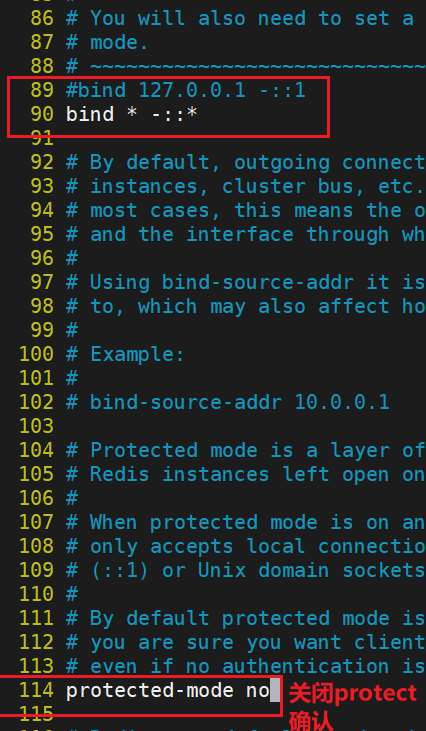
1.Redis主节点配置
编辑redis配置文件


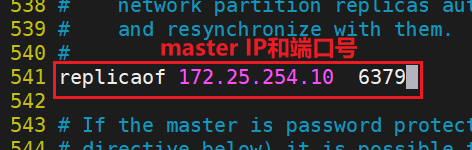
2.配置Redis从节点
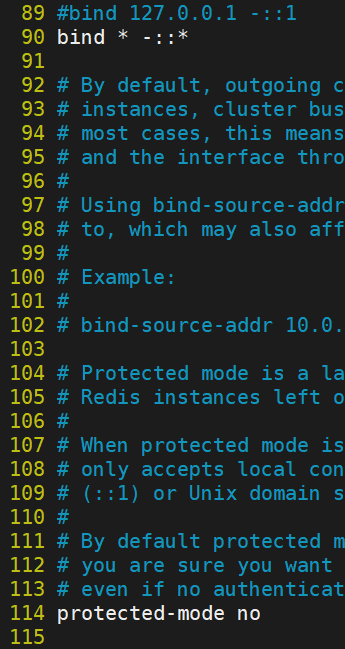
在所有从节点配置


3.查看状态并测试
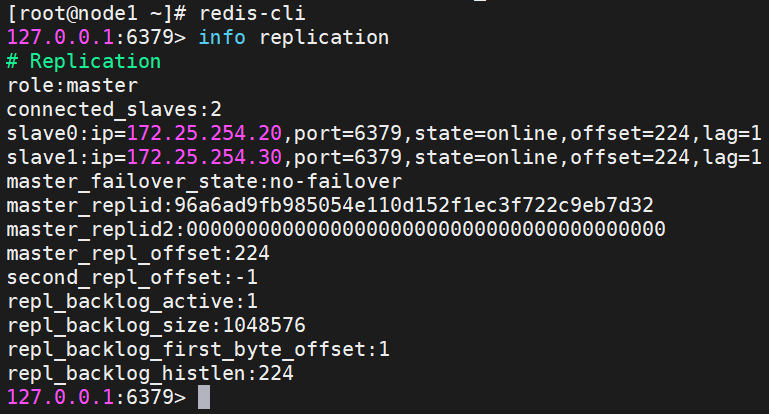
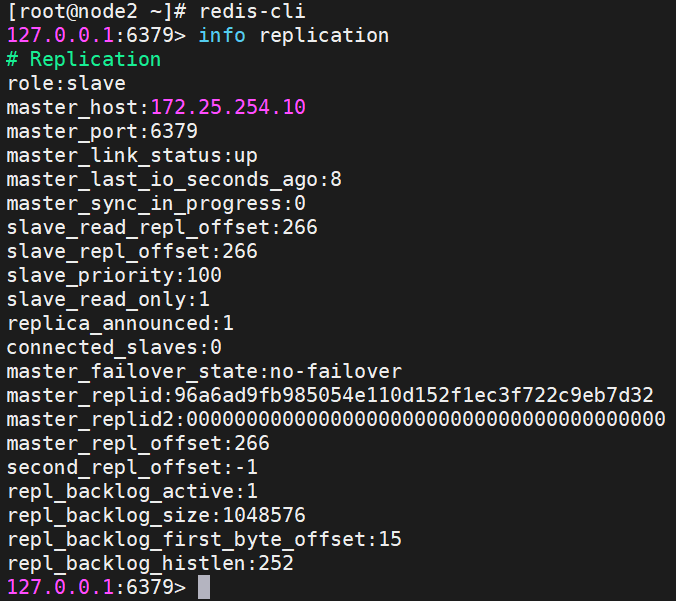
状态查看
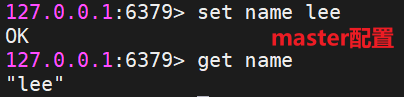
测试数据同步性


三、Redis哨兵模式
#redis 主节点
[root@redis-node1 redis-7.4.8]# cp -p sentinel.conf /etc/redis/
[root@redis-node1 redis-7.4.8]# vim /etc/redis/sentinel.conf
[root@redis-node1 redis-7.4.8]# vim /etc/redis/sentinel.conf
protected-mode no									#关闭保护模式
port 26379											#监听端口
daemonize no										#进入不打如后台
pidfile /var/run/redis-sentinel.pid					#sentinel进程pid文件
loglevel notice										#日志级别
sentinel monitor mymaster 172.25.254.10 6379 2		#创建sentinel监控监控master主机,2表示必须得到2票
sentinel down-after-milliseconds mymaster 10000		#master中断时长,10秒连不上视为master下线
sentinel parallel-syncs mymaster 1					#发生故障转移后,同时开始同步新master数据的slave数量
sentinel failover-timeout mymaster 180000			#整个故障切换的超时时间为3分钟
#在所有从节点关闭protected-mode模式然后重启redis
[root@node2 ~]# vim /etc/redis/6379.conf
protected-mode no

[root@redis-node2 ~]# systemctl restart redis_6379.service
#在主节点复制sentinel.conf到从节点

#所有节点开启哨兵
[root@node1~3 ~]# redis-sentinel /etc/redis/sentinel.conf测试故障切换
[root@node1 ~]# redis-cli
127.0.0.1:6379> SHUTDOWN
(0.57s)
not connected>
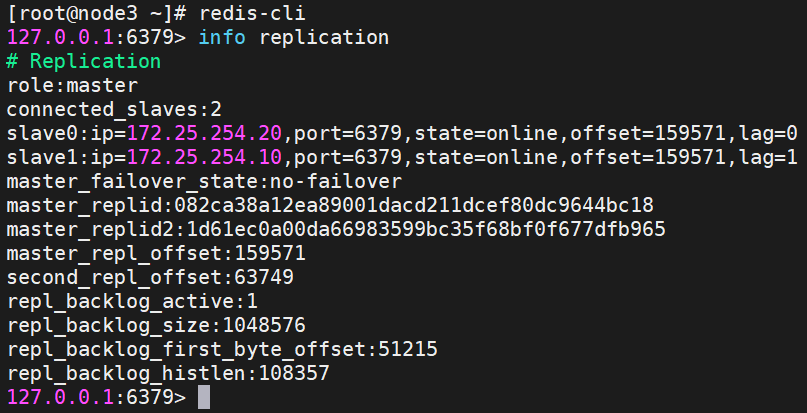
#切换信息
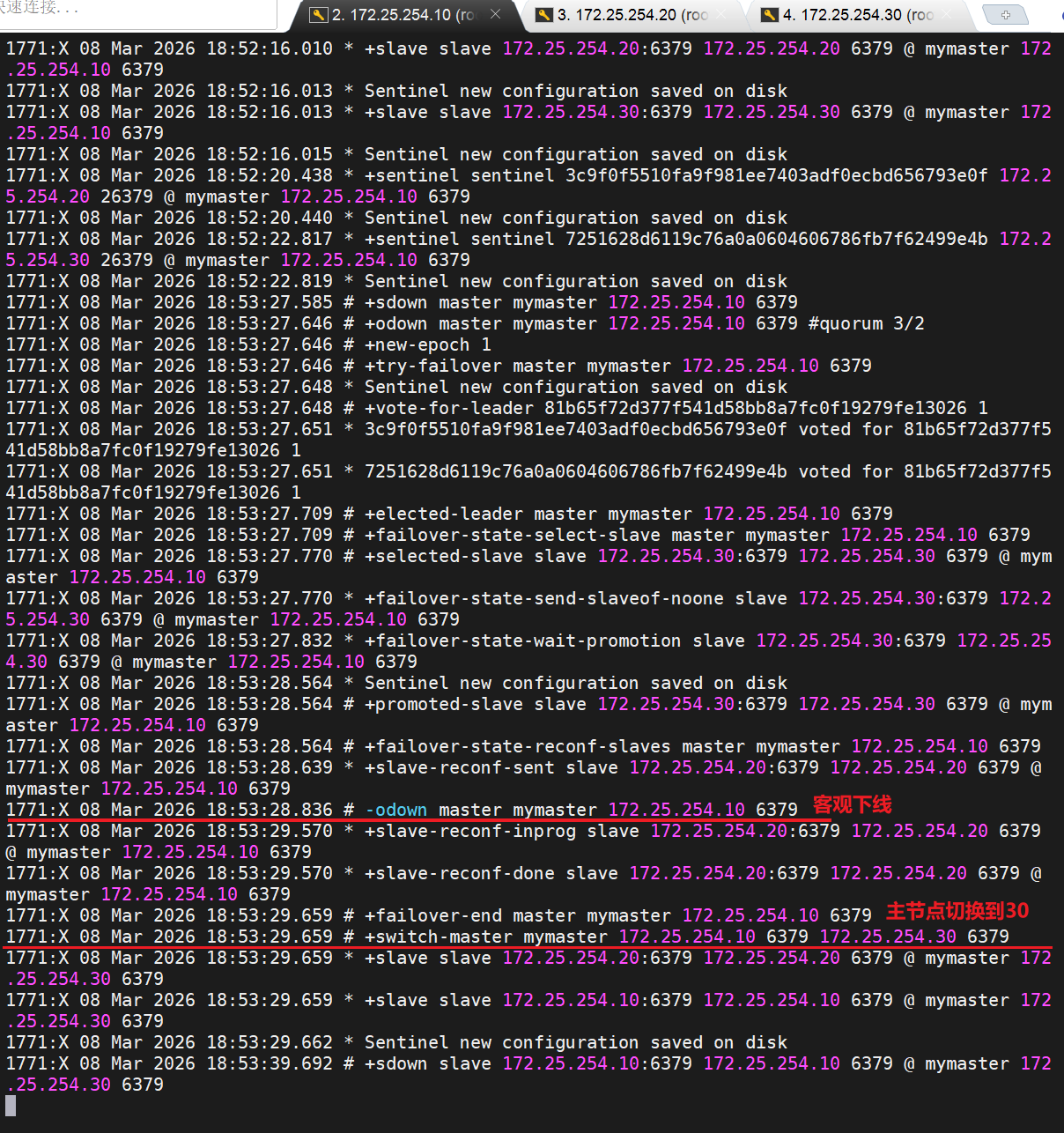
#在从节点20中查看信息
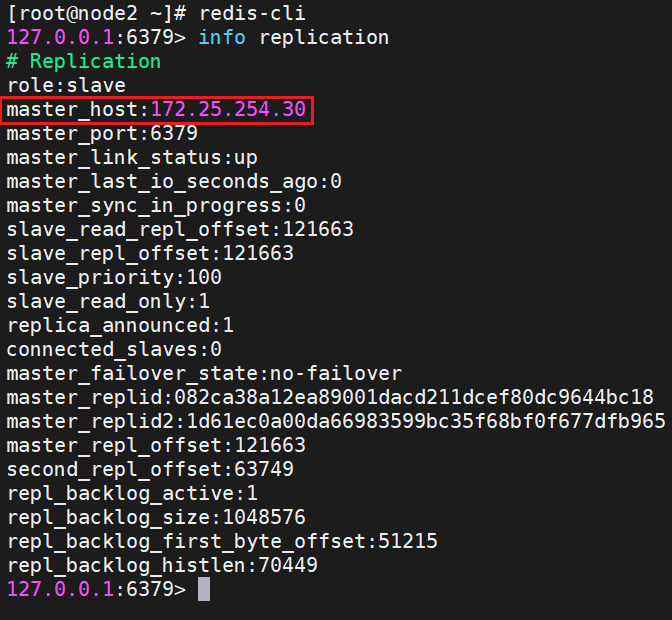
#恢复10redis

#在30查看信息
四、redis-cluster 集群
1.修改所有节点配置文件
R
[root@redis-node1~6 ~]# vim /etc/redis/6379.conf
masterauth "123456"					#集群主从认证
cluster-enabled yes					#开启cluster集群功能
cluster-config-file nodes-6379.conf	#指定集群配置文件
cluster-node-timeout 15000			#节点加入集群的超时时间单位是ms
# 绑定本机 IP 和回环地址
bind 172.25.254.10 127.0.0.1
protected-mode no

[root@redis-node1~6 ~]# /etc/init.d/redis_6379 stop
[root@redis-node1~6 ~]# /etc/init.d/redis_6379 start
2.启动集群
R
[root@redis-node1 ~]# redis-cli  --cluster create 172.25.254.10:6379 172.25.254.20:6379 172.25.254.30:6379 172.25.254.40:6379 172.25.254.50:6379 172.25.254.60:6379 --cluster-replicas 1
>>> Performing hash slots allocation on 6 nodes...
Master[0] -> Slots 0 - 5460
Master[1] -> Slots 5461 - 10922
Master[2] -> Slots 10923 - 16383
Adding replica 172.25.254.50:6379 to 172.25.254.10:6379
Adding replica 172.25.254.60:6379 to 172.25.254.20:6379
Adding replica 172.25.254.40:6379 to 172.25.254.30:6379
M: a0bc6c8eb0344ebced6e4c631b329cc43dda7376 172.25.254.10:6379
   slots:[0-5460] (5461 slots) master
M: 87800212effc1bbbaa61b4a6974e6ce86b1bf033 172.25.254.20:6379
   slots:[5461-10922] (5462 slots) master
M: 612573f49cfaebb4c56d638d874807caa85450f8 172.25.254.30:6379
   slots:[10923-16383] (5461 slots) master
S: 4419766ba786e7e377252c365d16e193090490ca 172.25.254.40:6379
   replicates 612573f49cfaebb4c56d638d874807caa85450f8
S: 83566895448e78fceb5ce4ef031bb9cadb8fdb91 172.25.254.50:6379
   replicates a0bc6c8eb0344ebced6e4c631b329cc43dda7376
S: 1b2f3a561b2e6dc0300aeddff5f4bee76f351f03 172.25.254.60:6379
   replicates 87800212effc1bbbaa61b4a6974e6ce86b1bf033
Can I set the above configuration? (type 'yes' to accept): yes    #输入yes
>>> Nodes configuration updated
>>> Assign a different config epoch to each node
>>> Sending CLUSTER MEET messages to join the cluster
Waiting for the cluster to join

>>> Performing Cluster Check (using node 172.25.254.10:6379)
M: a0bc6c8eb0344ebced6e4c631b329cc43dda7376 172.25.254.10:6379
   slots:[0-5460] (5461 slots) master
   1 additional replica(s)
M: 87800212effc1bbbaa61b4a6974e6ce86b1bf033 172.25.254.20:6379
   slots:[5461-10922] (5462 slots) master
   1 additional replica(s)
S: 4419766ba786e7e377252c365d16e193090490ca 172.25.254.40:6379
   slots: (0 slots) slave
   replicates 612573f49cfaebb4c56d638d874807caa85450f8
S: 83566895448e78fceb5ce4ef031bb9cadb8fdb91 172.25.254.50:6379
   slots: (0 slots) slave
   replicates a0bc6c8eb0344ebced6e4c631b329cc43dda7376
S: 1b2f3a561b2e6dc0300aeddff5f4bee76f351f03 172.25.254.60:6379
   slots: (0 slots) slave
   replicates 87800212effc1bbbaa61b4a6974e6ce86b1bf033
M: 612573f49cfaebb4c56d638d874807caa85450f8 172.25.254.30:6379
   slots:[10923-16383] (5461 slots) master
   1 additional replica(s)
[OK] All nodes agree about slots configuration.
>>> Check for open slots...
>>> Check slots coverage...
[OK] All 16384 slots covered.
提供了 6 个节点,且设置副本数为 1,Redis 会自动进行如下分配:
- 主节点 :从这 6 个节点中选出 3 个 作为主节点,负责处理读写请求。
- 从节点 :剩下的 3 个 节点会自动成为那 3 个主节点的从节点,负责数据备份。
R
#查看集群状态
[root@redis-node1 ~]# redis-cli  --cluster info 172.25.254.10:6379
172.25.254.10:6379 (a0bc6c8e...) -> 0 keys | 5461 slots | 1 slaves.
172.25.254.20:6379 (87800212...) -> 0 keys | 5462 slots | 1 slaves.
172.25.254.30:6379 (612573f4...) -> 0 keys | 5461 slots | 1 slaves.
[OK] 0 keys in 3 masters.
0.00 keys per slot on average.
R
#查看集群信息
[root@redis-node1 ~]# redis-cli  cluster info
cluster_state:ok
cluster_slots_assigned:16384
cluster_slots_ok:16384
cluster_slots_pfail:0
cluster_slots_fail:0
cluster_known_nodes:6
cluster_size:3
cluster_current_epoch:6
cluster_my_epoch:1
cluster_stats_messages_ping_sent:128
cluster_stats_messages_pong_sent:129
cluster_stats_messages_sent:257
cluster_stats_messages_ping_received:124
cluster_stats_messages_pong_received:128
cluster_stats_messages_meet_received:5
cluster_stats_messages_received:257
total_cluster_links_buffer_limit_exceeded:0
R
#检测当前集群
[root@redis-node1 ~]# redis-cli  --cluster  check  172.25.254.10:6379
172.25.254.10:6379 (a0bc6c8e...) -> 0 keys | 5461 slots | 1 slaves.
172.25.254.20:6379 (87800212...) -> 0 keys | 5462 slots | 1 slaves.
172.25.254.30:6379 (612573f4...) -> 0 keys | 5461 slots | 1 slaves.
[OK] 0 keys in 3 masters.
0.00 keys per slot on average.
>>> Performing Cluster Check (using node 172.25.254.10:6379)
M: a0bc6c8eb0344ebced6e4c631b329cc43dda7376 172.25.254.10:6379
   slots:[0-5460] (5461 slots) master
   1 additional replica(s)
M: 87800212effc1bbbaa61b4a6974e6ce86b1bf033 172.25.254.20:6379
   slots:[5461-10922] (5462 slots) master
   1 additional replica(s)
S: 4419766ba786e7e377252c365d16e193090490ca 172.25.254.40:6379
   slots: (0 slots) slave
   replicates 612573f49cfaebb4c56d638d874807caa85450f8
S: 83566895448e78fceb5ce4ef031bb9cadb8fdb91 172.25.254.50:6379
   slots: (0 slots) slave
   replicates a0bc6c8eb0344ebced6e4c631b329cc43dda7376
S: 1b2f3a561b2e6dc0300aeddff5f4bee76f351f03 172.25.254.60:6379
   slots: (0 slots) slave
   replicates 87800212effc1bbbaa61b4a6974e6ce86b1bf033
M: 612573f49cfaebb4c56d638d874807caa85450f8 172.25.254.30:6379
   slots:[10923-16383] (5461 slots) master
   1 additional replica(s)
[OK] All nodes agree about slots configuration.
>>> Check for open slots...
>>> Check slots coverage...
[OK] All 16384 slots covered.
3.集群扩容
R
#新主机也要先配置
[root@redis-node1~6 ~]# vim /etc/redis/6379.conf
masterauth "123456"					#集群主从认证
cluster-enabled yes					#开启cluster集群功能
cluster-config-file nodes-6379.conf	#指定集群配置文件
cluster-node-timeout 15000			#节点加入集群的超时时间单位是ms
# 绑定本机 IP 和回环地址
bind 172.25.254.10 127.0.0.1
protected-mode no

[root@redis-node1~6 ~]# /etc/init.d/redis_6379 stop
[root@redis-node1~6 ~]# /etc/init.d/redis_6379 start
R
#添加master
[root@redis-node1 ~]# redis-cli --cluster  add-node 172.25.254.70:6379 172.25.254.10:6379

[root@redis-node1 ~]# redis-cli  --cluster  check  172.25.254.10:6379
172.25.254.10:6379 (8db833f3...) -> 0 keys | 5461 slots | 1 slaves.
172.25.254.70:6379 (dfabfe07...) -> 0 keys | 0 slots | 0 slaves.
172.25.254.30:6379 (d9300173...) -> 0 keys | 5461 slots | 1 slaves.
172.25.254.20:6379 (ca599940...) -> 1 keys | 5462 slots | 1 slaves.
[OK] 1 keys in 4 masters.
0.00 keys per slot on average.
>>> Performing Cluster Check (using node 172.25.254.10:6379)
M: 8db833f3c3bc6b8f93e87111f13f56d366f833a0 172.25.254.10:6379
   slots:[0-5460] (5461 slots) master
   1 additional replica(s)
M: dfabfe07170ac9b5d20a5a7a70c836877bd64504 172.25.254.70:6379
   slots: (0 slots) master
S: c939a04358edc1ce7a1c1a44561d77fb402025fd 172.25.254.60:6379
   slots: (0 slots) slave
   replicates ca599940209f55c07d06951480703bb0a5d8873a
M: d9300173b75149d3056f0ee3edec063f8ec66e9a 172.25.254.30:6379
   slots:[10923-16383] (5461 slots) master
   1 additional replica(s)
M: ca599940209f55c07d06951480703bb0a5d8873a 172.25.254.20:6379
   slots:[5461-10922] (5462 slots) master
   1 additional replica(s)
S: ba6ef067c63d30c213493eb48d43427015018898 172.25.254.50:6379
   slots: (0 slots) slave
   replicates 8db833f3c3bc6b8f93e87111f13f56d366f833a0
S: 32d797eb30094b77edb896abcc0b0fc91ccdb4fd 172.25.254.40:6379
   slots: (0 slots) slave
   replicates d9300173b75149d3056f0ee3edec063f8ec66e9a
[OK] All nodes agree about slots configuration.
>>> Check for open slots...
>>> Check slots coverage...
[OK] All 16384 slots covered.


#分配solt给新加入的主机
>>> Performing Cluster Check (using node 172.25.254.10:6379)
M: 8db833f3c3bc6b8f93e87111f13f56d366f833a0 172.25.254.10:6379
   slots:[0-5460] (5461 slots) master
   1 additional replica(s)
M: dfabfe07170ac9b5d20a5a7a70c836877bd64504 172.25.254.70:6379
   slots: (0 slots) master
S: c939a04358edc1ce7a1c1a44561d77fb402025fd 172.25.254.60:6379
   slots: (0 slots) slave
   replicates ca599940209f55c07d06951480703bb0a5d8873a
M: d9300173b75149d3056f0ee3edec063f8ec66e9a 172.25.254.30:6379
   slots:[10923-16383] (5461 slots) master
   1 additional replica(s)
M: ca599940209f55c07d06951480703bb0a5d8873a 172.25.254.20:6379
   slots:[5461-10922] (5462 slots) master
   1 additional replica(s)
S: ba6ef067c63d30c213493eb48d43427015018898 172.25.254.50:6379
   slots: (0 slots) slave
   replicates 8db833f3c3bc6b8f93e87111f13f56d366f833a0
S: 32d797eb30094b77edb896abcc0b0fc91ccdb4fd 172.25.254.40:6379
   slots: (0 slots) slave
   replicates d9300173b75149d3056f0ee3edec063f8ec66e9a
[OK] All nodes agree about slots configuration.
>>> Check for open slots...
>>> Check slots coverage...
[OK] All 16384 slots covered.
How many slots do you want to move (from 1 to 16384)? 4096			#分配solt的数量
What is the receiving node ID? dfabfe07170ac9b5d20a5a7a70c836877bd64504
Please enter all the source node IDs.
  Type 'all' to use all the nodes as source nodes for the hash slots.
  Type 'done' once you entered all the source nodes IDs.
Source node #1: all			#solt来源

Ready to move 4096 slots.


#给新主机添加slave
[root@redis-node1 ~]# redis-cli  --cluster  add-node 172.25.254.80:6379 172.25.254.10:6379 --cluster-slave --cluster-master-id dfabfe07170ac9b5d20a5a7a70c836877bd64504


[root@redis-node1 ~]# redis-cli  --cluster  check  172.25.254.10:6379                                              172.25.254.10:6379 (8db833f3...) -> 0 keys | 4096 slots | 1 slaves.
172.25.254.70:6379 (dfabfe07...) -> 1 keys | 4096 slots | 1 slaves.
172.25.254.30:6379 (d9300173...) -> 0 keys | 4096 slots | 1 slaves.
172.25.254.20:6379 (ca599940...) -> 0 keys | 4096 slots | 1 slaves.
[OK] 1 keys in 4 masters.
0.00 keys per slot on average.
>>> Performing Cluster Check (using node 172.25.254.10:6379)
M: 8db833f3c3bc6b8f93e87111f13f56d366f833a0 172.25.254.10:6379
   slots:[1365-5460] (4096 slots) master
   1 additional replica(s)
S: 1176ee294e6b5071ca57e93374d04ac22028daed 172.25.254.80:6379
   slots: (0 slots) slave
   replicates dfabfe07170ac9b5d20a5a7a70c836877bd64504
M: dfabfe07170ac9b5d20a5a7a70c836877bd64504 172.25.254.70:6379
   slots:[0-1364],[5461-6826],[10923-12287] (4096 slots) master
   1 additional replica(s)
S: c939a04358edc1ce7a1c1a44561d77fb402025fd 172.25.254.60:6379
   slots: (0 slots) slave
   replicates ca599940209f55c07d06951480703bb0a5d8873a
M: d9300173b75149d3056f0ee3edec063f8ec66e9a 172.25.254.30:6379
   slots:[12288-16383] (4096 slots) master
   1 additional replica(s)
M: ca599940209f55c07d06951480703bb0a5d8873a 172.25.254.20:6379
   slots:[6827-10922] (4096 slots) master
   1 additional replica(s)
S: ba6ef067c63d30c213493eb48d43427015018898 172.25.254.50:6379
   slots: (0 slots) slave
   replicates 8db833f3c3bc6b8f93e87111f13f56d366f833a0
S: 32d797eb30094b77edb896abcc0b0fc91ccdb4fd 172.25.254.40:6379
   slots: (0 slots) slave
   replicates d9300173b75149d3056f0ee3edec063f8ec66e9a
[OK] All nodes agree about slots configuration.
>>> Check for open slots...
>>> Check slots coverage...
[OK] All 16384 slots covered.
4.集群缩容
R
#集群槽位回收到10主机中
[root@redis-node1 ~]# redis-cli  --cluster reshard 172.25.254.10:6379
>>> Performing Cluster Check (using node 172.25.254.10:6379)
M: 8db833f3c3bc6b8f93e87111f13f56d366f833a0 172.25.254.10:6379
   slots:[1365-5460] (4096 slots) master
   1 additional replica(s)
S: 1176ee294e6b5071ca57e93374d04ac22028daed 172.25.254.80:6379
   slots: (0 slots) slave
   replicates dfabfe07170ac9b5d20a5a7a70c836877bd64504
M: dfabfe07170ac9b5d20a5a7a70c836877bd64504 172.25.254.70:6379
   slots:[0-1364],[5461-6826],[10923-12287] (4096 slots) master
   1 additional replica(s)
S: c939a04358edc1ce7a1c1a44561d77fb402025fd 172.25.254.60:6379
   slots: (0 slots) slave
   replicates ca599940209f55c07d06951480703bb0a5d8873a
M: d9300173b75149d3056f0ee3edec063f8ec66e9a 172.25.254.30:6379
   slots:[12288-16383] (4096 slots) master
   1 additional replica(s)
M: ca599940209f55c07d06951480703bb0a5d8873a 172.25.254.20:6379
   slots:[6827-10922] (4096 slots) master
   1 additional replica(s)
S: ba6ef067c63d30c213493eb48d43427015018898 172.25.254.50:6379
   slots: (0 slots) slave
   replicates 8db833f3c3bc6b8f93e87111f13f56d366f833a0
S: 32d797eb30094b77edb896abcc0b0fc91ccdb4fd 172.25.254.40:6379
   slots: (0 slots) slave
   replicates d9300173b75149d3056f0ee3edec063f8ec66e9a
[OK] All nodes agree about slots configuration.
>>> Check for open slots...
>>> Check slots coverage...
[OK] All 16384 slots covered.
How many slots do you want to move (from 1 to 16384)? 4096
What is the receiving node ID? 8db833f3c3bc6b8f93e87111f13f56d366f833a0  #10id
Please enter all the source node IDs.
  Type 'all' to use all the nodes as source nodes for the hash slots.
  Type 'done' once you entered all the source nodes IDs.
Source node #1: dfabfe07170ac9b5d20a5a7a70c836877bd64504		#70id
Source node #2: done


#删除70和80节点
[root@redis-node1 ~]# redis-cli --cluster del-node  172.25.254.10:6379 dfabfe07170ac9b5d20a5a7a70c836877bd64504
>>> Removing node dfabfe07170ac9b5d20a5a7a70c836877bd64504 from cluster 172.25.254.10:6379
>>> Sending CLUSTER FORGET messages to the cluster...
>>> Sending CLUSTER RESET SOFT to the deleted node.

[root@redis-node1 ~]# redis-cli --cluster del-node  172.25.254.10:6379 1176ee294e6b5071ca57e93374d04ac22028daed
>>> Removing node 1176ee294e6b5071ca57e93374d04ac22028daed from cluster 172.25.254.10:6379
>>> Sending CLUSTER FORGET messages to the cluster...
>>> Sending CLUSTER RESET SOFT to the deleted node.


[root@redis-node1 ~]# redis-cli  --cluster  check  172.25.254.10:6379
172.25.254.10:6379 (8db833f3...) -> 1 keys | 8192 slots | 1 slaves.
172.25.254.30:6379 (d9300173...) -> 0 keys | 4096 slots | 1 slaves.
172.25.254.20:6379 (ca599940...) -> 0 keys | 4096 slots | 1 slaves.
[OK] 1 keys in 3 masters.
0.00 keys per slot on average.
>>> Performing Cluster Check (using node 172.25.254.10:6379)
M: 8db833f3c3bc6b8f93e87111f13f56d366f833a0 172.25.254.10:6379
   slots:[0-6826],[10923-12287] (8192 slots) master
   1 additional replica(s)
S: c939a04358edc1ce7a1c1a44561d77fb402025fd 172.25.254.60:6379
   slots: (0 slots) slave
   replicates ca599940209f55c07d06951480703bb0a5d8873a
M: d9300173b75149d3056f0ee3edec063f8ec66e9a 172.25.254.30:6379
   slots:[12288-16383] (4096 slots) master
   1 additional replica(s)
M: ca599940209f55c07d06951480703bb0a5d8873a 172.25.254.20:6379
   slots:[6827-10922] (4096 slots) master
   1 additional replica(s)
S: ba6ef067c63d30c213493eb48d43427015018898 172.25.254.50:6379
   slots: (0 slots) slave
   replicates 8db833f3c3bc6b8f93e87111f13f56d366f833a0
S: 32d797eb30094b77edb896abcc0b0fc91ccdb4fd 172.25.254.40:6379
   slots: (0 slots) slave
   replicates d9300173b75149d3056f0ee3edec063f8ec66e9a
[OK] All nodes agree about slots configuration.
>>> Check for open slots...
>>> Check slots coverage...
[OK] All 16384 slots covered.