先这样拆解 不然越来越乱
css
src/
  components/
    StudentBar.vue
    TabNav.vue
    SolvePanel.vue
    HistoryPanel.vue
    WrongPanel.vue
1)新增 src/components/StudentBar.vue
xml
<template>
  <div class="student-bar">
    <select
      :value="currentStudentId"
      class="student-select"
      @change="onStudentChange"
    >
      <option v-for="item in studentList" :key="item.id" :value="item.id">
        {{ item.name }}
      </option>
    </select>

    <input
      :value="newStudentName"
      class="student-input"
      placeholder="输入新学生姓名"
      @input="onNameInput"
    />

    <button class="retry-btn" @click="$emit('create-student')">
      新增学生
    </button>

    <button class="wrong-btn" @click="$emit('export-report')">
      导出练习单
    </button>
  </div>
</template>

<script setup lang="ts">
import type { StudentItem } from '../api/math'

defineProps<{
  studentList: StudentItem[]
  currentStudentId: number
  newStudentName: string
}>()

const emit = defineEmits<{
  (e: 'update:currentStudentId', value: number): void
  (e: 'update:newStudentName', value: string): void
  (e: 'student-change'): void
  (e: 'create-student'): void
  (e: 'export-report'): void
}>()

const onStudentChange = (event: Event) => {
  const value = Number((event.target as HTMLSelectElement).value)
  emit('update:currentStudentId', value)
  emit('student-change')
}

const onNameInput = (event: Event) => {
  emit('update:newStudentName', (event.target as HTMLInputElement).value)
}
</script>

<style scoped>
.student-bar {
  display: flex;
  gap: 12px;
  align-items: center;
  margin-bottom: 20px;
}

.student-select,
.student-input {
  height: 40px;
  padding: 0 12px;
  border: 1px solid #ddd;
  border-radius: 8px;
  background: #fff;
  outline: none;
}

.retry-btn {
  padding: 8px 14px;
  border: none;
  background: #2080f0;
  color: #fff;
  border-radius: 8px;
  cursor: pointer;
}

.wrong-btn {
  padding: 8px 14px;
  border: none;
  background: #f0a020;
  color: #fff;
  border-radius: 8px;
  cursor: pointer;
}
</style>
2)新增 src/components/TabNav.vue
xml
<template>
  <div class="tabs">
    <button
      v-for="item in tabList"
      :key="item.value"
      :class="['tab-btn', activeTab === item.value ? 'active' : '']"
      @click="$emit('change', item.value)"
    >
      {{ item.label }}
    </button>
  </div>
</template>

<script setup lang="ts">
defineProps<{
  activeTab: 'solve' | 'history' | 'wrong' | 'report' | 'suggestion'
}>()

defineEmits<{
  (e: 'change', value: 'solve' | 'history' | 'wrong' | 'report' | 'suggestion'): void
}>()

const tabList = [
  { label: '题目解析', value: 'solve' },
  { label: '历史记录', value: 'history' },
  { label: '错题本', value: 'wrong' },
  { label: '学习报告', value: 'report' },
  { label: '学习建议', value: 'suggestion' },
] as const
</script>

<style scoped>
.tabs {
  display: flex;
  gap: 12px;
  margin-bottom: 20px;
}

.tab-btn {
  padding: 8px 16px;
  border: 1px solid #ddd;
  background: #fff;
  border-radius: 8px;
  cursor: pointer;
}

.tab-btn.active {
  background: #18a058;
  color: #fff;
  border-color: #18a058;
}
</style>
3)新增 src/components/SolvePanel.vue
xml
<template>
  <div>
    <div class="upload-area">
      <label class="upload-btn">
        {{ imageLoading ? '识别中...' : '上传题目图片' }}
        <input
          type="file"
          accept="image/*"
          class="file-input"
          :disabled="imageLoading"
          @change="$emit('image-change', $event)"
        />
      </label>
    </div>

    <textarea
      :value="question"
      class="question-input"
      placeholder="请输入一道数学题,例如:解方程 3x + 5 = 11"
      @input="$emit('update:question', ($event.target as HTMLTextAreaElement).value)"
    />

    <button class="submit-btn" @click="$emit('submit')" :disabled="loading">
      {{ loading ? '解析中...' : '开始解析' }}
    </button>

    <div v-if="result" class="result-card">
      <div class="card-header">
        <h2>本次解析结果</h2>

        <div class="card-actions">
          <button class="retry-btn" @click="$emit('regenerate', result.id)">
            {{ regenerateLoadingMap[result.id] ? '生成中...' : '再练一题' }}
          </button>

          <button class="wrong-btn" @click="$emit('toggle-wrong', result)">
            {{ result.is_wrong ? '取消错题' : '加入错题本' }}
          </button>
        </div>
      </div>

      <h3>题目</h3>
      <p>{{ result.question }}</p>

      <h3>答案</h3>
      <p>{{ result.answer }}</p>

      <h3>步骤解析</h3>
      <ol>
        <li v-for="(step, index) in result.steps" :key="index">{{ step }}</li>
      </ol>

      <h3>知识点</h3>
      <ul>
        <li v-for="(kp, index) in result.knowledge_points" :key="index">{{ kp }}</li>
      </ul>

      <h3>相似题</h3>
      <p>{{ result.similar_question }}</p>

      <div v-if="regeneratedMap[result.id]" class="regenerated-box">
        <h3>再练一题</h3>
        <p>{{ regeneratedMap[result.id].question }}</p>

        <h3>答案</h3>
        <p>{{ regeneratedMap[result.id].answer }}</p>

        <h3>步骤解析</h3>
        <ol>
          <li v-for="(step, idx) in regeneratedMap[result.id].steps" :key="idx">
            {{ step }}
          </li>
        </ol>
      </div>
    </div>

    <div class="practice-panel">
      <h2>按知识点生成练习题</h2>
      <div class="practice-form">
        <input
          :value="practiceKnowledge"
          class="practice-input"
          placeholder="请输入知识点,例如:一元一次方程"
          @input="$emit('update:practiceKnowledge', ($event.target as HTMLInputElement).value)"
        />
        <button class="submit-btn" @click="$emit('generate-practice')" :disabled="practiceLoading">
          {{ practiceLoading ? '生成中...' : '生成练习题' }}
        </button>
      </div>

      <div v-if="practiceList.length" class="practice-list">
        <div v-for="(item, index) in practiceList" :key="index" class="result-card">
          <h3>练习题 {{ index + 1 }}</h3>
          <p>{{ item.question }}</p>

          <h3>答案</h3>
          <p>{{ item.answer }}</p>

          <h3>步骤解析</h3>
          <ol>
            <li v-for="(step, idx) in item.steps" :key="idx">{{ step }}</li>
          </ol>
        </div>
      </div>
    </div>
  </div>
</template>

<script setup lang="ts">
import type { PracticeQuestionItem, SolveResponse } from '../api/math'

defineProps<{
  question: string
  loading: boolean
  imageLoading: boolean
  result: (SolveResponse & { question: string }) | null
  practiceKnowledge: string
  practiceLoading: boolean
  practiceList: PracticeQuestionItem[]
  regenerateLoadingMap: Record<number, boolean>
  regeneratedMap: Record<number, PracticeQuestionItem>
}>()

defineEmits<{
  (e: 'update:question', value: string): void
  (e: 'submit'): void
  (e: 'image-change', event: Event): void
  (e: 'toggle-wrong', item: SolveResponse & { question: string }): void
  (e: 'regenerate', id: number): void
  (e: 'update:practiceKnowledge', value: string): void
  (e: 'generate-practice'): void
}>()
</script>

<style scoped>
.upload-area {
  margin-bottom: 16px;
}

.upload-btn {
  display: inline-flex;
  align-items: center;
  padding: 10px 16px;
  background: #2080f0;
  color: #fff;
  border-radius: 8px;
  cursor: pointer;
}

.file-input {
  display: none;
}

.question-input {
  width: 100%;
  min-height: 140px;
  padding: 12px;
  border: 1px solid #ddd;
  border-radius: 8px;
  resize: vertical;
  font-size: 16px;
  box-sizing: border-box;
}

.submit-btn {
  margin-top: 16px;
  padding: 10px 18px;
  border: none;
  background: #18a058;
  color: #fff;
  border-radius: 8px;
  cursor: pointer;
}

.result-card {
  margin-top: 24px;
  padding: 20px;
  background: #fafafa;
  border-radius: 8px;
}

.card-header {
  display: flex;
  align-items: center;
  justify-content: space-between;
  gap: 12px;
}

.card-actions {
  display: flex;
  gap: 8px;
}

.retry-btn {
  padding: 8px 14px;
  border: none;
  background: #2080f0;
  color: #fff;
  border-radius: 8px;
  cursor: pointer;
}

.wrong-btn {
  padding: 8px 14px;
  border: none;
  background: #f0a020;
  color: #fff;
  border-radius: 8px;
  cursor: pointer;
}

.practice-panel {
  margin-top: 32px;
}

.practice-form {
  display: flex;
  gap: 12px;
  margin-bottom: 16px;
}

.practice-input {
  flex: 1;
  height: 40px;
  padding: 0 12px;
  border: 1px solid #ddd;
  border-radius: 8px;
  outline: none;
}

.practice-list {
  margin-top: 16px;
}

.regenerated-box {
  margin-top: 16px;
  padding: 16px;
  background: #f0f7ff;
  border-radius: 8px;
}
</style>
4)新增 src/components/HistoryPanel.vue
xml
<template>
  <div>
    <div v-if="historyList.length === 0" class="empty">暂无历史记录</div>

    <div v-for="item in historyList" :key="item.id" class="result-card">
      <div class="card-header">
        <h2>记录 #{{ item.id }}</h2>

        <div class="card-actions">
          <button class="retry-btn" @click="$emit('regenerate', item.id)">
            {{ regenerateLoadingMap[item.id] ? '生成中...' : '再练一题' }}
          </button>

          <button class="wrong-btn" @click="$emit('toggle-wrong', item)">
            {{ item.is_wrong ? '取消错题' : '加入错题本' }}
          </button>
        </div>
      </div>

      <h3>题目</h3>
      <p>{{ item.question }}</p>

      <h3>答案</h3>
      <p>{{ item.answer }}</p>

      <h3>步骤解析</h3>
      <ol>
        <li v-for="(step, idx) in item.steps" :key="idx">{{ step }}</li>
      </ol>

      <h3>知识点</h3>
      <ul>
        <li v-for="(kp, idx) in item.knowledge_points" :key="idx">{{ kp }}</li>
      </ul>

      <h3>相似题</h3>
      <p>{{ item.similar_question }}</p>

      <div v-if="regeneratedMap[item.id]" class="regenerated-box">
        <h3>再练一题</h3>
        <p>{{ regeneratedMap[item.id].question }}</p>

        <h3>答案</h3>
        <p>{{ regeneratedMap[item.id].answer }}</p>

        <h3>步骤解析</h3>
        <ol>
          <li v-for="(step, idx) in regeneratedMap[item.id].steps" :key="idx">
            {{ step }}
          </li>
        </ol>
      </div>
    </div>
  </div>
</template>

<script setup lang="ts">
import type { HistoryItem, PracticeQuestionItem } from '../api/math'

defineProps<{
  historyList: HistoryItem[]
  regenerateLoadingMap: Record<number, boolean>
  regeneratedMap: Record<number, PracticeQuestionItem>
}>()

defineEmits<{
  (e: 'toggle-wrong', item: HistoryItem): void
  (e: 'regenerate', id: number): void
}>()
</script>

<style scoped>
.empty {
  padding: 32px 0;
  text-align: center;
  color: #999;
}

.result-card {
  margin-top: 24px;
  padding: 20px;
  background: #fafafa;
  border-radius: 8px;
}

.card-header {
  display: flex;
  align-items: center;
  justify-content: space-between;
  gap: 12px;
}

.card-actions {
  display: flex;
  gap: 8px;
}

.retry-btn {
  padding: 8px 14px;
  border: none;
  background: #2080f0;
  color: #fff;
  border-radius: 8px;
  cursor: pointer;
}

.wrong-btn {
  padding: 8px 14px;
  border: none;
  background: #f0a020;
  color: #fff;
  border-radius: 8px;
  cursor: pointer;
}

.regenerated-box {
  margin-top: 16px;
  padding: 16px;
  background: #f0f7ff;
  border-radius: 8px;
}
</style>
5)新增 src/components/WrongPanel.vue
xml
<template>
  <div>
    <div v-if="wrongList.length === 0" class="empty">暂无错题</div>

    <div v-for="item in wrongList" :key="item.id" class="result-card">
      <div class="card-header">
        <h2>错题 #{{ item.id }}</h2>

        <div class="card-actions">
          <button class="retry-btn" @click="$emit('regenerate', item.id)">
            {{ regenerateLoadingMap[item.id] ? '生成中...' : '再练一题' }}
          </button>

          <button class="wrong-btn" @click="$emit('toggle-wrong', item)">
            取消错题
          </button>
        </div>
      </div>

      <h3>题目</h3>
      <p>{{ item.question }}</p>

      <h3>答案</h3>
      <p>{{ item.answer }}</p>

      <h3>步骤解析</h3>
      <ol>
        <li v-for="(step, idx) in item.steps" :key="idx">{{ step }}</li>
      </ol>

      <h3>知识点</h3>
      <ul>
        <li v-for="(kp, idx) in item.knowledge_points" :key="idx">{{ kp }}</li>
      </ul>

      <h3>相似题</h3>
      <p>{{ item.similar_question }}</p>

      <div v-if="regeneratedMap[item.id]" class="regenerated-box">
        <h3>再练一题</h3>
        <p>{{ regeneratedMap[item.id].question }}</p>

        <h3>答案</h3>
        <p>{{ regeneratedMap[item.id].answer }}</p>

        <h3>步骤解析</h3>
        <ol>
          <li v-for="(step, idx) in regeneratedMap[item.id].steps" :key="idx">
            {{ step }}
          </li>
        </ol>
      </div>
    </div>
  </div>
</template>

<script setup lang="ts">
import type { HistoryItem, PracticeQuestionItem } from '../api/math'

defineProps<{
  wrongList: HistoryItem[]
  regenerateLoadingMap: Record<number, boolean>
  regeneratedMap: Record<number, PracticeQuestionItem>
}>()

defineEmits<{
  (e: 'toggle-wrong', item: HistoryItem): void
  (e: 'regenerate', id: number): void
}>()
</script>

<style scoped>
.empty {
  padding: 32px 0;
  text-align: center;
  color: #999;
}

.result-card {
  margin-top: 24px;
  padding: 20px;
  background: #fafafa;
  border-radius: 8px;
}

.card-header {
  display: flex;
  align-items: center;
  justify-content: space-between;
  gap: 12px;
}

.card-actions {
  display: flex;
  gap: 8px;
}

.retry-btn {
  padding: 8px 14px;
  border: none;
  background: #2080f0;
  color: #fff;
  border-radius: 8px;
  cursor: pointer;
}

.wrong-btn {
  padding: 8px 14px;
  border: none;
  background: #f0a020;
  color: #fff;
  border-radius: 8px;
  cursor: pointer;
}

.regenerated-box {
  margin-top: 16px;
  padding: 16px;
  background: #f0f7ff;
  border-radius: 8px;
}
</style>
6)修改 src/App.vue
直接把 template 部分 替换成下面这个版本:
ini
<template>
  <div class="page">
    <div class="container">
      <h1>AI 数学辅导老师</h1>

      <StudentBar
        v-model:currentStudentId="currentStudentId"
        v-model:newStudentName="newStudentName"
        :student-list="studentList"
        @student-change="handleStudentChange"
        @create-student="handleCreateStudent"
        @export-report="handleExportReport"
      />

      <TabNav
        :active-tab="activeTab"
        @change="handleTabChange"
      />

      <SolvePanel
        v-if="activeTab === 'solve'"
        v-model:question="question"
        v-model:practiceKnowledge="practiceKnowledge"
        :loading="loading"
        :image-loading="imageLoading"
        :result="result"
        :practice-loading="practiceLoading"
        :practice-list="practiceList"
        :regenerate-loading-map="regenerateLoadingMap"
        :regenerated-map="regeneratedMap"
        @submit="handleSubmit"
        @image-change="handleImageChange"
        @toggle-wrong="toggleWrong"
        @regenerate="handleRegenerateQuestion"
        @generate-practice="handleGeneratePractice"
      />

      <HistoryPanel
        v-else-if="activeTab === 'history'"
        :history-list="historyList"
        :regenerate-loading-map="regenerateLoadingMap"
        :regenerated-map="regeneratedMap"
        @toggle-wrong="toggleWrong"
        @regenerate="handleRegenerateQuestion"
      />

      <WrongPanel
        v-else-if="activeTab === 'wrong'"
        :wrong-list="wrongList"
        :regenerate-loading-map="regenerateLoadingMap"
        :regenerated-map="regeneratedMap"
        @toggle-wrong="toggleWrong"
        @regenerate="handleRegenerateQuestion"
      />

      <template v-else-if="activeTab === 'report'">
        <div v-if="reportLoading" class="empty">学习报告加载中...</div>

        <div v-else-if="learningReport" class="report-panel">
          <div class="report-summary">
            <div class="summary-card">
              <div class="summary-label">总题数</div>
              <div class="summary-value">{{ learningReport.total_count }}</div>
            </div>

            <div class="summary-card">
              <div class="summary-label">错题数</div>
              <div class="summary-value">{{ learningReport.wrong_count }}</div>
            </div>

            <div class="summary-card">
              <div class="summary-label">正确数</div>
              <div class="summary-value">{{ learningReport.correct_count }}</div>
            </div>

            <div class="summary-card">
              <div class="summary-label">错题率</div>
              <div class="summary-value">{{ learningReport.wrong_rate }}%</div>
            </div>
          </div>

          <div class="result-card">
            <h2>高频知识点 Top 5</h2>
            <div v-if="learningReport.top_knowledge_points.length === 0" class="empty">
              暂无知识点统计
            </div>
            <ul v-else class="stat-list">
              <li
                v-for="(item, index) in learningReport.top_knowledge_points"
                :key="index"
                class="stat-item"
              >
                <span>{{ item.name }}</span>
                <strong>{{ item.count }}</strong>
              </li>
            </ul>
          </div>

          <div class="result-card">
            <h2>最近练习</h2>
            <div v-if="learningReport.recent_records.length === 0" class="empty">
              暂无记录
            </div>

            <div
              v-for="item in learningReport.recent_records"
              :key="item.id"
              class="recent-item"
            >
              <div class="recent-header">
                <span>题目 #{{ item.id }}</span>
                <span :class="['status-tag', item.is_wrong ? 'wrong' : 'correct']">
                  {{ item.is_wrong ? '错题' : '正常' }}
                </span>
              </div>

              <div class="recent-question">{{ item.question }}</div>

              <div class="recent-kp">
                <span
                  v-for="(kp, idx) in item.knowledge_points"
                  :key="idx"
                  class="kp-tag"
                >
                  {{ kp }}
                </span>
              </div>
            </div>
          </div>
        </div>
      </template>

      <template v-else>
        <div v-if="suggestionLoading" class="empty">学习建议加载中...</div>

        <div v-else-if="studySuggestion" class="report-panel">
          <div class="result-card">
            <h2>整体学习建议</h2>
            <p>{{ studySuggestion.overall_suggestion }}</p>
          </div>

          <div class="result-card">
            <h2>薄弱知识点分析</h2>

            <div v-if="studySuggestion.weak_knowledge_points.length === 0" class="empty">
              暂无薄弱知识点
            </div>

            <div
              v-for="(item, index) in studySuggestion.weak_knowledge_points"
              :key="index"
              class="weak-item"
            >
              <div class="weak-header">
                <strong>{{ item.name }}</strong>
                <span class="weak-rate">错误率 {{ item.wrong_rate }}%</span>
              </div>

              <div class="weak-meta">
                错误 {{ item.wrong_count }} 次 / 共出现 {{ item.total_count }} 次
              </div>

              <div class="weak-suggestion">
                {{ item.suggestion }}
              </div>

              <button
                class="retry-btn"
                @click="handleGenerateWeakPractice(item.name)"
              >
                生成该知识点练习题
              </button>
            </div>
          </div>
        </div>
      </template>
    </div>
  </div>
</template>7)src/App.vue 的 script 只补充这些 import
在顶部新增:
javascript
import StudentBar from './components/StudentBar.vue'
import TabNav from './components/TabNav.vue'
import SolvePanel from './components/SolvePanel.vue'
import HistoryPanel from './components/HistoryPanel.vue'
import WrongPanel from './components/WrongPanel.vue'8)src/App.vue 的 script 新增两个方法
加到 script setup 里:
ini
const handleTabChange = async (tab: 'solve' | 'history' | 'wrong' | 'report' | 'suggestion') => {
  activeTab.value = tab

  if (tab === 'history') {
    await loadHistory()
  } else if (tab === 'wrong') {
    await loadWrongList()
  } else if (tab === 'report') {
    await loadReport()
  } else if (tab === 'suggestion') {
    await loadStudySuggestion()
  }
}

const handleGenerateWeakPractice = async (knowledgeName: string) => {
  practiceKnowledge.value = knowledgeName
  activeTab.value = 'solve'
  await handleGeneratePractice()
}9)src/App.vue 的 style 删除这些已拆走的样式
可以从 App.vue 里删掉这些,避免重复:
lua
.student-bar
.student-select,
.student-input
.tabs
.tab-btn
.tab-btn.active
.upload-area
.upload-btn
.file-input
.question-input
.card-header
.card-actions
.retry-btn
.wrong-btn
.practice-panel
.practice-form
.practice-input
.practice-list
.regenerated-box
保留这些全局页面级样式:
css
.page {
  min-height: 100vh;
  background: #f5f7fa;
  padding: 40px 16px;
}
.container {
  max-width: 900px;
  margin: 0 auto;
  background: #fff;
  padding: 24px;
  border-radius: 12px;
}
.submit-btn {
  margin-top: 16px;
  padding: 10px 18px;
  border: none;
  background: #18a058;
  color: #fff;
  border-radius: 8px;
  cursor: pointer;
}
.result-card {
  margin-top: 24px;
  padding: 20px;
  background: #fafafa;
  border-radius: 8px;
}
.empty {
  padding: 32px 0;
  text-align: center;
  color: #999;
}
.report-panel {
  margin-top: 24px;
}
.report-summary {
  display: grid;
  grid-template-columns: repeat(4, 1fr);
  gap: 16px;
  margin-bottom: 24px;
}
.summary-card {
  padding: 20px;
  background: #fafafa;
  border-radius: 12px;
  text-align: center;
}
.summary-label {
  color: #666;
  font-size: 14px;
  margin-bottom: 8px;
}
.summary-value {
  font-size: 28px;
  font-weight: 700;
  color: #18a058;
}
.stat-list {
  padding: 0;
  margin: 0;
  list-style: none;
}
.stat-item {
  display: flex;
  justify-content: space-between;
  padding: 12px 0;
  border-bottom: 1px solid #eee;
}
.recent-item {
  padding: 16px 0;
  border-bottom: 1px solid #eee;
}
.recent-header {
  display: flex;
  justify-content: space-between;
  align-items: center;
  margin-bottom: 8px;
}
.recent-question {
  margin-bottom: 10px;
  color: #333;
}
.recent-kp {
  display: flex;
  gap: 8px;
  flex-wrap: wrap;
}
.kp-tag {
  display: inline-block;
  padding: 4px 10px;
  background: #f3f3f3;
  border-radius: 999px;
  font-size: 12px;
}
.status-tag {
  display: inline-block;
  padding: 4px 10px;
  border-radius: 999px;
  font-size: 12px;
  color: #fff;
}
.status-tag.wrong {
  background: #d03050;
}
.status-tag.correct {
  background: #18a058;
}
.weak-item {
  padding: 16px 0;
  border-bottom: 1px solid #eee;
}
.weak-header {
  display: flex;
  justify-content: space-between;
  align-items: center;
  margin-bottom: 8px;
}
.weak-rate {
  color: #d03050;
  font-weight: 600;
}
.weak-meta {
  color: #666;
  font-size: 14px;
  margin-bottom: 8px;
}
.weak-suggestion {
  margin-bottom: 12px;
  color: #333;
  line-height: 1.7;
}
10)效果
这次拆分完:
App.vue只保留页面编排和状态- 学生切换独立
- tab 独立
- 解析区独立
- 历史记录独立
- 错题本独立
后面再拆:
ReportPanel.vueSuggestionPanel.vue
功能都测试一遍 没问题

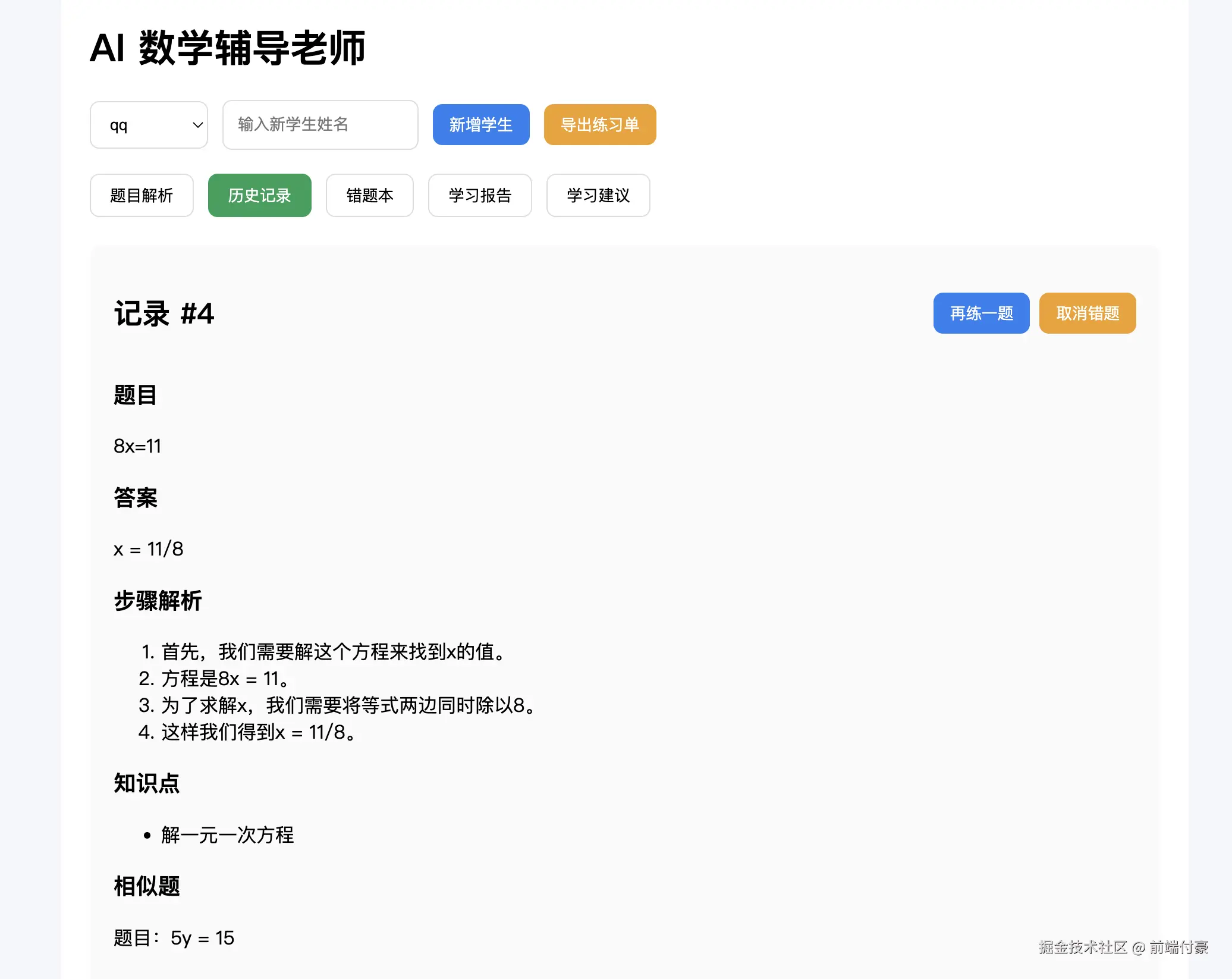
nice !