https://help.solidworks.com/2023/english/api/swconst/filesaveasdxfoptions.htm
drw2dwg耗时: 618 ms
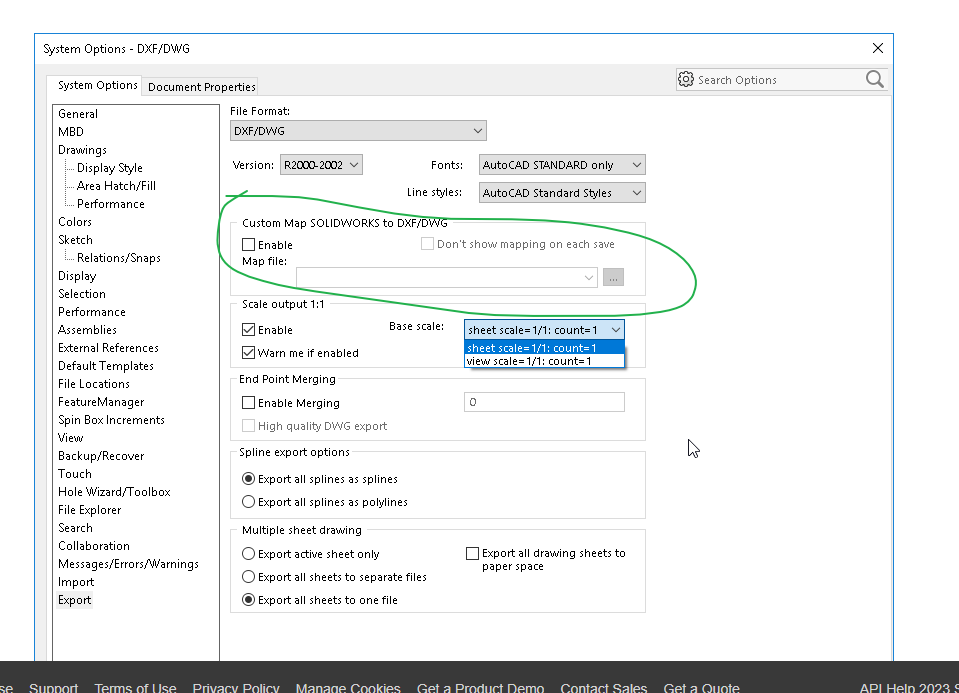
map文件:
[Version]
SW990001

[Layers]
0 = 7, 0
注释 = 250, 0
尺寸 = 3, 6

[Entities]
草图直线 [16] = BYLAYER, BYLAYER, 0
尺寸 [1] = 3, BYLAYER, 尺寸
注释 [2] = BYLAYER, BYLAYER, 注释

[Colors]
0 -> 0
0 -> 0
0 -> 0
0 -> 0
0 -> 0
0 -> 0
0 -> 0
0 -> 0
16776960 -> 4
65535 -> 2
65280 -> 3
16776960 -> 4
8372223 -> 0
cs
using System;
using System.IO;
using System.Runtime.InteropServices;
using SolidWorks.Interop.sldworks;
using SolidWorks.Interop.swconst;

namespace tools
{
    public class drw2dwg
    {
        static public string run(ModelDoc2 swModel, SldWorks swApp )
        {

            string fullpath = swModel.GetPathName();

            string? directory = Path.GetDirectoryName(fullpath);
            if (string.IsNullOrEmpty(directory))
            {
                Console.WriteLine("错误:无法获取文件所在目录。");

            }

            string outputfile = directory + "\\" + "出图" + "\\" + "工程图";
            if (!Directory.Exists(outputfile))
            {
                Directory.CreateDirectory(outputfile);
            }
            string dwgFileName = directory + "\\" + "出图" + "\\" +  "工程图" + "\\" + Path.GetFileNameWithoutExtension(fullpath) + ".dwg";
            swApp.SetUserPreferenceIntegerValue((int)swUserPreferenceIntegerValue_e.swDxfOutputNoScale, 1);
            // 设置自定义映射文件
            if (swApp != null)
            {
                string pluginDir = Path.GetDirectoryName(typeof(drw2dwg).Assembly.Location);

                string mapFilePath = Path.Combine(pluginDir, "dwgmaping");

                if (File.Exists(mapFilePath))
                {
                    swApp.SetUserPreferenceStringListValue(
                        (int)swUserPreferenceStringListValue_e.swDxfMappingFiles,
                        mapFilePath);

                    int index = swApp.GetUserPreferenceIntegerValue(
                        (int)swUserPreferenceIntegerValue_e.swDxfMappingFileIndex);

                    if (index == -1)
                    {
                        var set_result=swApp.SetUserPreferenceIntegerValue(
                            (int)swUserPreferenceIntegerValue_e.swDxfMappingFileIndex,
                            0);
                    }
                }
                else
                {
                    Console.WriteLine($"错误:无法找到自定义映射文件。{mapFilePath}");

                }
            }

            int errors=0, warnings=0;
            var result = swModel.SaveAs4(
                dwgFileName,
                (int)swSaveAsVersion_e.swSaveAsCurrentVersion,
                (int)swSaveAsOptions_e.swSaveAsOptions_Silent,
               ref errors,
                ref warnings);

            Console.WriteLine($"{result},已创建工程图{dwgFileName}");
            return dwgFileName;
        }
    }
}